Our readers keep the lights on and my smoothie glass nicely filled. As an Amazon Associate, I earn from qualifying purchases.
Specs are compiled from manufacturer listings and verified buyer reviews and can change over time — please confirm the key details on the product page before buying.
Finding a compact ATX case that actually fits a full-size motherboard without choking your high-end GPU is the real puzzle. You want a smaller footprint on your desk, but you don’t want to sacrifice cooling performance or struggle with cable management. This guide breaks down five models that balance size, airflow, and component support, so you can pick the one that fits your build without the guesswork.
I’m Mohammad Maruf — the founder and writer behind WellFizz. This guide is built by comparing the manufacturers’ published specifications and the patterns across verified customer reviews, so you get each pick’s real strengths and trade-offs instead of marketing spin.
Whether you’re building a new gaming rig or upgrading an older system, the right case makes the entire process smoother. Here are the top contenders for the best compact atx case that deliver room for your components without taking over your entire desk.
Quick Picks
- LIAN LI LANCOOL 207 Compact ATX RGB Gaming Computer Case — Best Overall
- LIAN LI O11D MINI V2 Flow Compact ATX Mid-Tower Airflow Computer Case — Premium Pick
- be quiet! Pure Base 501 Black ATX Case — Silent Performer
- MONTECH XR-B ATX Mid-Tower PC Gaming Case — Wood & Value
- FOIFKIN F1 PC Case – ATX Mid-Tower Computer Case — Six-Fan Value
How To Choose The Best Compact ATX Case
A compact ATX case is a balancing act. You need enough interior space for a standard ATX motherboard, a sizable graphics card, and a decent power supply, all while keeping the exterior footprint smaller than a traditional mid-tower. The key is knowing which specs to prioritize for your specific build.
GPU and CPU Cooler Clearance
This is often the first dealbreaker. Check the maximum GPU length the case supports — many mid-range cases accommodate cards up to 340mm or more, but budget options might be tighter. Also, the height of your CPU air cooler matters; a case with 160mm or more clearance fits most large tower coolers, while anything under 155mm limits you to low-profile models.
Cooling and Fan Support
A compact space heats up fast. Look at where fans can be mounted and how many are included. Cases with a mesh front panel and room for at least three 120mm intake fans generally provide good airflow. Radiator support (360mm at the front or top) gives you the option for liquid cooling down the line. Pre-installed fans save you money, but check their speed and noise ratings—some budget fans are loud at higher RPMs.
Cable Management and PSU Placement
In a compact case, space behind the motherboard tray is limited. Look for cases with generous rubber grommets and Velcro straps to keep cables tidy. Power supply placement matters too — some cases mount the PSU at the front, which frees up bottom fan space but might limit PSU length to around 160mm. Traditional bottom-mount designs are simpler but may compete for space with a 3.5-inch drive cage.
Quick Comparison
| Model | Best For | GPU Length | Max Radiator | Pre-installed Fans | Amazon |
|---|---|---|---|---|---|
| LIAN LI LANCOOL 207 | Airflow-Focused Builds | Standard (GPU anti-sag bracket) | 360mm (Front) | 2x140mm ARGB, 2x120mm PWM | Amazon |
| LIAN LI O11D MINI V2 Flow | Trendy Fish-Tank Builds | Standard (GPU sag brackets) | 360mm | 5x120mm Reverse Blade | Amazon |
| be quiet! Pure Base 501 | Silent Workstation Builds | High-end GPU support | 360mm (Front) / 240mm (Top) | 2x140mm Pure Wings 3 PWM | Amazon |
| MONTECH XR-B | Budget-Friendly Wood-Aesthetic Builds | Supports 40-series GPUs | 360mm (Top) | 3x120mm ARGB PWM (2 reverse, 1 forward) | Amazon |
| FOIFKIN F1 | Dual-Chamber Value Builds | Up to 400mm | 360mm | 6x120mm ARGB PWM (5 reverse, 1 forward) | Amazon |
In‑Depth Reviews
1. LIAN LI LANCOOL 207 Compact ATX RGB Gaming Computer Case

The case that cools your CPU and GPU with a clever fan layout from the start.
The LANCOOL 207 rethinks internal airflow by placing two 120mm PWM fans right under the GPU, where they push cool air directly onto your graphics card. Reviewers report “noticeable CPU/GPU temp drops” after switching to this case, which is a direct result of having those dedicated bottom intakes. Up front, two thick 140x140x30mm ARGB fans spin up to 1900 RPM, and they come with an infinity mirror center for some visual flair. The internal layout also moves the PSU to the front, using an adapter cable so the connector ports face outward — this frees up space below the motherboard for those bottom fans. The power supply length support goes up to 160 mm, so you need to check your PSU size before buying.
Build quality is solid, with SECC steel construction and no sharp edges. An included GPU anti-sag bracket gives you adjustable support for heavy cards. At 20 pounds, it is noticeably heavier than the MONTECH XR-B (14.46 pounds), which reflects the sturdier materials and extra fans. The case measures 17.9″D x 8.62″W x 17.9″H — that is about 7% deeper than the LIAN LI O11D MINI V2 Flow (16.68″D), so it takes a bit more desk depth. The snap-on side panels are tool-less, but reviewers have noted they are not ideal if you move your PC frequently. The internal bays quantity is 2, a 2.0x gap compared to the O11D MINI V2 Flow’s 4 bays, so storage options are more limited.
Buyers also mention that the included front fans can be a little noisy at high speeds, with a slight resonant hum in a quiet room. A simple fix is adding rubber gaskets between the fans and the chassis. The case also lacks a dedicated reset button, and the bottom intake does not have a dust filter, which is something to keep in mind if your floor gets dusty. For a mid-range price, you get a smart, well-ventilated case that does the heavy lifting for your thermals right away.
Cooling Genius
- Dedicated bottom fans directly cool the GPU
- Two thick 140mm front fans with infinity mirror lighting
- Built-in GPU anti-sag bracket included
Room for Improvement
- Front fans can be noisy at high RPM (fixable with gaskets)
- No bottom intake dust filter
- Limited to 2 internal drive bays
Grab it if: you want a case that actively cools your graphics card with bottom fans and comes with a GPU sag bracket.
Think twice if: you need multiple 3.5-inch drives or want a dust filter on the bottom intake.
2. LIAN LI O11D MINI V2 Flow Compact ATX Mid-Tower Airflow Computer Case

A compact showpiece that includes five fans and supports full-size ATX boards.
This case nails the popular “fish tank” look with pillar-less tempered glass on the front and side, giving you an unobstructed view of your components. The O11D MINI V2 Flow comes with 5 pre-installed 120mm reverse blade fans positioned at an angle for direct cooling. The bottom of the case has a 10° slanted design that pulls in cold air more effectively, especially for your GPU. Buyers confirm the “excellent build quality” and note that the “frameless glass corner is stable” despite the clean look. The case only stands 15.41 inches tall, making it noticeably shorter than the LANCOOL 207’s 17.9 inches, while being wider at 10.73 inches to keep that panoramic view.
You get both a horizontal and a vertical GPU anti-sag bracket, which is a rare inclusion at this price. The case supports standard ATX, M-ATX, and Mini-ITX motherboards, with specific optimization for ATX Back-Connect boards. The internal bays quantity is 4, double the LANCOOL 207’s 2 bays, so you have more room for storage drives. The case weighs 20 pounds, similar to the LANCOOL 207, but packs more fan count and a higher drive capacity into a shorter vertical space. The “protruded mesh side panel” is a clever trick to fit a full-sized ATX power supply without making the case bulky.
A common point from reviewers is that the stock fans are quiet below about 800 RPM but do become audible above that speed. If you are sensitive to fan noise, you might want to set a custom fan curve in your BIOS. The case is slightly wider than typical mid-towers, so make sure your desk has enough width to clear a monitor arm or other peripherals. It also comes with removable drive bays and space for 2 SSDs. This is a fantastic choice if you want a compact build that shows off your hardware and already includes a full fan setup.
Perfect for display builds: The glass panels and included 5 reverse fans create a clean, eye-catching interior with strong airflow.
Best for: builders who want a short, wide case with a panoramic side view and more drive bays.
Keep in mind: the stock fans are audible above 800 RPM; plan a quiet fan curve.
3. be quiet! Pure Base 501 Black ATX Case
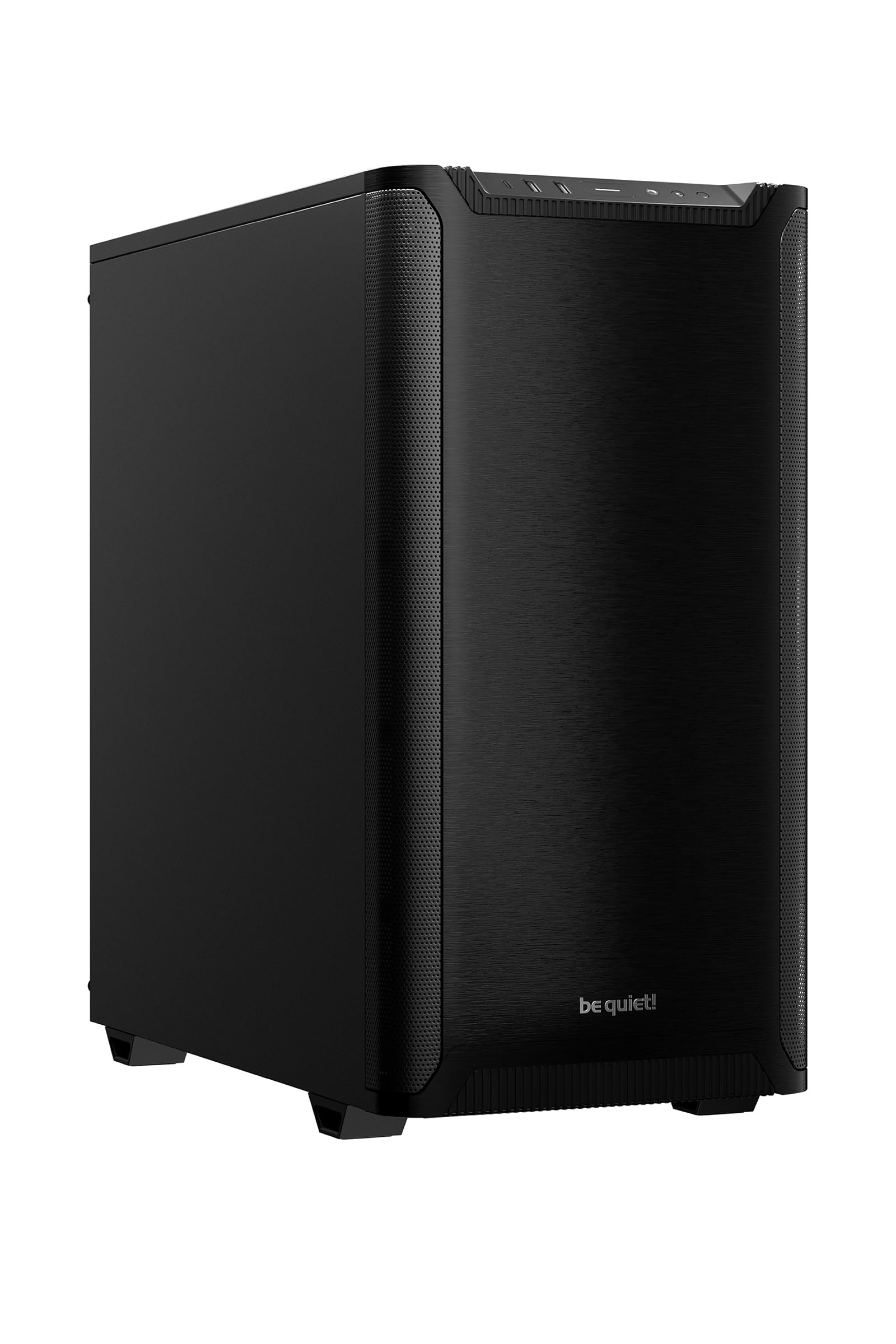
A no-nonsense case that stays whisper-quiet while keeping your components cool.
True to its name, the Pure Base 501 focuses on quiet operation without sacrificing airflow. It comes with two pre-installed Pure Wings 3 140mm PWM fans, which have 7 airflow-optimized blades that generate less turbulence and noise. Buyers report it is “virtually silent at idle” and that the fans are “near Noctua” levels of quiet. The case measures 17.72″D x 9.09″W x 17.68″H — a fairly standard footprint that fits under most desks. It weighs about 14.8 pounds (6.7 kg), placing it on the lighter side of the mid-range options. The PCIe slots can be rotated 90° for a vertical GPU installation, and the included foam base provides anti-sag support for the graphics card.
Internally, the case supports a 360mm radiator at the front and up to a 240mm radiator at the top, so you have plenty of water-cooling options. The space behind the motherboard tray has “cleverly integrated cable routing options” that make cable management straightforward. The front I/O includes a USB 3.2 Gen. 2 Type C port and two Type A ports. The steel construction feels solid, and there are no sharp edges to worry about during the build process. The case fits an ATX board, a high-end GPU, and a large CPU cooler like the NH-D15 with room to spare.
The main trade-off is that the top panel is permanently vented — there is no solid cover included. This means that if you do not use the top fan mounts, you may hear some CPU fan noise more clearly in a quiet room. It is a minor compromise for airflow-focused builds. A few reviewers also mention that the filter sections pop off a bit easily when moving the case. If you are looking for a clean, understated case that prioritizes a quiet environment over flashy RGB, this is a strong candidate.
Quiet Champion
- Extremely quiet 140mm Pure Wings 3 fans at stock
- Vertical GPU mount with anti-sag foam base
- USB 3.2 Gen 2 Type-C on front panel
Trade-Offs
- Top panel is permanently vented (no solid cover option)
- Filter sections can pop off easily during movement
- Only two fans included in the base model
Reach for this if: a near-silent PC is your top priority and you want a straightforward, high-quality build.
Look elsewhere if: you need a solid top panel for noise dampening or want more fans included from the start.
4. MONTECH XR-B ATX Mid-Tower PC Gaming Case

A great-value mid-tower with a wood-grain accent that cools well right from the start.
The MONTECH XR-B stands out with its “mature wood grain design I/O interface” on the front panel, giving it a natural, slightly different look from the all-mesh competition. It ships with 3 pre-installed 120mm ARGB PWM fans — 2 reverse-blade fans on the side and 1 regular-blade fan at the rear. They spin at a maximum speed of 1500 RPM, which is on the quieter side. The case can hold up to 9 fans total, so you have plenty of room to expand. Despite being a compact mid-tower, it accommodates a 360mm radiator at the top and supports high-end GPUs, like the Nvidia 40 series.
At 14.46 pounds, the XR-B is 38% lighter than the LIAN LI LANCOOL 207 (20 pounds), making it easier to lift and move around during the build process. Its dimensions are 17.1″D x 9″W x 17.7″H — right in line with other compact ATX cases. Reviewers describe it as “spacious” and praise the “excellent cable management” with pre-installed rubber gaskets. The ATX standoffs are already pre-installed, and the case includes screws, zip ties, and Velcro straps. Dust filters cover the top, bottom, and side panels to keep things clean.
The most common complaint is that the glass panel can arrive dirty with light scratches, though those are cosmetic. Some buyers also noted a broken clip for the glass panel inside the box, so it is worth double-checking the package as soon as it arrives. The included instructions are a bit sparse, but the case is straightforward to build in. For this price tier, you get a solid foundation with decent fans and a unique look.
Good starter case: Comes with three ARGB fans, rubber gaskets for cable routing, and a wood-grain design for a slightly warmer aesthetic.
Great for: budget-conscious builders who want a spacious interior and a distinctive wood-grain front panel.
Be aware: glass panel may arrive with minor scratches or damaged clips; inspect immediately upon delivery.
5. FOIFKIN F1 PC Case – ATX Mid-Tower Computer Case

A budget-friendly way to get six ARGB fans and a dual-chamber layout right away.
The FOIFKIN F1 packs an incredible amount of hardware for its price point — it includes 6 pre-installed 120mm ARGB PWM fans (5 of them are reverse-blade, 1 is forward). That is more fans than any other case on this list, and they all connect via a 5V header for lighting control. The case uses a dual-chamber design, separating the motherboard area from the PSU and drive bay to improve cable management and airflow. It supports up to a 400mm GPU and a 220mm PSU, giving you a lot of flexibility on component sizes. Owners mention it is “lightweight, functional” and a “great budget case.”
Measuring 16.9″D x 8.38″W x 19.2″H, the F1 is the tallest case here, but still fits the compact ATX description in terms of depth and width. The dual tempered glass panels (front and side) let you show off the six fans. The internal layout includes a removable drive tray that can hold 2 SSDs and 1 HDD. The front I/O has a USB 3.0 Type-C port, along with 1 USB 3.0, 2 USB 2.0 ports, and an LED switch button.
The biggest catch is that the included fans are 5V ARGB. If your motherboard has an older 12V RGB header, you will need a 12V-to-5V converter to control the lighting. Some buyers also noted that the fan wiring is on the shorter side, so plan your cable routes carefully. A few units have had loose power switch cables, which caused intermittent startup issues. Overall, this case gives you a head start on cooling and lighting for a very low entry cost.
Fan Count King
- Six ARGB PWM fans included (5 reverse, 1 forward)
- Dual-chamber design for cleaner cable management
- Supports GPUs up to 400mm and large PSUs
Watch Out For
- Fans are 5V ARGB — needs converter for older 12V motherboard headers
- Short fan cables may complicate routing
- Loose power switch cable reported on some units
Who it fits: anyone on a tight budget who wants a fully populated fan setup and a wide interior for large components.
Who should skip: builders with a 12V RGB motherboard who don’t want to buy an adapter, or those needing a shorter case.
Understanding the Specs
GPU Height and Length
This is the maximum physical space inside the case for your graphics card. A case supporting 340mm or more fits most modern high-end cards. Cases with lower clearance (under 320mm) may not fit triple-fan designs. Also check if the case has a GPU anti-sag bracket — it supports heavy cards from the backplate to stop them from bending over time.
Fan and Radiator Support
The number of fan mounts determines how much air you can push through the case. More fans generally mean better cooling, but they also add noise. A 360mm radiator mount gives you room for a large AIO liquid cooler. Cases with pre-installed reverse blade fans are designed to pull air directly onto components like the GPU, which is a big plus for compact builds.
FAQ
Will a compact ATX case fit my standard ATX motherboard?
How long of a GPU can I fit in a compact ATX case?
Do compact cases have enough space for cable management?
Can I install a 360mm radiator in a compact ATX case?
What is the difference between a reverse blade fan and a normal fan?
How do I know if my power supply will fit a compact case?
Are compact ATX cases louder than full-size ones?
Can I install vertical GPU mount in these cases?
How many 3.5-inch hard drives can I fit in a compact ATX case?
Are tempered glass panels safe in a compact case?
Final Thoughts: The Verdict
If you want one dependable pick, the best compact atx case winner is the LIAN LI LANCOOL 207 because its innovative bottom fan placement directly cools the GPU, and it comes with a built-in anti-sag bracket — all at a solid mid-range price. If you want a quiet workstation case with excellent cable management and a vertical GPU mount, grab the be quiet! Pure Base 501. And for a budget-friendly build that includes six ARGB fans and a dual-chamber design, the standout is the FOIFKIN F1 for pure value.
How We Picked
We do not accept paid placement. Every pick is matched to a real buyer and a real use-case; we do not hands-on test units.
Sources & Methodology
Specifications: manufacturer listings and product documentation. Review insights: verified customer reviews, as of July 2026. Pricing: not shown on this page (it changes often); check the current price via the retailer link.
As an Amazon Associate, WellFizz earns from qualifying purchases. This does not affect which products we feature.

Mo Maruf
I created WellFizz to bridge the gap between vague wellness advice and actionable solutions. My mission is simple: to decode the research and give you practical tools you can actually use.
Beyond the data, I am a passionate traveler. I believe that stepping away from the screen to explore new environments is essential for mental clarity and physical vitality.