Our readers keep the lights on and my smoothie glass nicely filled. As an Amazon Associate, I earn from qualifying purchases.
Finding the right communication device for a child or adult on the autism spectrum often feels overwhelming. Between complex apps, fragile tablets, and bulky hardware, many tools create more frustration than connection. The best solutions strip away that complexity, focusing on what matters most: reliable, repeatable, and understandable communication.
I’m Mohammad Maruf — the founder and writer behind WellFizz. I’ve spent hundreds of hours analyzing assistive technology hardware, from AAC tablets to low-tech binders, comparing build quality, customization depth, and real-world durability across dozens of models.
Whether you need a rugged button for a single request or a full vocabulary system, this guide breaks down the top options. Here is the definitive, research-backed communication device for autism across every price tier and use case.
How To Choose The Best Communication Device For Autism
The right device depends on the user’s current communication level, motor skills, and daily environment. A child who can point and swipe will benefit from a different tool than someone who needs a single large switch. The three categories below help you narrow the field.
Low-Tech vs. High-Tech: The Battery Question
Low-tech options like PECS binders and AAC folders use zero batteries. They never die in the middle of a request, survive drops, and work in the bath or pool. High-tech tablets and dedicated AAC devices offer voice output, unlimited vocabulary, and can grow with the user, but require charging, carry a higher price, and risk screen damage. Your tolerance for charging discipline and device fragility often dictates this first fork in the road.
Button Activation Force and Size
For dedicated speech buttons like the BIGmack or QuickTalker, pay close attention to the force required to trigger a message. Some users with motor-planning challenges need a large, soft-touch surface (FeatherTouch technology reduces required force by 70%), while others benefit from a deeper well that guides finger placement. Activation surface area — measured in inches — determines how easy it is to hit the right cell without accidental presses.
Customization Depth and Image Quality
Not all devices let you swap images easily. Binders with sheet protectors let you swap any flat item in seconds. Dedicated AAC tablets like the TalkingTiles come pre-loaded with thousands of images and let you create unlimited pages. The critical question: can you add photos of the user’s actual dog, favorite snack, or real classroom schedule? Real-photo customization nearly always wins over generic clip art because it bridges the gap between the device and the user’s lived experience.
Quick Comparison
On smaller screens, swipe sideways to see the full table.
| Model | Category | Best For | Key Spec | Amazon |
|---|---|---|---|---|
| TalkingTiles AAC Tablet | High-Tech Tablet | Full vocabulary, unlimited pages | 10.1″ screen, 8hr battery | Amazon |
| AbleNet QuickTalker 23 | Multi-Message Device | 23 locations, classroom use | 18 min recording, 5 levels | Amazon |
| PicSeePal AAC Folder | Low-Tech Binder | Zero battery, waterproof use | Battery-free, 3-12 age range | Amazon |
| Smile4Autism Visual Book | PECS Binder | 162 cards, ready to use | 1.5×1.5″ plastic cards | Amazon |
| AbleNet BIGmack | Single Button | One-message requesting | 7.5″ button, 2-min record | Amazon |
| Scanmarker Max Pen | Reading Scanner | Text-to-speech for readers | Scans text, 100+ languages | Amazon |
| NuVois III Digital | Electrolarynx | Laryngectomy speech aid | 9V battery, tone/pitch adj | Amazon |
In‑Depth Reviews
1. TalkingTiles AAC Device
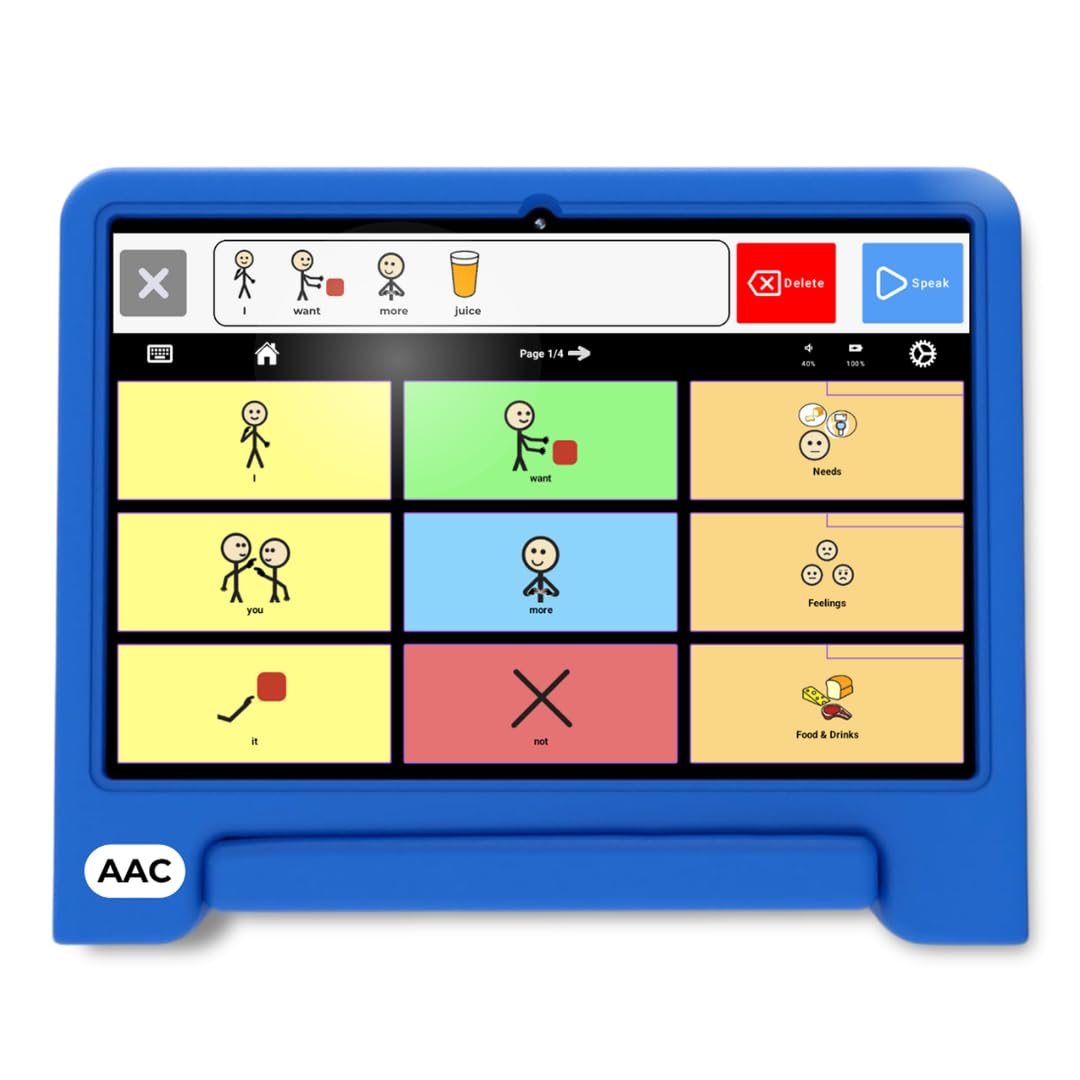
The TalkingTiles is a dedicated AAC tablet that arrives pre-configured with over 3,400 images and a turn-key app — no iPad hunting, no app subscriptions, no password barriers. The 10.1-inch LED screen at 1024×800 resolution offers enough real estate for up to 56 tiles per page, and the swipe-gesture system encourages fine motor development without accidental page changes.
The 6000mAh battery delivers a genuine 8-hour day, and the hard plastic chassis has survived drops, throws, and stomps from everyday use. Users and therapists report that children — including a 5-year-old nonverbal child — used the device immediately without instruction, and the built-in speaking typewriter function provides a text-to-speech fallback for more advanced communicators.
One early unit developed a cracked screen within hours, but the manufacturer replaced it free of charge, and subsequent units appear more robust. Compared to a standard tablet with a third-party AAC app, the TalkingTiles locks down settings to prevent accidental deletion and skips the typical + iPad-plus-app price tag. For families wanting a dedicated AAC device with professional-grade customization and no ongoing subscription, this is the strongest all-around pick.
Why it’s great
- Pre-loaded with thousands of images — no setup required beyond power-on
- Unlimited pages with up to 56 tiles per page for vocabulary growth
- 8-hour battery supports full school and therapy schedules
- Built-in swipe gestures aid fine motor skill development
Good to know
- Some early units had screen fragility; manufacturer warranty covered replacements
- Does not include a charger in the box; requires a standard USB-C brick
- Settings menu could be better locked from curious users
2. AbleNet QuickTalker 23

The QuickTalker FT 23 packs 20 main communication locations plus three core cells into a portable, rugged AAC device designed for classroom routines. Its FeatherTouch membrane reduces activation force by 70%, making it suitable for users with motor challenges who might struggle with stiffer buttons. The device holds up to five recording levels, giving you access to 103 distinct messages without needing multiple devices.
Speech-language pathologists appreciate the deep wells that guide finger placement and the clear, though slightly tinny, audio output. The 18-minute total recording time is generous for a device at this level, and the built-in handle makes it easy to carry between stations. One issue: creating custom overlay pictures requires either the iPad-exclusive app or manual work with Photoshop — there is no Android or PC workflow provided.
The QuickTalker has proven durable through daily classroom use, and the manufacturer provided prompt replacement when one unit glitched. For speech therapists and special education teachers who need a multi-message device that students can operate independently, the QuickTalker 23 remains the standard-bearer despite the overlay creation friction.
Why it’s great
- FeatherTouch membrane needs 70% less force than standard AAC buttons
- Five recording levels provide 103 total messages in one device
- Deep cell wells aid accurate finger placement for motor-planning users
- Rugged construction with carrying handle designed for school environments
Good to know
- Overlay creation requires iPad app or manual design — no Android/PC support
- Audio quality is clear but lacks richness compared to tablet speakers
- Battery life is rated at 18 minutes of continuous recording time
3. PicSeePal AAC Communication Folder
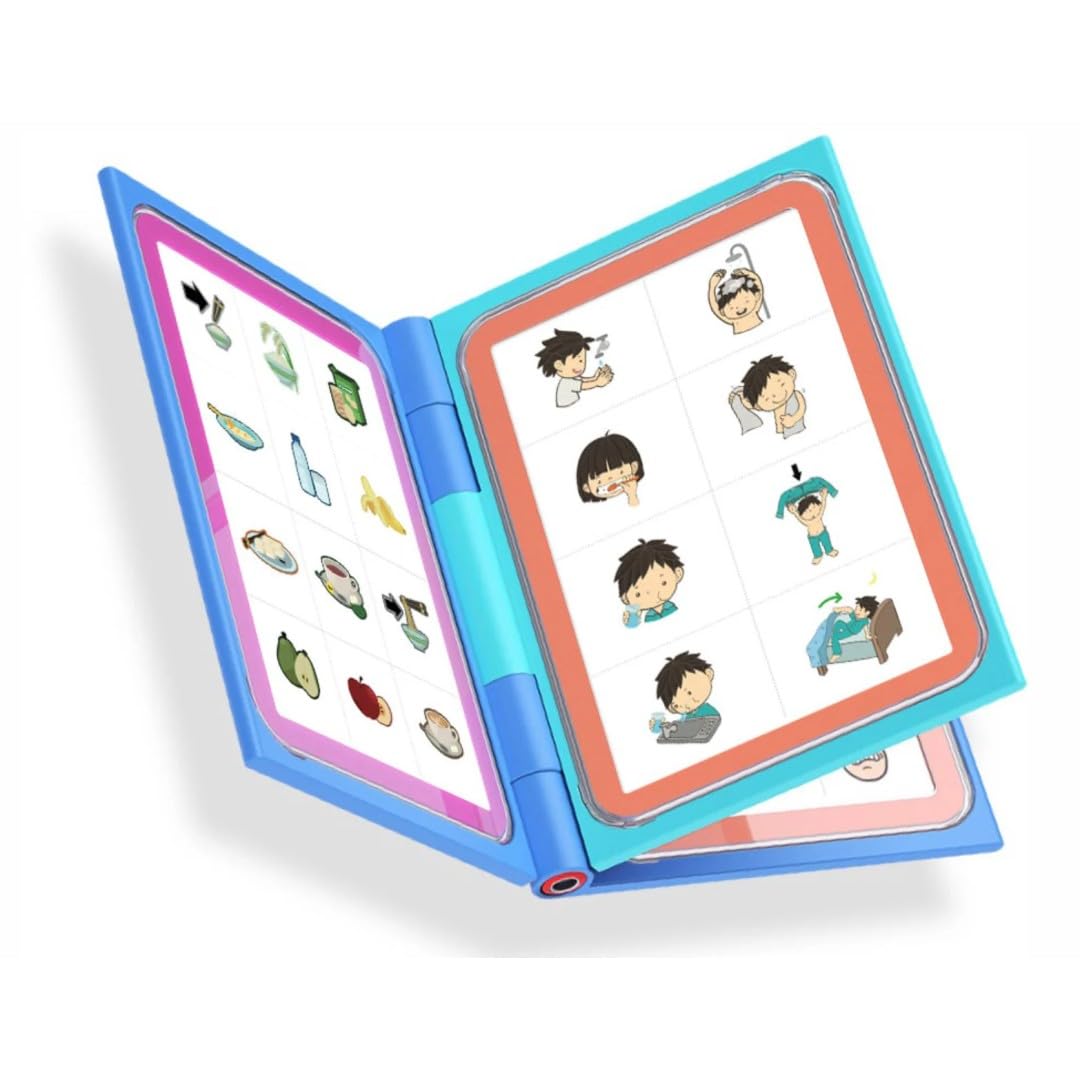
The PicSeePal is a low-tech AAC folder that bridges the gap between a simple PECS binder and a high-tech device. It uses clear sheet protectors to hold photographs, drawings, food packaging, or pre-printed templates — anything flat can become a communication symbol. The folder is built from rugged, mess-proof plastic and includes printed templates from major AAC providers like PRC-Saltillo, AssistiveWare, and CoughDrop.
Because it requires zero batteries, the PicSeePal works everywhere screens cannot: the swimming pool, messy play, mealtimes, outdoor outings, and bedtime. One parent reported it survived being thrown on a sidewalk during a tantrum without damage. The folder is roughly the size of an iPad and comes with a strap for easy carrying. The included icons are on the small side for younger users, but the website offers larger downloadable templates.
Developed by a special education teacher with over two decades of experience, the system grows with the child by swapping visuals as interests and vocabulary expand. Compared to home-made binders, the PicSeePal offers professional-grade durability and a proven layout. The only consistent complaint is the price — it functions as a plastic binder with sheet protectors, which feels expensive until you factor in the included AAC templates and the rugged build quality.
Why it’s great
- Completely battery-free — works in water, mud, and during power outages
- Includes AAC templates from leading providers — no design work needed
- Rugged plastic build survives drops, throws, and daily wear
- User can swap any flat item — real photos, schedules, or food wrappers
Good to know
- Included icons are small for younger or visually impaired users
- Larger icons must be downloaded and printed separately
- Price reflects a premium for the design and template inclusion
4. Smile4Autism Visual Communication Book

The Smile4Autism Visual Communication Book arrives fully assembled with 162 plastic photo cards across eight categories: Food, Toys, School, Places, Home Activities, Signs, Emotions, and Actions. Each card is 1.5×1.5 inches with rounded corners to eliminate sharp edges, and the 10-mil poly dividers keep everything organized. The system follows the PECS protocol with a progression from single-icon exchanges to full sentences like “I want apple” or “I see park.”
The cards are thick plastic rather than laminated paper, making them resistant to bending, tearing, and moisture — teachers and parents consistently praise the durability. The binder is available in two sizes (9×7″ small or 11.5×8.5″ large), and the small version easily fits into a child’s backpack. Users report that the ready-to-use format eliminates the hours of cutting and laminating that home-made PECS systems require.
One teacher described it as “so helpful to have actual pictures” for a newcomer student, and multiple parents say their children feel comfortable communicating with family and friends using the book. The kit also includes five blank cards for customization, a sentence strip, and a reward card. For a complete, ready-to-go PECS foundation at an entry-level price, this kit delivers the most pieces per dollar without sacrificing build quality.
Why it’s great
- 162 thick plastic cards, ready to use — zero cutting or laminating required
- Organized into eight intuitive categories with color-coded dividers
- Rounded corners and safe materials for young hands
- PECS-compatible system progresses from single icons to sentences
Good to know
- Cards are small (1.5×1.5”) — might be hard for some users to grasp individually
- Plastic cards can be slippery for children with fine motor challenges
- Some users wished for more emotion or action options
5. AbleNet BIGmack AAC Communication Device

The AbleNet BIGmack is the gold standard for single-message AAC communication. Its large 7.5-inch activation surface, available in vibrant colors, records and plays back messages up to two minutes long. The design is intentionally simple: press the button, hear the message. This makes it ideal for teaching cause-and-effect communication, requesting, greeting, or participating in a classroom activity with a single repeated phrase.
The rugged plastic casing withstands the demands of daily therapy sessions and classroom environments, and the built-in mounting plate allows attachment to wheelchairs, tabletops, or communication boards. Speech therapists consistently approve the BIGmack for developing basic requesting skills. One educator noted it gives “voice to students without voices” during community outings like ordering at Starbucks or buying items at a school coffee cart.
The primary drawback is the price point — a single-message button carries a high cost per phrase compared to multi-message alternatives. Some users also report static issues on older units. However, for the user who needs exactly one reliable, durable, easily triggered message, the BIGmack remains the most trusted option in schools and therapy clinics nationwide.
Why it’s great
- Large 7.5-inch button is easy to target for users with motor challenges
- Records up to two minutes of personalized audio per message
- Rugged construction with mounting plate for wheelchair or table attachment
- Clinically proven for teaching cause-and-effect communication
Good to know
- Single message only — limited for users ready for multi-phrase communication
- Price feels high relative to the single-message capability
- Some units show static on playback; check for updated models
6. Scanmarker Max Reading Pen + Phonics Cards Bundle
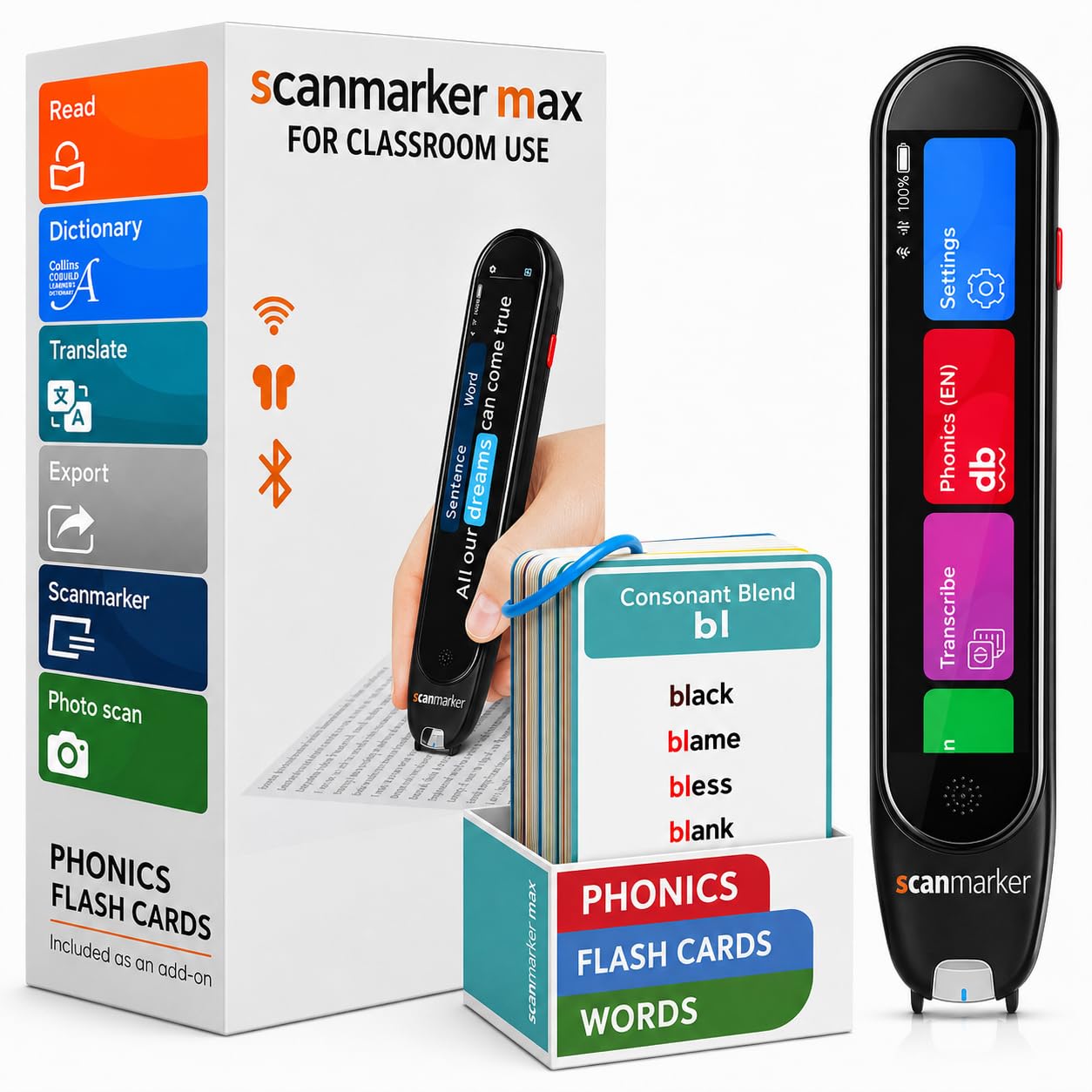
The Scanmarker Max is a reading pen designed to scan printed text and read it aloud instantly using natural text-to-speech, now bundled with a 161-card phonics set for early literacy practice. For a user on the spectrum who struggles with decoding or reading comprehension, this device provides immediate audio feedback without requiring a screen or app to interpret results.
The pen supports scanning across 100+ languages, includes a lock function for exam environments, and connects to a web app for vocabulary building and text export. The included phonics cards — covering short vowels, digraphs, and blends — give the device a structured use case beyond random book scanning. Users report accurate word recognition with rare errors, and the compact form factor works well on worksheets, books, and the phonics cards themselves.
At this price point, the Scanmarker Max is a significant investment, but families who need reading support for a child who can already match words to pictures — and who is ready to decode text independently — will find the pen bridges a gap that PECS and AAC buttons cannot. The teacher lock ensures the device stays focused on reading tasks during structured lessons. For secondary-age students who are reading but need scaffolding, this is a specialized tool worth considering.
Why it’s great
- Scans and reads any printed text aloud — books, worksheets, or the included phonics cards
- 161-card phonics bundle provides structured early literacy practice
- Teacher lock prevents feature misuse during exams or lessons
- Supports 100+ languages and connects to a web app for vocabulary tracking
Good to know
- Designed for literacy support, not general communication — serves a different need than AAC devices
- High price point for the core OCR technology
- Scanning works best on standard printed fonts; handwritten text may not register
7. NuVois III Digital Speech Aid

The NuVois III is an electrolarynx designed for individuals who have lost their natural voice due to laryngectomy or other medical conditions. It uses a 9V battery to generate sound through the neck tissue, allowing the user to form speech. The device includes volume and tone/pitch buttons that give the user control over inflection, making the resulting speech sound more natural than basic electrolarynx models.
Users report that the device requires practice to find the correct placement on the neck and to coordinate speaking with the tone generation — initial use may yield only one or two recognizable words per sentence. However, with consistent practice, the NuVois III enables users to communicate with family members and participate in conversations. One review from a cancer patient confirmed the device restored the ability to speak after surgery.
The NuVois III is a specialized tool that serves a very different population than PECS binders or AAC tablets. It is not suited for young children or users who can produce any vocal sound. For the specific audience of adults who have undergone laryngectomy and need a reliable, pitch-controlled speech aid, the NuVois III is a proven, established option backed by a five-year limited warranty.
Why it’s great
- Volume and pitch controls allow for more natural-sounding speech with inflection
- Five-year limited warranty provides long-term reliability assurance
- Proven track record for restoring speech after laryngectomy
- Relatively lightweight at 4.5 ounces for portability
Good to know
- Requires significant practice to find correct neck placement and speech coordination
- Uses a 9V battery; non-recommended batteries reduce sound quality
- Designed primarily for medical speech loss, not developmental communication needs of autism
FAQ
Should I start with a low-tech or high-tech communication device?
How do I know which button size my child needs?
Can I use an iPad instead of a dedicated AAC device?
What does FeatherTouch mean on the QuickTalker?
How do I choose between a single-message and a multi-message device?
Final Thoughts: The Verdict
For most users, the communication device for autism winner is the TalkingTiles AAC Device because it combines a large 10.1-inch touchscreen, 3,400+ pre-loaded images, and an 8-hour battery into a dedicated, distraction-free tablet that works out of the box with no app subscriptions. If you need a battery-free option that survives the playground and the pool, grab the PicSeePal AAC Folder. And for a classroom-tested multi-message button system that offers 103 messages in one device, nothing beats the AbleNet QuickTalker 23.

Mo Maruf
I created WellFizz to bridge the gap between vague wellness advice and actionable solutions. My mission is simple: to decode the research and give you practical tools you can actually use.
Beyond the data, I am a passionate traveler. I believe that stepping away from the screen to explore new environments is essential for mental clarity and physical vitality.