Our readers keep the lights on and my smoothie glass nicely filled. As an Amazon Associate, I earn from qualifying purchases.
A commercial label printer needs to do one thing above all else: print labels that stay readable in harsh conditions, day after day, without jamming or wasting expensive tape. The best models handle heat shrink tubing for electrical wiring, weatherproof vinyl for outdoor asset tags, and laminated labels that resist chemicals and scuffs — all while keeping up with high-volume jobs. This guide walks through five proven industrial-grade machines, from portable job-site workhorses to network-connected production units.
I’m Mohammad Maruf — the co-founder and writer behind WellFizz. This guide is built by comparing the manufacturers’ published specifications and the patterns across verified customer reviews, so you get each pick’s real strengths and trade-offs instead of marketing spin.
You will find a detailed comparison of five durable models that represent the best options when searching for a commercial label printer for demanding environments like warehouses, manufacturing floors, and data centers.
How To Choose The Best Commercial Label Printer
Picking the right industrial label maker comes down to three things: what you are labeling, how many you print per day, and where you need to connect from. A portable unit with hot keys for wire flags is a different tool than a networked desktop machine designed for hundreds of inventory labels per shift. Here is what to check before you buy.
Label width and tape compatibility
The widest labels this category handles go up to 36 mm (about 1.5 inches), which is enough for warehouse shelf tags, cable wraps, and equipment ID plates. But the real trap is tape compatibility: some machines accept only specific cartridge families. For example, one Brother model reviewed here explicitly blocks older TZ cartridges, allowing only TZe tape. If you already own a stock of TZ rolls, that is a costly surprise. Check the tape width range (most support 6 mm to 36 mm) and whether the printer takes third-party cartridges or is locked into a proprietary ecosystem.
Print speed and volume
For production environments where you need to crank out dozens of labels per batch, print speed matters. The slowest models manage about 1 page per minute — fine for one-off cable tags — while the fastest (the Zebra ZT411) reaches 14 inches per second. High-speed printing also depends on the software: some machines let you import data directly from an Excel spreadsheet and batch-print hundreds of labels without manual entry, which saves hours on large jobs.
Connectivity and multi-user access
A printer that sits under a desk and connects only via USB is fine for a single workstation. But in a busy shop or warehouse, you want Ethernet, Wi-Fi, or Bluetooth so several people can send labels from a PC, tablet, or smartphone. Look for models with built-in networking (like Ethernet or Wi-Fi) if you plan to share the printer across a team. Remember that some wireless setups are finicky — one Epson reviewer noted the connection process required pressing a button and waiting for a flashing light, which adds friction on a busy floor.
Label durability requirements
Think about the environment the labels will live in. If you are labeling electrical panels, heat shrink tubing that shrinks around wires is essential. For outdoor or chemical-exposed areas, laminated labels that resist UV, water, and abrasion are a must. Industrial models offer vinyl, self-laminating wraps, and polyester tapes specifically designed for harsh conditions. The printer technology itself — thermal transfer (using a ribbon) versus direct thermal (no ribbon) — also affects longevity; thermal transfer labels are generally more durable because the ink is fused into the material.
Quick Comparison
On smaller screens, swipe sideways to see the full table.
| Model | Category | Best For | Key Spec | Amazon |
|---|---|---|---|---|
| Epson LW-PX800 | Desktop Industrial | High-volume batch printing with Excel import | 35 ppm color, 36 mm tape width | Amazon |
| DYMO Rhino 5200 | Portable Job-Site | On-location wire flags and heat shrink tubing | 1 ppm, one-touch hot keys | Amazon |
| Brother PT-P950NW | Network Laminate | Multi-user office/lab with durable laminated labels | 3.1 ips, 360 dpi, Ethernet/Wi-Fi | Amazon |
| Brother PTD800W | Commercial Portable | Heavy-duty labeling with extra-wide multi-line output | 1 ppm, 36 mm tape, Wi-Fi | Amazon |
| Zebra ZT411 | Production Industrial | Extreme volume and rugged thermal transfer labels | 14 ips, 4 in. print width, 600 dpi | Amazon |
In‑Depth Reviews
1. LABELWORKS Epson LW-PX800 Industrial Wireless Label Maker

35 pages per minute — 35× faster than the portable DYMO Rhino 5200 — makes the Epson LW-PX800 the top pick for facilities that run dozens or hundreds of asset tags, barcode labels, or cable wraps per shift and need automated batch printing from Excel.
Buyers report that the “high resolution prints great, thin labels,” even though the wireless setup requires a bit of patience (you press the Connect button and wait for the flashing light to stop). The printer accepts tape cartridges up to 36 mm wide and supports heat shrink tubing, durable vinyl, self-laminating wraps, and magnetic labels — covering virtually any industrial labeling task. A full-service lifetime warranty backs the unit.
The catch is the proprietary ecosystem: owners mention that tape cartridges cost $20 to $40 each, and the software uses a UDP-only protocol with no support for IPP, CUPS, or gLabels on Linux. If your operation tolerates a closed system for the sake of speed and resolution, this is the strongest all-around desktop choice.
Why it’s great
- Excel data import for batch printing saves hours on large jobs.
- 35 ppm print speed is among the fastest in this class.
- Lifetime warranty covers repairs or replacement.
Good to know
- Proprietary tape cartridges are expensive at -50 each.
- Wireless setup can be finicky and software sometimes uninstalls itself.
- No support for third-party label design tools on Linux.
2. DYMO Industrial Label Maker Rhino 5200

Where the Epson LW-PX800 stays on a desk, the DYMO Rhino 5200 goes with you to the job site — it has one-touch “Hot Keys” that automatically size, space, and format labels for electrical patch panels, 110 blocks, wire flags, and horizontal or vertical wraps without needing a computer at all. This is the machine to grab when you are standing in front of a server rack or pulling wire in a ceiling.
The Rhino 5200 prints Code 39 and Code 128 barcodes on 3/4-inch wide labels and meets ANSI and TIA/EIA-606-A industry labeling standards, so compliance labels come out right the first time.
If your work takes you to different locations — job sites, data centers, or maintenance closets — choose this over the desktop-only Epson LW-PX800. The downside is that at just 1 page per minute, it is far slower for high-volume batch jobs, and some users report the LCD display failing over time (the backlight stays on but the screen goes blank).
Where it shines
- One-touch hot keys format labels for patch panels and wire flags instantly.
- Prints on heat shrink tubing and chemical-resistant materials.
- Meets industry compliance standards (ANSI, TIA/EIA-606-A).
Worth noting
- Print speed is slow at 1 ppm, not for high-volume work.
- LCD display can fail after a few years of use.
- No Wi-Fi or Ethernet — USB only.
3. Brother P-Touch PT-P950NW Industrial Network Laminate Label Printer

Picture a shared label printer on a production floor where three technicians need to send labels from different workstations — the Brother PT-P950NW handles that with built-in Ethernet, Wi-Fi, and optional Bluetooth so multiple people can send print jobs from PCs, tablets, or smartphones without swapping cables. It prints laminated labels up to 36 mm wide at 3.1 inches per second with 360 dpi (dots per inch) resolution, so chemical-resistant, UV-resistant, and waterproof labels come out sharp and durable.
Customers note that it is their favorite among three Brother label printers they own, especially for larger laminated labels. The drop-in tape cartridge design makes swapping media quick, and the auto cutter with an easy-peel function reduces waste. One caution: reviewers point out that chain printing (where labels are printed in a continuous sequence) does not work on Mac, and the first label in each run has excess leader material, which adds up to “significant waste at 1+ cartridge per day.”
The 360 dpi resolution and network connectivity make this the go-to printer for labs, maintenance facilities, or any team environment where label quality and shared access are both priorities — and it prints laminated labels at 3.1 inches per second without a single cable swap.
What stands out
- Ethernet, Wi-Fi, and Bluetooth for multi-user access across a facility.
- Laminated labels resist chemicals, UV, and water — ideal for harsh environments.
- Drop-in tape loading and auto cutter with easy peel save time.
The trade-offs
- Chain printing does not work on Mac — Windows only for that feature.
- First label in a batch wastes tape, and heavy users see significant waste.
- No portable battery option — requires AC power.
4. Brother P-touch Label Maker PTD800W

The single number that matters most in this category is maximum label width, and the PTD800W scores a 36 mm — the widest TZe tape it accepts, enabling extra-wide multi-line labels for commercial signage and bin labeling. It prints barcodes (9 types), supports Excel data import via the P-Touch Editor software, connects via Wi-Fi to PCs and smartphones, and can run on an optional lithium-ion battery pack for portable use around a warehouse.
One reviewer who replaced an older P-Touch with this unit describes it as “The Labelmaker for The Serious Labeler,” noting it is versatile for labeling samples, chemicals, storage bins, and safety instructions. The trade-off is a critical one: this printer is NOT compatible with older TZ tape cartridges — it only accepts TZe tape, which has a physical pin that blocks TZ cartridges from fitting. If you have a drawer full of TZ rolls, you will have to replace them all.
At 1 page per minute, the PTD800W is not a speed demon, but its extra-wide label support and mobile connectivity make it a strong value for a facility manager or lab supervisor who needs to produce professional, durable labels across a variety of materials without tying up a desktop computer.
The upsides
- Accepts TZe tape up to 36 mm for extra-wide multi-line labels.
- Wi-Fi connectivity to mobile devices and PCs for flexible printing.
- Optional lithium-ion battery pack for true portability.
Keep in mind
- Not compatible with older TZ tape cartridges — only TZe.
- Slow print speed at 1 ppm, not for high-volume production.
- One reviewer noted a defective unit and had difficulty with returns.
5. ZEBRA ZT411 Thermal Transfer Industrial Printer
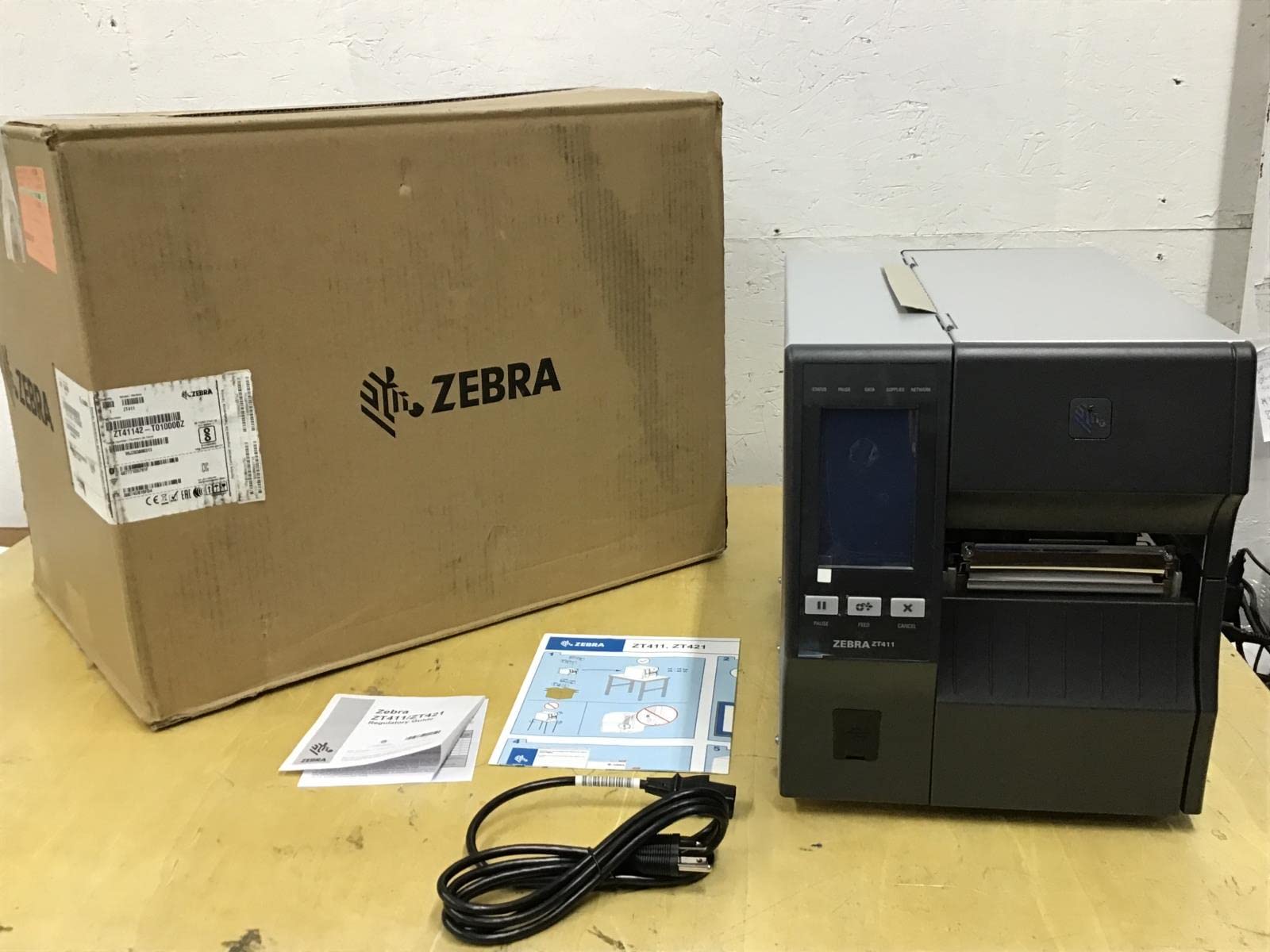
What you actually get at this lower price is a full production-grade thermal transfer printer designed for facilities that need to run thousands of labels per shift. It prints up to 14 inches per second (that is 40 black-and-white or 20 color pages per minute) with a 4-inch print width and resolution up to 600 dpi, so barcodes, logos, and fine text come out razor-sharp even on small label sizes. The 4.3-inch full-color touch display lets operators see status at a glance and navigate settings without digging through manuals.
Buyers who have deployed this unit alongside existing ZT410s report that “users are very happy with them.” However, the reported quality-control issues are worth noting: one reviewer received a non-functioning unit past the return window and could not get support from the seller, while another had a printer that did not work as expected (though the seller resolved it). This suggests the ZT411 requires a reliable vendor and careful inspection upon arrival.
For a high-volume production environment that needs extreme label durability (thermal transfer ribbons fuse ink into the label material for chemical and abrasion resistance) and the fastest print speed in this lineup, the ZT411 is the class leader. The field simply cannot match its throughput, but you pay a premium for that capability, making it the exact budget buyer it is perfect for: a facility manager or operations lead who prioritizes maximum throughput and durability over upfront cost.
Why we’d pick it
- Print speed up to 14 inches per second — fastest in this roundup.
- 600 dpi resolution for ultra-sharp barcodes and small text.
- 4.3-inch full-color touchscreen for easy operation.
A few caveats
- Several reports of units arriving non-functional or defective.
- Very high cost — premium-tier investment.
- Requires thermal transfer ribbons, adding to ongoing supply cost.
Understanding the Specs
Print Speed (ppm or ips)
Speed is measured either in pages per minute (ppm) for desktop units or inches per second (ips) for industrial roll-fed printers. The Epson LW-PX800 at 35 ppm is a desktop speed champion, while the Zebra ZT411 at 14 ips is a production beast. For occasional labels, 1 ppm is fine; for batch runs of 100+ labels, aim for at least 3 ips or 30 ppm to avoid sitting around waiting.
Label Width and Tape Types
Maximum tape width determines what you can print. Most commercial models accept up to 36 mm (about 1.5 inches), enough for shelf labels and equipment tags. Check whether the printer supports heat shrink tubing (for wire labeling), self-laminating wraps (for cable ID), and laminated tapes (for chemical/UV resistance). Also verify cartridge compatibility: TZe vs TZ, or proprietary Epson PX tapes — mixing them up can make your existing inventory useless.
Resolution (dpi)
Dots per inch (dpi) controls how sharp your text and barcodes look. Standard industrial models offer 203 to 360 dpi, which is fine for most labels. The Zebra ZT411 offers 600 dpi, ideal for tiny barcodes or very small asset tags where every millimeter of clarity counts. For general warehouse use, 203 dpi is adequate; for electronics or laboratory labels, higher dpi prevents scanning errors.
Connectivity
How you connect the printer determines who can use it and where it lives. USB is universal but ties the printer to one computer. Ethernet or Wi-Fi lets multiple people on the same network send print jobs from different workstations or mobile devices. Some models (like the Brother PT-P950NW) also support Bluetooth for direct smartphone printing. Portable units like the DYMO Rhino 5200 are standalone with no computer required — just load the tape and use the keypad.
FAQ
Can I use third-party tape cartridges in these printers?
What is the difference between thermal transfer and direct thermal printing?
What does “laminated label” mean and why does it matter?
Can I print barcodes with these printers?
How do I print labels from a spreadsheet or database?
Final Thoughts: The Verdict
For most people, the commercial label printer winner is the Epson LW-PX800 because it combines the fastest print speed in its class (35 ppm) with Excel data import for batch jobs and the widest tape variety. If you need a rugged portable unit for on-location wire and cable labeling, grab the DYMO Rhino 5200. And for a multi-user team environment that demands laminated labels and network connectivity, the standout is the Brother PT-P950NW.

Mo Maruf
I created WellFizz to bridge the gap between vague wellness advice and actionable solutions. My mission is simple: to decode the research and give you practical tools you can actually use.
Beyond the data, I am a passionate traveler. I believe that stepping away from the screen to explore new environments is essential for mental clarity and physical vitality.