Our readers keep the lights on and my smoothie glass nicely filled. As an Amazon Associate, I earn from qualifying purchases.
Specs are compiled from manufacturer listings and verified buyer reviews and can change over time — please confirm the key details on the product page before buying.
You want one machine that sews clothes and quilts and then switches to embroidering names or designs on them. The trick is finding a combo that does both jobs well without a fussy interface or a pile of extra parts. This guide covers eight models, from mid-range workhorses to premium machines, so you can see which specs matter and where each pick shines or has a real trade-off.
I’m Mohammad Maruf — the founder and writer behind WellFizz. This guide is built by comparing the manufacturers’ published specifications and the patterns across verified customer reviews, so you get each pick’s real strengths and trade-offs instead of marketing spin.
Below, you will find a side-by-side comparison of embroidery field sizes, built-in designs, stitch counts, and screen quality — four specs that define how much creative freedom and ease you get from a combo sewing and embroidery machine.
Our Picks at a Glance


How To Choose The Best Combo Sewing And Embroidery Machine
The two biggest decisions are hoop size and screen quality. A 4″x4″ hoop fits typical monograms and small patches, while a 5″x7″ hoop lets you do larger designs like shirt backs or quilt blocks without having to re-hoop. The screen is your main control center — a larger, sharper color touchscreen makes editing designs, positioning text, and navigating menus much easier. After those two, look at the number of built-in embroidery designs and sewing stitches, which tell you how much creative variety you get without buying extra cards or software.
Hoop Size: Your Creative Canvas
The embroidery hoop determines the maximum single design you can stitch in one go. A 4″x4″ area (common on entry-level and mid-range combos) is enough for names, small logos, and decorative accents. A 5″x7″ area (found on higher-end models) allows larger patterns like full shirt fronts or tote bag designs, and also lets you use multi-position hooping for even bigger layouts. If you plan to embroider anything larger than a pocket, the bigger hoop saves you the hassle of re-hooping and aligning.
Built-in Designs and Stitches: Out-of-the-Box Variety
Every machine comes with a set of pre-loaded embroidery designs and sewing stitches. A machine with 80 to 100 designs is fine for basic personalization, while 130 to 175 designs gives you more decorative options like flowers, borders, and seasonal motifs. On the sewing side, 103 stitches covers essential utilities and decorative patterns, while 200-plus stitches offers more options for heirloom stitching, quilting, and embellishment. More does not always mean better — the key is whether the designs suit your style and if the machine allows you to import your own patterns via USB or WiFi.
Connectivity: Wireless Transfer and Apps
Modern machines let you transfer embroidery designs wirelessly from your phone or computer, or via a USB drive. Wireless LAN connectivity means you can send files without plugging in a cable, and some brands offer mobile apps (like the ArtsPira app from Brother) that let you draw custom patterns on your device and send them directly to the machine. This is a real time-saver if you often download or create your own designs instead of relying only on the built-in library.
Machine Weight and Workspace
A combo machine is heavier than a standard sewing machine because it includes the embroidery unit and motor. Weights range from around 15.5 pounds up to 47 pounds. A lighter machine (15-20 pounds) is easier to move to a class or store away, but may feel less stable when doing heavy embroidery at higher speeds. A heavier machine (35-47 pounds) sits rock-solid on a table and handles thick fabrics better, but you will not want to move it often. Check the space around your needle — the sewing area to the right of the needle affects how easily you can handle a rolled-up quilt or a large project.
Quick Comparison
| Model | Best For | Hoop Size | Built-in Designs | Built-in Stitches | Amazon |
|---|---|---|---|---|---|
| Brother SE600★ Best Overall | Budget-friendly entry point | 4″ x 4″ | 80 | 103 | Amazon |
| Brother SE700Also Great | Wireless design transfer | 4″ x 4″ | 135 | 103 | Amazon |
| SINGER SE9180Design Powerhouse | Large touchscreen control | 170x100mm (≈6.7″x3.9″) | 150 | 250 | Amazon |
| PooLin EOC05 | Dual hoop sizes | 4″x4″ & 4″x9.25″ | 130 | 207 | Amazon |
| Janome MC 9850 | Premium brand reliability | 6.7″ x 7.9″ | 175 | 200 | Amazon |
| Bernette B79 | Heavy-duty sewing space | — | — | — | Amazon |
| EverSewn Sparrow X2 | Smart-device embroidery control | Large and small (included) | Over 100 | Over 120 | Amazon |
In-Depth Reviews
1. Brother SE600 Sewing and Embroidery Machine
Our pick — over 4.5★ from 4,500+ verified ratings; the strongest balance of quality and price.
The lowest-priced combo machine in this guide that still gives you genuine sewing and embroidery functionality without feeling like a toy.
The SE600 has 80 built-in embroidery designs, 6 embroidery lettering fonts, 103 sewing stitches including 10 styles of auto-size buttonholes, and a 3.2-inch LCD color touchscreen. The 4″x4″ hoop area is the standard starter size — good for personalizing towels, bags, and small clothing items with names or simple motifs. The automatic needle threader and drop-in top bobbin are the same reliable system Brother uses on its higher-end models, so threading is not a hassle even at this budget level.
At 26.24 pounds, the SE600 is heavier than the SE700 (15.6 pounds) and the SINGER SE9180 (15.5 pounds) — the weight mostly comes from the metal construction of the chassis and embroidery unit. It includes 7 sewing feet from the start: buttonhole, zipper, zigzag, button sewing, overcasting, blind stitch, and monogramming feet, plus a dust cover and accessory pouch. Buyers have given it a 4.6 out of 5 rating across over 4,800 reviews on Amazon, reporting that it is a reliable first combo machine for those new to embroidery.
Reliable Starter
- Genuine combo functionality at the lowest entry price — sewing and embroidery in one box
- 103 built-in stitches and 80 designs cover personalization basics well
- Automatic needle threader and jam-resistant drop-in bobbin work smoothly
Design Library Limit
- Only 80 built-in designs — you will likely want to import more designs via USB
- 4″x4″ hoop is the smallest here, restricting design size
Perfect for the budget-conscious beginner. If this is your first combo machine and you want to test whether embroidery is for you without spending much, the SE600 is the safest bet. If you already know you want lots of built-in designs or a larger hoop, save up for the SE700 or SE2000.
2. Brother SE700 Sewing and Embroidery Machine
The best combo overall because wireless design transfer and 135 built-in designs give you huge creative freedom at a mid-range price.
You get wireless LAN (a built-in network connection) so you can send embroidery designs from your PC to the machine without plugging in a USB cable. The free ArtsPira mobile app from Brother lets you draw custom patterns on your phone and send them to the machine. That means you are not stuck with only the 135 built-in designs. The machine also has 10 embroidery lettering fonts for personalizing, plus 103 sewing stitches including 10 styles of one-step auto-size buttonholes. The 3.7-inch LCD color touchscreen is large enough to preview designs clearly before stitching, and it supports on-screen editing like zooming, resizing, and rotating.
The embroidery hoop is a standard 4″x4″ — fine for monograms, small logos, and patches, but you will need to re-hoop for anything bigger. At 15.6 pounds it is one of the lighter machines in its class, so you can move it to a sewing class or a guest room without strain. Buyers report that the automatic needle threader works reliably and the drop-in top bobbin (the spool of thread underneath) is easy to replace mid-project. Compared to the Brother SE600 below, the SE700 holds 69% more built-in designs (135 vs 80), making it a much better value for creative variety without buying extra design cards.
Wireless Workflow Wins
- Wireless LAN transfer from PC and mobile app gives you huge design flexibility
- 135 built-in designs and 10 fonts, plus ArtsPira app for custom patterns
- Relatively lightweight at 15.6 pounds, easy to move
One Creative Limit
- 4″x4″ hoop is small — you cannot do large shirt-back designs in one go
This is the best balance of features and price for most home sewists. You get wireless design transfer, 135 built-in designs, and the ability to send your own patterns from a phone or PC — without jumping to a five-hundred-dollar premium machine.
skip it if you need a 5″x7″ hoop for large embroidery projects — the SE700 cannot handle that without re-hooping.
3. SINGER SE9180 Sewing & Embroidery Machine
The 7-inch color touchscreen — the largest in this roundup — makes design editing far easier than the 3.7-inch screen on the Brother SE700.
The SE9180 packs 250 sewing stitches and 401 stitch applications (applications include multiple stitch variations), plus 150 embroidery designs and 10 fonts. That is 21% more built-in stitches than the PooLin EOC05’s 207 stitches, giving you more utility stitches for garment construction and decorative options for quilting. The included hoop measures 170x100mm (about 6.7 inches by 3.9 inches) — that sits between a standard 4″x4″ and a full 5″x7″ in usable area. One unusual feature is the “endless hoop capability” that the brand says lets you stitch repeating border patterns beyond a single hoop placement for home decor and quilts.
At 15.5 pounds, this machine is light for its feature set, though the dimensions (19 inches deep by 8 inches wide by 12 inches high) mean it takes up more front-to-back desk space than some competitors. The SINGER SE9180 is 19 inches deep, which is 3.5 inches deeper than the 15.5-inch-deep Brother SE600. Owners mention that the automatic needle threader and built-in thread cutter save noticeable time, and the start/stop button lets you sew without the foot pedal.
Screen and Stitch Muscle
- 7-inch color touchscreen is the largest in this roundup, making design editing far easier
- 250 sewing stitches and 150 embroidery designs offer high creative variety
- Light at 15.5 pounds with a helpful built-in thread cutter
Size Consideration
- At 19 inches deep, it needs a roomy table — not ideal for a cramped sewing corner
Best for the screen-focused sewist. If you want the largest display for design editing and the highest stitch count of any mid-range combo here, the SE9180 delivers. The 170x100mm hoop is not as large as the 5″x7″ hoops on premium models, so massive single embroidery designs may still require multi-hooping.
4. PooLin EOC05(2in1) Sewing and Embroidery Machine
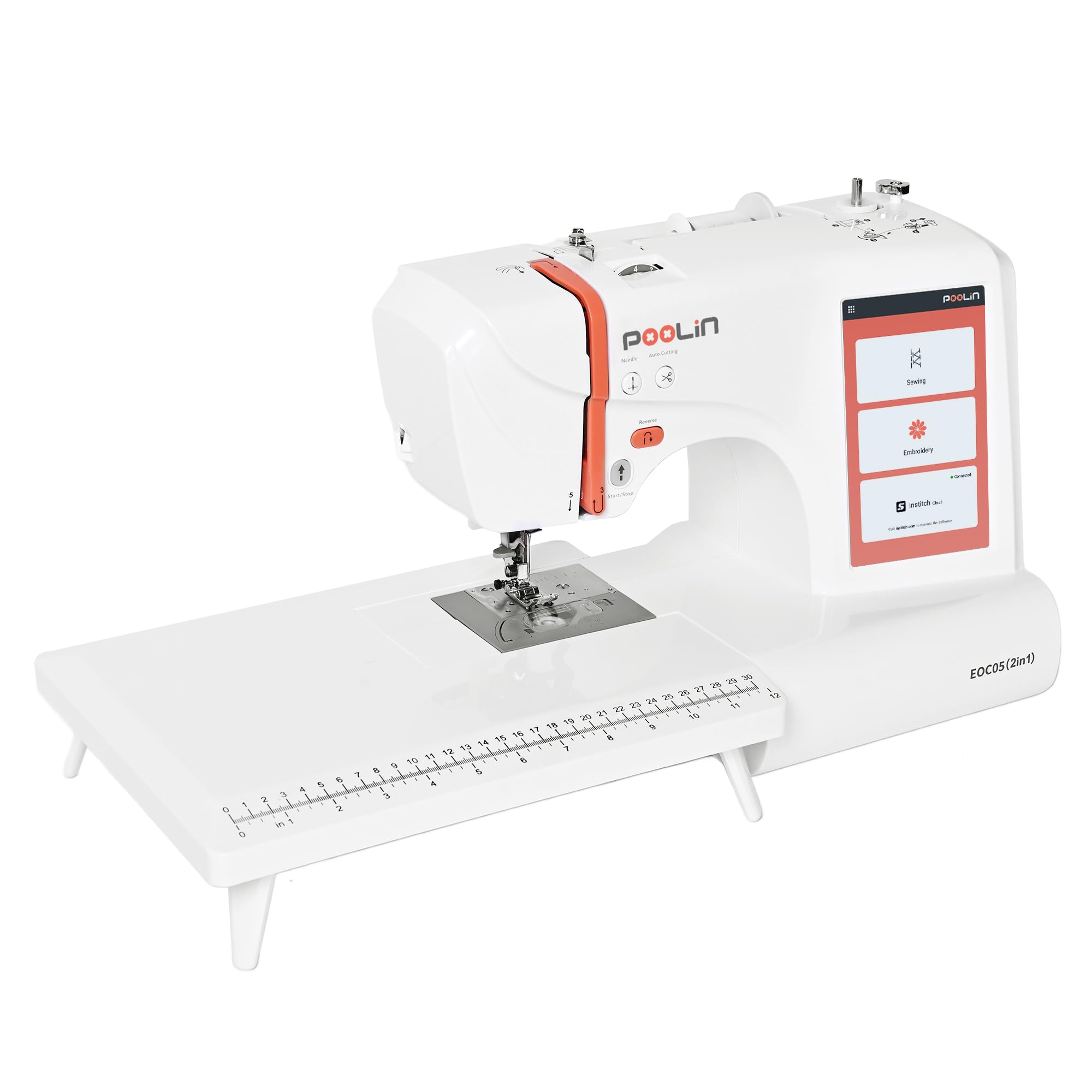
Two embroidery hoops in the box — including a rare 4″x9.25″ long hoop — let you stitch tall towel borders or continuous patterns without buying extra accessories.
The 4″x4″ hoop handles standard small designs, while the 4″x9.25″ long hoop is good for towel borders, scarf ends, or continuous patterns that need extra height. This dual-hoop setup is unusual at this price point and saves you from buying a separate hoop later. It has 130 built-in embroidery designs and 207 sewing stitches, which is a solid library. The 7-inch touchscreen uses the InStitch i2 system, which according to the manufacturer’s description works like a phone interface that automatically recommends the right presser foot (the part that holds fabric flat while stitching) for the stitch you select — helpful if you are still learning.
The all-in-one starter kit is unusually complete: you get polyester sewing thread, embroidery thread, 24 pre-wound bobbins, and stabilizers so you can start stitching right from the start. At 12 kilograms (about 26.5 pounds), it is mid-weight — heavier than the Brother SE700 (15.6 pounds) but lighter than the Bernette B79 (47 pounds). Customers note that the 1-on-1 training support included with the machine is helpful for beginners who need live guidance, and the PooLin Official User Group on social media provides community troubleshooting.
Two Hoops, One Box
- Two hoops included: 4″x4″ and tall 4″x9.25″ for longer designs
- 207 sewing stitches and a 7-inch touchscreen with presser-foot recommendations
- Full starter kit with thread, bobbins, and stabilizers included
Newer Brand
- PooLin is a newer brand than Brother or Janome, with a smaller user community so far
Pick this for the long-hoop advantage. If you regularly embroider tall designs on towels, runners, or scarves, the included 4″x9.25″ hoop makes it the only model here that does that from the start. The brand is newer, so replacement parts and long-term support may not be as established as with Brother or Janome.
5. Janome Horizon Memory Craft 9850

The 6.7-inch by 7.9-inch embroidery hoop is the largest single area in this comparison — bigger than the Brother SE2000’s 5″x7″ hoop — so you can stitch full shirt pockets or large quilt blocks in one pass.
You get 175 built-in embroidery designs and 200 built-in sewing stitches, which is a close match to the SE2000 on design count (175 vs 193). The automatic thread tension adjusts for different fabric thicknesses without you having to fiddle with a dial — a real time-saver when switching from a cotton shirt to a denim jacket. The top-loading full rotary hook bobbin (the thread underneath) is easy to access for mid-project changes, and the bobbin winder includes a plate and cutting blade for quick refills. The embroidery speed ranges from 60 to 800 stitches per minute, so you can go fast for production work or slow down for detailed designs.
At 23 pounds, the Janome MC 9850 is heavier than the SINGER SE9180 (15.5 pounds) but lighter than the Bernette B79 (47 pounds) — a stable platform without being immovable. One trade-off versus the Brother SE700: it does not have wireless transfer built in, so you rely on a USB drive for design imports. Buyers with long experience with Janome often cite the brand’s reputation for mechanical reliability as a reason to choose this over newer brands.
Biggest Embroidery Area
- 6.7″ x 7.9″ hoop is the largest single-embroidery area in this guide
- 175 built-in designs and automatic thread tension for fuss-free fabric changes
- Top-loading rotary hook bobbin is easy to view and replace mid-project
Premium Investment
- Higher price than the mid-range options, reflecting Janome’s brand positioning
For the dedicated embroiderer. If a large hoop area and automatic tension are your top priorities, and you trust the Janome brand reputation for reliability, the Memory Craft 9850 delivers. One caveat: it does not have wireless transfer built in — you rely on USB for design imports.
6. Bernette B79 Computerized Sewing and Embroidery Machine

The 230mm sewing space — roughly 9 inches to the right of the needle — beats every other machine here for handling large quilts or bulky home decor projects.
The Bernette B79 is built with an aluminum frame and weighs 47 pounds, making it the heaviest machine in this roundup by a wide margin — more than triple the weight of the 15.5-pound SINGER SE9180. That weight translates to zero vibration at high speeds, which matters when you are doing long seams or detailed machine quilting. The four LEDs in the work area provide shadow-free lighting, so you see every stitch clearly even on dark fabrics.
The B79 includes a programmable foot control with a back-kick function (it nudges the fabric in reverse for a moment), a semi-automatic needle threader, and dual feed for even fabric feeding — the dual feed helps prevent layers from shifting when sewing knits, slippery fabrics, or multiple quilt layers. The 5-inch color touchscreen is smaller than the 7-inch screens on the SINGER SE9180 and PooLin EOC05, but it is paired with multi-function knobs for physical control, giving you the option to adjust settings by touch instead of screen taps. Reviewers point out that the dual feed system is genuinely useful for matching plaids and stripes, and that the work area is noticeably more spacious than the Brother SE2000.
Spacious and Stable
- 230mm sewing space to the right of the needle — ideal for large projects
- Aluminum frame and 47-pound weight eliminate vibration at high speeds
- Dual feed and four LEDs for precise fabric handling and visibility
Screen Size Trade-Off
- The 5-inch touchscreen is smaller than competitors’ 7-inch displays
- No specific hoop size or design count is listed in the data — check before buying
For the quilter and garment maker. If you need maximum workspace and sewing stability and plan to use the embroidery function as a secondary feature, the Bernette B79 is your machine. The lack of detailed embroidery specs (hoop size, design count) in the data means you should confirm those numbers with the seller before ordering if embroidery is your primary use.
7. EverSewn Sparrow X2 Sewing & Embroidery Machine

You control all embroidery through a mobile app on your phone or tablet — there is no built-in touchscreen, which makes the machine itself very compact at just 8 inches deep.
The EverSewn Sparrow X2 does not have a built-in screen for embroidery. Instead, the machine communicates directly with your phone or tablet locally (no WiFi needed). The app lets you customize designs, combine patterns, and send them to the machine. The sewing side has over 120 stitch patterns, an advanced auto-threader, presser foot pressure adjustment, electronic tension adjustment, and a straight-stitch plate. It also includes two hoops (large and small) in the box.
At 20 pounds and measuring 8 inches deep by 18 inches wide by 12.5 inches high, the Sparrow X2 is more compact front-to-back than the SINGER SE9180 (19 inches deep) — a real advantage if your sewing desk is shallow. The machine reads common embroidery file formats (EXP, PES, DST), so you can use designs from most online sources. Buyers appreciate that you can lower the presser foot pressure for delicate fabrics, but the 3.8 out of 5 rating from 53 reviews on Amazon suggests some users found the app-driven workflow less intuitive than a dedicated touchscreen. The 8-inch depth is about 2.4 times smaller than the SINGER SE9180’s 19-inch depth, making this the most desk-friendly machine here.
Phone-First Workflow
- Embroidery control via mobile app with no WiFi needed — works with Apple or Android
- Very compact at 8 inches deep, saving desk space
- Reads EXP, PES, and DST file formats and includes two hoops from the start
Screen-Free Learning Curve
- No built-in embroidery screen — all design editing happens on your phone or tablet
- Lower customer rating (3.8) and fewer reviews suggest a smaller user community
Best for the tech-savvy sewist with limited desk space. If you are comfortable designing on your phone and want the smallest machine footprint, the Sparrow X2 is a creative, space-saving alternative. If you prefer a dedicated screen to preview and edit designs directly, the Sparrow X2’s app-based workflow may feel limiting.
Understanding the Specs
Hoop Area (Embroidery Field)
This is the maximum size of the design you can embroider in a single clamping. It is measured in inches (like 4″x4″ or 5″x7″) or millimeters (like 170x100mm). A larger hoop means larger single designs — a 5″x7″ hoop can fit a design that is 70% larger than a 4″x4″ hoop. If you plan to embroider shirt backs or big quilt blocks, the hoop size is the single most important spec. Machines that include multiple hoops (like the PooLin EOC05) give you flexibility without buying extra accessories.
Built-in Designs vs Importable Designs
Built-in designs are the patterns pre-loaded on the machine — you can stitch them immediately without any extra software. Importable designs are patterns you transfer via USB, WiFi, or app and store on the machine. A machine with fewer built-in designs (like the SE600 with 80) relies on you importing your own, which is fine if you buy or download designs. Machines with wireless LAN (SE700, SE2000, SE9180) make importing easier because you send digital files without plugging in a cable. The total design library matters most if you want variety without buying or sourcing patterns elsewhere.
FAQ
Can I sew regular garments with a combo sewing and embroidery machine?
What is the best hoop size for a beginner?
Can I use designs from Etsy or other online shops on these machines?
Do I need a computer or tablet to use a combo machine?
How long does it take to embroider a design?
What does automatic needle threader actually do?
Is wireless LAN worth paying extra for in a combo machine?
How do I clean and maintain a combo sewing and embroidery machine?
What is the difference between a combo machine and a separate sewing machine plus embroidery machine?
Which machine is best for quilting?
Final Thoughts: The Verdict
Related Guides

Mo Maruf
I created WellFizz to bridge the gap between vague wellness advice and actionable solutions. My mission is simple: to decode the research and give you practical tools you can actually use.
Beyond the data, I am a passionate traveler. I believe that stepping away from the screen to explore new environments is essential for mental clarity and physical vitality.