Our readers keep the lights on and my smoothie glass nicely filled. As an Amazon Associate, I earn from qualifying purchases.
Specs are compiled from manufacturer listings and verified buyer reviews and can change over time — please confirm the key details on the product page before buying.
A color sticker printer lets you turn any phone snapshot into a peel-and-stick keepsake for your journal, scrapbook, or party favor — but the real challenge is finding one that actually prints the colors you saw on your screen, without a blue or pink tint ruining the photo. That single frustration separates a printer you will use for years from one you box up after a week.
I’m Mohammad Maruf — the founder and writer behind WellFizz. This guide is built by comparing the manufacturers’ published specifications and the patterns across verified customer reviews, so you get each pick’s real strengths and trade-offs instead of marketing spin.
if you need something pocket-sized for daily journaling or a dual-format printer for home use, the right best color sticker printer balances accurate colors, fast Bluetooth pairing, and a battery that keeps up with your creative flow — this guide lines up five of them.
Quick Picks
- Liene Pearl N200 Pro Portable AI Photo Printer — Best Overall
- Canon Ivy 2 Mini Photo Printer — Compact Champion
- HP Sprocket 2×3 Instant Smartphone Photo Printer — Party Ready
- HP Sprocket Panorama Instant Color Label & Smartphone Photo Printer — Label Maker
- Liene Amber M110 Bluetooth Photo Printer — Dual Format
How To Choose The Best Color Sticker Printer
A sticker printer is a portable photo printer that uses either ZINK (Zero Ink) or thermal dye-sublimation technology. The choice between the two defines your color accuracy, running cost, and print feel — so start here.
Print Technology: ZINK vs Thermal Dye-Sublimation
ZINK printers (like the HP Sprocket and Canon Ivy 2) build color crystals into the paper itself — no ink cartridges, no toner. The result is a simple, cartridge-free system that is great for casual use, but buyers report a common blue, pink, or green color cast that takes some tweaking in the app to correct. Thermal dye-sublimation printers (like both Liene models) use a separate ribbon and paper pack, so the dye penetrates the paper more deeply, giving you richer colors that are also water-resistant and smudge-proof. The trade-off is you have to buy matched paper-and-ribbon sets, which is a recurring cost.
Battery Life and Portability
Look at how many prints a single charge delivers. The HP Sprocket gives you 35 prints per charge, and the Liene Pearl N200 Pro offers 27 stickers per charge. If you need the printer for an all-day party, check for USB-C charging that lets you plug into a power bank without stopping.
App Experience and Compatibility
Every portable sticker printer runs through a companion app on your phone, so ease of setup and the quality of editing tools matter. Look for an app that lets you add frames, filters, text, and adjust brightness or color tint before printing — that last feature is the one that saves you from a blue-tinted print. Bluetooth connectivity ensures quick pairing, and multi-device support means friends at a gathering can take turns printing without disconnecting and reconnecting.
Print Size and Paper Format
The common sizes are 2×3″ sticky sheets (perfect for a journal or scrapbook), 3×3″ square stickers, and roll-based continuous paper that lets you print 0.5″ wide labels or 9″ long photobooth strips. A dual-tray printer like the Liene Amber M110 supports both 4×6″ photos and 3×3″ stickers in the same machine, which is the most versatile option if you want one device for photo prints and sticker making.
Quick Comparison
| Model | Best For | Print Technology | Print Size | Prints per Charge | Amazon |
|---|---|---|---|---|---|
| Liene Pearl N200 Pro | Best color accuracy in a pocket size | Thermal Dye-Sublimation | 2×3″ | 27 stickers | Amazon |
| Canon Ivy 2 | Ultra-portable daily journaling | ZINK | 2×3″ | — | Amazon |
| HP Sprocket 2×3 | Pocket-sized fun with long battery | ZINK | 2×3″ | 35 prints | Amazon |
| HP Sprocket Panorama | DIY photobooth strips and labels | ZINK | 2″ wide roll (0.5″ – 9″) | — | Amazon |
| Liene Amber M110 | Dual-format home versatility | Thermal Dye-Sublimation | 4×6″ & 3×3″ sticker | — | Amazon |
In‑Depth Reviews
1. Liene Pearl N200 Pro Portable AI Photo Printer

The pocket printer that finally kills the color cast problem.
Unlike ZINK-based printers that rely on embedded dye crystals in the paper, the Liene Pearl N200 Pro uses thermal dye-sublimation, where a separate ribbon transfers dye onto special paper. The payoff is colors that look true to your phone screen — buyers consistently say the print quality “exceeded expectations” with “vibrant, sharp” results, and one reviewer who compared it to a Kodak Step rated the Liene’s color “10x better.”
The trade-off is that you need to buy matched paper-and-ribbon packs, which is an ongoing cost, and the printer itself is slightly larger than the HP Sprocket — its dimensions are 5.69″D x 3.44″W x 1.16″H. But for that size, you get a full charge that delivers power for printing up to 27 stickers, so the fun keeps going without interruption, as owners mention. The app includes AI-powered background removal, custom frames, and multi-device Bluetooth pairing so everyone at a party can take a turn.
A minor catch several buyers mention: you need to connect to the device via your phone’s Bluetooth settings first before the app recognizes the printer — the app connection can feel a bit buggy on first setup. Still, for sticker printers in this size, the color accuracy is the defining win.
Color King
- Vibrant, true-to-original color using dye-sublimation tech
- Multi-device pairing for parties
- Compact but slightly larger frame
The Ongoing Cost
- Requires separate paper and ink cartridge packs
- Bluetooth connection requires manual device pairing first
Reach for this if: you value accurate, vivid color over cartridge-free convenience and want a pocket printer that makes your photos look true to the original.
Look elsewhere if: you prefer a no-cartridge system and are okay with tweaking colors in an app to fix a slight tint.
2. Canon Ivy 2 Mini Photo Printer

The ultra-portable ZINK printer that slips into a jeans pocket.
At 4.69″D x 0.79″W x 3.29″H, the Canon Ivy 2 is more compact than the Liene Pearl N200 Pro at 5.69″D x 3.44″W x 1.16″H, making it the easiest to carry everywhere. It uses ZINK technology (zero ink), so there is never a cartridge to replace; the color crystals are embedded inside the paper. Customers note it is “ultra-portable” and “prints from phone in 1-2 min,” which makes it ideal for journaling on the go.
Canon claims improved print quality over the original Ivy: optimized skin tones, better contrast, and sharper prints. The Bluetooth 5.0 connectivity is quick enough for daily use, and the peel-and-stick backing works well on walls, laptop cases, or journal pages. One reviewer who uses the printer almost daily for book journaling praised the app as “amazing” and said the process was easy.
The honest trade-off is the same color-cast issue common to ZINK printers — several owners mention a “blue tint” on prints, which may be paper-related. You can adjust brightness and tint in the Canon Mini Print App before printing, but that adds a step. If you prefer a drop-in-and-print experience with zero ink cost, this is your pick; if you want instant accurate color, the dye-sublimation models above are better.
Pocket Ready
- Ultra-compact 4.69″ x 3.29″ footprint
- No ink cartridges to replace
- Peel-and-stick backing for versatile placement
Color Cast
- Blue tint reported by some buyers
- Cannot connect two devices at once
Perfect for: daily journalers who want a no-fuss, cartridge-free sticker printer they can keep in a bag and grab instantly.
skip it if: you need precise color accuracy straight out of the printer without any app tweaks.
3. HP Sprocket 2×3 Instant Smartphone Photo Printer
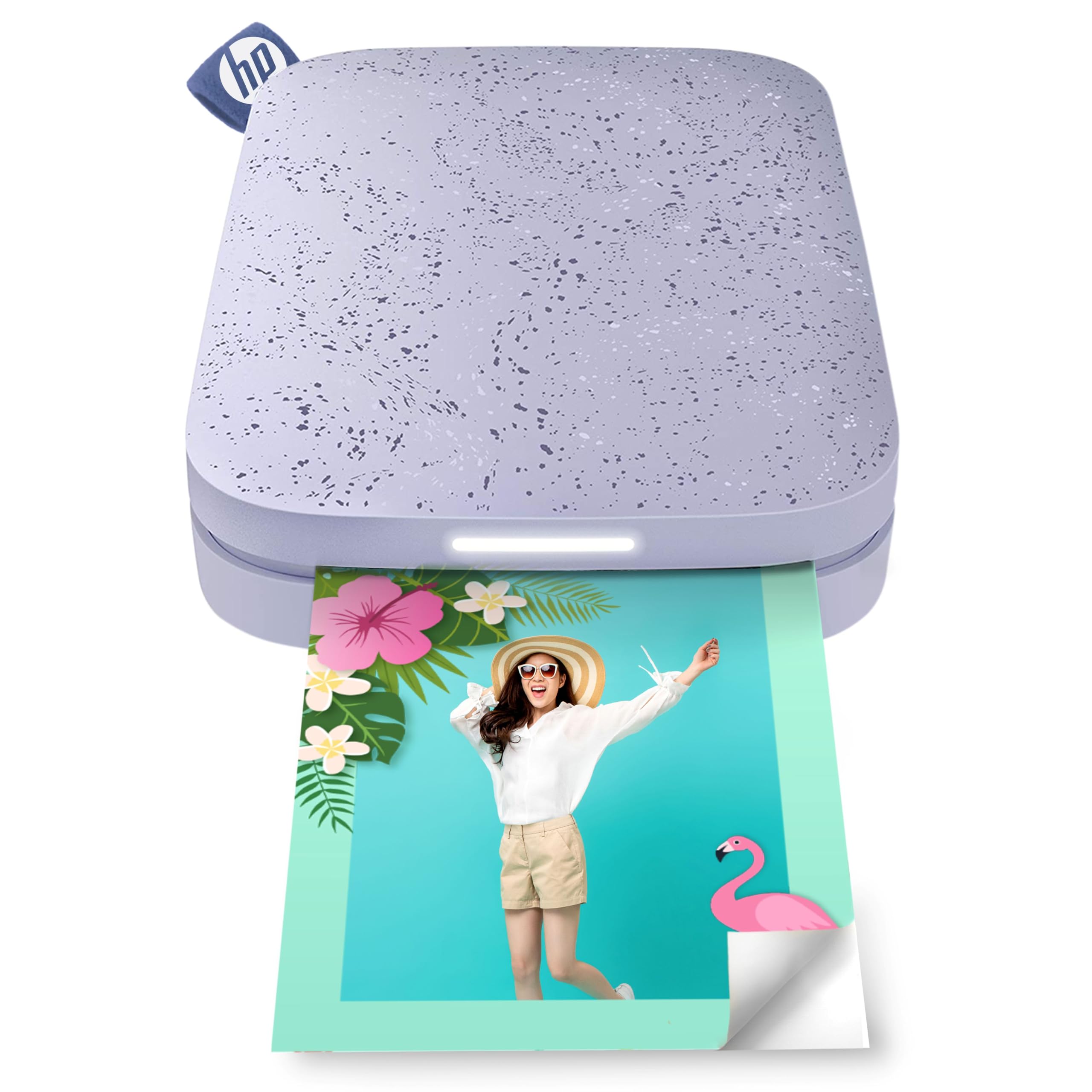
The longest-running battery in this size — 35 prints per full charge.
The HP Sprocket 2×3 uses ZINK technology like the Canon Ivy 2, but it packs the best battery life among all five options here: 35 prints per charge, which buyers confirm by noting the “long-lasting battery” and the ability to print while charging. That means you can keep printing through an entire party or a weekend trip without hunting for an outlet. It also uses Bluetooth 5.3, the newest generation, for a faster and more stable connection.
Print size is 2×3″ on glossy sticky-back paper, and the HP Sprocket App offers filters, frames, emojis, and borders — plus multi-device support with an LED light that shows who is printing. Reviewers praise how “small enough that it fits in my purse” and “easy to set up,” while also noting that the app can be tricky for collages and zoom adjustments. Another common tip from owners: use the included calibration card and adjust tint in a photo editor for best results, because the prints can have a pink or blue color cast.
A buyer mentioned they “wishes for larger version” — which is fair given the tiny 2×3″ format. If you want a bigger canvas or a photobooth strip, look at the HP Sprocket Panorama below.
Battery Champ
- 35 prints per charge
- Bluetooth 5.3 for stable connection
- Multi-device LED indicator for parties
Tiny Canvas
- 2×3″ prints may feel small for some users
- Pink/blue color cast noted by reviewers
Grab this for: day-long events where long battery life is the top priority and you want a purse-sized printer that keeps going without a recharge.
The catch: the pink/blue tint is real — be prepared to use the calibration card and tweak colors in the app first.
4. HP Sprocket Panorama Instant Color Label & Smartphone Photo Printer

The roll-fed ZINK printer that makes photobooth strips and labels from one device.
Instead of individual 2×3″ sheets, the HP Sprocket Panorama feeds 2″ wide ZINK paper on a continuous roll, so you can print anything from a 0.5″ label to a 9″ long photobooth strip. A built-in cutter button lets you separate each print instantly. This makes it the most versatile option for DIY projects: mailing labels, locker decor, scrapbook stickers, or event tickets. One buyer used it for a DIY Photo Booth at a Christmas party and later switched to making stickers and tickets for events.
The Panorama uses the same ZINK technology as the smaller Sprocket 2×3, so there is no ink to buy — just the special ZINK paper rolls. The companion HP Sprocket Panorama App includes pre-made photobooth strip templates, filters, custom text, and frames. The trade-off, however, is inconsistent print quality: some reviewers point out “sometimes accurate color, other times green or red tint,” and the cutting mechanism can jam, wasting paper. One reviewer also noted that the app does not save your preferences, requiring trial and error for picture sizing. A separate buyer reported a defective unit that would not charge or maintain power.
Versatility is the killer feature here — no other printer in this list lets you print labels, stickers, and photobooth strips from the same roll. But if consistent color accuracy matters more than variety, the Liene Pearl N200 Pro above is a safer choice.
Roll Versatility
- Continuous roll prints from 0.5″ to 9″ lengths
- Cutter button for instant separation
- Great for DIY stickers, labels, photobooth strips
Quality Dance
- Inconsistent color — green or red tint reported
- Cutting mechanism can jam
- App does not save size preferences
Best suited for: crafters who want one device that can produce labels, photobooth strips, and stickers from a single roll without switching paper types.
Who should skip: anyone who needs reliable, consistent color accuracy straight out of the printer without fiddling with settings each time.
5. Liene Amber M110 Bluetooth Photo Printer

The home-friendly printer that handles both 4×6″ photos and 3×3″ stickers in one unit.
The Liene Amber M110 is the biggest and most versatile printer here, with a dual-tray design that lets you switch between 4×6″ standard photo paper and 3×3″ sticky-backed paper without swapping rolls or settings. It uses thermal dye-sublimation — the same technology as the Pearl N200 Pro — so colors are vibrant, water-resistant, and resistant to fingerprints and fading. Shoppers say “excellent color accuracy” and “amazing picture quality,” with one reviewer calling it “absolutely perfect.”
Bluetooth pairing is fast — the manufacturer claims it pairs in 13 seconds, and owners confirm the setup is “quick” and “a breeze.” The included Liene App lets you add Polaroid borders, filters, and even print ID or visa photos from home. It is also compatible with laptops and PCs via USB-C, which is rare for a portable sticker printer. One reviewer who connected to Windows 10 said it worked well after installing the Liene driver, printing from the Windows Photos app after editing in Lightroom — though they noted the prints are slightly darker than the screen and the paper feels less glossy than traditional drugstore photo prints.
The trade-off is that it is heavier and larger than the pocket-sized models — it is designed more as a home or small-office printer than a grab-and-go device. If you want one machine that handles full-size photo prints for framing and 3×3″ stickers for journaling, this is your only option in this list.
Two in One
- Dual tray supports 4×6″ photo paper and 3×3″ sticker paper
- Excellent color accuracy and water-resistant finish
- Works with laptops, PCs, and mobile devices
Home Use Only
- Larger and heavier — not pocket portable
- Paper is less glossy and slightly thinner than drugstore prints
- Only compatible with Liene cartridges
Go with this if: you need a single device that prints both 4×6″ photos for framing and 3×3″ stickers for scrapbooking without swapping hardware.
Think twice if: you want the smallest possible device to carry in a purse or pocket — the Amber M110 is designed for home, not travel.
Understanding the Specs
ZINK (Zero Ink) vs Thermal Dye-Sublimation
ZINK printers embed dye crystals directly into the paper. When the print head heats the paper, the crystals activate to create color. The advantage is you never buy a cartridge — just paper rolls. The trade-off, as buyers of the HP Sprocket and Canon Ivy 2 report, is a common blue or pink color cast that requires color adjustments in the app. Thermal dye-sublimation (used in both Liene printers) uses a separate ribbon that transfers dye onto the paper layer by layer. The result is richer, more accurate colors that resist water and smudges, but you must buy matched paper-and-ribbon packs each time.
Prints Per Charge
This is the number of sticker prints you get from a full battery before needing to recharge. Among this group, the HP Sprocket 2×3 delivers 35 prints per charge, while the Liene Pearl N200 Pro gives you 27 stickers per full charge. If you are printing at a party or during a long trip, a higher number means fewer interruptions. All printers here charge via USB (either Micro USB or USB-C), and several can print even while charging, so a power bank extends the session indefinitely.
Print Size and Paper Format
The three main formats are 2×3″ individual sheets (pocket-sized, fits a journal), 3×3″ square sticker paper, and continuous roll paper that lets you print in variable lengths from 0.5″ up to 9″. The HP Sprocket Panorama uses the roll format and gives you a cutter button to separate prints, making it the only option for photobooth strips and DIY labels. The Liene Amber M110 is the only dual-tray model that supports both 4×6″ photo prints and 3×3″ stickers in the same machine.
Bluetooth Version and Multi-Device Support
Bluetooth 5.0 or 5.3 (the HP Sprocket 2×3 has 5.3) provides quick pairing and stable connections up to about 30 feet. Multi-device support means multiple phones can connect to the same printer one after another without re-pairing — useful at parties or family gatherings. The Liene models also support simultaneous connections for group printing. On the Canon Ivy 2, however, you cannot connect two devices at the same time; you must disconnect the first to pair the second.
FAQ
Will a color sticker printer work with my iPhone or Android phone?
Do I need to buy ink cartridges for ZINK printers?
Why do my prints look blue or pink?
How many stickers can I print on a single battery charge?
Can I print labels for shipping or organizing with a sticker printer?
Does the printer need Wi-Fi or an internet connection?
What is the difference between the Canon Ivy 2 and the HP Sprocket 2×3?
How long does it take to print one sticker?
Can I print from a laptop or computer?
Are the sticker prints waterproof or smudge-proof?
Final Thoughts: The Verdict
For most buyers, the best color sticker printer is the Liene Pearl N200 Pro because its thermal dye-sublimation technology delivers true-to-original colors without the color cast that plagues ZINK printers, all in a pocket-sized frame with 27 prints per charge. If you want a printer that can also produce full-size 4×6″ photo prints, grab the Liene Amber M110 for its dual-tray design. And for the longest battery life at 35 prints per charge plus a party-friendly multi-device setup, the HP Sprocket 2×3 is your best bet for all-day events.
How We Picked
We do not accept paid placement. Every pick is matched to a real buyer and a real use-case; we do not hands-on test units.
Sources & Methodology
Specifications: manufacturer listings and product documentation. Review insights: verified customer reviews, as of July 2026. Pricing: not shown on this page (it changes often); check the current price via the retailer link.
As an Amazon Associate, WellFizz earns from qualifying purchases. This does not affect which products we feature.

Mo Maruf
I created WellFizz to bridge the gap between vague wellness advice and actionable solutions. My mission is simple: to decode the research and give you practical tools you can actually use.
Beyond the data, I am a passionate traveler. I believe that stepping away from the screen to explore new environments is essential for mental clarity and physical vitality.