Our readers keep the lights on and my smoothie glass nicely filled. As an Amazon Associate, I earn from qualifying purchases.
Specs are compiled from manufacturer listings and verified buyer reviews and can change over time — please confirm the key details on the product page before buying.
If you own a color printer, the machine itself was the cheap part. The real cost and frustration come from tiny ink cartridges that run dry just when you need them most. A color printer with cheap ink breaks that cycle by letting you refill with bottles that cost pennies per page instead of dollars.
I’m Mohammad Maruf — the founder and writer behind WellFizz. This guide is built by comparing the manufacturers’ published specifications and the patterns across verified customer reviews, so you get each pick’s real strengths and trade-offs instead of marketing spin.
Whether you print school projects, home office documents, or family photos, a tank printer delivers quality without the quarterly shock of buying new cartridges. Here is the definitive guide to finding the best color printer with cheap ink for your home or small office.
Our Picks at a Glance


How To Choose The Best Color Printer With Cheap Ink
The old trap is buying a cheap printer then getting hit with cartridge costs that can exceed the printer’s own price in under a year. The solution is switching to a tank-based (Supertank or INKvestment) printer. These use high-capacity refillable ink reservoirs instead of small, disposable cartridges. Here is what to look for to avoid the wrong pick.
Ink System: Tank vs. Cartridge
To keep your ink costs low, you want a tank printer — every product in this guide uses one. Tank printers come with bottles of ink that you pour into built-in tanks, and a full set can last thousands of pages. Cartridge printers use replaceable plastic cartridges that are far more expensive per page, so a tank system saves you money over time.
Page Yield and Cost Per Page
Page yield is the number of pages a set of ink can print. Look for a printer that includes a high-yield starter set in the box — some include enough ink for up to three years of typical home use. More yield means fewer refills and lower cost per page over the life of the printer.
Print Speed and Connectivity
Print speed is measured in pages per minute (ppm). A speed of 10 ppm or higher is comfortable for most homes and home offices. All modern printers offer wireless connectivity, but pay attention to whether a model supports 2.4 GHz and 5 GHz WiFi bands, or just 2.4 GHz. A reliable wireless connection is critical to avoid frustration with your printer.
Quick Comparison
| Model | Best For | Black Print Speed | Page Yield per Setup | Duplex Printing | Amazon |
|---|---|---|---|---|---|
| Canon MegaTank G3270★ Best Overall | Home Users & Value | 11 ppm | 6,000 black / 7,700 color | No | Amazon |
| HP Smart Tank 5101Clean Refill System | Mess-Free Refills | 12 ppm | Up to 6,000 black or color | Manual | Amazon |
| Epson EcoTank ET-2903 | Top-Rated & Reliable | 11 ppm | 3,600 black / 6,500 color | No | Amazon |
| Epson EcoTank ET-2800 | High Color Yield | 10 ppm | 4,500 black / 7,500 color | No | Amazon |
| Brother INKvestment MFC-J4355DW | Small Office Speed | 20 ppm | 1,800 black / 750 color per cartridge | Yes, Auto | Amazon |
In‑Depth Reviews
1. Canon MegaTank G3270 All-in-One Wireless Inkjet Printer
This printer puts the “cheap” in cheap ink without sacrificing build quality.
This Canon delivers a whopping 6,000 black and 7,700 color pages from the ink bottles that come in the box. That is years of printing for most households. Buyers consistently report exactly that experience — many note the original ink set lasted nearly two years under heavy use, which completely changes the math on what you spend per page.
Setup is straightforward using the Windows app, and the printer handles auto printhead alignment without fuss. The 1.35-inch square LCD display makes navigation simple. At 11 ppm for black text and 6 ppm for color, it is faster than many tank rivals on color jobs. The caveat is that connectivity can be fiddly; some buyers report the printer occasionally goes offline and needs a few minutes to reconnect. Single-sided printing only, so you will flip pages manually for duplex.
What wins people over is the sheer value for money. Printer quality earns the most praise, and the ink savings are dramatic compared to any cartridge machine. The trade-off is that the wireless connection is best for someone comfortable troubleshooting the occasional drop-out.
Why It Earns the Top Spot
- Highest included page yield in this list: 6,000 black and 7,700 color pages
- Original ink reportedly lasts nearly two years under heavy home use
- Fast color print speed at 6 ppm, beating many rivals at the same price
What to Keep in Mind
- Wireless connectivity can be inconsistent, requiring occasional reconnection
- No automatic duplex printing for two-sided pages
- Print speed mixed in real-world use when handling large jobs
Reach for this if: You want the absolute lowest long-term ink cost and can handle a minor connectivity quirk.
Look elsewhere if: You need rock-solid wireless reliability from the start without any setup fuss.
2. HP Smart Tank 5101 Wireless All-in-One Refillable Printer
HP’s answer to the cartridge tax is a tank system designed for true mess-free refilling.
The HP Smart Tank 5101 leans into an easy, clean refill experience. Instead of squeezing a bottle, you plug it into the tank and let it drain — no spills, no stress. The starter ink bottles are rated for up to 6,000 color or black pages right from the start, and owners confirm the ink economy is genuine. Owners mention that after three months of printing around 25 pages per week, all ink levels still read full.
Black text prints at a brisk 12 ppm, the fastest monochrome speed in this list’s tank category, at 12 ppm, compared to the Canon’s 11 ppm. Color printing comes in at 5 ppm. The printer uses a 24-bit color depth for richer image detail. The main limitation is connectivity — this model operates on 2.4 GHz WiFi only, so you cannot use a 5 GHz band. Some owners experience dropped connections if the printer sits far from the router, around 35 feet away. The LCD display is small for checking ink levels.
The setup process earns mixed feedback. Some find it very easy, while others struggle with driver installation and WiFi connectivity. Once running, the print quality for text is fine with no smearing. The honest downside is that reliability is the most-discussed aspect, and it is split — many owners are satisfied, but a notable minority report persistent connection problems.
Ink champion with a WiFi catch: The refill system and ink economy are this printer’s standout traits. If your router is close to the printer and you only need 2.4 GHz, the day-to-day savings are real.
Who it trips up: Anyone who needs a printer that works flawlessly on a 5 GHz network or who cannot afford any setup headaches.
Great for: Home users who prioritize ink savings and want a clean, cartridge-free refill process.
Not ideal for: Tech-averse buyers or homes where the printer must sit far from the router.
3. Epson EcoTank ET-2903 Wireless All-in-One Color Supertank Printer
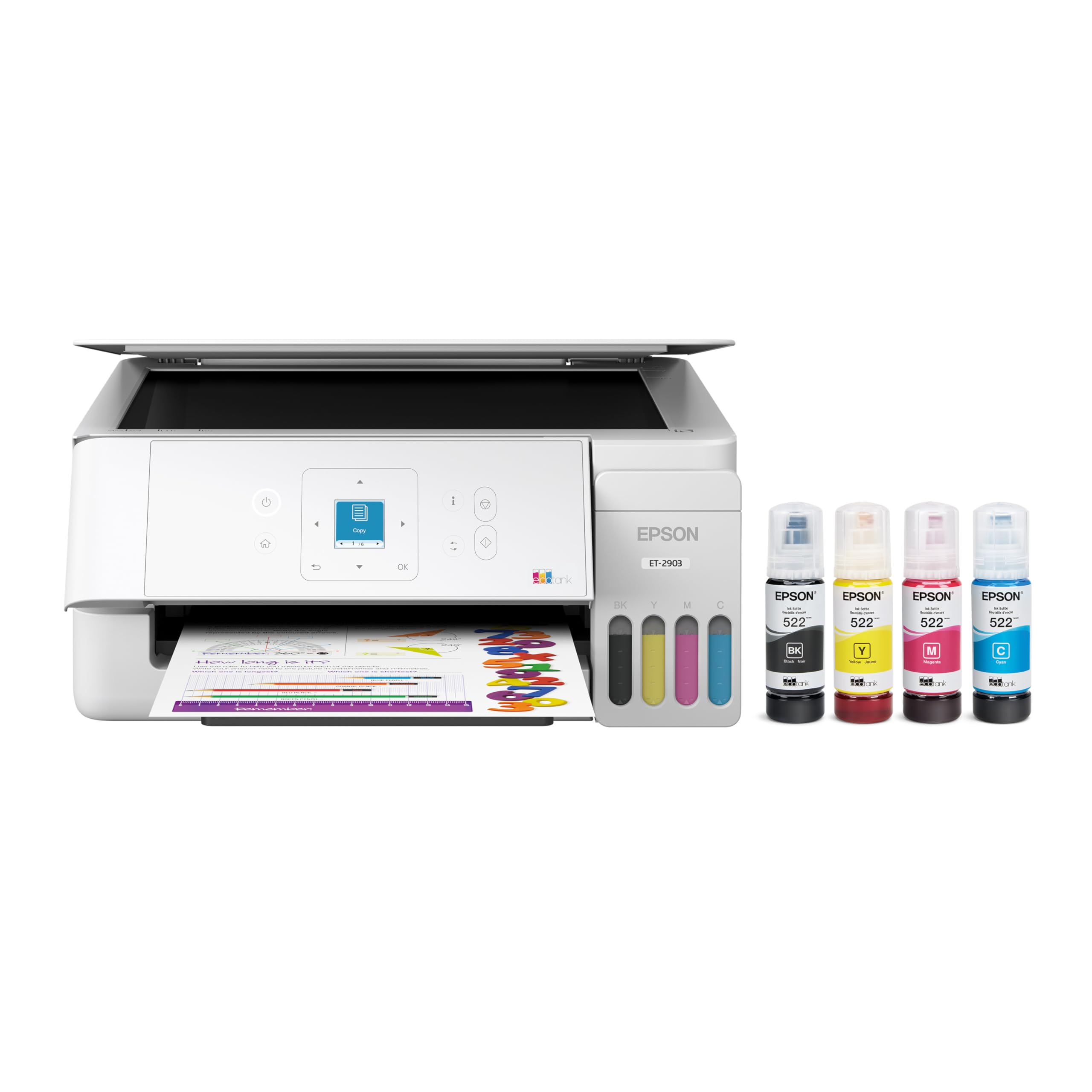
This tank printer sets the standard for reliability and photographic print quality.
The Epson ET-2903 is a 7th-generation EcoTank model — Epson has sold 100 million of these worldwide, and this version refines what made the series famous. It comes with enough ink for up to three years of typical use, printing a claimed 3,600 black pages and 6,500 color pages from the starter bottles. One owner printed over 300 photos for a memorial and used only about a quarter of the ink. That is real-world proof the yield holds up.
Print quality is a step above most home tank printers thanks to a high 5760 x 1440 dpi resolution, which produces sharp text and vivid photo prints. The Heat-Free technology means the printhead is designed to last the life of the machine — no warmup time, so the first page comes out instantly. It prints at 11 ppm black and 6 ppm color, the same color speed as the Canon. The 1.44-inch color screen is small but functional for checking ink levels and navigating settings.
Setup is universally praised as easy, and the EcoFit ink bottles are keyed so you cannot accidentally pour the wrong color into a tank. The singular weakness is speed — it is not the fastest machine for big jobs. Owners describe it as a great home printer that feels light and easy to handle. For anyone who prints photos at home alongside documents, this is the best balance of quality and ink cost.
Photo-quality powerhouse: The 5760 x 1440 dpi resolution makes this the premier pick for printing family photos without stepping up to a dedicated photo printer.
The trade-off: Not the fastest for large text documents; better suited to steady, moderate-volume use.
Choose this if: Print quality in both documents and photos is your top priority, and you are okay with moderate print speeds.
skip it if: You need a high-speed workhorse for a busy home office with frequent large print runs.
4. Epson EcoTank ET-2800 Wireless Color All-in-One Cartridge-Free Printer

Proven ink savings from a crowd-favorite model that tens of thousands of owners trust.
The Epson ET-2800 is the most-reviewed tank printer in this list, and it earned that status for a reason. Each bottle set is equivalent to about 90 individual ink cartridges, and the starter ink prints up to 4,500 black pages or 7,500 color pages — one of the highest color page yields in this guide. Customers note the ink lasts hundreds of pages with tanks barely appearing to drain, making the cost-per-page virtually negligible.
Setup is quick, around 10 to 15 minutes for most users, and the Micro Piezo Heat-Free Technology prints sharp documents at 10 ppm black and 5 ppm color. The printer handles card stock and sticker paper without jams, which is a bonus for craft projects. The LCD screen is on the small side, but it is enough for basic navigation.
The most-discussed aspect here is the printer quality — and it carries a mixed verdict. While many owners are perfectly happy, a minority report issues like blank pages or wireless connectivity problems. A vocal minority experienced severe printhead issues requiring multiple cleaning cycles. This makes it a great value pick for the patient owner but not the most reliable tank printer on the market.
What Makes It a Value King
- Highest color page yield in the list at 7,500 pages from starter ink
- Equivalent to 90 individual ink cartridges per bottle set
- Quick setup time, typically around 10 to 15 minutes
What Holds It Back
- Printer quality is the most-discussed aspect and reviews are divided
- Reported connectivity issues and occasional blank page problems
- Slowest black print speed at 10 ppm among these picks
Best for: Budget-focused buyers who want maximum ink yield and are okay with slight reliability trade-offs.
Think twice if: You need hands-off reliability and cannot tolerate troubleshooting print or connectivity issues.
5. Brother INKvestment MFC-J4355DW Wireless Color All-in-One Printer

The fastest printer here — and the only one with automatic two-sided printing built in.
The Brother MFC-J4355DW takes a different approach to cheap ink. Rather than massive bottles, it uses high-yield cartridges with a claimed 1,800-page black yield and 750-page color yields per cartridge. The real draw is speed: it prints black text at 20 ppm (pages per minute) and color at 19 ppm, while the other models in this guide print between 10 and 12 ppm black and 5 to 6 ppm color. It also prints the first page in roughly 5.8 seconds for black and 5.9 seconds for color — nearly instant, so you don’t wait for your first page.
This is the only pick with automatic duplex (two-sided) printing, plus a 20-page automatic document feeder (ADF) for multi-page scanning or copying, and a 150-sheet paper tray with a manual feed slot for envelopes or specialty paper. It also includes fax, Wi-Fi Direct for printing without a network, Ethernet, and USB 2.0. The 1.8-inch color display is larger than most here for easier menu navigation.
Printer quality earns the most praise, and setup is widely rated as easy. The catch is that the sustainability of cheap ink depends on buying Brother Genuine LC506 cartridges, which some owners find expensive compared to tank bottle refills. Wireless connectivity also earns mixed feedback — some report it works well, others say it drops connection. The included starter cartridge is high yield, but the true cost per page over years of use is higher than a tank-based printer.
Speed leader with a trade-off: At 20 ppm black and 19 ppm color, this printer is built for a busy environment where time is money.
The honest truth on ink: The INKvestment system gives you more pages per cartridge than standard, but the per-page cost over time is higher than a bottle-based tank system.
Perfect for: A small office or busy home office that needs fast printing, automatic duplex, and scanning with a document feeder.
Not the best for: The lowest possible long-term ink cost — a tank printer saves more per page over years of use.
Understanding the Specs
Page Yield
This tells you how many pages you can print before you need to refill or replace ink. A higher yield means fewer interruptions and a lower cost per page over the life of the printer. Tank printers typically quote yields of 4,000 to 7,000 pages per set of ink bottles. Cartridge yields are often 200 to 600 pages per cartridge. The difference is why tank printers are the core of cheap ink.
Print Speed (PPM)
Measured in pages per minute (ppm), this number tells you how fast the printer produces documents. A speed of 10 ppm or higher is comfortable for most homes. The Brother in this guide hits 20 ppm, which matters if you frequently print multi-page reports. Tank printers tend to be slightly slower than cartridge equivalents, but the ink savings usually outweigh the few extra seconds per page.
Duplex Printing
Duplex means the printer can automatically print on both sides of a page without you flipping the paper. This saves paper and makes multi-page documents feel professional. Only one printer in this list — the Brother MFC-J4355DW — offers automatic duplex. The others use simlex (single-sided) printing or manual duplex, where you flip the paper yourself.
Print Head Technology
Inkjet printers use a printhead to spray tiny drops of ink onto paper. Epson uses Micro Piezo Heat-Free Technology, which applies a small electrical charge to fire ink without heat. Canon and HP use thermal technology, which heats the ink to create a bubble that ejects it. Heat-Free printheads are designed to last the life of the printer and eliminate warmup time, so the first page prints instantly.
FAQ
How much cheaper is ink from a tank printer compared to a cartridge printer?
Will the printer work with my phone or tablet?
Can I use third-party ink in these printers?
How long does the starter ink actually last?
What is the difference between Supertank and INKvestment?
Do these printers support automatic two-sided printing?
Are these printers good for printing photos?
Will these printers connect to my 5 GHz WiFi or only 2.4 GHz?
Final Thoughts: The Verdict
If you want one dependable pick, the best color printer with cheap ink winner is the Canon MegaTank G3270 because it delivers the highest included page yield and real-world ink savings that owners confirm over years of use. If you want photo-quality prints with the same low ink cost, grab the Epson EcoTank ET-2903. And for a busy small office that needs speed and automatic duplex, the Brother INKvestment MFC-J4355DW is the one to reach for.
How We Picked
We do not accept paid placement. Every pick is matched to a real buyer and a real use-case; we do not hands-on test units.
Sources & Methodology
Specifications: manufacturer listings and product documentation. Review insights: verified customer reviews, as of July 2026. Pricing: not shown on this page (it changes often); check the current price via the retailer link.
As an Amazon Associate, WellFizz earns from qualifying purchases. This does not affect which products we feature.
Related Guides

Mo Maruf
I created WellFizz to bridge the gap between vague wellness advice and actionable solutions. My mission is simple: to decode the research and give you practical tools you can actually use.
Beyond the data, I am a passionate traveler. I believe that stepping away from the screen to explore new environments is essential for mental clarity and physical vitality.