Our readers keep the lights on and my smoothie glass nicely filled. As an Amazon Associate, I earn from qualifying purchases.
Finding a color printer for labels that produces crisp, durable, and waterproof results without smudging or fading is a hunt that often ends in frustration. Whether you are labeling cables in a data center, creating professional product barcodes, or generating custom oil change stickers, the wrong printer wastes time, materials, and money. The market is split between dedicated industrial label makers and versatile desktop units, and each has a specific set of specs that determines whether it fits your workflow.
I’m Mohammad Maruf — the founder and writer behind WellFizz. I’ve spent hundreds of hours analyzing the build quality, print resolution, media compatibility, and real-world durability of the leading thermal and ink-based label printers on the market to bring you this guide.
After comparing print speeds, resolution, connectivity, and material support across seven distinct models, I’ve narrowed down the winners to help you find the best color printer for labels for your specific workspace or shop floor.
How To Choose The Best Color Printer For Labels
Choosing the right printer means matching the machine’s core capabilities to your volume, label size, and environment. Below are the three most critical factors to evaluate before making a purchase.
Print Technology: Thermal Transfer vs. Direct Thermal vs. ZINK
Thermal transfer printers use a ribbon to fuse ink onto the label, producing results that are highly resistant to smudging, scratching, and UV exposure — ideal for industrial or long-term labeling. Direct thermal prints without a ribbon but relies on heat-sensitive paper that can darken over time, making it best for short-term use like shipping labels. ZINK (Zero Ink) technology embeds color crystals inside the paper, which are activated by heat, and is primarily used for photo-centric label applications like the HP Sprocket. For general-purpose color labeling where durability matters, thermal transfer is the dominant choice.
Resolution and Speed
Resolution, measured in dots per inch (dpi), directly impacts the sharpness of text and the readability of barcodes. A 300 dpi print head is the professional standard for small fonts and high-density barcodes, while 203 dpi is acceptable for larger text. Print speed, measured in inches per second (ips), dictates your throughput — a 6 ips printer can churn out hundreds of labels per minute, whereas slower models (1 ips) are better suited for occasional, precision work. High-volume operations should prioritize 300 dpi at 4 ips or faster.
Media Compatibility and Connectivity
Not all printers accept the same label materials. Some are locked into proprietary cartridges, while others offer a drop-in, spindle-less design that works with any continuous roll or fanfold label stock. Check the maximum label width (1” to 4”) and the types of material supported — vinyl, polyester, heat-shrink, or standard paper. Connectivity also matters: Ethernet and Wi-Fi allow multiple users to queue jobs, while USB-only models are best for a single dedicated workstation. Bluetooth support is a bonus for mobile printing directly from a phone or tablet.
Quick Comparison
On smaller screens, swipe sideways to see the full table.
| Model | Category | Best For | Key Spec | Amazon |
|---|---|---|---|---|
| Brother PT-P950NW | Industrial Laminate | Durable high-volume labeling with network printing | 360 dpi, 3.1 ips, Wi-Fi | Amazon |
| Brother TD-4550DNWB | Desktop Thermal | High-volume barcodes and shipping labels | 300 dpi, 6 ips, 4-inch width | Amazon |
| Epson LW-PX900 | Industrial Handheld | Versatile multi-tape industrial labeling | 1.5-inch max tape width | Amazon |
| DYMO Rhino 4200 Kit | Industrial Handheld | Field techs needing portability and durability | 3/4-inch max tape width | Amazon |
| McAuley Godex RT200i | Specialized Thermal | Color oil change reminder stickers | Color LED, auto date/mile calc | Amazon |
| Indy Print 2 Oil Change | Specialized Thermal | Entry-level oil change reminder printing | 2.25 x 1.25 inch label size | Amazon |
| HP Sprocket Photo Booth | Photo ZINK Printer | Event photo labels and sticker printing | 10.1-inch LCD screen, ZINK | Amazon |
In‑Depth Reviews
1. Brother P-Touch PT-P950NW

The Brother PT-P950NW is a network-ready industrial thermal printer that sets the standard for high-resolution (360 dpi) printing on laminated labels up to 36mm wide. Its build quality is robust, and the drop-in tape cartridge system makes media swaps fast and hassle-free. The auto cutter with a half-cut and easy-peel function is a game-changer for producing professional, continuous-label strips for cable wraps or asset tags.
What truly distinguishes this model is its connectivity: wired Ethernet and built-in Wi-Fi allow multiple users to queue label jobs from desktop PCs, tablets, or smartphones without sharing a single USB cable. The included P-touch Editor 5 software provides extensive barcode and design control, though users report the chain-printing workflow on MacOS can be slightly finicky. The printer outputs at up to 3.1 inches per second, which is fast enough for moderate-volume production workflows.
The only real drawback is the proprietary tape system, which locks you into Brother’s TZe cartridges — these are high-quality but carry a recurring cost. For shops or data centers that demand durable, chemical-resistant labels that survive harsh environments, the PT-P950NW is the top choice among mid-range to high-volume users who also value remote network printing capabilities.
Why it’s great
- High 360 dpi resolution delivers exceptionally crisp text and barcodes
- Excellent network connectivity (Ethernet, Wi-Fi) for multi-user environments
- Auto cutter with half-cut feature saves time and creates professional connected strips
Good to know
- Proprietary TZe tape cartridges can be costly over time
- Chain printing on Mac has software quirks that require extra setup steps
2. Brother TD-4550DNWB

The Brother TD-4550DNWB is a 4-inch desktop thermal label printer built for productivity, delivering up to 6 inches per second at a clean 300 dpi resolution. Its spindle-less, drop-in media loading is a time-saver, allowing you to swap between different label rolls, tags, or fanfold stock in seconds without fussing with spindles or adapters. This makes it an excellent fit for high-volume shipping, warehousing, and barcode applications.
Connectivity is comprehensive with standard USB, Serial, Ethernet, built-in Wi-Fi, and Bluetooth, allowing seamless integration into existing shipping software or supply chain workflows. The Android-based app control enables mobile printing, though some users have noted that wireless printing from Android devices was limited at launch. The printer produces crisp details even on small fonts and mini barcodes — a necessity for compliance labeling. The automatic and manual duplex capability is a rare bonus for label printers.
Reliability is generally strong, but the lack of a full-featured mobile app for some platforms is frustrating, and the occasional “receiving errors” during batch jobs can stall production until the job is reset. The print head is also costly to replace if it develops a dead line. For operations that need a fast, compatible, wide-format thermal printer that accepts any brand of label roll, the TD-4550DNWB is a premium workhorse.
Why it’s great
- Very fast 6 IPS print speed for high-volume throughput
- Accepts non-proprietary thermal labels, reducing long-term costs
- Multiple connectivity options including Wi-Fi, Bluetooth, and Ethernet
Good to know
- Wireless printing from Android devices may require workarounds or app updates
- Print head is expensive to replace if it develops damage over time
3. LABELWORKS Epson LW-PX900

The Epson LW-PX900 is a versatile industrial handheld label maker that stands out for its broad media compatibility — it can print on standard, self-laminating, heat-shrink, magnetic, vinyl, polyester, and specialty PX tapes up to 1.5 inches wide. The large print preview screen is genuinely useful, saving you from wasting tape on formatting errors. Its auto-rewind function also reduces margin waste by pulling excess tape back into the cartridge before cutting.
Performance matches the high price point: the thermal engine is fast, the automatic cutter scores both the label and its backing, and the print quality remains consistent even on the 36mm heat-shrink tubing. The lifetime warranty is extremely reassuring, covering breakage at the office, data center, or worksite with a no-questions-asked replacement policy in the US and Canada. Users praise its durability, calling it a combination of “a Rolls Royce with a tank” — meaning high-end features inside a rugged chassis.
On the downside, this model is strictly a handheld device — it lacks network or Bluetooth connectivity, so you cannot queue jobs from a remote computer or phone. It also uses proprietary Epson PX tape cartridges, which are premium-priced. For field technicians, IT cable installers, and industrial professionals who need extreme media flexibility and a bulletproof warranty, the LW-PX900 is a top-tier, specialized tool.
Why it’s great
- Supports the widest variety of media types including heat-shrink and magnetic tapes
- Lifetime replacement warranty provides unmatched peace of mind
- Print preview screen and auto-rewind reduce tape waste significantly
Good to know
- No network or Bluetooth connectivity for wireless printing
- Uses proprietary PX tape cartridges which are premium-priced
4. DYMO Rhino 4200 Industrial Kit
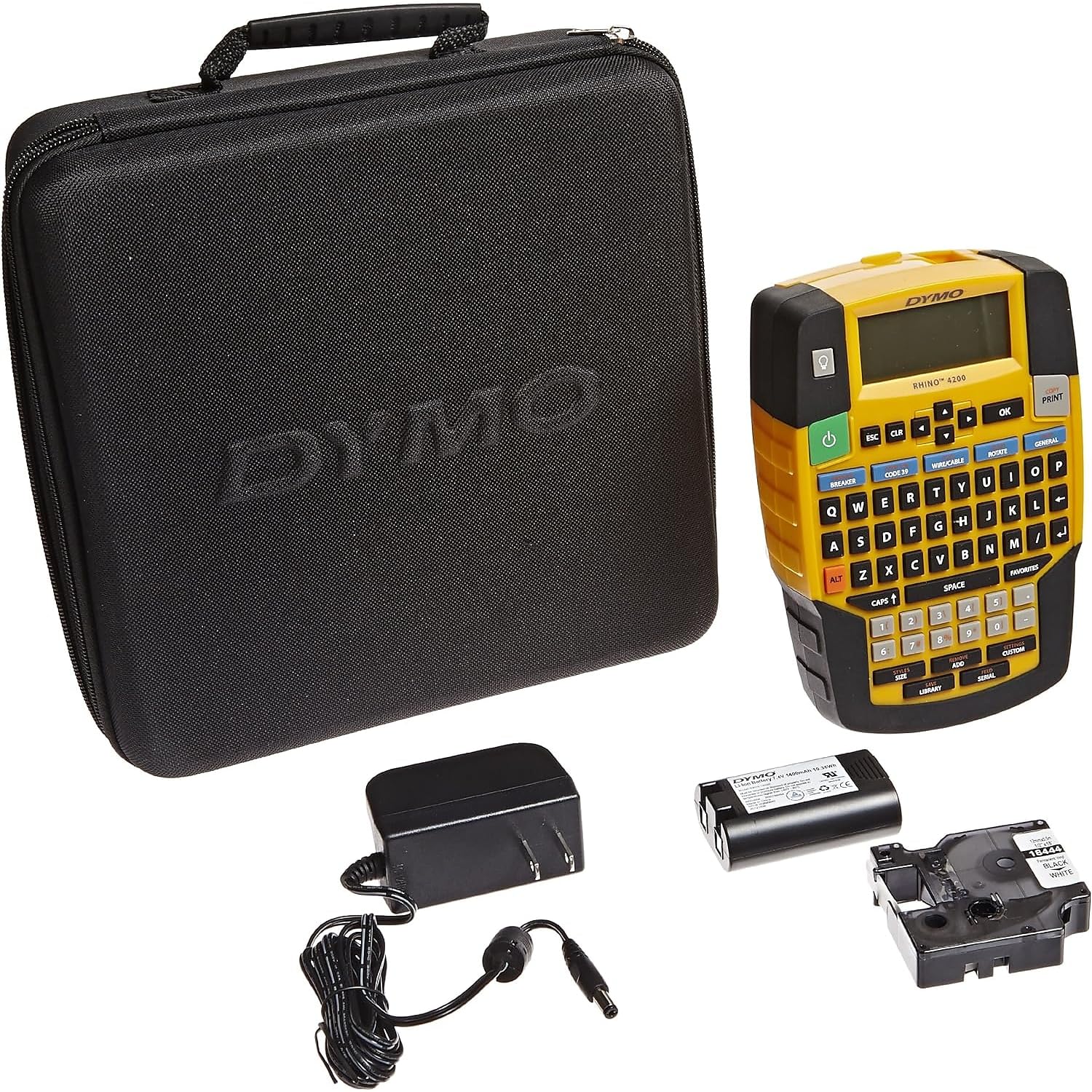
The DYMO Rhino 4200 is a rugged, handheld thermal label printer designed explicitly for low-voltage techs, electricians, and cable installers who need to produce wire wraps, cable flags, and breaker labels in the field. The familiar QWERTY keyboard and one-touch hot keys for barcodes (Code 39 and Code 128), fixed-length labels, and breaker labels make it fast to operate even while balancing on a ladder. It supports label widths from 1/4 inch up to 3/4 inch and can print directly onto heat-shrink tubes.
The carry case kit includes a fast-charge lithium-ion battery that users report lasts impressively long and allows the printer to function while charging. The backlit screen and responsive buttons are appreciated in dimly lit server rooms and attic spaces. It saves up to 99 custom labels, which streamlines repetitive labeling jobs considerably. The industrial-grade vinyl tape produces clear, durable labels that hold up well on cables and equipment.
That said, the Rhino 4200 has some quirks: it wastes 1.5 to 2 inches of tape per label with no way to reduce the margin, and small print can occasionally have unreadable gaps due to blank lines in the layout. It also lacks built-in hazmat symbols that some industrial users need. But for a portable, self-contained field labeler that runs on battery for days and prints on heat-shrink, it remains a favorite among tradespeople.
Why it’s great
- Excellent portability with a long-lasting rechargeable battery that works while charging
- One-touch hot keys for wire wrap, barcode, and breaker label formats save time
- Prints directly onto heat-shrink tubing for cable and wire identification
Good to know
- Excessive tape waste of 1.5–2 inches per label with no adjustable margin
- Small print can have occasional gaps or artifacts; lacks hazmat symbols
5. McAuley Godex RT200i
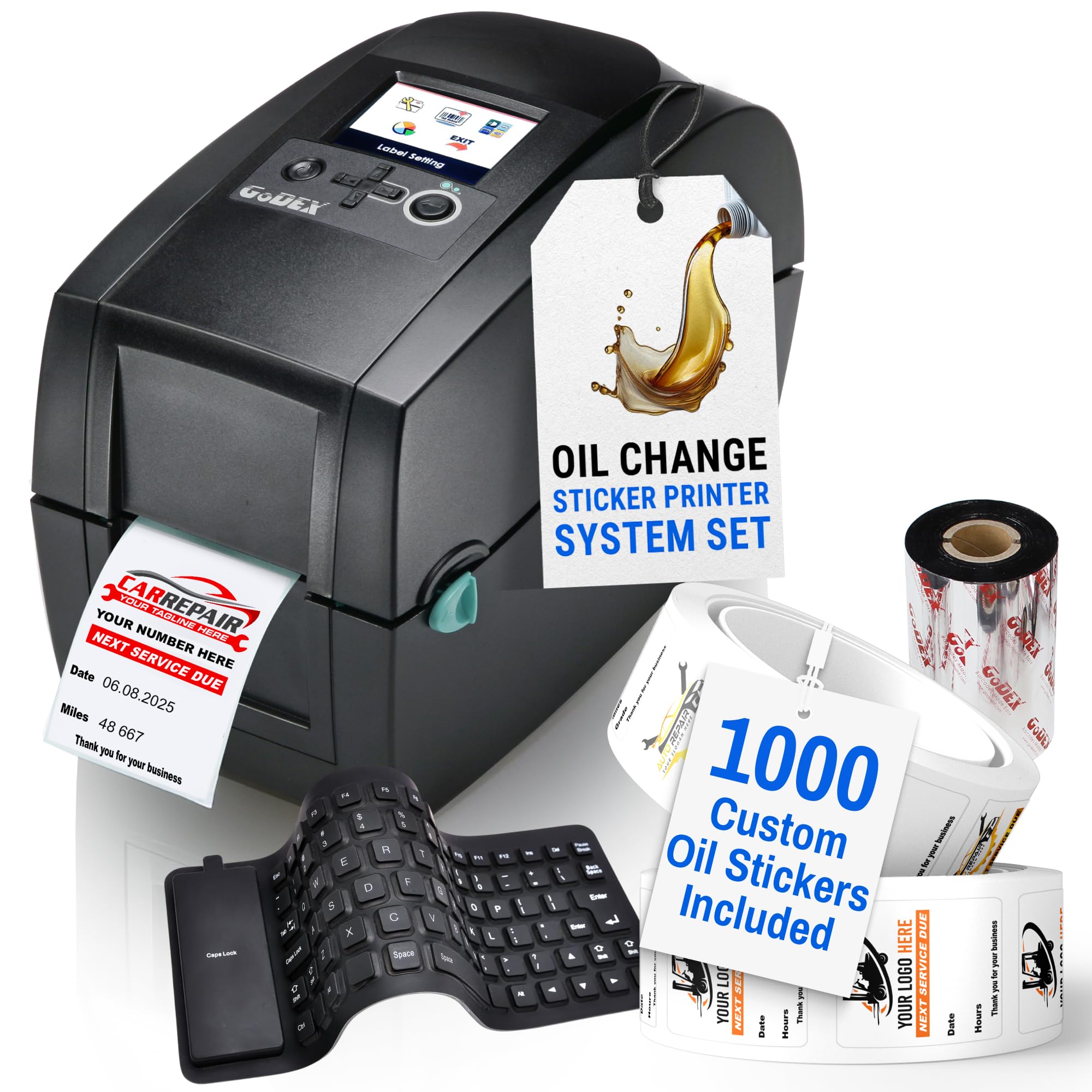
The Godex RT200i, bundled by McAuley Labels, is a purpose-built thermal transfer printer designed specifically for auto shops that need color oil change reminder stickers. It arrives pre-programmed with a color LED screen and a flexible USB keyboard, allowing you to operate the system completely without a computer. The automatic calculation of the next service date and mileage is a major labor saver — it eliminates manual math errors.
The kit includes 1,000 custom labels with your shop’s logo, a ribbon (ink), and the keyboard, so it is truly a turnkey solution. The thermal transfer prints are resistant to fading, smearing, and scratching, meaning the stickers placed on windshields or door jambs stay readable for months. Customer support from McAuley Labels is frequently praised as responsive and helpful, resolving any programming or setup issues quickly.
While the RT200i is a phenomenal tool for its specific use case, it is a single-purpose device. If you ever need to print general-purpose barcodes, shipping labels, or asset tags, this printer won’t be the right fit — its software and label stock are optimized for oil change reminders. For dedicated auto service centers, however, the RT200i is the most efficient and professional option available at this tier.
Why it’s great
- Pre-programmed with auto date and mileage calculation for oil change reminders
- Computer-free operation with color LED screen and included keyboard
- Fade- and smear-resistant prints that hold up in windshield and door-jamb conditions
Good to know
- Highly specialized for oil change stickers — not a general-purpose label printer
- Bundled custom labels are pre-printed with your logo, limiting alternative uses
6. Indy Print 2 Oil Change Kit

The Indy Print 2 is another specialized oil change reminder printer kit that covers the basics without any unnecessary complexity. It includes the printer, a keyboard, an ink ribbon, a power supply, and 1,000 pre-sized stock labels (2.25 x 1.25 inches). The 2.3-inch color TFT display makes it easy to navigate the menu and customize the mileage, oil grade, and next-service date fields.
Users consistently praise its reliability — with some reporting zero jams or wasted stickers out of 500 prints. It is significantly more affordable than competing oil-change-reminder systems, yet its build quality does not feel cheap. The LED indicator (red, green, amber) gives you quick visual confirmation of the printer status. The two-year warranty provides adequate coverage for the price point, and customer service from the manufacturer has been noted as responsive for the small number of issues that arise.
The biggest limitation is its label size — it only prints 2.25 x 1.25 inch stickers, which means you cannot use it for larger windshield tags or multi-line reminder cards without buying alternative stock. It also lacks an auto-cut feature, requiring manual tearing after each print. For small independent garages or quick-lube shops that want a reliable, no-fuss entry-level system, the Indy Print 2 delivers solid value.
Why it’s great
- Best value in the oil change printer category with reliable jam-free operation
- Color TFT screen and simple menu make customization easy
- Includes 1,000 pre-sized stock labels, keyboard, and ribbon for immediate setup
Good to know
- Fixed label size of 2.25 x 1.25 inches — not suitable for larger sticker formats
- Lacks an auto-cutter; you must manually tear off each label after printing
7. HP Sprocket Photo Booth Machine
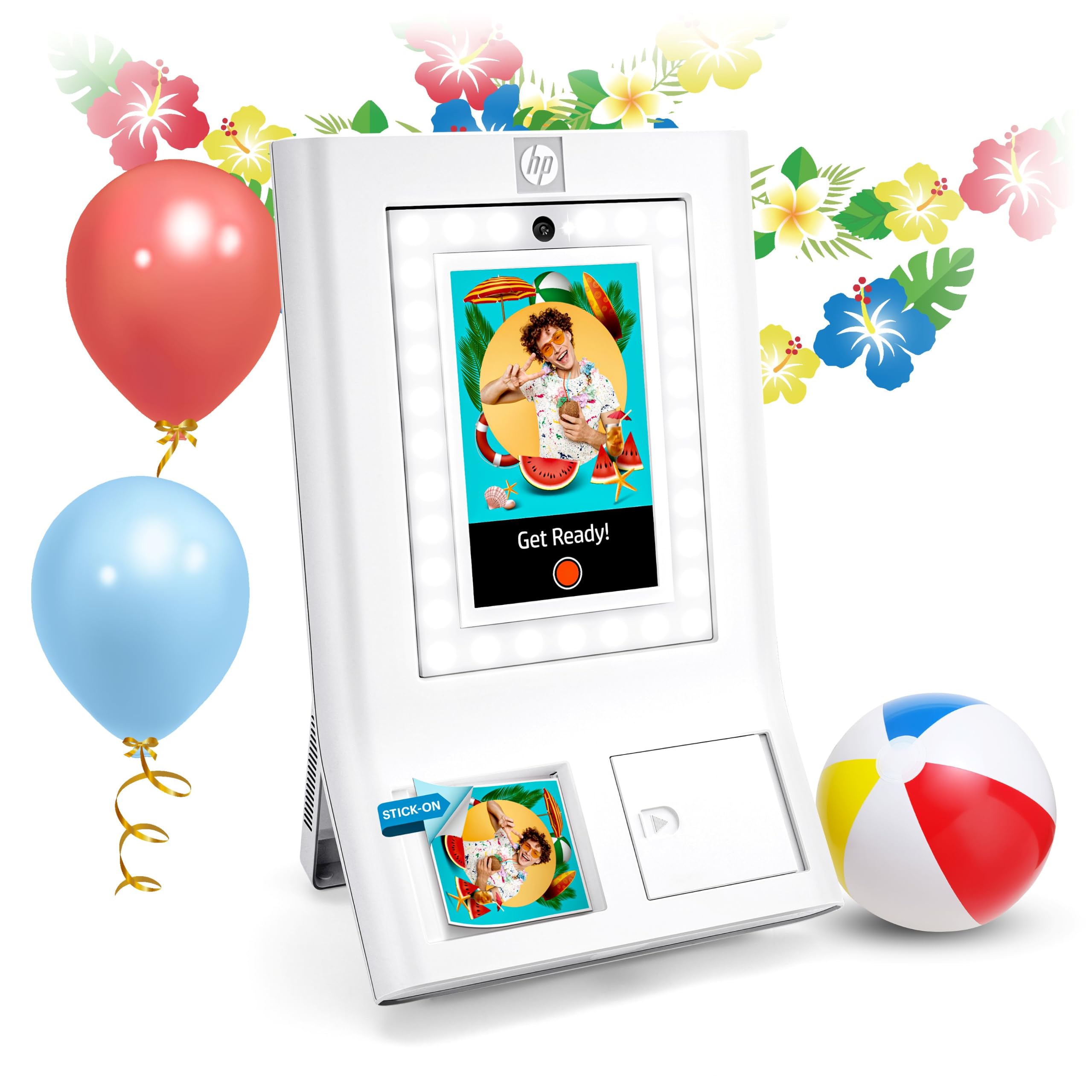
The HP Sprocket Photo Booth takes a different approach to color label printing — it uses ZINK (Zero Ink) technology to produce full-color, high-quality 3×4 inch photo prints on sticky-backed paper. The large 10.1-inch touchscreen LCD and built-in LED ring light give you full control over framing, filters, and layouts, making it ideal for event photo booths, wedding favors, and party keepsakes. The white chassis is portable for a device weighing just over seven pounds.
Customization is robust: over 250 frames and stickers are available, and you can control guest permissions like max prints and sharing restrictions via the companion app. Photos can be automatically stored to the cloud and shared via generated QR codes, which adds a digital distribution layer. The ZINK paper is waterproof, smudge-resistant, and tear-resistant, so the stickers last well on laptops, journals, and walls.
That said, this is not an industrial label printer. Its print speed is slow (approximately 1 page per minute), and it is limited to HP 3×4 ZINK paper only. Furthermore, there are consistent reports of unit failures after moderate use — the touch screen can become unresponsive, and print quality can degrade over a few events. For a party or wedding, the HP Sprocket produces great results out of the box, but for long-term daily use as a label printer, it is less reliable than the thermal options in this lineup.
Why it’s great
- Full-color ZINK printing with no need for ink cartridges or ribbons
- 10.1-inch touch screen and LED ring light provide a polished user experience
- QR code sharing and cloud storage simplify distributing digital copies of prints
Good to know
- Very slow print speed — only about 1 page per minute
- Limited to HP 3×4 ZINK paper; some users report reliability issues after limited use
FAQ
What label width should I choose for cable wraps and asset tags?
Can I use generic label rolls in a printer that uses proprietary cartridges?
What is the difference between thermal transfer and direct thermal for label durability?
Final Thoughts: The Verdict
For most users, the best color printer for labels winner is the Brother PT-P950NW because it combines high 360 dpi resolution, robust network printing, and durable laminated labels in a user-friendly package that fits data centers and industrial shops alike. If you need speed and wide-format media flexibility, grab the Brother TD-4550DNWB. And for a specialized, turnkey oil change labeling solution, nothing beats the McAuley Godex RT200i kit.

Mo Maruf
I created WellFizz to bridge the gap between vague wellness advice and actionable solutions. My mission is simple: to decode the research and give you practical tools you can actually use.
Beyond the data, I am a passionate traveler. I believe that stepping away from the screen to explore new environments is essential for mental clarity and physical vitality.