Our readers keep the lights on and my smoothie glass nicely filled. As an Amazon Associate, I earn from qualifying purchases.
Moving beyond single-color filament opens up a world of functional and aesthetic possibilities, from detailed architectural models and realistic prototypes to lithophanes with embedded lighting. The challenge has always been finding a machine that handles multiple materials or filaments without constant clogging, calibration failures, or excessive waste during purging. The right system makes multi-material printing feel like a natural extension of your workflow, not a battle with the hardware.
I’m Mohammad Maruf — the founder and writer behind WellFizz. I’ve broken down the key technology differences in this space, from CoreXY kinematics to independent toolhead systems, and filtered through hundreds of user experiences and spec sheets to find the machines that deliver consistent color results.
Whether you need a compact unit for prototyping or a large-format production tool, this guide separates reliable multi-color performers from the rest to help you find the best color 3d printer for your specific projects and skill level.
How To Choose The Best Color 3D Printer
Adding color capability to your 3D printing arsenal changes more than just the final look of a model. The hardware decisions you make impact every aspect of setup time, material waste, and long-term reliability. The following points are the most critical factors to evaluate before you commit to a multi-filament system.
Multi-Material System Type: Single Nozzle vs. Independent Toolheads
The most common approach is a single print head paired with a filament multiplexer like an AMS or CFS unit. These systems retract one filament, purge the old color, and load the next — a process that generates a visible waste block (purge tower) on the build plate. The waste volume depends on the heat break volume and the filament swap frequency. Independent toolhead printers, like the Prusa XL, carry separate hotends for each color, eliminating purge waste entirely but adding significant mechanical complexity and weight. For occasional color swaps, a single-nozzle system is far more economical. For production color runs, independent toolheads pay off in material savings and faster cycle times.
Build Volume and Heated Chamber Considerations
Multi-color prints often combine materials with drastically different temperature requirements — PLA next to PETG or a flexible TPU alongside rigid ABS. A heated chamber (ideally 55°C or higher) minimizes warping on engineering-grade materials, especially when you’re printing tall parts or wide bases. Size matters too: if your color models are large, a 256 mm cubed bed may force you to scale down a multi-part helmet or a decorative lamp shade. Larger formats like the Creality K2 Plus (350 mm cubed) or the Prusa XL (360 mm cubed) allow you to print full-size color assemblies in one pass without splitting the model.
Filament Drying and Active Material Management
Color quality is only as good as the filament moisture level. Nylon, PETG, and even PLA can absorb humidity, causing bubbles, stringing, and layer separation that ruin a multi-color print. The best systems now include integrated dry-while-print chambers or active drying modules (like the Anycubic ACE PRO and the QIDI BOX) that maintain a low-humidity environment during the entire job. If your workshop is humid or you print hygroscopic materials frequently, a printer with a sealed, actively dried filament management unit will deliver significantly higher success rates on color transitions.
AI Monitoring and Print Recovery Features
A multi-color print that fails after ten hours because of a tangled filament spool or a spaghetti failure is a painful waste of material and time. AI cameras that detect nozzle clogs, filament tangles, or first-layer separation can pause the job before the damage spreads. Look for systems that offer real-time alerts via an app and power-loss recovery that resumes from the exact layer. Features like Creality’s spaghetti detection on the K2 Plus and the Elegoo’s residue detection on the Saturn 4 Ultra are not marketing gimmicks — they directly impact your yield rate on long, complex color prints.
Quick Comparison
On smaller screens, swipe sideways to see the full table.
| Model | Category | Best For | Key Spec | Amazon |
|---|---|---|---|---|
| Prusa XL | Independent Toolhead | Production color models | 360 mm³ build, 5 independent heads | Amazon |
| Creality K2 Plus | Large Format | Full-size multi-color projects | 350 mm³ build, 30,000 mm/s² accel | Amazon |
| Creality K2 Combo | Mid-Large Combo | Helmets and large models | 260 mm³ build, 300°C nozzle | Amazon |
| Bambu Lab P1S Combo | Enclosed Workhorse | Reliable daily color printing | 256 mm³ build, up to 16 colors | Amazon |
| QIDI Q2 | Engineering Focus | High-temp materials in color | 270 mm³ build, 65°C chamber | Amazon |
| ELEGOO Saturn 4 Ultra | Resin | Ultra-fine detail & color vats | 10″ 16K LCD, 150 mm/h speed | Amazon |
| Anycubic Kobra S1 Combo | Value Mid-Range | Budget color + integrated dryer | 250 mm³ build, 600 mm/s speed | Amazon |
| ELEGOO Centauri Carbon 2 Combo | Closed Ecosystem | Streamlined CANVAS color system | 256 mm³ build, 350°C nozzle | Amazon |
| Bambu Lab A1 Combo | Entry Level | Beginner multi-color on a budget | 256 mm³ build, AMS lite support | Amazon |
| Creality SPARKX i7 Combo | AI-Powered Entry | Photo-to-3D color portraits | 260 mm³ build, AI failure detection | Amazon |
| Flashforge Adventurer 5M Pro | Budget Enclosed | Entry-level enclosed printing | 220 mm³ build, 600 mm/s speed | Amazon |
In‑Depth Reviews
1. Prusa XL 5 Independent Toolhead

The Prusa XL eliminates the purge waste problem entirely by using up to five fully independent print heads, each with its own hotend. This means you can switch between colors or materials — PLA to PVA support to PETG — with zero purge blocks or tower waste. The segmented heated bed system heats only the zone under the print, reducing energy consumption and warping risk on large-format ABS or Nylon parts.
Assembly requires more hands-on attention than the Bambu or Creality combos because the heads ship separate and need careful alignment. Once dialed in, the reliability is class-leading, with Prusa’s open firmware and local control options that don’t require a cloud account. The 360 mm cubed volume handles full-size items like motorcycle helmets or architectural mockups in one piece.
The main trade-off is the upfront investment and the physical footprint — at 75 pounds and over 35 inches wide, you need a dedicated sturdy table. For a shop printing production color parts daily, the XL pays for itself in avoided waste and the ability to run five materials simultaneously without any manual filament swapping.
Why it’s great
- Zero purge waste on color changes
- Heated zones save energy on large prints
- Open-source control with no forced cloud
Good to know
- Requires significant assembly and calibration
- Very heavy unit; needs a reinforced bench
- Premium price reflects industrial-grade parts
2. Creality K2 Plus Combo

The K2 Plus is Creality’s answer to those who need a huge build area — 350 mm cubed — without stepping into the Prusa XL price tier. The step-servo motor system pushes acceleration to 30,000 mm/s², which means even large prints complete in hours rather than days. The CFS (Creality Filament System) handles up to 16 colors when you daisy-chain four units, and the built-in drying keeps hygroscopic filaments ready.
Dual AI cameras monitor spaghetti failures and foreign object interference, while the strain gauge-based auto-leveling measures bed mesh at the exact print point. The actively heated chamber and 80W high-flow hotend allow it to run engineering-grade materials like PPA-CF and PA-CF without layer adhesion issues. The magnetic bed makes part removal simple even on complex multi-color bases.
Some users report vague assembly instructions for the CFS wiring, and the sheer size (36 inches wide) demands a large workspace. However, for a single printer that can produce a full-color helmet or a large functional prototype in one session, the K2 Plus offers a remarkably high build volume per unit of investment.
Why it’s great
- Massive 350 mm cubed build area
- Accelerates fast enough for production speed
- Active drying in the CFS for PA/PETG
Good to know
- Heavy unit; needs two people to unpack
- Setup instructions could be clearer
- Some parts arrive very tight from shipping
3. Creality K2 Combo

The K2 Combo sits below the K2 Plus in size but shares the same CFS multi-color system and CoreXY kinematics. The 260 mm cubed volume is enough for large drone frames, functional brackets, and cosplay helmets when split into a few pieces. The hardened steel gears in the direct drive extruder handle abrasive filaments like carbon-fiber reinforced polymers without wearing out quickly.
The adaptive mesh leveling probes only the area where the model will be printed, reducing the leveling time on the K2 Combo significantly. The chamber AI camera watches for spaghetti failures and can alert you via the app, which is helpful for overnight color prints. The magnetic nozzle cover simplifies hotend swaps when you need to change diameter or clear a jam.
A few users note that the initial test print gcode for the included dog model is sliced poorly and consumes excessive filament. You’ll benefit from slicing your own test prints in the provided Creality Print software. Overall, for a mid-sized color printer that can still handle engineering filaments, the K2 Combo is a strong balance of size and cost.
Why it’s great
- Handles abrasive CF filaments with hardened steel gears
- Fast adaptive leveling for the print area
- Magnetic nozzle cover for quick hotend swaps
Good to know
- Preloaded test print gcode uses too much filament
- Manual is slightly behind hardware updates
- Bed may need glass replacement for perfect flatness
4. Bambu Lab P1S Combo

The P1S Combo has become the default recommendation for anyone wanting reliable multi-color printing without a steep learning curve. The combination of a fully enclosed CoreXY frame and the AMS (Automatic Material System) allows you to load up to four filaments at once — expandable to 16 by adding more AMS units. The auto bed leveling and active flow rate compensation mean you rarely need to manually adjust Z-offset or extrusion multiplier.
Setup takes about 30 minutes, and the Bambu slicer profiles are pre-configured for the most common filaments. The 500 mm/s speed with 20,000 mm/s² acceleration keeps print times competitive, and the enclosed design lets you run ABS and ASA without drafts causing warps. The AMS automatically switches colors and even handles filament runout by switching to a new roll of the same color.
The main limitation is that the P1S Combo does not support carbon-fiber or glass-fiber reinforced materials due to the standard hotend. For abrasive filaments, you’d need to upgrade the nozzle. For PLA, PETG, TPU, ABS, and ASA, this system delivers exceptionally consistent results with very little tinkering, making it a top choice for both beginners and experienced makers.
Why it’s great
- Excellent out-of-box calibration and profiles
- AMS supports automatic refill on runout
- Enclosed chamber for ABS and ASA printing
Good to know
- Not recommended for carbon/glass fiber filaments
- Nozzle swap requires some disassembly
- Cloud-based app can feel restrictive to some users
5. QIDI Q2

The QIDI Q2 focuses on what many multi-color printers overlook: the ability to print engineering-grade polymers reliably. With a 65°C actively heated chamber and a 370°C high-temp nozzle, this machine handles PA, PC, and carbon-fiber composites as easily as PLA and PETG. The nozzle itself acts as the leveling sensor, which improves first-layer accuracy across the 270 mm cubed build plate because it measures contact force directly rather than relying on a separate switch.
The triple filtration system (G3 pre-filter, H12 HEPA, and activated carbon) makes a meaningful difference when printing ABS or Nylon, keeping the air in your workspace cleaner. The QIDI BOX add-on enables up to 16-color printing with active drying while you print, which solves moisture absorption problems in humid environments. The 1.5GT synchronous belt reduces vibration artifacts, giving you smoother sidewalls on tall color prints.
The firmware quality and AI spaghetti detection have received mixed feedback. Some users report that the latest firmware introduced bugs with filament loading, and the AI detection can false-trigger on shadows. However, the raw mechanical build — linear rails, all-metal frame, and enclosed aluminum chassis — is excellent for the mid-range price point.
Why it’s great
- 65°C chamber enables warp-free ABS and PA prints
- Nozzle-based leveling is very accurate
- Excellent filtration for safe indoor use
Good to know
- Firmware bugs reported in recent updates
- AI detection has false positives
- May require riser for some abrasive filaments
6. ELEGOO Saturn 4 Ultra 16K

If your color printing revolves around miniatures, jewelry patterns, or detailed figurines, the Saturn 4 Ultra delivers a level of surface finish that FDM systems cannot match. The 10-inch 16K monochrome LCD provides a resolution that reveals fingernail grooves, hair texture, and fabric stitching in 1:10 scale models. The tilt release mechanism speeds up print times by peeling the model from the vat film with less force, allowing speeds up to 150 mm/h.
The built-in tank heating keeps the resin at a consistent 30°C, reducing the viscosity of standard and tough resins for better layer adhesion and fewer delaminations. The AI camera monitors for empty build plates and warped models, sending alerts to your phone. The auto-leveling system removes the traditional resin printer headache of manually adjusting four bed screws.
Resin printing requires more post-processing than FDM — washing and curing, plus dealing with liquid resin cleanup. The build volume is also smaller at 8.33 x 4.66 x 8.66 inches, so you cannot make large multi-color parts in one piece. For detail-oriented color work, however, the Saturn 4 Ultra is a top-tier choice.
Why it’s great
- 16K LCD captures extreme fine detail
- Tilt release technology speeds up prints significantly
- Heated vat maintains consistent resin temperature
Good to know
- Requires washing and curing post-processing
- Smaller build volume than FDM alternatives
- Resin handling requires gloves and ventilation
7. Anycubic Kobra S1 Combo

The Kobra S1 Combo brings a strong feature set to the mid-range price point, with the standout being the ACE PRO active filament dryer integrated into the multi-color system. The dual PTC heating module and 360° hot air circulation keep your filament at optimal dryness, which directly improves color transition quality and reduces stringing between material swaps. The system supports up to four colors with one ACE PRO, and eight when you daisy-chain a second unit.
Print speeds reach 600 mm/s with 20,000 mm/s² acceleration, and the flow compensation algorithm delivers smooth surfaces without visible artifacts at high speeds. The anycubic OS handles one-click printing from the app, and the multi-plate document parsing is useful for complex multi-part projects. The 250 mm cubed build volume fits most consumer and prototyping needs.
Some users have reported receiving units that required customer support intervention, but the Anycubic team has been proactive in sending replacements with upgraded components like metal sensor tabs and PTFE-free hotends. Once dialed in, the Kobra S1 Combo offers a very compelling price-to-performance ratio for color printing.
Why it’s great
- Integrated filament dryer maintains material quality
- Fast 600 mm/s speed with good surface quality
- App control with one-click print initiation
Good to know
- Initial units needed support intervention
- App is web-based which can be slow
- Some users reported connection issues on arrival
8. ELEGOO Centauri Carbon 2 Combo

Elegoo’s Centauri Carbon 2 Combo emphasizes simplicity with the CANVAS system, which manages four-color filament switching with automatic refill detection and tangle monitoring. The CoreXY frame with a rigid aluminum bed delivers 500 mm/s printing speed with 20,000 mm/s² acceleration. The 350°C high-temp nozzle extends material compatibility to PC, Nylon, and carbon-fiber composites without requiring a separate hotend upgrade.
The fully automated calibration covers bed leveling, vibration compensation, and flow calibration in one sequence. The enclosure is insulated and the chamber is actively monitored by 31 different sensors to ensure stable conditions during long prints. The built-in camera allows time-lapse capture and remote monitoring from your phone.
The ecosystem is somewhat closed — the slicer is locked to Elegoo’s version and there is no Klipper or Orca support. Users who prefer open-source control may find this restrictive. Additionally, the chamber light cannot be turned off through remote access, which is a minor annoyance for overnight prints. Despite these quirks, the hardware quality and CANVAS system reliability justify its position as a solid mid-range color printer.
Why it’s great
- High-temp nozzle handles engineering filaments
- 31 sensors for stable print conditions
- Automatic refill detection in CANVAS system
Good to know
- Closed ecosystem with limited slicer options
- Chamber light can’t be turned off remotely
- LAN-only mode is recommended to avoid firmware issues
9. Bambu Lab A1 Combo + LED Lamp Kit

The A1 Combo serves as the most affordable entry point into the Bambu Lab ecosystem. It supports the AMS Lite for up to four colors, and the included LED lamp kit lets you produce illuminated decorative projects right out of the box. The active flow rate compensation algorithm reads nozzle pressure and adjusts extrusion in real time, which helps maintain consistent color transitions even at high speeds.
Full-auto calibration handles bed leveling, Z-offset, and vibration compensation without any manual input. The A1 uses a 1-clip quick swap nozzle system that makes hotend changes a 10-second operation. The active motor noise cancelation keeps the operating sound below 48 dB, making it suitable for home offices or shared spaces.
The build volume is the same 256 mm cubed as the P1S, but the A1 uses an open-frame design rather than an enclosure. This limits its ability to print ABS and ASA without warping. For PLA and PETG color prints, the A1 Combo delivers excellent results with Bambu’s seamless app integration and the massive library of free community designs.
Why it’s great
- Very low noise for home/office use
- Quick-swap nozzle simplifies maintenance
- Excellent app ecosystem with free print templates
Good to know
- Open-frame design limits high-temp materials
- Only small sample of filament included
- AMS Lite is less robust than the full AMS
10. Creality SPARKX i7 Combo
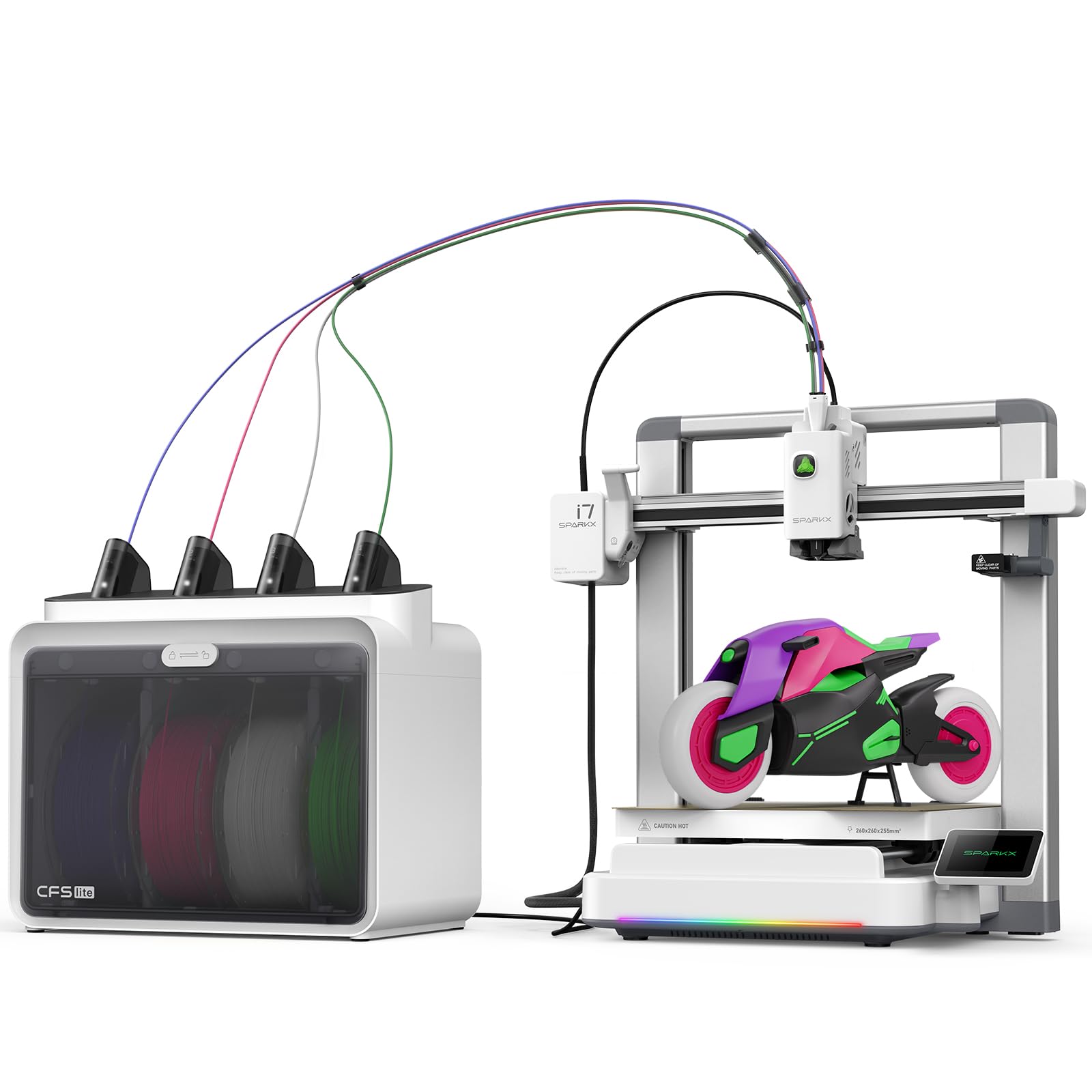
The SPARKX i7 is designed around a specific use case: turning portrait photos into 3D models using Creality’s CubeMe AI. You upload a photo and the software generates a 3D model in seconds, which you can then print in four colors using the CFS Lite system. The 95% pre-assembled design means you can unbox and be printing within five minutes, including the first multi-color test print.
The built-in AI camera detects spaghetti failures, air printing, and filament tangles in real time, sending alerts to your phone. The CFS Lite produces 50% less waste than traditional multi-color systems, which keeps operating costs lower. The 260 mm cubed build volume is generous for a machine at this price point, and the quiet night mode reduces noise enough to print in a bedroom.
Some users criticize Creality’s build quality consistency and note that support can be slow. The print quality with the default profiles is decent but may require tuning for finer details. If your primary goal is printing personalized gifts and portraits in color, the SPARKX i7 fits a unique niche. For general multi-color printing, other options provide more consistent results.
Why it’s great
- AI photo-to-3D feature works instantly
- 50% less waste vs traditional color switching
- Very fast unbox-to-print process
Good to know
- Print quality needs profile tuning for detail
- Creality support can be slow to respond
- Requires WiFi connection for full features
11. Flashforge Adventurer 5M Pro

The Adventurer 5M Pro is an enclosed, high-speed printer that offers great value for its feature set. The 600 mm/s maximum travel speed and 20,000 mm/s² acceleration allow it to complete prints quickly, and the nozzle heats to 200°C in 35 seconds, reducing warm-up waits. The CoreXY structure and all-metal frame maintain stability during those fast movements, producing clean results even with tall prints.
The dual-sided PEI platform enables tool-less model removal, and the integrated HEPA/activated carbon dual circulation system reduces fumes and dust, making it safer for indoor use. The pressure-sensing auto leveling detects the plate height at multiple points without any manual Z-axis calibration. The Flash Maker app supports remote video monitoring, and the printer includes auto shutdown, resume printing, and filament detection.
Some users have received units with adhesive plate or filament feeding issues, but Flashforge’s customer service is responsive and has replaced faulty machines. The 220 mm cubed build volume is smaller than most competitors, so large multi-color projects may be constrained. For a beginner wanting an enclosed, fast, and affordable color-capable machine, the 5M Pro is a solid starting point.
Why it’s great
- Very fast heating and print speed
- HEPA/activated carbon filtration for safe indoor use
- Tool-less removal from PEI bed
Good to know
- 220 mm build volume is restrictive for large parts
- Software installer may be outdated for new macOS
- Some units have had quality control issues
FAQ
How much additional waste does multi-color printing create?
Can I print TPU and PLA together in the same multi-color print?
What is the difference between FDM and resin for color prints?
Final Thoughts: The Verdict
For most users, the best color 3d printer overall is the Bambu Lab P1S Combo because it combines reliable out-of-box calibration, an enclosed chamber for advanced materials, and a seamless AMS that expands to 16 colors without significant adjustments. If you need a large format for full-size color prototypes or production parts, the Creality K2 Plus Combo offers an enormous 350 mm cubed build area with fast printing speeds. And for detail-oriented work like jewelry or miniatures, the ELEGOO Saturn 4 Ultra 16K delivers unmatched resolution with its 16K LCD and heated resin vat.

Mo Maruf
I created WellFizz to bridge the gap between vague wellness advice and actionable solutions. My mission is simple: to decode the research and give you practical tools you can actually use.
Beyond the data, I am a passionate traveler. I believe that stepping away from the screen to explore new environments is essential for mental clarity and physical vitality.