Our readers keep the lights on and my smoothie glass nicely filled. As an Amazon Associate, I earn from qualifying purchases.
Holding crypto on an exchange feels fine until it doesn’t. A cold wallet gives you total self-custody, but the setup overhead—seed phrases, firmware updates, USB cables—stops many beginners cold. The good news is that today’s cold wallets are easier to use than ever, with models that ditch cables entirely and fit right into your wallet or pocket.
I’m Mohammad Maruf — the founder and writer behind WellFizz. I’ve spent hundreds of hours combing through hardware specs, reading real user feedback, and comparing the security certification levels of the most popular cold storage devices to find the ones that genuinely work for first-time buyers.
After researching seven top contenders, I’ve put together this guide to the best cold wallets for beginners that balance strong offline security with a genuinely simple onboarding experience.
How To Choose The Best Cold Wallets For Beginners
Selecting your first cold wallet comes down to three main factors: how the device connects, what security certification it carries, and whether its backup method feels manageable. Beginners often overvalue feature lists and undervalue the day-to-day friction of getting a signed transaction out the door.
Authentication Layers
Three-factor authentication—biometric, PIN, and physical card—provides the deepest security for a cold wallet. Devices that rely on a single PIN leave you vulnerable if someone watches you enter it. Cards that also require a fingerprint or a tap from a separate metal card add real protection against physical theft.
Connection Method
USB-only wallets force you to plug into a computer, which can feel clunky. Bluetooth models offer mobile freedom but introduce a wireless attack surface, however small. NFC tap-to-sign cards need no battery or cable at all; they pair with your phone in under a second. For absolute beginners, an NFC-based card often removes the biggest barrier to regular use.
Backup Simplicity
Traditional seed phrase backup (12 or 24 words written on paper) is the industry standard but easy to lose or mishandle. Some modern wallets use a second identical card as backup, eliminating the need for paper altogether. If you struggle to keep track of a single piece of paper, a card-duplication backup system may be your best bet.
Quick Comparison
On smaller screens, swipe sideways to see the full table.
| Model | Category | Best For | Key Spec | Amazon |
|---|---|---|---|---|
| Arculus Cold Storage Wallet | Premium NFC Card | Security-first beginners who want biometrics | CC EAL6+ Secure Element | Amazon |
| Tangem Wallet | Premium NFC Card | Users who hate dealing with cables and seed phrases | NFC Tap-to-Sign | Amazon |
| Ledger Nano X | Premium USB/Bluetooth | Mobile-first users managing many coins | Bluetooth + 2 MB Storage | Amazon |
| SecuX V20 Plus | Mid-Range Touch | Users who want a large responsive touchscreen | 2.8″ Color Touch Screen | Amazon |
| ELLIPAL Titan Mini | Mid-Range Air-Gapped | Users paranoid about remote hacks | Reinforced Metal Casing | Amazon |
| Ballet REAL 3-Pack | Budget Steel Card | Users who want zero setup and gift-giving | Stainless Steel, No Battery | Amazon |
| Ledger Nano S Plus | Budget USB Wallet | Budget-conscious desktop/Android users | CC EAL6+ Certified Chip | Amazon |
In‑Depth Reviews
1. Arculus Cold Storage Wallet

The Arculus wallet looks like a standard metal credit card, but inside it packs a CC EAL6+ certified secure element—the same high-level chip used in premium passports and payment cards. The cold wallet relies on a three-factor authentication model: a biometric fingerprint lock on the companion app, a 6-digit PIN, and the physical metal card itself. No USB port, no battery, no Bluetooth. The card communicates solely through secure NFC tap-to-transact technology, which keeps private keys completely offline.
Setup takes under five minutes. After installing the Arculus app on your phone, you tap the card to the back of the device, create a PIN, and register your fingerprint. The wallet supports 95% of the crypto market cap, including Bitcoin, Ethereum, XRP, and Cardano. Because the card has no internal power source, it never needs charging and can sit in a drawer for years without losing functionality.
Users highlight the simple shared-wallet feature—both spouses can tap their own card to the same account—and the peace of mind that comes from a device that cannot be hacked remotely. The only friction reported is that NFC pairing can be slightly finicky with thick phone cases, and some wish the app offered more DeFi integrations directly.
Why it’s great
- No battery, cables, or firmware updates to manage
- Biometric + PIN + physical card for triple-layer security
- Compact credit-card form fits any wallet
Good to know
- NFC tap can be inconsistent with thick phone cases
- Does not support direct staking or DApp browsing
2. Tangem Wallet
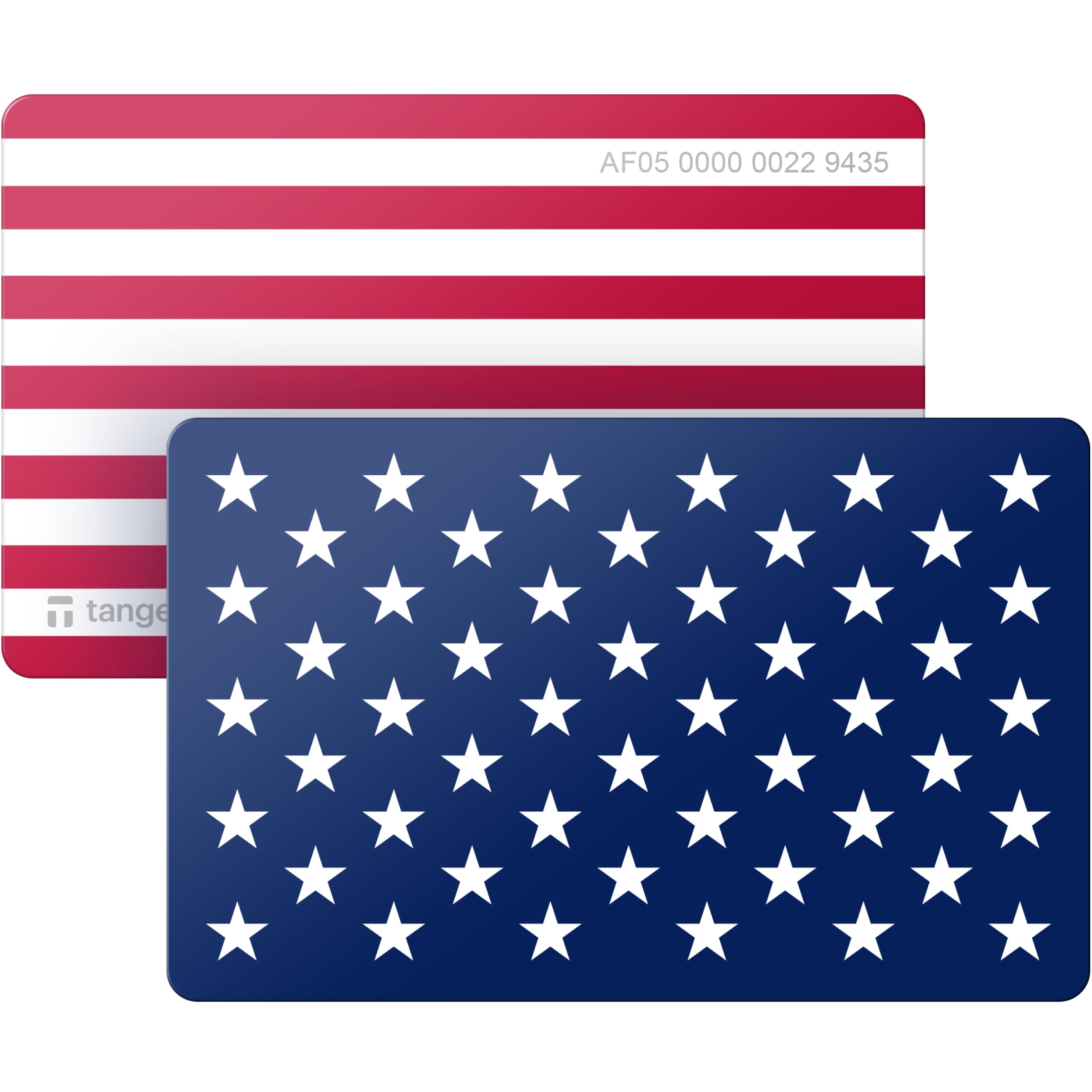
The Tangem Wallet is a polycarbonate card that eliminates almost every traditional friction point in cold storage. There is no screen, no button, no battery, and no USB port. The private key is generated on a CC EAL6+ certified chip inside the card and never leaves it. To sign a transaction, you simply tap the card against your phone’s NFC reader—no pairing, no cable, no Bluetooth scanning. The card is also rated IP68 for dust and water resistance, and comes with a 25-year warranty.
Tangem’s standout feature is its smart backup system. Instead of a paper seed phrase, the wallet ships with a second identical card. When you set up the wallet, the app mirrors the private key onto the backup card, giving you a physical copy with zero handwriting or memorization required. The wallet supports over 600 tokens across 20 blockchains, including Ethereum, Bitcoin, and major ERC-20 assets.
Beginners consistently praise the setup speed—under two minutes from unboxing to having a funded wallet. The app’s interface is clean and allows buying crypto directly via Google Pay or Apple Pay. A minor drawback is that the single-card model leaves no backup if you lose the original, so the two-card bundle is strongly recommended for anyone new to self-custody.
Why it’s great
- No seed phrase to write down—backup card does it for you
- Extremely durable with IP68 rating and 25-year warranty
- Instant tap-to-sign with no connection delays
Good to know
- A single card means no backup if lost—buy the two-pack
- No screen for address verification on the card itself
3. Ledger Nano X

The Ledger Nano X is the most feature-rich option in this guide, combining Bluetooth connectivity with a CC EAL6+ certified secure element. Unlike budget models, the Nano X offers 2 MB of storage, which lets you install up to 100 different blockchain apps simultaneously. The companion Ledger Live app provides a single dashboard for buying, selling, swapping, and staking across over 15,000 coins and tokens—including Bitcoin, Ethereum, Solana, and Tezos.
The hardware itself is compact, with a small OLED screen and two physical buttons for on-device transaction verification. Bluetooth connects to the Ledger Live mobile app on both iOS and Android, while the USB-C port handles charging and desktop use. Battery life is rated for several hours of continuous Bluetooth operation, and the device charges fully in under two hours.
Users consistently call the Nano X the most polished all-around cold wallet, though some note that the initial setup—updating firmware, installing coin apps, and writing down the 24-word seed phrase—can take 30 minutes. The Bluetooth pairing is smooth but drains the battery faster than USB-only use. A few reviewers also mention that the physical buttons can feel stiff at first.
Why it’s great
- Supports over 15,000 coins via the Ledger Live app
- Bluetooth gives full mobile freedom without cables
- Large app storage capacity for multi-coin portfolios
Good to know
- Setup takes around 30 minutes for firmware and seed phrase
- Battery drains faster with active Bluetooth use
4. SecuX V20 Plus

The SecuX V20 Plus stands out with its 2.8-inch full-color touchscreen—the largest display in this lineup. The on-screen keyboard lets you verify wallet addresses and sign transactions directly on the device, which provides strong protection against malware that might try to redirect funds on a connected computer. The metal housing feels premium and adds physical durability, while the CC EAL5+ certified secure element keeps private keys isolated.
Connectivity options include both Bluetooth and USB-C, giving you flexibility to pair with desktop (Windows, macOS, Linux) or mobile (iOS and Android) devices. The device supports over 1,000 ERC-20 tokens plus Bitcoin, Ethereum, XRP, Litecoin, and many more. Battery life is excellent—users report months of standby without needing a charge, thanks to the efficient power management inside the 5 GB memory storage configuration.
User feedback highlights the responsive touchscreen and the quick pairing process. The biggest complaint involves the in-device exchange feature, which some users found to have unfavorable rates compared to regular exchanges. A few also noted that the Bluetooth connection didn’t reliably pair with Windows 10 machines, though the USB-C cable always worked without issue.
Why it’s great
- Large 2.8″ touchscreen for easy on-device address verification
- Rugged aluminum case with premium build quality
- Long standby battery life measured in months
Good to know
- Built-in exchange feature charges high fees
- Bluetooth pairing can be inconsistent with Windows 10
5. ELLIPAL Titan Mini

The ELLIPAL Titan Mini takes an extreme approach to security: it is fully air-gapped, meaning the device never connects to the internet, a computer, or any other network via USB, Bluetooth, or Wi-Fi. Transactions are signed completely offline and transmitted via a QR code that you scan with the companion app. The hardware itself is housed in a reinforced metal casing, and the device includes anti-tamper technology that causes the internal chip to self-destruct if anyone tries to forcibly disassemble it.
The wallet features a 2.4-inch HD color touchscreen that handles all on-device interaction, including entering your PIN and scanning QR codes for transaction signing. It supports over 10,000 coins and tokens across 40 different blockchains, including Bitcoin, Ethereum, XRP, and Stellar. Firmware updates are handled via a magnetic adapter and an included SD card, keeping the device offline while still receiving security patches.
User reviews praise the build quality and the confidence that comes with a truly air-gapped device. However, some report that the touchscreen is small enough that typing with a thumb feels cramped—a stylus or fingernail works better. The device also has a heavier feel compared to plastic competitors, which is the trade-off for the metal armor.
Why it’s great
- True air-gap eliminates all remote attack vectors
- Reinforced metal casing withstands physical drops and crushing
- Anti-tamper self-destruct protects against hardware extraction
Good to know
- Touchscreen is small for thumb-based typing
- Firmware updates require a physical SD card adapter
6. Ballet REAL 3-Pack
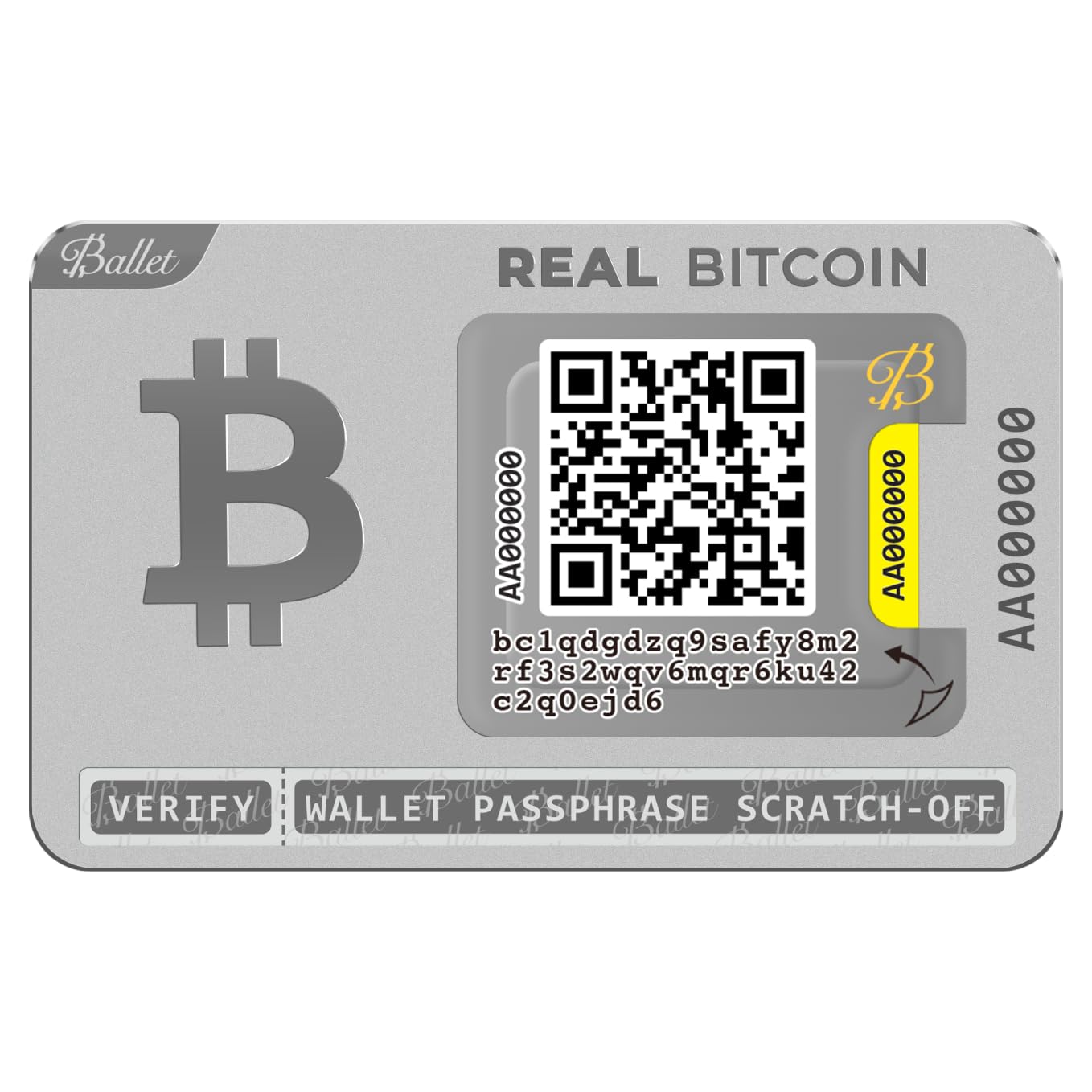
The Ballet REAL is the simplest cold wallet you can buy because it requires absolutely no setup. There is no seed phrase to write down, no firmware to update, and no battery to charge. Each wallet is a laser-etched stainless steel card that comes with the private key already embedded and protected behind a scratch-off QR code. You load funds by using the free Ballet Crypto app to scan the public key QR on the front of the card.
Because the card is entirely non-electronic, it has zero attack surface for remote hackers. The steel body is far more durable than paper wallets and can survive being carried in a wallet for years. The 3-pack gives you three independent wallets, making it ideal for separating long-term holdings, cold storage backups, or even gifting crypto to someone else—the packaging allows the public key to be scanned without opening the seal.
Users love the instant readiness and the physical feel of the steel card. The biggest caveat is that transferring funds out of the Ballet wallet uses the Ballet app, which charges a flat fee that can be high relative to small transfers—some users reported a fee on a Bitcoin transaction. The wallet is designed for holding, not frequent spending. Also, the QR sticker is not fireproof, so storing the card in a fire-safe box is a good idea for long-term holders.
Why it’s great
- Zero setup—works straight out of the package
- Stainless steel construction is highly durable
- 3-pack allows for flexible storage and gifting
Good to know
- Transfer fees via the Ballet app can be steep for small amounts
- Scratch-off QR is not fireproof—store in a safe location
7. Ledger Nano S Plus

The Ledger Nano S Plus is the entry-level workhorse from the most recognized name in hardware wallets. It uses the same CC EAL6+ certified secure element found in the more expensive Nano X, but cuts costs by removing Bluetooth and limiting connectivity to a USB-C cable. The device supports over 15,000 coins and tokens via the Ledger Live app, though the 1.5 MB memory means you can only install a handful of coin apps at a time—if you rotate wallets often, you’ll need to uninstall and reinstall.
The wallet communicates exclusively with desktop (Windows, macOS, Linux) and Android devices. iOS users are out of luck due to Apple’s restrictions on external hardware accessories. The small OLED screen and two physical buttons handle all on-device verification, which is slower than a touchscreen but more reliable in terms of accidental presses. The compact size makes it highly portable, and the Sapphire Blue color option adds a visual twist to the classic black design.
Users praise the straightforward setup and the strong security foundation, calling it a great value for simple cold storage. The main frustrations center on the USB-only requirement—some expected Bluetooth convenience at this price—and the limited app storage, which forces frequent app swaps for multi-coin holders. A few also noted that while the device lists support for many coins, actually transferring some obscure tokens may require third-party wallet software.
Why it’s great
- Industry-leading Secure Element at an entry-level price
- Compatible with over 15,000 coins via Ledger Live
- Compact and portable physical design
Good to know
- No Bluetooth or iOS compatibility—USB and Android only
- 1.5 MB storage limits number of coin apps you can install
FAQ
Do I still need a seed phrase if the wallet has a backup card?
Which cold wallet works with an iPhone?
Final Thoughts: The Verdict
For most users, the best cold wallets for beginners winner is the Tangem Wallet because it removes every traditional barrier—no cables, no seed phrase handwriting, and a one-second tap for every transaction. If you want biometric-fortified security with a card form factor, grab the Arculus Cold Storage Wallet. And for those who prefer the app ecosystem depth of Ledger with mobile Bluetooth freedom, the Ledger Nano X gives you the most coin support and the richest feature set in a compact device.

Mo Maruf
I created WellFizz to bridge the gap between vague wellness advice and actionable solutions. My mission is simple: to decode the research and give you practical tools you can actually use.
Beyond the data, I am a passionate traveler. I believe that stepping away from the screen to explore new environments is essential for mental clarity and physical vitality.