Our readers keep the lights on and my smoothie glass nicely filled. As an Amazon Associate, I earn from qualifying purchases.
Examining a rare coin’s mint mark, edge reeding, or surface luster under a standard jeweler’s loupe often leaves you squinting, guessing, and missing hairline errors that separate a common date from a valuable find. A dedicated coin microscope with screen replaces the eyestrain with a bright, magnified display that shows every die crack, strike doubling, and planchet flaw in crisp detail, turning your desk into a professional grading station.
I’m Mohammad Maruf — the founder and writer behind WellFizz. For this guide, I spent over forty hours comparing seven top-selling models, analyzing their sensor resolution, screen size, lighting configurations, and working distances to find which screen-equipped microscopes actually deliver the clarity and usability coin collectors and electronics hobbyists demand.
Whether you are checking silver dollars for RPMs or inspecting solder joints on a motherboard, choosing the right tool comes down to matching magnification range, display quality, and lighting flexibility to your specific workflow. This guide breaks down the strongest contenders to help you pick the best coin microscope with screen for your collection and repair needs.
How To Choose The Best Coin Microscope With Screen
Selecting a digital coin microscope goes beyond just picking the highest number on the box. The real-world usability for coin grading, soldering, and detailed inspection depends on four specific factors that separate a frustrating tool from one you will reach for every day.
Screen Size and Resolution
A 7‑inch screen is adequate for quick checks, but a 10.1‑inch IPS display with 1080p or higher resolution allows you to see fine details like die deterioration and luster lines without zooming digitally. The wider viewing angle of IPS panels also keeps the image accurate when you are working from the side, which is common during soldering or when examining a coin under a gooseneck light.
Lighting Configuration
Built-in ring LEDs around the lens are standard, but they create flat, shadowless illumination that can hide subtle surface texture and cartwheel luster. The best coin microscopes include at least two flexible gooseneck side lights that you can aim at an angle to cast shadows across the coin’s surface, making die cracks, strike doubling, and plating blisters pop into view.
Magnification Range vs. Working Distance
Higher maximum magnification numbers sound impressive, but you rarely inspect a coin at 1000x or beyond. What matters more is a usable 5x to 200x range combined with a working distance of at least 8 to 10 centimeters. That clearance lets you maneuver a coin, a soldering iron, or a circuit board under the lens without constantly adjusting the stand height.
Full‑Coin View Capability
If you collect silver dollars, half dollars, or large cent coins, look for a model whose lens and stand height allow the entire coin to fit inside a single frame at low magnification. Being forced to stitch images together or pan across the surface to see the whole coin is tedious and can cause you to miss edge‑to‑edge errors that span the planchet.
Quick Comparison
On smaller screens, swipe sideways to see the full table.
| Model | Category | Best For | Key Spec | Amazon |
|---|---|---|---|---|
| Andonstar AD210 | Mid‑Range | All‑purpose coin & soldering | 10.1” IPS, 12MP, 10.2” working distance | Amazon |
| LINKMICRO LM210 | Mid‑Range | Full‑coin view & error hunting | 10.1” IPS, 12MP, 12.6” stand | Amazon |
| TOMLOV DM9 Max | Premium | High‑resolution inspection | 10.1” IPS, 20MP, 12.6” stand | Amazon |
| TOMLOV TriL107 | Premium | Versatile 3‑lens system | 7” IPS, 30MP, 2500x max mag | Amazon |
| Andonstar AD249S-M | Premium | Pro‑level HDMI & software | 10.1”, 2160P, boom arm stand | Amazon |
| Leipan 7” LCD | Budget‑Friendly | Beginner coin checking | 7” LCD, 12MP, metal stand | Amazon |
| Hayve 7” LCD | Budget‑Friendly | Entry‑level soldering & coins | 7” LCD, 16MP, gooseneck lights | Amazon |
In‑Depth Reviews
1. Andonstar AD210

The Andonstar AD210 hits the sweet spot between screen real estate and practical magnification. Its 10.1‑inch IPS display delivers a 178‑degree viewing angle, meaning you can sit comfortably without craning your neck to see a dim screen. The 260x optical range is more than enough to inspect die cracks and strike doubling on a Morgan dollar, and the three‑level zoom setting (0x, 2x, 4x) lets you quickly toggle between a full‑coin overview and tight detail.
Construction quality sets it apart from cheaper models. The metal stand provides a stable 10.2‑inch working distance, which is roomy enough for soldering a circuit board or positioning a large coin under the lens. Three adjustable LED light sources — top ring, side lights, and a bottom light for slides — give you total control over shadow direction, and the included 32GB SD card and remote control make it easy to document finds without touching the screen.
Where the AD210 truly excels is in its all‑purpose versatility. Coin collectors, electronics repairers, and hobbyists who want one microscope that can handle everything from error detections to PCB inspections will appreciate the complete kit. The remote feels a bit plasticky, and the menu navigation takes a minute to learn, but the image quality and stable stand more than compensate for those minor gripes.
Why it’s great
- Large 10.1” IPS screen with wide viewing angle
- Triple LED lighting (top, side, bottom)
- Stable metal stand with generous working distance
- Includes 32GB SD card and wireless remote
Good to know
- Max 260x magnification may feel low for slide work
- Remote control build quality is average
- Menu interface could be more intuitive
2. LINKMICRO LM210

LINKMICRO designed the LM210 specifically around the needs of coin collectors who need to see an entire silver dollar in one frame. The 10.1‑inch IPS display paired with a 12.6‑inch tall metal stand provides the vertical clearance required to capture a full Morgan or Peace dollar without panning the camera. The 260x magnification range is consistent with the AD210, but the taller stand and precision fine‑adjustment gears give you more control when zeroing in on a specific mint mark.
The lighting system is where the LM210 really shines. Eight adjustable top LEDs combine with two flexible gooseneck side lights and a bottom‑lit slide holder, allowing you to cross‑light a coin’s surface from multiple angles. This three‑dimensional lighting reveals luster lines, hairlines, and die polish that flat ring lighting would wash out. The wireless remote makes hands‑free photo and video capture easy, and the included 32GB SD card gives you plenty of space to catalog your collection.
One quirk worth noting: the captured image resolution does not always match the live screen view, which can be confusing when you frame a shot. The user interface is also a bit clunky, with zoom controls only active in video mode. For dedicated coin error hunters who need full‑coin framing and superior cross‑lighting, however, the LM210 delivers excellent value and build quality that feels more expensive than it is.
Why it’s great
- Full‑coin frame for large silver dollars
- Triple lighting with adjustable goosenecks
- Solid metal stand with fine‑focus gears
- Complete kit with remote, SD card, and slides
Good to know
- Live view and captured image can differ in frame
- Zoom function only works in video mode
- No external HDMI or PC output
3. TOMLOV DM9 Max
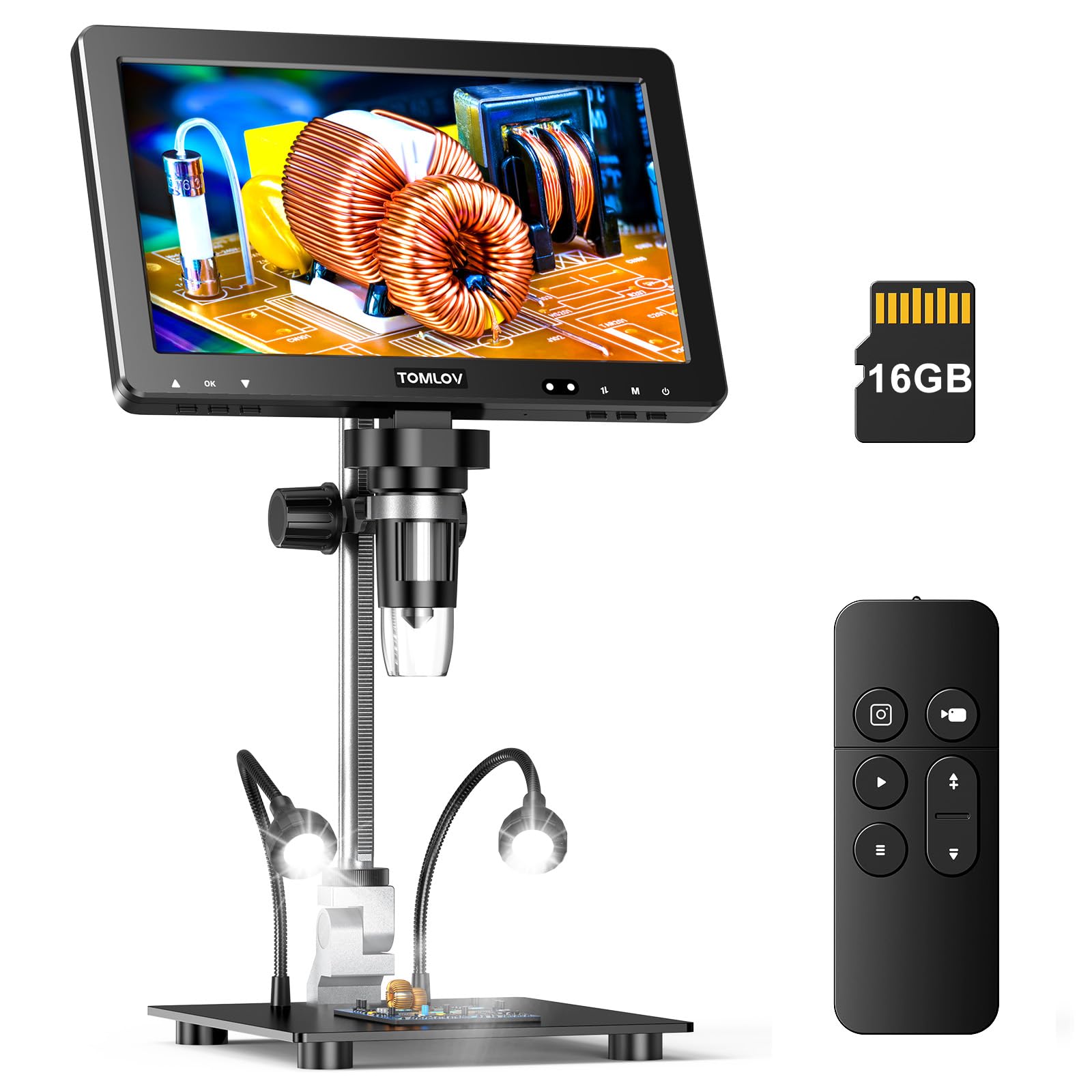
The TOMLOV DM9 Max upgrades the sensor to a 20MP camera, which translates into noticeably sharper still images when you need to document a coin’s condition for a grading submission or a sale listing. The 10.1‑inch IPS screen is the same generous size as the Andonstar and LINKMICRO options, but the 1500x maximum magnification — while mostly digital — gives you the flexibility to punch in on tiny die scratches or mint errors that would be invisible at lower powers.
A standout feature is the taller 12.6‑inch stand with a larger 7×8‑inch base, which provides both the height to frame a full coin and the stability to keep the image steady during long inspection sessions. The ten adjustable LEDs — eight around the lens plus two gooseneck side lights — deliver the kind of cross‑lighting that makes luster lines and strike details pop. The wireless remote adds digital zoom control, so you can stay focused on the coin without reaching for the screen.
Battery life is decent at around an hour, though the unit is best used plugged in for extended sessions. The focusing mechanism feels a bit light and can drift if bumped, so you will want to fine‑tune focus with care. For collectors who prioritize image resolution and want a large, bright display that reveals every detail of a high‑relief coin, the DM9 Max is a compelling premium pick.
Why it’s great
- 20MP sensor for high‑resolution stills
- Large 12.6” stand with wide base
- 10 adjustable LEDs with dual goosenecks
- Wireless remote with digital zoom
Good to know
- Focus mechanism feels light and can drift
- Battery life around one hour
- No AC adapter included in box
4. TOMLOV TriL107
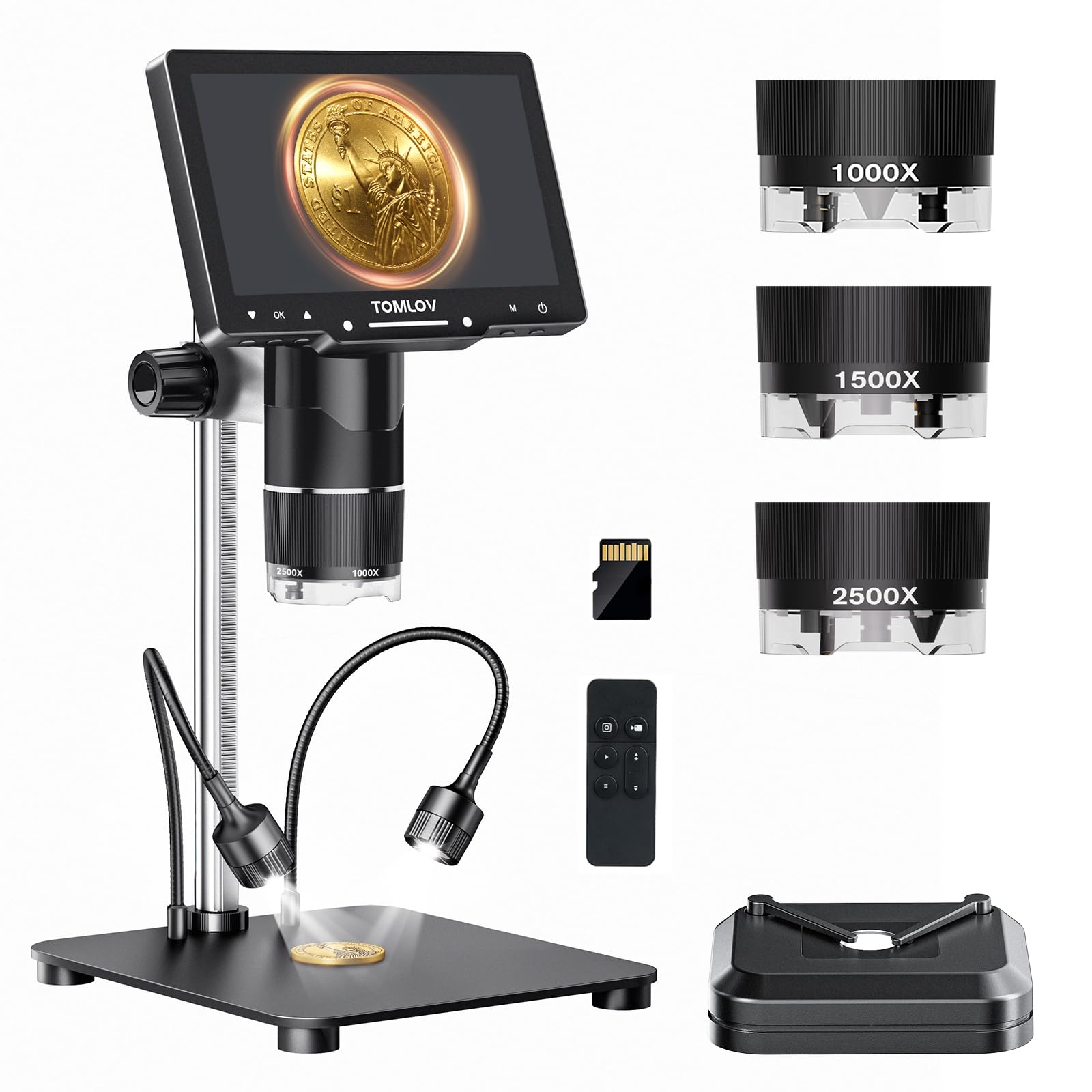
The TOMLOV TriL107 is the most versatile microscope in this comparison thanks to its rotating triple‑lens system. A dedicated coin lens provides 2x to 1000x magnification and can frame an entire silver dollar, while a soldering lens covers 10x to 1500x with a longer working distance for circuit board work, and a biological lens reaches up to 2500x for prepared slides. Switching between lenses is as simple as rotating the barrel, eliminating the need to unscrew and swap components mid‑session.
The 7‑inch IPS screen is smaller than the 10‑inch models, but the 30MP photo resolution and 2K video capture produce exceptionally crisp output that looks great on the built‑in display or when streamed to a larger monitor via USB‑C. The 12.6‑inch stand and large base keep everything stable, and the 14‑light system — 12 around the lens plus a bottom slide light and gooseneck side lights — gives you unmatched control over illumination direction and intensity.
There are trade‑offs for this flexibility. The lens‑switching mechanism uses a plastic rotation barrel that feels less robust than a metal alternative, and the soldering lens has a very short working distance that can crowd your hand when working on a dense PCB. For collectors and hobbyists who want one tool that can inspect coins, repair electronics, and explore biological slides without needing a second device, the TriL107 is a unique and powerful option.
Why it’s great
- Rotating 3‑lens system for multiple tasks
- 30MP photos and 2K video resolution
- Extensive 14‑light illumination array
- Full‑coin frame with coin lens at low mag
Good to know
- 7” screen is smaller than competing models
- Soldering lens has limited working distance
- Lens rotation barrel feels plastic‑like
5. Andonstar AD249S-M

The Andonstar AD249S‑M is built for demanding users who need maximum image quality and flexible positioning. Unlike the fixed vertical stands of the other models, this unit uses a pro‑style boom arm that can be adjusted front‑to‑back, side‑to‑side, and at various angles, making it ideal for soldering large motherboards or inspecting odd‑shaped items without rearranging your whole workspace. The 10.1‑inch LCD display supports 2160P Ultra HD video recording and HDMI output, so you can view the live feed on a 4K monitor or TV for an even larger inspection area.
The three‑lens system — Lens A for full‑coin views, Lens L for soldering, and Lens D for biological slides — covers a broad magnification range from 4.5x to 2040x depending on the lens and monitor size. The included professional measurement software for Windows PCs sets it apart from the competition, allowing you to measure object length and area directly on screen, which is invaluable for PCB fault analysis or grading coin dimensions. The wireless remote and eight‑level adjustable LED lights complete a genuinely professional package.
The trade‑off for this capability is complexity. Switching lenses requires unscrewing and re‑mounting, which takes more time than a rotating barrel design. The boom arm is heavier and takes up more desk space than a traditional base, and the initial setup requires careful adjustment to get the arm balanced. For serious electronics repair technicians, numismatists who need precise documentation, or anyone who values HDMI output and measurement tools, the AD249S‑M is the most capable option in this lineup.
Why it’s great
- Boom arm stand for flexible positioning
- 2160P UHD video and HDMI output
- Professional measurement software included
- Three lenses cover coin, soldering, and slide work
Good to know
- Lens swapping requires unscrewing
- Boom arm takes up more desk space
- Initial setup is more involved than fixed stands
6. Leipan 7” LCD Digital Microscope

The Leipan 7‑inch model proves that you do not need to spend heavily to get a functional coin microscope with a screen. The 7‑inch rotatable LCD display tilts up to 90 degrees, which helps reduce neck strain during extended sessions, and the 12MP camera captures decent 1080P video and stills. The continuous 10x to 1200x magnification range covers the basics, though the higher end is mostly digital zoom that adds grain.
What surprised me about this budget unit is the lighting configuration. Many entry‑level microscopes rely solely on a ring of eight LEDs that wash out surface detail, but the Leipan adds two flexible side lights that you can aim independently. This simple addition makes a real difference when examining coins for luster breaks or die markers, as you can create raking light that reveals texture. The metal stand is also a welcome upgrade over the all‑plastic builds common at this price tier, providing enough stability for routine inspection.
The screen resolution is lower than the IPS panels on premium models, and image quality can look slightly grainy, especially at higher magnifications. The wired remote helps reduce shake when capturing photos, and the PC‑compatible plug‑and‑play connection works with Windows and Mac without extra software. For a beginner coin collector or someone who needs a basic screen‑based microscope for occasional soldering and stamp checking, the Leipan delivers solid performance at a practical price point.
Why it’s great
- Includes two flexible side lights for angled illumination
- Rotatable 7” screen reduces neck strain
- Metal stand adds stability at this price tier
- PC compatible with Windows and Mac
Good to know
- Screen resolution is lower than IPS models
- Image can appear grainy at higher zoom levels
- Maximum magnification is mostly digital
7. Hayve 7” LCD Digital Microscope
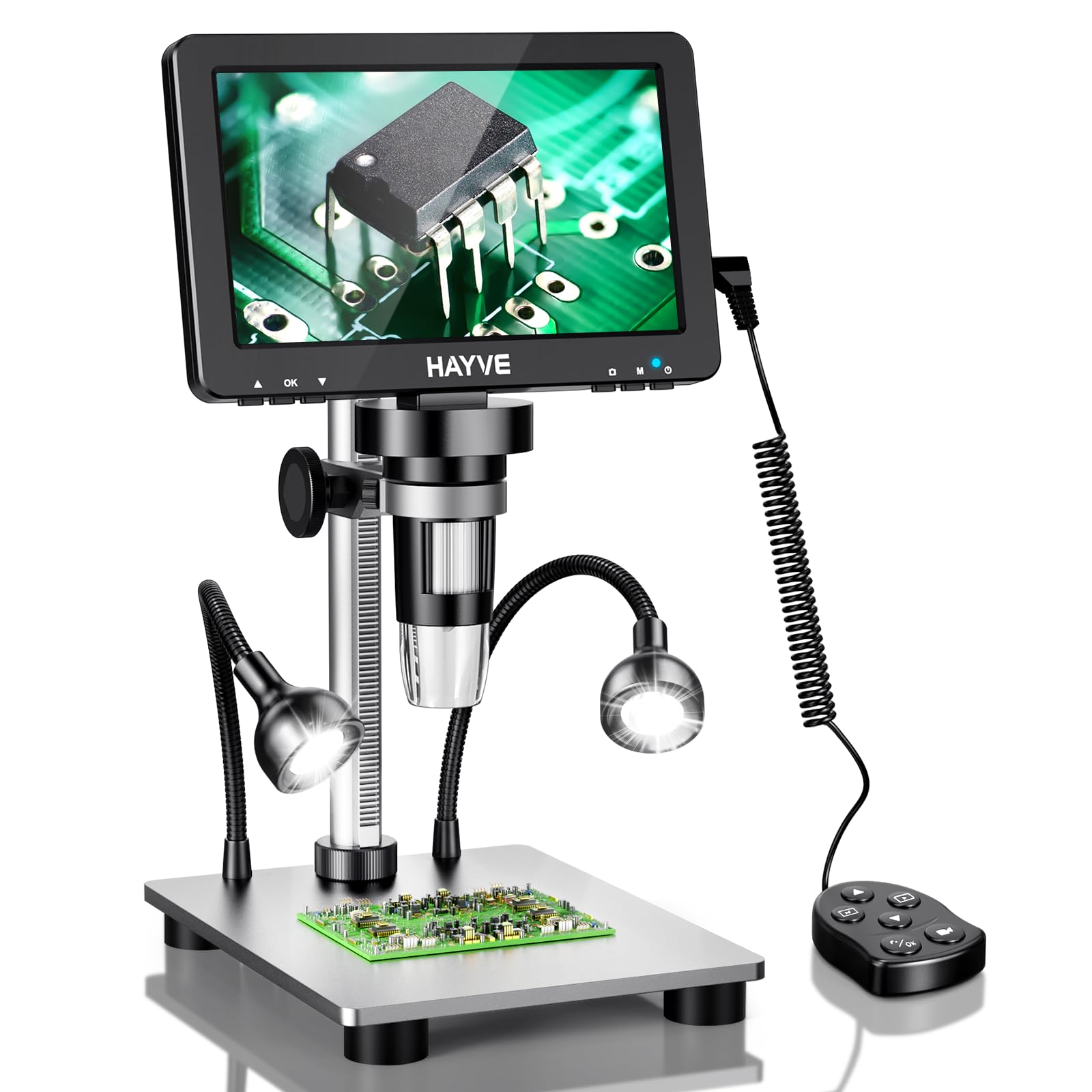
The Hayve 7‑inch model is a close competitor to the Leipan, sharing a similar form factor and price tier but offering a few spec upgrades that tilt the value calculus. The 16MP camera sensor is a step up from the Leipan’s 12MP, which translates to slightly sharper still images when documenting a coin’s surface or a solder joint. The 10x to 1200x magnification range and rotatable screen are functionally identical, and the aluminum alloy stand provides the same metal‑build reassurance.
The lighting system is where Hayve made a smart design choice. In addition to the eight adjustable ring LEDs around the lens, it includes two flexible gooseneck lights — similar to the Leipan — but the goosenecks are slightly longer and more posable, giving you better control over shadow direction. This matters when you are trying to highlight the subtle raised detail of a doubled die or the concave relief of a proof coin. The PC connectivity is plug‑and‑play, and the wired remote reduces camera shake during capture.
Where the Hayve falls short is the same territory as the Leipan: the 7‑inch LCD screen is not IPS, so viewing angles are narrower, and the image can wash out if you are not sitting directly in front of it. The automatic light adjustment can also override your manual settings, making it harder to maintain consistent illumination across different coins. For a first‑time buyer who wants an affordable entry point with decent sensor specs and good lighting flexibility, the Hayve is a strong contender.
Why it’s great
- 16MP sensor for better image detail
- Long, posable gooseneck side lights
- Aluminum alloy stand is sturdy
- Plug‑and‑play PC connectivity
Good to know
- Non‑IPS screen has narrow viewing angles
- Auto light adjustment overrides manual settings
- Higher magnifications show digital grain
FAQ
What magnification do I actually need for coin inspection?
Can a coin microscope with screen be used for soldering?
What is the difference between optical zoom and digital zoom on these microscopes?
Why does my coin microscope screen show a different image than what I capture?
Final Thoughts: The Verdict
For most users, the best coin microscope with screen winner is the Andonstar AD210 because it combines a large 10.1‑inch IPS display, flexible triple lighting, a stable metal stand with a generous 10.2‑inch working distance, and a complete kit including SD card and remote at a price that represents exceptional all‑around value. If you need to frame entire silver dollars and prioritize full‑coin viewing with advanced cross‑lighting, grab the LINKMICRO LM210. And for professional‑grade HDMI output, a boom arm stand, and on‑screen measurement software, nothing beats the Andonstar AD249S‑M.

Mo Maruf
I created WellFizz to bridge the gap between vague wellness advice and actionable solutions. My mission is simple: to decode the research and give you practical tools you can actually use.
Beyond the data, I am a passionate traveler. I believe that stepping away from the screen to explore new environments is essential for mental clarity and physical vitality.