Our readers keep the lights on and my smoothie glass nicely filled. As an Amazon Associate, I earn from qualifying purchases.
Specs are compiled from manufacturer listings and verified buyer reviews and can change over time — please confirm the key details on the product page before buying.
You want a toy that teaches real skills without feeling like a chore. The challenge is finding one your kid actually enjoys after the wrapping comes off. A good coding toy for kids turns logic, sequencing (putting steps in the right order), and problem-solving into a game they want to play.
I’m Mohammad Maruf — the founder and writer behind WellFizz. This guide is built by comparing the manufacturers’ published specifications and the patterns across verified customer reviews, so you get each pick’s real strengths and trade-offs instead of marketing spin.
The six picks below cover every age and interest level, from a screen-free dinosaur set for a preschooler to a 901-piece robot builder for a tinkerer aged 8–14. Each review explains exactly which kid it suits and which kid should skip it, based on real specs and buyer reports.
Quick Picks
- Learning Resources Coding Critters Rumble & — Best Overall
- Snap Circuits Jr. SC-100 Electronics — Best STEM Value
- Sillbird STEM Robot Building Kit — Top Performer
- Sciencow 2-in-1 Build a Robot Kit (901 Pieces) — Best for Older Kids
- IQKidz 3-in-1 RC Robot Car Building Kit — Compact Pick
- EduCuties Robot Toy for Kids — Budget Champion
How To Choose The Best Coding Toys For Kids
Not every toy labeled “STEM” is a good fit for every child. The list below focuses on six top-tier options, but before you scroll, here is what separates a toy that collects dust from one that gets played with every single day.
Match the Age, Not the Label
The manufacturer’s minimum and maximum ages are your first filter. A set designed for ages 8+ will frustrate a 4-year-old, while a preschool toy will bore a 10-year-old in minutes. Pay close attention to the age range — it tells you how many steps each project has and whether the instructions assume reading ability.
Screen-Free vs. App-Based
Some coding toys teach logic entirely without a screen — you press buttons on the toy itself to program a sequence of moves. Others use a smartphone or tablet app for more advanced programming, like drag-and-drop commands or path plotting. Screen-free sets are ideal for younger kids or if you want to limit device time; app-controlled sets offer deeper coding challenges for older children.
Build-It-Yourself vs. Ready to Play
Construction kits (like building-block robots) teach engineering and patience, but they come with assembly time. Ready-to-play sets work from the start and focus purely on programming logic. Consider how much time your child (and you) wants to invest before getting to the “play” part. Buildable kits are great for kids who love Lego-like projects, while pre-built robots are better for immediate coding action.
Quick Comparison
| Model | Best For | Age Range | Pieces / Parts | Play Style | Amazon |
|---|---|---|---|---|---|
| Learning Resources Coding Critters Rumble & Bumble | Early coding logic (ages 4-7) | 4 years and up | 23-piece playset | Screen-free, story-based | Amazon |
| Snap Circuits Jr. SC-100 Electronics Exploration Kit | Circuitry & STEM fundamentals (ages 8+) | 8 years to 108 years | 29 snap modules | Build-and-play, no tools | Amazon |
| Sillbird 5-in-1 STEM Robot Building Kit | Advanced building & app coding (ages 8+) | 8 years and up | 596 blocks | Build, then remote/app code | Amazon |
| Sciencow 2-in-1 Build a Robot Kit | Building-block robot/car (ages 8+) | 8 years to 14 years | 901 pieces | Build, then remote/app control | Amazon |
| IQKidz 3-in-1 RC Robot Car Building Kit | Independent builders (ages 8-12) | 6 years and up | 440 pieces | Build, then remote/app control | Amazon |
| EduCuties Robot Toy | Immediate play & gesture control (ages 3+) | 3 years and up | Pre-built robot | Remote & gesture, ready to play | Amazon |
In‑Depth Reviews
1. Learning Resources Coding Critters Rumble & Bumble Set

This dinosaur duo teaches coding logic through a storybook — no screen needed.
Your child presses directional buttons on the mama dinosaur (Rumble) to create a move sequence — a tangible way to grasp sequencing (putting steps in order) and cause-and-effect. The 23-piece pet playset includes two dinosaur figures and a storybook that turns programming into a narrative adventure. Buyers report their kids “felt like coders in 30 mins” and that it feels like “fun AND learning.” Unlike the Sillbird or Sciencow building kits, this set is ready to play with from the start — zero assembly. The manufacturer minimum age is 48 months (4 years), and the entirely screen-free design means you teach STEM fundamentals without adding more screen time. The honest trade-off is that the small playset pieces could be easily misplaced, so keep the playset contained. For a preschool or early-elementary child aged 4–7, this gives you the highest “value per insight” for a first coding toy. Kids aged 8+ who want a building challenge will be far happier with the Snap Circuits or Sillbird kits below.
Why It Works
- Screen-free design teaches sequencing and problem-solving without a device
- Storybook-based play keeps young kids engaged and focused
- Ready to use immediately; no construction time required
The Catch
- Small playset pieces are easy to lose if not stored carefully
- Best suited for ages 4–7; older kids may outgrow it quickly
Smart starter pick: If you have a child aged 4 to 7 and want their first real taste of coding logic without a screen, this is the most rewarding option on the list.
Consider alternatives: Older kids (8+) who want a building challenge will be far happier with the Snap Circuits or Sillbird kits below.
2. Snap Circuits Jr. SC-100 Electronics Exploration Kit

The classic electronics kit that introduces real circuitry through 100+ projects.
You build circuits — no soldering, no tools — using 29 color-coded snap modules that click onto a plastic grid. The full-color manual guides you through over 100 projects, from a flying saucer to a sound alarm. One reviewer noted their “4yo grandson loves taking apart and rebuilding; keeps him engaged,” which speaks to its durability and cross-compatibility with other Snap Circuits kits. The manufacturer maximum age is 1188 months (99 years), so ages 8 to 108 can build together. Compared to the pre-built EduCuties robot, the Snap Circuits gives your child an actual engineering foundation — you build the circuit, then the toy works. The main design limitation some buyers flagged is that the plastic components can feel fragile and may not survive aggressive play. But for a curious child who likes following instructions and understanding cause-and-effect, this kit is tough to top in its price tier. The box is slim at 12 x 9.5 x 1.75 inches, easy to store.
Real-world engineering: Teaches circuit-building fundamentals through over 100 distinct projects, all without extra tools or soldering.
Durability note: A minority of buyers experienced fragile parts, so supervision during assembly helps keep the modules intact.
Perfect for curious tinkerers: If your child (ages 8+) loves figuring out how gadgets work, this kit delivers months of projects at a budget-friendly cost.
Not for rough players: If durability is your top concern or your child tends to throw toys around, look at the Sillbird kit for a sturdier build.
3. Sillbird STEM Robot Building Kit (5-in-1, 596 Pieces)
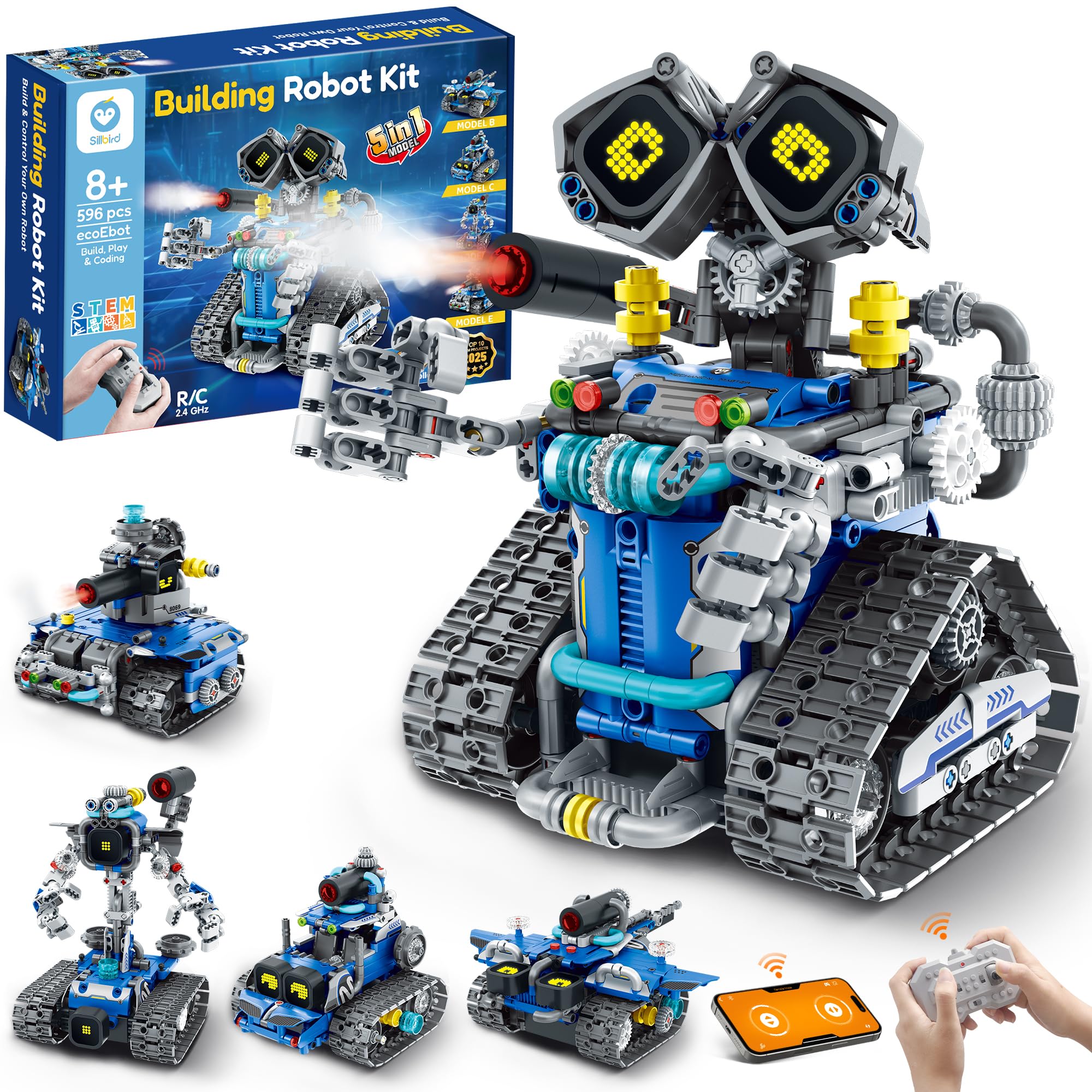
A 596-piece buildable robot with expressive LED eyes and a mist-spray feature.
This is the premium pick for the child who loves building and wants more than just a static model. The 596 blocks let you construct five different designs — including a robot, tank, and car — with varying difficulty. Once built, the robot is controlled via remote or a Bluetooth app, and has interactive extras like digital LED (light-emitting diode) eyes that change expression and a mist-spray function (just add water). Owners mention the instructions are “easy to follow” and “high quality,” with one noting their son “built it by himself in a few hours.” The rechargeable battery provides up to 40 minutes of playtime per charge, saving you the cost of disposables. The Sillbird kit surpasses the IQKidz set because it offers more pieces (596 vs 440) and more build variations (5 vs 3) at a similar premium price point. The manufacturer minimum age is 96 months (8 years), and the complexity is well-calibrated for that range. The honest trade-off is that younger children may struggle to push the tube connectors together firmly enough, so expect some adult assistance on the first few builds.
what separates it
- Five buildable models (robot, tank, car, and more) from one set of 596 blocks
- Interactive LED eyes with changing expressions and a mist-spray feature
- Rechargeable battery delivers up to 40 minutes of continuous play
Assembly Note
- Tube connectors require some finger strength; younger kids may need help
- Build time is significant — expect a few hours for the first model
Top choice for building enthusiasts: If your child loves Lego-like projects and wants app-controlled coding, the Sillbird offers the most models and premium features in this list.
Skip for instant gratification: If your child gets frustrated by multi-hour builds, choose the ready-to-play Coding Critters or EduCuties robot instead.
4. Sciencow 2-in-1 Build a Robot Kit (901 Pieces)
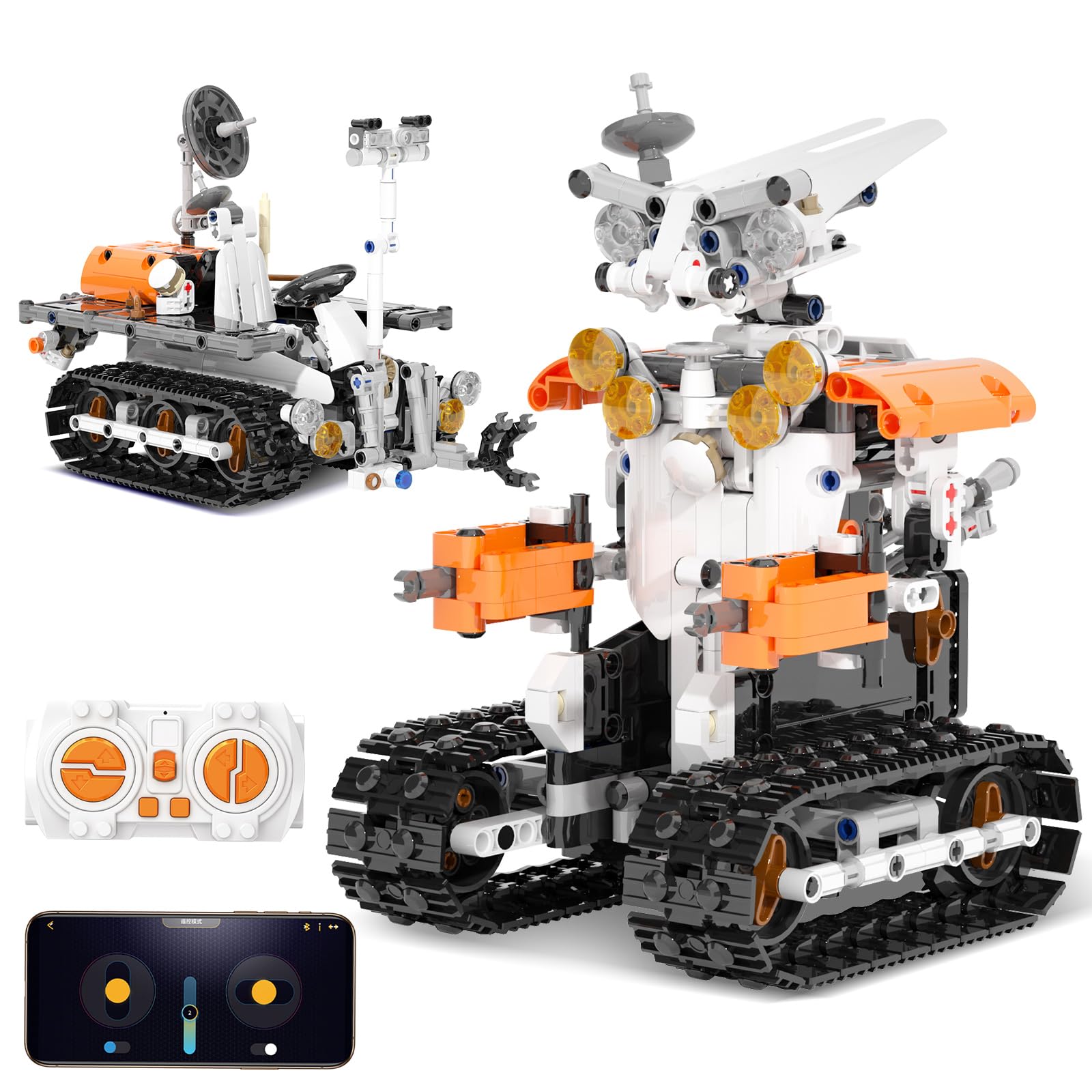
A massive 901-piece set that transforms between a tank robot and a racing car.
With 901 pieces, the Sciencow kit is the largest building set on this list by part count. You build either a dynamic tank robot or a speedy racing car. The dual control methods — a wireless remote (requires 2 AAA batteries) and a Bluetooth smartphone app — give your child 4 app modes, including programming, path, and gyroscope (tilt-control) mode, with a remote control distance of about 20-30 meters (roughly 65-98 feet). One buyer mentioned: “Our 11 year old grandson loved putting this car together and then playing with it!” This kit is designed for kids aged 8 to 14, with a manufacturer minimum age of 96 months (8 years) and a maximum of 168 months (14 years). Compared directly to the IQKidz kit, the Sciencow offers more than double the pieces (901 vs 440), making it a better fit for an experienced builder who wants a longer, more challenging project. However, the sheer number of small pieces means this is not a toy for children under 4 years old — a point repeatedly mentioned by buyers. The kit is made from non-toxic ABS (acrylonitrile butadiene styrene) plastic and meets ASTM (American Society for Testing and Materials) and CPSIA (Consumer Product Safety Improvement Act) safety standards.
Two builds, one box: The tank robot and racing car designs offer genuine re-buildability, extending the toy’s lifespan past a single project.
Small parts hazard: Not suitable for homes with children under 4 due to the high number of small blocks.
Best for the dedicated builder: If your child (ages 8–14) loves spending hours on complex building projects and wants a robot *and* a car from one kit, the Sciencow delivers the most pieces for the price.
Not for impatient builders: The 901-piece count is intimidating for a beginner; start with the IQKidz or Snap Circuits if your child is new to construction kits.
5. IQKidz 3-in-1 RC Robot Car Building Kit (440 Pieces)
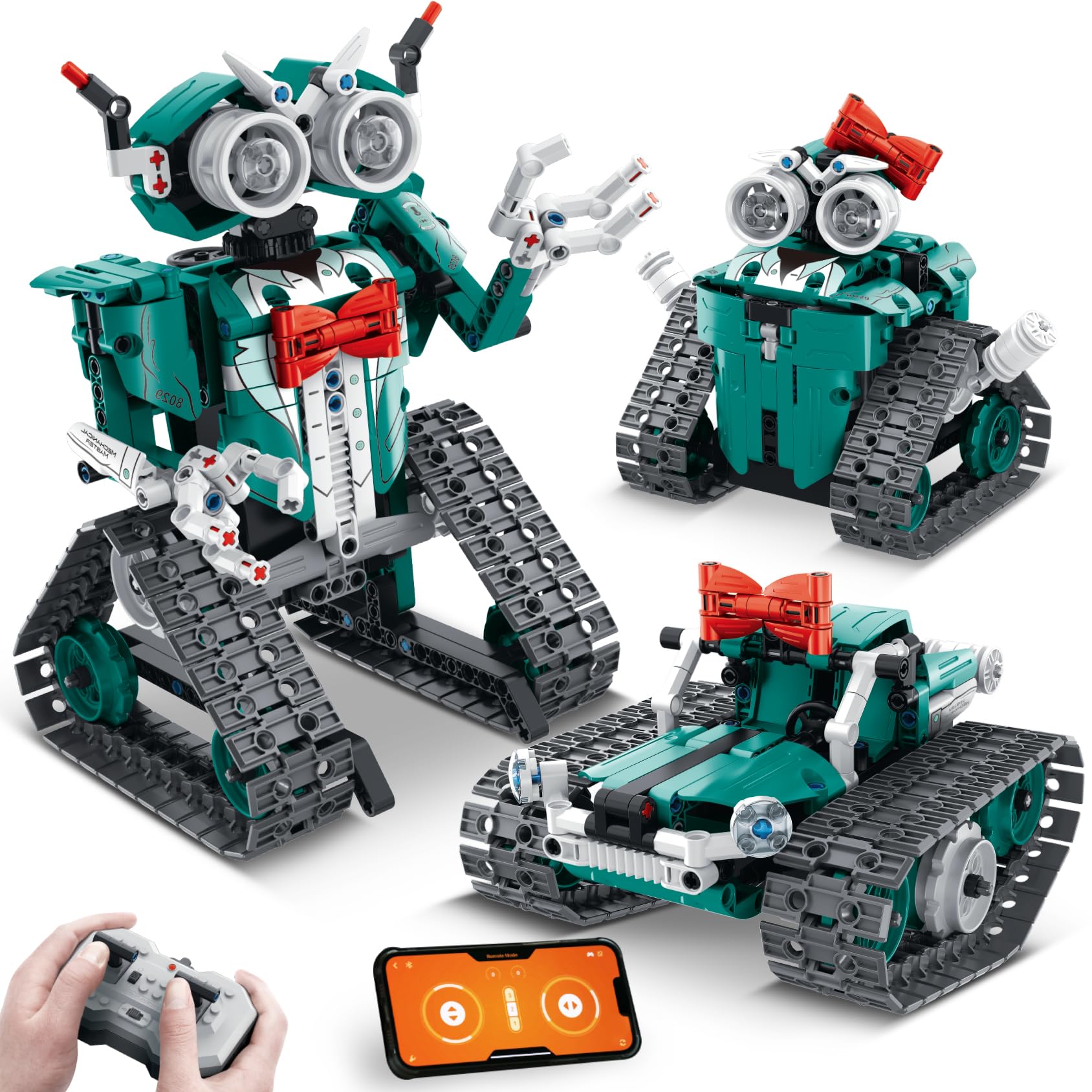
A 3-in-1 building kit with a unique red bowtie design that kids love.
With 440 pieces, the IQKidz kit is a step down in complexity from the Sciencow, making it a better fit for a child aged 8–12 who is new to building-block robotics. You build one of three models: a robot with movable fingers and a red bowtie, a stunt tank, or a robot girl with a red bowknot hair clip. The kit includes remote control and an easy-to-use app for programming movement. One 10-year-old builder “had it put together in one evening and having loads of fun with driving the robot around the house.” The kit comes with extra pieces in case any get lost, a thoughtful touch that reduces frustration. Where the IQKidz falls short compared to the Sillbird is in model variety (3 vs 5) and total piece count (440 vs 596). Additionally, some buyers noted that the robot only moves forward and backward — it does not turn — which limits its maneuverability compared to the Sciencow and Sillbird. The pieces come mixed in bags rather than numbered, which some families found less organized than competitor sets.
What Works
- Three buildable versions from one set of 440 pieces
- Unique “red bowtie” design stands out from typical robot toys
- Quick build time — many kids finish in one sitting
Limitations
- Robot only moves forward and backward; no turning capability
- Pieces are mixed in bags (not numbered), making sorting harder
Good for beginners: If your child is 8–12 and new to buildable robotics, the 440-piece count and quick build time make this a confidence-boosting first project.
Pass for advanced coders: Kids who want full directional control and app-based coding will get more out of the Sillbird or Sciencow kits.
6. EduCuties Robot Toy for Kids (Programmable, Green)
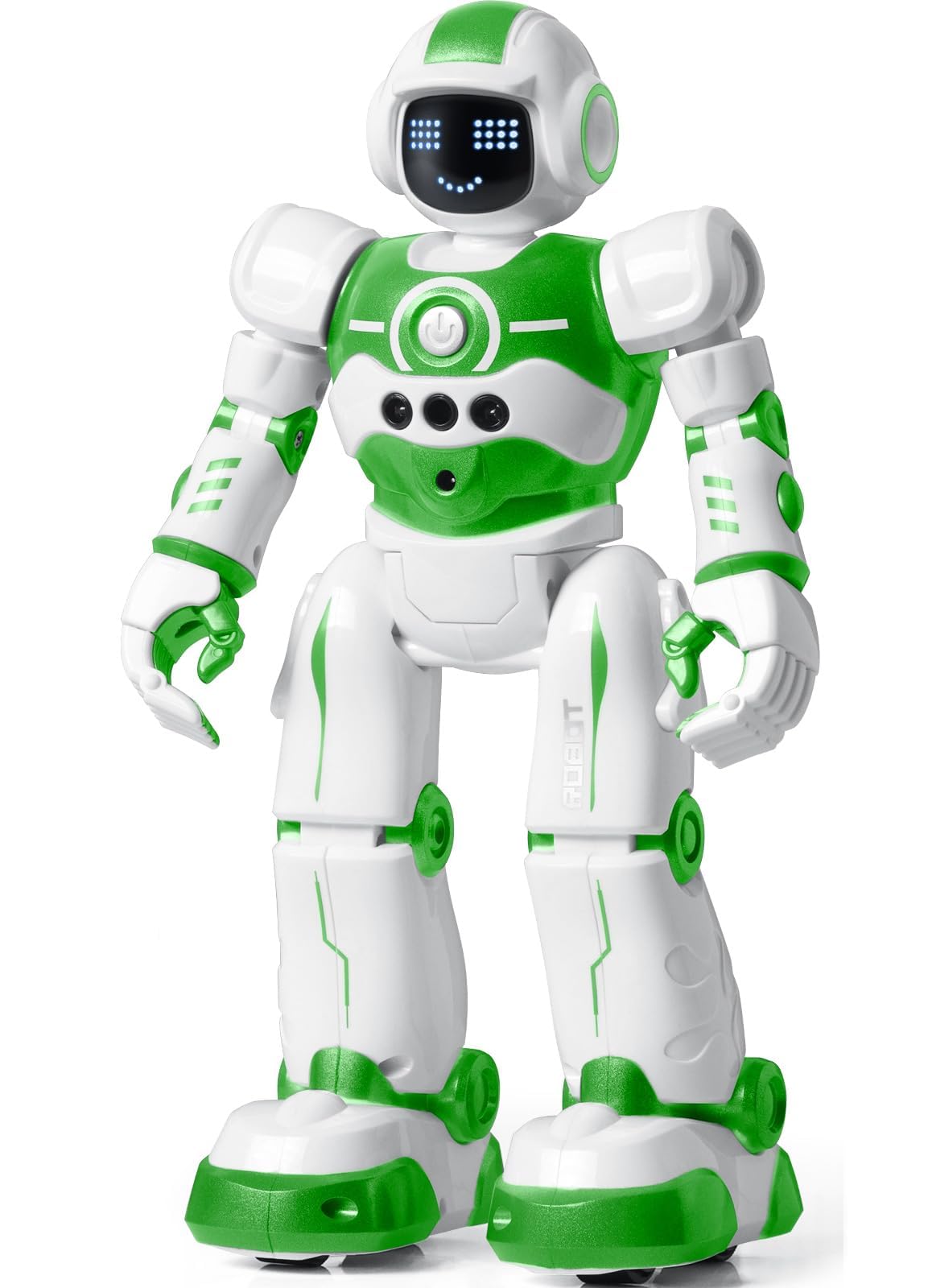
A pre-built, rechargeable robot that responds to hand gestures and voice commands.
For a child as young as 3 years old, this green robot is ready to play immediately — no building, no app setup. At 10.6 x 5.9 x 3.3 inches, it is pre-assembled and offers two control methods: an infrared remote control and hand-gesture sensing (wave left, wave right, and it follows). It also has an intelligent programming mode where you input up to 50 actions (like turn left, walk forward, dance) and the robot plays back the sequence — a direct, tangible introduction to coding logic. The rechargeable battery provides about 60 minutes of playtime after a 2-hour charge, which reviewers noted as a strong point. One parent reported the robot “lasted 2 days on initial battery,” underscoring the importance of recharging after each session. The robot is made from non-toxic ABS plastic and has flexible multi-joint shoulders, elbows, and thumbs for expressive movement. Unlike the Sillbird, Sciencow, or IQKidz kits, there is zero building here, so it is ideal for toddlers and preschoolers (manufacturer minimum age is just 36 months). The catch is that some buyers found the charger is not included (a non-standard port), and the robot struggles on carpet — it works best on tile or wood floors.
Immediate play, zero setup: Perfect for ages 3-5 who want to start coding through gesture commands and simple action sequencing right away.
Floor surface sensitive: Performs well on tile or wood but struggles on thick carpet, so plan your play area accordingly.
Ideal for the youngest coders: If your child is 3–6 years old and you want a screen-free, pre-built robot that teaches cause and effect through gestures and simple programming, this is the most affordable entry point.
Not for older kids or builders: Kids aged 8+ who want a construction challenge will find this too simple — steer them toward the Sillbird or Snap Circuits instead.
Understanding the Specs
Buildable vs. Pre-Built
Some coding toys require you to assemble the robot or circuit from pieces before you can start coding. Buildable sets (like the Sillbird, Sciencow, and IQKidz) teach engineering and fine motor skills alongside coding, but require significant time and patience. Pre-built toys (like the Coding Critters and EduCuties robot) are ready to play immediately, so the focus is purely on programming logic. Choose based on whether your child enjoys the building process or wants instant coding action.
Control Methods: Remote, App, or Gesture
Coding toys typically use one of three control types. Infrared or wireless remotes are simple and intuitive for young kids. Bluetooth app control (offered by the Sillbird, Sciencow, and IQKidz) adds modes like path programming and gyroscope control for deeper challenges. Gesture control (found on the EduCuties robot) lets kids command the toy by waving their hand, making it the most physical and accessible for toddlers. Consider which interface matches your child’s current reading ability and patience level.
FAQ
What age is appropriate for a coding toy?
Are coding toys screen-free?
How long do these toys last?
Do these toys require batteries?
Are the building-block kits compatible with Lego or other brands?
Can two kids build together?
How do I know if a toy is safe for my child?
Which toy is best for a complete beginner?
Can these toys be used without a smartphone or tablet?
How much assembly time is typical for building-block kits?
Final Thoughts: The Verdict
Across the board, the best coding toys for kids winner is the Learning Resources Coding Critters Rumble & Bumble Set because it introduces coding logic through a screen-free, story-driven experience that works perfectly for ages 4-7. If you want an advanced building challenge with app-based coding, grab the Sillbird 5-in-1 STEM Robot Building Kit. And for the youngest learners (ages 3-5) who need a pre-built, gesture-controlled robot that works right from the start, the EduCuties Robot Toy is the most accessible entry point.
How We Picked
We do not accept paid placement. Every pick is matched to a real buyer and a real use-case; we do not hands-on test units.
Sources & Methodology
Specifications: manufacturer listings and product documentation. Review insights: verified customer reviews, as of July 2026. Pricing: not shown on this page (it changes often); check the current price via the retailer link.
As an Amazon Associate, WellFizz earns from qualifying purchases. This does not affect which products we feature.
Related Guides

Mo Maruf
I created WellFizz to bridge the gap between vague wellness advice and actionable solutions. My mission is simple: to decode the research and give you practical tools you can actually use.
Beyond the data, I am a passionate traveler. I believe that stepping away from the screen to explore new environments is essential for mental clarity and physical vitality.