Our readers keep the lights on and my smoothie glass nicely filled. As an Amazon Associate, I earn from qualifying purchases.
Eight hours of daily debugging, sprint planning, and deep-focus coding shouldn’t leave your spine feeling like a crumpled stack of sticky notes. The difference between a productive session and a painful grind often comes down to one thing: whether your chair actively supports your body’s natural posture—or fights against it. A proper coding chair is not a luxury add-on; it is your primary interface with the desk, and its link to your long-term physical health is direct.
I’m Mohammad Maruf — the founder and writer behind WellFizz. I’ve spent hundreds of hours analyzing engineering specs, studying biomechanical support systems, and cross-referencing user feedback to isolate the concrete factors that separate an ergonomic tool from a glorified seat.
From adaptive lumbar tracking systems to breathable mesh frameworks and memory foam density ratings, this guide delivers a meticulous breakdown of the best coding chair options currently on the market, organized by the real spec-driven decisions that matter most to developers and designers who sit for extended periods.
How To Choose The Best Coding Chair
Every spine is a unique curve, and every coding posture is a unique habit. The right chair compensates for your posture’s weaknesses rather than forcing you to compensate for the chair’s limitations. The following criteria will help you cut through marketing noise and focus on the structural elements that genuinely improve your seated experience.
Lumbar Support: Static vs. Adaptive
Static lumbar pads are better than none, but they often sit in the wrong spot for your specific lumbar curve. Adaptive or height-adjustable lumbar support allows you to dial in the pressure point exactly where your lower back needs it most. Models with mechanical tracking that follow your movement—like the Newtral’s auto-following spring system—provide a dynamic advantage that a simple foam bump cannot match.
Seat Cushion Density and Depth
A cushion that bottoms out after two hours is a trap. Look for high-density foam (7cm or thicker) or a dense mesh weave that sustains tension for years. Seat depth adjustment is non-negotiable if you are not the average 5’10” male—having a seat pan that slides forward or backward ensures your knees bend at the correct 90-degree angle without pressure behind the kneecaps.
Mesh vs. Upholstered Backrest
Mesh backrests allow continuous airflow, preventing sweat buildup during a summer afternoon debugging session. Upholstered backs provide a plusher feel but trap heat. For pure function and temperature regulation, a full mesh back is preferable for anyone logging more than six hours continuously. The trade-off is that mesh does not dampen noise the way upholstery does—a minor point in a silent home office.
Armrest Adjustability
Static armrests are the enemy of efficient typing. 3D armrests (height, width, angle) let you keep your elbows at a 90-degree angle with relaxed shoulders. The premium 4D or 720-degree options from Hbada and Steelcase add depth and pivot adjustments, which matter when you switch between keyboard typing and mouse navigation.
Quick Comparison
On smaller screens, swipe sideways to see the full table.
| Model | Category | Best For | Key Spec | Amazon |
|---|---|---|---|---|
| Steelcase Leap | Premium | All-day ergonomic support | 3D LiveBack + lumbar firmness dial | Amazon |
| Herman Miller Embody | Premium | Even pressure distribution | Pixelated support matrix + Backfit | Amazon |
| Hbada X7 | Premium | Smart auto-lumbar tracking | 8D massage + dual-fan cooled seat | Amazon |
| WorkPro Quantum 9000 | Mid-Range | Durable mesh for long hours | Ratchet-adjustable back height | Amazon |
| Branch Ergonomic Chair | Mid-Range | Short/petite users | 8 adjustment points + adjustable seat depth | Amazon |
| Tempur-Pedic TP9000 | Mid-Range | Memory foam comfort | Responsive TEMPUR material seat | Amazon |
| Newtral Ergonomic Chair | Mid-Range | Auto-following lumbar support | KGS class 4 gas lift + 7cm foam | Amazon |
| Staples Dexley | Value | Affordable mesh ergonomics | Full mesh back + 3D armrests | Amazon |
| YFO Home Office Chair | Value | Budget-friendly leather style | Spring bag cushion + rubber casters | Amazon |
In‑Depth Reviews
1. Steelcase Leap

The Steelcase Leap is engineered with the Natural Glide System, which allows the seat to glide forward and backward as you recline—keeping your eyes at the same distance from the monitor even when you lean back on a deep debug thought. Its 3D LiveBack technology mimics the spine’s natural movement, providing continuous contact through the entire range of motion, a critical feature for coders who switch between focused typing and leaning back to read documentation.
The lower back firmness dial lets you dial in lumbar pressure precisely—from a gentle touch to a firm push—without needing an extra cushion. The 4D adjustable arms rotate, lift, slide, and pivot, giving you a custom elbow angle that reduces shoulder strain over long compile times. The upholstered back, while not as breathable as mesh, dampens noise and provides a quieter experience in a shared home office.
The build quality is serious: a polished frame with a 275 lb weight capacity and no assembly required out of the box. Some users report the seat padding is firm initially and needs a break-in period, and the + entry price is significant, but the chair’s 70 years of research-backed adjustability justify the premium for professionals who spend their day coding.
Why it’s great
- Natural Glide System keeps your monitor distance constant while reclining.
- Lumbar firmness dial provides custom pressure that static pads cannot match.
- Comes fully assembled—no build time wasted.
Good to know
- Upholstered back traps more heat than mesh equivalents.
- Initial seat firmness requires a few weeks to break in.
- Fake replicas are occasionally sold—buy from trusted sellers.
2. Herman Miller Embody

The Herman Miller Embody represents the apex of ergonomic seating, developed with input from over 20 physicians, PhDs, and biomechanics researchers. Its Pixelated Support technology uses a dynamic matrix of thousands of pixels that conform to your body’s micro-movements, distributing weight evenly to eliminate pressure points—a literal lifesaver for the 10-hour coding shift where shifting weight is the only movement you make.
The Backfit adjustment lets you align the backrest with your spine’s natural curvature, delivering constant support whether you lean forward to sprint through a deadline or recline to read a code review. The Rhythm fabric is tight and smooth to the touch, designed to prevent heat buildup—though it is not full mesh, the breathability system works well in air-conditioned offices. The fully adjustable arms include height and width adjustments, but lack fore/aft pivot that some premium peers offer.
The real magic is the feeling of floating while sitting: the chair moves with you, not against you. Users with shorter frames (under 5’4″) may find the seat edge pressure uncomfortable, and the retail price requires a serious commitment. However, the 12-year warranty and the health benefits for your spine and circulation make it a potential career investment for the working developer.
Why it’s great
- Pixelated support eliminates hot spots and pressure points.
- Backfit adjustment aligns the spine naturally without a bulky lumbar pad.
- 12-year warranty covers your entire career growth cycle.
Good to know
- Armrests lack depth/width pivot found on other premium chairs.
- Single size does not fit shorter users well—knees may hit the seat edge.
- Price is the highest in this list; best for those who treat seating as a health tool.
3. Hbada X7 Smart Ergonomic Chair
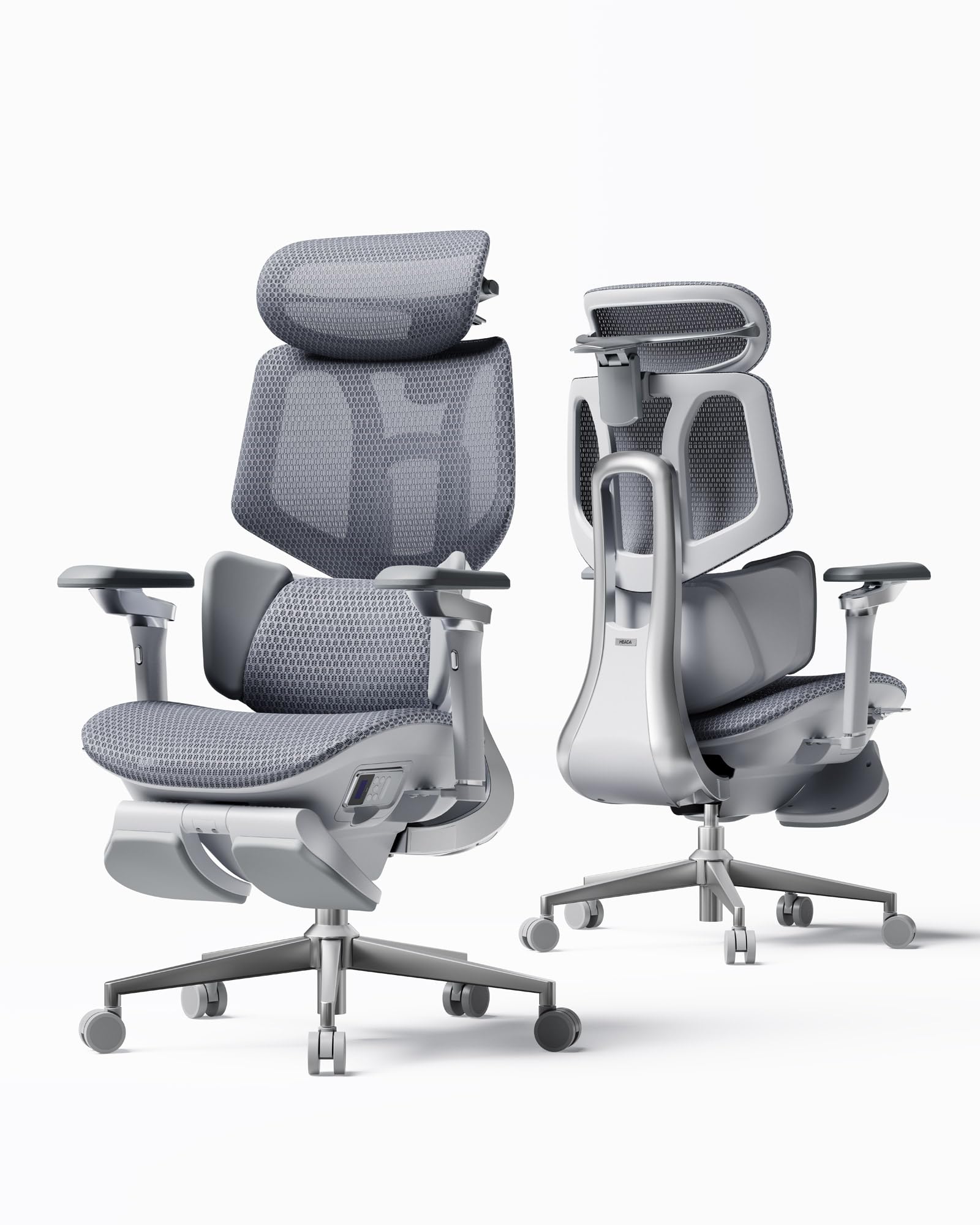
The Hbada X7 brings unprecedented smart features to the coding chair market: a gravity-sensing base that auto-adapts lumbar support intensity in real time, plus 8D massage rollers with three-level heating (40-50°C). This is not a gimmick—for coders who feel their lower back lock up after three hours of intense focus, the massage function can restore blood flow without requiring a stand-up break.
The Cloud Breathable Ventilation Seat integrates a dual-fan cooling system into the 3D high-resilience mesh seat with three speed settings (Silent, Balanced, Turbo). This keeps your backside cool during summer coding sessions and warm in winter, offering a 65% improvement in breathability over standard mesh seats. The 720° omnidirectional armrests rotate 360 degrees, extend 110mm, and lift 50mm, syncing seamlessly with the 140-degree recline for work-to-nap transitions.
The aircraft-grade aluminum frame and nylon base support up to 150kg, with quiet-roll casters that work on any floor. Assembly is minimal—the chair arrives mostly pre-assembled. Tall users over 6 feet may need a replacement gas cylinder to achieve proper ergonomic height, and the battery for the smart functions drains quickly because it constantly detects movement. But for a tech-forward developer who wants heat, massage, and active lumbar tracking, the X7 is a compelling package.
Why it’s great
- Auto-adjusting lumbar support responds to your shifting weight.
- 8D massage rollers with heating relieve back muscle fatigue on demand.
- Dual-fan seat ventilation prevents sweat buildup.
Good to know
- Smart functions drain battery quickly—you may need to adjust sensitivity.
- Standard gas cylinder may be too short for users over 6 feet tall.
- Premium price places it in the same bracket as established office chair brands.
4. WorkPro Quantum 9000

The WorkPro Quantum 9000 is built for the 8-10 hour professional workday, with a full mesh construction on both the back and the seat that promotes continuous airflow. The ratchet-adjustable back height lets you position the lumbar support exactly at your spine’s curve, while the seat depth adjustment accommodates different leg lengths—a rare combination in the sub- range that directly benefits coders who alternate between sitting upright and leaning back.
The tilt tension and tilt lock mechanisms are controlled by a single lever, allowing you to switch between a locked upright position for typing and a relaxed recline for reading documentation. The armrests adjust in height and angle, though they pivot sideways quite easily and do not lock into position—a minor annoyance if you bump them during a fast mouse flick.
Assembly takes about 15 minutes with the included long Allen wrench, and users report the chair holds up well after 4-6 years of daily use. The foam seat cushion under the mesh may feel stiff initially but breaks in after a few weeks. The chair is often compared to the Herman Miller Aeron at a fraction of the price, making it a strong mid-range pick for developers who prioritize breathability and adjustability without breaking the bank.
Why it’s great
- Full mesh seat and back prevent heat buildup during marathon sessions.
- Ratchet-adjustable back height gives precise lumbar placement.
- Easy 15-minute assembly with included tools.
Good to know
- Armrests pivot easily without locking—can shift under accidental pressure.
- Seat cushion requires a break-in period before reaching optimal comfort.
- Limited lifetime warranty but parts shipping can be slow.
5. Branch Ergonomic Chair
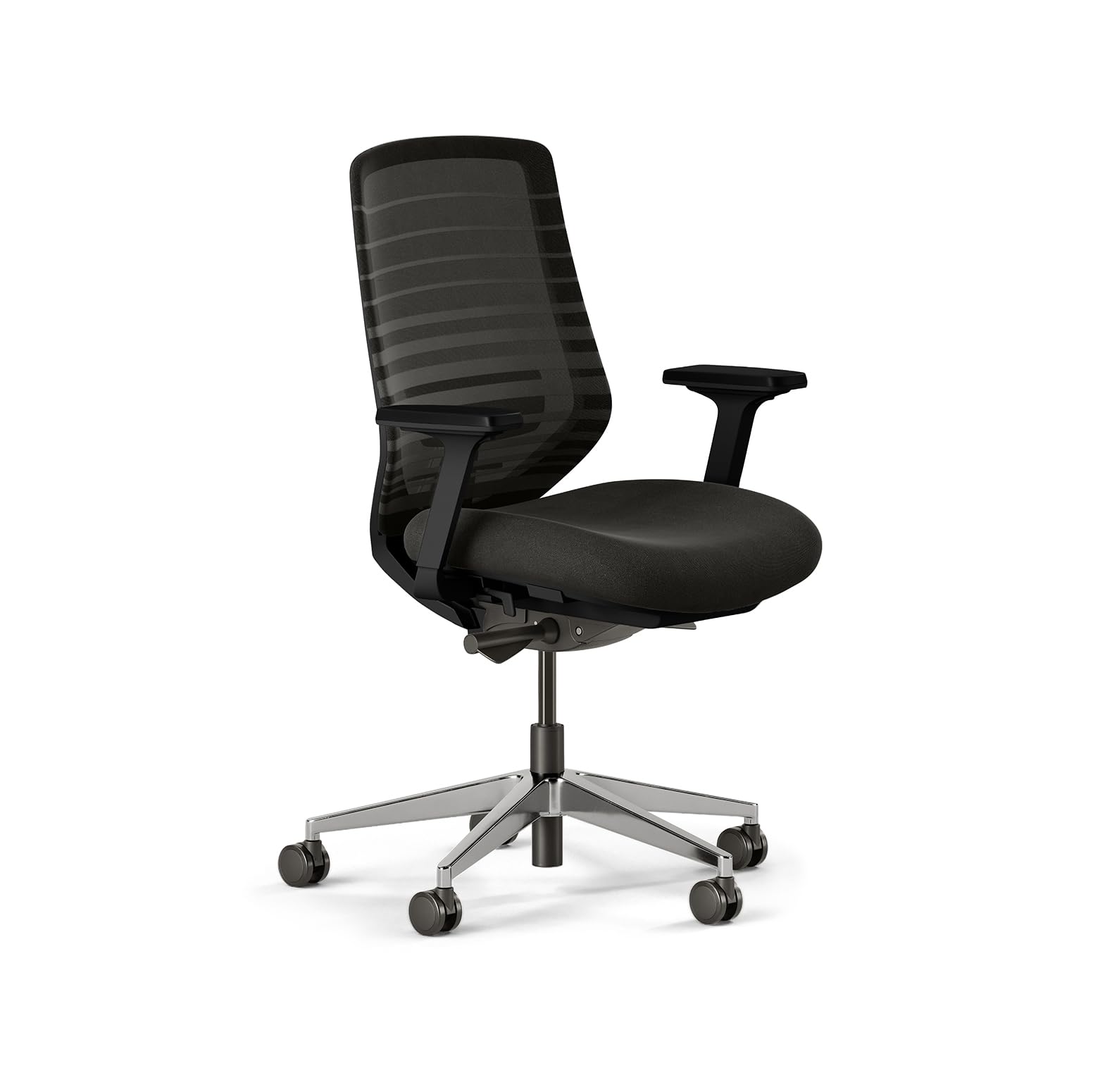
The Branch Ergonomic Chair delivers a sophisticated mesh design with eight points of adjustment, including seat depth, lumbar position, armrest placement, and tilt tension. Its standout feature is the low minimum seat height, making it one of the best options available for shorter users (5’0” to 5’4”) who often struggle with chairs designed around an average male build. The adjustable seat slides forward and backward, ensuring proper knee bend without edge pressure for petite frames.
The breathable mesh backrest provides moderate lumbar support that is sufficient for most users, though those with acute back issues may want a model with more aggressive lumbar curve. The aluminum frame feels sturdy and the chair rolls smoothly on carpet using the included wheels. Assembly is straightforward at around 30 minutes, though attaching the seatback requires some awkward balancing.
The arms slide forward and backward with a bit too much ease—tightening the bolts helps but does not fully eliminate the drift—making them less reliable for users who lock in a specific arm position. Still, for the sub- price point, the Branch offers an excellent balance of adjustability, breathability, and aesthetic minimalism that fits modern home offices well.
Why it’s great
- Low seat height makes it ideal for petite coders who cannot reach the floor on standard chairs.
- Seat depth adjustment prevents knee pressure and improves circulation.
- Lightweight build with an aluminum frame that feels premium at a mid-range price.
Good to know
- Armrests slide forward/backward loosely unless bolts are over-tightened.
- Lumbar support is mild—users needing firm lumbar may require an additional cushion.
- No seat tilt function for those who prefer a forward tilt for aggressive typing posture.
6. Tempur-Pedic TP9000
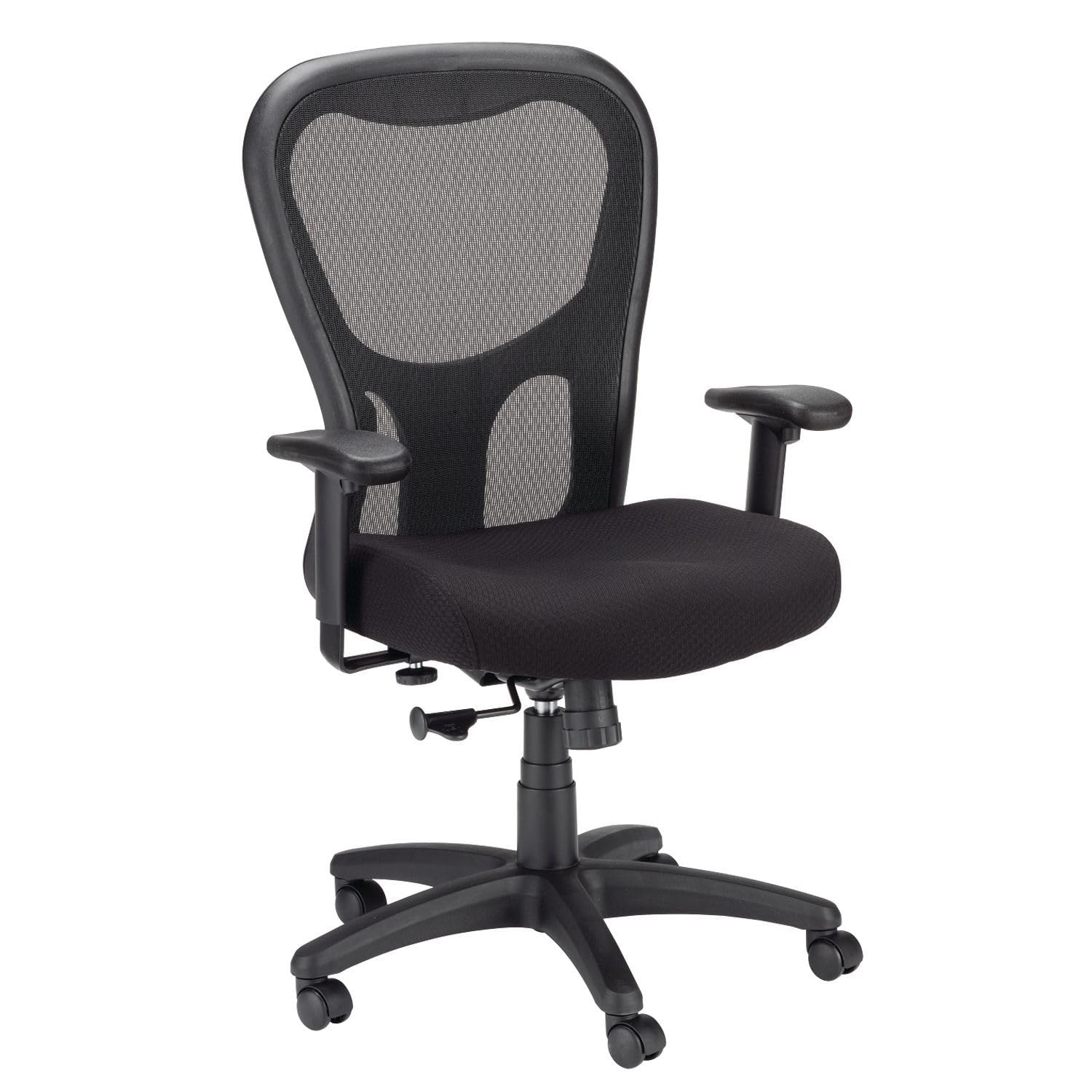
The Tempur-Pedic TP9000 leverages the brand’s famous memory foam technology in a task chair format, offering a seat cushion that conforms to your body shape and distributes weight evenly. For coders who find mesh seats too rigid or foam seats that bottom out, the responsive TEMPUR material provides a supportive yet plush feel that reduces hip pressure during 8-hour sprints. Users with sciatica or lower back pain report significant relief after switching to this chair.
The Synchro tilt mechanism allows the seat and backrest to move in a coordinated ratio, keeping your feet planted and your monitor distance consistent as you recline. The adjustable arms move in height and width, providing decent elbow support for typing, though they are not as precise as the 4D systems found on pricier chairs. The mesh back breathes well, but the mid-back design does not offer cushioning for the upper shoulders.
The chair lacks a height-adjustable lumbar support, which may be a deal-breaker for those who need specific lower back positioning. At a price point, the Tempur-Pedic name and the seat quality offer strong value for users who prioritize a plush, pain-reducing seat cushion over adjustability. The 275 lb weight capacity and sturdy five-star base ensure long-term stability.
Why it’s great
- TEMPUR memory foam seat conforms to your body, reducing pressure points.
- Synchro tilt maintains constant foot pressure and monitor distance while reclining.
- Widely praised for resolving sciatica and lower back pain during long sits.
Good to know
- No height-adjustable lumbar support—users needing specific lumbar positioning should look elsewhere.
- Mid-back design leaves upper back and shoulders without cushion support.
- Mesh back is okay but not as supportive as full-back upholstered options.
7. Newtral Ergonomic Chair

The Newtral chair introduces a lockable auto-following lumbar support that tracks your spine’s movement using a pre-tensioned spring mechanism. As you shift from leaning forward to read code to reclining to think, the lumbar pad adjusts its pressure point automatically, providing continuous support without manual re-dialing. American ergonomist Iris Sokol from Ergowell praised this mechanism as “one of the most unique lumbar supports” she had evaluated since the 1980s.
The backrest offers three height options, with a tilt range from 96° to 126°, and the 3D armrests adjust in height, width, and depth—though they slide loosely without locking, which some users find irritating. The seat cushion uses 7cm of high-density foam with flame-retardant fabric, providing substantial padding that does not bottom out for users weighing up to 180 lbs. Heavier users report the cushion feels soft and bottoms out more quickly, exposing the hard frame beneath.
The KGS class 4 gas lift from Korea ensures smooth height adjustment, and the Korea Filo breathable mesh back keeps air circulating. The headrest feels slightly flimsy but is functional for occasional leaning back. At a price point that sits between budget and mid-range, the Newtral delivers exceptional lumbar technology and solid build quality, but the spring mechanism can be noisy and pulls clothing when not locked.
Why it’s great
- Auto-following lumbar spring adjusts pressure dynamically as you move.
- KGS class 4 gas lift from Korea ensures reliable height adjustment.
- 7cm high-density foam seat cushion provides excellent initial comfort.
Good to know
- Spring mechanism can be noisy and may pull clothing if not locked.
- Armrests slide loosely without a locking mechanism.
- Heavier users (over 200 lbs) may find the cushion bottoms out over time.
8. Staples Dexley

The Staples Dexley is a well-established entry-level ergonomic chair that provides a full mesh back and seat for airflow, along with adjustable lumbar support, tilt tension, tilt lock, and 3D armrests. It is a common upgrade from the smaller Hyken model, offering a larger seat pan and higher weight capacity that better supports taller users and longer sitting sessions. Assembly is straightforward with clearly labeled parts, though the chair is heavy enough to need a second pair of hands.
The lumbar support is height-adjustable, but some users find it ineffective or bothersome—it is easily removed to create a flat mesh surface. The 3D armrests adjust in height, width, and depth using a controller with multiple positions, allowing you to dial in a comfortable typing angle. The tilt lock lets you fix the backrest in a middle position that some users find essential for maintaining good posture while coding.
Some users report that the seat angle is too aggressive, pushing the knees up uncomfortably, and may need to be modified with washers. The headrest can cause neck soreness for some and is also removable. At a budget-friendly price point, the Dexley offers genuine ergonomic adjustability but requires more fine-tuning than premium options, making it a solid pick for cost-conscious coders who are willing to tweak their setup.
Why it’s great
- Full mesh construction promotes airflow for cool seating.
- 3D armrests provide good adjustability for the price.
- Easy assembly with clearly labeled parts.
Good to know
- Lumbar support may be ineffective or uncomfortable for some—easily removed.
- Seat angle may be too aggressive, requiring modification.
- Headrest can cause neck soreness and is often removed by users.
9. YFO Home Office Desk Chair
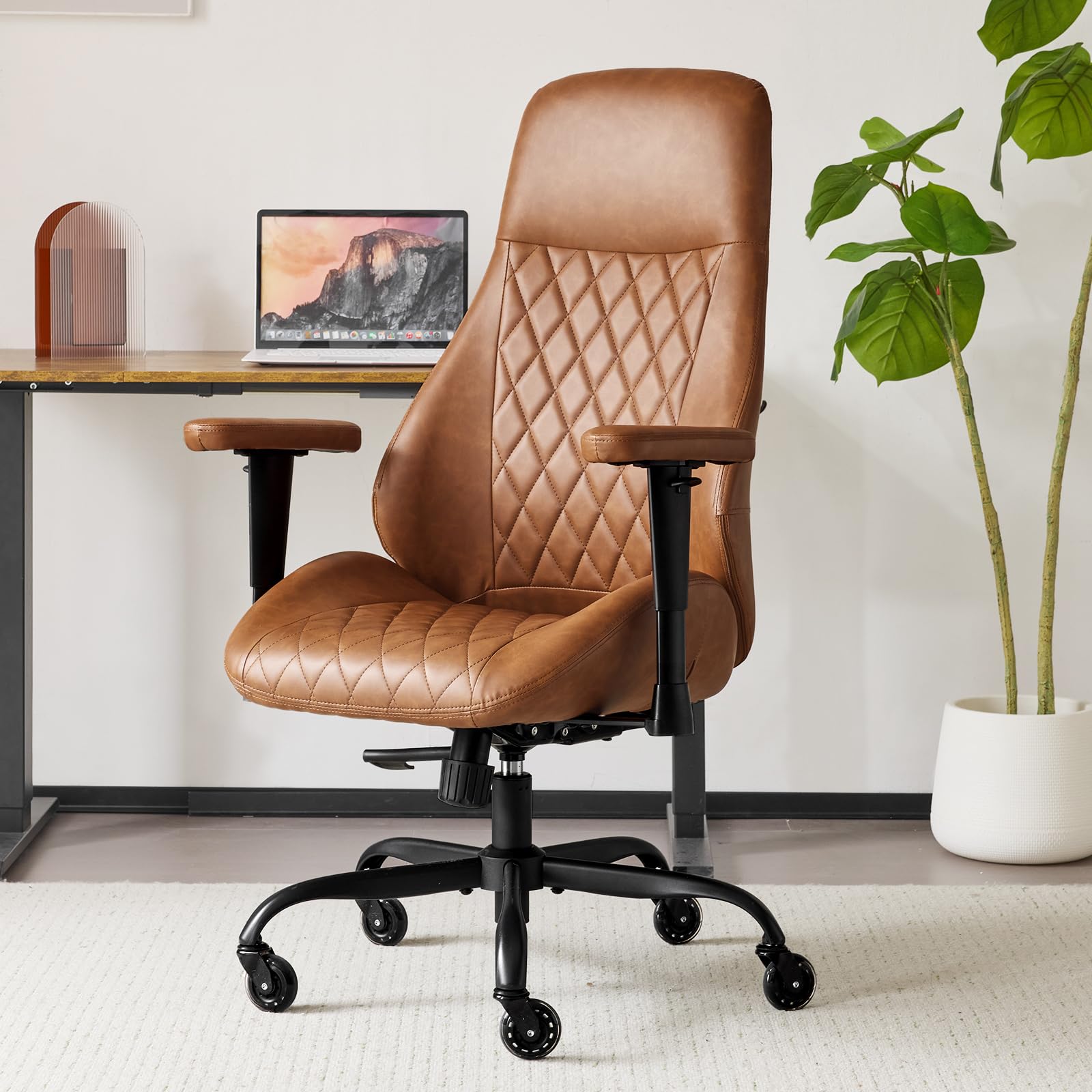
The YFO chair offers an upholstered leather look with a seat cushion built on a spring bag system over a sturdy wooden board and soft foam. This construction provides a much more resilient seat than standard foam-only chairs—the springs absorb weight and bounce back, maintaining comfort for extended periods without the bottom-out feeling common in budget office chairs. At a price point that competes with basic mesh chairs, this build quality is noteworthy for a leather-style option.
The chair comes in both a high-back version (with adjustable arms and recline) and a mid-back version (without those features)—make sure to select the high-back version if you want armrest adjustability and reclining. The rubber casters are designed to glide smoothly over wood floors, carpets, and marble without scratching, adding value for users with mixed flooring. Assembly is straightforward with clearly labeled parts.
The faux leather upholstery resembles Naugahyde and feels durable, though it lacks the breathability of mesh—users in warm climates may experience sweating. The chair also lacks substantial lumbar support, so coders with lower back issues may need an additional cushion. The 24.5-inch seat width is generous, accommodating larger body types better than many budget chairs, but the lack of adjustable lumbar and limited height adjustment hold it back from being a true ergonomic tool.
Why it’s great
- Spring bag seat cushion provides resilient support that does not bottom out easily.
- Rubber casters work silently on multiple floor types without scratching.
- Generous seat width accommodates various body sizes comfortably.
Good to know
- Faux leather lacks breathability—can trap heat during long sitting sessions.
- No adjustable lumbar support; requires an additional cushion for back pain relief.
- Mid-back version lacks armrest adjustability and recline—choose the high-back model.
FAQ
What lumbar support type is best for a coding chair used 8+ hours daily?
Should I choose a mesh back or an upholstered back for a coding chair?
Final Thoughts: The Verdict
For most users, the best coding chair winner is the Steelcase Leap because its 3D LiveBack and lumbar firmness dial provide the most precise back support across all sitting positions, backed by research-driven engineering. If you want a responsive memory foam seat that relieves pressure points without needing a gaming-level lumbar system, grab the Tempur-Pedic TP9000. And for a tech-forward option with auto-lumbar tracking and integrated massage, nothing beats the Hbada X7.

Mo Maruf
I created WellFizz to bridge the gap between vague wellness advice and actionable solutions. My mission is simple: to decode the research and give you practical tools you can actually use.
Beyond the data, I am a passionate traveler. I believe that stepping away from the screen to explore new environments is essential for mental clarity and physical vitality.