Our readers keep the lights on and my smoothie glass nicely filled. As an Amazon Associate, I earn from qualifying purchases.
Specs are compiled from manufacturer listings and verified buyer reviews and can change over time — please confirm the key details on the product page before buying.
You head home with groceries in both arms, and your free hand fumbles for keys. A code deadbolt fixes that: you punch in a number, press a fingerprint reader (a tiny scanner that reads your fingerprint’s unique ridges), and the door unlocks. It locks itself behind you. With dozens of models promising Wi-Fi (wireless internet to control the lock from your phone from anywhere) and auto-lock timers (a setting that makes the bolt slide shut after a set delay), it is hard to know which one lasts years, not just months.
I’m Mohammad Maruf — the founder and writer behind WellFizz. This guide is built by comparing the manufacturers’ published specifications and the patterns across verified customer reviews, so you get each pick’s real strengths and trade-offs instead of marketing spin.
Every deadbolt here replaces your old keyed lock with a keypad (a number-pad on the outside), a fingerprint scanner (a touch sensor that reads your skin’s pattern), or both. After comparing seven top models, the advice depends on a few clear winners. The best code deadbolt for most homes gives you fast entry, rock-solid reliability, and an app that actually works.
Quick Picks
- Tapo Smart Wi-Fi Door Lock DL110 — Best Overall
- Philips Wi-Fi Door Lock DDL242X-1HW — Top Performer
- Philips Wi-Fi Smart Door Lock 1HB+Wi-Fibridge — Fastest Fingerprint
- Veise VE06-L Smart Lock with 2 Lever Handle Set — Most Versatile
- TEEHO TE012W WiFi Smart Lock — Budget Champion
- Amazon Basics Contemporary Electronic Keypad Door Lock with Handle Set — Best Value Set
- Kwikset Powerbolt 240 5-Button Keypad Venetian Bronze Traditional Electronic Deadbolt — Budget Pick
How To Choose The Best Code Deadbolt
A code deadbolt is the first thing your hand touches every time you come home. Picking the wrong one means sticky keypads, dead batteries at the worst moment, or a lock that fails after a few months. Here is what actually matters.
Battery Life and Power Type
Most electronic deadbolts run on AA alkaline batteries (a standard single-use battery). A lock with 4 AA batteries typically lasts around 12 months. A lock with 8 AA batteries often claims the same duration but also powers features like Wi-Fi and fingerprint scanning. Some newer models pack a rechargeable battery pack (a built-in battery you recharge via USB) that lasts a full year — no more hunting for AA batteries at midnight.
Authentication Methods: Keypad vs Fingerprint vs App
A plain keypad is the simplest — you type a 4-to-6 digit code, and a motor turns the bolt (a metal bar that slides into the door frame) to unlock it. The catch is that codes can be seen over your shoulder. A fingerprint sensor (a touch pad that reads your fingerprint’s ridges) adds speed (usually under one second) and cannot be copied easily, but some scanners struggle with wet or very dry fingers in cold weather. App control via Wi-Fi or Bluetooth (a short-range wireless signal that connects to your phone within about 30 feet) is convenient for letting in a dog walker while you are at work, but it consumes more battery, and every app is not created equal — clunky interfaces kill the convenience.
Auto-Lock and Security Alerts
Auto-lock is the feature that makes a code deadbolt truly set-and-forget: you set a timer (30 seconds, 1 minute, up to 3 minutes), and the deadbolt throws itself behind you so your door is always locked. Intrusion alerts (a warning that sounds after several wrong code attempts) are standard on most models here. Make sure the lock you choose lets you adjust or disable the auto-lock timer, because a door that locks itself too fast can hit you on the way out.
Quick Comparison
| Model | Best For | Auth Methods | Battery | Auto-Lock Range | Amazon |
|---|---|---|---|---|---|
| Tapo DL110 | Set-and-forget reliability | Fingerprint / Code / App / Key | Rechargeable 1-year | Not specified | Amazon |
| Philips DDL242X-1HW | Built-in Wi-Fi convenience | Fingerprint / Code / App / Key | 8 AA (not included) | 10–180 sec | Amazon |
| Philips 1HB+Wi-Fibridge | Fast fingerprint plus app control | Fingerprint / Code / App / Key | 8 AA | 30–180 sec | Amazon |
| Veise VE06-L | Multi-user access (landlords) | Code / IC Card / App / Key | 4 AA (not specified) | 5–900 sec | Amazon |
| TEEHO TE012W | Budget-friendly fingerprint plus Wi-Fi | Fingerprint / Code / App / Key | 8 AA (not included) | 10–180 sec | Amazon |
| Amazon Basics Keypad Deadbolt | Simple keypad + handle set | Code / Key | 4 AA (not specified) | Not specified | Amazon |
| Kwikset Powerbolt 240 | Budget bare-bones keypad | Code / Key | 4 AA (12-mo claim) | 30 sec / 1 / 3 / 5 / 10 min | Amazon |
In‑Depth Reviews
1. Tapo Smart Wi-Fi Door Lock DL110

The featherweight of worry — a rechargeable deadbolt that recognizes your fingerprint in half a second.
No smart lock should force you to keep a stack of AA batteries in the junk drawer. The Tapo DL110 skips that with a removable rechargeable battery pack that the maker claims lasts a full year. When the battery runs low, you unplug the pack and charge it via USB — no midnight dash for alkaline cells. Reports from reviewers indicate the battery was still above 95% after the first month of heavy use, including Wi-Fi connectivity and frequent fingerprint scans.
That fingerprint sensor unlocks in 0.42 seconds and stores up to 100 different fingerprints. A long-term owner noted that after six months, the scanner still works fast even with wet or dirty hands — a common weak point for cheaper fingerprint locks. You get six total ways in: fingerprint, passcode (a 4- to 6-digit code you type), Wi-Fi app, Bluetooth (short-range wireless to your phone), voice assistant, and the included backup keys. While the auto-lock timer is not specified in the specs, the BHMA Grade 2 rating (a durability test that measures 150,000 cycles, as defined by the Builders Hardware Manufacturers Association) puts it a notch above the Grade 3 locks (100,000 cycles) common at this price. That means it was tested for more open-close cycles and higher security.
Compared to the Kwikset Powerbolt 240 below, the Tapo gives you a fingerprint reader and rechargeable battery for roughly the same premium-tier cost. The catch is that the integrated battery means you cannot just swap in fresh AAs if you forget to charge — though the included USB charger and backup key are safety nets.
Why it stands out
- Removable rechargeable battery lasts a year — no AA hunting.
- Fingerprint sensor works in wet or dirty conditions, per owner reports.
- BHMA Grade 2 — tested for more cycles than typical Grade 3 locks.
The trade-off
- If the battery dies and you have not charged it, you use the backup key or app.
- No auto-lock timer spec provided — you rely on app-based settings.
Who it fits: Anyone who wants a set-and-forget deadbolt with a fingerprint reader and never wants to buy AA batteries again.
One thing to know: The battery pack is rechargeable, not hot-swappable — keep the USB cable handy if you travel a lot.
2. Philips Wi-Fi Door Lock DDL242X-1HW

Built-in Wi-Fi without a separate hub — lock and unlock your door from anywhere, no extra gadget required.
Many Wi-Fi deadbolts need a separate bridge or gateway plugged into your router to connect the lock to the internet. The Philips DDL242X-1HW has its Wi-Fi radio built right in, so you pair it directly with your 2.4 GHz network (the standard home Wi-Fi frequency band) and control it from the Philips Home Access app instantly. That means you can let in a guest from the office or check if the door is locked from bed without buying extra hardware. Buyers report the app is smooth, and the Alexa (Amazon’s voice assistant) and Google Assistant voice control works reliably.
You get four ways in: a fingerprint sensor, a backlit keypad (a number pad that glows in the dark for night use), the app, and two physical keys. The lock supports up to 100 custom passcodes (permanent codes you set for family), plus unlimited one-time and scheduled codes — perfect for a dog walker who needs access every Tuesday at 3 PM. The auto-lock timer is adjustable from 10 to 180 seconds. At 1.4 pounds, it is noticeably lighter than the Amazon Basics deadbolt with handle set (3.8 pounds), meaning less bulk hanging off your door. One reviewer who replaced a faulty Ultraloq with this Philips called the app and built-in Wi-Fi “superior.”
The trade-off is that this lock uses 8 AA batteries — you will go through them faster if you use Wi-Fi remote control a lot. Also, it does not include a door sensor (a small magnet that detects when the door is fully closed), so auto-lock works on a timer, not by sensing the door is shut.
What buyers like
- Built-in Wi-Fi means no hub or gateway to buy and plug in.
- Fingerprint scanner is fast and accurate, per multiple owner reports.
- Unlimited one-time and scheduled passcodes via the app.
What to note
- Requires 8 AA batteries — higher upfront cost and more to replace.
- Auto-lock is timer-based, not door-sensor-based; it may lock before the door is fully closed.
Reach for this if: You want full remote control and voice commands without plugging in an extra box.
Consider something else if: You dislike buying 8 AA batteries every 6-12 months and prefer a rechargeable pack.
3. Philips Wi-Fi Smart Door Lock 1HB+Wi-Fibridge
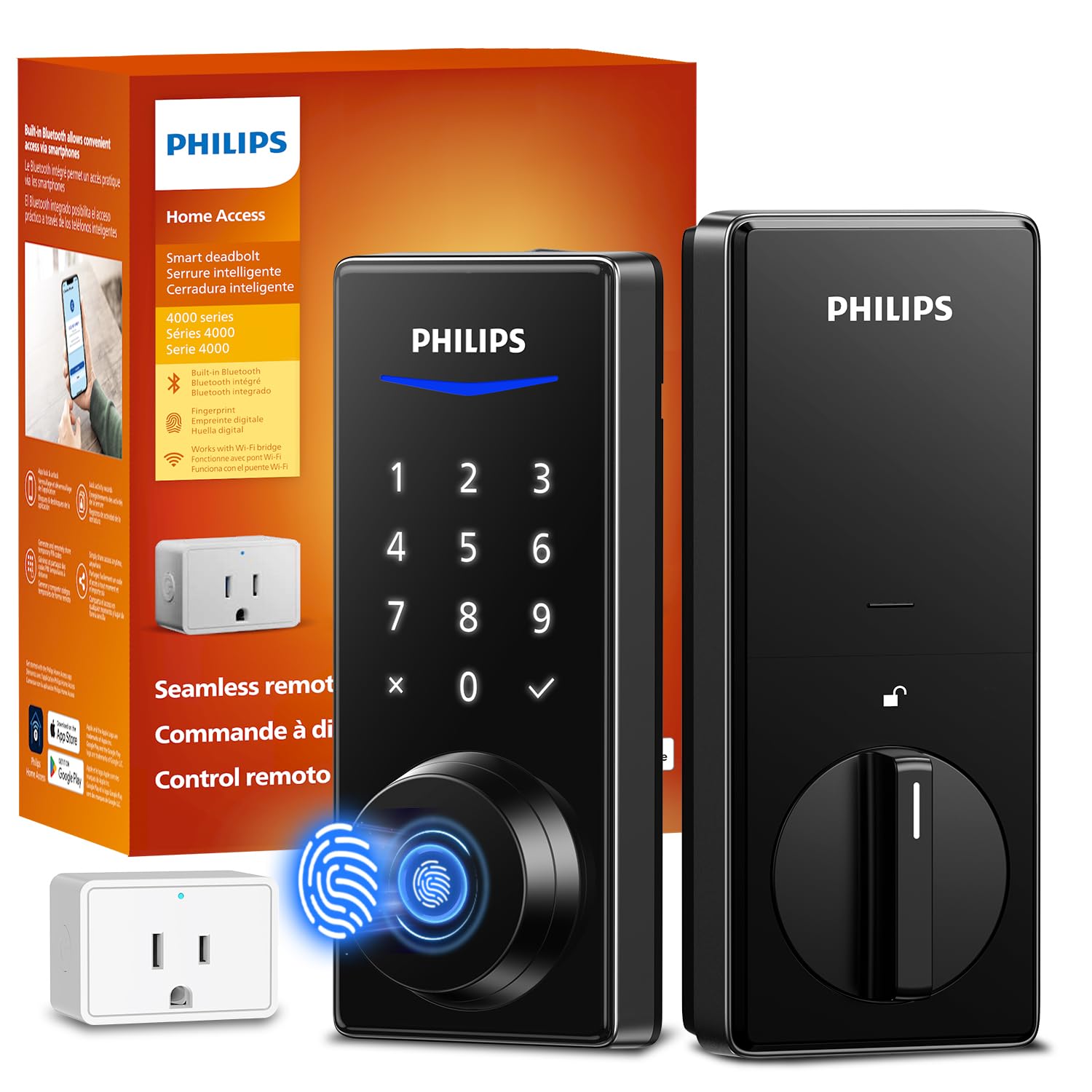
The fastest finger in the house — unlock in less than a third of a second with a claimed 99.99 percent accuracy rate.
Philips makes two Wi-Fi locks, and this one trades built-in Wi-Fi for a slightly different setup: it uses a separate Wi-Fi Bridge adaptor (a small box that plugs into your router and talks to the lock over Bluetooth) included in the box. The bridge handles the Wi-Fi heavy lifting, which can extend battery life compared to a lock with Wi-Fi crammed into the lock body. The fingerprint sensor is the star — the maker claims it unlocks in 0.3 seconds with 99.99 percent accuracy. Buyers mention that the scanner works well for children and adults, and one reviewer noted it even recognizes kids’ fingerprints reliably when the lock is set up with individual profiles.
Auto-lock is adjustable from 30 to 180 seconds. The lock supports unlimited one-time PINs and up to 100 user PINs, with timed and recurring sharing options. The build is solid, and the exterior screws are optional (you drill a 19/32-inch hole if you want extra security on weak doors). Unlike the Tapo DL110 which is Grade 2, this lock does not carry a BHMA grade in its specs, so the Tapo likely has a durability edge. One buyer mentioned that a screw head broke during installation, though the lock itself functioned well after.
Compared with the Philips DDL242X-1HW, this model uses a separate Wi-Fi bridge which may mean longer battery life, but you have one more small box near your router. Both are solid, but this one leans toward fingerprint-first users who value speed over a pure hubless design.
Strengths
- Fingerprint sensor is extremely fast (0.3 seconds) and highly accurate as advertised.
- Separate Wi-Fi bridge may extend battery life versus built-in Wi-Fi.
- Unlimited one-time and temporary PINs via the app.
Weaknesses
- No BHMA Grade listed — may not be as cycle-tested as the Tapo.
- One owner reported a screw head snapping during installation.
Your best bet if: You want the fastest fingerprint read time and do not mind a small Wi-Fi bridge plugged into your router.
Watch for: The installation screws are soft — use a #2 Phillips carefully and do not overtighten.
4. Veise VE06-L Smart Lock with 2 Lever Handle Set

The landlord’s secret weapon — manage a hundred temporary codes and two IC cards without a subscription.
Most deadbolts are just a deadbolt. The Veise VE06-L is a full handle-and-lock set with two levers, making it a complete replacement for a standard door handle plus deadbolt. It unlocks via the keypad, the DDlock app, two included IC cards (smart cards that work like hotel key cards, using a small chip inside), backup keys, or an Apple Watch. That makes it among the most flexible options for rental properties where you want to issue a physical card to a tenant without giving them a metal key. The lock stores more than 250 codes and has a 1,000+ capacity for IC cards.
The auto-lock timer is adjustable from 5 seconds to 900 seconds — the widest range of any lock here, so you can set it to lock almost instantly or leave it unlocked for a full 15 minutes during a party. It is rated IP54 weatherproof (an Ingress Protection rating that means it resists dust and light water spray, but is not fully waterproof) and BHMA/ANSI Grade 3, which is solid for a mid-range residential lock. The catch is that remote app control (via Alexa or Google) requires a separate G2 gateway (sold separately) — without that, the app only works over Bluetooth within about 30 feet. Owners mention that the installation is straightforward with the included videos, and the support team (Aaron and Isabella are named) provides good walkthroughs.
At 3.93 inches depth and 3.8 pounds (roughly the same as the Amazon Basics), it is a bigger unit. Unlike the compact Tapo DL110 at 1.29 inches deep, the Veise has more bulk because of the handle set. It also lacks a fingerprint sensor, so you are typing codes or tapping a card every time.
What makes it special
- Complete handle-and-deadbolt set — replaces your entire entry hardware.
- IC card support (two included) plus 250+ codes, great for landlords.
- Auto-lock timer adjustable from 5 to 900 seconds — best range here.
What holds it back
- Remote app control needs a separate G2 gateway (sold separately).
- No fingerprint reader — codes or IC cards are the main fast methods.
Best for: Rental property owners who need to issue multiple codes and IC cards to guests without sharing a physical key.
Not ideal if: You want a sleek compact lock with a fingerprint sensor — the Veise is bulky and code-only.
5. TEEHO TE012W WiFi Smart Lock
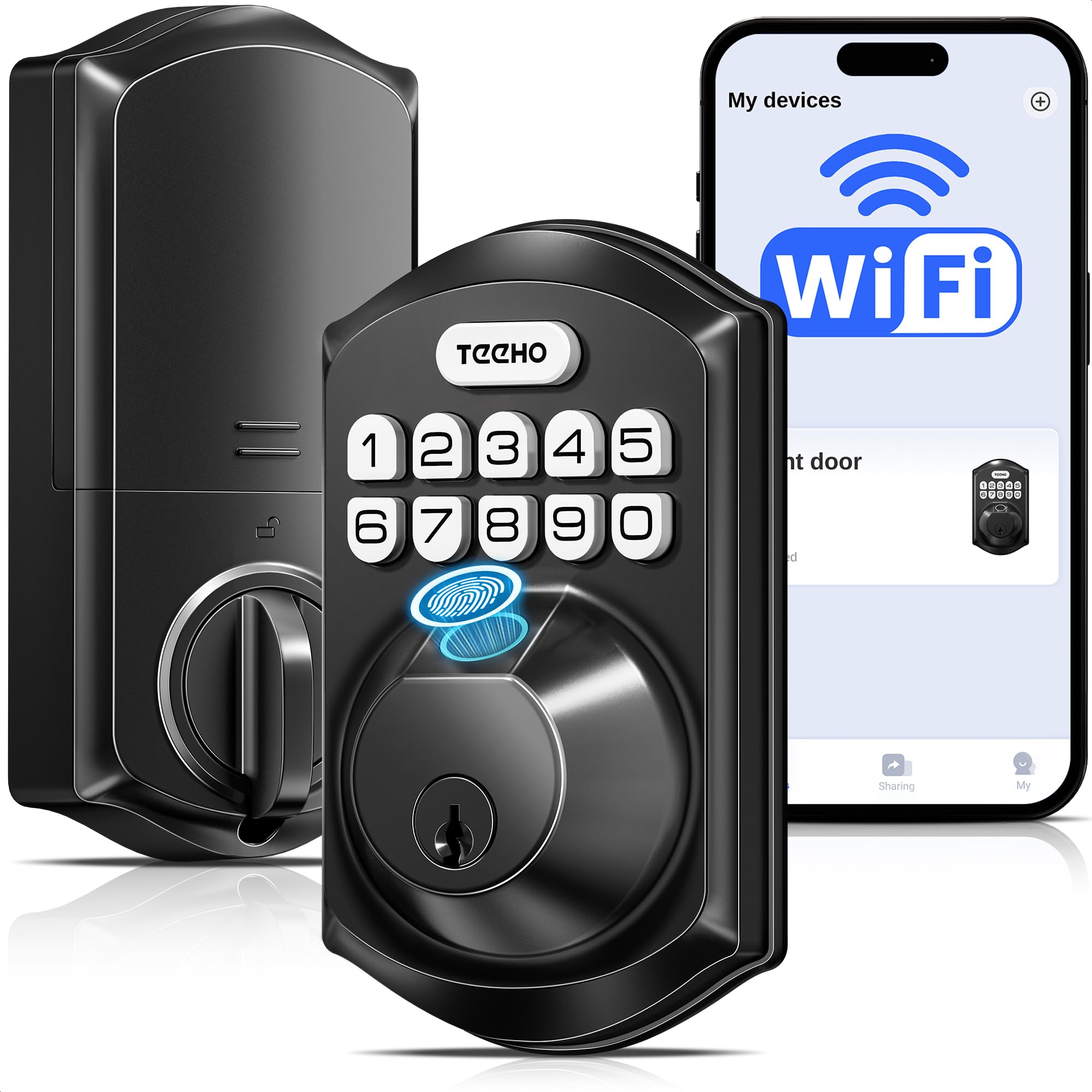
Fingerprint, Wi-Fi, and Alexa for a budget price — the feature list punches way above its cost.
The TEEHO TE012W packs a fingerprint reader, built-in Wi-Fi (2.4 GHz, no hub), app control via the KK Home app, Alexa/Google voice control, and an IP55 weather-resistance rating (an Ingress Protection rating meaning it resists dust and low-pressure water jets, so rain splash is okay) — all at a price that typically gets you a basic keypad lock. It supports up to 20 fingerprint users and 100 passcodes. One owner reported that the first set of batteries lasted more than 36 weeks through a cold winter with heavy daily use, which is impressive for an 8-AA lock. Another reviewer mentioned it was easy to install in a metal-clad mobile home door, though it needed a deeper bolt hole and some chisel work.
The auto-lock is adjustable from 10 to 180 seconds, and you can one-touch lock by holding any key for two seconds. The lock has an anti-peeping password feature (you type random digits before and after your real code so someone watching cannot steal it). The break-in detection locks the keypad for three minutes after 10 incorrect attempts. All of this runs on 8 AA batteries, and some customers note that the lock does not work with 4 AA batteries despite the larger compartment. Compared with the Kwikset Powerbolt 240 (1.8 pounds, basic 5-button keypad), the TEEHO is a major feature jump — fingerprint and Wi-Fi for a similar budget price point.
The main negative from reviews: the KK Home app is large (120 MB) and some users report occasional “abnormal state” alerts and Alexa routines that do not always fire. The interior feels plastic, and if you have non-standard doors, you may need tools beyond a screwdriver.
Budget value
- Fingerprint + built-in Wi-Fi + Alexa for an entry-level price.
- Battery life reported at 36+ weeks even in cold weather.
- IP55 weatherproof rating for outdoor exposure.
Budget trade-offs
- 8 AA batteries needed — some users were surprised it does not work on 4.
- App can be buggy with occasional alerts and unreliable Alexa routines.
Who should grab it: Anyone on a tight budget who still wants fingerprint access and Wi-Fi remote control without paying mid-range prices.
One honest caveat: Be prepared for a slightly clunky app experience and have backup keys handy for the rare abnormal-state alert.
6. Amazon Basics Contemporary Electronic Keypad Door Lock with Handle Set

Five years and one battery change — a buyer’s report of a lock that outlasted their expectations.
The Amazon Basics lock is a straightforward keypad deadbolt with a passage lever handle — meaning it replaces both your deadbolt and your doorknob in one package. At 3.8 pounds and 15.98 x 6.1 x 3.07 inches, it is physically the largest and heaviest unit in this comparison. It uses a 6-way adjustable latch (a bolt that can be set to fit different door hole depths) that fits both 2-3/8-inch and 2-3/4-inch backsets (the distance from the door edge to the center of the lock hole), and the reversible lever works on left-handed and right-handed doors. The matte black finish and zinc/steel/stainless-steel construction give it a sturdy feel. One glowing 5-star review from a buyer who owned it for five-plus years said: “5 years later and still working excellently! I maybe had to change batteries 1x!” That kind of long-term durability report is rare for a budget-priced lock — the Kwikset Powerbolt 240 below has a reviewer reporting a plastic button cap failure at 11 months.
The lock is rated for indoor use only, so do not mount it on an uncovered front door exposed to rain. It uses 4 AA batteries (not included) and has a lit keypad for night use. The auto-lock feature is mentioned but no timer range is specified in the specs. Some reviewers report that the striker plate (the metal piece on the door frame where the bolt slides into) may need adjustment for a perfect fit, and one unit arrived defective. The 14% one-star review rate on Amazon is a notable red flag — a small but meaningful batch of units seem to die after a few months.
Compared with the Tapo DL110 above, the Amazon Basics lacks a fingerprint sensor, Wi-Fi, and app control entirely — it is a simple code-or-key lock with a handle.
The upside
- Complete door handle and deadbolt set — one purchase replaces everything.
- Long-term reviewers point out 5+ years of reliable operation.
- Zinc and steel construction feels solid for the price.
The downside
- 14% one-star review rate suggests quality control is inconsistent.
- Indoor use only — not weather-sealed for exposed front doors.
Ideal if: You want a one-piece keypad handle set on a budget and do not need Wi-Fi or fingerprint access.
skip it if: Your door is exposed to direct rain or you want the confidence of a more consistent brand.
7. Kwikset Powerbolt 240 5-Button Keypad Venetian Bronze Traditional Electronic Deadbolt

The bare-bones keypad lock that asks for nothing but four AA batteries and gets out of your way.
The Kwikset Powerbolt 240 is the cheapest deadbolt in this lineup, and it shows — there is no fingerprint sensor, no Wi-Fi, no app, no handle set. Just a 5-button keypad, a motorized deadbolt, and a backup key. You get up to 12 user codes plus 2 one-time codes, auto-lock with five timer options (30 seconds, 1, 3, 5, or 10 minutes), an intrusion alarm that sounds after 3 wrong attempts, and a vacation mode that disables the keypad entirely (so intruders cannot guess codes while you are away). The bright LED keypad lights up with a tap for low-light entry. At 1.8 pounds and just 1.03 x 2.69 x 4.44 inches, it is the smallest and lightest deadbolt here — the Amazon Basics above is roughly 15 times as large by volume and about 2.1 times heavier.
Reviewers report that installation takes under 20 minutes with a screwdriver, and many praise the fast unlock (under one second) and automatic re-lock. However, the plastic construction is a recurring complaint. One buyer specifically reported: “Plastic button cap failed at 11 months in sun.” Earlier batches of this model reportedly used metal parts, but recent versions have switched to plastic, which some buyers view as a downgrade. The Kwikset also needs a deeper deadbolt hole than some doors have — one customer observed needing a 1-cm deeper hole for the bolt to work.
If you compare it spec-for-spec with the TEEHO TE012W above (which adds fingerprint and Wi-Fi for a small premium), the Kwikset feels dated. But if you just want a deadbolt that codes and nothing else, and you keep the keypad out of direct sun, it is functional and cheap.
What works
- Fast unlock under one second, per multiple buyer reports.
- Five auto-lock timer options including a 10-minute delay.
- Vacation mode disables the keypad entirely for confidence.
What fails
- Plastic button cap can fail in direct sunlight within a year.
- Recent models are plastic-cased, not metal like older versions.
Use it for: A covered back door or garage entry where you need a basic code lock and do not want to spend much.
Consider something else if: Your door faces the sun all day — the plastic keypad may not survive a full year outside.
Understanding the Specs
BHMA/ANSI Grade
This is the rating that tells you how many open-and-close cycles a lock can endure before wearing out. Grade 1 is commercial-grade (hundreds of thousands of cycles), Grade 2 is heavy residential (about 150,000 cycles), and Grade 3 is standard residential (about 100,000 cycles). Most code deadbolts in this guide are Grade 3. The Tapo DL110 is a Grade 2 lock, meaning it should outlast a Grade 3 lock in a busy household. If your front door gets opened 20 times a day, a Grade 2 lock could last roughly 20 years versus 13 for a Grade 3 — but both will likely outlive your interest in changing batteries.
Built-in Wi-Fi vs Bridge
Some smart locks have the Wi-Fi radio built directly into the lock body. That means you connect it straight to your router without extra hardware, but the constant Wi-Fi signal can drain batteries faster. Other locks use a separate “bridge” or “gateway” — a small box plugged into your router that handles the Wi-Fi connection, while the lock talks to the bridge via Bluetooth (a short-range wireless signal). The bridge approach generally gives better battery life because the lock uses lower-power Bluetooth to reach the bridge a few feet away. The Philips 1HB+Wi-Fibridge uses this method; the Tapo DL110 and the Philips DDL242X-1HW have built-in Wi-Fi.
FAQ
Will a code deadbolt fit my existing door hole?
How long do the batteries last in a keypad deadbolt?
What happens if the battery dies and I am locked out?
Do Wi-Fi deadbolts work if the internet goes out?
Can I use a code deadbolt on a metal door?
What is the difference between a code deadbolt and a smart lock?
Are code deadbolts safe against lock picking?
Can I share temporary codes with a dog walker or Airbnb guest?
Do code deadbolts work with smart home systems like Alexa or Google?
How do I install a code deadbolt?
Final Thoughts: The Verdict
For most buyers, the best code deadbolt winner is the Tapo DL110 because it combines a blazing-fast fingerprint sensor (0.42 seconds) with a rechargeable battery that lasts a full year and a solid BHMA Grade 2 rating — you never buy batteries and never worry about lock failure. If you want built-in Wi-Fi without a hub and a proven app experience, grab the Philips DDL242X-1HW. And for a budget-friendly option that still gives you fingerprint and Wi-Fi, the TEEHO TE012W is the one to buy.
How We Picked
We do not accept paid placement. Every pick is matched to a real buyer and a real use-case; we do not hands-on test units.
Sources & Methodology
Specifications: manufacturer listings and product documentation. Review insights: verified customer reviews, as of July 2026. Pricing: not shown on this page (it changes often); check the current price via the retailer link.
As an Amazon Associate, WellFizz earns from qualifying purchases. This does not affect which products we feature.

Mo Maruf
I created WellFizz to bridge the gap between vague wellness advice and actionable solutions. My mission is simple: to decode the research and give you practical tools you can actually use.
Beyond the data, I am a passionate traveler. I believe that stepping away from the screen to explore new environments is essential for mental clarity and physical vitality.