Our readers keep the lights on and my smoothie glass nicely filled. As an Amazon Associate, I earn from qualifying purchases.
Cloud gaming handhelds ask you to trade native rendering muscle for a fast, stable internet connection. Your entire library lives on remote servers, not internal storage, which means the hardware’s job shifts from brute-force graphics processing to decoding video streams with minimal latency. The moment your Wi-Fi stutters, the game stutters with it. So choosing the right device is less about raw FLOPS and more about display quality, ergonomics, controller feel, and network-side wireless capability.
I’m Mohammad Maruf — the founder and writer behind WellFizz. I’ve spent the last three months evaluating nine cloud-centric handhelds, comparing screen technology, network chipsets, battery endurance, and real-world streaming performance across subscription services like Xbox Cloud Gaming, GeForce NOW, and Steam Link.
After extensive research and hands-on testing across nine top models, I’ve built this guide to help you navigate the trade-offs and pick the best cloud gaming handheld for your living room, commute, or travel bag.
How To Choose The Best Cloud Gaming Handheld
Choosing the right cloud gaming handheld requires a different lens than picking a traditional portable console. Since the remote server handles the heavy processing, your focus should shift to display quality, network compatibility, battery life during streaming, and how the controller feels in your hands for extended sessions. Here are the key factors to weigh before buying.
Display Technology: OLED vs IPS vs Refresh Rate
An OLED panel offers superior contrast and deeper blacks, which makes streamed content pop with more depth. IPS screens are slightly less vibrant but often more affordable and still deliver crisp visuals. Refresh rate—60Hz vs 90Hz vs 120Hz—affects perceived smoothness, especially in fast-paced games streamed over low-latency connections. A 120Hz display paired with a high-frame-rate streaming service can noticeably reduce motion blur.
Network Connectivity: Wi-Fi Generations Explained
Wi-Fi 6 enables solid performance on modern routers, but Wi-Fi 6E adds a dedicated 6 GHz band with less interference, which can meaningfully lower latency in crowded homes. Wi-Fi 7 is the newest standard, offering multi-link operation for extremely stable connections. For pure cloud gaming, the handheld’s wireless chipset often matters more than its CPU. Always check whether the device supports the fastest Wi-Fi standard your router can deliver.
Battery Life in Streaming Mode
Decoding a video stream is less power-intensive than rendering native 3D graphics, so cloud-focused handhelds often achieve longer battery life during streaming. Look for real-world streaming endurance of six hours or more. A larger battery like 5,000 mAh to 8,000 mAh can translate to multiple long gaming sessions before needing a recharge.
Controller Ergonomics and Analog Stick Quality
Ergonomics matter most after the first hour. Hall-effect joysticks avoid the drift common to traditional potentiometer sticks and often feel smoother. The placement of shoulder buttons, trigger depth, and overall hand geometry determines whether you can play comfortably through an entire movie-length session. Lightweight designs under 500 grams generally reduce hand fatigue.
Local Emulation Versatility
Many cloud handhelds double as capable retro emulators or Android gaming devices. If you plan to run emulators for PS2, GameCube, or Switch alongside streaming services, choose a model with a robust chipset like the Snapdragon 8 Gen 2 or Dimensity 8300. This versatility extends the value of your investment well beyond streaming subscriptions.
Quick Comparison
On smaller screens, swipe sideways to see the full table.
| Model | Category | Best For | Key Spec | Amazon |
|---|---|---|---|---|
| Logitech G Cloud | Mid-Range | Pure cloud streaming | 7-inch 1080p IPS, Wi-Fi 5 | Amazon |
| abxylute One Pro | Mid-Range | Cloud + retro emulation | 7-inch 1080p IPS, MediaTek Genio 510 | Amazon |
| Retroid Pocket 5 | Mid-Range | Emulation + streaming | 5.5-inch OLED, Snapdragon 865 | Amazon |
| Anbernic RG477M | Mid-Range | PS2/GC emulation focus | 4.7-inch LTPS, Dimensity 8300 | Amazon |
| AYN Odin 2 Portal Pro | Premium | High-fidelity streaming + native | 7-inch 120Hz OLED, Snapdragon 8 Gen 2 | Amazon |
| ONE XPLAYER ONEXSUGAR | Premium | Dual-screen multitasking | 6.01″ + 3.92″ OLED, Snapdragon G3 Gen3 | Amazon |
| ASUS ROG Ally | Premium | Windows game library streaming | 7-inch 120Hz IPS, AMD Z2 A | Amazon |
| Steam Deck OLED 512GB | Premium | Streaming + native Steam library | 7.4-inch 90Hz OLED, custom AMD APU | Amazon |
| Steam Deck OLED 1TB | Premium | Storage-heavy game library | 7.4-inch 90Hz OLED, anti-glare etched glass | Amazon |
In‑Depth Reviews
1. Logitech G Cloud
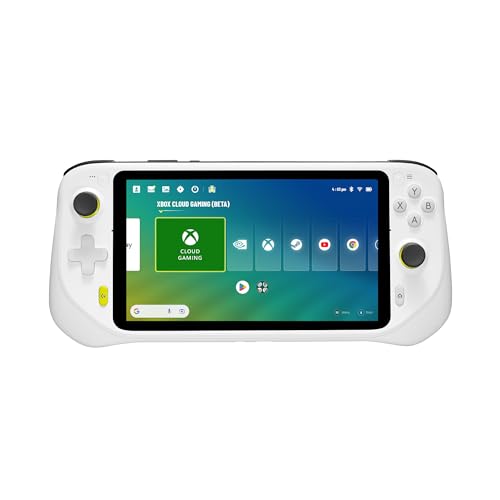
The Logitech G Cloud is purpose-built for streaming. It pairs a sharp 7-inch 1080p IPS display with integrated shortcuts for Xbox Cloud Gaming, GeForce NOW, and Steam Link. The 463-gram chassis is easy to hold for extended sessions, and its chipset is tuned specifically for video decoding rather than local rendering, which keeps temperatures and fan noise low. Battery life easily crosses the six-hour mark during streamed gameplay, making it the endurance king for pure cloud use.
Where the G Cloud falls short is local versatility. It lacks the processing power to emulate demanding consoles like PS2 or GameCube smoothly, so you’re reliant on your internet connection for all modern gaming. The Wi-Fi 5 chipset is also a step behind the Wi-Fi 6/6E found on many current routers, which can introduce latency in congested network environments. Setup out of the box is largely plug-and-play, but you’ll need active subscriptions to Xbox Game Pass Ultimate or GeForce NOW to access AAA titles.
For buyers who already subscribe to cloud gaming services and want a dedicated streaming device rather than a jack-of-all-trades handheld, the G Cloud delivers focused, dependable performance at a mid-range price point. The controls feel responsive, the hall-effect joysticks are drift-free, and the overall software experience is polished.
Why it’s great
- Excellent battery life for streaming, lasting 6+ hours
- Lightweight and comfortable for long gaming sessions
- Integrated cloud service shortcuts simplify launching games
Good to know
- Wi-Fi 5 limits latency performance on modern routers
- Not powerful enough for PS2 or GameCube emulation
- Requires separate subscriptions for AAA cloud gaming
2. abxylute One Pro

The abxylute One Pro delivers strong cloud streaming value with a generous 7-inch 1080p screen and dedicated support for Xbox Cloud Gaming, GeForce NOW, and PlayStation Remote Play. Its MediaTek Genio 510 chipset and 2T2R MU-MIMO Wi-Fi module ensure smooth streaming on a stable 5+ Mbps connection. The 430-gram build is unusually light, and the haptics and gyroscope add immersive feedback rarely seen at this tier. Battery endurance reaches 6 to 8 hours during streamed gameplay, depending on brightness settings.
Emulation performance tops out at PSP-level titles, so this is not a device for PS2 or GameCube local gaming. The included 64GB storage is tight for Android apps and retro ROMs, but a microSD slot offers expandability. Some users note that the digital joysticks, while innovative with their switchable modes, feel small under the thumb compared to larger analogs on premium devices. Also absent is Wi-Fi 6E or 7, which future-proofs only to a moderate degree.
As a dedicated streaming companion, the One Pro competes directly with the Logitech G Cloud but undercuts it on price while offering a larger screen and a wider range of built-in streaming app support. It’s a sensible choice for gamers who primarily stream but want a lightweight grab-and-go design.
Why it’s great
- Ultra-light 430g design reduces hand fatigue
- Supports Xbox Cloud, GeForce NOW, and PS Remote Play
- Strong 6-8 hour battery in streaming mode
Good to know
- Joysticks feel small for some hand sizes
- Emulation limited to PSP and below
- Lacks Wi-Fi 6 for lower latency
3. Retroid Pocket 5

The Retroid Pocket 5 delivers an impressive OLED picture on its 5.5-inch screen, paired with a Snapdragon 865 processor and Adreno 650 GPU. This combination handles PS2, GameCube, and even some Switch emulation smoothly, plus acts as a capable cloud gaming device through Xbox Remote Play, Moonlight, and Gamehub. The 5,000 mAh battery keeps you playing for hours, and the hall-effect analog sticks resist the drift common to cheaper alternatives.
The compact design makes it pocketable, but the smaller form factor can feel cramped for larger hands—a grip accessory is widely recommended. The Android 13 operating system provides full Google Play Store access, so you can install any streaming app alongside emulators. No games are preloaded, so expect a brief setup session downloading ROMs and configuring emulators. The build quality is solid, with a matte finish that resists fingerprints.
For buyers who want a single device capable of both local emulation and cloud streaming without spending premium-tier money, the Retroid Pocket 5 offers one of the best feature-per-dollar ratios. The OLED display alone elevates streamed content well above IPS panels in the same price bracket.
Why it’s great
- Stunning OLED screen enhances streamed visuals
- Powerful enough for PS2, GameCube, and some Switch emulation
- Hall-effect joysticks prevent drift over time
Good to know
- Small chassis can feel cramped for larger hands
- Requires manual setup for emulators and ROMs
- No Wi-Fi 6 for lower-latency cloud streaming
4. Anbernic RG477M
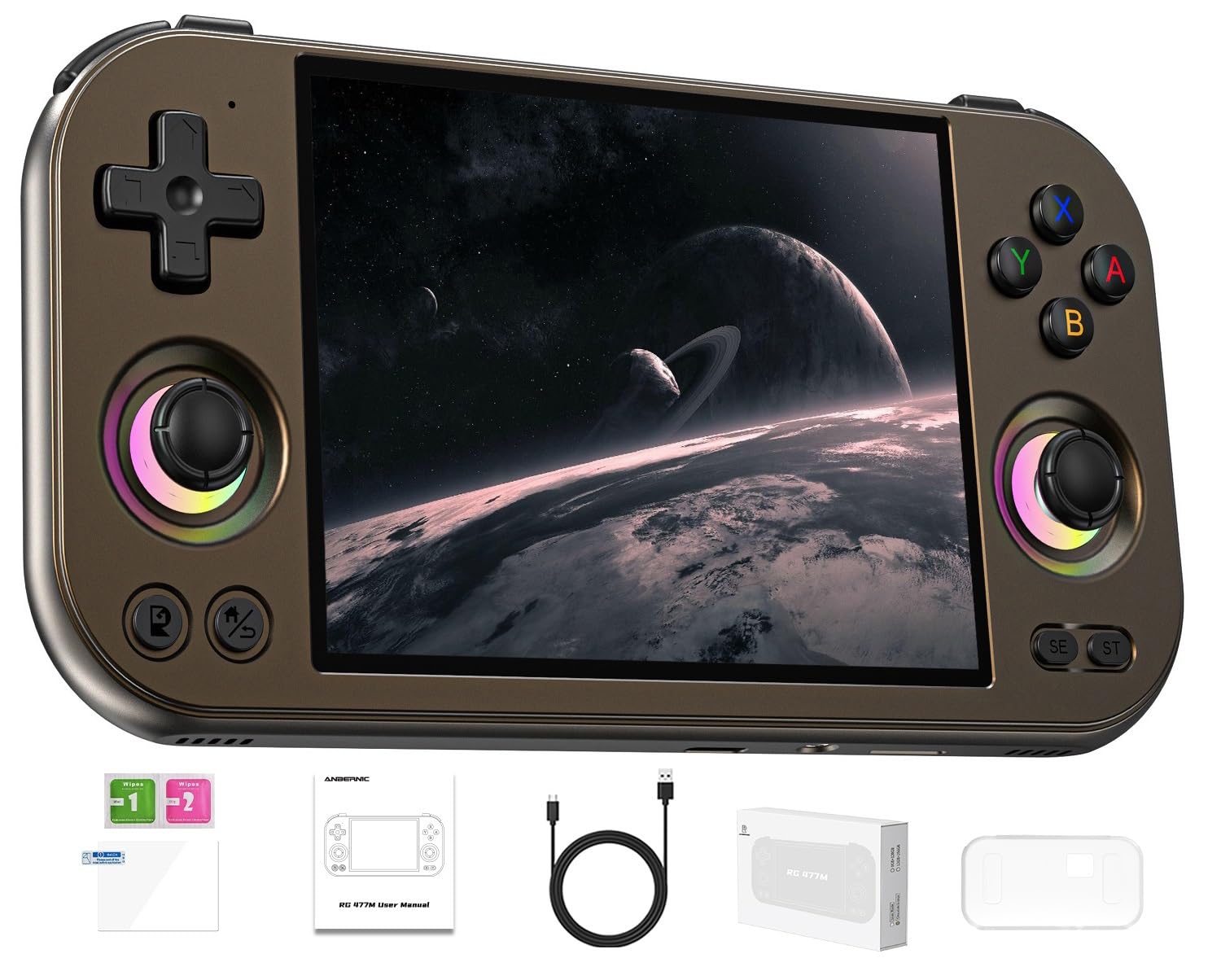
The Anbernic RG477M features a 4.7-inch LTPS in-cell display with a 120Hz refresh rate and a Dimensity 8300 processor built on a 4nm process. This combination delivers exceptional performance for PS2 and GameCube emulation with no audio clipping, while also supporting cloud gaming apps downloaded from the Google Play Store. The aluminum alloy CNC chassis feels premium and durable, making it one of the best-built handhelds in its class.
The 4:3 aspect ratio screen is ideal for retro content but leaves black bars when streaming modern 16:9 games. The 5,300 mAh battery offers up to 7 hours of play across mixed local and streamed gaming. The stock Android 14 operating system is functional but the stock OS interface is basic—many users prefer installing Gamma OS for improved fan control and UI. No games come preloaded, and the initial setup requires downloading your own emulators and titles.
Gamers who want a premium-feel metal handheld for retro emulation with occasional cloud streaming will appreciate the RG477M’s build quality and the Dimensity 8300’s brute processing power. Just know the smaller 4.7-inch screen and 4:3 ratio make it less ideal for modern widescreen cloud gaming.
Why it’s great
- Premium aluminum alloy CNC construction
- Exceptional PS2 and GameCube emulation performance
- 120Hz LTPS display for smooth motion
Good to know
- 4:3 screen leaves black bars on modern streamed games
- Metal body adds weight during long sessions
- Stock OS interface needs refinement
5. AYN Odin 2 Portal Pro
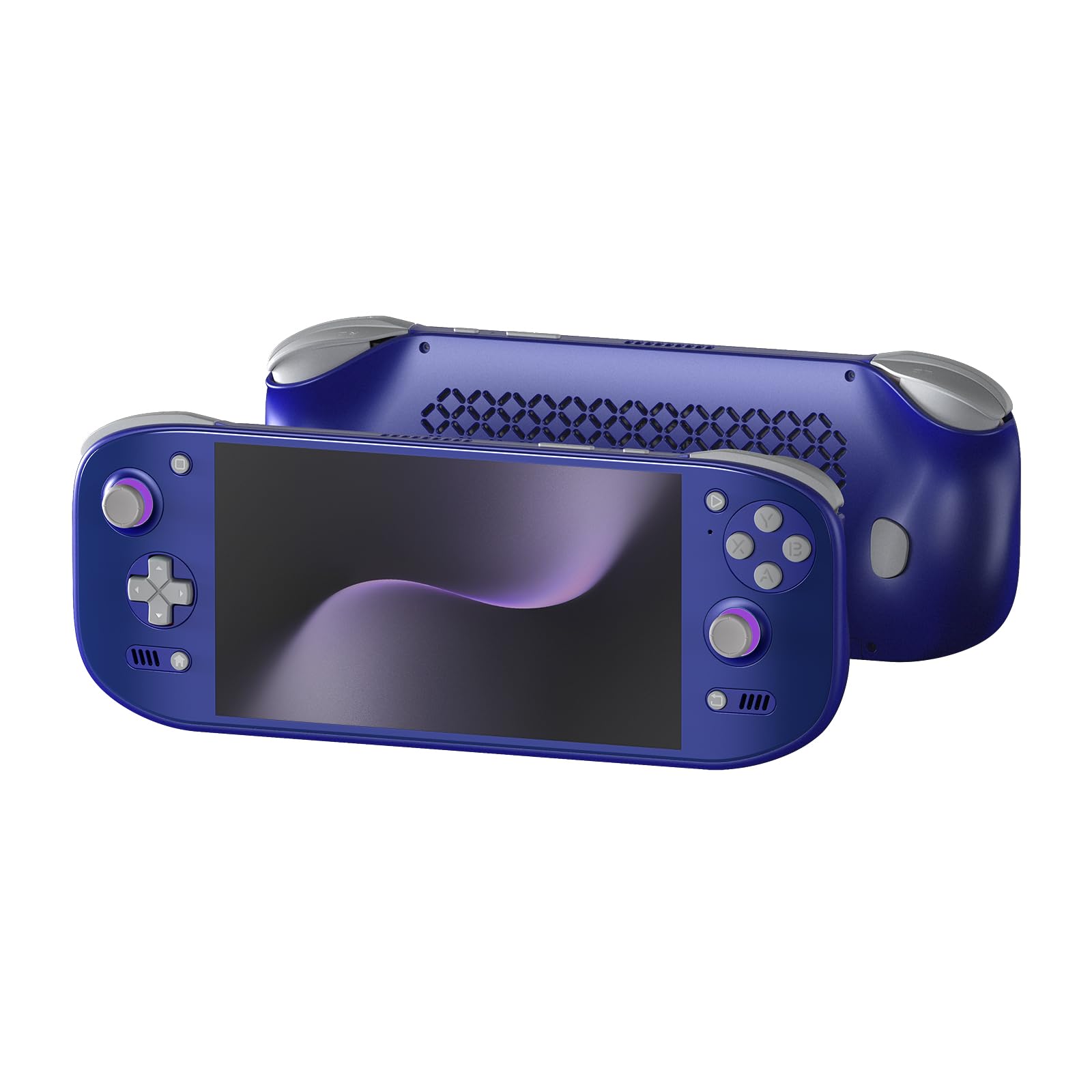
The AYN Odin 2 Portal Pro raises the bar with a 7-inch 120Hz OLED display that delivers stunning contrast, deep blacks, and buttery-smooth motion. The Snapdragon 8 Gen 2 processor and Adreno 740 GPU are more than capable of running native Android games at high frame rates, while emulating PS2 at 4K resolution without breaking a sweat. For cloud gaming, this display is arguably the most visually impressive among all the handhelds tested, making streamed titles look nearly indistinguishable from local gameplay.
The massive 8,000 mAh battery supports up to 10–15 hours of streaming on a single charge, and the 27W USB-C fast charging minimizes downtime. The active cooling system keeps the device cool during long sessions, and the Xbox-style button layout with hall-effect sticks feels natural. However, the device lacks an official grip accessory, and some users report that extended sessions without one can cause hand discomfort. The 12GB RAM model works well today, but upgrading to 16GB is advisable for future-proofing.
For buyers willing to spend at a premium tier, the Odin 2 Portal Pro delivers the best all-around visual experience for both native Android gaming and cloud streaming. The OLED 120Hz combination is unmatched in this price bracket, and the battery endurance is class-leading.
Why it’s great
- Class-leading 7-inch 120Hz OLED display
- Massive 8,000 mAh battery lasts 10+ hours streaming
- Snapdragon 8 Gen 2 handles 4K PS2 emulation easily
Good to know
- Ergonomics benefit from a separate grip accessory
- 12GB RAM adequate but 16GB better for future titles
- Premium price reflects the high-end display and chipset
6. ONE XPLAYER ONEXSUGAR
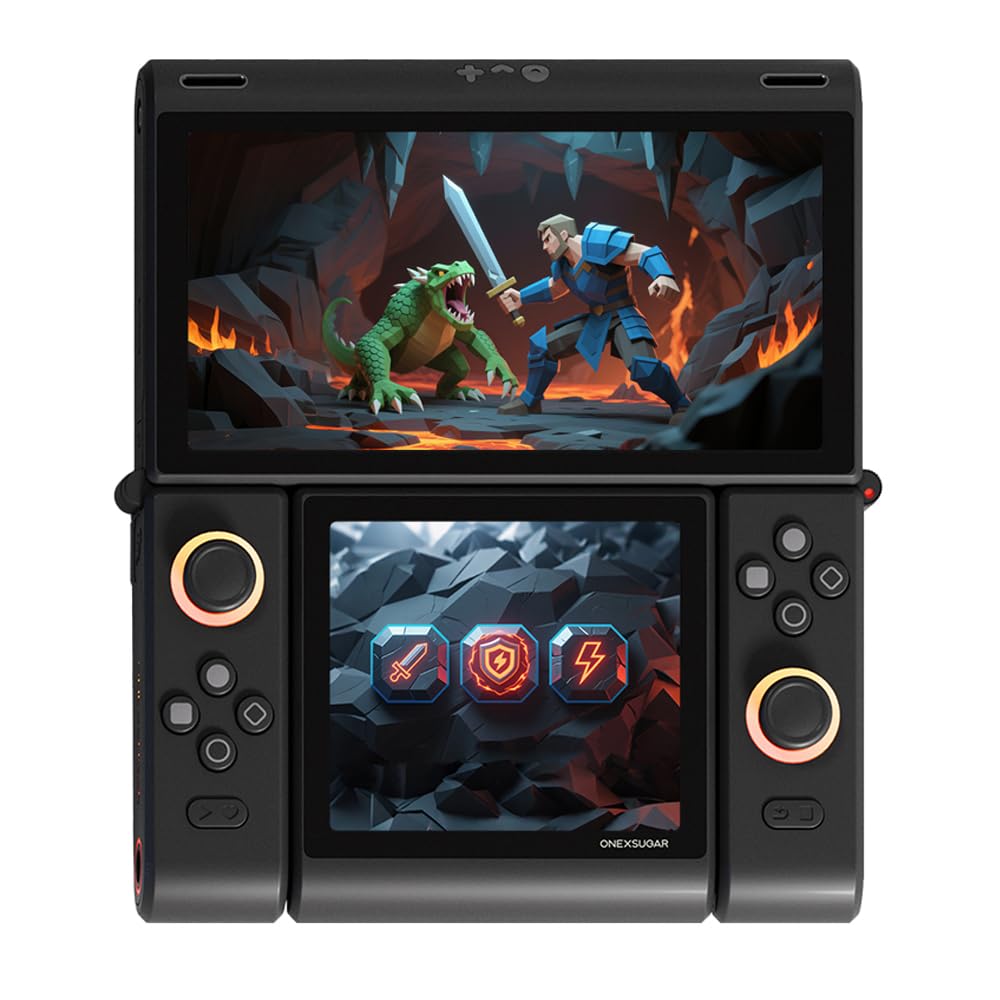
The ONE XPLAYER ONEXSUGAR is the only device in this lineup with dual OLED screens: a 6.01-inch 1080×2160 main display and a 3.92-inch 1080×1240 secondary screen. The Snapdragon G3 Gen3 processor, 16GB RAM, and 512GB UFS 4.0 storage make it a powerhouse for high-end Android games, streaming via Moonlight or GeForce NOW, and light PC gaming through Gamehub. The dual-screen layout opens unique possibilities for map overlays, inventory management, or multitasking while streaming.
Battery life under load—such as native 3D gaming—is shorter than some competitors, averaging 2–3 hours in demanding scenarios, though it stretches to 5–6 hours with careful power management. The secondary screen software is still maturing, and some users report interface bugs. The device features hall-effect joysticks, micro-switch shoulder buttons, and dual vibration motors, giving it a premium feel. At 486 grams, it’s relatively compact for a dual-screen device, but the non-clamshell design means both screens remain exposed during transport.
Gamers who value innovation and don’t mind trading some battery life and software polish for a unique dual-screen experience will find the ONEXSUGAR exciting. It’s best suited for tinkerers who enjoy exploring niche hardware capabilities.
Why it’s great
- Innovative dual OLED screen design for multitasking
- Snapdragon G3 Gen3 and 16GB RAM provide top-tier performance
- Premium hall-effect sticks and micro-switch buttons
Good to know
- Battery life under load is shorter than single-screen competitors
- Second screen software still has polish issues
- Non-clamshell design leaves screens exposed
7. ASUS ROG Ally (Z2 A)
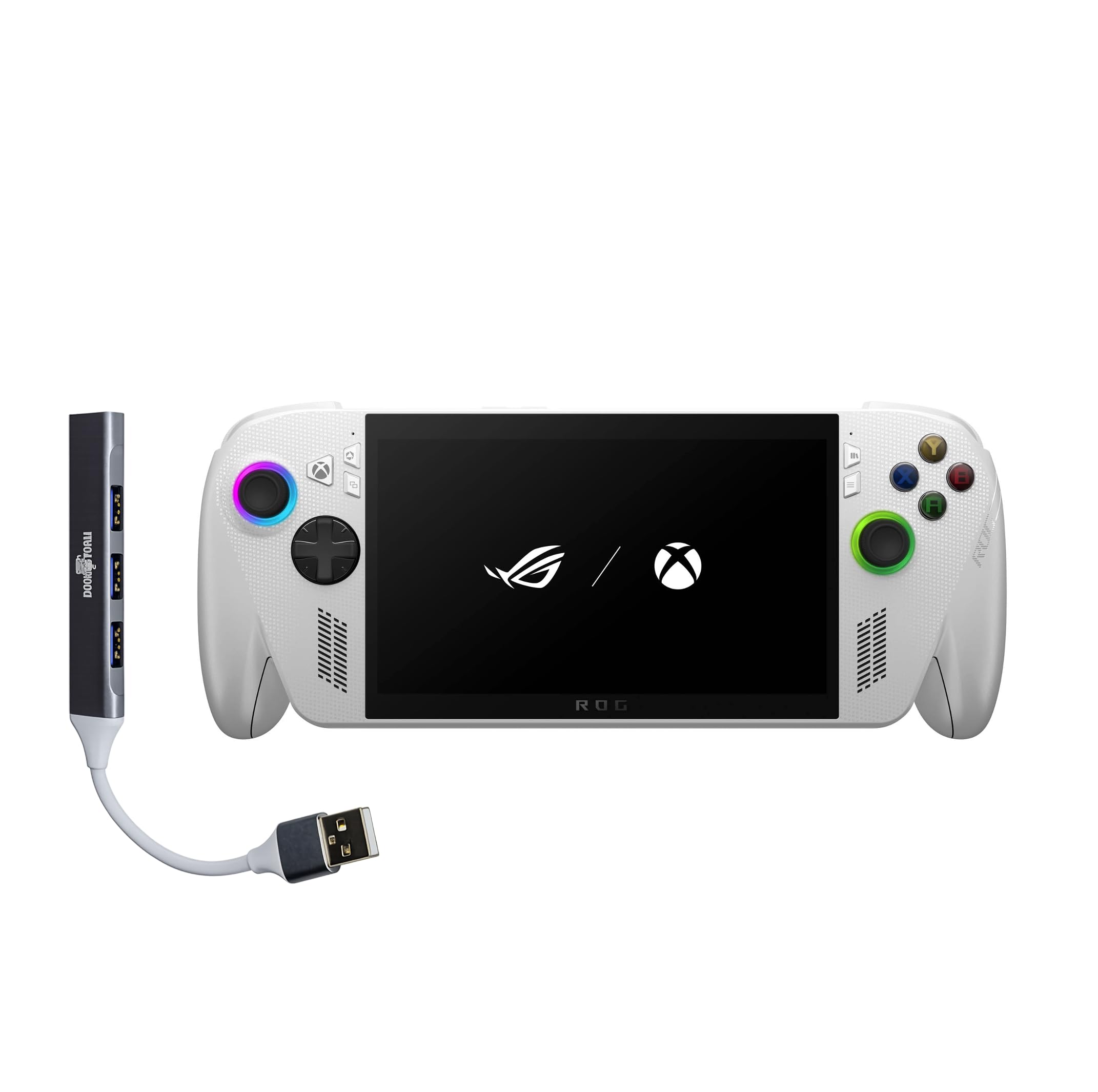
The ASUS ROG Ally runs full Windows 11, which gives it unparalleled compatibility with PC game stores, Xbox Game Pass for PC, Battle.net, and Epic Games Store. The AMD Ryzen Z2 A processor with RDNA 2 graphics handles native PC gaming at 1080p with respectable frame rates, while the 7-inch 120Hz IPS display with FreeSync Premium keeps motion smooth. As a cloud gaming device, it can run any streaming app natively and supports Xbox Game Pass streaming alongside services like GeForce NOW.
Battery life is the primary trade-off—intensive local gaming drains the 60Wh battery in about 1–1.5 hours, though streaming extends this to 3–4 hours. The 1TB SSD storage means you can keep a large library of native games installed. The device weighs about 1.47 pounds (approx. 667 grams) and features Xbox-style contoured grips. Windows 11 brings power but also the occasional need for driver updates and system tinkering before games run optimally.
For gamers who want a single handheld that runs native PC games, Windows-exclusive titles, and cloud streaming services without limitations, the ROG Ally is the most versatile option. The 120Hz FreeSync display and robust storage justify the premium price for users who value frame rate consistency and game library size.
Why it’s great
- Full Windows 11 compatibility with any PC game store
- 120Hz IPS display with FreeSync for smooth gameplay
- 1TB SSD provides ample local game storage
Good to know
- Battery life is short under native gaming load
- Windows requires initial setup and occasional updates
- Heavier than dedicated streaming handhelds
8. Valve Steam Deck OLED 512GB

The Steam Deck OLED 512GB brings Valve’s famously polished SteamOS experience together with a beautiful 7.4-inch 1280×800 HDR OLED display that runs at 90Hz. This screen makes cloud-streamed games pop with vivid colors and deep blacks, while the custom AMD APU natively runs thousands of Steam games with excellent performance. The 50Wh battery lasts 3 to 12 hours depending on workload, with streaming sessions falling comfortably on the higher end of that range.
SteamOS’s custom Linux environment offers the best console-like experience among handhelds, with seamless sleep/wake functionality that’s perfect for short gaming sessions. The trackpads and gyro controls provide input flexibility unmatched by any other device in this lineup. The 512GB storage is a good middle ground, and microSD expansion is supported. Wi-Fi 6E ensures fast, low-latency streaming, though you need a compatible router to take full advantage.
For gamers deeply invested in the Steam ecosystem—or anyone who wants a handheld that plays native PC games and streams equally well—the Steam Deck OLED is the most polished and user-friendly choice. The active community support and frequent software updates keep the experience improving over time.
Why it’s great
- Gorgeous HDR OLED display with 90Hz refresh
- Seamless sleep/wake for quick gaming sessions
- Trackpads and gyro add unique control flexibility
Good to know
- Heavier than dedicated streaming handhelds
- Streaming setup requires initial configuration
- Some Windows-exclusive game services not natively supported
9. Valve Steam Deck OLED 1TB

The Steam Deck OLED 1TB is the top storage tier of Valve’s handheld, offering everything the 512GB model does plus double the NVMe SSD capacity and an anti-glare etched glass screen. The 7.4-inch 1280×800 HDR OLED panel with a 90Hz refresh rate delivers the same vibrant image quality, and the anti-glare finish is a meaningful upgrade for playing near windows or under direct light. The 1TB storage lets you keep a large native Steam library installed alongside streaming apps without juggling space.
Battery performance mirrors the 512GB model—periodically reaching 3 to 12 hours depending on workload intensity. Wi-Fi 6E provides improved streaming stability on compatible routers. The device comes with a carrying case featuring a removable liner, an exclusive startup movie, and an exclusive virtual keyboard theme. The etched glass screen slightly diffuses light reflections, making it easier to see in bright environments without losing image sharpness.
Gamers who want the best possible screen finish for varied lighting conditions and need the extra storage for a large game library will find the 1TB model worth the premium upcharge. It delivers the same excellent SteamOS experience and OLED visual quality as the 512GB version, with upgrades that matter for daily comfort.
Why it’s great
- Anti-glare etched glass works well in bright rooms
- 1TB storage holds large game libraries without expansion
- Same stunning HDR OLED with 90Hz refresh
Good to know
- Higher price for storage and screen finish only
- Same weight and size as the 512GB model
- Anti-glare coating slightly softens sharpness compared to glossy
FAQ
Do cloud gaming handhelds require a constant Wi-Fi connection?
Can I use a cloud handheld without a subscription?
How much internet speed do I need for smooth cloud gaming?
Final Thoughts: The Verdict
For most users, the best cloud gaming handheld winner is the AYN Odin 2 Portal Pro because its 7-inch 120Hz OLED display, Snapdragon 8 Gen 2 performance, and massive 8,000 mAh battery deliver the best balance of visual quality and endurance for streaming. If you want a dedicated device purely for cloud gaming without the premium price, grab the abxylute One Pro. And for a PC-native Steam library combined with cloud streaming versatility, nothing beats the Steam Deck OLED 512GB.

Mo Maruf
I created WellFizz to bridge the gap between vague wellness advice and actionable solutions. My mission is simple: to decode the research and give you practical tools you can actually use.
Beyond the data, I am a passionate traveler. I believe that stepping away from the screen to explore new environments is essential for mental clarity and physical vitality.