Our readers keep the lights on and my smoothie glass nicely filled. As an Amazon Associate, I earn from qualifying purchases.
A dim, glowing display with numbers you can’t quite make out without reaching for glasses. Buttons smaller than a thumbnail. An alarm that’s too loud or too soft, and a time that never seems to stay set after a power flicker. That’s the reality of a poorly chosen clock radio for many seniors. The right one does the opposite: it becomes a silent anchor for daily routines, a clear window to the time and date, and a gentle nudge for medication.
I’m Mohammad Maruf — the founder and writer behind WellFizz. I’ve spent well over a hundred hours analyzing product specs, measuring contrast ratios, examining dimmer ranges, and digging through user feedback on displays built specifically for impaired vision, memory support, and simplified interfaces.
Whether you need legible numbers across a dim bedroom or a calendar that helps track the day of the week, this guide breaks down the specific hardware and features that actually matter. We have reviewed the top models to find the best clock radio for seniors.
How To Choose The Best Clock Radio For Seniors
Selecting a clock radio for a senior isn’t about the latest smart features. It’s about eliminating friction: seeing the time without glasses, knowing the day without guessing, and setting an alarm without a manual. The wrong choice can cause missed appointments or disrupted sleep. The right choice fades into the background of a reliable routine.
Display Size, Font, and Contrast
Forget screen resolution. The critical spec is the physical height of the numbers — at least two inches tall for viewing from across a room. High contrast (white text on black, or red on black) preserves night vision and reduces glare. Look for displays that offer a matte finish or anti-glare coating, and multiple brightness settings so the clock doesn’t act like a nightlight.
Time Setting and Backup
Clocks that automatically set the time using radio signals (like Sharp’s AccuSet) are a major win for seniors who may struggle with button sequences. A battery backup — even a small CR2032 cell — is non-negotiable. It holds the time and alarm settings during a power outage, preventing the frustration of a flashing 12:00 in the morning.
Alarm and Reminder Flexibility
A simple dual-alarm system covers couples with different wake times. But for seniors managing medication or daily routines, a clock that supports multiple custom alarms with optional recurring schedules is a powerful tool. Reminders that can be labeled (e.g., “Take pill”) or tied to specific days of the week add real independence support.
Quick Comparison
On smaller screens, swipe sideways to see the full table.
| Model | Category | Best For | Key Spec | Amazon |
|---|---|---|---|---|
| Sharp Digital Alarm Clock | Mid-Range | Clear large numbers and FM radio | 8.9″ display with 3″ digits | Amazon |
| CAZOKASI 10.1″ | Mid-Range | Day, date, and time clarity for impaired vision | 10.1″ display with non-abbreviated fonts | Amazon |
| Raynic 10.1″ | Mid-Range | Displaying day, date, temp, and humidity | 10.1″ screen with 12 themes | Amazon |
| Mesqool 10.1″ Dementia Clock | Premium | Medication reminders with remote control | 10.1″ IPS screen with 13 time periods | Amazon |
| JALL 8″ Calendar Day Clock | Premium | Custom alarms and memory support | 8″ IPS screen with 5-level auto-dimming | Amazon |
| American Lifetime Dementia Clock | Premium | Alzheimer’s and memory loss support | 8″ display with day/month spelled out | Amazon |
| Soundfreaq Sound Rise II | Premium | Bluetooth audio and FM radio with great sound | 5″ display with 6-level dimmer | Amazon |
In-Depth Reviews
1. Sharp Digital Alarm Clock

The Sharp Digital Alarm Clock stands out because of its massive 8.9-inch display, which uses three-inch-tall red digits that are legible from across a bedroom. The red-on-black color scheme is especially kind to aging eyes at night, preserving natural night vision without creating a glare that acts like a nightlight. The display tilts and swivels, so you can aim the screen toward the bed or away from a sleeping partner without moving the entire unit.
The AccuSet automatic time setting is a practical convenience for seniors: plug it in, select your time zone, and the clock synchronizes itself using a pre-programmed signal. There is no need to fumble with hour and minute buttons. The built-in FM radio stores up to ten stations, and the sound quality from the integrated speaker is notably full for a device this size. Dual alarms with a nine-minute snooze cover households with different wake times.
A pre-installed CR2032 battery backup retains the time and alarm settings during power outages, though the screen itself goes blank. The 3-level brightness adjuster (Off, Low, High) gives control over the room’s light level without making the display too dim to read. The only weakness is that the AccuSet feature does not automatically adjust for Daylight Saving Time — you must flip a small physical switch, which some users found inconvenient.
Why it’s great
- Exceptionally large 3-inch red digits readable without glasses
- Tilt-and-swivel display for custom viewing angles
- AccuSet automatically sets time after initial time zone selection
- Dual USB charging ports with 2-amp output for fast device charging
Good to know
- Does not auto-adjust for Daylight Saving Time; requires manual switch
- Some users found the clock runs slightly slower than reference time
- All controls are on the back, which can be awkward when mounted
2. CAZOKASI Extra Large Digital Alarm Clock
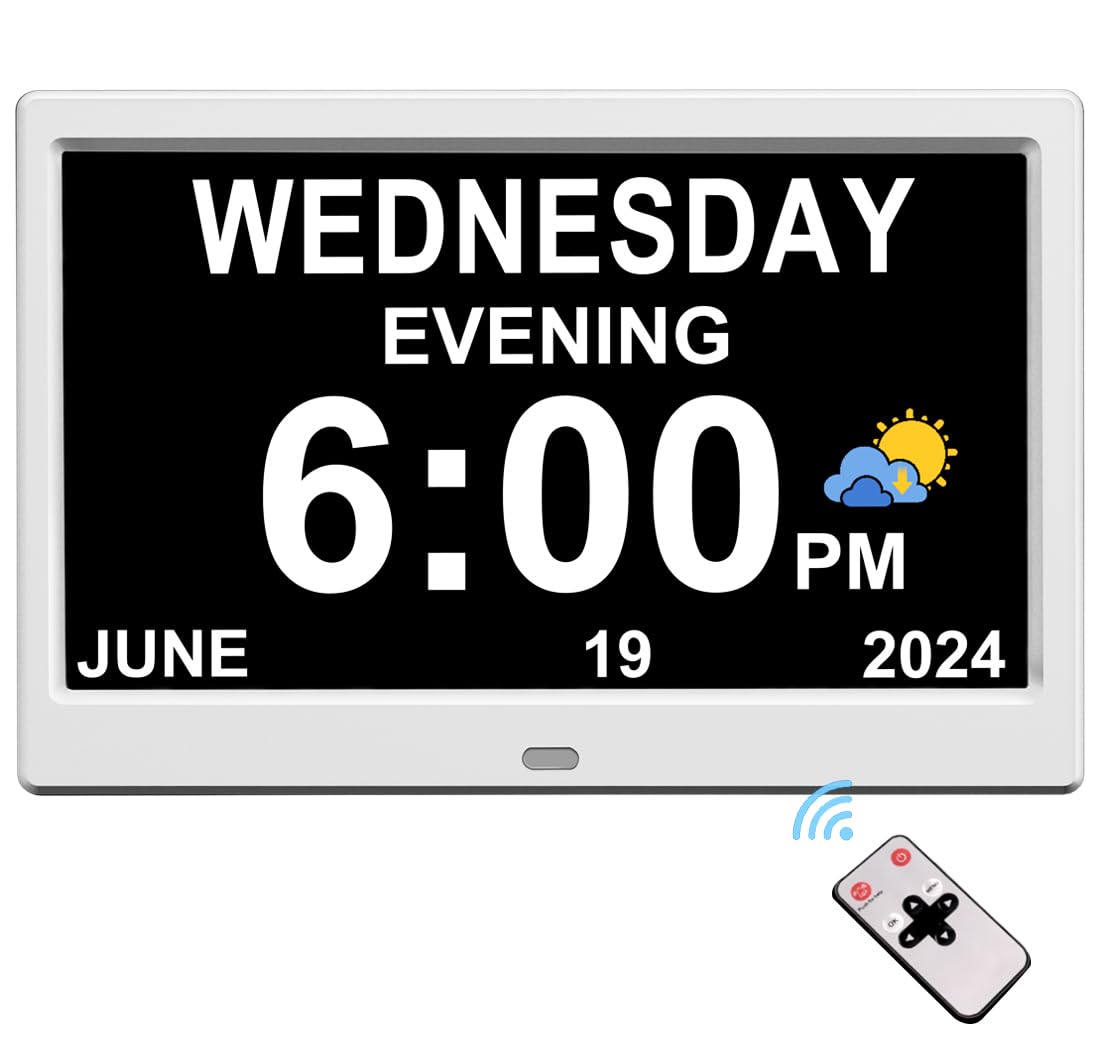
The CAZOKASI clock is built around a 10.1-inch screen that uses bold, non-abbreviated fonts — every letter of the day, month, and year is fully spelled out. This is a huge advantage for seniors who struggle with abbreviations like “Tue” vs “Thu”. It offers three interface modes (UI-1 for elderly with oversized text, UI-2 as a wall clock, and UI-3 for general use), so you can pick the layout that minimizes visual clutter.
Auto-brightness is handled by a light sensor that brightens during the day for visibility in strong sunlight and dims automatically at night to avoid disturbing sleep. The transition times are fixed (bright from 7:00 AM to 7:59 PM, dim from 8:00 PM to 6:59 AM), which works well for most schedules. The clock plugs directly into a wall outlet with no battery required for operation, though it still retains memory during a power outage.
With 12 independent alarms and 3 reminder schedules, this clock can manage a full day of medication or routine prompts. The wide-angle viewing means the display remains clear even when viewed from the side, making it a practical choice for a shared nightstand. Setup is straightforward and the included instructions are easy to follow. The only drawback is the lack of an FM radio, which some seniors may miss as a source of background audio.
Why it’s great
- Large, non-abbreviated font eliminates day/date confusion
- Three display interfaces to suit different visual needs
- Auto-brightness with light sensor prevents night glare
- 12 alarms and 3 reminder slots cover medication schedules
Good to know
- No FM radio or Bluetooth audio built in
- Auto brightness times are fixed, not user-customizable
- Screen may appear too bright at the lowest setting for some dark rooms
3. Raynic Digital Clock
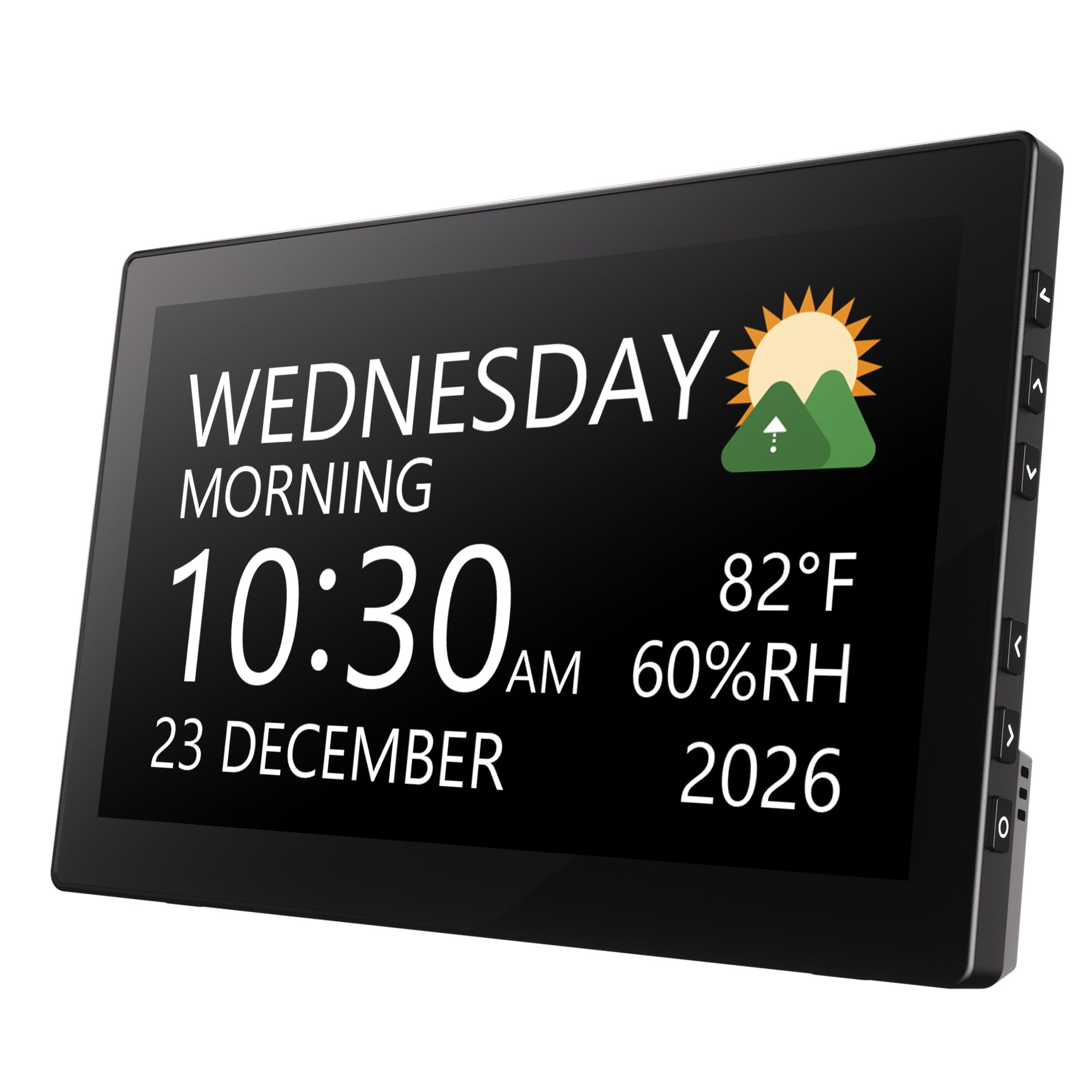
The Raynic clock combines a 10.1-inch display with a calendar, indoor temperature, and humidity sensor in one clean device. The large format shows the day of the week, month, date, year, and time of day (morning/night) in bold characters. This is especially helpful for seniors who need a constant reminder of where they are in the week. The 12 display themes let you switch between different color schemes and font styles to find the highest contrast for your eyes.
Auto-dimming works smoothly, automatically lowering the screen brightness at night to avoid eye strain. The clock supports 20 alarms and 20 reminder slots, which is far more capacity than most will ever need but provides flexibility for caregivers scheduling recurring prompts. Setup is intuitive, with a simple interface that doesn’t require scrolling through complex menus.
One thoughtful feature is the inclusion of indoor temperature and humidity, giving caregivers a quick read on whether the room is too warm, cool, or dry. However, note that the sensor reads internal room conditions, not outdoor weather — some users initially expected a forecast. The clock does not include a battery (it must be plugged in), but it does retain settings during a power interruption. The absence of an FM radio limits its use as a traditional bedside companion for audio.
Why it’s great
- Massive 10.1-inch screen shows full day/date/year without abbreviations
- 12 display themes allow personalized contrast adjustment
- 20 alarms and 20 reminders for comprehensive daily scheduling
- Built-in temperature and humidity sensor for room monitoring
Good to know
- No FM radio or Bluetooth connectivity
- Temperature/humidity sensor is internal, not a weather forecast
- No backup battery included; must stay plugged in to retain settings
4. Mesqool 10.1″ Dementia Clock
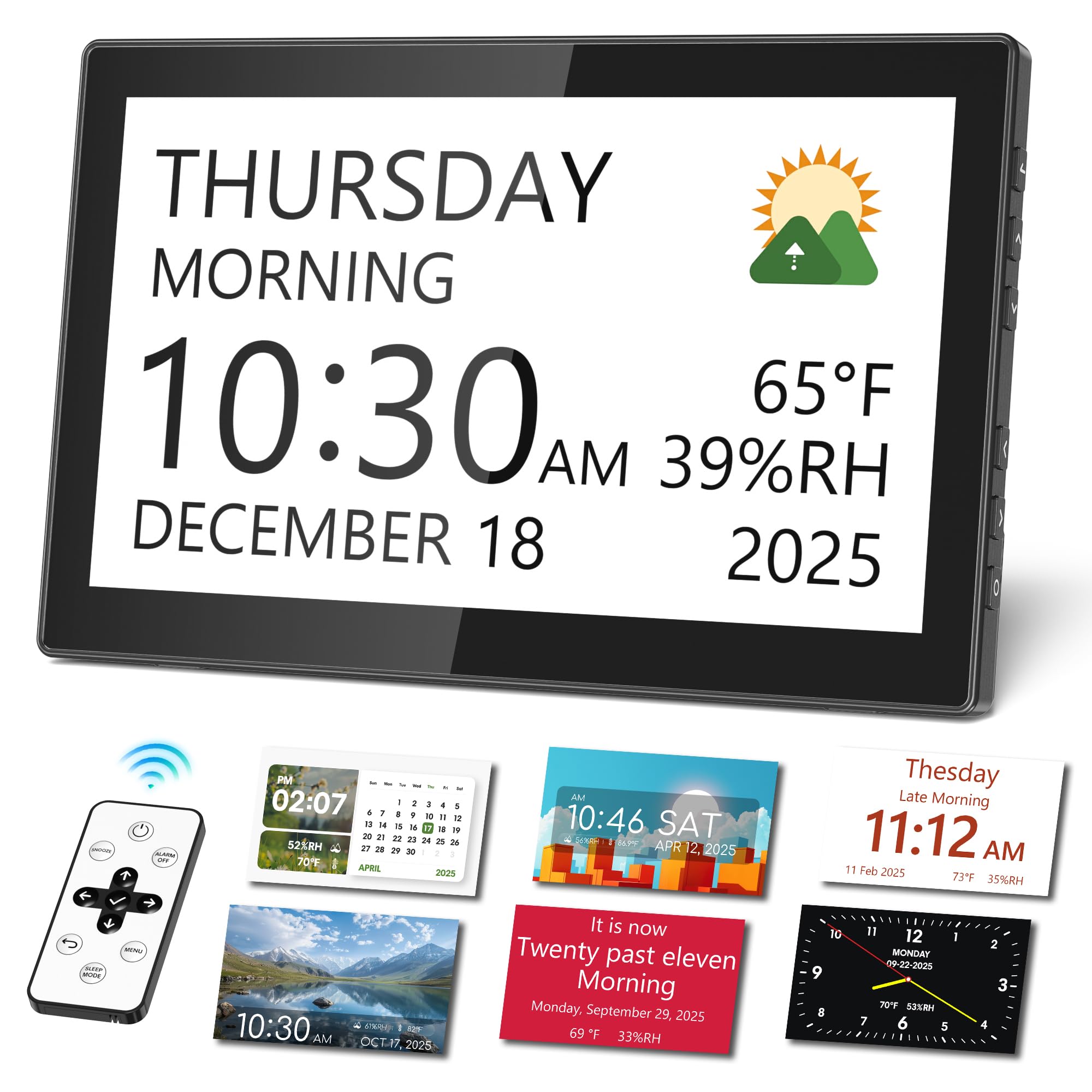
The Mesqool clock is designed specifically for seniors with memory loss or dementia. Its 10.1-inch IPS screen provides a wide viewing angle with high contrast, and it divides the day into 13 distinct time periods (Midnight, Early Morning, Morning, etc.) to help orient the user to the current part of the day. This reduces the confusion of seeing “3:00 AM” and not knowing whether it’s time to wake up or go back to sleep.
The clock includes a remote control, which is a practical addition for seniors who may have difficulty reaching or pressing buttons on the device itself. Custom medication reminders can be set as one-time or recurring alarms, and the clock supports up to 12 display themes and 9 font colors. The backup memory preserves all settings — including alarms and reminders — during a power outage, so you don’t have to reprogram everything.
Built-in sensors display indoor temperature and humidity, giving you useful room-condition feedback. The clock also has a USB and SD card slot for displaying personal photos, which can be a comforting touch. One caveat: the auto-dimming is fixed and some users noted the minimum brightness was still too bright for a pitch-black bedroom. The clock is best suited for a counter, desk, or tabletop rather than a wall mount, despite being wall-mountable in theory.
Why it’s great
- 13 daily time periods help orient those with memory loss
- Remote control for easy adjustments without reaching the device
- Custom medication reminders with recurring schedules
- Backup memory retains all alarms and settings after power loss
Good to know
- Minimum auto-dimming level may still be too bright for deep sleepers
- Not truly wall-mountable; best on a flat surface
- Setting up memory backup requires a small coin cell battery
5. JALL 8″ Large Digital Calendar Day Clock
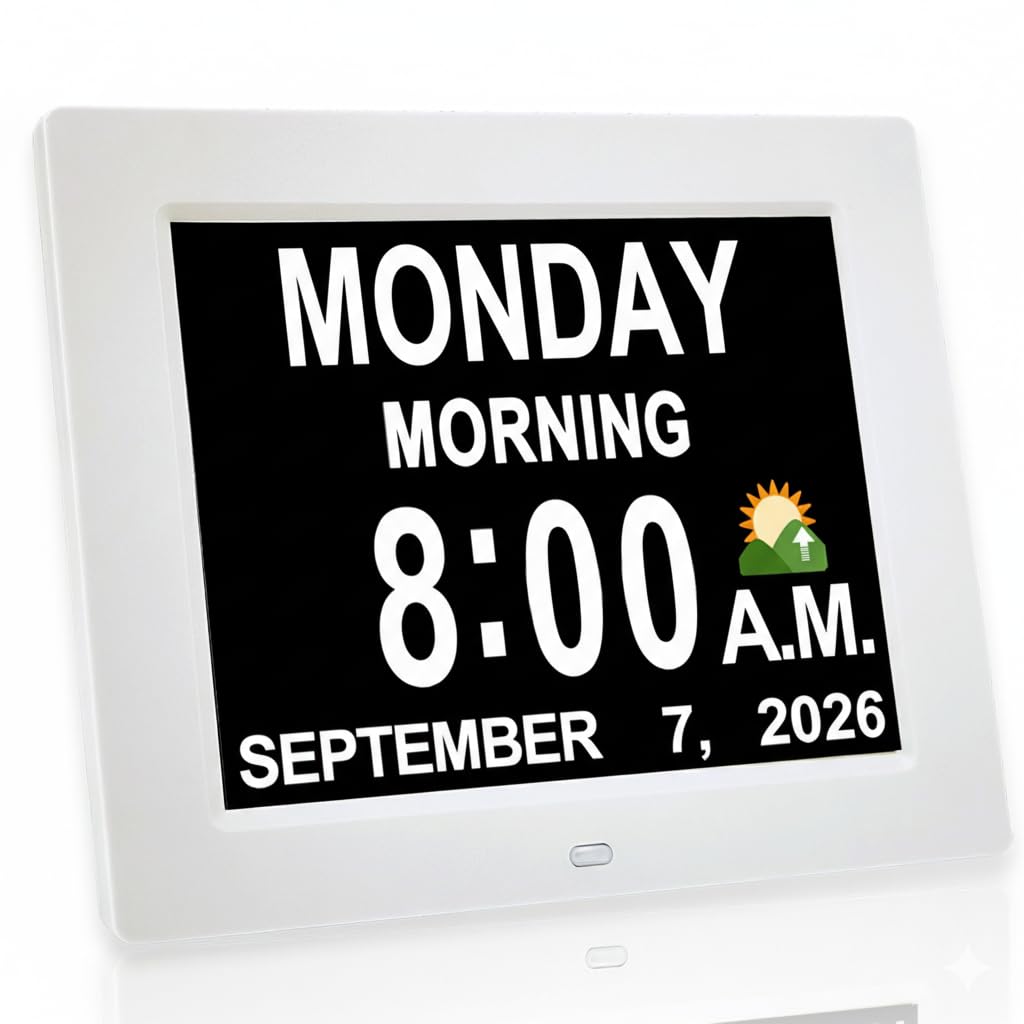
The JALL clock uses an 8-inch IPS screen that spells out the day of the week, month, and date in full, non-abbreviated text. This is a deliberate design choice for seniors with memory challenges — “Tuesday” instead of “Tue” — so there is no ambiguity. The 4:3 aspect ratio is slightly taller than a typical widescreen clock, which makes the text feel larger and more readable from a distance.
It delivers 12 independent alarms, which is generous for managing medication times, meal reminders, and appointment alerts. The auto-dimming system automatically lowers brightness at 7:00 PM and brightens at 7:00 AM, and you can manually override to one of five brightness levels. This flexibility ensures the clock is readable at night without being disruptive. The clock also features an optional hourly chime, which some seniors find comforting as a time reference.
The JALL clock runs on standard 110V AC power and includes a built-in battery backup that retains all settings during a power outage. It can be placed on a desk or mounted on a wall. One important detail: the packaging and the clock itself avoid terms like “dementia” or “Alzheimer’s”, making it a respectful gift. Some users reported the unit failing after a year, but the company’s customer service and lifetime warranty seem to handle replacements quickly.
Why it’s great
- Non-abbreviated day/date text reduces confusion
- 12 independent alarms with recurring options
- 5-level auto-dimming protects night vision
- Lifetime warranty with responsive customer support
Good to know
- Occasional reports of unit failure after several months
- No FM radio or Bluetooth audio included
- 8-inch screen is smaller than 10-inch competitors
6. American Lifetime Dementia Clock

The American Lifetime clock is tailored for Alzheimer’s and dementia care, using an 8-inch display that spells out the time, day of the week, month, and date in full without abbreviations. The high-contrast layout is designed to minimize visual guessing. It includes a period-of-day indicator (Morning, Afternoon, Evening, Night) to help orient the user, which has been shown to reduce sundowning-related confusion and nighttime wandering.
It supports up to 5 custom daily alarms, which is slightly less than some competitors but sufficient for medication and meal reminders. The auto-dimming feature adjusts brightness based on ambient light, and the screen remains legible in both bright and dim conditions. The clock’s compact size (8 x 6.1 inches) makes it easy to place on a nightstand or mount on a wall without dominating the room.
The clock is backed by a U.S.-based customer service team and includes a 1-year warranty. Multi-language support covers English, French, and Spanish, which is useful for multilingual households. Setup is straightforward with clear instructions. The packaging does not mention dementia or Alzheimer’s, making it a sensitive gift option. A minor limitation is the lack of an FM radio or audio playback, but for many caregivers, the clear visual display is the priority.
Why it’s great
- Full day/date text without abbreviations reduces confusion
- Period-of-day indicator helps with time orientation
- Compact form fits easily on a nightstand or wall
- U.S.-based customer support with 1-year warranty
Good to know
- Only 5 alarms, less than similar-priced 12-alarm models
- No FM radio, Bluetooth, or nature sounds
- Some users desired a larger screen size
7. Soundfreaq Sound Rise II

The Soundfreaq Sound Rise II is a premium bedside clock radio that prioritizes audio quality without ignoring the visual needs of seniors. Its 5-inch LCD screen is smaller than other models in this guide, but the display is crisp, with 6 levels of dimmer control that can be dialed down to a very soft glow. The numbers are not oversized, so this is a better fit for seniors who wear glasses to bed or prefer a less visually dominant device.
Where it excels is sound. A custom monophonic driver paired with a passive radiator delivers surprisingly full audio for FM radio and Bluetooth streaming. Seniors who enjoy talk radio, news, or music will appreciate the vocal clarity and the ability to listen at higher volumes without distortion. The progressive wake-up volume gradually increases the alarm over 60 seconds, which is gentler than a sudden blare. Nature sounds (ocean waves, forest, rain, city sounds, temple bells) serve as a sleep aid.
The device includes three USB charging ports (20W USB-C, 12W USB-A, and 18W QC3.0) for overnight device charging. The backup battery retains time and alarm settings during a power outage. The main compromise for seniors is the smaller display and the compact button layout — distinguishing Alarm 1 and Alarm 2 buttons by feel in the dark can be tricky. There is no auto-dimming; brightness must be adjusted manually via a dial, which some users see as a plus for fine control.
Why it’s great
- Excellent FM radio and Bluetooth audio with strong bass
- Progressive wake-up volume is easier on the ears
- 6-level dimmer with fine manual control for dark rooms
- Three fast USB charging ports for bedside devices
Good to know
- 5-inch screen is small; not ideal for severe vision impairment
- No auto-dimming; brightness must be adjusted by hand
- Alarm buttons are small and can be hard to distinguish by touch
FAQ
What size display is best for a senior with vision problems?
Is automatic time setting important for a senior clock radio?
How many alarms do I need for medication reminders?
Final Thoughts: The Verdict
For most users, the clock radio for seniors winner is the Sharp Digital Alarm Clock because it combines a large, legible display with automatic time setting, a quality FM radio, and dual USB charging at a value that’s hard to beat. If you need a clock that helps with memory and day confusion, grab the Mesqool 10.1″ Dementia Clock for its daily time periods and remote control. And for seniors who prioritize audio quality and a smaller bedside footprint, nothing beats the Soundfreaq Sound Rise II with its excellent FM radio and Bluetooth streaming.

Mo Maruf
I created WellFizz to bridge the gap between vague wellness advice and actionable solutions. My mission is simple: to decode the research and give you practical tools you can actually use.
Beyond the data, I am a passionate traveler. I believe that stepping away from the screen to explore new environments is essential for mental clarity and physical vitality.