Our readers keep the lights on and my smoothie glass nicely filled. As an Amazon Associate, I earn from qualifying purchases.
The satisfying, crisp sound of a mechanical keystroke landing with an audible click is more than just noise—it’s a rhythmic affirmation of precision. That tactile and auditory feedback is the core reason serious typists and gamers alike refuse to settle for the mushy feel of a standard membrane board. Finding the right switch and chassis that delivers this experience without fatiguing your fingers can be a noisy but rewarding journey.
I’m Mohammad Maruf — the founder and writer behind WellFizz. After analyzing switch actuation forces, chassis materials, connectivity standards, and acoustic profiles across dozens of models, I’ve built this guide around the specific metrics that define a truly great clicky keyboard.
Whether you crave the retro clatter of a typewriter or the crisp feedback of a modern mechanical switch, the right choice comes down to balancing switch type, build quality, and layout to match your daily workflow or gaming style.
How To Choose The Best Clicky Keyboard
Selecting a clicky keyboard is more nuanced than just picking the loudest switch. The interplay between the switch type, the mounting system, the keycap material, and the chassis all shape the final sound and feel you get with every press. Understanding these variables helps you avoid a board that sounds hollow or feels cheap.
Switch Type and Actuation Force
The switch is the heart of the sound. Clicky switches like Cherry MX Blue or Razer Green use a separate click jacket or leaf mechanism that creates the signature audible snap. Actuation force, measured in grams, determines how hard you need to press—lighter forces (around 50g) suit fast typing, while heavier forces (60g+) can reduce accidental presses but cause finger fatigue over long sessions.
Mounting Style and Acoustics
How the plate is attached to the case dramatically changes the sound profile. Tray-mount boards can create a hollower, more metallic ping, while gasket-mount designs suspend the plate between foam gaskets, absorbing vibration and producing a deeper, thockier sound. The presence and density of internal foam layers also dampen unwanted resonance, making a cheap chassis sound more premium.
Keycap Material and Profile
Keycaps are your point of contact. Double-shot PBT keycaps resist shine and wear far longer than ABS, retaining a textured grip. Profile matters for ergonomics—OEM and Cherry profiles are standard, while XDA and MDA profiles offer a wider, more uniform surface that some typists prefer for a cushioned feel. The thickness of the keycap wall also affects the pitch of the click.
Quick Comparison
On smaller screens, swipe sideways to see the full table.
| Model | Category | Best For | Key Spec | Amazon |
|---|---|---|---|---|
| Razer BlackWidow V4 | Premium | Dedicated Macros & Durability | Razer Green Switches (50g actuation) | Amazon |
| Logitech MX Mechanical | Premium | Productivity & Multi-Device | Low-Profile Clicky Switches (10m battery) | Amazon |
| Razer BlackWidow V3 Mini HyperSpeed | Performance | Compact Wireless Performance | Razer Green Switches, 200hr battery | Amazon |
| Logitech Alto Keys K98M | Mid-Range | Quiet Clicks & Office Typing | Marble Switches, Gasket Mount | Amazon |
| Cherry MX 3.0S | Mid-Range | Clean Aesthetics & Precision | Cherry MX Brown Switches (Aluminum Frame) | Amazon |
| Redragon Wireless Typewriter | Budget | Retro Styling & Value | Blue Switches, Tri-Mode Wireless | Amazon |
| RK ROYAL KLUDGE R98 Pro | Budget | Creamy Sound & Customization | Pre-Lubed Cream Switches, Hot-Swappable | Amazon |
In‑Depth Reviews
1. Razer BlackWidow V4

The BlackWidow V4 is the definitive full-size clicky gaming keyboard, built to withstand marathon sessions. Its Razer Green switches deliver a crisp tactile bump and a loud, satisfying click at a 1.9mm actuation point with 50g of force, making every input feel deliberate. The doubleshot ABS keycaps are thick-walled to resist wear, and the per-key Chroma RGB lighting is complemented by a two-side underglow for an immersive desk glow.
A standout feature is the dedicated row of six macro keys and a multifunction command dial, providing deep programmability without cluttering the main layout. The magnetic plush leatherette wrist rest snaps on securely and offers genuine all-day comfort, a rarity among gaming boards. The chassis feels substantial at over three pounds, reducing any flex during frantic keystrokes.
While the typing experience is excellent, the switches are not hot-swappable, locking you into the Razer Green feel. Some users report that the exposed LEDs can be overly bright, and the sharp edges of the top frame may not suit everyone’s desk ergonomics. Despite these minor quirks, this is a premium, feature-packed weapon for those who love a loud, tactile typing experience.
Why it’s great
- Six dedicated macro keys and a command dial for powerful customization.
- Magnetic cushioned wrist rest provides excellent ergonomic support.
- Dual-side RGB underglow creates a vibrant, immersive desk aesthetic.
Good to know
- Switches are not hot-swappable, limiting future customization.
- Sharp edges on the chassis may be uncomfortable for some users.
2. Logitech MX Mechanical

The Logitech MX Mechanical redefines the clicky experience for the professional workspace, pairing a satisfying audible click with a low-profile design that reduces wrist strain. Its low-profile clicky switches provide distinct tactile feedback without the full-height travel of traditional switches, making it ideal for fast, accurate typing over long workdays. The full-size layout includes a dedicated numpad, and the metal top case gives it a premium, desk-ready weight.
Smart illumination is a killer productivity feature—the backlit keys sense your hands approaching and light up automatically, adjusting to ambient lighting conditions. Bluetooth Low Energy allows pairing with up to three devices across Windows, macOS, Linux, iOS, and Android, with near-instant switching via a dedicated key. Battery life reaches up to 15 days with backlighting on, or a staggering 10 months with it off, making it a truly worry-free wireless companion.
The Logi Options+ software unlocks deep customization for Fn keys and backlighting effects, but the switches themselves are not hot-swappable, so you are committed to the clicky low-profile feel. Some users note the keycaps are prone to showing fingerprints, and the typing sound, while clicky, is more refined than a full-height switch. For a professional who needs tactile feedback across multiple platforms, this is an unmatched choice.
Why it’s great
- Low-profile clicky switches reduce fatigue while retaining audible feedback.
- Hand-sensing backlighting and 10-month battery life are class-leading.
- Seamless multi-device, multi-OS Bluetooth pairing with instant switching.
Good to know
- Switches and keycaps are not replaceable or hot-swappable.
- Keycaps can attract fingerprints over time.
3. Razer BlackWidow V3 Mini HyperSpeed

The BlackWidow V3 Mini HyperSpeed is a 65% powerhouse that packs the full clicky experience into a desk-saving footprint without sacrificing wireless performance. Its Razer Green switches deliver the same tactile, clicky feedback as the full-size V4, but in a layout that keeps the arrow keys and essential Fn row while ditching the numpad. The Phantom Pudding keycaps feature translucent sides that amplify the Chroma RGB, creating a brilliant halo effect around each key.
Connectivity is top-tier with three modes: lag-free Razer HyperSpeed Wireless (2.4GHz), Bluetooth for low-power convenience, and USB-C for charging. The battery life is impressive at up to 200 hours on HyperSpeed, meaning weeks of daily use between charges. The compact build is also surprisingly heavy at over 1.5 pounds, giving it a planted, premium feel that belies its small size.
The 65% layout can be an adjustment period, as the F-row and some navigation keys require Fn-layer combinations. Razer Synapse software is required for full customization, and the Phantom keycaps have a slightly different sound profile than standard caps, which some users find alters the pitch of the click. For a portable, wireless clicky board that doesn’t compromise on feel, this is a top contender.
Why it’s great
- Compact 65% layout saves desk space while keeping arrow keys.
- Phantom Pudding keycaps dramatically enhance RGB light diffusion.
- 200-hour battery life on HyperSpeed wireless is exceptional.
Good to know
- 65% layout lacks dedicated F-row and numpad, requires Fn layers.
- Phantom keycaps alter the resonance of the click compared to standard caps.
4. Logitech Alto Keys K98M
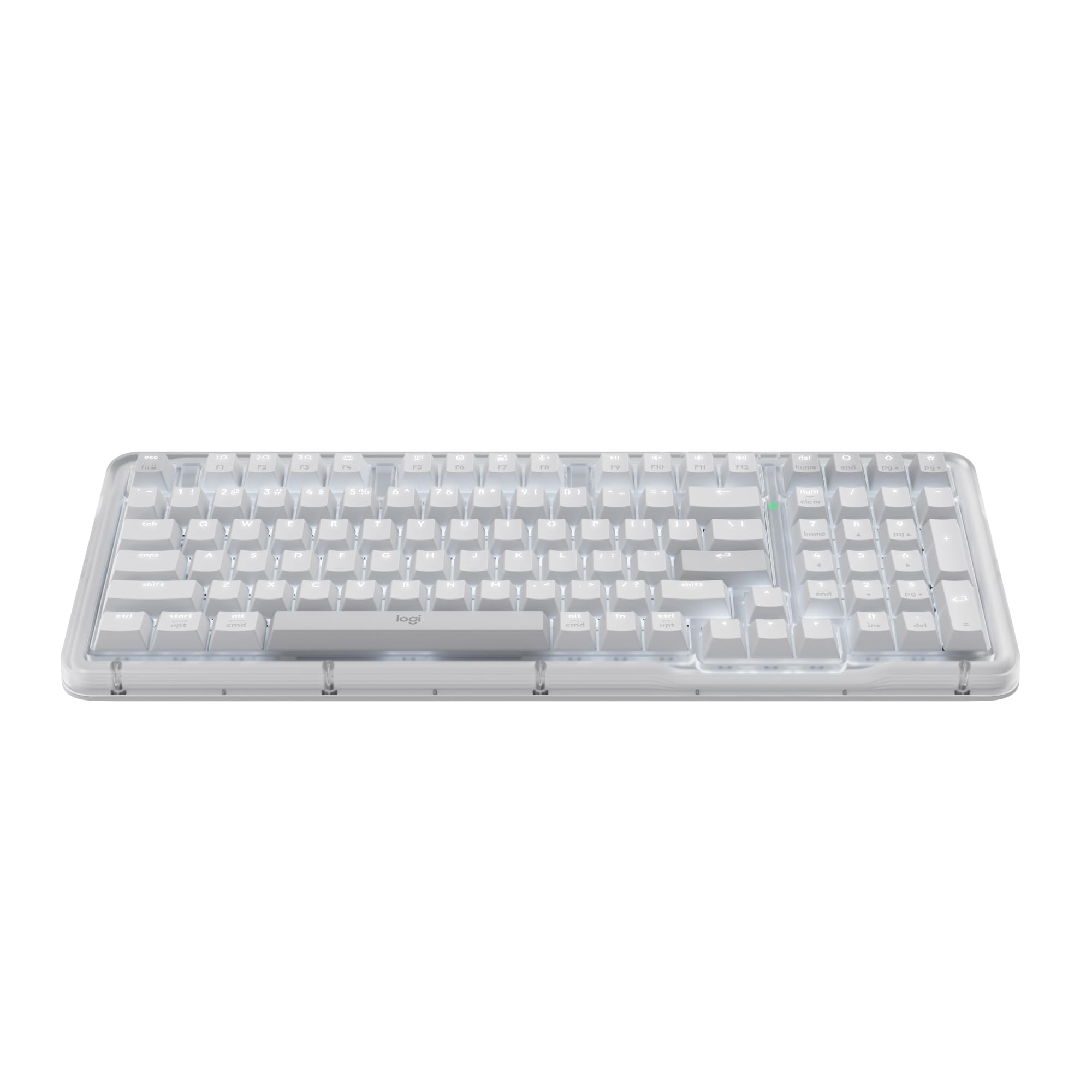
The Logitech Alto Keys K98M is a unique entry in the clicky world, prioritizing a refined, vibration-absorbed click that is satisfying without being disruptive. Its UniCushion gasket mount isolates the plate from the case, soaking up harsh pings and delivering a smoother, deeper keystroke sound. The hot-swappable Marble switches are pre-lubed, offering a smooth tactile bump and a click that is noticeably quieter than typical blue or green switches, making it office-friendly.
The 98-key compact 1800-style layout retains a full numpad but trims the width compared to a traditional 104-key board, a smart compromise for productivity. Instead of flashy RGB, it opts for a clean white backlighting system that illuminates the legends clearly without distraction. The transparent top case adds a subtle style element, showing off the internal gasket mount construction.
Battery life is a strong point, offering up to 12 months of wireless use via Bluetooth Low Energy or the Logi Bolt receiver. The Logi Options+ app allows for Action Key programming, but the non-standard Marble switches may have limited aftermarket replacements. The hollow sound of the space bar is a common complaint, and the plastic chassis, while sturdy, lacks the metal weight of premium competitors. For a quiet clicky board, it is a brilliant choice.
Why it’s great
- Gasket-mounted design absorbs vibrations for a deeper, quieter click.
- Hot-swappable Marble switches allow for future switch customization.
- Compact 98-key layout with numpad and excellent 12-month battery life.
Good to know
- Space bar produces a hollow sound that can feel lower quality.
- Plastic chassis lacks the heft of an aluminum-frame keyboard.
5. Cherry MX 3.0S
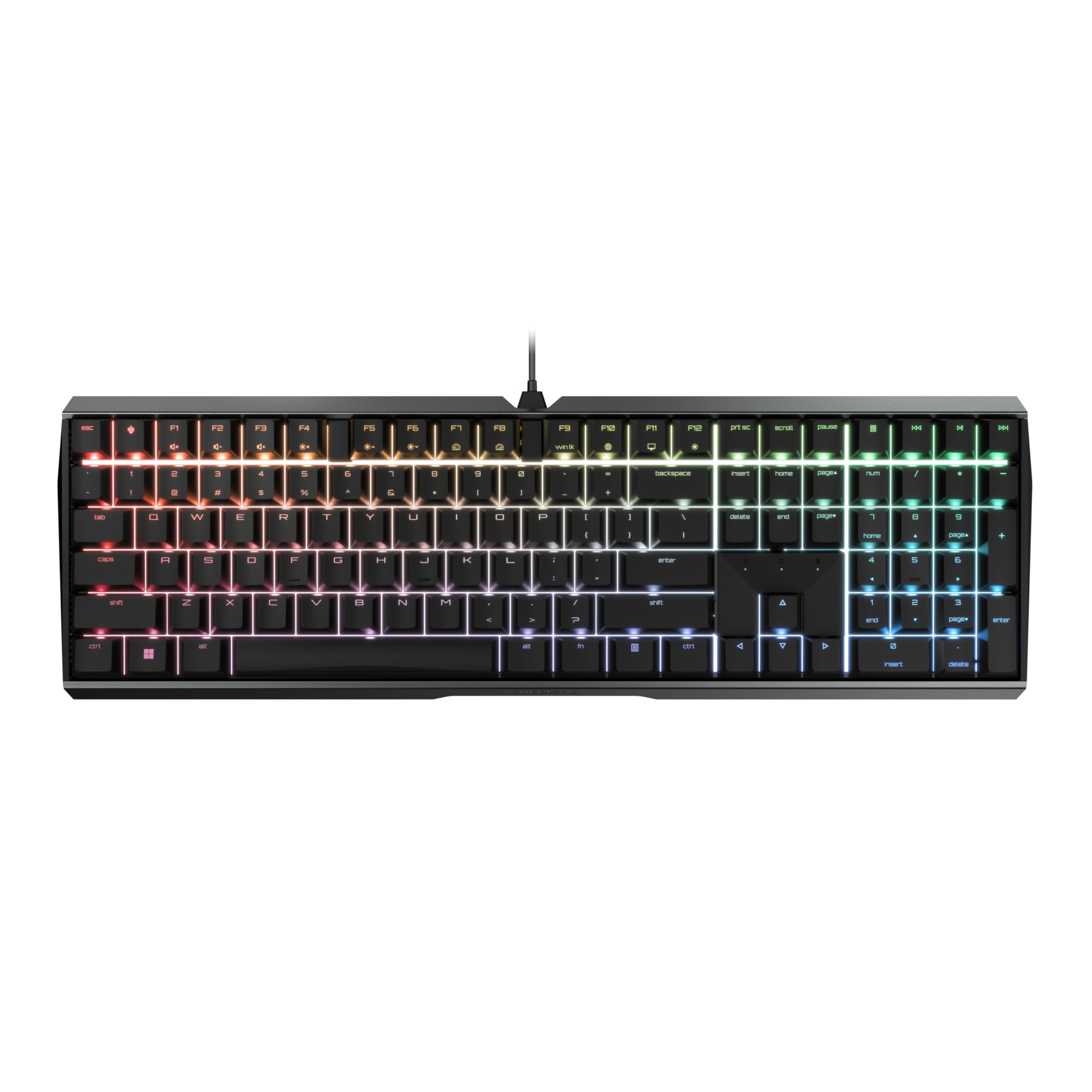
The Cherry MX 3.0S is a testament to German engineering, offering a no-frills typing experience centered on the legendary Cherry MX Brown switch. While not a clicky switch in the traditional sense (no separate click jacket), it provides a distinct tactile bump with a lower-pitched audible feedback that many find more pleasant for all-day use. The extruded aluminum housing is screw-free, giving it a clean, monolithic look and a solid, hefty feel that resists any flex.
It includes full N-key rollover and anti-ghosting, making it perfectly capable for gaming, though its strengths shine in typing. The vibrant RGB backlighting offers over 16 million colors and numerous integrated effects, programmable via the Cherry Utility software. The detachable USB-C to micro-USB cable and four round rubber feet keep the board planted on any surface.
The Cherry Utility software is functional but limited compared to competitor suites like Razer Synapse, offering fewer customization options for lighting effects. The keycaps use a standard font that some users find unattractive, and the height adjustment requires screwing in legs rather than a flip-out mechanism. For purists seeking a quiet but tactile mechanical experience with a premium aluminum chassis, this is an excellent value.
Why it’s great
- Extruded aluminum housing delivers a premium, screw-free, rigid build.
- Cherry MX Brown switches provide a tactile bump with a more refined sound profile.
- Full N-key rollover and anti-ghosting for reliable gaming performance.
Good to know
- Cherry Utility software offers less lighting customization than competitors.
- Height adjustment requires manually screwing in legs.
6. Redragon Wireless Typewriter
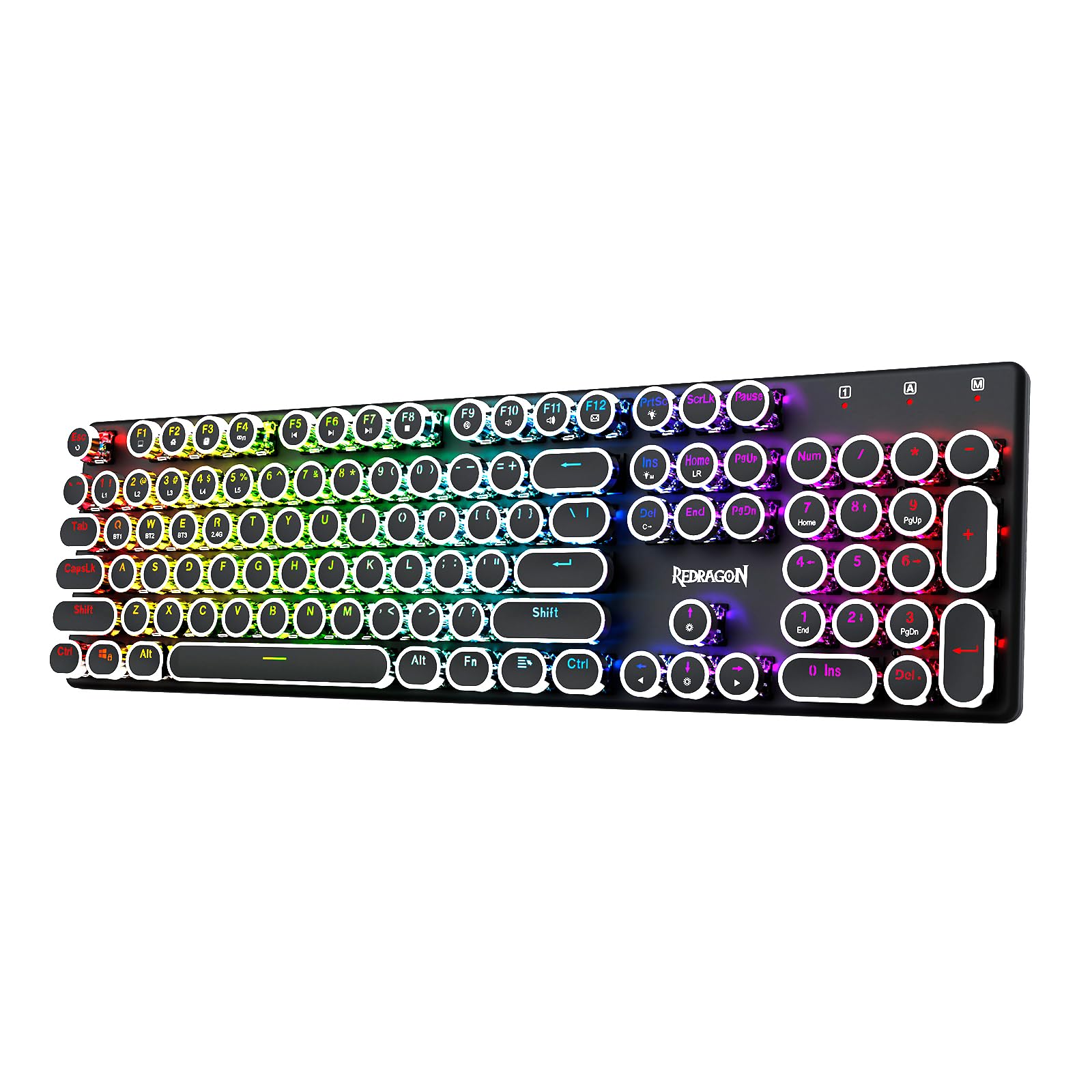
The Redragon Wireless Typewriter keyboard delivers maximum nostalgia at a budget-friendly price, combining a classic steampunk aesthetic with modern tri-mode connectivity. The round, vintage-inspired keycaps sit on Redragon blue switches, which produce the loud, clicky sound typical of a mechanical switch, satisfying users who miss the clatter of old typewriters. The metal panel base provides a sturdy foundation, keeping the 104-key layout stable on the desk.
Connectivity is versatile with Bluetooth 3.0/5.0, 2.4GHz wireless, and USB-C wired modes, allowing seamless switching between a PC, laptop, or tablet. The RGB backlighting includes 16 presets with adjustable brightness and speed, and the keys can be individually customized via the downloadable software. Users report a heavy, premium feel that exceeds expectations at this price point, and the keycaps are easy to remove for cleaning or swapping.
The software download link on the Redragon website does not always function correctly, which can limit lighting customization for some users. The blue switches are among the loudest clicky switches, which may not be suitable for shared offices or quiet environments. If the goal is to replicate a vintage typing experience with modern wireless convenience, this keyboard is a compelling, characterful choice.
Why it’s great
- Classic typewriter aesthetic with round keycaps and metal panel is visually striking.
- Tri-mode wireless (BT/2.4GHz/USB-C) offers excellent device flexibility.
- Feels heavy and premium for its price tier, with a satisfying, loud click.
Good to know
- Blue switches are very loud and may not be suitable for quiet environments.
- Software download links on the website are sometimes non-functional.
7. RK ROYAL KLUDGE R98 Pro

The RK Royal Kludge R98 Pro is a community-favorite budget board that punches far above its weight class by delivering a creamy, thocky sound signature out of the box. It features a gasket mount design with five layers of sound-absorbing foam, which effectively eliminates hollow pings and produces a deep, satisfying keystroke sound. The pre-lubed linear Cream switches are exceptionally smooth, but the board is hot-swappable with 3/5-pin support, allowing you to easily swap in clicky switches if you prefer a louder profile.
The 96% (98-key) layout is a space-saving dream, retaining the numpad and arrow keys while trimming the overall footprint. The MDA profile PBT keycaps are thick, doubleshot, and have a matte texture that resists shine. A detachable aluminum CNC volume knob adds a tactile control element, and the online driver allows for full key remapping and macro creation.
The backlighting, while bright, is dimmer than some premium boards, and the RGB does not shine through the legends as strongly due to the opaque PBT caps. Some users report durability concerns with the hot-swap sockets over long periods, and the software is functional but not as polished as bigger brands. For a budget-conscious enthusiast, the R98 Pro offers a fantastic foundation for customization and a premium sound profile.
Why it’s great
- Five-layer foam and gasket mount deliver a deep, creamy sound signature.
- Hot-swappable with 3/5-pin switch support for easy customization.
- Thick MDA-profile PBT keycaps offer a premium texture and durability.
Good to know
- RGB backlighting is dimmer and does not shine through opaque keycaps well.
- Hot-swap socket durability can be a concern over extended use.
FAQ
Are clicky switches always louder than linear or tactile ones?
What does hot-swappable mean for a clicky keyboard?
Final Thoughts: The Verdict
For most users, the clicky keyboard winner is the Razer BlackWidow V4 because it combines six dedicated macro keys, a premium plush wrist rest, and the unmistakable Razer Green click in a sturdy chassis built to last. If you want a professional, low-profile click that works seamlessly across multiple operating systems, grab the Logitech MX Mechanical. And for a compact, wireless powerhouse with flexible layouts, nothing beats the Razer BlackWidow V3 Mini HyperSpeed.

Mo Maruf
I created WellFizz to bridge the gap between vague wellness advice and actionable solutions. My mission is simple: to decode the research and give you practical tools you can actually use.
Beyond the data, I am a passionate traveler. I believe that stepping away from the screen to explore new environments is essential for mental clarity and physical vitality.