Our readers keep the lights on and my smoothie glass nicely filled. As an Amazon Associate, I earn from qualifying purchases.
Finding a Chromebook that genuinely works as a tablet means navigating a market flooded with clamshells labeled “2-in-1” but built like laptops with a wobbly hinge. The real contenders share a common DNA: they detach from the keyboard, fold flat into a slate, and run Android apps without the trackpad lag or desktop interface frustrations that plague lesser hybrids. Whether you need a note-taking slate for lectures, a media-consumption device for travel, or a secondary screen for light work, the physical form factor and touch-optimized Chrome OS experience define your daily satisfaction.
I’m Mohammad Maruf — the founder and writer behind WellFizz. I’ve spent countless hours dissecting processor benchmarks, display resolutions, and real-world user feedback to separate the true Chrome OS slates from the marketing fluff.
This guide focuses exclusively on the laptops and detachables that earn the tablet badge, because finding the best chrome tablet means balancing screen quality, battery life, and keyboard usability in a package you can comfortably hold for hours.
How To Choose The Best Chrome Tablet
The Chromebook tablet world splits into two camps: the detachable (a screen that snaps onto a keyboard cover, like Microsoft’s Surface approach) and the 360° convertible (a standard laptop hinge that rotates the screen all the way back). Each has tradeoffs in lap stability, kickstand flexibility, and overall weight. Your choice hinges on whether you plan to type extensively on your lap or primarily use the device as a handheld slate with an occasional keyboard.
Processor and RAM: The Real Performance Bottleneck
Chrome OS runs efficiently on ARM-based MediaTek chips as well as Intel processors, but the RAM allocation is non-negotiable. Models with 4GB of RAM handle a handful of Chrome tabs and light Android apps, but 8GB becomes essential if you juggle cloud-based documents, video calls, and note-taking simultaneously. Don’t rely on processor clock speed alone; the synergy between the chipset and the 64GB or 128GB eMMC storage dictates how quickly apps load and whether you’ll encounter stutter when multitasking.
Display Quality and Form Factor Ergonomics
A Chrome tablet’s primary purpose is handheld use, so screen size and weight matter more than on a traditional laptop. A 10.1-inch to 12.2-inch display strikes the best balance between readability and portability. Resolution above 1920 x 1200 (WUXGA) ensures crisp text for reading and sharp video playback. Also consider the aspect ratio: 16:10 offers more vertical space for documents and web browsing, while 16:9 suits widescreen movie viewing. Low Blue Light certification is a practical bonus for late-night reading sessions.
Keyboard Attachments and Stylus Support
Detachable models include the keyboard in the box or as an optional accessory. The keyboard’s travel distance and rigidity are critical — a flimsy cover can make typing frustrating on a couch or train. Built-in stylus support via USI (Universal Stylus Initiative) or an included pen turns the tablet into a genuine note-taking and sketching tool. If you plan to write or draw regularly, verify that the tablet supports active pen protocols and offers low-latency response, as many budget models leave this feature out entirely.
Battery Life and Charging Speed
Chrome tablets typically advertise 10 to 13.5 hours of battery life, but real-world endurance varies dramatically with screen brightness and app load. Models with 10,200mAh or larger batteries generally last a full day of mixed use. Charging speed is equally important: a device that supports 45W fast charging can recover most of its battery during a short break, while a unit limited to 15W will require overnight replenishment. USB-C Power Delivery compatibility ensures you can carry a single charger for your phone and tablet.
Quick Comparison
On smaller screens, swipe sideways to see the full table.
| Model | Category | Best For | Key Spec | Amazon |
|---|---|---|---|---|
| ASUS Chromebook Flip | Convertible | Power multitasking | Intel i5, 8GB RAM, 512GB SSD | Amazon |
| Samsung Galaxy Tab S8 Ultra | Premium Slate | Media & large-screen work | 14.6″ AMOLED, S-Pen included | Amazon |
| Samsung Chromebook Plus V2 | Convertible | Built-in stylus users | Intel Core m3, 13MP camera | Amazon |
| Lenovo Duet 11 Chromebook | Detachable | Kids’ school use | MediaTek 838, 2K LCD touch | Amazon |
| Lenovo Chromebook Duet (10.1″) | Detachable | Ultra-portable reading | MediaTek Helio P60T, 128GB | Amazon |
| Lenovo Idea Tab Pro | Android Slate | Gaming & AI features | Dimensity 8300, 12.7″ 3K LCD | Amazon |
| HP 14 2-in-1 Chromebook | Convertible | Affordable 360° flexibility | Intel N100, 4GB DDR5 RAM | Amazon |
| Lenovo Chromebook 14″ | Convertible | Budget all-day battery | MediaTek Kompanio 520, 13.5hrs | Amazon |
| Apple iPad 11-inch | iOS Slate | iOS ecosystem users | A16 chip, Liquid Retina display | Amazon |
In‑Depth Reviews
1. ASUS Chromebook Flip
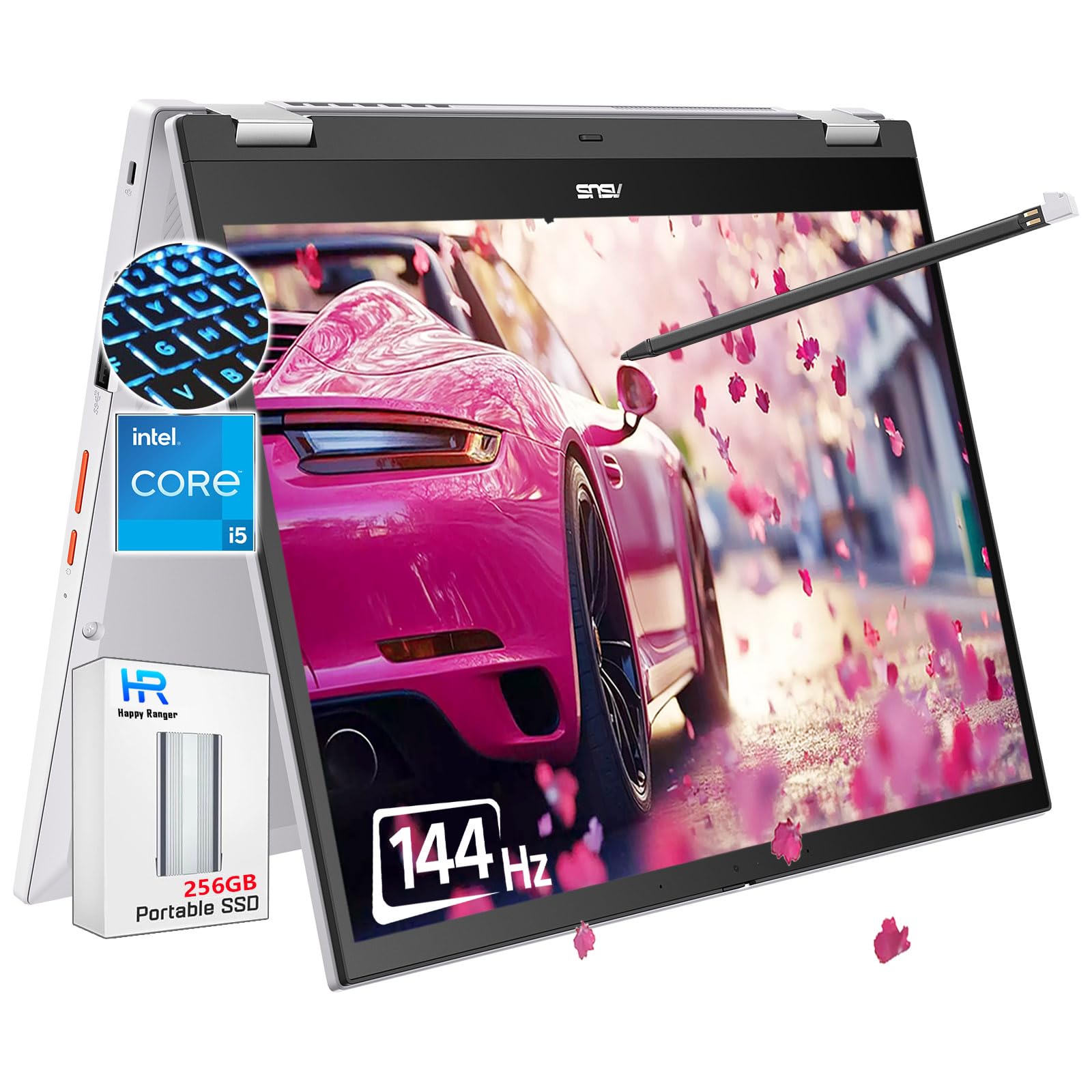
The ASUS Chromebook Flip delivers desktop-class performance in a convertible 14-inch chassis. Its 12th-gen Intel Core i5-1235U processor paired with 8GB of RAM and a 512GB SSD (256GB onboard plus 256GB portable SSD) eliminates the storage anxiety common in Chromebooks. The 144Hz WUXGA touchscreen with 400-nit brightness makes scrolling and gaming feel remarkably fluid, and the integrated stylus pen is a welcome inclusion for quick annotations.
Users report that the device handles multiple Chrome tabs and simultaneous Google Workspace documents without stutter, and the backlit keyboard is comfortable for extended typing sessions. The 360° hinge is sturdy enough to hold the screen at any angle for tent or tablet modes, though the glass touchscreen does pick up reflections under direct light. At roughly 10 hours of real-world battery life, it keeps pace with a full workday.
Where the Flip truly stands out is the upgrade path: the 512GB total storage gives you room for offline files and Android games that most Chrome tablets lack. The bottom-firing speakers are adequate but not immersive, and the privacy webcam shutter is a nice touch for security-conscious users.
Why it’s great
- Fast Intel i5 processor with roomy 8GB RAM
- 144Hz high-refresh touchscreen for smooth scrolling
- Included stylus and 512GB effective storage
Good to know
- Glass screen can produce glare in bright settings
- Bottom speakers lack depth for media
2. Samsung Galaxy Tab S8 Ultra (Renewed)

For a Chrome OS user who wants the largest possible canvas, the Galaxy Tab S8 Ultra offers a 14.6-inch AMOLED display with a 16:9 aspect ratio that excels at widescreen video consumption and document split-view. The Snapdragon 8-core processor and 8GB RAM ensure buttery multitasking, while the 11,200mAh battery delivers up to 15 hours of video playback, easily outlasting any competitor in this list.
The S-Pen is included and magnetically attaches to the back, requiring no battery or pairing. Renewed units often arrive in excellent condition with a generic charger, but users note the screen may have minor micro-scratches. The display’s brightness and color accuracy are outstanding for photo editing and streaming, and the four-speaker setup produces rich sound.
The main tradeoff is portability: at 14.6 inches, this is not a one-handed reading device. The renewed status means the warranty is limited, but the hardware feels premium with an aluminum unibody. For professionals who need a large canvas for note-taking and media, this slate is unmatched among Chrome-compatible tablets.
Why it’s great
- Massive, vibrant 14.6″ AMOLED screen for media
- Exceptional 15-hour battery life
- Included S-Pen with no charging required
Good to know
- Very large and heavy for handheld tablet use
- Renewed condition may have cosmetic imperfections
3. Samsung Chromebook Plus V2

The Samsung Chromebook Plus V2 is a fanless 12.2-inch convertible that weighs under three pounds, making it one of the most portable Chromebooks that still feels like a proper laptop. The Intel Core m3 processor keeps things cool and quiet, and the 1920×1200 display in a 16:10 aspect ratio gives you extra vertical space for reading documents and web pages without constant scrolling.
A standout feature is the built-in stylus that slots into the chassis and never needs charging — it’s always ready for note-taking, sketching, or magnifying sections of the screen. The 13MP rear camera with autofocus is unusually high-resolution for a Chromebook, useful for capturing whiteboard content or documents in tablet mode.
User feedback highlights the fantastic keyboard feel and the premium metal-and-plastic construction. The main limitations are 4GB of RAM, which can feel constrained with many Chrome tabs, and an older 7th-gen processor that can’t match modern i3 performance. For writing, web browsing, and occasional drawing, this is a refined choice that’s still available at a mid-range price.
Why it’s great
- Sturdy, lightweight 2-in-1 design with premium feel
- Always-ready, never-charge built-in stylus
- Excellent keyboard with comfortable travel
Good to know
- 4GB RAM limits heavy multitasking
- Processor is older 7th-gen Core m3
4. Lenovo Duet 11 Chromebook

The Lenovo Duet 11 is a detachable Chrome tablet that includes the keyboard in the box, making it a complete student-ready package. The 10.95-inch 2K LCD touchscreen with WUXGA resolution delivers sharp text and vibrant colors in a form factor that is easy to hold in one hand. The MediaTek Kompanio 838 processor offers a noticeable 20–30% performance improvement over older Snapdragon-based Chromebooks, with faster boot times and smoother app switching.
AV1 codec support means video streaming is more efficient, and Wi-Fi 6E (via BT 5.3) ensures fast, stable connectivity in crowded networks like school campuses. The webcam includes a privacy slider, a welcome security feature for remote learning. The battery is rated for 10 hours of use, which aligns with a typical school day.
Potential buyers should know the stylus is sold separately, and the USI Pen 2 can cost around . The included keyboard is functional for on-desk typing but lacks the rigidity for comfortable lap use. For a dedicated student device that transitions between tablet and laptop modes seamlessly, this is a top contender.
Why it’s great
- Sharp 2K display with vibrant colors
- Detachable keyboard included for 2-in-1 flexibility
- Upgraded MediaTek CPU with AV1 support
Good to know
- Stylus not included, costs extra
- Keyboard is not ideal for lap typing
5. Lenovo Chromebook Duet (10.1″)

The original Lenovo Chromebook Duet remains a favorite for its ultra-portable 10.1-inch form factor that slips into a bag effortlessly. The 1920×1200 WUXGA display is bright and sharp for its size, and the included keyboard cover transforms it into a mini-laptop for typing tasks. The MediaTek Helio P60T processor runs cool and fanless, making it silent in use, and the 10-hour battery life supports a full day of light productivity.
Users consistently praise the screen quality and the surprisingly usable keyboard, which attaches and detaches magnetically with satisfying ease. The 4GB of RAM handles several Chrome tabs and Android apps like Kindle and Netflix without major slowdown, making it a dedicated media and reading device. The ARM-based processor sips power, so the Duet charges quickly via USB-C and works well in spaces with limited outlets, like campervans or coffee shops.
The main compromises are storage: 128GB is decent for the category but not expandable via SD card, and there is no USB-A port, requiring an adapter for legacy peripherals. The device is slightly heavier than expected due to the kickstand mechanism, but for anyone prioritizing the smallest Chrome tablet with a keyboard, this is the benchmark.
Why it’s great
- Super compact 10.1″ design with great portability
- Excellent screen clarity for reading and video
- Included keyboard cover enables typing when needed
Good to know
- No USB-A or SD card slot
- Heavier than expected for its size
6. Lenovo Idea Tab Pro

The Lenovo Idea Tab Pro is an Android tablet optimized for Chrome OS users who want AI-assisted productivity. Powered by the MediaTek Dimensity 8300, it runs on Android 14 with Google Gemini integration and Circle to Search, making it a study powerhouse. The 12.7-inch 3K LCD display with a 90Hz refresh rate and 360Hz touch sampling rate makes scrolling through documents and playing PUBG feel responsive and smooth.
The included Tab Pen Plus attaches magnetically and works well for note-taking and annotations, while the folio case provides protection. Quad JBL speakers with Dolby Atmos produce room-filling sound for lectures and entertainment. The 10,200mAh battery delivers 11 hours of video streaming, and 45W fast charging refuels the device quickly when you’re between classes.
Users love the bright, colorful display and the premium build, but note that the device is heavy at this screen size and requires a specific 45W PD charger for optimal charging speeds. The LCD panel drains battery faster than an OLED alternative, and bloatware is present at setup. For the price, it’s a feature-packed slate that blends AI, gaming, and productivity into one package.
Why it’s great
- Powerful Dimensity 8300 with AI features
- Stunning 3K 90Hz display with included pen
- Excellent quad JBL speakers
Good to know
- Requires specific 45W PD charger for fast charging
- Heavy for handheld tablet use
7. HP 14 2-in-1 Chromebook

The HP 14 2-in-1 Chromebook brings a 14-inch FHD IPS touchscreen with a 360° hinge to the budget-friendly tier. The Intel N100 quad-core processor with 4GB of DDR5 RAM offers snappy performance for typical web tasks, light gaming, and video streaming. The 64GB eMMC storage is modest but sufficient for a secondary device that relies on cloud storage.
Users report that the display is clear and pixel-sharp, the touchscreen is responsive, and the device switches between laptop and tablet orientations smoothly. The lightweight construction makes it easy for kids to carry between classes, and the long battery life supports a full school day. The 720p webcam with dual microphones handles Zoom calls adequately.
The downsides are the limited 64GB storage and 4GB RAM, which means you’ll need to manage Chrome tabs carefully to avoid lag. The speaker output is basic, and the AC adapter is included without any premium accessories. For a family looking for an affordable convertible Chromebook with a large screen, this is a solid entry-level option.
Why it’s great
- Large 14″ FHD touchscreen at budget price
- 360° hinge for flexible use modes
- Reliable performance for school and home use
Good to know
- Only 64GB storage and 4GB RAM
- Basic speakers and audio quality
8. Lenovo Chromebook 14″ Touchscreen

The Lenovo Chromebook 14 offers an impressive 13.5-hour battery life in a 14-inch touchscreen convertible package that includes a Marxsol 6-in-1 USB-C hub and wireless mouse. The MediaTek Kompanio 520 octa-core processor handles basic productivity, web browsing, and video streaming efficiently, while the 64GB eMMC plus an included 64GB memory card gives you 128GB of total storage for files and downloads.
The 1920×1080 IPS display provides good color and wide viewing angles, and the 720p webcam with a privacy shutter ensures secure video calls. The bundle is particularly useful for students who need a complete setup without extra purchases. Users report that the device is durable, lightweight at 2.86 pounds, and the touchscreen responds accurately for navigation.
Performance is adequate for light multitasking but shows lag with gaming or heavy app loads, especially after months of use. The 4GB RAM is the main bottleneck for power users. For budget-conscious buyers who prioritize all-day battery life and a large screen, this bundle offers exceptional value for the price.
Why it’s great
- Exceptional 13.5-hour battery life
- Includes USB-C hub and wireless mouse bundle
- Sturdy 14″ touchscreen with privacy shutter
Good to know
- 4GB RAM limits multi-tab browsing
- Storage cleanup needed over time
9. Apple iPad 11-inch

While not a Chromebook, the Apple iPad 11-inch is the default alternative for anyone who prioritizes app ecosystem and polished hardware. The A16 chip delivers class-leading CPU and GPU performance, and the 128GB of base storage doubles what most budget Chrome tablets offer. The 11-inch Liquid Retina display with True Tone auto-adjusts color temperature for comfortable reading in any lighting.
Touch ID is built into the top button, making unlocking fast and secure. The 12MP Center Stage front camera automatically tracks you during video calls, a feature no Chrome tablet currently matches. All-day battery life and Wi-Fi 6 connectivity round out a premium package that feels immediately familiar to iPhone users. The Magic Keyboard Folio and Apple Pencil (USB-C) add laptop-level productivity to the slate.
The tradeoff is the closed iPadOS ecosystem: you can’t run desktop Chrome extensions, and file management is more restrictive than Chrome OS. The 60Hz display is standard whereas competitors offer 90Hz or 144Hz panels. For buyers who value app quality, longevity, and Apple’s support over Chrome OS’s flexibility, the iPad 11-inch is a compelling alternative.
Why it’s great
- Superfast A16 chip with excellent app optimization
- 128GB base storage with premium build quality
- Top-tier cameras with Center Stage for video calls
Good to know
- iPadOS lacks full Chrome OS flexibility
- Keyboard and pencil sold separately
FAQ
Can I use an Android stylus with any Chrome tablet?
Is 4GB of RAM enough for a Chrome tablet in 2025?
Do all 360-degree Chromebooks support tablet mode Android apps?
Final Thoughts: The Verdict
For most users, the best chrome tablet winner is the ASUS Chromebook Flip because it combines a powerful Intel i5 processor, 8GB of RAM, and a 144Hz touchscreen with a versatile 360° hinge at a competitive mid-range price. If you want a massive AMOLED canvas and don’t mind a renewed device, grab the Samsung Galaxy Tab S8 Ultra. And for a budget-friendly detachable that includes the keyboard and works great for school, nothing beats the Lenovo Duet 11 Chromebook.

Mo Maruf
I created WellFizz to bridge the gap between vague wellness advice and actionable solutions. My mission is simple: to decode the research and give you practical tools you can actually use.
Beyond the data, I am a passionate traveler. I believe that stepping away from the screen to explore new environments is essential for mental clarity and physical vitality.