Our readers keep the lights on and my smoothie glass nicely filled. As an Amazon Associate, I earn from qualifying purchases.
Specs are compiled from manufacturer listings and verified buyer reviews and can change over time — please confirm the key details on the product page before buying.
Handing a tablet to a child used to mean crossing your fingers every time it left your hands. Between cracked screens, settings they wander into, and batteries that die mid-road-trip, picking the right one is about buying back your confidence. This guide cuts through the noise to find the tablet that actually fits your kid’s age, your rules, and your budget.
I’m Mohammad Maruf — the founder and writer behind WellFizz. This guide is built by comparing the manufacturers’ published specifications and the patterns across verified customer reviews, so you get each pick’s real strengths and trade-offs instead of marketing spin.
These are the proven picks that earn their spot in your home. A reliable children’s tablet balances a sturdy case, long battery life, and control over what your child sees and does.
Quick Picks
- Amazon Fire HD 10 Kids Pro tablet — Best Overall
- Amazon Fire HD 10 Kids tablet (newest model) ages 3-7 — Best for Toddlers
- Urao Kids Tablet, Android 16 Tablet for Kids 10 inch with Case, 24GB RAM 64GB ROM — Performance King
- WXUNJA Android 15 Kids Tablet, 2025 Upgraded 10.1 Inch Tablets with Octa-core Processor, 6000mAh Battery — Best Value Android
- Plimpton Kids Tablet 10 Inch – 2026 Upgraded Android 15 Tablet for Kids — Rock-Solid Build
- EDDBNi Kids Tablet Android 15 Tablet 10 inch Kids Tablets with Case Quad Core 64GB — Solid Mid-Range
- ZZB Kids Tablet 10 Inch, Android 15.0, 8GB (3+5 Extended) RAM, 32GB ROM — Budget Champion
How To Choose The Best Children’s Tablet
Picking the right tablet for your child means looking past the cute case colors and focusing on a few key specs that separate a toy from a tool. Here is what really matters.
Parental Controls Are Non‑Negotiable
A children’s tablet is only as good as the guardrails it gives you. Look for profiles that let you set daily screen-time limits, block or allow specific apps, and filter web content remotely from your own phone. This is the feature that separates a learning device from a potential rabbit hole.
Battery Life That Matches Your Day
A dead tablet during a car ride or a rainy afternoon is a recipe for a meltdown. Battery life is often measured in hours of video playback, and for a tablet to be useful, it should last at least 6 to 8 hours on a charge. A bigger battery also means fewer charging cycles over its life.
Storage and RAM Keep It Fast
After a few apps, games, and downloaded shows, a tablet with too little storage will slow to a crawl. Look for at least 32GB of internal storage, with the option to add a microSD card to expand space. RAM (random access memory) matters too — more RAM means the tablet can switch between apps without stuttering.
The Case Is the First Line of Defense
A screen replacement costs more than most budget tablets. The bundled case should absorb drops, have a stand for hands-free watching, and leave the charging port and buttons accessible. The material matters — EVA (a firm, lightweight foam) handles bumps better than soft silicone.
Quick Comparison
| Model | Best For | RAM / Storage | Battery Life | Display Resolution | Amazon |
|---|---|---|---|---|---|
| Amazon Fire HD 10 Kids Pro | Older Kids (6-12) + Amazon Ecosystem | — | 13 hours | 1080p Full HD | Amazon |
| Amazon Fire HD 10 Kids | Younger Kids (3-7) + Amazon Kids+ | 3GB RAM / 32GB | 13 hours | 1080p Full HD | Amazon |
| Urao Kids Tablet Android 16 | Max Performance & Storage | 24GB RAM / 64GB | 6 hours | 1280 pixels | Amazon |
| WXUNJA Android 15 Kids Tablet | Versatile Android + Stylus | 21GB (3+18) RAM / 64GB | 9 hours | 1280×800 | Amazon |
| Plimpton Kids Tablet | Durable Build + Long Warranty | 4GB RAM / 64GB | 8 hours | 1280×800 | Amazon |
| EDDBNi Kids Tablet | Solid Mid-Range Android | 6GB RAM / 64GB | 8 hours | 1280×800 | Amazon |
| ZZB Kids Tablet | Budget-Friendly Starter | 8GB (3+5) RAM / 32GB | 7.99 hours | — | Amazon |
In‑Depth Reviews
1. Amazon Fire HD 10 Kids Pro tablet

The versatile powerhouse built for ages 6 to 12 that parents can control from their pocket.
This tablet stops you from hovering. Its 13-hour battery is rated at 13 hours, while the other models in this guide range from 6 to 9 hours — enough for a school day plus a long car ride home. You manage everything from your phone via the Amazon Kids Parent Dashboard, which lets you set screen-time limits and approve app downloads remotely. The 10.1-inch 1080p Full HD display is noticeably sharper than the 1280×800 screens on budget Android tablets, so video calls and shows look crisp.
The included 1-year subscription to Amazon Kids+ unlocks ad-free content from Disney, Marvel, LEGO, and PBS — no surprise charges from accidental in-app taps. Buyers report the tablet handles drops well and that the slim case is durable, making it a reliable travel companion. Unlike the Urao or WXUNJA Android tablets, the Fire HD 10 Kids Pro is not a general-purpose Android device; it lives inside Amazon’s walled garden, which means fewer settings for a kid to wander into but also no access to the Google Play Store.
Why It Wins
- 13-hour battery rating, versus 6 to 9 hours for the other tablets in this guide
- 1080p Full HD display is noticeably sharper than the 1280×800 screens on budget Android tablets
- 2-year low-maintenance guarantee replaces the tablet if it breaks
The Trade-Off
- Locked to Amazon’s app store — no direct Google Play Store access
- Kids+ subscription costs /month after the first free year
- 32GB storage fills quickly; expandable up to 1TB via microSD (sold separately)
Smart pick if: you want the longest battery life, best parental controls, and a low-maintenance guarantee for a child aged 6-12.
Look elsewhere if: your family relies on the Google Play Store or you want a fully open Android experience.
2. Amazon Fire HD 10 Kids tablet (newest model) ages 3-7

The 13-hour marathon runner that comes with a bumper case and a 2-year replacement promise.
This is the sibling of the Pro model, tuned for ages 3-7 with a more playful, chunky kid-proof case and the same excellent longevity. The 10.1-inch 1080p Full HD display is bright enough for outdoor reading, and the 3GB of RAM keeps things snappy. You get a 1-year Amazon Kids+ subscription, which includes age-appropriate content from Disney, Nickelodeon, and PBS Kids, with no ads to distract them.
The built-in 2-year low-maintenance guarantee is the catch here: if the tablet breaks, Amazon replaces it for free — no questions asked. Buyers consistently call it durable and easy for little hands, with one parent noting the “sturdy build, good battery life” even for a neurodivergent toddler. The main limitation is the 32GB internal storage — it fills quickly, and one reviewer noted lag when it gets full — but you can expand it up to 1TB with a microSD card.
What Stands Out
- 13-hour battery life, versus 6 hours for the Urao tablet
- 1080p Full HD screen gives sharper images than the 1280×800 Android alternatives
- Free replacement for 2 years if the device breaks
The Catch
- 32GB base storage fills quickly; microSD expansion is required for heavy media use
- Locked to Amazon app ecosystem — no Google Play Store
- Bulky case may not fit in small backpacks easily
Reach for this if: you want a low-maintenance, drop-proof tablet for a toddler or preschooler with the longest battery life available.
skip it if: you need a fully open Android tablet with Google Play access for your child’s apps.
3. Urao Kids Tablet, Android 16 Tablet for Kids 10 inch with Case, 24GB RAM 64GB ROM

A massive 24GB of RAM for far more multitasking headroom than many budget Android tablets.
The Urao stands out for one number: 24GB of RAM. That is 24GB versus the 6GB you get in the EDDBNi tablet, meaning this tablet can juggle many educational apps, games, and videos without a hint of stutter. It runs Android 16, the latest version, which means better security and ad-blocking on a clean OS. The 64GB of internal storage (expandable to 1TB via microSD) gives you room to download entire video playlists for long trips.
Owners mention it has a “durable protective cover with stand,” a “good screen size,” and that it works well for educational apps. It also uses an 18 Watt Hour battery, which is smaller than the 6000mAh packs in competitors, so all-day outings require a power bank.
Why It’s a Beast
- 24GB RAM versus 6GB on the EDDBNi, for stronger multitasking headroom
- Android 16 is the newest OS with enhanced security and ad-blocking
- 64GB internal memory plus microSD slot up to 1TB
The Weakness
- 6-hour battery is the shortest in this guide, versus 13 hours for the Amazon Fire tablets
- 1280 pixel display is not Full HD; less sharp than the Fire HD 10’s 1080p screen
- No fast-charge specs listed; full charge takes 1.5 hours per the manufacturer
Perfect for the heavy user: if your kid runs 10 apps at once or you want the smoothest Android tablet for learning and gaming, the RAM advantage is undeniable.
Not for long days out: the 6-hour battery means you will need to charge it before any full-day trip.
4. WXUNJA Android 15 Kids Tablet, 2025 Upgraded 10.1 Inch Tablets with Octa-core Processor, 6000mAh Battery

An Android 15 tablet that pairs a 9-hour battery with a free stylus and a tough case.
The WXUNJA hits a balance: you get 21GB of combined RAM (3GB physical + 18GB virtual), a 64GB ROM, compared with 32GB on the ZZB, and a 6000mAh battery that lasts 9 hours, versus 6 hours on the Urao. It has an octa-core processor running at 2.0 GHz, and it supports 2.4/5GHz dual-band WiFi, which means fewer buffering hiccups than tablets stuck on single-band WiFi. The bundle includes a stylus and a strong silicone case, and the 1280 x 800 IPS HD display has an eye-protection mode to reduce blue light.
Customers note it is a “sturdy kid-friendly device with a simple interface” and has “good performance and battery life for videos/light games.” The downside is that one buyer mentioned an internal screen break after a fall from a bed onto carpet; while the included case helps, the screen is still vulnerable. Unlike the Amazon Fire tablets, this runs full Android 15 with Google Kids Space, so you have access to the entire Google Play Store.
The Upside
- 9-hour battery life, versus 6 hours for the Urao
- 64GB storage, versus 32GB on the ZZB, with microSD expansion to 1TB
- Full Android 15 with Google Kids Space and 2.4/5GHz dual-band WiFi
Watch Out For
- Screen is glass and can break on hard falls despite the case, per one buyer report
- No spec sheet for exact RAM speed; virtual RAM is not as fast as physical RAM
- Battery charges at 18W PD; not as fast as some competitors
Grab this for: a first Android tablet that balances performance, storage, and battery life at a reasonable price, especially if you want Google Play access.
Hesitate if: your child is a heavy dropper — the glass screen is a weak point despite the case.
5. Plimpton Kids Tablet 10 Inch – 2026 Upgraded Android 15 Tablet for Kids

A rugged EVA foam case that is odorless and resists deformation, backed by a 2-year warranty.
The Plimpton is built for rough-and-tumble kids. It uses an EVA (ethylene-vinyl acetate) protective case — a firm foam that absorbs drops better than soft silicone — with a 360-degree rotatable bracket for hands-free viewing. Inside, you get 4GB of RAM, 64GB of storage (expandable to 1TB), Android 15 with Gemini AI (a smart assistant that can help explain homework concepts), and Google Kids Space. The 1280 x 800 HD IPS glass screen includes low blue light technology and automatic brightness adjustment to reduce eye strain.
Reviewers point out it is “easy to set up” and that their grandchildren love it, with excellent after-sale service. The battery is optimized for about 8 hours, which the maker claims is 30% longer than their original model. The downside is that one owner reported “screen lags and is slow,” with a 2-minute power-on time on a replacement unit, so build quality may vary. The 2-year warranty helps here, but it is a risk the more consistent Amazon and Urao tablets do not carry.
Build Quality
- EVA case is tougher than silicone and includes a 360° stand
- 2-year warranty is the longest standard coverage in this guide
- Gemini AI integration for homework help is a unique extra
Possible Downside
- One customer observed lag and slow boot times on two separate units
- 4GB RAM versus 24GB on the Urao; heavy app loads may stutter
- 1280×800 resolution is not Full HD like the Amazon Fire HD 10
Best for the clumsy kid: the EVA case and 2-year warranty make this a safe bet for learners who drop things often.
Not for power users: if your child needs smooth performance for demanding games, the RAM and potential lag are a concern.
6. EDDBNi Kids Tablet Android 15 Tablet 10 inch Kids Tablets with Case Quad Core 64GB
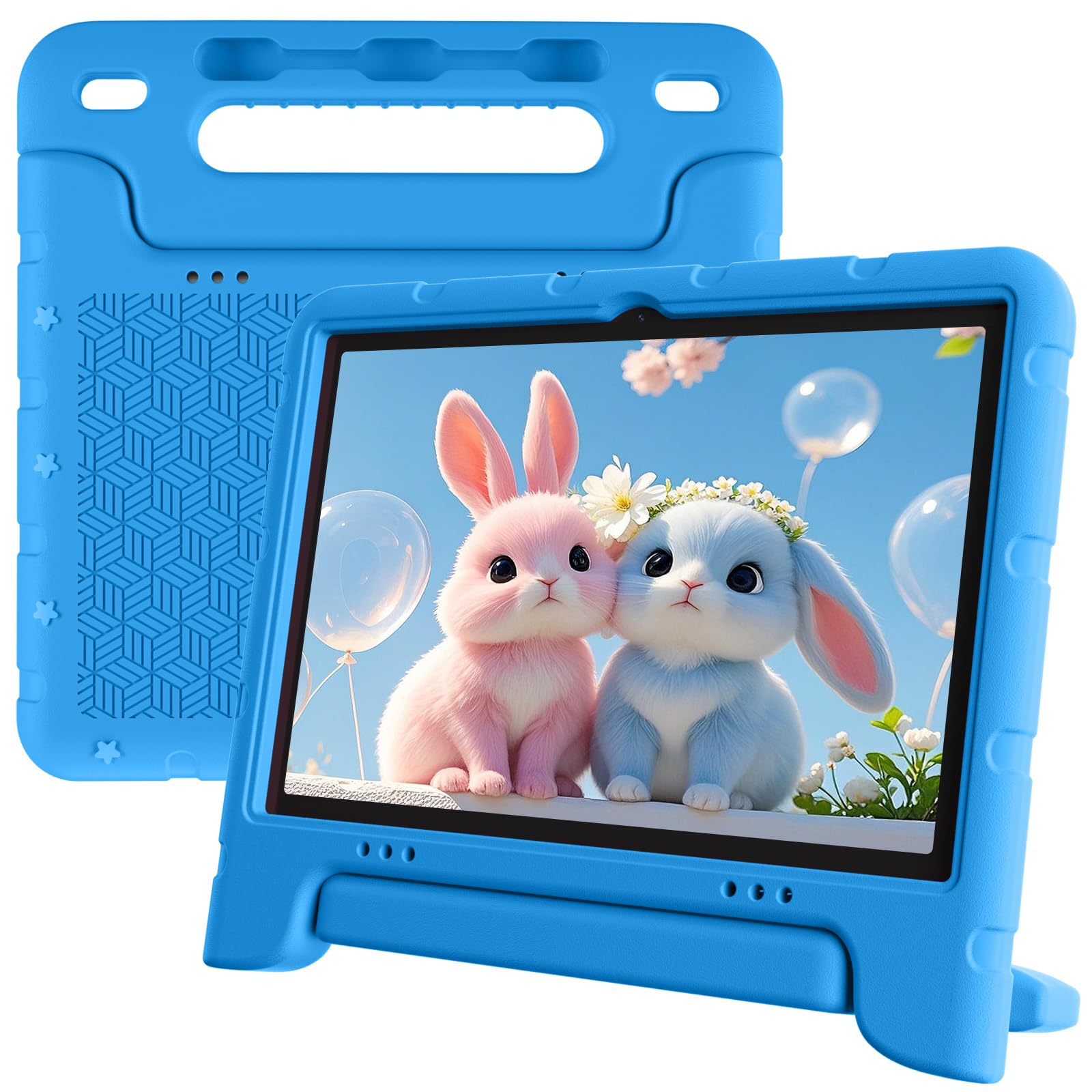
A reliable Android 15 tablet with 8 hours of battery and a 6GB RAM for smooth everyday use.
The EDDBNi is the steady middle child of this guide. It runs Android 15 with a quad-core processor, 6GB of RAM, and 64GB of ROM (expandable to 1TB). The 10.1-inch IPS screen has a 1280 x 800 resolution and automatic brightness adjustment. The 6000mAh battery provides up to 8 hours of use, versus 8 hours for the Plimpton and 6 hours for the Urao. It has a 5MP front camera and an 8MP rear camera, versus the ZZB’s 2MP front camera and 8MP rear camera.
The bundled bumper case with an adjustable stand protects against drops, and the parental controls let you set profiles, filter content, and manage screen time. While there are no customer reviews in the data to draw from, the specs line up well with the ZZB below — more RAM and storage for a slightly higher tier. It lacks the dual-band WiFi of the WXUNJA, sticking to 2.4G WiFi, which can be slower in crowded networks.
What You Get
- 8-hour battery, versus 6 hours for the Urao
- 6GB RAM with 64GB storage gives solid headroom for apps and media
- 5MP front camera is better for video calls than the 2MP on the ZZB
Trade-Offs
- Only 2.4G WiFi, not dual-band like the WXUNJA
- Quad-core processor, not octa-core like the Urao or WXUNJA
- No 5GHz WiFi means slower speeds if your home network is crowded
Good for the value-conscious: if you want a capable Android tablet with decent battery life and enough RAM for most apps, without a high price tag.
Pass if you need fast WiFi: the lack of 5GHz band support can mean laggy streaming on congested networks.
7. ZZB Kids Tablet 10 Inch, Android 15.0, 8GB (3+5 Extended) RAM, 32GB ROM
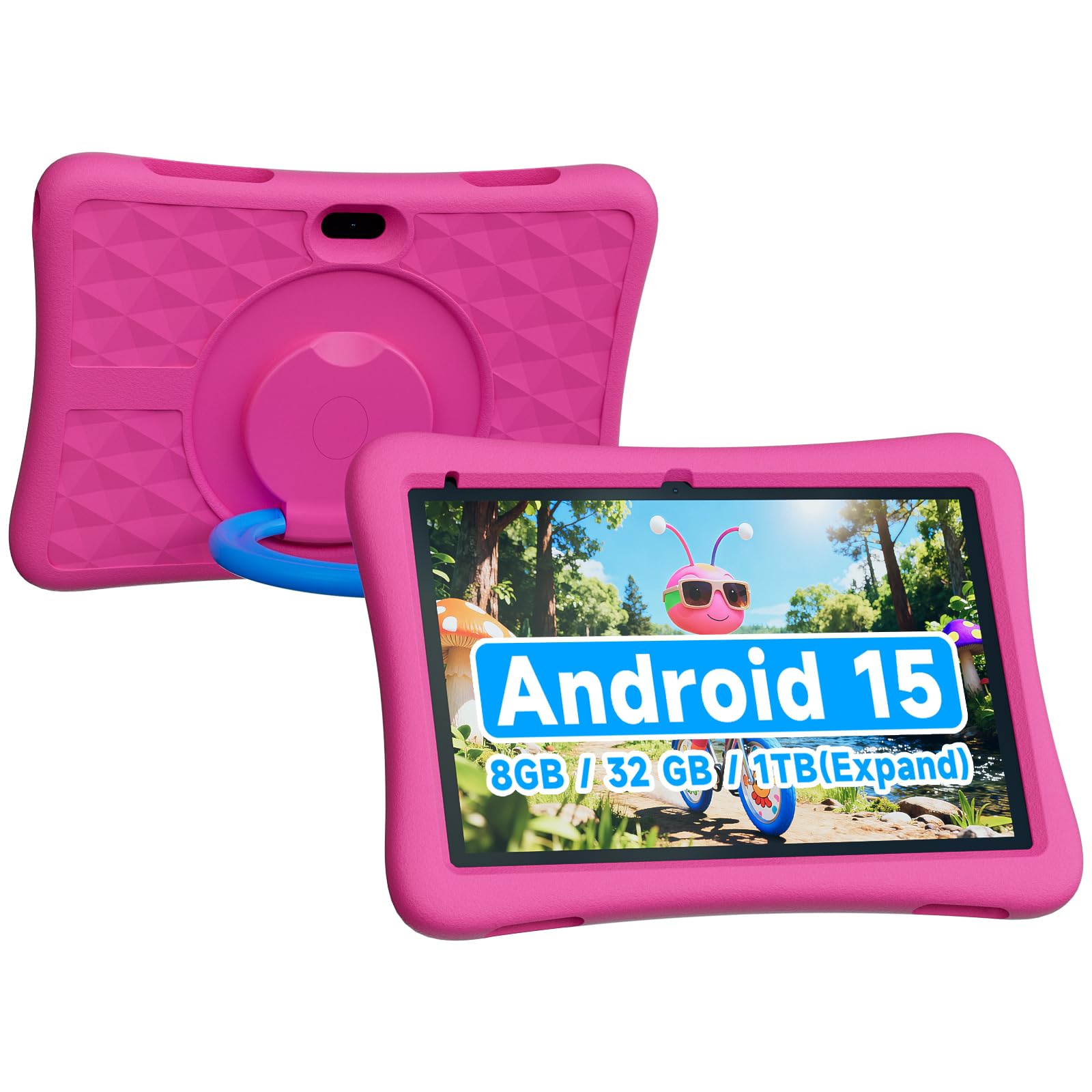
A surprisingly capable entry-level tablet that one three-year-old “loves” and a parent calls “great value at this price.”
The ZZB is the budget pick that punches above its weight. It has 8GB of RAM (3GB built-in plus 5GB virtual expansion), 32GB of internal storage (expandable to 1TB via microSD), a 6000mAh battery that lasts 7.99 hours, and a rugged EVA case. It runs Android 15.0, which is the same version as the more expensive EDDBNi and WXUNJA tablets. The 2.0MP front camera handles video calls, while the 8.0MP rear camera takes decent snapshots for a child.
Shoppers say it is a “great beginner tablet” that is “fast” and “easy to use,” with one parent mentioning “my three year old loves this Tablet and so do I.” The touch screen works well, and the “bright, responsive screen” runs apps and games smoothly. The main catch is that the screen is glass, so one reviewer advises it is “not recommended for tinny toddlers without supervision.” The 32GB storage is lower than the 64GB you get on the WXUNJA, so you will need a microSD card early on.
Why It Earns Its Spot
- 8GB RAM with 6000mAh battery gives near-premium speed and endurance at an entry-level price
- Android 15.0 is the same modern OS as pricier models
- Buyers praise the “bright, responsive screen” and “easy setup”
Budget Realities
- 32GB storage fills quickly; microSD expansion is a must for media-heavy use
- Glass screen means it is less durable than the Amazon Fire HD 10 Kids for toddlers
- 2MP front camera is low-resolution for video calls compared to the EDDBNi’s 5MP
Perfect for the budget-first buyer: if you need a functional Android tablet with good battery and modern software for a low spend, this is your pick.
Reconsider for rough toddlers: the glass screen is vulnerable; the Amazon Fire HD 10 Kids is a safer bet for the 3-and-under set.
Understanding the Specs
RAM & Storage
RAM is the tablet’s short-term memory — more of it means you can switch between a puzzle app, a video, and a drawing game without the tablet pausing to reload. Storage is the long-term space where apps and downloaded episodes live. Aim for at least 3GB of RAM and 32GB of storage. If you plan to load a lot of movies or games offline, get a tablet with a microSD card slot so you can add more space later.
Battery Life
This is measured in hours of mixed usage like watching videos and browsing the web. A children’s tablet should last at least 6 to 8 hours on a charge to cover a school day or a long car ride. The battery capacity is measured in milliampere-hours (mAh) — a 6000mAh battery is the standard for 10-inch kids’ tablets. Bigger number equals longer runtime, but the actual hours depend on the screen brightness and what apps are running.
FAQ
What age is a children’s tablet suitable for?
Can a children’s tablet run the Google Play Store?
How much storage do I need for a children’s tablet?
How long should a children’s tablet battery last?
Do children’s tablets come with a protective case?
What is the difference between Amazon Kids+ and Google Kids Space?
Can I control screen time on a children’s tablet?
Is a children’s tablet waterproof?
What is virtual RAM expansion?
Which children’s tablet has the best screen quality?
Final Thoughts: The Verdict
For most people, the children’s tablet winner is the Amazon Fire HD 10 Kids Pro because it combines the longest 13-hour battery, top-tier parental controls, and a 2-year low-maintenance guarantee for kids 6-12. If you want an open Android tablet with massive 24GB RAM for heavy multitasking, grab the Urao Kids Tablet. And for a toddler-friendly device with a tough case and the same 13-hour battery, the Amazon Fire HD 10 Kids is the safest bet for ages 3-7.
How We Picked
We do not accept paid placement. Every pick is matched to a real buyer and a real use-case; we do not hands-on test units.
Sources & Methodology
Specifications: manufacturer listings and product documentation. Review insights: verified customer reviews, as of July 2026. Pricing: not shown on this page (it changes often); check the current price via the retailer link.
As an Amazon Associate, WellFizz earns from qualifying purchases. This does not affect which products we feature.

Mo Maruf
I created WellFizz to bridge the gap between vague wellness advice and actionable solutions. My mission is simple: to decode the research and give you practical tools you can actually use.
Beyond the data, I am a passionate traveler. I believe that stepping away from the screen to explore new environments is essential for mental clarity and physical vitality.