Our readers keep the lights on and my smoothie glass nicely filled. As an Amazon Associate, I earn from qualifying purchases.
Finding a video card under tight budget constraints means navigating a minefield of outdated chipsets, confusing RAM types, and compatibility pitfalls that can leave even experienced builders frustrated. The core challenge isn’t just performance—it’s making sure your chosen card actually works with your power supply, fits your case, and delivers the output you need without burning cash on gimmicks.
I’m Mohammad Maruf — the founder and writer behind WellFizz. I’ve spent countless hours cross-referencing benchmark data, spec sheets, and real-world compatibility reports to separate genuine value from marketing noise in the entry-level GPU space.
This guide breaks down the market for the best cheapest video card by analyzing core specs, real-world use cases, and hidden compatibility gotchas that typically catch buyers off guard.
How To Choose The Best Cheapest Video Card
Before hitting the buy button, understand the three constraints that define this category: power delivery, physical size, and video memory type. Ignoring any of these three will likely result in a card that either doesn’t fit your case, trips your power supply, or delivers performance worse than integrated graphics.
Memory Type Over Capacity
A card with 4GB of DDR3 memory will be outrun by a card with 2GB of GDDR5 memory in almost every scenario due to bandwidth. Graphics memory bandwidth measured in GB/s tells you how fast data moves between the GPU and the frame buffer. When comparing the cheapest video cards, prioritize GDDR5 or GDDR6 over DDR3, even if the DDR3 card has more gigabytes.
Power Supply Compatibility
Many budget cards draw all their power directly from the PCIe slot, requiring no external power connector. This makes them ideal for older office PCs with weak power supplies. Others like the RX 580 require a dedicated 6-pin or 8-pin power connector. Verify your power supply’s wattage and available connectors before purchasing—a card that needs an 8-pin won’t run on a 300W office PSU that lacks one.
Physical Form Factor: Low Profile vs Full Height
Small form factor (SFF) desktops like Dell Optiplex and HP Elitedesk use low-profile slots that require a half-height bracket. Most budget cards ship with a low-profile bracket included, but some do not—check the product description carefully. A full-height card will not physically fit inside an SFF case.
Quick Comparison
On smaller screens, swipe sideways to see the full table.
| Model | Category | Best For | Key Spec | Amazon |
|---|---|---|---|---|
| ASUS GeForce GT 1030 | Mid-Range | Silent HTPC & Office Build | Passive Cooling, 1506MHz Boost | Amazon |
| ASRock Arc A380 Challenger | Premium | Transcoding & Modern Budget Build | 6GB GDDR6, AV1 Encode | Amazon |
| Sparkle Intel Arc A310 | Mid-Range | Media Server & Transcoding | 50W TBP, Single Slot | Amazon |
| Kelinx RX 580 | Mid-Range | 1080P Gaming on a Tight Budget | 8GB GDDR5, 2048SP | Amazon |
| MOUGOL RX 580 | Mid-Range | Dual-Fan Gaming & Content Creation | 8GB GDDR5, 256-bit Bus | Amazon |
| MSI GT 1030 4GD4 | Mid-Range | Basic 4K Display Output | 4GB DDR4, 1430MHz Boost | Amazon |
| Maxsun GT 1030 | Entry-Level | Ultra-Low Power SFF Build | 30W TDP, GDDR5 | Amazon |
| QTHREE GT 730 | Entry-Level | Multi-Monitor Office Setup | 4GB DDR3, 4 Outputs | Amazon |
| EVGA GeForce GT 730 | Entry-Level | Reliable Dual DVI Outputs | 1GB DDR3, 128-bit Bus | Amazon |
In‑Depth Reviews
1. ASUS GeForce GT 1030 2GB GDDR5

The ASUS GT 1030 uses a fully passive heatsink, meaning zero fan noise under any load. Its 1506MHz boost clock in OC mode is the highest among GT 1030 variants, leveraging the Pascal architecture with 2GB of GDDR5 memory on a 64-bit interface. The card draws power entirely from the PCIe slot, keeping total power consumption around 30W, which leaves ample headroom for older 300W power supplies.
Auto-Extreme manufacturing and Super Alloy Power II components give this card uncommonly high build quality for its tier. The low-profile bracket is included, making it a drop-in upgrade for Dell Optiplex, HP Elitedesk, and other SFF office desktops. Real-world testing shows it handles 4K video playback, light photo editing, and esports titles like Fortnite and CS:GO at playable frame rates without any audible fan whine.
GPU Tweak II software provides one-click overclocking and monitoring, though the passive cooler means sustained gaming loads will push temperatures to around 80°C in poorly ventilated cases. Users pair it with mainstream CPUs to resolve stuttering in media center builds. For a silent, low-power upgrade that transforms an old office PC into a capable multimedia machine, this card delivers precisely what it promises.
Why it’s great
- Completely silent passive cooling
- High boost clock for GT 1030 class
- Includes low-profile bracket
- Excellent ASUS build quality and warranty
Good to know
- Passive cooler needs adequate case airflow
- Not suitable for AAA gaming
- Limited to 2GB VRAM
2. ASRock Intel Arc A380 Challenger ITX 6GB

The ASRock Arc A380 brings modern architecture to the entry-level segment with 6GB of GDDR6 memory on a 96-bit bus. Its factory overclocked core runs at 2250MHz, and the card supports Intel XeSS upscaling, hardware-accelerated AV1 encoding, and ray tracing. The single-fan cooling includes a 0dB fan-stop mode where the fan stays off under low loads for total silence.
This card requires ReBAR (Resizable BAR) support from the motherboard for full performance—without it, expect roughly a 40% performance penalty. It fits into ITX cases measuring just 169.9×123.5×39.2mm but requires a single 8-pin power connector and a recommended 500W PSU. Real-world feedback from homelab users praises its transcoding capabilities, particularly AV1 encode for Plex servers, where it outperforms much older cards.
Driver maturity remains the main caveat—older DirectX 9 games may need DXVK translation layers for proper performance, but modern DirectX 12 titles run well. Power consumption peaks around 60W, making it efficient for always-on servers. For budget builders willing to ensure ReBAR compatibility, this card offers a massive generational leap over HD 7000 or GT 700 series hardware.
Why it’s great
- Industry-first AV1 encoding at this price
- 6GB GDDR6 is generous for entry-level
- Compact ITX size with 0dB fan mode
- Ray tracing support
Good to know
- Requires ReBAR for full performance
- Intel drivers still maturing
- Recommends 500W power supply
3. Sparkle Intel Arc A310 ECO 4GB

The Sparkle Arc A310 ECO is a single-slot, low-profile card with a total board power of just 50W, making it the most power-efficient option around. It features 4GB of GDDR6 memory on a 64-bit interface and includes both standard and short brackets. Its compact dimensions let it fit into almost any chassis, including the tightest SFF and 1U server cases.
The card supports Xe HPG architecture with ray tracing, Intel XeSS upscaling, and DirectX 12 Ultimate. Users consistently highlight its transcoding performance in Jellyfin and Plex servers as a top-tier experience—fast 4K transcoding with very low power draw. The single fan is noticeable under sustained load, and some users report a droning sound at certain RPMs, though firmware updates and powertop settings mitigate this.
Like other Intel Arc cards, this requires ReBAR for optimal performance. Without it, you lose about 40% of the card’s potential. It works plug-and-play on modern Linux kernels with both i915 and Xe drivers. For media server builders or those needing a low-profile, ultra-low-power GPU with modern codec support, this is the top contender in its niche.
Why it’s great
- Ultra-low 50W power consumption
- Single-slot low-profile design
- Excellent video transcoding performance
- GDDR6 memory
Good to know
- Requires ReBAR for gaming performance
- Fan noise can be droning at certain speeds
- Not a dedicated gaming card for AAA titles
4. MOUGOL AMD Radeon RX 580 8GB
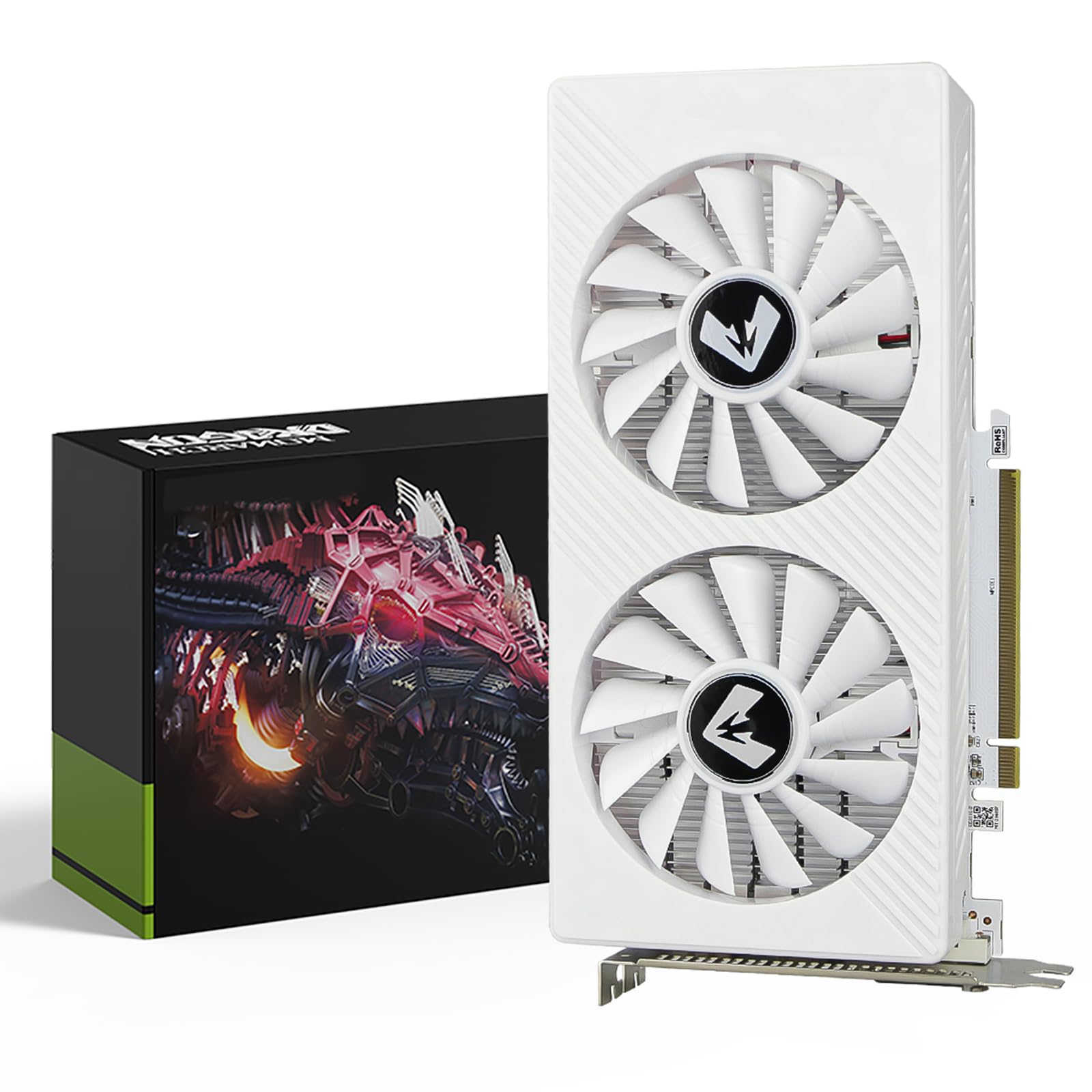
The MOUGOL RX 580 packs 8GB of Samsung GDDR5 memory across a 256-bit bus, delivering real bandwidth for 1080P gaming. It features 2048 Stream Processors with a 1206MHz core clock, dual-fan cooling with efficient heat pipes, and a full-height dual-slot design measuring 240x135x45mm. The card supports DirectX 12, Vulkan, and OpenGL 4.6, and works with AMD Adrenaline software for driver and performance management.
This card requires a 6-pin power connector, unlike the slot-powered GT 1030 cards. Power draw hits around 185W under load, so a quality 450W+ PSU is recommended. Users report solid 1080P frame rates in Fortnite, GTA V, Apex Legends, and Valorant. The dual-fan cooling keeps temperatures manageable, and the card includes a durable backplate for structural rigidity.
Some users note that the card’s shell covers the PCIe release tab on some motherboards, making removal slightly awkward. The card works well with Linux including Bazzite, and drives ultrawide 3440×1440 displays at moderate refresh rates. For anyone wanting genuine 1080P gaming capability without stepping into the mid-range price bracket, this RX 580 represents the best raw graphics horsepower per dollar.
Why it’s great
- 8GB VRAM with 256-bit bus for smooth 1080P gaming
- Dual-fan cooling runs quiet under normal loads
- Large performance jump over GT 1030/730 class
- AMD Adrenaline software support
Good to know
- Requires 6-pin power connector
- 185W power draw needs adequate cooling
- Card shell can block motherboard release tab
5. Kelinx AISURIX RX 580 8GB

The Kelinx AISURIX RX 580 is another 8GB GDDR5 card based on the Polaris 20 XTX processor with 2048 Stream Processors. It features a semi-automatic intelligent fan system with freeze fan stop—the fans halt completely when GPU temperatures are low, providing silent operation during light desktop work. The card uses a single 8-pin power connector and has a maximum power draw of 185W.
This card outputs via 2x DisplayPort and 1x HDMI, supporting up to 4K resolution. Users report good Linux compatibility, including support for Proxmox and various distros. The Polaris 20 chip is essentially an RX 480 with minor clock adjustments, a design that dates back to 2017 but still competently handles 1080P gaming for most modern titles.
The main concern with this card is reliability—several users reported the card dying within one to two weeks, with graphical glitches at the BIOS screen and driver recognition failures. Customer support response times have been inconsistent. If you need a cheap RX 580, consider buying from the more established MOUGOL brand instead for better support and consistency.
Why it’s great
- Freeze fan stop for silent idle operation
- 8GB GDDR5 with 2048SP for solid 1080P gaming
- Good Linux compatibility reported
Good to know
- Reports of early failures and driver issues
- Customer support responsiveness varies
- Requires 8-pin power connector
6. MSI Gaming GeForce GT 1030 4GD4 LP OC

The MSI GT 1030 4GD4 is unusual in this segment—it uses 4GB of DDR4 memory instead of GDDR5. While the larger capacity might look appealing on paper, the DDR4 memory runs at significantly lower bandwidth than GDDR5, which impacts performance in gaming and texture-heavy tasks. The card features a boost clock of 1430MHz, a single fan, and outputs via DisplayPort 1.4a and HDMI 2.0b, supporting 4K resolution output.
Because it uses DDR4, this card consumes less power than GDDR5-based GT 1030 cards, making it suitable for sub-300W power supplies. Users recommend it for PSUs under 300W that cannot support even a standard GT 1030. Linux compatibility is excellent, with multiple users confirming plug-and-play support on Linux Mint and other distros.
For gaming, the DDR4 memory bottleneck means this card underperforms the 2GB GDDR5 GT 1030—expect lower frame rates in titles like Minecraft. However, for office work, 4K video playback, and multi-monitor productivity setups where raw gaming performance isn’t the goal, the extra memory and low power draw make this card a viable choice for very power-constrained systems.
Why it’s great
- Excellent for sub-300W power supplies
- 4GB memory for multi-monitor desktop use
- DisplayPort 1.4a outputs for high-res displays
- Great Linux compatibility
Good to know
- DDR4 memory bottlenecks gaming performance
- Slower than standard GDDR5 GT 1030
- Single fan can be audible under load
7. Maxsun GeForce GT 1030 2GB GDDR5

The Maxsun GT 1030 offers the same Pascal architecture as the ASUS card but at a lower price point. It uses 2GB of GDDR5 with a 64-bit interface, a core clock of 1228MHz with boost up to 1468MHz, and a 30W TDP that leaves huge headroom on 360W power supplies. The silver-plated PCB and all solid capacitors target improved stability and lower operating temperatures.
This card is ideal for SFF builds needing a low-profile solution—it includes the half-height bracket, though some users report that the bracket is occasionally missing from the package. Check the package contents upon delivery. The card outputs via DVI and HDMI, and supports up to 4K resolution for video streaming and basic productivity tasks.
Users consistently confirm it fixes monitor blanking issues on old Dell PCs and handles 4K video streaming without any lag. It is explicitly not meant for gaming beyond very light titles like Flash games. For anyone needing to breathe life into an aging office PC for media consumption and web browsing, the Maxsun GT 1030 provides a cost-effective solution with solid reliability feedback.
Why it’s great
- Extremely low 30W power draw
- Silver plated PCB for stability
- Excellent for SFF and old office PC upgrades
- Works without external power connector
Good to know
- Low-profile bracket not always included
- Not for modern gaming
- Only 2GB VRAM limits future-proofing
8. QTHREE GeForce GT 730 4GB DDR3

The QTHREE GT 730 features 4GB of DDR3 memory on a 64-bit interface, with a core clock of 902MHz based on the Kepler architecture. Its standout feature is the output configuration—2x HDMI, DisplayPort, and VGA, supporting up to four monitors simultaneously at 2560×1440 resolution. The card draws 30W and needs no external power, fitting into both full-height and low-profile chassis with the included brackets.
This card is specifically designed for office productivity and multi-monitor workstation setups, not gaming. Users running three 42-inch screens at 2560×1440 with an HP Tower 800 G1 report smooth desktop operation. The whisper-quiet fan and inexpensive price make it a popular choice for Linux workstations and triple-monitor stat setups that don’t require 3D acceleration.
The main issue reported is the VGA output on some units failing to display correctly—users recommend sticking to HDMI and DisplayPort connections. The card is compatible with Windows 11 and includes automatic driver installation. For anyone needing four monitors on a tight budget without any gaming requirements, the QTHREE GT 730 delivers unmatched output flexibility.
Why it’s great
- Four monitor outputs including dual HDMI
- Incredibly low 30W power draw
- Includes both full and low-profile brackets
- Plug-and-play on Windows and Linux
Good to know
- VGA output may not work on all units
- DDR3 memory limits performance
- Not suitable for gaming
9. EVGA GeForce GT 730 1GB DDR3

The EVGA GT 730 is a 1GB DDR3 card with a 128-bit memory interface—wider than many competitors at this price point, giving it decent memory bandwidth for its class. It uses 96 CUDA cores at a base clock of 700MHz with effective memory clock of 1600MHz. The card draws power from the PCIe slot and requires a 300W power supply. It includes dual DVI outputs and a mini-HDMI port, supporting resolutions up to 4096×2160.
EVGA is known for excellent customer service and a 3-year warranty, which adds peace of mind when buying a budget card. Users report this card works seamlessly with Dell Precision workstations, automatically detecting and installing drivers under Windows 10 with no manual intervention. It handles dual 24-inch monitors via DVI without issue and provides faster video editing performance than integrated graphics.
This card is not for gaming—users describe it as “very slow” for modern titles, recommending the GTX 1050 Ti for any gaming ambitions. The DVI-I output requires a compatible monitor or adapter. For a reliable, dual-display office build or a simple HTPC setup, the EVGA GT 730 offers a trusted brand and a strong support network at a minimal price point.
Why it’s great
- Wide 128-bit memory bus for better bandwidth
- EVGA 3-year warranty and excellent support
- Dual DVI for legacy monitor support
- Automatic driver detection on Windows 10
Good to know
- 1GB VRAM is very limited
- DDR3 memory bottlenecks performance
- Not suitable for any modern gaming
FAQ
Will a GT 1030 run my games at 60 FPS?
Can I use an RX 580 with a 300W power supply?
Why does my low-profile card not fit my Dell Optiplex?
Final Thoughts: The Verdict
For most users, the best cheapest video card winner is the ASUS GeForce GT 1030 because it combines silent passive cooling, excellent build quality, and reliable compatibility with SFF and office PCs. If you need genuine 1080P gaming performance, grab the MOUGOL RX 580. And for media server builders needing modern codec support, nothing beats the ASRock Arc A380 with its AV1 encoding and compact ITX form factor.

Mo Maruf
I created WellFizz to bridge the gap between vague wellness advice and actionable solutions. My mission is simple: to decode the research and give you practical tools you can actually use.
Beyond the data, I am a passionate traveler. I believe that stepping away from the screen to explore new environments is essential for mental clarity and physical vitality.