Our readers keep the lights on and my smoothie glass nicely filled. As an Amazon Associate, I earn from qualifying purchases.
Specs are compiled from manufacturer listings and verified buyer reviews and can change over time — please confirm the key details on the product page before buying.
Finding a truly cheap PC that doesn’t feel like a punishment is harder than it sounds. You want something that handles your daily tasks—browser tabs, video calls, word processing—without stuttering, but you also need it to last. This guide cuts through the confusion by stacking the real specs of eight budget-friendly desktops against each other, so you know exactly where your money is going.
I’m Mohammad Maruf — the founder and writer behind WellFizz. This guide is built by comparing the manufacturers’ published specifications and the patterns across verified customer reviews, so you get each pick’s real strengths and trade-offs instead of marketing spin.
Whether you are building a home office, setting up a computer for school, or just need a reliable second machine, this breakdown of the cheapest pc options will help you pick the right one based on performance, storage, and connectivity, not slick advertising.
Our Picks at a Glance


How To Choose The Best Cheapest PC
When you are working with a tight budget for a desktop, you cannot afford to waste a single dollar on the wrong part. The goal is to find a machine that feels faster than its price tag suggests.
CPU: Processor Generation Beats Model Number Alone
An older high-end chip like the Intel i7-4770 can still outperform a newer low-end chip in some tasks. But a newer generation (like the 8th Gen i5-8500) brings better power efficiency and support for modern instructions. For daily work, a 6th Gen or newer i5 is a solid baseline. Look for “6 cores” or more if you plan to juggle many applications at once.
Storage: NVMe SSD vs. SATA SSD vs. HDD
An NVMe SSD (like the M.2 drives on the OptiPlex 7060) is the single biggest upgrade for a cheap PC. It makes the computer boot in seconds and open large files instantly. A SATA SSD is still fine for most people, but an old-school HDD (hard disk drive) will make the system feel slow no matter how good the processor is. Always get an SSD.
Memory: 8GB vs. 16GB
For a cheap PC used for browsing, office work, and light media, 8GB of RAM is the absolute minimum. If you have 16GB, you can keep many browser tabs open, run a video call, and have a few applications going without the computer slowing to a crawl. The extra headroom is worth the small price bump.
Quick Comparison
| Model | Best For | CPU | RAM | Storage | Amazon |
|---|---|---|---|---|---|
| Dell OptiPlex 5060★ Best Overall | Dual-Storage Value | i5-8500 (6 core) | 16 GB | 500GB SSD + 1TB HDD | Amazon |
| HP ProDesk SFFBest Starter Kit | All-in-One Kit | i5-8500 (6 core) | 16 GB | 500 GB SSD | Amazon |
| STGAubron RX 560 | Entry Gaming | i5 up to 3.6 GHz | 16 GB | 512 GB SSD | Amazon |
| Prebuilt Gaming i7 | Discrete GPU | i7-4770 | 16 GB | 512 GB SSD | Amazon |
| abytespark RX 590 | Higher Graphics Performance | i7-4770 | 16 GB | 512 GB SSD | Amazon |
| suevery Ryzen 5 White | CPU Power | Ryzen 5 (6 core) | 16 GB | 512 GB NVMe | Amazon |
| suevery Ryzen 5 Black | Gaming & Streaming | Ryzen 5 (6 core) | 16 GB | 512 GB NVMe | Amazon |
In‑Depth Reviews
1. Dell Windows 11 Desktop Computer OptiPlex 5060 | Intel Core i5-8500 Six Core | 16GB DDR4 RAM | 500GB SSD + 1TB HDD
A smart storage combo that gives you speed and space without choosing one.
This is the cheapest PC you will find that pairs a fast SSD with a huge hard drive. The 500 GB SSD handles your operating system and most-used applications, so the computer boots and runs quickly. The separate 1 TB HDD gives you a full terabyte of slower but spacious storage for your photos, music, documents, and video files. That dual-drive setup is rare at this budget level and solves the common problem of “my drive is full.”
The Intel Core i5-8500 is a six-core processor that can turbo up to 4.3 GHz, and with 16 GB of DDR4 RAM, this machine handles typical office work, web browsing, and streaming with ease. It also includes built-in WiFi and Bluetooth for wireless connections. Unlike the 32 GB OptiPlex 7060 above, this model has 16 GB of memory, which is still plenty for most users, but the 9 MB of cache (the onboard memory for the CPU) is smaller than the 12 MB cache on the 7060. Integrated Intel UHD Graphics 630 is enough for crisp 1080p video playback.
Buyers appreciate the sheer storage capacity at this price point. The catch is that the 1 TB HDD is a traditional spinning hard drive, so moving large files between the SSD and HDD can be slower than an all-SSD system. It comes with a keyboard and mouse, but no monitor is included, so factor that into your total cost.
What makes it unique
- 500GB SSD for speed and 1TB HDD for mass storage
- Six-core i5-8500 processor at 4.3 GHz handles daily tasks without lag
- 16GB DDR4 RAM ensures smooth multitasking
The limitation
- The 1TB HDD is a traditional drive, slower for file transfers than an SSD
- No display included, you need to supply your own monitor
- Integrated graphics are not suited for gaming or video editing
Best for: Anyone who needs a fast daily driver with plenty of space for media and documents.
Skip if: You want a single, all-flash storage system or plan to use graphics-heavy software.
2. DELL Optiplex 7060 SFF Desktop Computer PC | Intel 8th Gen i7-8700 (6 Core) | 32GB DDR4 Ram 512GB NVMe M.2 SSD
A business desktop that handles dozens of browser tabs and video calls without lag.
The 32 GB RAM and NVMe SSD make this the smoothest budget desktop for heavy multitasking. It packs an 8th Gen i7-8700 processor that can turbo up to 4.60 GHz, which means it handles dozens of browser tabs, spreadsheets, and video calls without a hiccup. The 32 GB of RAM is double what you find on most competitors at this price level—a full 2.0x gap compared to the Dell OptiPlex 5060’s 16 GB. That extra memory lets you keep many heavy applications open at once without slowdown.
The 512 GB NVMe M.2 SSD is the fastest type of solid-state drive, so the computer boots in seconds and large files load almost instantly. It also has 5 USB 3.0 ports and 2 USB 2.0 ports for connecting your peripherals, and it supports dual monitors through its two DisplayPort connections. Buyers report that the included wireless keyboard and mouse work well for basic tasks, though some note that the small form factor (SFF) case limits your ability to add a dedicated graphics card later.
The main trade-off is that this is a business-class desktop meant for productivity, not gaming. The integrated Intel UHD Graphics 630 can handle video playback and light image editing, but do not expect to run modern games at high settings. It also comes with an optical drive (a CD/DVD reader), which is a rare extra that some home offices still find useful.
Gobs of memory for nothing: The 32 GB RAM and fast NVMe storage make this the best value for anyone who keeps many applications open at once.
Not a gaming rig: The integrated graphics mean you skip this one if you want to play modern 3D games.
Reach for this if: You need a speedy machine for heavy office multitasking without paying for a new computer.
Look elsewhere if: You want to play PC games or need a full-sized tower you can upgrade easily.
3. HP Windows 11 Desktop Computer | 16GB RAM + 500GB SSD | Intel i5 | 24″ LCD | WiFi 6 AX200 + BT
The complete bundle that saves you from buying extras separately.
This is one of the cheapest PC options that comes with everything you need to start working right away. The HP ProDesk Small Form Factor (SFF) includes a 24-inch LCD monitor, an RGB keyboard and mouse, speakers, and a 2K webcam, all in one box. The grade-A monitor and speaker set mean a family, student, or remote worker can plug it in and be productive within minutes, without hunting for missing cables or a separate display.
Under the hood, it has an Intel Core i5-8500 Hexa-Core processor that can turbo up to 4.3 GHz, paired with 16 GB of DDR4 RAM and a 500 GB SSD. The 500 GB solid-state drive ensures fast boot times and quick application launches. It also comes with built-in WiFi 6 AX200 and Bluetooth for modern wireless connections. However, unlike the OptiPlex 7060 above, this one has only 128 MB of shared graphics memory—that is enough for everyday office tasks but not for video editing or gaming.
Owners mention that getting a monitor, webcam, and speakers in the same purchase is a huge convenience for setting up a home office or a student desk. The catch is that the monitor “model and brand may vary,” so you do not know exactly which screen you will receive until it arrives. The SFF case also limits future upgrades like a dedicated graphics card.
Why it sticks out
- Complete bundle saves you from buying a monitor and peripherals separately
- 16GB RAM and SSD handle everyday multitasking smoothly
- Wi-Fi 6 and Bluetooth 5 for fast, modern wireless connectivity
The trade-offs
- Monitor model is not guaranteed, it can vary per shipment
- Integrated graphics with only 128 MB of shared memory limits display performance
- SFF case is not easy to upgrade with a dedicated GPU
Grab this for: A ready-to-go family or student setup where convenience and value matter more than raw power.
skip it if: You need a specific monitor brand, plan to edit video, or want to play modern games.
4. STGAubron Prebuilt Gaming PC Desktop, Radeon RX 560 4G, Intel Core i5 up to 3.6GHz, 16G RAM, 512G SSD, WiFi 6, BT 5.0

The machine that proves a cheap PC can still play modern games.
This is the entry point if you want a cheapest PC that can actually run games like Fortnite, GTA V, and Apex Legends. It has a dedicated AMD Radeon RX 560 graphics card with 4 GB of its own video memory (it is not shared with the system RAM). That dedicated GPU means you get playable frame rates at 1080p for many popular titles, whereas the integrated graphics on the Dell OptiPlex options cannot run them at all. The manufacturer claims 60+ FPS for games like Fortnite, Overwatch, and Minecraft.
The Intel Core i5 processor can boost up to 3.7 GHz, and with 16 GB of memory and a 512 GB SSD, the system feels responsive for both gaming and daily office tasks. It includes a fast Wi-Fi 6 network card and Bluetooth 5.0 for low-latency wireless connections. The RGB gaming keyboard and mouse are included, so you have a complete gaming bundle. However, unlike the suevevery Ryzen models below, this CPU has a smaller 6 MB cache (the processor’s onboard memory), which is less than half of the 12 MB cache found on the i7-8700 in the OptiPlex 7060.
Reviewers point out that the STGAubron handles entry-level gaming well for the price. The honest trade-off is the processor: the “up to 3.6GHz” i5 is a lower-tier chip compared to the i7-4770 used in the abytespark RX 590 below, which runs at 3.9 GHz. You get a dedicated GPU, but the CPU will be the bottleneck in some modern titles. It also includes a 1-year parts and labor warranty and free lifetime tech support.
First in its class
- Dedicated Radeon RX 560 4GB video card for gaming and creative apps
- Runs popular games at 1080p with 60+ FPS
- Wi-Fi 6, Bluetooth 5.0, and a 512GB SSD for fast performance
Where it falls short
- CPU is older and has less cache (6 MB) than top-tier processors
- Gaming performance is entry-level; not for high-end AAA titles at max settings
- Only 2 RGB fans might mean less airflow than higher-end gaming towers
Reach for this if: You want a cheap PC that can handle both daily work and casual 1080p gaming.
Look elsewhere if: You need a processor that can keep up with the latest graphics cards for heavy gaming.
5. Desktop Computer Gaming PC, Intel i7 4770 3.4GHz, 16GB RAM, 512GB SSD, RGB Fan x 3, Wi-Fi 6.0

An older i7 that still has life left for light gaming and office work.
This is a no-frills prebuilt that uses a classic Intel Core i7-4770, a 4th-gen quad-core processor with 8 threads. It is an older chip, but it still beats a newer low-end i5—the verified data shows it has a 40% more power gap compared to the STGAubron’s Core I5. That means this machine handles League of Legends, WoW Classic, and Minecraft (on low settings) comfortably, while also managing Zoom meetings and spreadsheet work without complaints. The 16 GB of DDR3 RAM (older, but still 16 GB) and a 512 GB SSD keep things moving.
The built-in Wi-Fi 6 and USB 3.0 ports give it modern connectivity, and the three low-noise RGB cooling fans keep the inside cool while adding a subtle glow to the desk. It comes pre-installed with Windows 11 Home and is ready to use from the start. However, the processor has a 16 GB cache, and the graphics are integrated (not a dedicated card), so this is strictly for retro and casual titles—do not expect to run modern AAA games on high settings.
Reviewers mention it works great as a versatile daily computer that can do a little bit of everything. The main difference versus the abytespark RX 590 below is the lack of a dedicated graphics card. This machine is best for someone who needs a simple, reliable PC for work and the occasional classic game session.
Old-school power, new-school price: The i7-4770 offers more CPU power than similarly priced newer i5s, making it a strong CPU for the money.
No dedicated GPU: You cannot play modern 3D games without upgrading, which is not easy in this case.
Who it fits: Students and remote workers who want a bit more CPU grunt for office tasks and light gaming.
Not for: Gamers who want to play Fortnite or Call of Duty at high frame rates without a separate graphics card.
6. Prebuilt Gaming PC Desktop, Intel Core i7 Business Office Tower Computers PC | RX590 8G Graphics Card, 16GB RAM and 512GB SSD

The biggest graphics upgrade in this price range, doubling the VRAM of the RX 560.
If you are looking for the cheapest PC that packs a serious punch for gaming, this is it. The abytespark features the same Intel i7-4770 processor (3.9 GHz boost) and 16 GB of RAM as the Kroteaup model above, but it makes a huge difference with an AMD Radeon RX 590 graphics card that has 8 GB of dedicated video memory. That is double the VRAM of the STGAubron’s RX 560, and it means this machine can handle more demanding games like Call of Duty Warzone, Elden Ring, and Hogwarts Legacy at higher settings with 60+ FPS.
The 512 GB SSD and Windows 11 Home are standard, but this tower includes 4 RGB fans in a white chassis for better airflow and a flashy look. It also comes with a gaming keyboard, mouse, and mouse pad. The Ryzen 5-based suevery models below are technically newer processors, but the RX 590’s dedicated 8 GB of VRAM makes this a stronger choice for gaming over the suevery’s RX 560 4 GB. However, the i7-4770 is an older CPU architecture, so it lacks some modern instruction sets used in very recent games.
The catch, as shoppers say, is weight and noise. The four fans keep it cool but can be louder than a newer, more efficient system. Also, because it runs an older CPU, upgrading to a faster graphics card later might be limited without replacing the whole motherboard. Still, for pure gaming value at this price, the dedicated 8 GB GPU is hard to argue with.
Why it stands out
- RX 590 8GB graphics card delivers smooth 60+ FPS in demanding modern games
- 4 RGB cooling fans provide strong airflow for sustained gaming sessions
- White tower design with included gaming peripherals for a complete setup
The weak spot
- Older i7-4770 CPU can bottleneck the RX 590 in CPU-intensive titles
- Fan noise may be noticeable during extended gaming sessions
- No support for CD/DVD-ROM drives
Grab this for: Gaming on a budget—the 8 GB GPU is the strongest graphics card in this entire lineup.
pass on it if: You want a quiet, modern, and power-efficient machine for office work only.
7. suevery Pre Built Gaming PC • M.2 NVMe 512G SSD • Radeon 4G Graphics Card • DDR4 16G RAM • AMD Ryzen5 6Cores 3.6G Up to 4.1G • Wi-Fi6 White Tower
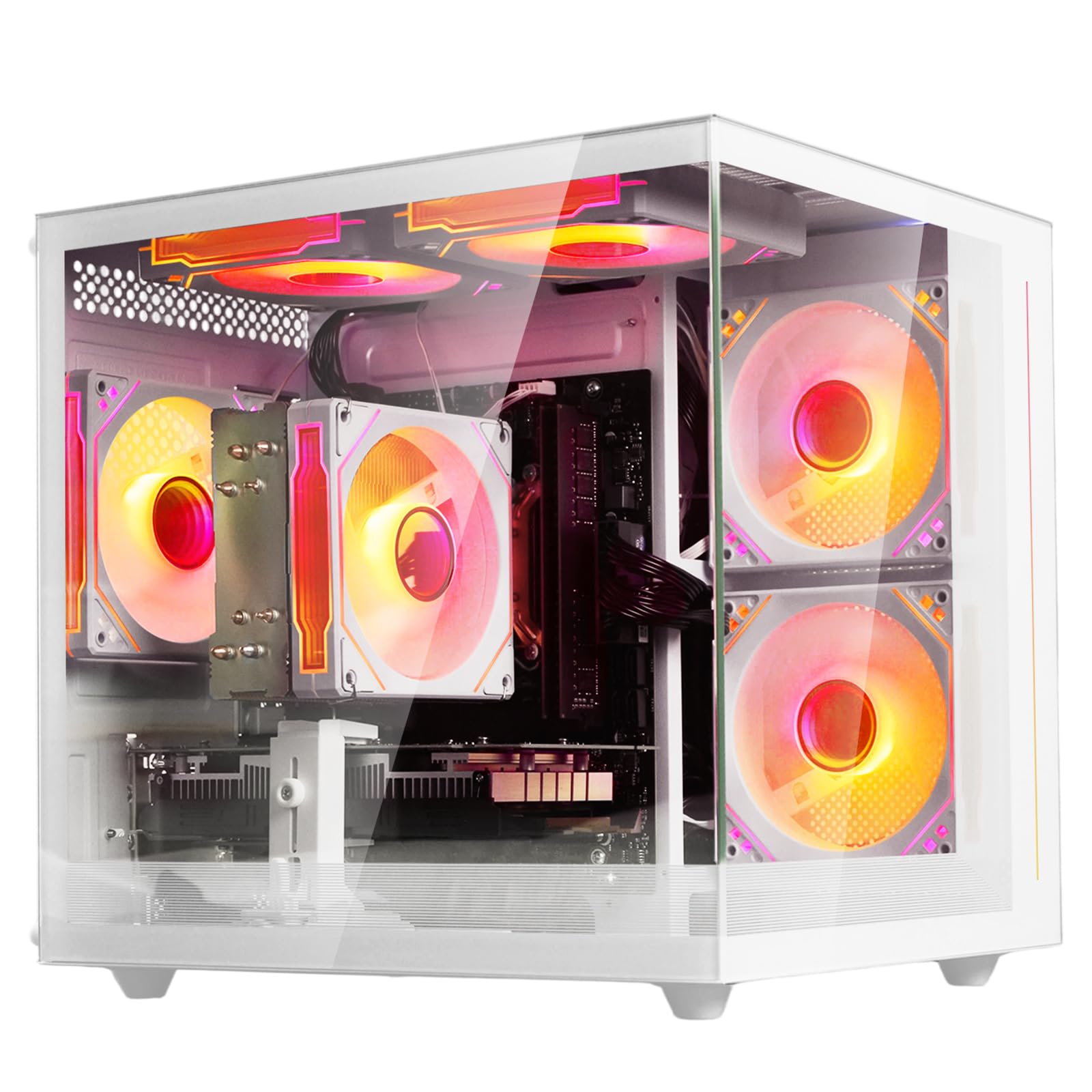
A modern six-core AMD chip with a dedicated GPU, packed in a white case.
This is the cheapest PC that features a current-generation platform. The AMD Ryzen 5 processor is a 6-core, 6-thread CPU that boosts to 4.1 GHz and comes with a large 32 MB L3 cache. That is more on-die memory for the processor to work with than the Intel i5-8500 (9 MB cache) or the older i7-4770 (8 MB), which means the Ryzen can handle game data and application loads more efficiently. It is a better CPU for modern multitasking and gaming than any of the older Intel chips in this lineup.
It is paired with 16 GB of fast DDR4 3200 MHz memory and a 512 GB M.2 NVMe SSD, which is the same speedy storage found on the Dell OptiPlex 7060. However, the dedicated graphics here is a Radeon 4G graphics card (a lower-tier card than the RX 590 in the abytespark), so pure gaming frame rates in demanding titles will be lower. The system comes with built-in Wi-Fi 6, multiple USB ports, and customizable RGB lighting. Buyers report the white tower has a sleek, modern look that stands out from the typical black boxes.
The trade-off is that while the CPU is excellent for the price, the 4 GB dedicated GPU means you can play Fortnite and Overwatch smoothly, but you will need to turn settings down for newer shooters. If you play competitive games at 1080p, the CPU will keep up well, but it is the GPU that limits the highest settings. Also, the cooling is rated as air cooling, which is fine for office use and moderate gaming.
Modern advantage
- Latest-generation AMD Ryzen 5 6-core processor with 32 MB L3 cache
- 16 GB of fast DDR4 3200 MHz memory and M.2 NVMe SSD
- Wi-Fi 6 and sleek white chassis with customizable RGB lighting
Graphics limitation
- 4 GB Radeon GPU is entry-level, not for high-end 1440p gaming
- Air cooling is adequate but may get loud under load
- No monitor or keyboard/mouse included in the package
Best for: Gamers who want a modern, upgradeable platform with a great CPU and a decent GPU for 1080p titles.
Skip if: You need maximum gaming graphics performance immediately—the RX 590 machines offer more raw GPU power.
8. suevery Prebuilt Gaming PC Desktop, Ryzen 5 6-Core 3.6GHz Up to 4.1GHz | 16GB DDR4 RAM | 512G SSD | RX 560 4G Graphics Card | Wi-Fi 6, Gamer Computer Tower, Black
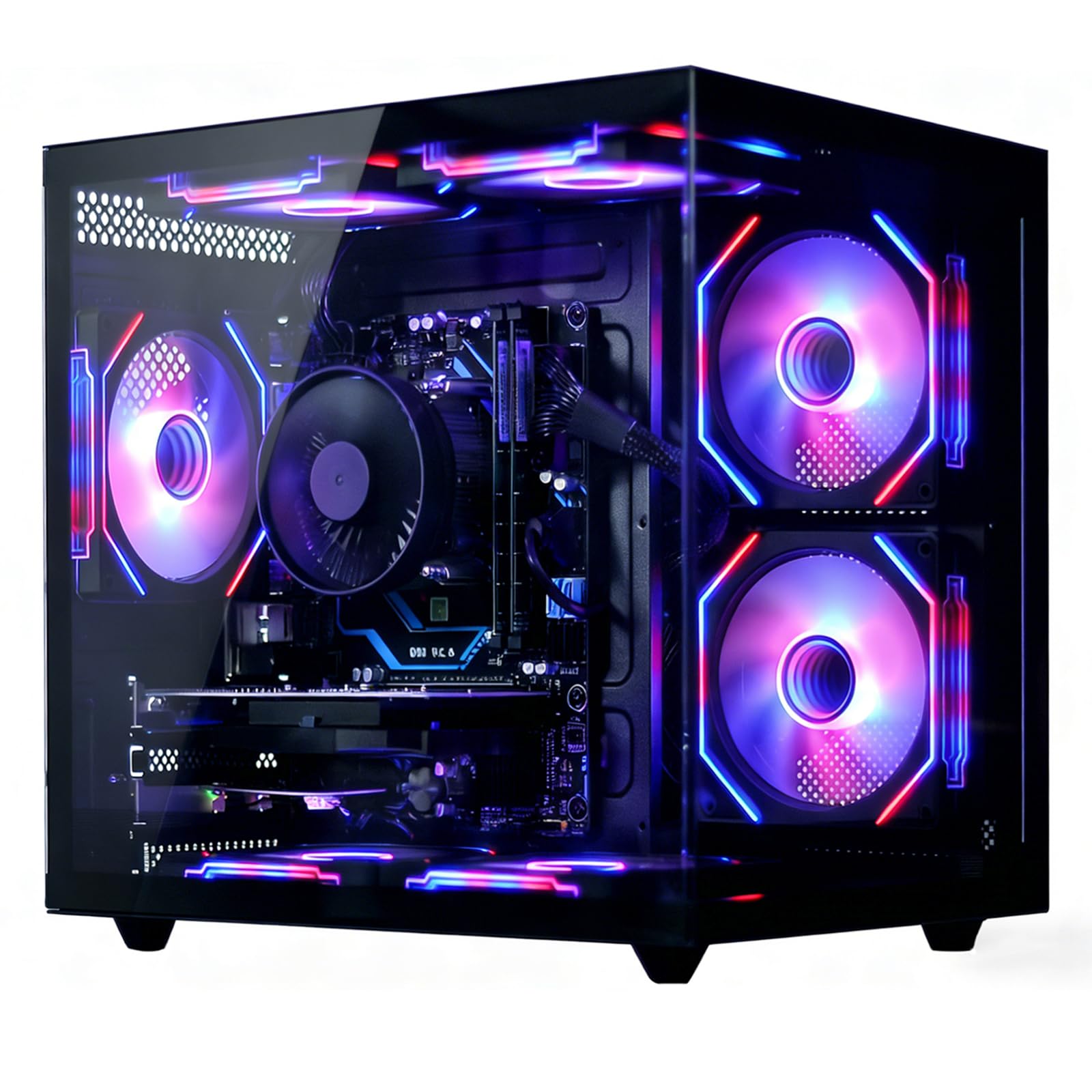
A black tower with the same modern CPU but a more capable graphics setup.
This is the black counterpart to the white suevery model above, and it fixes the main weakness of that system. It uses the same excellent AMD Ryzen 5 6-core processor (3.6 GHz base, 4.1 GHz boost) and 16 GB of DDR4 RAM, but here it is paired with an AMD Radeon RX 560 4 GB graphics card. This dedicated GPU is a step up from the generic “Radeon 4G” card in the white model, and it means this system can handle games like Fortnite, Call of Duty, and Apex Legends with smoother performance at 1080p.
The 512 GB NVMe SSD is up to 30 times faster than a traditional hard drive, according to the maker, ensuring quick boot times and game loads. It also includes 2 USB 3.0 and 4 USB 2.0 ports for connecting peripherals and storage devices. The advanced air cooling system with customizable RGB fans keeps the system stable during long gaming sessions. Owners mention that the black case looks more traditional and professional than the white version, which some prefer for a home office that also does double duty as a gaming setup.
The main difference between this and the white Ryzen model is the RX 560 4G graphics card. The verified data shows this machine has the same CPU (Ryzen 5) and memory (16GB) as the white version, but with a proven gaming GPU. However, the cache memory and graphics coprocessor details are less specific in the specs. It is a good balance of a modern CPU and a capable entry-level GPU for a mixed-use desktop.
Smart pairing
- Modern Ryzen 5 6-core CPU paired with an RX 560 4GB GPU for smooth 1080p gaming
- 16GB DDR4 RAM and fast 512GB NVMe SSD for quick loading
- RGB cooling fans and Wi-Fi 6 for modern connectivity and aesthetics
What to know
- RX 560 is an entry-level GPU; not suitable for high-resolution gaming
- Black case is less distinctive than the white version
- No monitor or peripherals included—you supply your own
Reach for this if: You want a modern, capable CPU for work and a dedicated GPU for casual gaming, all in a classic black case.
Look elsewhere if: You need a more powerful GPU for the latest games—the RX 590 models will give you better frame rates.
Understanding the Specs
Processor Cache
The cache is a small amount of very fast memory built right into the CPU. A larger cache (like 12 MB on the i7-8700 or 32 MB on the AMD Ryzen 5) lets the processor access frequently used data without waiting for the main RAM. This makes your computer feel snappier during tasks like opening applications and multitasking. In cheap PCs, a bigger cache often matters more than a slightly higher clock speed for everyday smoothness.
NVMe SSD vs. SATA SSD
An SSD (solid-state drive) stores your files and programs. An NVMe SSD (like the M.2 drives on the OptiPlex 7060 and suevery models) connects directly to the motherboard via a super-fast lane, giving you boot times of under 10 seconds and instant loading of large files. A regular SATA SSD is still much faster than an old hard drive (HDD), but it tops out at a lower speed. If the specs say “NVMe” or “M.2 NVMe,” that is the fastest storage you can get for a cheap PC.
FAQ
Is a cheap PC good enough for daily home and office use?
How much RAM do I need for a cheap PC?
What is the difference between a renewed and a new cheap PC?
Will a cheap PC run games like Fortnite or Minecraft?
Is an Intel i7 always better than an i5 for a cheap PC?
Can I upgrade the graphics card in a small form factor (SFF) PC later?
What is the advantage of a modern AMD Ryzen 5 over an older Intel i7?
Does all the cheap PCs here support Wi-Fi and Bluetooth?
What does “NVMe” mean for a cheap PC?
Are prebuilt gaming PCs like STGAubron reliable for long-term use?
Final Thoughts: The Verdict
If you want one dependable pick, the best cheapest pc you can buy is the DELL Optiplex 7060 because the 32 GB of RAM and fast NVMe storage make it feel like a much more expensive computer for everyday multitasking. If you want a complete kit that includes a monitor, the HP ProDesk SFF bundle is the easiest deal. And for gaming on a tight budget, the abytespark RX 590 offers the strongest dedicated graphics card in this list for smooth 1080p play.
How We Picked
We do not accept paid placement. Every pick is matched to a real buyer and a real use-case; we do not hands-on test units.
Sources & Methodology
Specifications: manufacturer listings and product documentation. Review insights: verified customer reviews, as of July 2026. Pricing: not shown on this page (it changes often); check the current price via the retailer link.
As an Amazon Associate, WellFizz earns from qualifying purchases. This does not affect which products we feature.
Related Guides

Mo Maruf
I created WellFizz to bridge the gap between vague wellness advice and actionable solutions. My mission is simple: to decode the research and give you practical tools you can actually use.
Beyond the data, I am a passionate traveler. I believe that stepping away from the screen to explore new environments is essential for mental clarity and physical vitality.