Our readers keep the lights on and my smoothie glass nicely filled. As an Amazon Associate, I earn from qualifying purchases.
Specs are compiled from manufacturer listings and verified buyer reviews and can change over time — please confirm the key details on the product page before buying.
I’m Mohammad Maruf — the founder and writer behind WellFizz. This guide is built by comparing the manufacturers’ published specifications and the patterns across verified customer reviews, so you get each pick’s real strengths and trade-offs instead of marketing spin.
Our Picks at a Glance

How To Choose The Best Cheap Wireless Keyboard
A cheap wireless keyboard can feel like a great deal until the keys start sticking or the connection lags. The secret is knowing which trade-offs are worth making and which specs matter most for daily use.
Connection: Bluetooth vs. 2.4GHz
Bluetooth frees up a USB port and works across devices like tablets and phones, but some budget Bluetooth boards have a slight delay. A 2.4GHz connection uses a tiny USB receiver (a small dongle you plug into the computer) and is usually more stable and instant — great for a desktop setup where you do not switch devices often.
Battery Life and Power Source
Look for a keyboard that uses standard AA or AAA batteries (replaceable batteries) rather than a built-in rechargeable one if you hate hunting for a charging cable. Many models claim “months of battery life,” but check if that is based on daily use or just occasional typing. A physical on/off switch and auto-sleep help preserve power.
Key Feel and Layout
Scissor-switch keys tend to feel crisper and quieter, while membrane keys (a rubber-dome design under the keys) feel softer and mushier. Full-size layouts with a numpad (number pad) help with data entry, but a compact layout saves desk space and is easier to carry.
Quick Comparison
| Model | Best For | Connectivity | Battery Life | Key Type | Amazon |
|---|---|---|---|---|---|
| EDJO Wave Keys★ Best Overall | Budget ergonomic typing | 2.4GHz | Auto-sleep (1 AA) | Membrane | Amazon |
| Logitech MK270Also Great | Longest battery life combo | 2.4GHz | 36-month keyboard | Membrane | Amazon |
| Logitech K250 | Spill-resistant daily driver | Bluetooth | 12 months | Membrane | Amazon |
| Nulea RT08 Wave Keys | Cushioned ergonomic comfort | 2.4GHz | — | Membrane | Amazon |
| Arteck HB305 | Multi-device portability | Bluetooth | 6-month rechargeable | Membrane | Amazon |
| TECKNET X315 | Quiet combo for travel | 2.4GHz | Auto-sleep (2 AAA) | Scissor-switch | Amazon |
| Microsoft Designer Compact | Minimalist desk aesthetic | Bluetooth | — | Membrane | Amazon |
In‑Depth Reviews
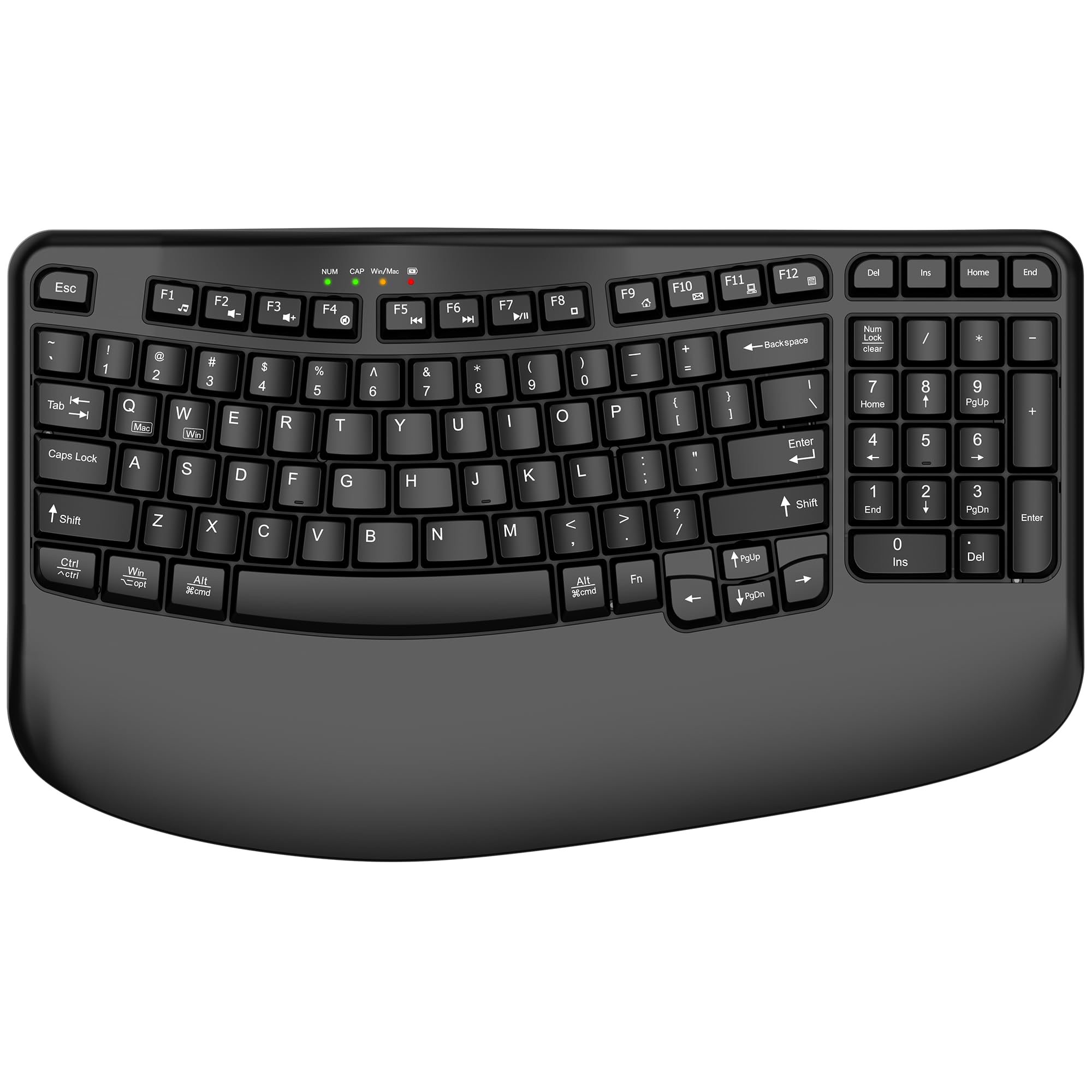
1. EDJO Ergonomic Wireless Keyboard with Wrist Rest, Wave Keys
The curved design that cradles your hands without the high price.
The EDJO Wave Keys save your wrists for less money than most ergonomic boards. It brings an ergonomic wave shape (the keys curve to follow the natural arc of your fingers) and a wide padded wrist rest that keeps your hands level with the keyboard. That is a rare find at this price point, where most boards are flat and basic. The 2.4GHz connection reaches up to 33 feet with no noticeable delay, and it works on Windows, Mac, and ChromeOS with a single touch to switch systems.
The full-size layout includes a number pad and 12 multimedia shortcut keys, plus 4 LED indicator lights so you always know which mode you are in. Auto-sleep kicks in after 10 minutes of inactivity, and the keyboard runs on one AA battery (not included). With a 15.35-inch width and a 1.89-inch height including the wrist rest, it is a big board — meant for a stationary desk, not a bag.
Customers note the wide palm rest genuinely helps during long typing sessions, and the wave layout reduces finger strain compared to a flat keyboard. The trade-off is that the large footprint means your mouse has to sit farther away. Also, the keys use a membrane feel, which some typists find too soft.
Zero learning curve ergonomics: The wave design and wrist rest work immediately — no adaptation period like with a split keyboard. Desk space eater: At 15.35 by 9.04 inches, it takes up significant room, so measure your desk before buying.
Perfect for heavy typists on a budget: If you spend hours writing or coding and feel wrist fatigue, this EDJO board gives you real ergonomic support without the premium price.
skip it if: You need a portable keyboard or you prefer a compact layout without a wrist rest.
2. Logitech MK270 Wireless Keyboard and Mouse Combo
The set you set once and forget about for years.
You avoid battery swaps for years with the Logitech MK270. It is the poster child for reliable budget combos, and with over 109,000 ratings logging a 4.5-star average, it has the crowd backing to prove it. You get a full-size keyboard with a spill-resistant design (so a coffee splash is not a disaster) plus a compact ambidextrous mouse (usable with either hand) — all running on a single 2.4GHz USB receiver that reaches up to 33 feet without drop-outs.
The real headline here is the battery life: the keyboard runs for a claimed 36 months, and the mouse lasts 12 months on its AA batteries. That means you are not hunting for replacements every other month. Buyers report the keys stay quiet and responsive even after heavy daily use, and the 8 multimedia hotkeys give you one-touch access to volume, internet, email, and play/pause.
The catch is that the keyboard uses a membrane feel (softer, mushier keystrokes) rather than a crisp scissor-switch — fine for typing, less fine if you want a tactile click. Also, the mouse is small, so larger hands may find it cramped. If you want a scooped-key upgrade with a palm rest, Logitech points you toward the MK540 combo instead.
Long-haul reliability: 36-month keyboard battery life means you practically never change batteries; the spill-resistant build adds a real safety net for a desk setup. Who should reconsider: If you need a multi-device Bluetooth keyboard to switch between a tablet and a PC, the MK270 does not support Bluetooth — you are tied to the USB receiver.
Solid daily driver: The MK270 is for anyone who wants a single reliable wireless keyboard and mouse combo for a desktop PC and does not want to think about it again for a couple of years.
Big hands beware: The mouse is on the small side, and the membrane keys lack the crisp feedback some typists prefer.
3. TECKNET Wireless Keyboard and Mouse Combo
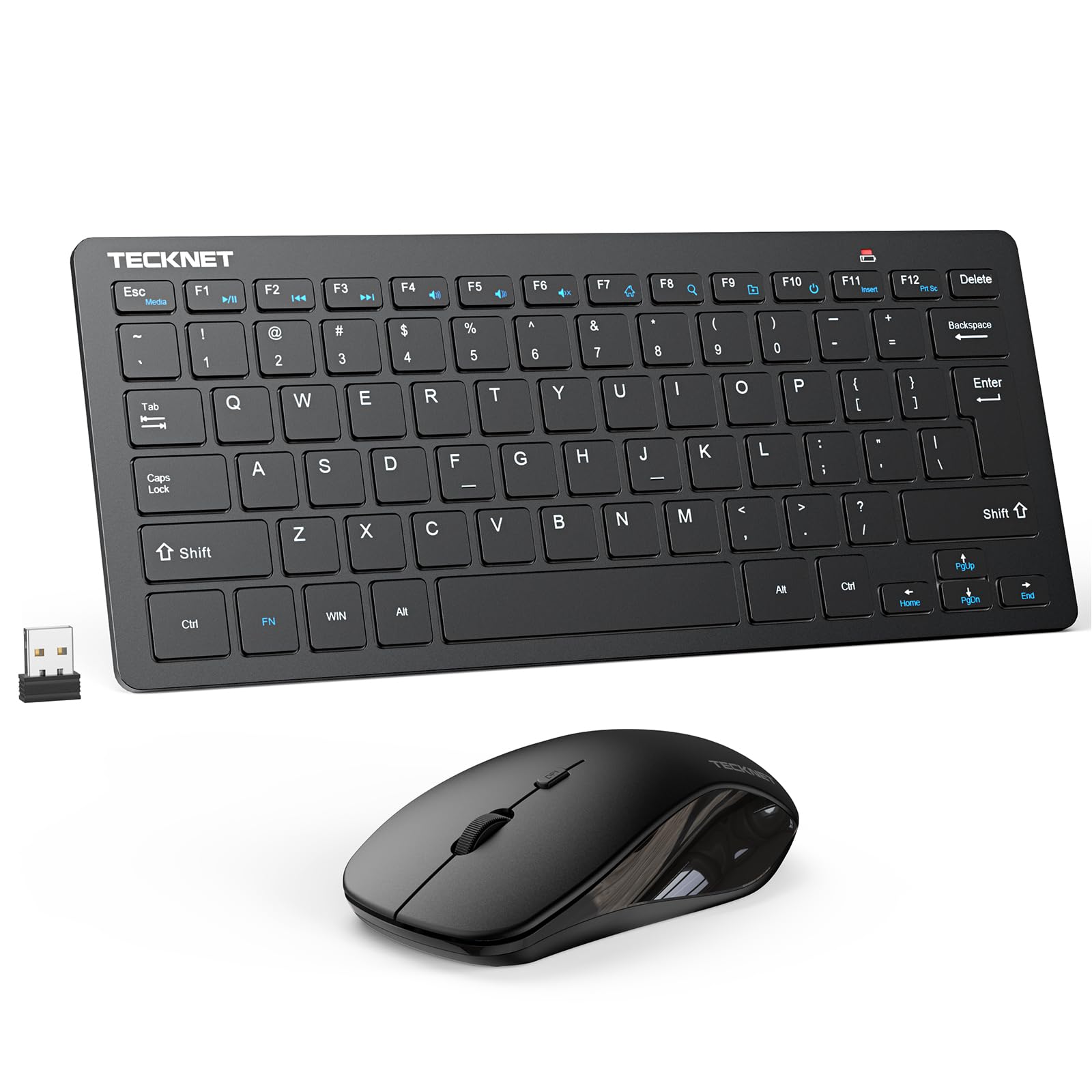
A travel-friendly combo that keeps the noise down.
If you need a keyboard and mouse you can toss into a backpack without a second thought, the TECKNET combo stands out. It uses scissor-switch keys — the same mechanism found in many laptops — which feel crisper and quieter than the usual mushy membrane boards at this price. The keyboard and mouse share one nano USB receiver (a very small dongle), so you free up a port, and that receiver tucks inside the mouse compartment when not in use.
Compared to the Logitech MK270, the TECKNET is slimmer and more portable, and its scissor-switch keys give a sharper typing feel. The wireless range reaches up to 49 feet, noticeably further than many budget combos, and the mouse offers adjustable 1600 DPI (dots per inch, which means cursor sensitivity) for faster or slower pointer movement. Both devices automatically sleep when idle and wake instantly with a press or click, saving battery. Owners mention that the quiet clicks are a real bonus in shared offices or late-night study sessions. TECKNET backs the set with a 36-month warranty.
However, the keyboard is compact — there is no number pad (numpad), which is a dealbreaker if you enter lots of numbers. It also needs 2 AAA batteries per device (four total), and the multimedia hotkeys do not fully work with Mac OS.
Crisp and quiet: The scissor-switch keys make this feel more premium than the price suggests, and the 49-foot range gives you real freedom from your desk. Missing numpad: The compact layout saves space but kills it for spreadsheet work or data entry.
Great for students and travelers: The TECKNET combo fits a laptop bag easily, the keys feel sharp, and the mouse is quiet — ideal for a dorm room or coffee shop.
Look elsewhere if: You need a full numpad or Mac-compatible shortcut keys.
4. Logitech K250 Bluetooth Keyboard

A Bluetooth board with a numpad that survives the occasional spill.
Logitech’s K250 is a Bluetooth-only keyboard, so you never need to use a USB dongle or occupy a port — just pair it instantly. Despite its compact frame, it keeps a full number pad and arrow keys, which is a space-saving trick not many keyboards pull off. The deep-profile keys and adjustable tilt legs make for comfortable long typing sessions.
A standout practical feature is the spill-resistant design (tested for up to 1.2 liters of liquid), meaning a knocked-over drink does not kill the keyboard instantly. Logitech also built the plastic parts with at least 64% recycled plastic, so you get a greener product without paying extra. Battery life reaches 12 months on the pre-installed AAA batteries, and the keyboard weighs 380 grams — substantial enough to feel sturdy but light enough to relocate.
Reviewers point out the Bluetooth connection is fast and stays stable, with no pairing headaches. The main limitation is that the K250 uses a membrane key feel — adequate for everyday typing but not as crisp as scissor-switch boards. It also requires two AAA batteries (included in the box), and there is no backlighting for typing in dim light.
Practical protection: The spill-resistant design is a real safety net for a desk where drinks sit next to the keyboard. Membrane-only feel: If you are used to a laptop-quality scissor switch, the K250’s key travel may feel a bit mushy.
Great for desk typists: The K250 is a strong pick if you want a wireless Bluetooth keyboard with a numpad and do not want to stress over accidental spills.
Not for gamers: Bluetooth can introduce a slight delay, and the membrane keys lack the feedback gamers look for.
5. Arteck Universal Multi-Device Bluetooth Keyboard HB305

An ultra-slim board that talks to three devices at once.
The Arteck HB305 is built for people who bounce between a laptop, a tablet, and a phone during the day. It connects to up to 3 Bluetooth devices simultaneously, and a single keystroke switches between them — no re-pairing, no USB receivers. At just 0.24 inches thick and 11.18 inches wide, it is noticeably thinner and more compact than the EDJO Wave Keys (which is 1.89 inches tall), making it easy to slide into a bag.
It uses a built-in rechargeable lithium battery that the manufacturer claims lasts 6 months between charges, based on 2 hours of daily non-stop use. That removes the need to buy AA or AAA batteries. The keyboard works with Windows, iOS, iPadOS, Android, and macOS — all four major operating systems — and features 78 full-size keys plus media hotkeys.
Buyers like the slim profile and the easy switching between devices, though some note that the keys are shallow compared to a full-travel keyboard. The plastic enclosure feels light at 12.1 oz, but it can flex a bit under heavy typing. There is no backlight and no included case, so it is best for bright workspaces.
smooth device hopping: Switching between a laptop and an iPad with one click is genuinely useful if you work across multiple screens. Shallow key travel: The ultra-slim design means the keys do not depress as deeply, which takes some adjustment if you are used to a standard keyboard.
Ideal for multi-device users: If you have a PC, a tablet, and a phone you all type on, the Arteck lets you keep one keyboard for everything without fussing with dongles.
Skip it for heavy typing: The low-profile keys feel less satisfying for long sessions compared to a deeper-travel keyboard.
6. Microsoft Designer Compact Keyboard – Matte Black

A sleek, no-frills keyboard with a dedicated emoji key.
You get a clean, clutter-free desktop with the Microsoft Designer Compact Keyboard. It is a standalone Bluetooth keyboard (no mouse included) with a low-profile design that measures 11.18 by 4.36 by 0.38 inches, so it takes up almost no desk space and keeps your mouse hand close to your body. The key spacing and travel are tune for fast, fluid typing without the bulk of a full-size board.
It connects to up to 3 devices and lets you switch between them smoothly, similar to the Arteck. A unique touch is the expressive input key that pops up emojis, symbols, and special characters on Windows — a small convenience for messaging or social media. The matte black finish resists fingerprints and looks clean on any desk setup.
Shoppers say the build quality feels solid for a compact keyboard, but there is a notable trade-off: the layout is compact — 78 keys and no number pad. If you do data entry or spreadsheet work, you will miss the numpad. It also uses a membrane key feel, and there is no adjustable tilt or wrist rest. The keyboard is compatible with Bluetooth-enabled PCs and Macs.
Clean and clutter-free: The slim profile and minimal design free up desk space and look modern. No numpad: The compact layout saves space but makes number-heavy tasks slower.
Best for minimalist desk setups: If you value a clean, low-profile look and type mostly words, not numbers, this Microsoft board fits right in.
pass on it if: You need a number pad, a wrist rest, or a mouse included in the package.
7. Nulea RT08 Wave Keys Wireless Ergonomic Keyboard
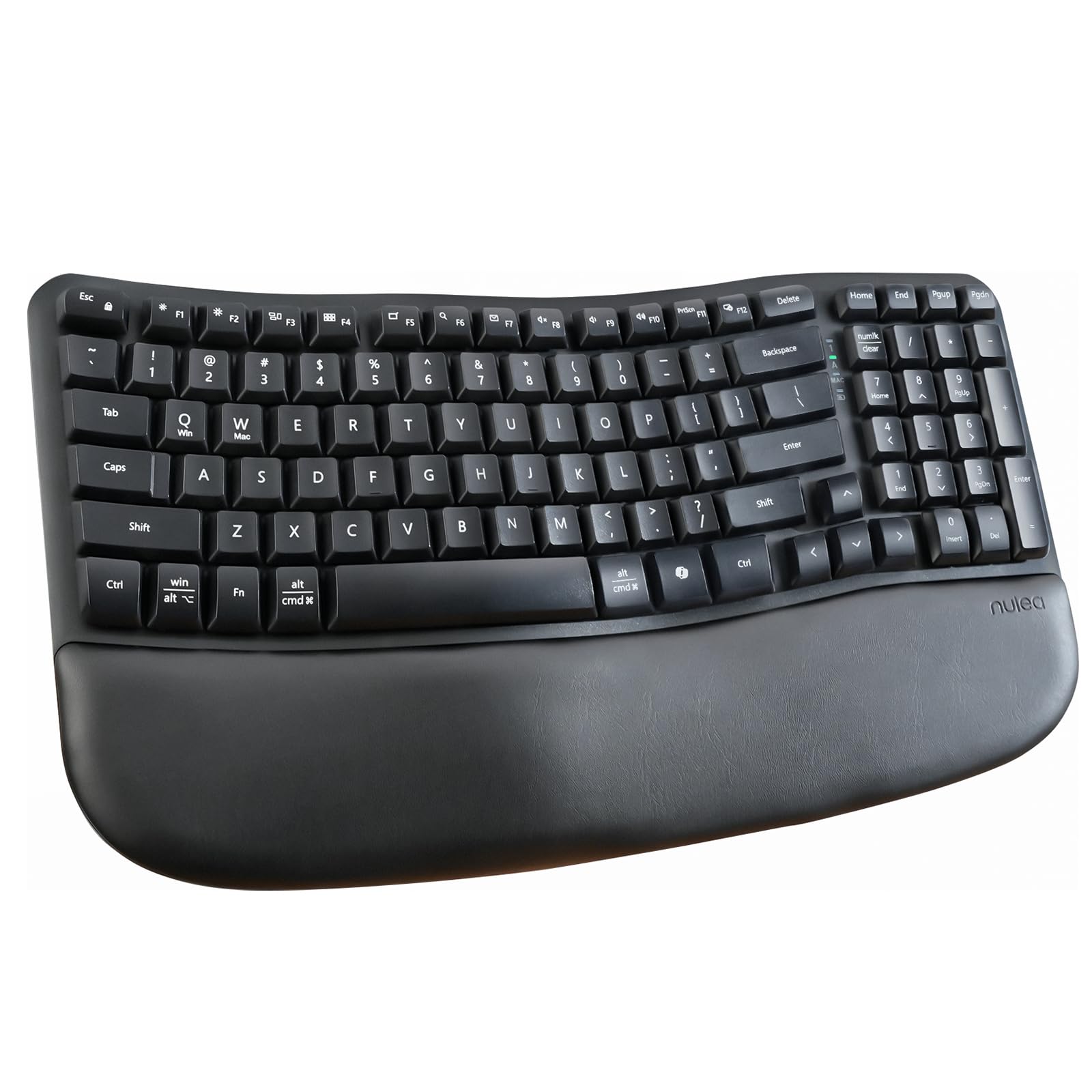
A wave-shaped keyboard with a cushioned rest that cradles your wrists.
The Nulea RT08 gives you more ergonomic adjustability than the EDJO Wave Keys. It takes the wave-key concept and adds a cushioned palm rest plus adjustable rear footrests, so you can tilt the keyboard to an angle that suits your wrist position. The wave shape is designed to match the natural curve of your fingers, reducing strain during long typing sessions. Unlike the EDJO board, the Nulea uses a rubber and silicone enclosure, giving the keys a slightly different dampened feel.
It uses a 2.4GHz wireless connection (via a USB receiver) for a stable, no-delay link, and the full-size layout includes all the function keys you need for daily office work or coding. Each crater-shaped key is molded for a consistent press force, which helps maintain a smooth typing rhythm. The keyboard is ambidextrous (works for left and right hands) and works with Windows, laptops, and PCs.
Buyers report the cushioned palm rest is genuinely comfortable for all-day use, and the adjustable footrest gives you more flexibility than the EDJO. The catch is that the Nulea is a bigger board, so it is not travel-friendly. It also requires a 2.4GHz receiver, so if you want to use Bluetooth to switch between devices, this is not the pick.
Adjustable comfort: The tilt legs let you fine-tune the angle, and the cushioned wrist rest feels softer than the EDJO’s padded bar. Receiver-dependent: No Bluetooth option means you are tethered to the USB dongle, which limits multi-device switching.
For desk-bound typists seeking customization: The Nulea RT08 gives you more ergonomic adjustments than most budget boards, making it a solid choice for people who spend eight hours at a desk.
Not for you if: You need portability or Bluetooth multi-device connectivity.
Understanding the Specs
Wireless Connectivity: 2.4GHz vs. Bluetooth
2.4GHz uses a tiny USB receiver (a dongle that plugs into your computer) for a lag-free, stable connection up to around 33 to 49 feet. It is “plug and play” — no pairing menus, no settings. Bluetooth connects directly without a dongle, which frees up a USB port and lets you switch between a laptop, tablet, and phone easily. The trade-off is that budget Bluetooth keyboards can sometimes feel slightly delayed, especially during fast typing.
Key Switch Type: Membrane vs. Scissor-Switch
Membrane keyboards use a rubber dome under each key — they are quieter and cheaper, but the keystrokes feel softer and mushier (like pressing into a soft surface). Scissor-switch keyboards use a mechanical scissor mechanism under each key, giving a crisper, more defined click, similar to a laptop keyboard. Scissor-switch boards tend to feel more responsive and last longer under heavy use, but they are less common at the very bottom of the price range.
FAQ
Can I use a cheap wireless keyboard with multiple devices like a laptop and a tablet?
How long does a cheap wireless keyboard battery usually last?
Are cheap wireless keyboards good for gaming?
What does spill-resistant mean on a keyboard?
Do cheap wireless keyboards work with Mac computers?
Is a 2.4GHz wireless keyboard more reliable than Bluetooth?
What is the difference between an ergonomic wave keyboard and a regular flat keyboard?
Can I use a cheap wireless keyboard without a USB receiver?
Final Thoughts: The Verdict
Across the board, the cheap wireless keyboard winner is the Logitech MK270 because it combines a full-size layout, an included mouse, 36-month keyboard battery life, and over 100,000 satisfied buyers at a price that is tough to top. If you want a quiet, portable combo with crisper scissor-switch keys, grab the TECKNET X315. And for all-day typing comfort without the premium cost, the EDJO Wave Keys gives you a real ergonomic curve and a padded wrist rest that your hands will thank you for.
How We Picked
We do not accept paid placement. Every pick is matched to a real buyer and a real use-case; we do not hands-on test units.
Sources & Methodology
Specifications: manufacturer listings and product documentation. Review insights: verified customer reviews, as of July 2026. Pricing: not shown on this page (it changes often); check the current price via the retailer link.
As an Amazon Associate, WellFizz earns from qualifying purchases. This does not affect which products we feature.
Related Guides

Mo Maruf
I created WellFizz to bridge the gap between vague wellness advice and actionable solutions. My mission is simple: to decode the research and give you practical tools you can actually use.
Beyond the data, I am a passionate traveler. I believe that stepping away from the screen to explore new environments is essential for mental clarity and physical vitality.