Our readers keep the lights on and my smoothie glass nicely filled. As an Amazon Associate, I earn from qualifying purchases.
Specs are compiled from manufacturer listings and verified buyer reviews and can change over time — please confirm the key details on the product page before buying.
Mounting a TV on the wall without spending cash on brackets is the whole point of a cheap TV wall mount — but the trap is grabbing a flimsy bracket that lets your screen sag or sends you back to the return counter. This guide sorts the skimpy steel from the surprisingly solid picks under the budget ceiling, so your TV stays flush against the drywall and your wallet stays full.
I’m Mohammad Maruf — the founder and writer behind WellFizz. This guide is built by comparing the manufacturers’ published specifications and the patterns across verified customer reviews, so you get each pick’s real strengths and trade-offs instead of marketing spin.
A cheap TV wall mount should still hold your screen securely and let you tilt out the glare. Here is how to pick a cheap tv wall mount that actually works without breaking your drywall or your budget.
Our Picks at a Glance

How To Choose The Best Cheap TV Wall Mount
Not all budget brackets are built the same. A mount that costs under twenty bucks can either be a solid piece of steel or a wobbly disappointment. Here is what separates the keepers from the junk.
Check Your TV’s VESA Pattern
VESA (the grid of screw holes on the back of your TV, measured in millimeters like 200×200 or 400×400) tells you if the mount can even attach to your screen. If the mount’s max VESA is smaller than your TV’s pattern, the bracket will not line up. Most budget tilt mounts top out at 600×400mm, which covers 65- to 82-inch screens.
Weight Limit vs. Screen Size
A 132-lb capacity sounds huge — and it is — but the minimum screen size matters too. Some mounts only fit TVs 37 inches and up, so a 32-inch bedroom TV will need a bracket with a lower minimum, like the 13-inch floor on the Pipishell.
Tilt vs. Full Motion
Tilt mounts only angle the TV up or down (usually 0-10 degrees) to fight glare. Full motion mounts add swivel and extension, letting you pull the screen out and turn it toward a couch or a kitchen island. Full motion costs a touch more but gives you far more flexibility.
Stud Spacing Compatibility
Your wall studs are usually spaced 16 or 24 inches apart. Make sure the bracket’s mounting plate can span those gaps. The best budget mounts include slots that work with 16, 18, and 24-inch spacing without extra adapters.
Quick Comparison
| Model | Best For | Max Screen | Tilt Range | Weight Limit | Amazon |
|---|---|---|---|---|---|
| Pipishell PISF1★ Best Overall | Small TVs and monitors | 43” | 15° | 44 lbs | Amazon |
| USX MOUNT XMM006-1Also Great | Full motion for living rooms | 65” | +5°/-15° | 77 lbs | Amazon |
| Mounting Dream MD2268-LK | Large TVs on a tilt | 75” | 8° | 132 lbs | Amazon |
| Amazon Basics AM40A | Full motion on a single stud | 55” | +10°/-5° | 80 lbs | Amazon |
| Solid As Mountain B0CZ9 | Low profile tilt for mid-size TVs | 82” | 10° | 132 lbs | Amazon |
| XINLEI MT5083 | Ultra-low profile on a budget | 82” | 8° | 132 lbs | Amazon |
In‑Depth Reviews
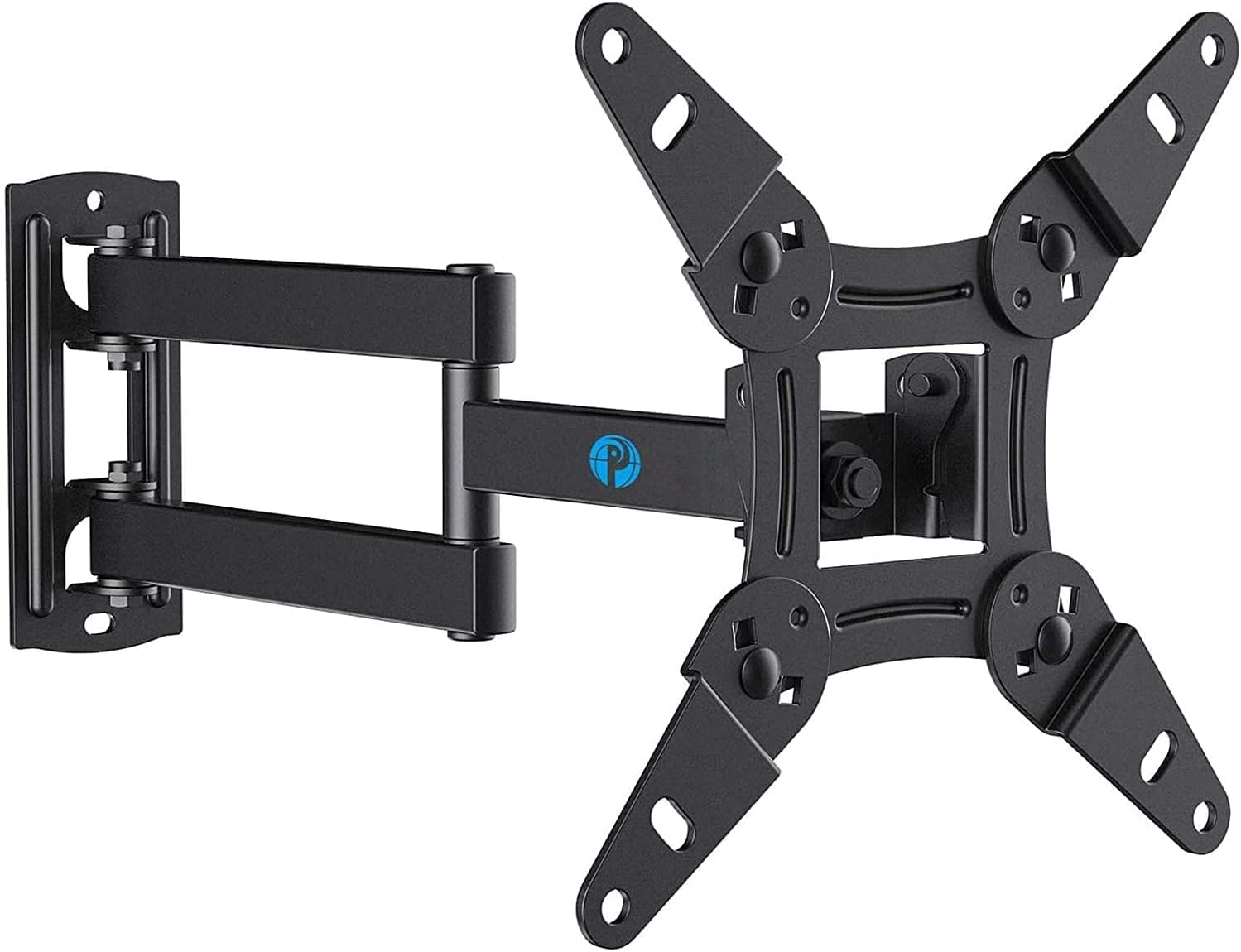
1. Pipishell Full Motion TV Wall Mount PISF1
The full-motion mount that flexes for small TVs and monitors.
This is the only bracket on the list that goes down to a 13-inch screen, making it essential for bedroom TVs, kitchen monitors, or a 32-inch screen that the other mounts here cannot touch. The VESA (screw-hole pattern) range goes as low as 75×75mm, and the 44-lb weight limit is enough for most TVs up to 43 inches. Buyers with ultrawide monitors (34-inch and 35-inch) report the articulating arm keeps the screen steady in landscape and portrait orientation.
The tilt range is 15° total (+9°/-11°), which beats every other pick on this list by a significant margin — the USX MOUNT offers 15° total as well, but the Pipishell does it at a lower price. It also swivels 90° left or right and rotates a full 360° for portrait mode. The 2.7-inch retracted depth means it sits closer to the wall than the USX MOUNT’s 2.81 inches when pushed flat. Plus, the 5-year customer service promise is the longest support window here.
The obvious limit: 44 lbs and 43 inches max means it will not hold a 55-inch or 65-inch TV. This is a specialty mount for small spaces, not a living-room workhorse.
Small-Screen Star
- 15° tilt range is the widest of any mount on this list
- Works with screens as small as 13” and VESA 75×75mm
- 5-year customer service — longest support period here
The Ceiling
- 44 lb max — cannot hold a 55” TV
- Max screen is 43”, so no good for large living-room sets
Perfect for: A bedroom TV, a kitchen monitor, or a 32-inch gaming setup where you need full motion and a wide tilt in a small bracket. The 15° tilt is class-leading here.
Not the one for: A 55-inch or larger TV in the living room — the 44 lb limit is simply not enough.
2. USX MOUNT UL Listed Full Motion TV Mount XMM006-1
Full-motion flexibility without the full-motion price tag.
You get a swivel arm that extends 16.7 inches from the wall and retracts to just 2.81 inches when you want the TV flat — a feature usually reserved for pricier brackets. The tilt range spans +5° upward to -15° downward, which is a wider sweep than most cheap TV wall mounts deliver. Buyers report the pre-labeled hardware bags and bubble level make the single-stud installation straightforward even for first-timers.
This mount fits 26- to 65-inch TVs with VESA (the screw-hole pattern) up to 400×400mm, but the weight limit is 77 lbs — noticeably lower than the 132 lbs on the Mounting Dream below. At 77 lbs, it still handles most mid-size LED and 4K sets without breaking a sweat. The ±5° post-installation leveling also lets you fine-tune the screen after it is already hanging, so a crooked bubble is never a permanent problem.
One detail that separates it: the USX MOUNT carries a UL listing (a safety certification from an independent lab, Underwriters Laboratories), meaning an independent lab verified its structural safety. For a budget full-motion bracket, that certification is rare and gives real confidence when you are swinging a 55-inch screen out over the couch.
The Full Motion Edge
- Extends 16.7” and swivels ±90° for flexible viewing
- UL listed for verified safety
- Pre-labeled hardware bags make installation easier
The Trade-offs
- 77 lb limit is less than the 132 lb brackets on this list
- Concrete anchors removed from the package — you may need to supply your own
Best for: Anyone who wants a full motion bracket that swivels and tilts without paying a premium. The UL listing and wide tilt range make it especially good for corner installations where you need to pull the screen out.
Consider this instead if: You own a 75-inch or heavier TV — the 77 lb max will not hold a giant set. Look at the Mounting Dream for the higher 132 lb capacity.
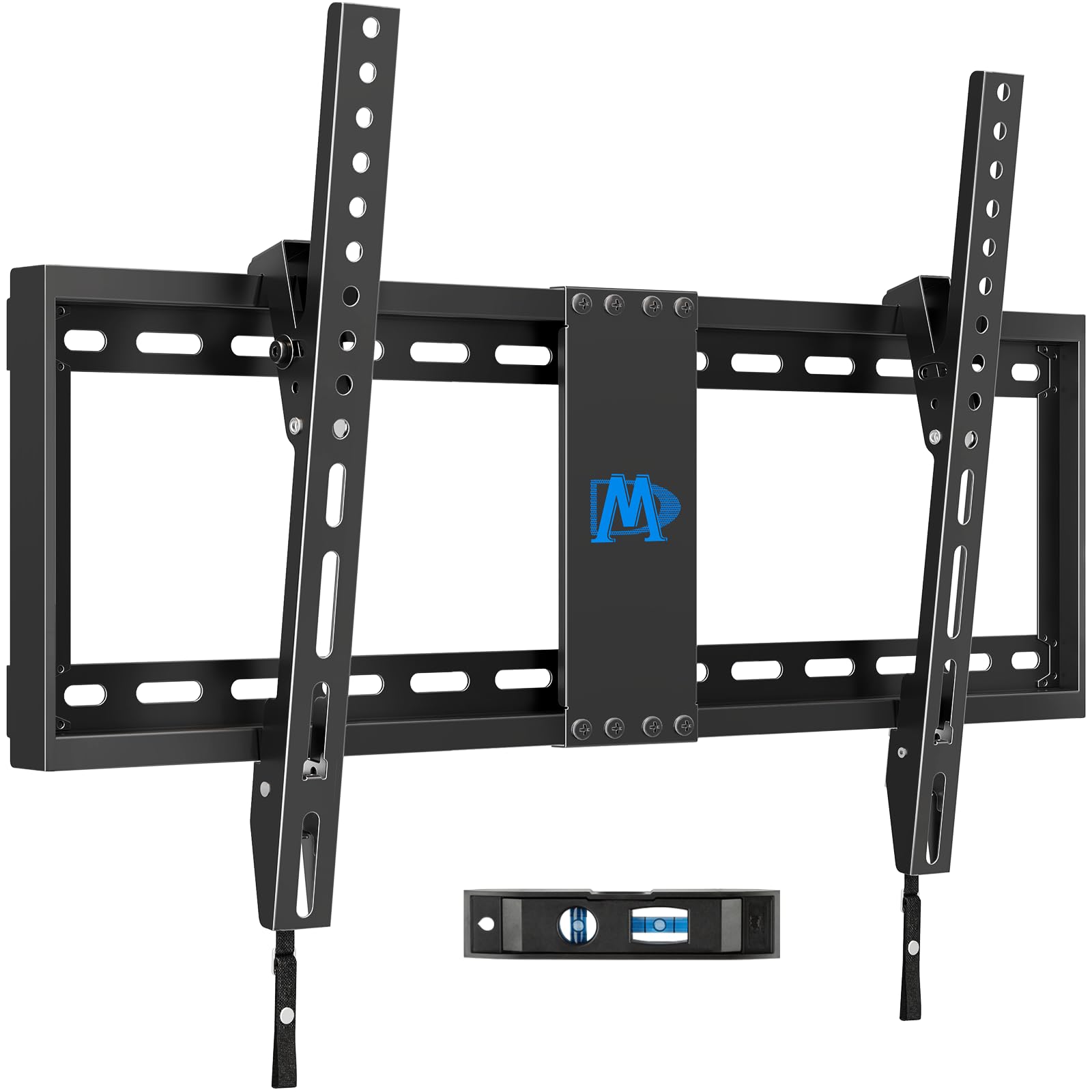
3. Mounting Dream TV Wall Mount MD2268-LK
The tilt bracket built for big screens on a budget.
With a 132-lb capacity and support for 37- to 75-inch TVs, this mount easily handles the large screens the USX MOUNT cannot take. The VESA (screw-hole pattern) range goes up to 600×400mm and the bracket fits 16, 18, and 24-inch stud spacing — three common wall layouts covered in one plate. Owners mention the 3-step installation with the included level is genuinely fast, and the US-based customer service team actually answers the phone.
It is a tilt-only design that angles 0-8° forward, so you lose the swivel and extension you get on a full-motion mount like the USX MOUNT. But at just 1.5 inches from the wall when flat, it gives the cleanest, most flush appearance of any bracket here.
Mounting Dream is among the most recognized names in budget TV brackets, and the MD2268-LK is their best-selling model with over 120,000 ratings. For a cheap TV wall mount that prioritizes sheer holding power and a low profile, it is tough to top.
The Low Profile Advantage
- Holds up to 132 lbs — covers most 75-inch TVs
- Only 1.5” from the wall for a clean look
- Fits 16”, 18”, and 24” stud spacing without adapters
What You Give Up
- Tilt-only — no swivel or extension arm
- 8° tilt is less than the 15° on the Pipishell
Reach for this if: You have a 65- to 75-inch TV and want the flattest possible wall hugger look. The 132 lb rating gives you headroom for heavier sets.
Skip it for: A corner setup where you need to pull the TV out and swivel it toward a seating area — you want a full motion mount like the USX MOUNT instead.
4. Amazon Basics Full Motion Articulating TV Wall Mount AM40A

A full-motion bracket that swivels 180° on a single stud.
The Amazon Basics mount fits 26- to 55-inch TVs up to 80 lbs, and its articulating arm extends from 2.6 inches to 16.3 inches with a full 180° swivel — more rotation than the USX MOUNT’s ±90°. This extra sweep makes it the best choice for a corner or a room where the TV needs to face two seating areas. The tilt range goes +10° to -5°, giving you a combined 15° of adjustment.
At 6.8 lbs, the bracket itself is light, but the single-stud design means you need to hit one stud dead center — no option to spread across two studs like the Mounting Dream. Customers note the included bubble level and mounting template are accurate and keep the process simple. With over 58,000 ratings and a 4.6 average, this is among the most-reviewed budget full-motion mounts on Amazon.
The obvious limitation: the max screen size is 55 inches, and the 80-lb weight limit falls short of the 132-lb brackets above. If you own a 65-inch TV, this mount will not fit.
Swivel Champion
- 180° swivel for wide viewing angles
- Extends to 16.3” from the wall
- Lightweight bracket at 6.8 lbs
Size Ceiling
- Max screen is 55”, max weight is 80 lbs
- Single-stud installation — no two-stud spread option
the balance: A 50-inch or smaller TV in a room where you need the screen to swing toward different viewing spots. The 180° swivel is the most flexible in this price range.
Not for: A 65-inch TV or any screen over 80 lbs — you will need the Mounting Dream’s higher capacity.
5. Solid As Mountain TV Wall Mount B0CZ9

A tilt bracket with a 10-degree range and a rock-solid 132-lb hold.
For a cheap TV wall mount, that small extra angle can mean the difference between killing a ceiling-light glare and still squinting. It holds up to 132 lbs and fits TVs from 37 to 82 inches with VESA (the screw-hole pattern) up to 600×400mm, matching the Mounting Dream’s capacity at a slightly lower price.
The real differentiator is the 2-year manufacturer warranty, which beats the 5-year on the Pipishell but still offers more protection than bracket brands that offer none. With a 4.7 rating from 933 reviews, buyers consistently say the instruction manual is clear and the hardware is well-organized. The low-profile design keeps the screen close to the wall, though you lose the swivel you would get from the Amazon Basics.
Compared to the XINLEI, the Solid As Mountain gives you a 10° tilt vs 8° and includes a warranty, making it the better pick for a few cents more.
Tilt Advantage
- 10° tilt range beats the 8° on the XINLEI and Mounting Dream
- 132 lb capacity covers most 82-inch TVs
- 2-year manufacturer warranty included
Limited Movement
- Tilt-only — no swivel or extension
- No concrete anchors included in the package
Grab this for: A mid-size to large TV where a two-degree tilt edge over the competition actually matters for glare. The 2-year warranty adds nice confidence at this price.
Look elsewhere if: You need full motion or a swivel — this mount is strictly a tilt bracket.
6. XINLEI Tilting TV Wall Mount MT5083

The cheapest way to get a 132-lb tilt bracket that fits 37- to 82-inch TVs.
The XINLEI is a few cents cheaper than the Solid As Mountain while delivering the same 132-lb capacity and 82-inch max screen size. The tilt range is 0-8°, which ties the Mounting Dream but falls two degrees short of the Solid As Mountain. Like the Mounting Dream, this bracket sits just 1.5 inches from the wall, keeping your TV looking painted onto the drywall.
The double-hook and anti-drop edge design adds a layer of security — if one hook slips, the other catches the TV. The mount also fits 16, 18, and 24-inch wood stud spacing. Buyers with outdoor TVs have reported the all-steel construction handles humidity better than cheaper zinc brackets. The biggest difference versus the Solid As Mountain: no explicit warranty is mentioned in the specs, so you are relying on Amazon’s return window if anything goes wrong.
For the absolute lowest price on a 132-lb tilt bracket, this is it. Just know you get 8° of tilt versus the 10° on the Solid As Mountain.
Budget King
- 132 lb capacity at the lowest price in this comparison
- Double-hook safety design prevents accidental drops
- Fits 16”, 18”, and 24” stud spacing
The Catch
- 8° tilt is less than the 10° on the Solid As Mountain
- No explicit manufacturer warranty mentioned
Best for: Shoppers on a razor-thin budget who still need a bracket that holds a 70-inch TV. The anti-drop edge is a nice safety bonus for a bracket this cheap.
Consider paying up for: An extra two degrees of tilt and a 2-year warranty — the Solid As Mountain is only a few cents more.
Understanding the Specs
Tilt Angle
Measured in degrees, this is how far the mount lets you angle the TV forward (down) or backward (up) to reduce glare from lights or windows. An 8° tilt is enough for most rooms, while 15° helps when the TV is mounted higher on the wall, like above a fireplace. The bigger the tilt range, the more flexibility you have to dial in the perfect viewing angle without moving the bracket.
VESA Pattern
VESA (the standard layout of screw holes on the back of your TV, measured in millimeters — for example, 200×200mm means the screws form a 200mm square) must match the mount’s range, or the bracket simply will not attach. Most budget mounts cover 75×75mm up to 600×400mm, which fits screens from 13 inches up to 82 inches.
Weight Capacity
This is the maximum load the bracket can safely hold, listed in pounds (lbs). A 132-lb capacity handle covers nearly all consumer TVs up to 82 inches, while a 44-lb bracket is only safe for smaller sets (usually 43 inches or smaller). Always compare the mount’s weight limit to your TV’s actual weight — never exceed it.
Stud Spacing
Studs are the vertical wooden beams inside your wall that a mount screws into. Common spacing is 16 inches, 18 inches, or 24 inches on center. A bracket that says “fits 16-24 inch studs” can span any of those gaps, giving you flexibility in where you place the mount. If the bracket only fits one stud type, you might need to cut new drywall or use heavy-duty anchors.
FAQ
Will a cheap TV wall mount hold a 75-inch TV?
What VESA pattern do I need for a 55-inch TV?
Can I install a TV mount on drywall only?
Is a tilt mount better than a full motion mount for a bedroom?
How much tilt do I need to reduce glare from a window?
What size TV does the Pipishell PISF1 fit?
Does the Amazon Basics mount work for a corner TV setup?
Which cheap TV wall mount has the fastest installation?
Can a 44 lb mount safely hold a 43-inch TV?
Do I need a stud finder to install a TV mount?
Final Thoughts: The Verdict
Across the board, the best cheap tv wall mount is the USX MOUNT XMM006-1 because it delivers full-motion flexibility (16.7-inch extension, 15° tilt, ±90° swivel) with the safety of a UL listing (a certification from Underwriters Laboratories), all at a price that undercuts typical full-motion brackets. If you need to mount a giant screen above 60 inches, grab the Mounting Dream MD2268-LK for its 132-lb capacity and ultra-flat 1.5-inch profile. And for a small bedroom TV or a monitor setup, the standout is the Pipishell PISF1 with its 15° tilt and 5-year support coverage.
How We Picked
We do not accept paid placement. Every pick is matched to a real buyer and a real use-case; we do not hands-on test units.
Sources & Methodology
Specifications: manufacturer listings and product documentation. Review insights: verified customer reviews, as of July 2026. Pricing: not shown on this page (it changes often); check the current price via the retailer link.
As an Amazon Associate, WellFizz earns from qualifying purchases. This does not affect which products we feature.
Related Guides

Mo Maruf
I created WellFizz to bridge the gap between vague wellness advice and actionable solutions. My mission is simple: to decode the research and give you practical tools you can actually use.
Beyond the data, I am a passionate traveler. I believe that stepping away from the screen to explore new environments is essential for mental clarity and physical vitality.