Our readers keep the lights on and my smoothie glass nicely filled. As an Amazon Associate, I earn from qualifying purchases.
Finding a digital slate for handwritten notes that doesn’t drain your wallet often leads to a frustrating compromise: sluggish performance, a slippery screen that feels nothing like paper, or a stylus that requires frequent battery changes. The market is flooded with generic budget tablets that prioritize video streaming over the tactile experience of writing, leaving students and professionals with a subpar tool for their most essential task.
I’m Mohammad Maruf — the founder and writer behind WellFizz. My research process for this guide involved cross-referencing hundreds of customer reviews against detailed spec sheets, focusing specifically on stylus latency, screen texture, and note-taking software integration to separate the true contenders from the also-rans.
Whether you need a focused e-ink reader or a full Android workstation, this guide breaks down the top options for a cheap tablet for note taking with stylus that balances cost with genuine writing performance.
How To Choose The Best Cheap Tablet For Note Taking With Stylus
A budget-friendly note-taking tablet is a different animal from a general-purpose media slate. The priority shifts from raw processing power to the quality of the writing interface. Screen texture, stylus precision, and software ecosystem become the deciding factors that determine whether your notes feel natural or frustrating.
Screen Technology: The Writing Surface
The display determines the entire feel of the note-taking experience. Standard glossy LCD screens create a slippery, glass-like resistance that can make handwriting feel imprecise. Look for tablets with matte or AG nano-etched finishes that introduce friction similar to paper. E-ink screens offer zero glare and a truly paper-like texture, but at the cost of refresh rate and color. The TCL NXTPAPER and XPPen Magic Note Pad use special laminated screens and anti-glare coatings to bridge this gap, providing visual clarity with tactile feedback.
Stylus Technology: Battery-Free vs. Active
The single biggest reliability differentiator is how the stylus is powered. Battery-free (EMR) pens like the ones used by Lenovo and XPPen require no charging at all — they resonate with the screen’s digitizer and are always ready to write. Active capacitive styluses, common in cheaper bundles, offer pressure sensitivity but rely on an internal battery that can die mid-note. For distraction-free note-taking, an EMR pen is almost always the better choice. The pressure sensitivity level — measured in levels (4096, 8192, 16384) — indicates how finely the pen can detect changes in force for shading and line weight.
Software & Ecosystem: Where Notes Live
A capable note-taking tablet needs robust software to organize, sync, and export your handwritten work. Pre-installed apps like Lenovo AI Note, XPPen Notes, or TCL’s NXTPAPER suite can save you from buying third-party apps. Check whether the tablet supports handwriting-to-text conversion, cloud backup, and multi-device syncing. Android tablets offer access to the full Google Play library, while dedicated e-ink devices like the BOOX provide a distraction-free environment with native note management and Google Play compatibility.
Quick Comparison
On smaller screens, swipe sideways to see the full table.
| Model | Category | Best For | Key Spec | Amazon |
|---|---|---|---|---|
| XPPen Magic Note Pad | Premium EMR | Realistic sketching & notes | 16K Pressure, 90Hz, AG Glass | Amazon |
| Lenovo Idea Tab Pro | Premium Android | Full productivity & media | 12.7″ 3K, Dimensity 8300 | Amazon |
| TCL NXTPAPER 14 | Premium Paper-Like | Sheet music & long reads | 14.3″ 2.4K, 10,000mAh | Amazon |
| TECLAST Artpadpro | Mid-Range Large | Drawing & writing on big canvas | 12.7″ 2K, 20GB RAM | Amazon |
| Lenovo Idea Tab | Mid-Range Value | College note-taking & study | 11″ 2.5K, 90Hz, 8GB | Amazon |
| BOOX Go Color 7 | Mid-Range E-Ink | Distraction-free reading & notes | 7″ Kaleido 3, Android 13 | Amazon |
| VekfulPC Android 16 Tablet | Value Bundle | Budget 2-in-1 laptop replacement | 24GB RAM, 256GB Storage | Amazon |
| Jeazans Android 16 Tablet | Budget Bundle | Entry-level productivity bundle | 10.1″, 24GB RAM, 64GB | Amazon |
| HUION Note | Digital Notebook | Paper-to-digital note capture | A5 paper, Bluetooth, 18hrs | Amazon |
In‑Depth Reviews
1. XPPen Magic Note Pad
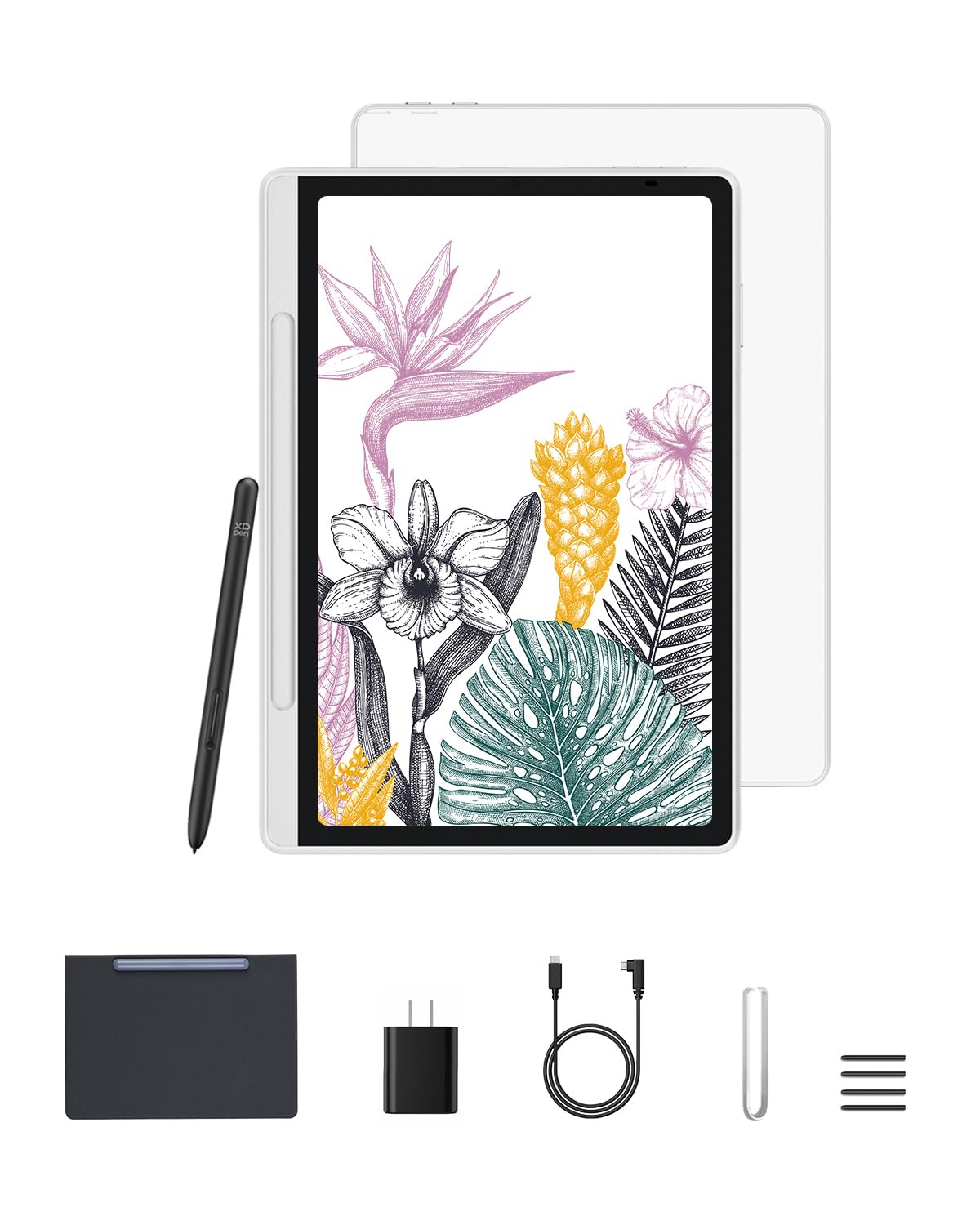
The XPPen Magic Note Pad is the closest you can get to a premium writing experience without crossing into iPad pricing. Its 10.95-inch X-Paper display features AG nano-etching technology that delivers real, tangible friction — every stroke feels like a pencil on quality paper, not a stylus on glass. The 90Hz refresh rate eliminates any visible lag while the 16,384 levels of pressure sensitivity give you extraordinary control for shading, sketching, and handwriting.
This is a standalone Android 14 tablet with Google Play access, so you can download your preferred note-taking apps instantly. The three color modes — nature, light color, and black and white — let you optimize the display for different tasks, from annotating dense PDFs to sketching in full color. The battery-free X3 Pro Pencil 2 means you never have to worry about charging the stylus, eliminating a major point of friction for daily note-takers.
The only real trade-off is the 1920 x 1200 resolution, which is slightly lower than some full HD competitors at this price tier. But the anti-glare, TÜV-certified low blue light screen is noticeably easier on the eyes during long study sessions, and the tablet’s slim 7mm profile makes it exceptionally portable. It includes a premium magnetic case and a full set of replacement nibs out of the box.
Why it’s great
- True paper-like screen texture with AG nano-etching
- Battery-free EMR stylus with 16K pressure levels
- 90Hz refresh rate for smooth, lag-free writing
- Three color modes for reading, sketching, and notes
Good to know
- Screen resolution is 1920×1200, not 2K
- Battery drains slightly overnight in standby
- Android 14, future OS updates not guaranteed
2. Lenovo Idea Tab Pro

If you need a tablet that does everything — notes, gaming, streaming, and heavy multitasking — the Lenovo Idea Tab Pro is the premium workhorse that justifies its position. The 12.7-inch 3K LCD display is stunningly sharp at 2944 x 1840 resolution, and the MediaTek Dimensity 8300 processor handles multiple Chrome tabs, split-screen note-taking, and video playback without a hiccup. The included Tab Pen Plus is an EMR stylus, so it works without charging.
Lenovo bundles serious note-taking software right out of the box: Lenovo AI Note, Squid, Nebo, and MyScript Calculator. These apps can convert handwriting to text, organize notebooks, and even solve equations — turning the tablet into a complete study companion. The quad JBL speakers with Dolby Atmos make media consumption genuinely enjoyable, and the 45W fast charging (charger sold separately) gets the 10,200mAh battery back up quickly.
The tablet’s size and battery make it noticeably heavier than smaller slates, which can be a concern if you plan to hold it for long reading sessions. The included folio case is flimsy, and Lenovo’s decision to require a specific charger for fast charging is frustrating. But if you want a single device that replaces both a laptop and a dedicated note-taking slate, this is the most capable option in the category.
Why it’s great
- Stunning 12.7″ 3K display with 90Hz refresh rate
- MediaTek Dimensity 8300 offers flagship-level speed
- Battery-free EMR pen with Google Circle to Search
- Pre-loaded with Lenovo AI Note and Nebo apps
Good to know
- Heavy at over 1.5 lbs; not ideal for one-handed reading
- Fast charging requires specific 45W PD charger
- Included folio case is basic and offers minimal protection
3. TCL NXTPAPER 14

The TCL NXTPAPER 14 is a unique entry that targets a specific audience: musicians, long-form readers, and anyone who needs a massive, eye-friendly canvas for notes and sheet music. The 14.3-inch 2.4K display uses NXTPAPER 3.0 technology with an anti-glare coating and DC dimming that closely mimics the look of printed paper. The dedicated NXTPAPER Key lets you toggle between Regular, Color Paper, and Ink Paper modes instantly.
The included T-PEN stylus offers 4096 levels of pressure sensitivity and connects via USB-C for charging. While it’s not a battery-free EMR pen, the battery life is sufficient for a full day of note-taking. The MediaTek Helio G99 processor and 8GB of RAM (expandable by another 8GB virtually) handle split-screen note-taking and document editing with ease. The 10,000mAh battery provides about 10 hours of use, and reverse charging lets you top off your phone.
The main limitation is the lack of a microSD slot — you get 256GB of storage, and no expansion is possible. The 60Hz refresh rate means scrolling isn’t as smooth as 90Hz competitors, though it’s fine for writing. Musicians will appreciate the 14-inch screen that can display two full pages of sheet music side-by-side, and the quad speakers deliver rich audio for media consumption.
Why it’s great
- Massive 14.3″ anti-glare NXTPAPER display
- Three display modes for reading, drawing, and media
- 10,000mAh battery with reverse charging capability
- Quad speakers with loud, clear audio
Good to know
- No microSD expansion; storage is fixed at 256GB
- 60Hz refresh rate; lags behind 90Hz rivals
- Wall charger not included in the box
4. TECLAST Artpadpro

The TECLAST Artpadpro offers a massive 12.7-inch display with a 2176×1600 resolution and a 4:3 aspect ratio that mirrors the iPad Pro’s canvas — making it excellent for digital art and long-form notes. The included T-Pen stylus supports USI 2.0 and delivers 4096 levels of pressure sensitivity with global anti-misclick palm rejection. The pre-installed ArtTune creative app is specifically optimized for the pen, giving you a smooth drawing experience out of the box.
Powered by a MediaTek G99 processor and 8GB of physical RAM (with 12GB of virtual expansion), this tablet handles multitasking well for its price tier. The 10,000mAh battery with 30W fast charging keeps you going all day, and the face unlock feature adds a layer of convenience. Android 15 with Widevine L1 certification means you can stream in high definition from Netflix and other services.
The pen does have a quirk: some users report that it registers a touch before making full contact, causing unintended marks. The 20GB RAM claim includes virtual expansion, which isn’t equivalent to physical RAM, and the tablet struggles with heavy 3D gaming. But for note-taking, sketching, and media consumption, the Artpadpro delivers a very large, bright, and responsive canvas at a competitive price.
Why it’s great
- Large 12.7″ 2K display with 4:3 aspect ratio
- Excellent 10,000mAh battery with 30W fast charging
- USI 2.0 stylus with palm rejection and 4096 levels
- Pre-installed with optimized creative apps
Good to know
- Pen registers touch before contact, causing unintended marks
- “20GB RAM” includes 12GB virtual expansion
- Struggles with large canvas sizes in drawing apps
5. Lenovo Idea Tab

The standard Lenovo Idea Tab is a refined mid-range option that punches well above its price class for note-taking. The 11-inch 2.5K IPS display (2560×1600) with a 90Hz refresh rate is noticeably sharper than budget 1080p panels, and the MediaTek Dimensity 6300 processor is more than capable of handling note-taking apps, PDFs, and multitasking. The included Lenovo Tab Pen is an EMR stylus, so it requires no charging and works the moment you pick it up.
Lenovo has loaded this tablet with genuine productivity software: AI Note, Squid, Nebo, and MyScript Calculator are pre-installed and optimized for the hardware. The TÜV Rheinland Low Blue Light certification helps reduce eye strain during long study sessions, and the 12-hour battery life means you can leave the charger at home for a full day of classes. The Google Circle to Search feature works seamlessly with the pen, letting you circle text or images to search instantly.
The included folio case is basic and offers limited protection, so you will want a sturdier third-party case. The 20W charger in the box is adequate but not fast by modern standards. Some users note the pen feels slightly slippery on a standard screen protector; a matte paper-feel protector solves this problem entirely. For students who want a reliable, sharp-screened note-taking device from a trusted brand, this is a smart buy.
Why it’s great
- Sharp 11″ 2.5K display with smooth 90Hz refresh
- Battery-free EMR stylus; always ready to write
- Pre-loaded with AI Note, Nebo, and MyScript
- Excellent 12-hour battery life for all-day campus use
Good to know
- Included folio case is flimsy and offers little protection
- 20W charger in box is slow; upgrade to faster brick
- Stylus feels slippery on standard screen protectors
6. BOOX Go Color 7

The BOOX Go Color 7 is not a standard tablet — it is an Android-powered e-ink device designed for those who want zero eye strain and zero distractions. The 7-inch Kaleido 3 color display offers 4096 colors and 300 PPI in black and white, making it exceptional for reading and reasonable for color-coded notes. The Android 13 operating system gives you access to the Google Play Store, so you can install Kindle, Libby, Onyx’s native note apps, and any other tools you need.
Writing on an e-ink screen is a fundamentally different experience: the display is darker and has a slower refresh rate than LCD, which means no backlight glare. It supports an active stylus (sold separately), and the native note-taking software offers organization, PDF annotation, and handwriting-to-text conversion. The front light with warm and cold tones lets you read in any lighting condition, and the built-in page-turn buttons are a tactile joy.
The trade-offs are significant. This is not a device for video, web browsing, or multitasking. The 4GB of RAM limits app switching, and the color quality is muted compared to any LCD tablet. The battery lasts 1-3 weeks with typical reading use, but it can drain faster with heavy note-taking. If you want a dedicated digital notebook for reading and writing without any app distractions, the BOOX is a specialized tool that excels at its mission.
Why it’s great
- Zero glare, paper-like e-ink display for eye comfort
- Runs Android 13 with full Google Play access
- Excellent battery life measured in weeks, not hours
- Page-turn buttons and compact, lightweight design
Good to know
- Stylus not included; must be purchased separately
- 4GB RAM limits heavy multitasking
- E-ink screen is darker and slower than LCD/LED
7. VekfulPC Android 16 Tablet
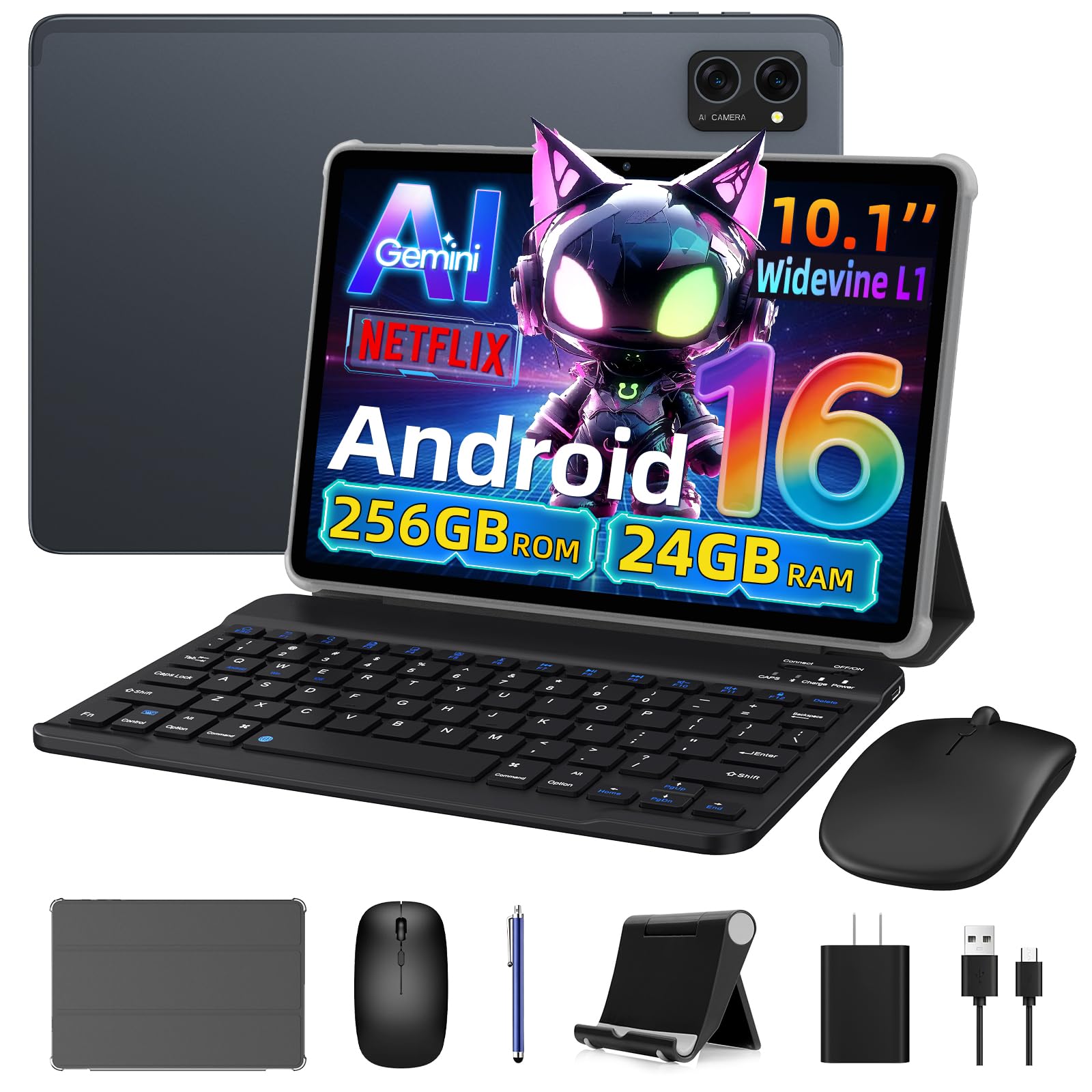
The VekfulPC tablet is a full-system 2-in-1 bundle that includes a detachable Bluetooth keyboard, a wireless mouse, a foldable stand case, and a stylus pen. This makes it an attractive option if you want a cheap note-taking device that can also function as a basic laptop. Powered by Android 16 with Gemini AI integration, it offers 24GB of RAM (8GB physical plus 16GB virtual) and 256GB of storage expandable up to 2TB via microSD.
The stylus is a basic active capacitive pen, adequate for quick notes and annotations but not designed for precision art. The 2-in-1 form factor works well for typing long documents, and the Gemini AI assistant can summarize notes, translate text, and help with research. The 5G WiFi and Bluetooth 5.0 ensure stable connectivity for cloud-synced notes.
The biggest advantage is the 4-year warranty — a sign of confidence from the manufacturer that is rare at this price level. The display is standard 1080p LCD, not as sharp as the Lenovo or XPPen screens, and the stylus lacks pressure sensitivity. It is best viewed as an affordable laptop replacement that happens to include a stylus, rather than a dedicated note-taking slate.
Why it’s great
- Complete 2-in-1 bundle with keyboard, mouse, and pen
- Android 16 with Gemini AI for note summarization
- 256GB storage with microSD expansion up to 2TB
- Exceptional 4-year warranty for peace of mind
Good to know
- Standard capacitive stylus, no pressure sensitivity
- 1080p LCD display is not as sharp as higher-tier options
- 24GB RAM claim includes 16GB virtual expansion
8. Jeazans Android 16 Tablet

The Jeazans Android 16 tablet is an entry-level 2-in-1 system that prioritizes value over premium specs. The bundle includes a Bluetooth keyboard, wireless mouse, stylus pen, and a protective leather case — everything you need to start taking notes and typing documents right away. The 10.1-inch LCD display has a 1280×800 resolution, which is adequate for reading and note-taking but lacks the sharpness of higher-resolution panels for detailed work.
The 24GB RAM claim includes 21GB of virtual memory, and the 64GB of built-in storage is expandable via microSD up to 1TB. Android 16 provides the latest privacy features and a modern UI. The capacitive stylus is responsive for basic note-taking and annotation, but it lacks pressure sensitivity and is not suitable for drawing or precise handwriting recognition.
Build quality is a concern with this tier. One review reported a screen spontaneously cracking, and some users note delayed touch response. The keyboard can have input lag. This is a functional entry point for someone who needs a basic note-taking and productivity device with a very small budget, but it is important to temper expectations regarding durability and performance. The 1-year warranty provides a safety net.
Why it’s great
- Complete bundle with keyboard, mouse, case, and pen
- Android 16 with latest security and privacy features
- Expandable storage up to 1TB via microSD
- Very affordable entry price for a full system
Good to know
- 1280×800 display is low resolution for detailed note work
- Capacitive stylus lacks any pressure sensitivity
- Build quality can be inconsistent; some units have issues
9. HUION Note

The HUION Note takes a completely different approach — it is a digital notebook that captures your handwriting on real paper and digitizes it via Bluetooth. You write with a special ballpoint pen on a standard A5 pad of paper, and the pen’s movements are tracked and transmitted to the HUION Note app on your phone or tablet. This gives you the tactile feel of pen on paper while maintaining a digital backup.
The included pen is battery-free for writing, and the device itself has an 18-hour battery life with a 30-day standby time. It can also function as a graphics tablet for your PC when you swap out the paper for the included tablet panel. The app allows you to organize notes, merge and split pages, and export as images, PDFs, or MP4s. Audio recording syncs with your notes, so you can replay a lecture while watching your handwriting appear on screen.
The HUION Note is not a replacement for a full Android tablet. It relies on the app for digitization, and the pen tips wear down after about 400 meters of writing. The magnetic pen sleeve is weak, and replacement refills can be hard to find. It is best for someone who loves writing on paper but wants the convenience of digital organization and cloud backup — a niche but genuinely useful tool for analog-first note-takers.
Why it’s great
- Real pen-on-paper feel with simultaneous digital capture
- Audio recording synced to handwriting for lectures
- 18-hour battery life with 30-day standby
- Can function as a PC drawing tablet
Good to know
- Not a standalone tablet; requires app and phone/tablet
- Pen nibs wear down and proprietary refills can be hard to find
- Magnetic pen sleeve attachment is weak
FAQ
Can I use a cheap tablet for note taking without internet access?
What is the minimum pressure sensitivity needed for comfortable note-taking?
How important is palm rejection for a note-taking tablet?
Can I replace the battery in a cheap note-taking tablet stylus?
Final Thoughts: The Verdict
For most users, the cheap tablet for note taking with stylus winner is the XPPen Magic Note Pad because it delivers a true paper-like writing feel with a battery-free 16K pressure stylus at a mid-range price. If you need a full productivity powerhouse that doubles as a laptop and media device, grab the Lenovo Idea Tab Pro. And for the most eye-friendly, distraction-free writing experience with week-long battery life, nothing beats the specialized BOOX Go Color 7.

Mo Maruf
I created WellFizz to bridge the gap between vague wellness advice and actionable solutions. My mission is simple: to decode the research and give you practical tools you can actually use.
Beyond the data, I am a passionate traveler. I believe that stepping away from the screen to explore new environments is essential for mental clarity and physical vitality.