Our readers keep the lights on and my smoothie glass nicely filled. As an Amazon Associate, I earn from qualifying purchases.
Specs are compiled from manufacturer listings and verified buyer reviews and can change over time — please confirm the key details on the product page before buying.
You want fast RAM for your gaming PC, but you do not want to overspend. The number that determines real-world snappiness is the CAS latency (the delay, in clock cycles, before the RAM sends the data you requested) combined with its speed. At 3200MHz and CL16, most budget kits perform almost identically on paper. So your choice depends on heat spreader design, physical height, and brand trust.
I’m Mohammad Maruf — the founder and writer behind WellFizz. This guide is built by comparing the manufacturers’ published specifications and the patterns across verified customer reviews, so you get each pick’s real strengths and trade-offs instead of marketing spin.
Whether you are on an Intel or AMD platform, the right cheap ram for gaming delivers 3200MHz speed with tight CL16 timings without breaking your build budget.
Our Picks at a Glance


How To Choose The Best Cheap RAM For Gaming
Not all 16GB DDR4 kits are built the same, even when they share the same speed and latency. Here is what separates a good budget buy from a headache.
Speed vs. Latency Trade-Off
At the budget end, 3200MHz paired with CL16 is your target. The CAS latency (CL16 means 16 clock cycles of delay) at this speed offers a strong boost over standard 2666MHz RAM, especially for games that rely on fast memory reads. A kit with looser timings (CL18 or higher) may be cheaper but can cost you frames.
XMP 2.0 Support is Required
Most budget kits ship at a lower JEDEC standard speed (like 2133MHz) to stay stable on any motherboard. XMP 2.0 (a pre-tuned overclocking profile stored on the memory stick) lets you hit the advertised 3200MHz by enabling a single setting in BIOS (the basic startup screen of your PC). Without it, you leave performance on the table.
Heat Spreader Material and Height
An anodized aluminum heat spreader (a metal plate attached to the RAM chips) pulls heat away during long gaming sessions. Taller spreaders look aggressive but may block a large CPU air cooler. Low-profile designs (around 32-34mm tall) fit nearly every build, including small-form-factor cases.
Quick Comparison
| Model | Best For | Speed | CAS Latency | Height | Amazon |
|---|---|---|---|---|---|
| Timetec Pinnacle Konduit★ Best Overall | White Aesthetic Builds | 3200 MHz | CL16 | — | Amazon |
| CORSAIR Vengeance LPXAlso Great | Small-Form-Factor Builds | 3200 MHz | CL16 | 34 mm | Amazon |
| TEAMGROUP T-Force Vulcan Z | Proven Reliability | 3200 MHz | CL16 | — | Amazon |
| OLOy Black Owl | Lowest Premium Price | 3200 MHz | CL16 | — | Amazon |
| Silicon Power Value Gaming | Lifetime Warranty Value | 3200 MT/s | CL16 | — | Amazon |
| PUSKILL KILLBLADE | Entry-Level Builders | 3200 MHz | CL16 | — | Amazon |
| PNY XLR8 Gaming | Low-Profile Clearance | 3200 MHz | CL16 | 32 mm | Amazon |
In‑Depth Reviews
1. Timetec Pinnacle Konduit 16GB (2x8GB) 3200MHz CL16 White
The only white DDR4 kit here — for builds that care about the look.
You match an all-white PC build with the Timetec Pinnacle Konduit because its white aluminum heat spreader is the only visually white option among these budget picks. Spec-wise it delivers the full package: 16GB (2x8GB) of DDR4 at 3200MHz (PC4-25600) with CL16-18-18-38 timings at 1.35V. It is a single-rank kit based on 1Rx8 memory (eight memory chips on one side of the module), which is typical at this price tier.
It supports XMP 2.0 one-click overclocking and is compatible with both Intel and AMD DDR4 motherboards. With a 4.7 out of 5 rating from 490 reviews, reviewers point out it runs stably at the rated speed. Several reviewers noted it paired well with white-themed motherboards and cables. The single-rank design means it is slightly less latency-tolerant than a dual-rank kit, but at 3200MHz CL16 the difference is undetectable in gaming.
Form meets function: The white heat spreader is not just for looks — it is anodized aluminum that handles heat dissipation. You do not sacrifice performance for the color.
Note for builders: Single-rank 1Rx8 memory is standard for budget 16GB kits. Dual-rank kits (2Rx8) can offer a small bandwidth advantage, but they cost more and are rare at this price.
Choose this if: You are building an all-white PC and refuse to compromise on the RAM color clashing with the motherboard — it matches the spec of the best here.
Look elsewhere if: Color does not matter; you can get the same performance for less from a gray or black kit in this list.
2. CORSAIR Vengeance LPX DDR4 16GB (2x8GB) 3200MHz CL16
The king of compatibility that slips into any build, big or small.
You get guaranteed clearance with the CORSAIR Vengeance LPX because its height is just 34mm. That low-profile design means a massive air CPU cooler (like a Noctua NH-D15) will not block the RAM slots — a real headache if you have dealt with a heatsink overhang before. The solid aluminum heat spreader (a metal plate that pulls heat away from the memory chips) keeps each module running at high clock speeds even during hours-long gaming sessions.
Hand-sorted memory chips provide generous overclocking headroom, though the kit hits its advertised 3200MHz at CL16-20-20-38 at 1.35V straight from the start with XMP 2.0 enabled. With a 4.8 out of 5 rating across nearly 6,000 reviews, buyers consistently report it “just works” on both Intel and AMD platforms — the most common praise is dead-simple installation and zero stability issues. The catch: it is pricier than almost every other kit here, so you pay a premium for that confidence.
Low-profile champion: At 34mm tall, it clears almost every CPU cooler, making it the right pick if you are building in a compact chassis or upgrading an existing prebuilt.
The trade-off: You pay more for name-brand reliability and hand-sorted chips, while a cheaper kit at the same 3200MHz CL16 will game just as well.
Its crowd: Anyone who values guaranteed compatibility and a slim profile over saving every last dollar — especially first-time builders who do not want to troubleshoot RAM clearance.
Look elsewhere if: You are on the tightest possible budget and willing to trust a lesser-known brand for the same speed and latency.
3. TEAMGROUP T-Force Vulcan Z 16GB (2x8GB) 3200MHz CL16

Over six thousand reviews say this is the budget kit you can trust.
You can trust this kit because over 6,000 buyers have rated it 4.8 out of 5 stars. The TEAMGROUP T-Force Vulcan Z uses selected high-quality ICs (integrated circuits, the actual memory chips) bonded to a gray heat spreader with high thermal conductive adhesive to keep temperatures in check during heavy loads. The kit supports Intel and AMD motherboards from the start, and XMP 2.0 gets you to the full 3200MHz CL16 with a single BIOS toggle.
Like the Vengeance LPX above, this is a dual-channel 16GB (2x8GB) DDR4 kit running at 1.35V. The lifetime warranty adds an extra layer of confidence. Buyers report it overclocks well beyond its rated speed on capable hardware. Unlike the Vengeance LPX, this kit is not low-profile, so measure your CPU cooler clearance before buying — especially if you run a dual-fan tower cooler.
Why it stands out
- 6,243 reviews with a 4.8 average rating — class-leading community trust in this price tier
- Lifetime warranty provides long-term confidence
- High-quality IC selection allows extra overclocking headroom
One caution
- Taller heat spreader may block large air CPU coolers — verify clearance before ordering
Perfect for: The builder who wants a proven, widely-reviewed kit with a warranty that outlasts the build — and does not mind checking cooler clearance.
skip it if: You need a low-profile module for a small-form-factor case; the Corsair Vengeance LPX or the PNY XLR8 are safer fits.
4. OLOy DDR4 RAM 16GB (2x8GB) Black Owl 3200 MHz CL16

The cheapest 3200MHz CL16 kit that still comes with a lifetime warranty.
You save money with the OLOy Black Owl while keeping all the essential specs: 16GB total in two 8GB sticks, 3200 MHz frequency, and CL16-20-20-38 timings at 1.35V. It supports XMP 2.0 automated overclocking, so you enable the profile once and forget it. What makes it stand out among the cheapest options is the lifetime warranty — most ultra-budget kits skimp on that.
Over 2,100 buyers have given it a 4.5 out of 5 rating. The most common real-world feedback is that it performs exactly like the bigger brands for a lower price. It does not include a heat spreader as thick as the Vengeance LPX or T-Force, but for standard gaming loads the anodized aluminum spreader is adequate. The timings at CL16-20-20-38 are slightly looser on the middle subtimings than the Timetec kit’s CL16-18-18-38, which means a negligible performance difference you will never notice in games.
Budget with a safety net: You get the same 3200MHz CL16 performance as kits costing more, plus a lifetime warranty that protects your investment years down the road.
Reality check: The heat spreader is basic — it does the job for gaming, but if you push aggressive manual overclocks, a thicker-spreader kit like the TEAMGROUP is a better bet.
Best for: Value-focused builders who want a lifetime warranty without paying extra for brand cachet — the balance of cheap and reliable.
Not for: Extreme overclockers chasing the last 100MHz; this is a set-and-forget kit, not a tuning platform.
5. Silicon Power Value Gaming DDR4 16GB (2x8GB) 3200MHz CL16
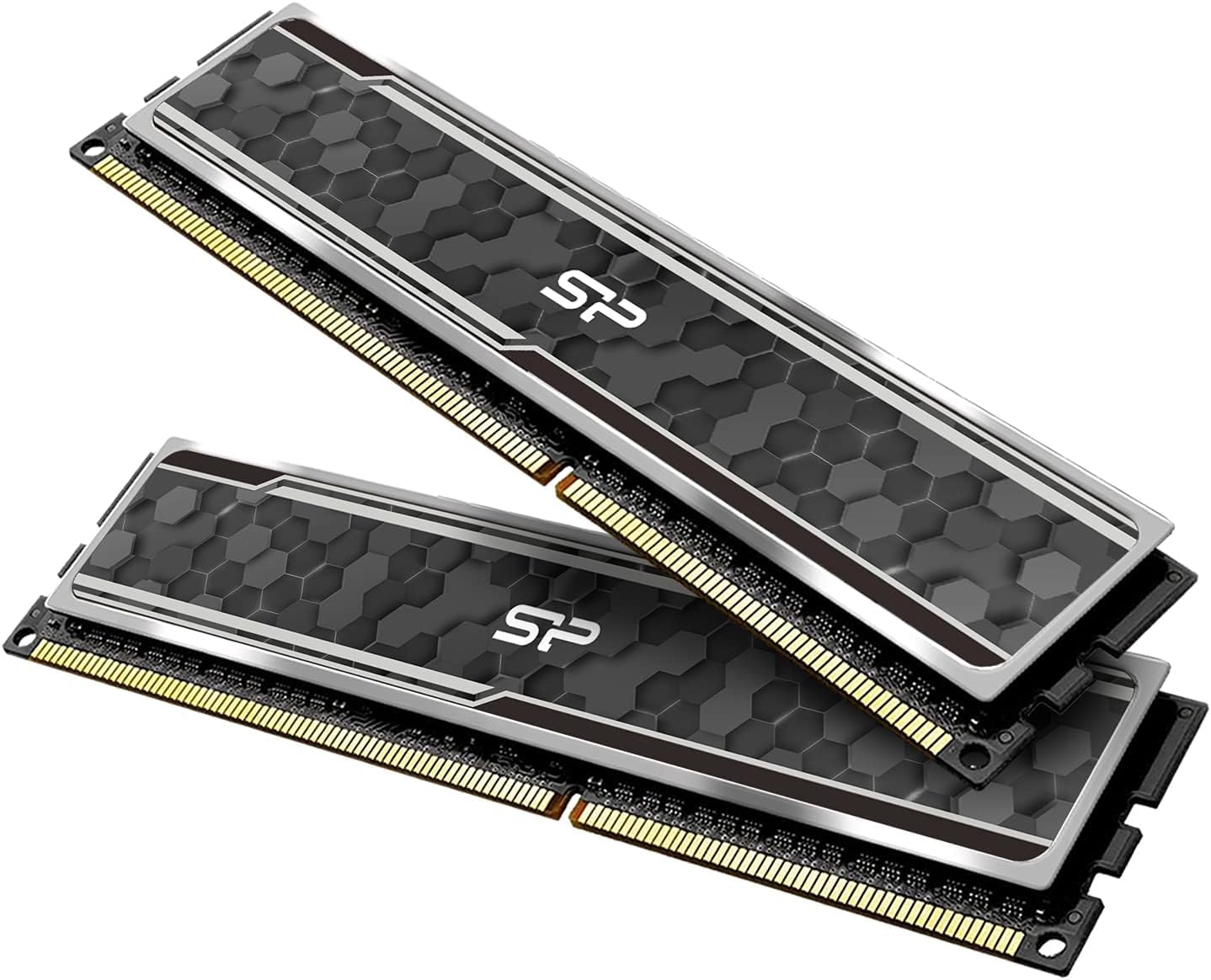
A lifetime warranty and an aluminum heatsink for less than most rivals.
You get a lifetime warranty with the Silicon Power Value Gaming kit — rare at this price point — plus the same 16GB capacity, 3200 MT/s data rate, and CL16-18-18-38 timings at 1.35V as the bigger names. It wraps those specs in a straightforward gray aluminum heat sink. It supports Intel XMP standards and works with Intel Coffee Lake processors and newer platforms.
With a 4.7 out of 5 rating from only 33 reviews, the sample size is small, but the feedback is entirely positive. Owners mention it runs stably at advertised speeds on both Intel and AMD boards after enabling XMP. One reviewer noted it paired easily with a Ryzen 5 5600 build. The one catch: like many value kits, advertised speeds are reached exclusively through XMP (or the equivalent DOCP/A-XMP profile) in BIOS — it will boot at a slower JEDEC speed if you do not enable the profile.
What makes it worth considering
- Lifetime warranty with technical support included
- Aluminum heat sink for thermal management during sessions
- Tight CL16-18-18-38 timings match pricier kits
The small catch
- Only 33 reviews so far — less community track record than the TEAMGROUP or Corsair kits
Go with this if: You want maximum warranty coverage at the lowest entry price and are comfortable enabling XMP yourself — the spec sheet matches premium kits.
Hesitate if: You prefer buying based on thousands of reviews rather than a warranty; the OLOy kit has far more buyer feedback at a similar price.
6. PUSKILL KILLBLADE DDR4 16GB (2x8GB) 3200MHz CL16
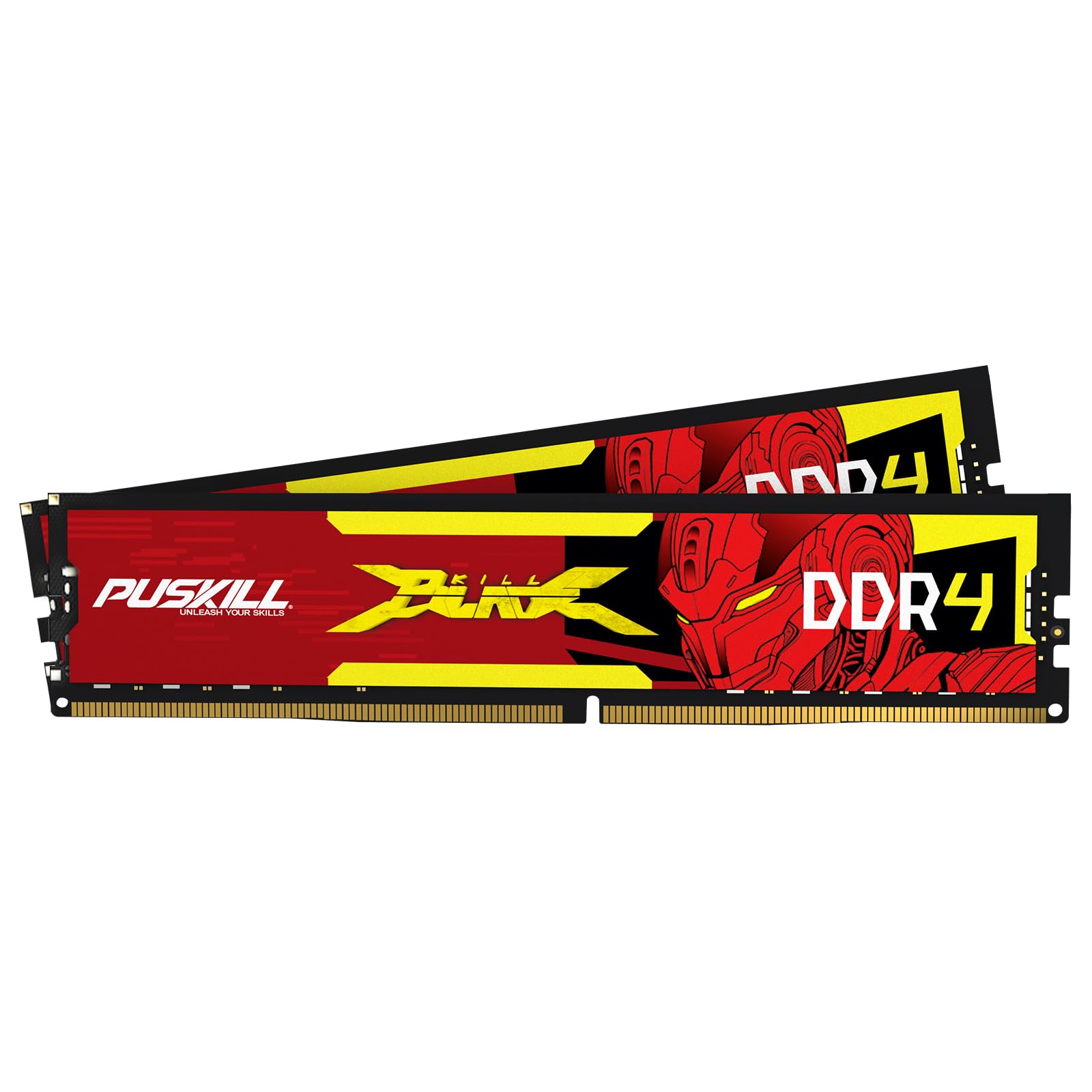
Fresh to the market with the exact specs experienced builders look for.
You get the exact specs that matter with the PUSKILL KILLBLADE: 16GB (2x8GB) of DDR4 at 3200MHz with tight CL16-18-18-42 timings. The sleek anodized aluminum heat spreader is designed to prevent thermal throttling during long gaming sessions, and the kit supports Intel XMP 2.0 for one-click overclocking to the full 3200MHz speed. The maker claims compatibility across Intel Core i9/i7/i5/i3 (10th, 11th Gen) and AMD Ryzen (3000, 5000 series) platforms.
It has a 4.6 out of 5 rating but only 42 reviews — early adopters report it hits advertised speeds without issues. The plug-and-play claim holds up: install the sticks, enable XMP in BIOS, and you are running at 3200MHz CL16. The CL18-18-42 subtimings are slightly looser than the Timetec kit (CL16-18-18-38), but the difference is academic in real gaming. The risk is the shorter buyer track record compared to the 6,000-review TEAMGROUP kit.
Specs-first approach: At 3200MHz CL16 with a metal heat spreader and XMP 2.0, it gives nothing away to established brands on paper — and costs less.
Early adopter reality: With only 42 reviews, there is less long-term feedback to lean on. If you value community-proven reliability, the TEAMGROUP Vulcan Z is a safer bet for a small price increase.
Ideal for: A builder who recognizes the spec sheet is identical to expensive kits and is willing to try a new brand to save money — the heat spreader does its job.
Skip if: You want a kit with thousands of verified reviews backing its long-term reliability; stick with TEAMGROUP or Corsair.
7. PNY XLR8 Gaming 16GB (2x8GB) 3200MHz CL16 Low Profile

The shortest stick in the lineup at 32mm — clearance issues vanish.
You can fit this kit under even the largest CPU coolers because the PNY XLR8 Gaming measures just 32mm tall — 2mm shorter than the Corsair Vengeance LPX. That makes it the lowest-profile kit here, compatible with massive dual-tower air coolers and small-form-factor cases. The speed is the same 3200MHz with CL16 at 1.35V, and it supports Intel XMP 2.0 for one-click overclocking.
The memory is backward compatible with slower speeds: 3200MHz, 3000MHz, 2933MHz, 2800MHz, 2666MHz, 2400MHz, and 2133MHz, so it adapts to whatever motherboard you pair it with. With a 4.6 out of 5 rating across 353 reviews, buyers confirm it performs identically to bulkier kits. Customers note the low-profile heat spreader runs slightly warmer than thicker designs under heavy loads, but stays well within safe limits.
Why size matters
- 32mm height is the shortest here — clears even the most oversized CPU coolers
- Broad speed backward compatibility works on older boards
- 353 reviews with a solid 4.6 rating
A trade-off
- Low-profile heat spreader runs warmer under sustained heavy load than taller kits — still safe, but something to note
Grab this if: You are building in a compact case or using a large air cooler and need every millimeter of RAM clearance — no other kit here is shorter.
Avoid if: You are not space-constrained; you can get a taller kit with a thicker heat spreader for better thermal headroom at the same price in this list.
Understanding the Specs
CAS Latency (CL)
The Column Address Strobe latency (the number of clock cycles it takes the RAM to respond to a request) is the most important spec after speed. A lower CL number means less delay. At 3200MHz, CL16 is the balance for budget gaming — it offers strong performance without the price jump to CL14 or CL15 kits that cost significantly more.
XMP 2.0 Profiles
Extreme Memory Profile 2.0 is a pre-loaded overclocking setting stored on the RAM stick. Without it, your RAM runs at a slower default speed (usually 2133MHz or 2666MHz). Enabling XMP 2.0 in your BIOS (the motherboard’s basic setup screen accessed by pressing Delete or F2 during startup) takes one click and delivers the full advertised 3200MHz. Every kit in this guide supports it.
Dual-Channel Kits
A 2x8GB kit (two 8GB sticks) runs in dual-channel mode, which nearly doubles the data bandwidth compared to a single 16GB stick. This directly improves gaming frame rates in CPU-bound titles like Valorant, CS2, and Escape from Tarkov. Always choose a 2x8GB kit over a single 16GB stick for gaming.
Voltage and Heat Spreaders
Standard DDR4 runs at 1.2V, but 3200MHz CL16 kits operate at 1.35V. This slightly higher voltage generates more heat. An aluminum heat spreader (the metal plate covering the chips) is essential for dissipating that heat and keeping the memory stable during long sessions. Kits without a heat spreader should be avoided for gaming.
FAQ
Will 3200MHz CL16 RAM work with my Ryzen 5000 CPU?
Is 16GB of RAM enough for gaming in 2025?
What happens if I mix two different RAM kits?
Do I need to enable XMP 2.0 on an AMD motherboard?
What is the difference between CL16 and CL18 RAM?
Will a 2x8GB kit fit under a Noctua NH-D15 cooler?
Should I get 3600MHz RAM instead of 3200MHz for AMD Ryzen?
How do I know if my motherboard supports DDR4 3200MHz?
Does RAM speed matter for gaming on Intel 12th/13th Gen?
What does “288-pin” mean on these RAM sticks?
Final Thoughts: The Verdict
For the majority of shoppers, the cheap ram for gaming winner is the CORSAIR Vengeance LPX because it combines a low 34mm profile, hand-sorted memory chips, a reliable aluminum heat spreader, and the highest trust rating from nearly 6,000 reviews. If you want the best balance of price and a lifetime warranty, grab the OLOy Black Owl. And for the tightest build clearance, the standout is the PNY XLR8 Gaming at just 32mm tall.
How We Picked
We do not accept paid placement. Every pick is matched to a real buyer and a real use-case; we do not hands-on test units.
Sources & Methodology
Specifications: manufacturer listings and product documentation. Review insights: verified customer reviews, as of July 2026. Pricing: not shown on this page (it changes often); check the current price via the retailer link.
As an Amazon Associate, WellFizz earns from qualifying purchases. This does not affect which products we feature.
Related Guides

Mo Maruf
I created WellFizz to bridge the gap between vague wellness advice and actionable solutions. My mission is simple: to decode the research and give you practical tools you can actually use.
Beyond the data, I am a passionate traveler. I believe that stepping away from the screen to explore new environments is essential for mental clarity and physical vitality.