Our readers keep the lights on and my smoothie glass nicely filled. As an Amazon Associate, I earn from qualifying purchases.
Specs are compiled from manufacturer listings and verified buyer reviews and can change over time — please confirm the key details on the product page before buying.
You need a cheap power supply that won’t fry your PC or drop dead mid-game, and the good news is you don’t have to gamble on a no-name unit. The budget aisle is filled with models that promise 600W but sag under load, buzz at idle, or die within months — so this guide picks the ones that actually deliver stable, safe power for your money. The top recommendation is the Apevia Jupiter 600W because it brings 80 Plus Bronze certification (at least 82% efficiency), a quiet 135mm fan, and a three-year warranty, all backed by years of owner reports that call it reliable.
I’m Mohammad Maruf — the founder and writer behind WellFizz. This guide is built by comparing the manufacturers’ published specifications and the patterns across verified customer reviews, so you get each pick’s real strengths and trade-offs instead of marketing spin.
You might be reviving an old office PC or piecing together a first gaming build on a tight budget. The right cheap power supply keeps your components safe and your wallet happy, without the anxiety of a mystery-brand gamble.
Our Picks at a Glance

How To Choose The Best Cheap Power Supply
A budget power supply is a compromise, but safety and stable power are non-negotiable. Here are the three things you need to check before clicking “buy.”
80 Plus Certification — The Efficiency Guarantee
An 80 Plus Bronze rating means the unit is at least 82% efficient at a typical load, so it wastes less energy as heat and runs cooler inside your case. Cheaper uncertified units often run hotter, louder, and deliver dirtier power (unstable voltage). For a cheap build, Bronze is the balance: it saves a little on your electric bill and puts less thermal stress on the other components.
12V Rail Amperage — The Real Power Number
The total wattage on the box is meaningless if the +12V rail (the single power line that feeds your CPU and GPU) can’t deliver enough amperage (measured in amps, or “A”). Look for the +12V output rating in the specs. A “600W” unit with only 44A on the 12V rail handles a mid-range graphics card and modern processor just fine; a unit with a wimpy 12V rail will trip or shut down under load.
Protection Circuits — Your Safety Net
Every budget power supply should list at least Over-Voltage Protection (OVP, stops a voltage spike from killing your motherboard), Over-Current Protection (OCP, prevents melted cables), and Short-Circuit Protection (SCP, shuts down instantly if something shorts). If a listing skips these entirely, skip that unit.
Quick Comparison
| Model | Best For | Wattage / Rating | 12V Rail Amps | Form Factor | Amazon |
|---|---|---|---|---|---|
| Apevia Spirit 600W | Absolute Bottom-Budget Builds | 600W / Uncertified | 45A | ATX | Amazon |
| Thermaltake Smart 500WSolid 500W Performer | Reliable Office & Light Gaming PC | 500W / 80 Plus White | — | ATX | Amazon |
| Apevia Jupiter 600W★ Best Overall | No-Fuss Reliability on a Budget | 600W / 80 Plus Bronze | 44A | ATX | Amazon |
| Segotep GN-650 650W | Mid-Range Gaming with Max Efficiency | 650W / 80 Plus Gold | — | ATX | Amazon |
| GAMDIAS Kratos M1-600B | RGB Builds on a Strict Budget | 600W / 80 Plus Bronze | — | ATX12V v2.2 | Amazon |
| MSI MAG A650BE | Compact Semi-Modular Micro ATX Builds | 650W / 80 Plus Bronze | — | ATX | Amazon |
| MSI MAG A750BE | Future-Proofed Power (750W) Without Splurging | 750W / 80 Plus Bronze | — | ATX | Amazon |
In‑Depth Reviews
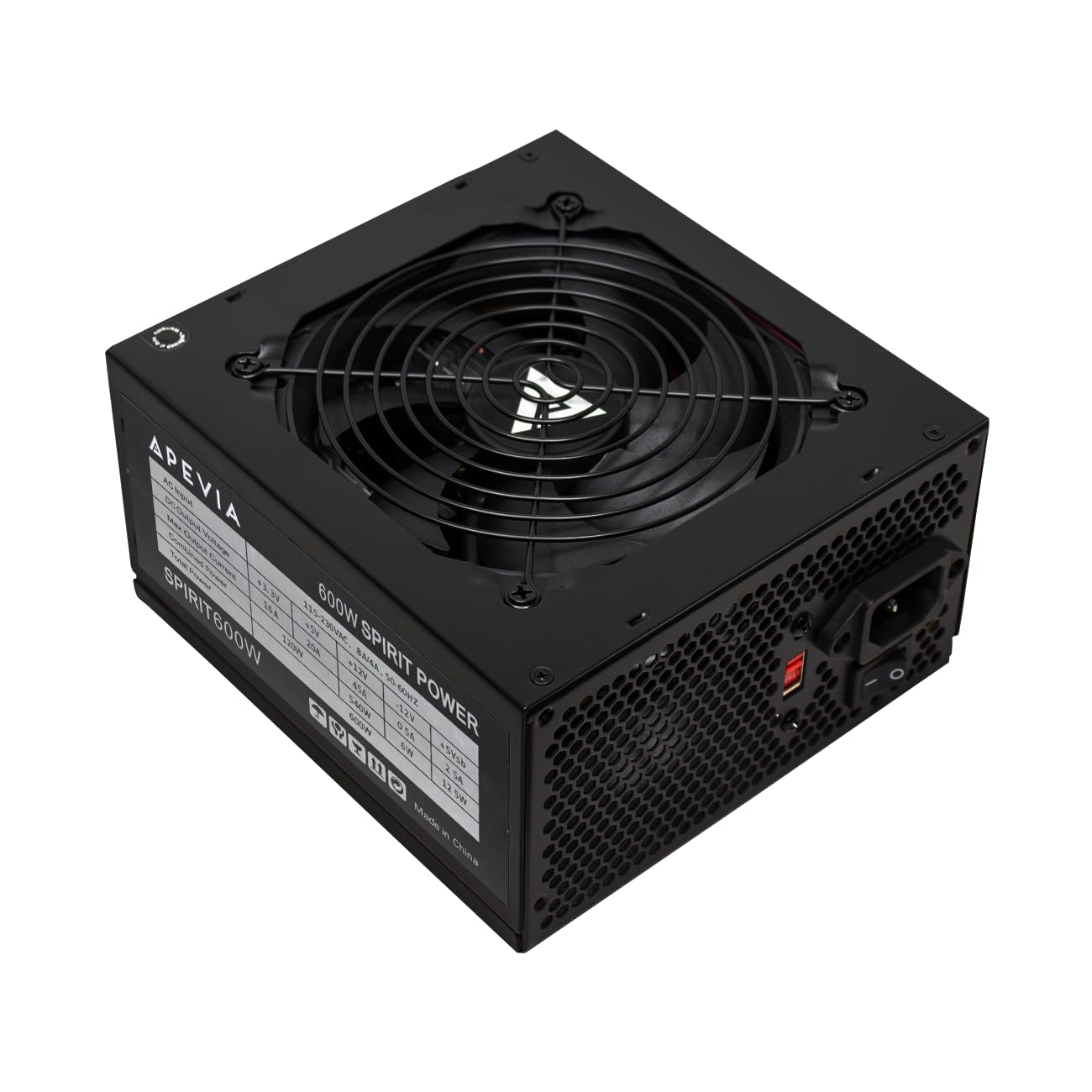
1. Apevia Spirit 600W (SPIRIT600W)
You get stable power for a first gaming PC without an efficiency badge, but expect lower efficiency and more heat.
This Apevia lacks an 80 Plus sticker (a certification that confirms at least 80% energy efficiency), which normally sends us running, but owner reports tell a different story. Builders are dropping it into PCs with RX 580s and i7-2600K setups — a combination that pulls real power — and reporting that it “runs smoothly daily for months.” The 45A single +12V rail gives it enough headroom for a modest gaming rig without voltage sag. The auto-thermally controlled 120mm fan stays inaudible under typical loads, and the outlet temp sits at a cool 81°F even while gaming, according to owners. That is quieter than the Thermaltake Smart 500W, which some owners find louder under load.
The main trade-off is the non-modular cable bundle — every cable is permanently attached, so you have to tuck extras away. In a large case you can hide them, but in a smaller ATX chassis some owners find the CPU power cable runs three inches short for a clean behind-the-motherboard route. All connectors are sleeved black, so the look is tidy even if the cable count is high. The heavy-duty protection suite — Short-Circuit (SCP), Over-Current (OCP), Over-Voltage (OVP), Over-Power (OPP), Under-Voltage (UVP), Over-Temperature (OTP) — is a genuinely strong safety net for a unit at this price tier. Buyers sum it up: “quality 600W PSU, great watt-per-dollar value.”
Surprising Strengths
- Runs cool and quiet — outlet temps around 81°F even in gaming
- Full protection suite (6 types) usually reserved for pricier units
- All cables are black-sleeved; connectors split apart for wide compatibility (20+4 pin, 4+4 CPU, 6+2 PCIe)
Real Limitations
- No 80 Plus efficiency rating; not on any high-tier PSU list
- CPU power cable runs short in some mid-tower cases, especially routed behind the motherboard tray
- Non-modular — you will have spare cables to tuck away
Grab it if: you are on the tightest possible budget for a first gaming PC or reviving an old machine and need a reliable 600W foundation with strong protections.
Think twice if: your case is small or you need a clean, cable-free interior — the non-modular design leaves a bundle of unused connectors.
2. Thermaltake Smart 500W (PS-SPD-0500NPCWBZ-W)
This name-brand 500W is ideal for an office PC or second build where brand trust matters more than peak wattage.
Thermaltake is a familiar name in PC power, and this 500W unit carries an 80 Plus White certification (the entry-level efficiency badge, meaning at least 80% efficiency) and a 240V max input voltage (AC). It is physically larger than the Apevia Spirit, measuring 9.84 x 7.87 x 4.33 inches, so check your case clearance before buying. Owners are using it for exactly the right thing: third computers, office PCs, and light gaming rigs where a known brand reduces anxiety. The consensus is “Good psu for the money, tested multiple pcie cards, and overclocked my cpu off of it, would buy again.”
The catch is that 500W is the lower limit for even a modest gaming PC with a discrete GPU (a separate graphics card). For a build with a GTX 1650 or RX 6400 it is fine, but an RX 580 or any mid-range card pushes it near its ceiling, and some owners note it “lacks real power under load” and call it “average, not sturdy for prolonged demands.” This is best understood as a high-quality basic PSU, not a nascent gaming powerhouse. At this wattage, the 80 Plus White rating is a sign of decent build quality, but the real value is the brand trust and the fact that three different buyers report buying it multiple times.
Right-sized advice: This is the pick for a home-office PC, a retro gaming build, or a secondary computer where power draw stays under 300W. For any build with a dedicated graphics card beyond entry-level, step up to a 600W unit like the Apevia Jupiter.
Best for: ultra-budget builds, office computers, and anyone who values a known brand name over raw specs at a very low entry cost.
Skip if: you want to run a mid-range or higher graphics card — the 500W ceiling leaves no headroom for peak loads.
3. Apevia Jupiter 600W (ATX-JP600W)

Buyers trust this 80 Plus Bronze unit enough to buy it for themselves and for a family member’s first PC.
The Jupiter is a step above the Spirit: it carries a legit 80 Plus Bronze certification (at least 82% efficiency), meaning higher efficiency and less heat waste, and uses a larger 135mm auto-thermally controlled fan for quieter cooling. Owners are running it with Ryzen 5 3600s and RX 580s without issue, and one owner wrote after two years: “Excelente an funcionado a la perfección la reseña la hago 2 años después de comprarlas” — working perfectly after two years. The single +12V rail delivers 44A, which is enough for most mid-range gaming systems. It also comes with a three-year warranty for added confidence. Compared to the Apevia Spirit (which lacks a certification), the Jupiter runs cooler and wastes less power, but costs more upfront.
The most-talked-about aspect is the value: owners call it “the cheap PSU to buy” and note it has “no audible coil whine” — a common plague in budget units. The cables are black-sleeved mesh, though some owners point out the individual wire colors (ketchup and mustard) are visible under the mesh if you look closely. It supports ATX 12V 2.3, dual/quad core CPUs, and SLI/Crossfire, though at 44A on a single rail dual-GPU setups are a stretch. In the customer-voice data, reliability gets the most praise by a clear margin, followed closely by quiet operation and power quality. This is the unit that makes you forget you bought cheap.
Why Owners Love It
- 80 Plus Bronze certified — real efficiency gains over uncertified units
- Dead-silent operation without coil whine; one owner calls it “virtually silent”
- Proven longevity — multiple reports of 2+ years of daily use without failure
Notes From the Data
- Cables are sleeved black but the inner wires are still ketchup-and-mustard colored
- Heavy-duty protections list is shorter than the Spirit: OVP, OPP, UVP, SCP (no OCP or OTP listed)
- Build quality is polarizing — some call it great, others call it mixed
Buy this if: you want a quiet, efficient 600W PSU that has a proven track record among owners and the confidence of a three-year warranty.
Consider another if: you need full Over-Current Protection (OCP) or Over-Temperature Protection (OTP) explicitly listed in the spec sheet — the Jupiter lists four protections, not six.
4. Segotep GN-650 650W

You get 80 Plus Gold efficiency at a Bronze-tier price, making it the best efficiency bargain on this list.
80 Plus Gold is a rare badge in the budget tier, and the Segotep GN-650 earns it. That means it hits at least 87% efficiency at typical loads, running cooler than any Bronze unit (like the Apevia Jupiter) and shaving a small but real amount off your electric bill over years of use. The single 12V output delivers reliable power, and the 120mm silent fan keeps noise low. The non-modular design is the main practical trade-off — owners note it lacks the clean look of a modular unit — but the cable length gets praise for reaching across full-sized ATX cases. Power performance is the top-cited positive aspect among owners, with 54 mentions in the data.
The honest caveat is that power reliability scores “mixed” in owner feedback, not positive. While most owners mention smooth operation (“no issues in over a year of service”), a few note concerns about long-term durability. The Global Voltage Adaptation feature (100-240V AC input) makes this a genuinely versatile unit for international travel or builds with varying grid power. At 5.91 x 5.51 x 3.35 inches, it is compact for a 650W unit, fitting well into mid-tower cases. Owners call it “the absolute best for the price” and “quiet and effective.”
The efficiency edge: The 80 Plus Gold certification means this unit runs cooler and wastes less electricity than any Bronze unit on this list. If you plan to keep your build for years, the efficiency savings alone can offset the small premium.
Ideal for: mid-range gaming builds where you want the efficiency of a Gold-rated PSU without paying premium-tier prices.
Check if: long-term reliability is your top concern — the owner feedback is strong overall but a small number of reports flag mixed durability results.
5. GAMDIAS Kratos M1-600B 600W

You can add RGB lighting to a windowed case on a budget, but the fan noise may be noticeable.
The GAMDIAS Kratos delivers 600W of 80 Plus Bronze rated power, but the real story is the RGB integration. It syncs with ASUS AURA, GIGABYTE FUSION, MSI MYSTIC, ASROCK POLYCHROME, and BIOSTAR VIVID LED DJ through an addressable header, or you can cycle through 30 lighting modes with a button on the unit itself. The ECO fan speed control system balances noise and cooling, and a dedicated silent mode switch lets you prioritize quiet operation. Owners consistently praise the reliability and power quality, with 40 and 24 mentions respectively in the feedback data.
The mixed-area is noise level: some owners find it quiet with the silent mode engaged, but others report the fan is “extremely noisy” under load. The cables also draw mixed feedback — several owners note the lack of true 8-pin connectors, which matters if your graphics card requires dual 8-pin power. The form factor is ATX12V v2.2, which is a slightly older spec but fully compatible with modern ATX cases. Owners sum up the experience as “great mid range PC PSU” with “pretty high quality cables for the price.”
Standout Features
- RGB sync with all major motherboard ecosystems (ASUS, Gigabyte, MSI, ASRock, Biostar)
- 30 lighting modes controllable via onboard button or motherboard software
- Ultra silent mode switch for low-noise operation when you don’t need max cooling
Watch Out For
- Fan noise is polarizing — some owners find it loud, even with silent mode on
- Some cables lack a true 8-pin PCIe connector, limiting compatibility with newer GPUs
- ATX12V v2.2 form factor is an older spec; ensure your case supports it
Choose this if: you have a windowed case and want coordinated RGB lighting without paying a heavy RGB-tax, and your GPU uses 6-pin connectors.
skip it if: noise sensitivity is a priority or your graphics card needs dual 8-pin power cables — the mixed fan and connector feedback suggests quieter alternatives like the Segotep or MSI MAG options.
6. MSI MAG A650BE 650W

The semi-modular design lets you attach only the cables you need, reducing clutter in compact cases.
MSI’s MAG A650BE brings semi-modular cabling to the budget tier, meaning you plug in only the cables you need and leave the rest out of the case entirely. For a micro ATX or compact ITX build, this is a big help for airflow and visual tidiness. It carries 80 Plus Bronze certification, a 120mm low-noise fan, and a suite of industrial-level protections: Over-Voltage Protection (OVP), Over-Current Protection (OCP), Over-Power Protection (OPP), Over-Temperature Protection (OTP), and Short-Circuit Protection (SCP). The DC-DC circuit design and Active PFC keep voltage regulation tight. This protection list is longer than the Apevia Jupiter’s four-item list, making it the better pick if you want explicit safety guarantees.
Owner satisfaction is remarkably high. The build quality gets called “premium,” the fan is described as “dead silent,” and the semi-modular design is praised for cleaning up cable clutter in compact cases. One owner is running it with a 5600X and Arc B580 without issues. The 650W output is comfortable for mid-range builds including an RTX 5060 Ti, as one verified owner confirms. At 11.42 x 8.11 x 4.96 inches the unit is physically larger than some competitors, but that extra internal space is part of why it runs cool and quiet. The five-year warranty is a strong confidence signal from MSI.
The data says: This is the best semi-modular option in the budget bracket by a wide margin. The pile of owner praise — “premium build,” “incredibly quiet,” “clean cable management” — is consistent and enthusiastic. It leads on reliability and build feel versus the non-modular alternatives.
Best for: small-form-factor builds (micro ATX, ITX) where cable management is tight, or any builder who values a clean interior without zip-tie frustration.
Consider the 750W version if: your build draws more power — for the same semi-modular convenience with extra headroom, the MSI MAG A750BE is the logical step-up.
7. MSI MAG A750BE 750W

This 750W semi-modular unit offers headroom for a future GPU upgrade without a premium price.
The MAG A750BE is the bigger sibling of the A650BE, sharing the same semi-modular design (essential cables fixed, extra ones detachable), 80 Plus Bronze certification, 120mm low-noise fan, and industrial protection suite (OVP, OCP, OPP, OTP, SCP). The extra 100W headroom matters for higher-end graphics cards, future upgrades, or builds with power-hungry CPUs and multiple drives. Customers note powering 6 SATA drives (5 HDDs and 1 SSD) plus an M.2 in a mini-ATX server build without breaking a sweat. That is more power-hungry peripherals than any other unit on this list regularly handles, so it suits a storage-heavy server build better than the Apevia Jupiter or Segotep GN-650.
Reliability is the top-cited positive aspect, with owners calling the build quality “amazing” and noting it is “very quiet under load.” Cable quality also earns strong marks (14 mentions), though cable length gets a “mixed” signal — most find it perfect for a mid-tower, but a small number note the motherboard cord is too short for certain case layouts. The 120V maximum input voltage (AC) means this unit is best for North American standard voltage — it lacks the global voltage range of the Segotep. The five-year warranty and the shared MSI platform with the A650BE mean you get consistent quality across the two units.
Why Owners Pick It
- 750W capacity gives genuine headroom for most single-GPU gaming builds and future upgrades
- Semi-modular design keeps the build clean without paying for full-modular complexity
- Reliability is the most-cited praise — owners trust it to power their systems daily
Practical Notes
- 120V maximum input voltage means it is tune for North America (100-120V AC); not ideal for 220-240V regions
- Motherboard cable length gets mixed feedback — may be tight in larger cases with top-mounted PSU bays
- Heavier than the 650W version (2.44 kg vs 2.38 kg) — check case weight limits if shipping
Reach for this if: you are building a mid-to-high-end gaming rig and want 750W of headroom for a GPU upgrade later, but don’t want to pay the premium for a fully modular high-efficiency unit.
Check cable reach first: if your case is a full-tower with a bottom-mounted PSU area, measure the motherboard cable path — some owners found it tight for their setup.
Understanding the Specs
80 Plus Certification (White vs Bronze vs Gold)
This badge tells you how efficiently the power supply converts AC wall power (alternating current from your outlet) into DC power (direct current for your components). 80 Plus White means at least 80% efficiency at typical load — fine for an office PC. 80 Plus Bronze (82%+) is the budget gaming balance. 80 Plus Gold (87%+) runs cooler and saves more electricity over time, often paying back the small price difference in a year or two of daily use.
The +12V Rail — The Real Power Delivery
Modern CPUs and graphics cards draw their power from the +12V rail (the main power line), not from the 3.3V or 5V rails (used for smaller components like drives). A single +12V rail design (like all the units on this list) delivers all its power through one strong channel. The amperage rating (amps, or “A”) on that rail — 44A or 45A on the 600W units — is the number that determines whether your GPU gets enough steady current. A higher amperage (and higher total wattage) gives you more room for a power-hungry graphics card.
FAQ
Can I use a cheap 600W power supply with a modern graphics card like an RTX 3060 or RX 6600?
Is a power supply without 80 Plus certification safe to use?
What is the difference between a modular and non-modular power supply?
Will a cheap PSU fit in my small micro ATX case?
How long should a budget power supply last?
What does the +12V rail amperage mean and why should I care?
Should I buy a power supply with more wattage than my build needs?
What protection features are non-negotiable in a budget PSU?
Final Thoughts: The Verdict
Across the board, the cheap power supply winner is the Apevia Jupiter 600W because it delivers 80 Plus Bronze efficiency, a 135mm quiet fan, three-year warranty proof, and a proven track record across years of real owner use. If you want a semi-modular design for a clean small-case build, grab the MSI MAG A650BE. And for max efficiency headroom at a still-affordable price, the Segotep GN-650 650W with its 80 Plus Gold rating is the one to reach for.
How We Picked
We do not accept paid placement. Every pick is matched to a real buyer and a real use-case; we do not hands-on test units.
Sources & Methodology
Specifications: manufacturer listings and product documentation. Review insights: verified customer reviews, as of July 2026. Pricing: not shown on this page (it changes often); check the current price via the retailer link.
As an Amazon Associate, WellFizz earns from qualifying purchases. This does not affect which products we feature.
Related Guides

Mo Maruf
I created WellFizz to bridge the gap between vague wellness advice and actionable solutions. My mission is simple: to decode the research and give you practical tools you can actually use.
Beyond the data, I am a passionate traveler. I believe that stepping away from the screen to explore new environments is essential for mental clarity and physical vitality.