Our readers keep the lights on and my smoothie glass nicely filled. As an Amazon Associate, I earn from qualifying purchases.
Tired of juggling external hard drives and paying monthly fees for cloud storage you don’t fully control? A network-attached storage (NAS — a box that plugs into your router and lets every device in your house access your files) is the logical next step. The challenge is that decent NAS devices have historically cost a small fortune, but that has changed. This guide cuts through the noise to find the budget-friendly models that actually deliver dependable, private storage without the premium price.
I’m Mohammad Maruf — the co-founder and writer behind WellFizz. This guide is built by comparing the manufacturers’ published specifications and the patterns across verified customer reviews, so you get each pick’s real strengths and trade-offs instead of marketing spin.
We have focused on models that offer the best mix of storage capacity, ease of use, and reliable performance for a sensible outlay, and each one is a serious contender for the title of the best cheap nas for your home or small office.
How To Choose The Best Cheap NAS
A NAS is a long-term purchase, so picking the right one from the start saves you from replacing it in a year. The main things to get right are the number of drive bays, the processor power, the amount of RAM, and what software the machine runs.
Number of Drive Bays
The bay count (slots for hard drives) is the single most defining spec. A 2-bay NAS is the minimum, and it is perfectly fine for basic backups and file sharing, especially if you use RAID 1 (a mode that writes the same data to both drives so you survive a single drive failure). A 4-bay NAS gives you room to grow, lets you use more storage-efficient RAID setups, and offers better performance if you plan to do more with your device over time.
Processor Speed and RAM
The processor (CPU — the chip that runs the operating system and all apps) determines how fast the NAS can transfer files and whether it can handle heavier tasks like transcoding video for Plex (converting a 4K movie into a format your TV can play without lag). A basic ARM chip is fine for simple file storage, while an Intel x86 processor is needed for smooth 4K streaming and running apps like Docker (a platform that lets you run small programs like a personal website or a download manager). RAM (the short-term working memory) helps the NAS juggle multiple tasks at once — 4GB is a comfortable starting point, but 8GB lets you run more apps without slowdowns.
RAID Modes
RAID (Redundant Array of Independent Disks) is a way of combining drives to get either more speed or more safety. RAID 0 combines all the drives into one large volume with faster speeds, but a single drive failure loses everything. RAID 1 mirrors the data so you have a live copy, but you lose half the total capacity. RAID 5 (available on 4-bay units) gives you a good balance of space and protection. A beginner-friendly option is to use JBOD (Just a Bunch Of Disks), which treats each drive as independent and avoids any complexity.
Quick Comparison
On smaller screens, swipe sideways to see the full table.
| Model | Category | Best For | Key Spec | Amazon |
|---|---|---|---|---|
| Synology DS223 | Premium | Reliable data protection | 2-Bay, Metal enclosure | Amazon |
| UGREEN DH4300 Plus | Premium | High-capacity media hub | 4-Bay, 8GB RAM, 2.5GbE | Amazon |
| TERRAMASTER F4-425 | Mid-Range | 4K Plex transcoding | 4-Bay, Intel x86, 2.5GbE | Amazon |
| Asustor Drivestor 2 Pro Gen2 | Mid-Range | High-speed network file sharing | 2-Bay, 2.5GbE, 4K media server | Amazon |
| UGREEN DH2300 | Mid-Range | First-time NAS buyers | 2-Bay, 4GB RAM, AI Photo Album | Amazon |
| Synology DS223j | Mid-Range | Simple, quiet backup | 2-Bay, Low power, Plastic build | Amazon |
| ZimaBlade 7700 | Mid-Range | DIY homelab and Docker | 2-Bay, x86, 16GB RAM, PCIe | Amazon |
| ORICO 4 Bay Enclosure | Budget | DAS expansion for an existing NAS | 4-Bay, 88TB max, Aluminum case | Amazon |
| JONSBO N4 Case | Budget | Building a custom DIY NAS | 8-Bay, Micro-ATX, Wood panel | Amazon |
In‑Depth Reviews
1. Synology DS223 Home & Office Backup Hub

You value data safety above everything and want a NAS that runs quietly in the background for years. The DS223 delivers that with Synology’s DiskStation Manager (DSM) operating system, which many users consider the most polished and secure NAS software, paired with a metal chassis (9.15″D x 4.25″W x 6.5″H) that keeps its two internal drives cool and quiet. Reviewers report that setting up RAID mirroring (automatic data duplication across both drives) is simple, and the device runs stably and nearly silently when kept running around the clock. The compact metal body is easy to tuck away. This is the most trustworthy foundation for your home storage, though its plastic cover pins can be fragile and the upfront cost is higher than other 2-bay models.
Why it’s great
- Excellent software that adds features like photo management and surveillance over time
- Metal enclosure for better heat dissipation and durability
- RAID mirroring provides automatic data duplication and protection
Good to know
- Higher upfront cost compared to other 2-bay models
- The plastic cover pins can be fragile and may not reattach securely
- Setup is more complex than a simple external hard drive
2. UGREEN NAS DH4300 Plus 4-Bay

Need a bigger storage ceiling and faster transfers than the Synology DS223 can offer? The DH4300 Plus supports up to 128TB and has a 2.5GbE port (about 2.5 times faster than the standard 1GbE port on the Synology DS223j), letting you move a 1GB file in about 3 seconds. It is the better fit if you already know you need four drive bays and more bandwidth for large video files. Buyers report the UGREEN software is intuitive for beginners, and the AI photo album feature automatically tags faces, objects, and locations so you can find a specific beach photo from years ago in seconds. Reviewers also note that the magnetic top dust cover makes closing the case effortless. If you want a beginner-friendly, 4-bay system that can grow with your media library and run side apps like a Plex server via Docker, choose this over the Synology.
Where it shines
- 8GB of RAM for smooth multi-tasking and Docker support
- 2.5GbE port for fast local file transfers
- AI-powered photo organization and duplicate removal
Worth noting
- Does not support virtual machines
- Enterprise-grade drives may vibrate in the chassis; some users add acoustic foam
- Wired Ethernet only — no built-in Wi-Fi support
3. TERRAMASTER F4-425 4-Bay NAS
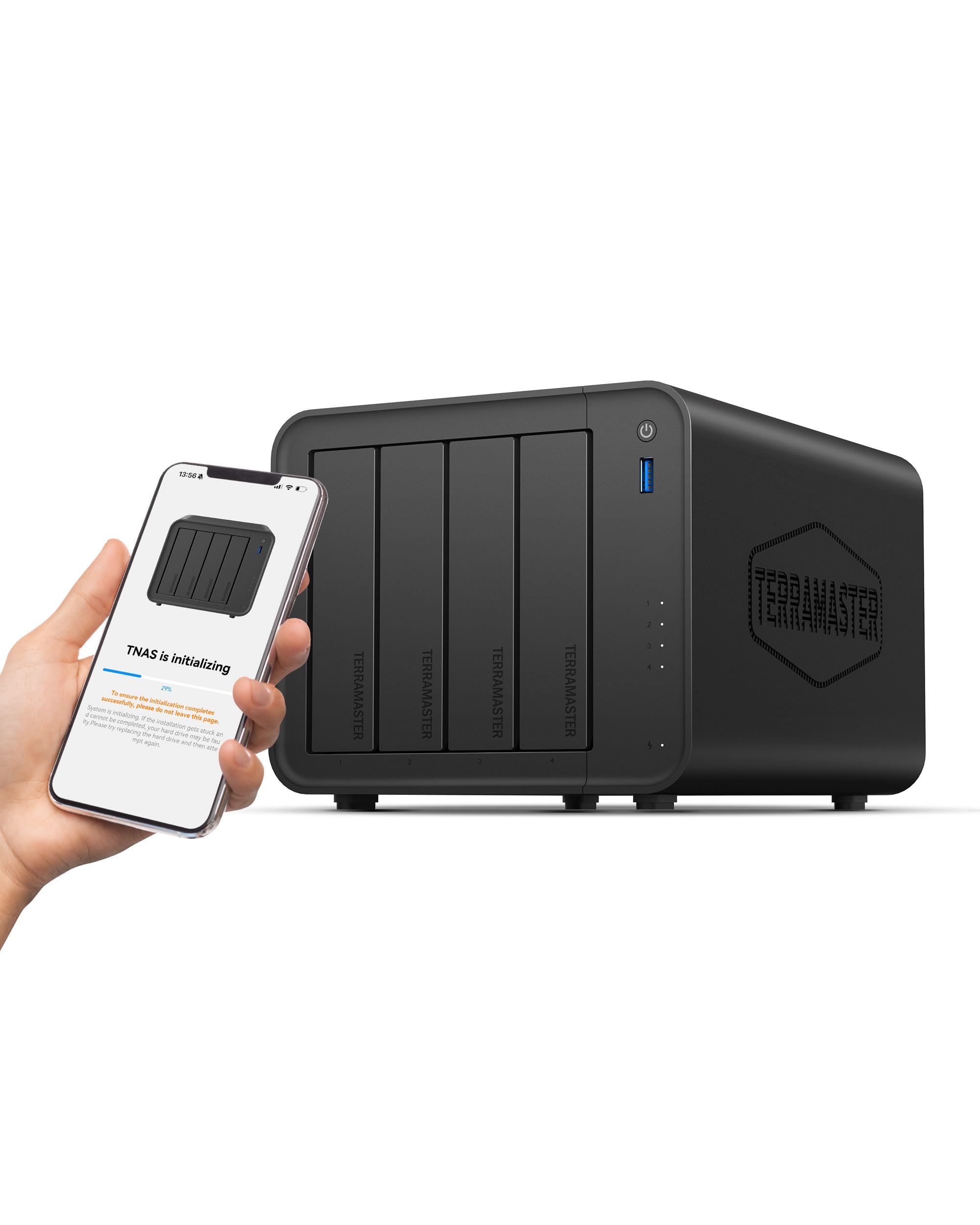
Own a 4K TV and want to stream your personal movie collection through Plex, Emby, or Jellyfin without buffering? The F4-425 is built for that exact job. Its Intel x86 quad-core processor supports hardware-level 4K H.265 decoding (converting the video format on the fly so your TV can play it), and the 2.5GbE port ensures you have the bandwidth to serve multiple streams at once. Reviewers report that the tool-free, push-lock HDD trays let you install drives in about 10 seconds, and the unit operates at just 21dB(A) — quieter than a whisper in a library, so it is fine to keep in a bedroom. One reviewer noted it easily handled two or more concurrent Plex streams without glitches, the real-world test of a media-focused NAS. The 4GB of RAM is upgradeable to 16GB, and Intel QuickSync gives it strong transcoding performance hard to match at this price. However, some reviews report boot times of 15-20 minutes, and customer support can be slow.
What stands out
- Intel x86 processor with QuickSync for strong 4K transcoding
- Ultra-quiet 21dB(A) operation
- Tool-free drive bays for fast installation
The trade-offs
- Some reviews report boot times of 15-20 minutes
- Customer support can be slow to respond
- Comes with 4GB RAM; upgrading is recommended for heavy use
4. Asustor Drivestor 2 Pro Gen2 AS3302T v2

Most budget 2-bay models still use the older 1GbE port, which tops out at about 125MB/s. The Asustor Drivestor 2 Pro Gen2 is one of the few that includes a 2.5GbE port, giving you over twice the network speed for moving large files between your computer and the NAS. You will notice this most if you edit video directly off the NAS or frequently transfer huge photo libraries. Reviewers highlight that the Asustor operating system has repeatable walkthrough lessons that guide you through common tasks, making it unusually beginner-friendly. Buyers also appreciate the tool-free drive installation and say the device is easy to set up for streaming music, videos, and photos to a smart TV or game console. The catch is that the Realtek quad-core processor is not powerful enough for heavy 4K video transcoding in Jellyfin — some users report constant buffering — so its value is in fast file sharing rather than multimedia horsepower. Some units also have a fan that fails after a few days of use.
The upsides
- 2.5GbE port for significantly faster file transfers than most 2-bay models
- Excellent, beginner-friendly software with video tutorials
- Tool-free drive bay design
Keep in mind
- Not powerful enough for smooth 4K Plex or Jellyfin transcoding
- Some units have a fan that fails after a few days of use
- Only 2GB of DDR4 RAM limits multi-tasking
5. UGREEN NAS DH2300 2-Bay

Never owned a NAS before and want the most user-friendly experience? The DH2300 is the entry point. It comes with 4GB of RAM on board, supports up to 64TB of storage, and its AI photo album feature automatically organizes your pictures by face, location, and object, removing the manual sorting chore that comes with moving from Google Photos. What you give up compared to the TERRAMASTER F4-425 is processing power and expandability — the DH2300 does not support Docker or virtual machines, so you cannot run additional services like a personal website or Home Assistant on it. Owners mention that the file transfer speed of 125MB/s over the 1GbE port is perfectly adequate for backups and streaming, but you will feel the bottleneck when moving many large files at once. This is the choice for the first-time buyer who just wants a simple, private way to automatically back up phones and computers and access files from anywhere, without any technical tinkering.
Why we’d pick it
- Very easy setup with UGREEN’s intuitive app and browser interface
- AI-powered photo tagging and duplicate detection
- No recurring cloud fees — a one-time purchase for long-term storage
A few caveats
- Does not support Docker or virtual machines for advanced users
- Wired Ethernet only — requires an external adapter for Wi-Fi
- Enterprise hard drives cause vibration noise; acoustic foam is a common fix
6. Synology 2-Bay DiskStation DS223j

Need a centralized backup destination for family photos and documents without the noise or electricity draw of a full-size server? The DS223j is the quiet, low-power option. Its plastic and tempered glass enclosure keeps the weight down to 0.87 kilograms (about 1.9 lbs), and its small footprint (6.5″D x 3.94″W x 8.9″H) fits on a bookshelf or desk easily. Reviewers consistently praise the Synology DiskStation Manager software for its reliability and the fact that it supports large capacity drives without issues — one buyer confirmed it worked perfectly with a 14TB WD drive. The DS223j also supports Surveillance Station (Synology’s camera recording system), so it can double as a 24/7 home security recorder using compatible IP cameras. The downside is that its ARM-based processor is slower than the Intel chips in the TERRAMASTER F4-425 or the Asustor, and performance can slow down noticeably if you run multiple tasks at the same time, like backing up files while streaming a video.
Strong points
- Very low power consumption and near-silent fanless operation
- Supports large single drives (up to 14TB or more) without compatibility issues
- Synology’s mature operating system with features like Surveillance Station
Before you buy
- Performance drops when multitasking
- Software interface can be complex for absolute beginners
- Cannot rename USB drives connected to the NAS
7. ZimaBlade 7700 x86 Home Server & 2-Bay NAS Kit
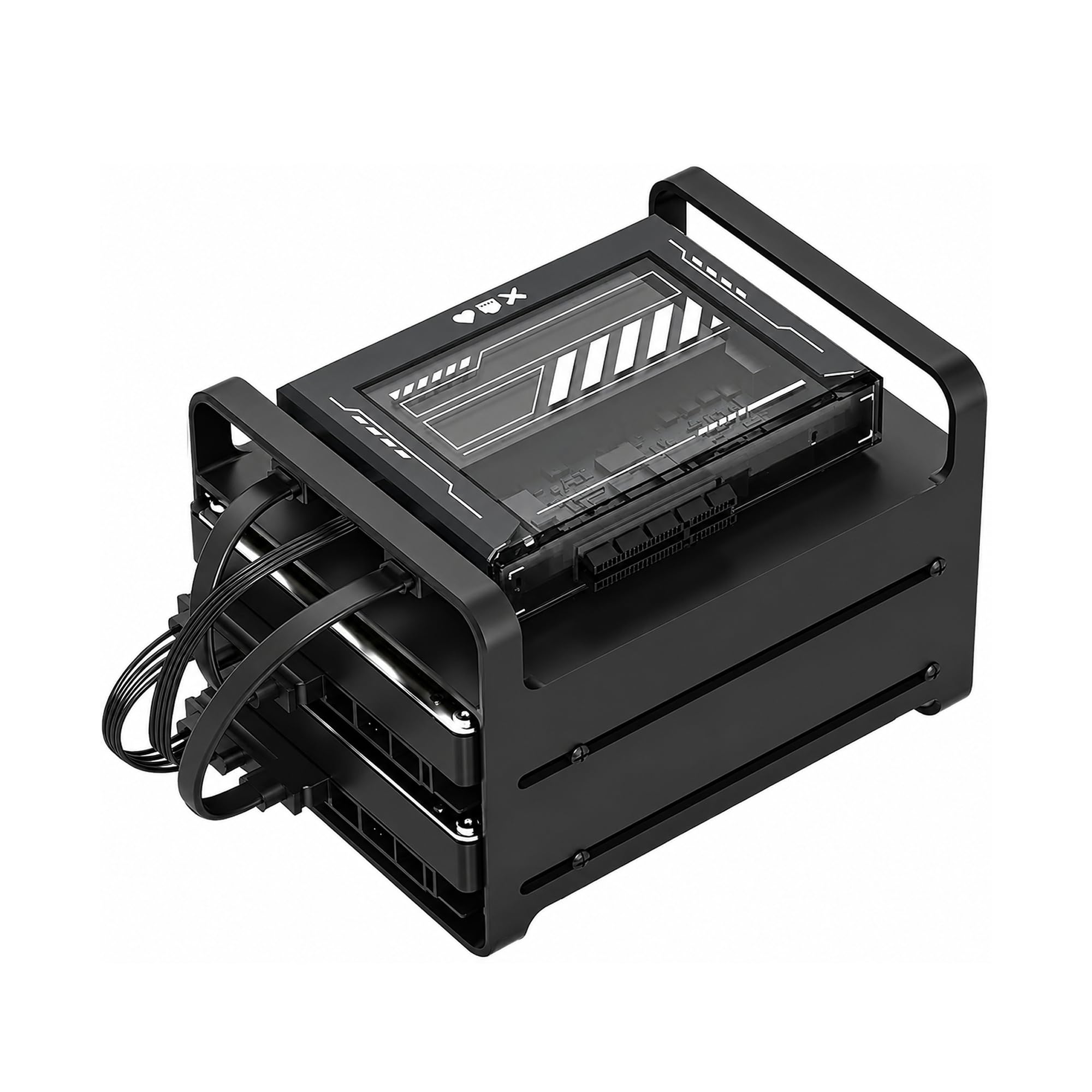
At its price, the ZimaBlade 7700 is the most flexible option for people who want a NAS that can also run Docker containers, act as a Home Assistant hub, host a personal website, or serve as a retro gaming machine — it is essentially a tiny computer with drive bays, not a locked-down appliance. It comes with 16GB of RAM, which is double what most budget NAS devices offer, and an Intel quad-core x86 processor that supports standard Linux operating systems. The complete kit includes the metal drive cage for two HDDs/SSDs, a power supply, and dual SATA cables, so you have everything you need to start building right out of the box. Customers note that CasaOS is preinstalled and provides a clean, web-based interface for managing files and apps, though some reviewers warn it is not beginner-friendly and requires a willingness to learn basic Linux commands. The PCIe x4 expansion slot is a rare find in this price range, letting you add a faster network card or an external GPU down the line, which makes this the best choice for anyone who sees the NAS as just the start of a larger homelab project.
What we like
- 16GB of RAM for running multiple Docker containers
- PCIe expansion slot for future upgrades like a faster network card
- Full x86 compatibility with almost any operating system or software
The downsides
- Open-frame design exposes drives to dust and requires clearance
- Not beginner-friendly — requires comfort with Linux and networking
- Only 2 bays for storage, limiting expansion
8. ORICO 4 Bay Raid Hard Drive Enclosure

The ORICO 4 Bay is not a true network-attached storage device but a Direct-Attached Storage (DAS — a box that connects to your computer via USB, not your router), which makes it a very different proposition from the other devices here. For the price, you get an all-aluminum 4-bay enclosure that can hold up to 88TB and supports 8 different RAID modes (including RAID 0, 1, 5, 10, JBOD, and CLONE). This flexibility makes it a cheap way to add a lot of storage to an existing computer or to a NAS that has a USB port. However, the USB 3.0 interface is a major bottleneck. While the connection can theoretically reach 5Gbps, reviewers report that real-world multi-drive access is very slow — read speeds of around 160MB/s, and writes that drop to 15-22MB/s once the cache fills up. One buyer mentioned that the unit works better plugged into a NAS’s USB port than directly into a PC, because PC USB power management can force daily hard resets. If you already own a NAS with a spare USB port and need a low-cost way to expand your raw storage capacity, the ORICO enclosure is a sensible tool; as a standalone network storage solution it falls short of the others on this list.
Why it’s great
- Very affordable way to add 4 bays of storage
- Supports 8 RAID modes for flexibility in how you configure drives
- All-aluminum chassis provides good passive cooling
Good to know
- USB 3.0 interface creates a severe write-speed bottleneck after cache fills
- Not a true network-attached device — must be connected to a computer
- Some users report firmware power management issues with PC USB ports
9. JONSBO N4 Black NAS PC Case

The JONSBO N4 is not a complete NAS — it is a case that you fill with your own computer parts (a motherboard, CPU, power supply, and drives), so it is for the DIY builder who wants to hand-pick every component. Priced lower than most pre-built 4-bay NAS units, it gives you an 8-bay chassis with a beautiful 8mm-thick North American black walnut front panel, making it one of the best-looking storage cases on the market. Reviewers point out that the included 120mm fan has a slight wobble that some replace with a Noctua fan for quieter operation. The case supports Micro-ATX motherboards, an SFX power supply, and includes a USB 3.2 Gen 2 Type-C port on the front. One owner reported that with 11 drives, the lower bays need extra ventilation, and the case has room to add fans. Its physical footprint (14″D x 14.5″W x 11.4″H) is much larger than the Synology DS223j (6.5″D x 3.94″W x 8.9″H) — a 2.2x size gap in depth and width, so you need desk space to spare. If you enjoy building computers and want the ability to configure a powerful, high-capacity server exactly to your specifications, the JONSBO N4 offers a premium aesthetic and massive drive capacity that no pre-built budget NAS can match.
Where it shines
- 8 drive bays provide immense storage capacity for the price
- Beautiful solid walnut wood front panel
- Compatible with standard Micro-ATX and ITX parts
Worth noting
- Requires a full PC build — no pre-assembled functionality
- Included fan may have a wobble causing noise; many users replace it
- Large footprint compared to pre-built 2-bay NAS devices
Understanding the Specs
Processor (CPU) and Transcoding
The CPU is the brain of the NAS. A basic ARM chip handles file storage and backups with ease, but if you want to stream 4K movies through Plex or run apps like a web server, you need an Intel x86 processor. These Intel chips include a feature called QuickSync that can convert a 4K video into a lower-resolution stream on the fly (transcoding), so your TV or phone can play it smoothly even over a slow Wi-Fi connection. The TERRAMASTER F4-425 is a prime example of a NAS with this capability.
Network Speed (GbE)
The Ethernet port is your NAS’s highway to the rest of your network. Most budget models have a 1GbE port, which moves data at a theoretical maximum of about 125MB/s — fine for backups and occasional streaming. A 2.5GbE port, found on the Asustor Drivestor 2 Pro Gen2 and the UGREEN DH4300 Plus, moves data at over 300MB/s, which is noticeable when you are moving large video files or if multiple people are accessing the NAS at once. Your computer and router also need to support 2.5GbE to get that full speed.
FAQ
How many drive bays do I need for a cheap NAS?
What is the difference between a NAS and a DAS enclosure?
Can I run Plex on a cheap NAS?
What does RAID 1 mean for backups?
Final Thoughts: The Verdict
When it comes down to it, the best cheap nas winner is the UGREEN DH2300 because it offers the best balance of beginner-friendly software, handy AI features, and enough performance for home backups and streaming without demanding a technical background. If you want more processing power for 4K Plex transcoding and more drive bays, grab the TERRAMASTER F4-425. And for the tinkerer who wants a flexible x86 platform to run Docker containers and build a true homelab, the ZimaBlade 7700 is the standout value.

Mo Maruf
I created WellFizz to bridge the gap between vague wellness advice and actionable solutions. My mission is simple: to decode the research and give you practical tools you can actually use.
Beyond the data, I am a passionate traveler. I believe that stepping away from the screen to explore new environments is essential for mental clarity and physical vitality.