Our readers keep the lights on and my smoothie glass nicely filled. As an Amazon Associate, I earn from qualifying purchases.
Finding a cheap keyboard usually means wading through a swamp of hollow plastic, mushy keys, and that faint rattle of something coming unglued after a month. Under you are trading between two distinct worlds — the soft, spill-proof silence of a membrane board and the crisp, durable feedback of a budget mechanical. Knowing which camp fits your wrists, your noise tolerance, and your desk layout is the only way to leave the swamp with a win.
I’m Mohammad Maruf — the founder and writer behind WellFizz. I’ve spent dozens of hours cross-referencing switch types, keycap materials, chassis rigidity, and real customer longevity data to find which entry-level keyboards actually hold up past the return window.
This guide breaks down five wired keyboards under , each tailored to a different priority — quiet typing, ergonomic support, mechanical feel, or a full combo setup. Whether you need a cheap keyboard for late-night data entry, a silent shared-office board, or a compact gaming deck, the right pick comes down to switch construction and build materials, not the sticker price.
How To Choose The Best Cheap Keyboard
In the sub- range, every dollar you save on the keyboard usually means a compromise in switch longevity, keycap fade resistance, or chassis rigidity. Focus on the three variables that affect daily typing experience the most.
Switch Construction: Membrane vs. Mechanical
Membrane keyboards use a single rubber sheet beneath the keys. They are quieter, usually spill-proof, and cost less to manufacture, but the rubber dome degrades over time — mushy spots and missed keystrokes appear after heavy daily use. Mechanical switches use individual springs and metal contacts under each key. They last tens of millions of keystrokes and provide consistent tactile or linear feedback, but entry-level mechanical boards can produce louder clatter and often lack waterproofing.
Layout and Key Rollover
A full-size 104-key layout includes the number pad, while tenkeyless (TKL) and 96% layouts save desk space by trimming the numpad or editing cluster. For gaming or fast typing, look for at least 26-key anti-ghosting or N-key rollover — this ensures simultaneous key presses all register without dropped inputs. Budget boards with basic 2-key rollover will miss combos in games or rapid typing sequences.
Build Materials and Ergonomics
Plastic chassis boards are lightweight and inexpensive but can flex under heavy typing. Aluminum or metal top plates add rigidity and a premium feel but increase weight. An integrated palm rest, adjustable kickstand feet, and a sculpted or ergonomic key angle reduce wrist fatigue during long sessions — especially important if you suffer from carpal tunnel or tendonitis. Keycaps made with double-shot injection molding resist fading far better than pad-printed or laser-etched letters.
Quick Comparison
On smaller screens, swipe sideways to see the full table.
| Model | Category | Best For | Key Spec | Amazon |
|---|---|---|---|---|
| HUO JI E-Yooso Z-99 | Mechanical | Creamy sound & hot-swap customization | 99-key 96% layout, gasket + 5-layer foam | Amazon |
| Kensington Pro Fit Ergonomic | Membrane | Ergonomic wrist support & spill resistance | Built-in cushioned wrist rest, MIL-STD spill test | Amazon |
| Redragon K552 | Mechanical | Compact TKL gaming with red switches | 87-key TKL, metal top plate, N-key rollover | Amazon |
| SEUNKWANG Purple Backlit | Membrane | Quiet typing with white backlight & aesthetics | Membrane + aluminum panel, 26-key anti-ghosting | Amazon |
| EDJO Wired Combo | Membrane Combo | Budget keyboard + mouse bundle | Full-size 104-key, optical mouse included | Amazon |
In‑Depth Reviews
1. HUO JI E-Yooso Z-99 Mechanical Keyboard

The HUO JI E-Yooso Z-99 punches surprisingly high for a sub- mechanical board. Its 99-key 96% layout preserves the number pad and navigation keys while shaving inches off the desk footprint — a smart middle ground between full-size and TKL. The pre-lubed linear switches paired with five layers of sound-absorbing foam and a gasket-mounted plate produce a creamy, muted thock rather than the hollow ping typical of cheap mechanicals. Reviewers consistently call the typing sound “satisfying” and “dreamy,” with minimal cavity echo. The hot-swap PCB (accepting 3-pin or 5-pin switches) lets you swap out switches later without soldering, which is nearly unheard of at this price tier.
The build feels denser than its weight suggests — the metal-and-plastic enclosure has no noticeable flex during normal typing. RGB backlighting offers 15 effects plus 8 solid colors, though the side lighting is more subtle than the main zone. The double-shot injection PBT keycaps resist shine and fading far longer than the pad-printed ABS keycaps found on most budget boards. A detachable USB-C cable adds convenience for travel or cable management. The only real trade-off is that the keyboard is entirely wired — users wanting wireless will need to spend more, and the backlight is not the brightest in a sunlit room.
For anyone wanting a mechanical keyboard that sounds and feels like a mid-range custom build without breaking the barrier, this is the strongest contender. The creamy acoustics, gasket isolation, and hot-swap upgrade path make it a long-term platform rather than a disposable peripheral. Just be prepared for a slightly heavier chassis than the all-plastic membrane alternatives.
Why it’s great
- Gasket structure with 5-layer sound dampening eliminates hollow echo
- Hot-swap PCB supports 3-pin and 5-pin switches for future customization
- PBT double-shot keycaps resist fading and shine over years of use
Good to know
- Backlight brightness is moderate, not blindingly bright
- No wireless option — wired USB-C only
- Heavier than membrane boards at 1.9 pounds
2. Kensington Pro Fit Ergonomic Wired Keyboard (K75400US)

The Kensington Pro Fit Ergonomic K75400US is built for one thing: reducing hand and wrist strain during long typing sessions. Its most distinctive feature is the integrated cushioned wrist rest that spans the full width of the board — no detachable, sliding wrist pad that eventually separates. The keys use a low-profile membrane construction that produces a soft, near-silent keystroke. Reviewers with carpal tunnel or tendonitis consistently note reduced fatigue compared to stiffer mechanical or budget flat keyboards. The keys themselves are arranged with a columnar offset (az, sx, dc, fv, gb) that follows natural finger reach better than a standard grid.
The board meets MIL-STD-810H Method 504.3 for spill resistance — it survived exposure to cleaning solvents like alcohol and bleach for 24 hours without degrading. That makes it a strong choice for shared offices, labs, or any desk where coffee spills happen. The full set of indicator lights (caps, num, scroll lock) sits in the upper right corner visible at a glance. A dedicated calculator launcher key sits above the backspace — some users love the convenience, others find it too easy to hit accidentally. The feet only tilt at the bottom edge, providing a slight negative tilt angle that helps keep wrists flat.
If ergonomic support and a silent, spill-proof membrane are your top priorities, this Kensington model punches above its mid-range price point. The cushioned wrist rest, MIL-STD fluid resistance, and near-silent keys form a productivity-focused package. However, the flat key surface can cause occasional wrong-key presses, and the F-key row sits tight against the number row without a gap — something typists used to separated rows may need to adjust to.
Why it’s great
- Full-width integrated cushioned wrist rest — no detachable pad to lose
- MIL-STD-810H spill resistance tested with alcohol and bleach
- Soft, near-silent membrane keys reduce typing fatigue over long sessions
Good to know
- Flat key profile can lead to accidental adjacent key presses
- F-row sits flush with number row with no gap for orientation
- Dedicated calculator key cannot be remapped without third-party software
3. Redragon K552 Mechanical Gaming Keyboard

The Redragon K552 is the budget mechanical keyboard that has built a cult following over years, not months. Its 87-key tenkeyless layout sheds the number pad to free up desk space for mouse swipes — a deliberate gaming trade-off. The board uses Outemu blue switches (clicky, tactile, loud) on this variant, though the current model ships with red linear switches for smoother, quieter operation. A steel top plate gives the chassis rigidity that most plastic keyboards lack — no flex when you rest your palms or mash keys during a firefight. N-key rollover across all 87 keys means every simultaneous press registers, essential for complex gaming inputs.
The rainbow LED backlighting comes with six preset modes — breathing, wave, ripple, reactive — but no per-key software customization. Brightness is adjustable via function shortcuts. The braided USB cable adds durability, though it is not detachable, which limits portability. Several users reported modding this board successfully: adding foam inside the case to reduce the hollow sound, swapping keycaps for PBT sets, and even replacing switches after de-soldering. The build quality of the PCB and chassis holds up well enough that modders treat it as a long-term project base.
For the gamer who wants a compact, wired mechanical with a metal frame and absolutely zero wasted space, the Redragon K552 delivers at a price that leaves room for future keycap and switch upgrades. The main downsides are the high noise level of the blue switches — not ideal for shared offices or late-night gaming near a sleeping partner — and the gamer-centric font on the keycaps that some find visually loud. If you need a numpad, skip this TKL and look at full-size alternatives.
Why it’s great
- Steel top plate provides rigid, flex-free chassis at a low price
- N-key rollover over all 87 keys for flawless gaming input
- Compact TKL layout maximizes mouse space on small desks
Good to know
- Blue switch variant is loud — disruptive in quiet environments
- Non-detachable USB cable limits cable management options
- Rainbow backlight is preset modes only, no per-key software control
4. SEUNKWANG Wired Backlit Keyboard with Pudding Keycaps
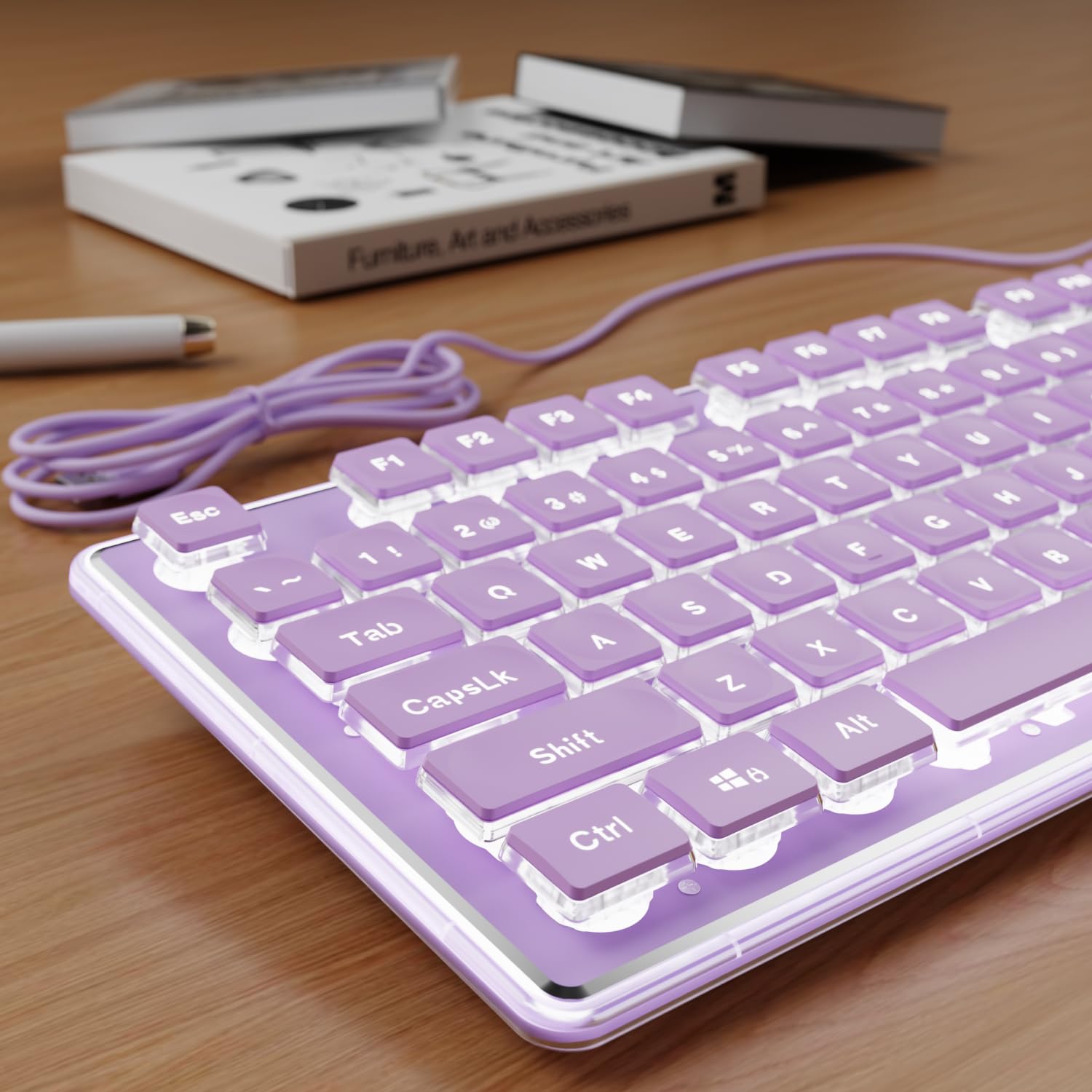
The SEUNKWANG wired backlit keyboard is a membrane board disguised with premium-looking details — a brushed aluminum top panel, water-drop pudding keycaps, and a single-zone white backlight that glows evenly through the translucent bottom half of each keycap. The purple color variant is genuinely distinctive on a desk, leaning toward light lavender rather than deep violet. The membrane switches produce a quiet thud rather than a click or clack — quiet enough for shared office spaces or late-night typing in a bedroom. A single-stage kickstand on the bottom combined with anti-slip foot pads keeps the board stable during use.
The 104-key full-size layout includes a dedicated number pad, 26-key anti-ghosting technology, and function shortcuts for media and volume. All of this works plug-and-play without drivers on Windows, Linux, and Chrome OS. The double-shot ABS keycaps resist fading better than basic pad-printed legends, though they are ABS not PBT — expect some shine after a couple years of heavy use. The backlight auto-dims and turns off after a few minutes of inactivity to save the LED lifespan, which some users found confusing at first until they learned it wakes on any keypress.
This is the best pick for someone who wants a quiet, attractive, full-size membrane keyboard with a premium visual feel and zero mechanical noise. The white backlight through pudding keycaps creates a clean, modern desk aesthetic without the flashy RGB patterns some users dislike. The membrane switches will eventually soften with heavy use, but at this price point the aluminum panel and fade-resistant keycaps provide a longevity edge over all-plastic competitors. If you need a truly silent workhorse with good looks, the SEUNKWANG delivers.
Why it’s great
- Aluminum top panel adds weight and rigidity absent from plastic-only boards
- Pudding keycaps with white backlight create a clean, uniform glow
- Membrane operation is genuinely quiet for shared workspaces
Good to know
- Backlight auto-dims and turns off after inactivity — no always-on option
- Keycaps are double-shot ABS, not PBT — eventual shine over years
- Mac OS support limited to basic typing; media shortcuts may not work
5. EDJO Wired Keyboard and Mouse Combo

The EDJO wired keyboard and mouse combo is the no-frills entry point for someone who needs both a full-size keyboard and an optical mouse in a single purchase. The keyboard uses a standard membrane rubber-dome construction with a textured palm rest molded into the front edge. Foldable stands at the bottom provide two typing angles, though a few users noted the anti-slip feet are not present on the folding stands, allowing some movement during heavy typing. The keycaps use pad-printed legends — expect wear on high-use letters like W, A, S, D, and the spacebar after a few months of daily use.
The included mouse is an ambidextrous optical wired unit with a symmetrical shape and a scroll wheel. It works on smooth surfaces without a mouse pad, and the sensor is adequate for basic productivity — web browsing, document navigation, spreadsheet work. The 12 multimedia function keys accessed via the Fn row provide quick volume, music, email, and calculator shortcuts. Compatibility spans Windows XP through 10, Mac OS, and Chrome OS, though some multimedia functions are unavailable on Mac.
This combo is best treated as a disposable starter kit — the keyboard and mouse will serve reliably for everyday office or home tasks, but neither component is built for heavy gaming, marathon typing, or long-term durability. The membrane keys are quiet and responsive out of the box, and the palm rest adds basic comfort not found on many budget keyboards. If you need to equip a secondary workstation, a kid’s first computer, or a guest setup for the lowest possible outlay, the EDJO combo gets the job done. Just know that the key legends fade faster than double-shot alternatives.
Why it’s great
- Keyboard and optical mouse included — one box, one cable
- Textured palm rest adds basic wrist support at no extra cost
- 12 multimedia shortcuts via function row for quick volume and music control
Good to know
- Pad-printed keycap legends wear off quickly on frequently used keys
- Anti-slip feet absent from folding stands — keyboard may shift during use
- Mouse left click may develop squeak after several hours of use
FAQ
Will a cheap mechanical keyboard feel better than a premium membrane one?
How important is a detachable USB cable on a budget keyboard?
What does “hot-swappable” mean, and should I look for it at this price?
Final Thoughts: The Verdict
For most users, the cheap keyboard winner is the HUO JI E-Yooso Z-99 because it delivers gasket-mounted mechanical feel, hot-swap capability, and creamy typing acoustics at a price that rivals basic membrane boards. If you need ergonomic wrist support and spill-proof durability for all-day office work, grab the Kensington Pro Fit. And for a compact gaming-focused TKL with a metal frame and upgrade potential, nothing beats the Redragon K552.

Mo Maruf
I created WellFizz to bridge the gap between vague wellness advice and actionable solutions. My mission is simple: to decode the research and give you practical tools you can actually use.
Beyond the data, I am a passionate traveler. I believe that stepping away from the screen to explore new environments is essential for mental clarity and physical vitality.