Our readers keep the lights on and my smoothie glass nicely filled. As an Amazon Associate, I earn from qualifying purchases.
Specs are compiled from manufacturer listings and verified buyer reviews and can change over time — please confirm the key details on the product page before buying.
The router you plug it into should not be the weak link that wastes that speed. A cheap home router that gets the basics right—stable Wi-Fi, enough ports, and a signal that reaches every room—keeps your streaming smooth and your work calls clear. The wrong one will have you rebooting mid-meeting or waiting for a video to buffer. The difference depends on a few specs that this guide explains in plain language, then compares across five affordable models so you can pick the one that fits your home.
I’m Mohammad Maruf — the founder and writer behind WellFizz. This guide is built by comparing the manufacturers’ published specifications and the patterns across verified customer reviews, so you get each pick’s real strengths and trade-offs instead of marketing spin.
If you are moving into a new place, ditching your ISP’s rental fee, or upgrading from a box that is six years old, you need a cheap home router that delivers stable speed and solid range without the monthly bill creep of a premium subscription box.
Our Picks at a Glance

How To Choose The Best Cheap Home Router
A handful of specs separate a router that quietly works for years from one that drives you back to the store. Focus on these three, and you will land the right box every time.
Wi-Fi Standard
The biggest generational leap in years is Wi-Fi 6 (802.11ax). It handles more devices at once and uses bandwidth more efficiently than the older Wi-Fi 5 (802.11ac). Even on a budget, a Wi-Fi 6 router gives you noticeably less lag when the whole family is online—streaming, gaming, and video calls all at the same time. If you live alone or only connect a handful of devices, the older standard still works fine for a lot less money.
Band Coverage
A dual-band router broadcasts two separate signals: a 2.4 GHz band that goes through walls better and a 5 GHz band that is faster but shorter-range. You connect your streaming boxes and gaming consoles to the 5 GHz band for speed, and your smart bulbs and doorbells to the 2.4 GHz band for reach. A single-band router does one signal only—you lose either speed or range, and your whole network suffers for it.
Gigabit Ethernet Ports
Your wired devices—PCs, game consoles, smart TVs—need gigabit LAN ports to get the full speed your internet plan provides. A router with 10/100 ports (the old standard) will cap your wired connection at a fraction of modern broadband speeds. Every router on this list includes four gigabit LAN ports, so your wired devices run as fast as your internet allows, with no bottleneck inside the box.
Quick Comparison
| Model | Best For | Wi-Fi Standard | Top Speed | Gigabit Ports | Amazon |
|---|---|---|---|---|---|
| Cudy AC1200 WR1300★ Best Overall | Reliable all-around budget | Wi-Fi 5 (802.11ac) | 1200 Mbps | 4 | Amazon |
| Tenda AX1500 RX2L ProBest Value | Entry-level Wi-Fi 6 | Wi-Fi 6 (802.11ax) | 1500 Mbps | 4 | Amazon |
| TP-Link Archer AX10 (Renewed) | Value with proven reliability | Wi-Fi 6 (802.11ax) | 1500 Mbps | 4 | Amazon |
| Cudy WR3000S AX3000 | OpenWRT tinkerers & power users | Wi-Fi 6 (802.11ax) | 3000 Mbps | 5 | Amazon |
| NETGEAR Nighthawk RAX36 | Large home coverage | Wi-Fi 6 (802.11ax) | 3000 Mbps | 4 | Amazon |
In‑Depth Reviews
1. Cudy AC1200 Gigabit WiFi Router (WR1300)
This is the router you buy when you want coverage, speed, and a simple setup, and you do not care about the latest Wi-Fi badge.
The Cudy WR1300 runs on the older Wi-Fi 5 standard (802.11ac) and delivers a combined data transfer rate of 1200 Megabits Per Second—300 Mbps on the 2.4 GHz band plus 900 Mbps on the 5 GHz band. That is enough for a 4K stream and a couple of Zoom calls at the same time. The signal concentrates toward your devices instead of spraying in every direction thanks to beamforming (technology that focuses the signal toward a device), and buyers report getting roughly 200 feet of range on both bands, even through cinder block walls.
Reliability is the thing owners praise most—over 40 of them single it out positively. A deeper look at the reviews shows that while the core performance is solid, a few owners note occasional connection drops, and one observed the unit runs hot without vents (a small fan on the desk solves it). Setup takes a few minutes via the web interface or the wall-mountable chassis, and four full gigabit LAN ports mean your wired PC and game console get the full speed your internet plan provides. It also supports AP Mode (Access Point Mode), so you can plug it into an existing wired network and turn it into a wireless access point if you want to extend coverage later.
Why It Works
- Four gigabit LAN ports at this price are rare—most budget routers cap wired devices at slower 10/100 speeds
- Beamforming extends the signal toward your devices, boosting range through walls
- Adjustable transmission power lets you dial in range or reduce interference
The Trade-Offs
- Lacks Wi-Fi 6, so it handles congested networks less efficiently than newer options
- No vents mean the unit runs warm; a few owners added a small fan for confidence
- Connectivity is rated as a mixed aspect, with occasional drops reported
Grab it if: you need a dead-simple, reliable router for a small to medium home and want to spend the absolute minimum without sacrificing gigabit ports.
Think twice if: your home has more than a dozen devices all fighting for bandwidth at once—the Tenda AX1500 below handles that better.
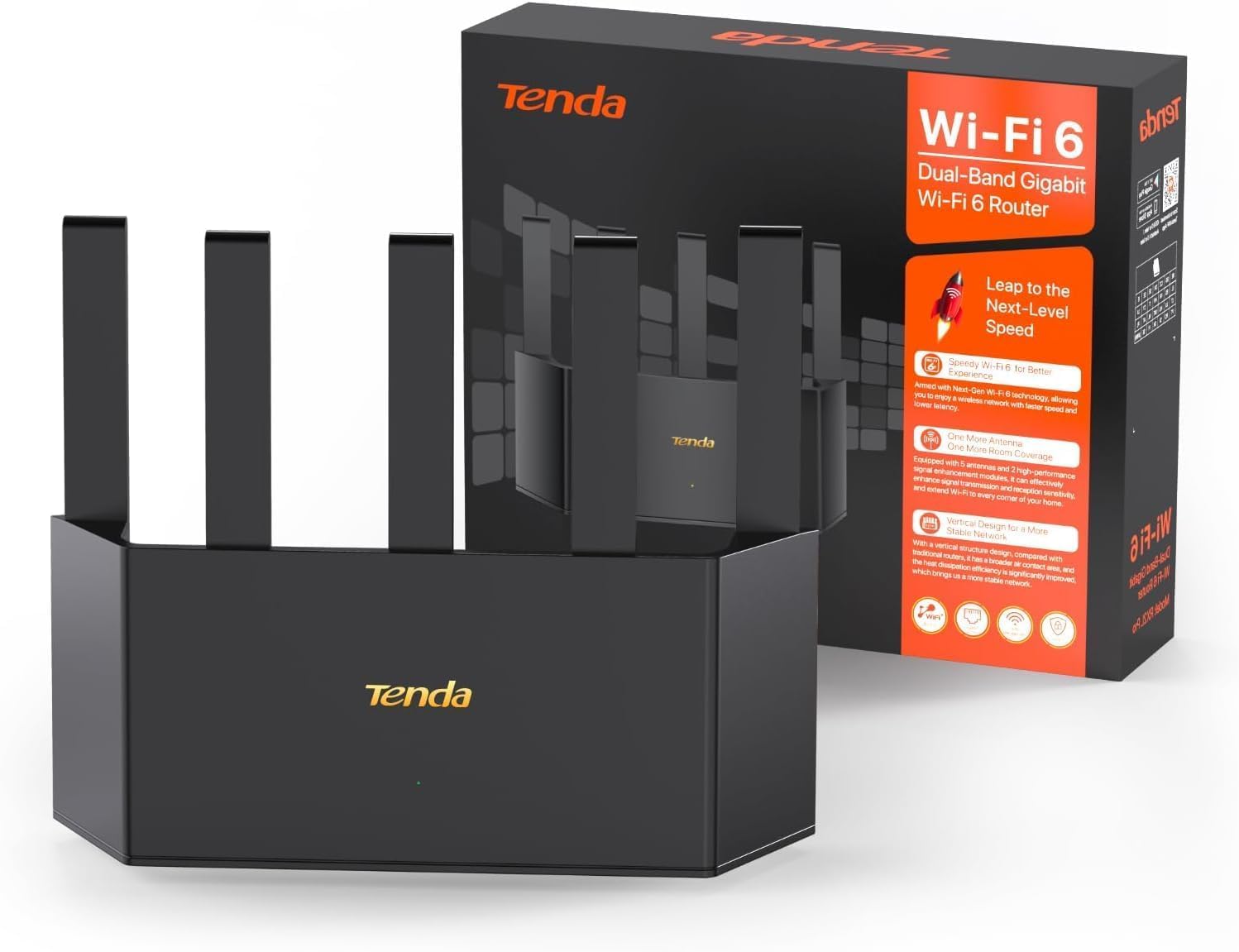
2. Tenda AX1500 WiFi 6 Router (RX2L Pro)
The cheapest way to get Wi-Fi 6 and a vertical design that stays cool—this is the router for households where several people stream, game, or do video calls simultaneously.
The RX2L Pro delivers a total throughput of 1500 Megabits Per Second — up to 1201 Mbps on the 5 GHz band and 300 Mbps on the 2.4 GHz band. That is a significant jump over the Cudy WR1300, especially for homes where multiple people watch 4K content or do video calls at the same time. The standout physical trick is the vertical tower design, which increases the air contact area for heat dissipation so the router does not throttle your speed when it gets warm. That matters because a cheap router that overheats will start dropping connections during the hottest part of the day.
The five external high-gain antennas plus two signal enhancement modules create broad coverage that easily fills a multi-room home. OFDMA (Orthogonal Frequency Division Multiple Access, a technology that splits a Wi-Fi channel into smaller sub-channels so multiple devices transmit at once) plus MU-MIMO (Multi-User, Multiple-Input, Multiple-Output, letting the router communicate with several devices simultaneously) let multiple devices share the same transmission window—so a smart doorbell sitting on 2.4 GHz does not force your gaming console on 5 GHz to wait. One small catch: a few owners mention the 2.4 GHz band refused to connect to certain older devices (smart plugs, older AC units) even after several attempts. If you rely on legacy smart home gear, check its compatibility before ordering.
Strong Points
- Wi-Fi 6 for under is the best price-to-standard ratio on this list
- Vertical design keeps the box cooler, which directly improves speed stability
- Tenda WiFi+ lets you daisy-chain multiple Tenda routers for whole-home coverage
Watch Out For
- 2.4 GHz band may refuse to pair with some older AC/smart home devices
- Stock firmware lacks some advanced VPN and QoS (Quality of Service, which prioritizes traffic) customization found on pricier models
- Plastic build feels light compared to the NETGEAR or TP-Link alternatives
Reach for it if: you want the smoothest multi-device experience for the lowest possible cost and your smart home gear is relatively modern.
Pass if: you have older Wi-Fi-only smart bulbs, thermostats, or AC units that rely strictly on the 2.4 GHz band.
3. TP-Link Archer AX10 AX1500 (Renewed)

The TP-Link Archer AX10 earned JD Power Awards for customer satisfaction in 2017 and 2019—and the renewed units still available today carry that reputation for a fraction of the original price.
Inside is a 1.5 GHz tri-core processor that handles traffic routing without buffering, even when you have a dozen devices pulling from the network. The Wi-Fi 6 standard gives you 300 Mbps on the 2.4 GHz band and 1201 Mbps on the 5 GHz band—exactly the same top speed as the Tenda AX1500 above, but with a processor that is noticeably snappier at managing multiple high-bandwidth streams. Customers note that when set up as an access point on a gigabit fiber connection, the AX10 delivered roughly a 10x speed increase—jumping from around 50 Mbps to 500-800 Mbps wirelessly.
The TP-Link Tether app makes the initial setup a straight one-minute job, and beamforming technology focuses signal strength toward your devices for a more reliable connection in rooms farther from the router. Reliability is the most-discussed aspect, with over 80 owners calling it out positively, and the renewed units arrive in great condition (buyers confirm a factory reset and firmware update is all that is needed). The caveat is that these are renewed (refurbished) units, so the long-term lifespan depends on the previous owner’s usage, though most reports indicate they run quietly and cool.
What Stands Out
- Tri-core processor delivers the strongest raw throughput in a budget Wi-Fi 6 router
- Award-winning reliability—the most praised aspect across hundreds of reviews
- Tether app makes setup genuinely fast, even for first-time buyers
Know Before You Buy
- Renewed product—warranty is shorter than buying new, though condition scores are high
- Setup may require a factory reset and using the IP address instead of the default web name
- No USB port for sharing a printer or external drive across the network
Buy it if: you want the proven reliability and processing power of a multi-award-winning router at a fraction of the new price—this is the one to pick over the Tenda if processor performance matters more to you.
Skip if: you prefer a brand-new-in-box warranty and are not comfortable with refurbished electronics.
4. Cudy WR3000S AX3000 Dual Band WiFi 6 Mesh Router
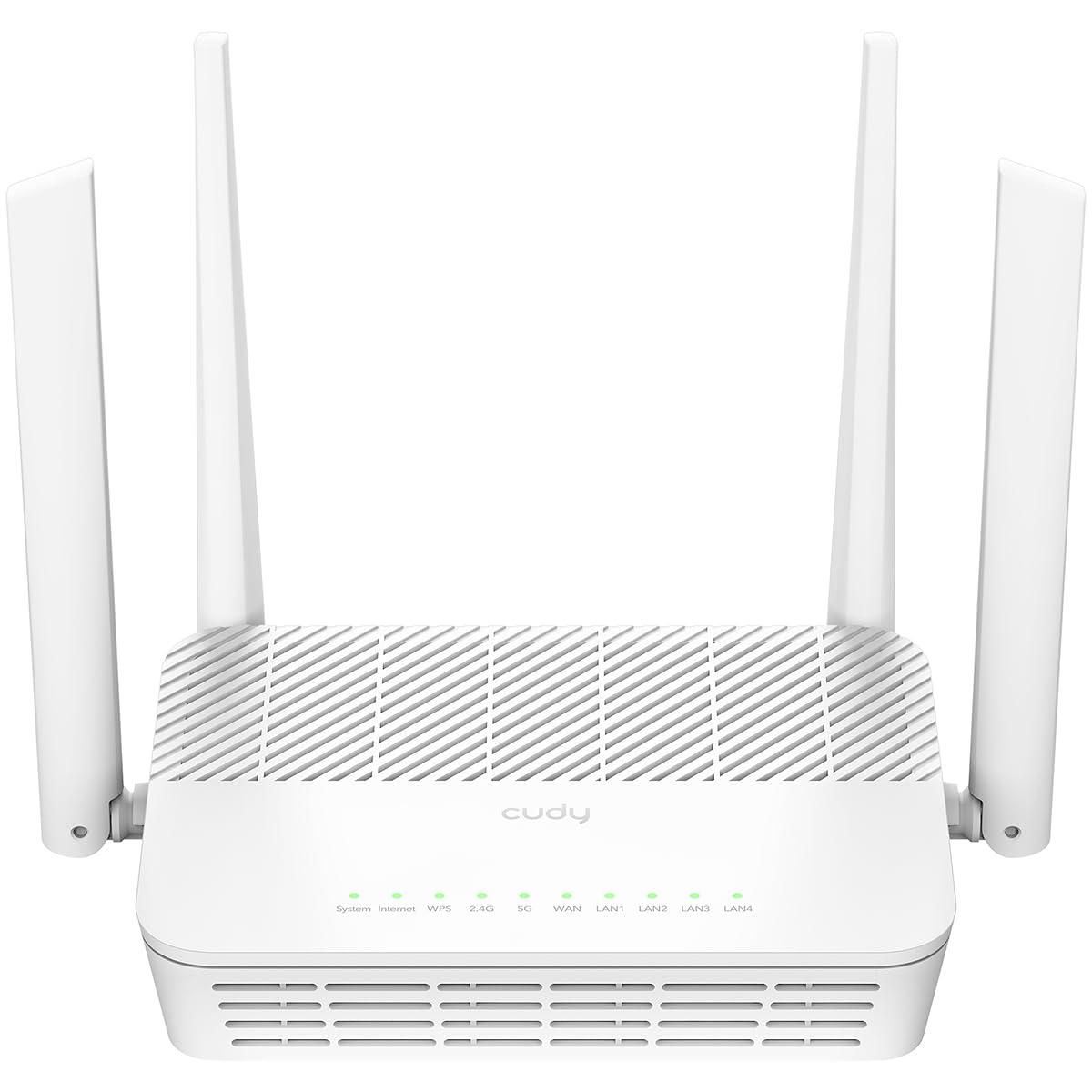
This is the most powerful router on this list by raw spec and runs circles around cheaper options for tech-savvy owners who want custom firmware.
The Cudy WR3000S jumps to the AX3000 class — up to 2400 Mbps on the 5 GHz band and 574 Mbps on the 2.4 GHz band — and packs a 1.3 GHz dual-core Cortex A53 processor that handles up to 256 connected devices without buckling. But the real prize is the native OpenWRT (an open-source operating system for routers that replaces the factory firmware) support: Cudy provides a signed image and the stock firmware is itself built on OpenWRT, with full source code available. Reviewers point out that the WiFi range beats older routers like the TP-Link A7 and covers a 2,000 sq ft home entirely on the 5 GHz band, and the router handles heavy traffic without dropping speeds or freezing.
Performance is the most-mentioned positive aspect, with owners calling the Wi-Fi speeds great and the stock interface straightforward. The con side is light: the web GUI (Graphical User Interface, the visual settings panel) lacks some advanced features from the start (OpenWRT fills that gap), and it lacks a USB port for drive sharing. This is not a router for someone who just wants to plug it in and forget it—it is for the buyer who enjoys tweaking and wants a platform that can grow with them.
Why It’s Special
- 5 gigabit Ethernet ports give you wired capacity for a gaming PC, TV, console, and two more devices
- Native OpenWRT with a signed image—rare community support at this price point
- VPN protocol suite (WireGuard, OpenVPN, IPSec, Zerotier) for secure remote access
Honest Limits
- No USB port for network-attached storage or printer sharing
- Stock firmware is adequate but lean; maximum value requires installing OpenWRT
- Connectivity range is listed at 1400 square feet—slightly less than the NETGEAR Nighthawk RAX36 below
Best for: anyone who wants to run custom firmware like OpenWRT, needs serious VPN support, or has a high device count (up to 256).
Not for: the buyer who just wants a low-maintenance router—the stock interface works, but you are paying for flexibility you may not use.
5. NETGEAR Nighthawk WiFi 6 Router (RAX36)

The NETGEAR Nighthawk RAX36 brings the brand’s enthusiast pedigree to a more accessible price, covering a 2,000 sq ft home and handling 25 devices without a hiccup.
This is an AX3000-class router with a total wireless speed of up to 3 Gbps—meaning the 5 GHz band can push data as fast as many wired gigabit connections. The official coverage figure is 2,000 square feet, but buyers with a 2,500 sq ft home report a strong signal throughout the house and well into the backyard. It handles up to 25 devices simultaneously—in practice, owners run four TVs, five phones, two computers, two iPads, and their smart home gear without any lag.
The hardware includes four 1G Ethernet ports and a USB 3.0 port (the only router on this list with USB), plus built-in VPN (Virtual Private Network, a secure tunnel for remote access) support for secure remote access. Setup is via the Nighthawk app, and most shoppers say it takes a single smooth run. Reliability is the most-discussed aspect by a wide margin — over 60 owners praise it — and one review summed it up as a “set-and-forget solution.” The honest trade-off is the price: this is the most expensive router here, and a small number of buyers experienced a glitch exactly 30 days in that required a manual firmware update and a factory reset, though most never hit that issue. It does not include a built-in modem, so you will need a separate cable modem with a coax input.
Why it justifies the cost: The combination of USB 3.0, built-in VPN, and consistent 2,000+ sq ft range makes this the only pick that can act as a full home media hub rather than just a signal box.
The real caveat: A handful of buyers report a setup that took roughly 1.5 hours due to firmware quirks, and NETGEAR’s customer service was described as cumbersome in those cases. If you want pure plug-and-play, the TP-Link Archer AX10 above is smoother.
Ideal for: medium-to-large homes (up to 2,000 sq ft) with a heavy device load and someone who wants USB storage sharing and advanced VPN features.
Think twice if: you are on a strict budget, or you do not want to deal with the small chance of a time-consuming initial setup.
Understanding the Specs
Wi-Fi Standard (802.11n vs ac vs ax)
The standard tells you how efficiently the router handles multiple devices at once. Wi-Fi 5 (802.11ac) is perfectly fine for a small home with a handful of gadgets. Wi-Fi 6 (802.11ax) uses OFDMA technology (Orthogonal Frequency Division Multiple Access) to bundle data from many devices into a single transmission, so your TV, your laptop, and your smart speaker all get their turn faster—no one waits for the others to finish.
Mbps vs Real-World Speed
A router’s data transfer rate in Megabits Per Second is the maximum theoretical speed of its Wi-Fi signal. You will never hit that number in real life because your internet plan, the distance to your device, and wall materials all chip away at it. What the number tells you is overhead: a 1200 Mbps router has plenty of headroom for a 300 Mbps internet plan, while a 300 Mbps router would leave you stuck at your ISP’s ceiling.
FAQ
Will a cheap home router work with my gigabit internet plan?
Can I use a cheap router with a fiber optic or cable modem?
How many devices can a budget router actually handle?
Is Wi-Fi 6 worth it on a cheap router?
What does “dual-band” mean for a cheap home router?
How long does a cheap router typically last before needing replacement?
Can I set up parental controls on a cheap home router?
What is the difference between a router and a mesh system?
Final Thoughts: The Verdict
For most people, the cheap home router winner is the Tenda AX1500 RX2L Pro because it brings genuine Wi-Fi 6 performance and a cool-running design at a price that undercuts almost everything else. If you want the strongest wired capacity and the flexibility to run custom firmware, grab the Cudy WR3000S. And for a large home where you need consistent coverage across 2,000 square feet, the NETGEAR Nighthawk RAX36 is the one to reach for.
How We Picked
We do not accept paid placement. Every pick is matched to a real buyer and a real use-case; we do not hands-on test units.
Sources & Methodology
Specifications: manufacturer listings and product documentation. Review insights: verified customer reviews, as of July 2026. Pricing: not shown on this page (it changes often); check the current price via the retailer link.
As an Amazon Associate, WellFizz earns from qualifying purchases. This does not affect which products we feature.
Related Guides

Mo Maruf
I created WellFizz to bridge the gap between vague wellness advice and actionable solutions. My mission is simple: to decode the research and give you practical tools you can actually use.
Beyond the data, I am a passionate traveler. I believe that stepping away from the screen to explore new environments is essential for mental clarity and physical vitality.