Our readers keep the lights on and my smoothie glass nicely filled. As an Amazon Associate, I earn from qualifying purchases.
Finding a budget-friendly drawing tablet that doesn’t feel like a toy is the real challenge. Most entry-level options skimp on pressure sensitivity, build quality, or driver support, leaving you with a frustrating gap between your intentions and the screen. This guide cuts through the noise to find the tools that actually deliver professional-grade control without emptying your wallet.
I’m Mohammad Maruf — the founder and writer behind WellFizz. I’ve spent countless hours analyzing the hardware specs, real-world driver stability, and digitizer accuracy across dozens of budget graphics tablets to pinpoint the ones worth your time.
After digging through user feedback and technical specs, here is your clear path to the best cheap graphics tablet that balances real pen performance with lasting build quality.
How To Choose The Best Cheap Graphics Tablet
Every entry-level graphics tablet makes promises about pressure levels and portability, but the real differentiators are driver stability, pen feel, and usable drawing area. Here are the three factors that separate a reliable creative tool from a frustrating paperweight.
Pressure Sensitivity and Tilt
Most cheap tablets advertise 8192 levels of pressure, but not all sensors interpret your hand the same way. Look for a model with a high report rate (at least 233 PPS) and quiet line wobble. Some newer models pack 16384 levels, which gives you finer control over subtle shading and brush taper. Tilt response of at least 60 degrees is a major bonus for natural pencil-like strokes.
Active Area and Build
The physical drawing space determines how much your hand moves across the tablet. A 10 x 6.25 inch area is the sweet spot for desktop use, while smaller 6 x 4 inch pads work better for travel. The surface texture should offer just enough paper-like friction—too slick and the pen slides, too rough and nibs wear out fast. Battery-free pens are a must; they never need charging and stay consistent in weight.
Driver Compatibility and Shortcuts
Driver support is the silent killer of budget tablets. Check reviews specifically for your operating system—Linux and recent macOS versions can trip up some brands. Programmable express keys and a scroll wheel can dramatically speed up your workflow by keeping common commands at your fingertips. A solid driver that doesn’t crash or require constant reinstallation is worth more than a few extra pressure levels.
Quick Comparison
On smaller screens, swipe sideways to see the full table.
| Model | Category | Best For | Key Spec | Amazon |
|---|---|---|---|---|
| XP-Pen Deco 01 V3 | Mid-Range | Premium pressure at budget price | 16,384 pressure levels | Amazon |
| Huion Inspiroy 2 Small | Mid-Range | Compact portability with scroll wheel | PenTech 3.0 + Scroll Wheel | Amazon |
| Wacom Intuos Small | Premium | Cartooning & professional software bundle | EMR battery-free pen | Amazon |
| XP-Pen Deco mini7W | Value | Wireless freedom in a small frame | 2.4G wireless + 8192 pressure | Amazon |
| GAOMON M10K | Budget | Large canvas with touch ring | 10×6.25 inch + Touch Ring | Amazon |
In‑Depth Reviews
1. XP-Pen Deco 01 V3

The XP-Pen Deco 01 V3 punches far above its price class with a staggering 16,384 levels of pressure sensitivity, which is typically reserved for high-end pro tablets. This means your brush strokes transition from whisper-thin to bold with buttery smoothness, and the 60-degree tilt support adds a natural pencil shading quality that most budget tablets lack entirely. The active area spans a generous 10 x 6.25 inches, giving you room to make sweeping gestures without feeling boxed in.
Setup is straightforward thanks to USB-C connectivity and included adapters, and the driver works reliably across Windows, macOS, Android, and even Linux — a rarity at this tier. The battery-free stylus sits in a sturdy stand, and the package includes a protective film, a glove, and ten replacement nibs. The lightweight 8mm profile makes it easy to toss in a bag.
Some users report minor connection drops with the driver, though this is far less frequent than with ultra-cheap alternatives. The 8 customizable express keys are well-positioned for both right- and left-handed users. For the price, you get a near-pro drawing experience that leaves most other entry-level tablets in the dust.
Why it’s great
- Industry-leading 16K pressure for nuanced line control
- Large drawing surface without a premium price tag
- Excellent Linux support out of the box
Good to know
- Driver can occasionally need a restart after connection changes
- Not wireless; requires a USB cable
2. Huion Inspiroy 2 Small

The Huion Inspiroy 2 Small brings a unique scroll wheel to the budget segment, a feature that dramatically speeds up canvas zooming and brush resizing without reaching for the keyboard. The upgraded PenTech 3.0 stylus eliminates the wobble and lag that plagued earlier Huion pens, delivering precise, jitter-free lines even at slow drawing speeds. The active area of 6.3 x 3.9 inches is compact but perfectly suited for laptop use or studio work where desk space is tight.
The PW110 stylus features a slimmer barrel with a soft silicone grip, making it comfortable for long sessions. The six programmable press keys sit on the left side and can be customized per application. Compatibility spans Windows, macOS, Linux, and Android 6.0+, and the included USB-C cable and OTG adapter make mobile connection effortless. The pink color option adds a welcome splash of personality.
Some users note that the screw-in rubber stoppers feel a bit small, and the scroll wheel can be stiff to push initially. The nibs wear a little faster than on some competitors, but replacement packs are affordable. For a travel-friendly tool that adds a genuine workflow shortcut, this is a clever pick.
Why it’s great
- Scroll wheel is a genuine productivity boost for zoom and brush size
- Slim, lightweight design that fits in any laptop bag
- PenTech 3.0 offers excellent line accuracy with no lag
Good to know
- Small active area may feel cramped for full-arm drawing
- Nib replacement may be needed sooner than expected
3. Wacom Intuos Small
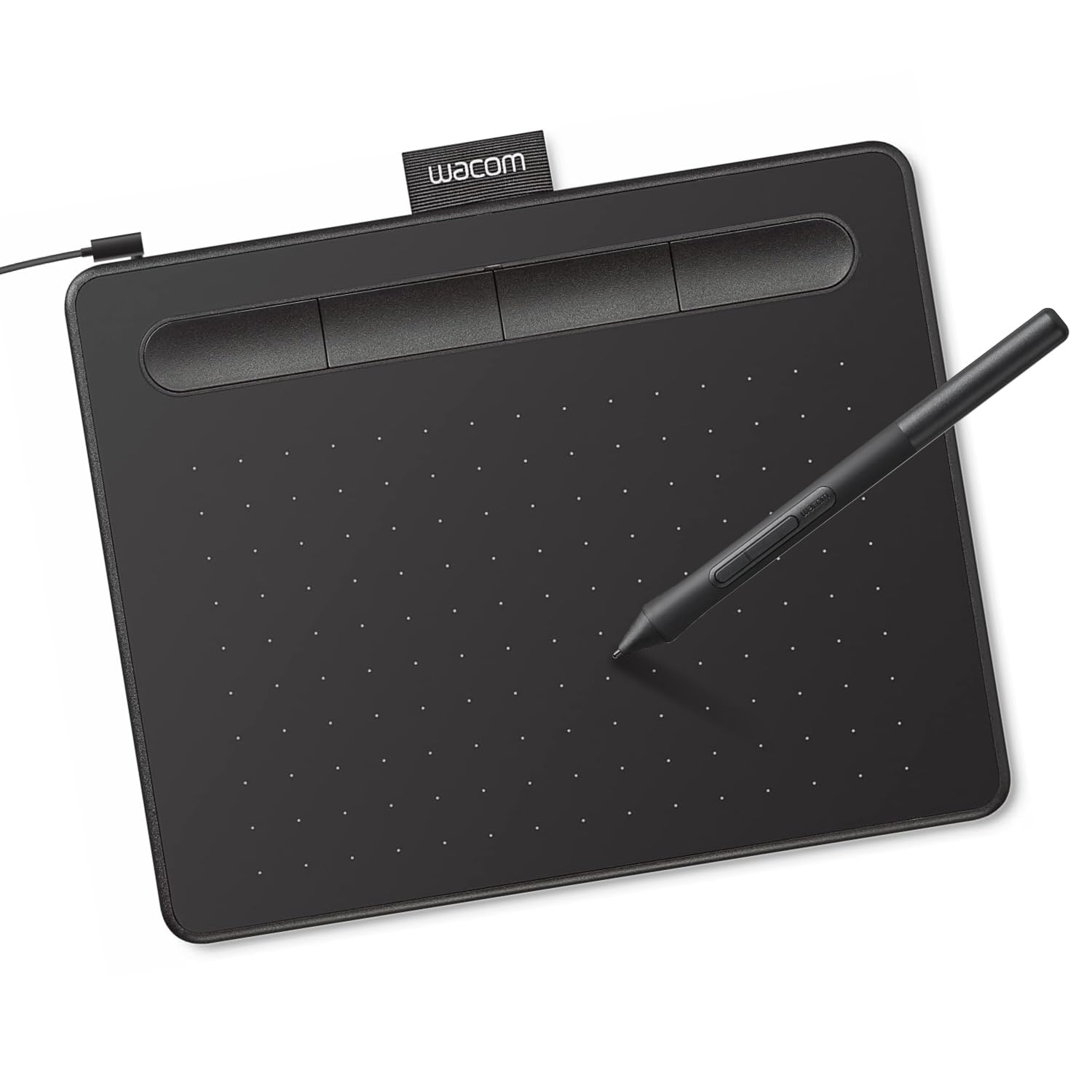
The Wacom Intuos Small is the entry point to the brand that professionals trust. Its EMR battery-free pen technology delivers a pen-on-paper feel that remains the benchmark for the industry, with a matte surface that provides just the right amount of drag. The active area is smaller at 6 x 3.7 inches, but the tablet’s build quality is exceptional — it feels dense and durable in hand, with a scratch-resistant surface that holds up to years of use.
Wacom sweetens the deal by including a two-year license for Clip Studio Paint Pro, plus access to online training courses, making it an incredible value for beginners who want to learn proper digital art techniques. The four customizable ExpressKeys are clicky and responsive, and the tablet works plug-and-play with Chromebooks without any driver hassle. The slim pen with a rubber grip is comfortable for extended sketching sessions.
The smaller drawing area can feel limiting for expansive strokes, and users with Macs will need a USB-A to USB-C adapter that is not included. The nibs wear down faster than on some competitors, so buying a bulk pack is wise. For those who value driver stability, software bonuses, and a long-proven pen feel, this is a compelling foundation.
Why it’s great
- Industry-standard EMR pen feel that professionals rely on
- Includes Clip Studio Paint Pro license and training
- Rock-solid driver stability with near-zero latency
Good to know
- Small active surface restricts large arm movements
- No USB-C adapter included for modern Macs
4. XP-Pen Deco mini7W

The XP-Pen Deco mini7W stands out by offering a reliable 2.4G wireless connection via a tiny USB dongle, freeing you from cable clutter without the latency issues of Bluetooth. The 7 x 4 inch active area strikes a comfortable middle ground between the ultra-portable and the spacious, and the 8192 levels of battery-free pressure sensitivity with 60-degree tilt support produce smooth, expressive lines. The slim profile makes it easy to slide into a laptop sleeve.
Eight customizable press keys give you ample shortcut flexibility, and the dual connectivity — wired USB-C or wireless dongle — means you can switch modes depending on your setup. Compatibility spans Windows, macOS, Android, Chrome OS, and Linux. The bundled accessories include a pen holder, a USB-to-USB-C adapter, and a micro-USB adapter for broader device support.
Some users report a higher baseline pressure needed for the first stroke compared to Wacom pens, and a few have noted that the wireless dongle can be easy to misplace due to its tiny size. The 8192 pressure levels are still excellent, but the 16K found on the Deco 01 V3 offers finer granularity. For a cable-free workflow without sacrificing battery-free pen technology, this is a smart choice.
Why it’s great
- Stable 2.4G wireless with no Bluetooth pairing issues
- Compact size that travels well while still offering decent drawing space
- Eight customizable express keys for shortcut-heavy workflows
Good to know
- Initial pen stroke requires slightly more pressure than expected
- Wireless dongle is small and can be easily lost
5. GAOMON M10K

The GAOMON M10K delivers a massive 10 x 6.25 inch drawing surface for an incredibly low entry price, making it the best option for anyone who wants maximum screen-to-tablet mapping without spending much. The battery-free AP31 stylus offers 8192 levels of pressure sensitivity with a papery surface texture that provides pleasant tactile feedback. The touch ring adds a quick way to zoom and scroll that is especially handy for photo editors and note-takers.
Ten programmable press keys on the tablet and two side buttons on the pen give you twelve shortcuts to streamline your workflow. The driver works reliably on Windows, macOS, and recent Android versions (11-14). Setup is simple: plug in the USB cable, install the driver from the GAOMON website, and you are ready. The package includes a carrying bag, a pen case with eight extra nibs, and a nib clip.
The pen requires a slightly firmer press after an hour or two of continuous use, which can fatigue the hand during long sessions. Some users also note a minor disconnect between drawing on the tablet while looking at the monitor — a learning curve common to all non-screen tablets. For a large canvas at a rock-bottom price, the M10K offers unbeatable real estate.
Why it’s great
- Huge 10×6.25 inch active area for expansive, natural strokes
- Touch ring is practical for fast zoom and scroll actions
- Comes with a carrying bag and a full set of replacement nibs
Good to know
- Pen pressure can feel inconsistent after extended use
- Wired-only connection; no wireless mode
FAQ
Do I need a screen protector on my cheap graphics tablet?
Can a cheap graphics tablet work with an Android phone or tablet?
What is the actual difference between 8192 and 16384 pressure levels?
Final Thoughts: The Verdict
For most users, the best cheap graphics tablet is the XP-Pen Deco 01 V3 because it delivers 16,384 pressure levels and a large drawing area at a price that undercuts many 8192-level competitors. If you want a compact travel companion with a productivity-boosting scroll wheel, grab the Huion Inspiroy 2 Small. And for a spacious canvas that costs almost nothing, the GAOMON M10K offers unbeatable real estate for note-taking and casual sketching.

Mo Maruf
I created WellFizz to bridge the gap between vague wellness advice and actionable solutions. My mission is simple: to decode the research and give you practical tools you can actually use.
Beyond the data, I am a passionate traveler. I believe that stepping away from the screen to explore new environments is essential for mental clarity and physical vitality.