Our readers keep the lights on and my smoothie glass nicely filled. As an Amazon Associate, I earn from qualifying purchases.
Finding a capable GPU that delivers playable frame rates without draining your entire build budget has always been the sweet spot for PC gamers. The market is flooded with options, but separating the true performers from the overpriced relics requires a deep dive into memory bandwidth, architecture age, and real-world thermal behavior.
I’m Mohammad Maruf — the founder and writer behind WellFizz. I’ve spent hundreds of hours analyzing GPU market trends, benchmarking data, and user-reported thermal and FPS figures to compile this guide on the best cheap graphics card for gaming.
This guide focuses exclusively on sub- options that deliver genuine 1080p and capable 1440p performance. Whether you are building a compact system or upgrading a decade-old rig, these picks represent the strongest value propositions available right now. Finding the best cheap graphics card for gaming means balancing VRAM size, memory type, and cooling efficiency against your specific resolution target.
How To Choose The Best Cheap Graphics Card For Gaming
Every budget card makes a trade-off. Your job is to pick the trade-off that matches your games, your monitor, and your power supply. These three factors will determine whether your purchase feels like a steal or a regret six months from now.
VRAM Size and Memory Bus Width
8GB of VRAM is the current minimum for comfortable 1080p gaming in modern titles. Cards with 4GB or 6GB will struggle with texture-heavy games and may cause stuttering. Equally important is the memory bus width — a 128-bit bus paired with GDDR6 is standard, but a 256-bit bus on cards like the RX 580 provides noticeably better texture throughput for older architectures.
Architecture Generation and Driver Support
Newer architectures like AMD RDNA 3 and NVIDIA Blackwell bring essential features such as hardware ray tracing, AI upscaling (DLSS/FSR), and longer driver support cycles. An older card may seem cheap initially, but if the manufacturer stops optimizing drivers, you lose performance in new game releases over time.
Power Connector and Physical Dimensions
Budget builds often use older or smaller power supplies. Check whether a card requires a 6-pin, 8-pin, or no external power connector at all. Dual-slot cards are the norm, but some compact models fit into small form factor cases. Measure your case clearance — a card that physically does not fit is the most expensive mistake you can make.
Cooling Solution and Noise Profile
Dual-fan designs with intelligent fan-stop technology are now common even in budget cards. A card that runs its fans constantly at low RPM will be quieter and last longer than a single-fan blower-style cooler. Look for zero-RPM idle fan modes if low noise is a priority for your setup.
Quick Comparison
On smaller screens, swipe sideways to see the full table.
| Model | Category | Best For | Key Spec | Amazon |
|---|---|---|---|---|
| ASUS Dual RTX 5060 OC | Premium | 1080p max settings, DLSS 4 | 8GB GDDR7, 2565 MHz Boost | Amazon |
| PNY RTX 5060 Ti OC | Premium | 1440p high settings, DLSS 4 | 8GB GDDR7, 2692 MHz Boost | Amazon |
| GIGABYTE RTX 5060 WF OC | Premium | 1080p ultra, ray tracing | 8GB GDDR7, 2512 MHz Boost | Amazon |
| XFX Speedster RX 7600 | Mid-Range | 1080p/1440p high, VR | 8GB GDDR6, 2655 MHz Boost | Amazon |
| ASRock RX 7600 Challenger | Mid-Range | 1080p esports, CAD | 8GB GDDR6, 2695 MHz Boost | Amazon |
| MSI RTX 3050 LP 6G OC | Mid-Range | SFF builds, HTPC | 6GB GDDR6, 1492 MHz Boost | Amazon |
| ZER-LON GTX 1660 Super | Entry-Level | 1080p high, no ray tracing | 6GB GDDR6, 1530 MHz | Amazon |
| AISURIX RX 5500 XT | Entry-Level | 1080p medium, budget builds | 8GB GDDR6, 1750 MHz | Amazon |
| MOUGOL RX 580 | Entry-Level | 1080p esports, Linux builds | 8GB GDDR5, 256-bit bus | Amazon |
In‑Depth Reviews
1. ASUS Dual NVIDIA GeForce RTX 5060 8GB GDDR7 OC Edition

The ASUS Dual RTX 5060 OC represents the pinnacle of what a budget-conscious gamer can realistically target. Built on the NVIDIA Blackwell architecture with GDDR7 memory running across a 128-bit interface, this card delivers rasterization performance that rivals last-gen mid-range hardware. The 2565 MHz boost clock and 623 AI TOPS capability through DLSS 4 make it a future-proof pick for 1080p ultra settings and a solid performer for most 1440p titles.
Its 2.5-slot Axial-tech fan design with 0dB technology means the fans stay completely silent under light loads, and even under sustained gaming, the thermal profile remains modest thanks to the efficient 150W TDP. The card draws power through a single 8-pin connector, making it compatible with a wide range of existing power supplies. Early user reports confirm stable frame rates above 100 FPS in Fortnite at high settings and smooth 60 FPS experiences in demanding titles at 1440p.
Some may lament the 8GB VRAM compared to the 12GB found on older RTX 3060 cards, but the GDDR7 memory bandwidth improvement more than compensates in real-world gaming scenarios. For anyone building around a 500W-600W PSU targeting high-refresh 1080p gaming with modern feature support, this card is the most balanced entry-level investment available.
Why it’s great
- GDDR7 memory delivers superior bandwidth for modern textures
- DLSS 4 support boosts performance in supported titles
- Quiet 0dB fan stop at idle, efficient 150W TDP
- Fits most ATX and SFF builds with single 8-pin power
Good to know
- 8GB VRAM may limit ultra textures in some 1440p titles
- Premium pricing pushes budget build limits
2. PNY NVIDIA GeForce RTX 5060 Ti OC Dual Fan
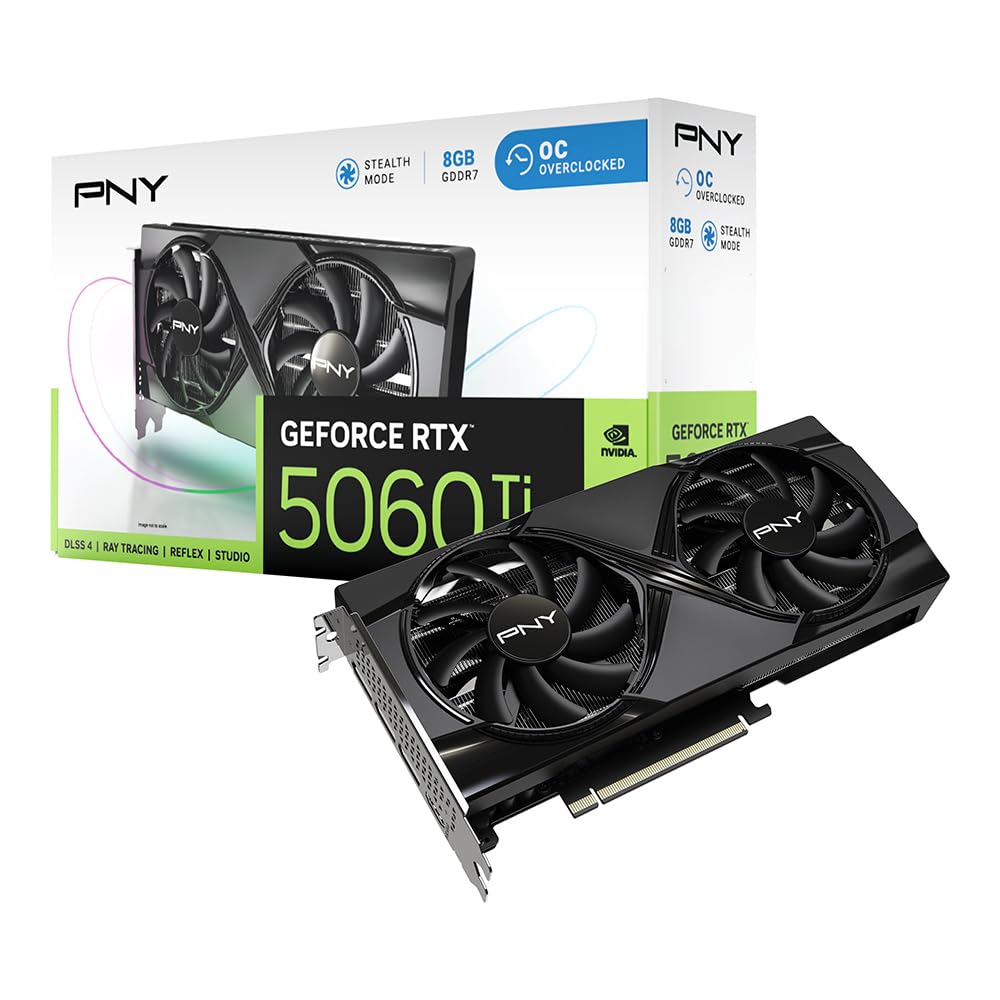
The PNY RTX 5060 Ti OC pushes budget performance further with a 2692 MHz boost clock and fifth-gen Tensor Cores that fully unlock DLSS 4 capabilities. Its dual-fan cooler runs efficiently at full load, and the card is SFF-ready, making it an excellent choice for compact gaming rigs. The 128-bit memory interface paired with GDDR7 ensures texture-heavy scenes load quickly and smoothly at 1440p high settings.
Real-world testing shows this card handles titles like Cyberpunk 2077 and Forza Horizon at well over 60 FPS with ray tracing enabled when DLSS is active. The PCIe 5.0 interface provides headroom for future motherboard upgrades. Users report rock-solid stability and minimal coil whine, with the card idling silently thanks to the fan-stop feature. PNY’s build quality is consistent, and the dual-slot design fits most mid-tower cases without clearance issues.
The main consideration is the 8GB VRAM — the 16GB version costs a noticeable premium, but for 1080p and the majority of 1440p titles, 8GB remains sufficient through the current console generation. If you want the best price-to-performance ratio without stepping into the used market, this card is the strongest contender.
Why it’s great
- Highest boost clock in its budget class at 2692 MHz
- DLSS 4 and fourth-gen ray tracing cores
- SFF-ready compact design fits small cases
- Runs cool and quiet even under sustained full load
Good to know
- 8GB VRAM may feel tight in 2-3 years for future AAA titles
- 16GB version is notably more expensive
3. GIGABYTE GeForce RTX 5060 WINDFORCE OC 8G

GIGABYTE’s WINDFORCE cooling solution is one of the most reliable in the budget segment, and the RTX 5060 OC variant proves the point. With a 2512 MHz boost clock and 8GB of GDDR7 memory, this card delivers consistent frame rates in demanding titles. Users report over 250 FPS in Cyberpunk 2077 when paired with a Ryzen 5700 and 750W PSU, demonstrating that even budget-tier cards can drive high-refresh monitors in less demanding scenes.
The dual-fan design is notably quiet at idle and remains subdued under gaming loads. The 128-bit memory interface and PCIe 5.0 compatibility ensure bandwidth is never a bottleneck for 1080p ultra textures. The card requires a single 8-pin power connector and fits within a standard 2-slot footprint. GIGABYTE’s build quality includes a metal backplate that adds rigidity and improves thermal dissipation.
The 8GB VRAM is again the limiting factor for ultra settings at 1440p, but for dedicated 1080p high-refresh gaming, this card is nearly perfect. Running a Display Driver Uninstaller (DDU) before swapping from an older GPU is strongly recommended to avoid driver conflicts, a common issue reported by upgraders.
Why it’s great
- WINDFORCE dual-fan cooling is quiet and efficient
- PCIe 5.0 support for future platform upgrades
- Consistent high frame rates in 1080p ultra
- Solid metal backplate included
Good to know
- 8GB VRAM limits 1440p ultra textures
- DDU recommended for clean driver installation
4. XFX Speedster SWFT210 Radeon RX 7600

The XFX Speedster SWFT210 RX 7600 hits the perfect balance between price and modern feature support. With 8GB of GDDR6 memory on a 128-bit bus and a boost clock reaching 2655 MHz, this card excels in 1080p high-refresh gaming and handles 1440p at medium settings well. The RDNA 3 architecture brings hardware ray tracing and FSR upscaling, keeping it relevant for the next several years.
Gamers upgrading from an older GTX 1650 Super report massive gains, with VR titles like Half-Life Alyx running at highest settings without stutter. The dual-fan SWFT cooler is compact and runs quietly, fitting easily into pre-built HP cases and small form factor builds. The card requires a single 8-pin power connector and has a modest power draw, making it ideal for budget power supplies in the 450W-550W range.
One common user note is the importance of updating drivers immediately after installation. Outdated drivers can cause system crashes and high idle temperatures — once updated, the card stabilizes in the upper 70s Celsius under load. For the price, the RX 7600 delivers newer architecture and better efficiency than comparable NVIDIA offerings.
Why it’s great
- RDNA 3 architecture with hardware ray tracing
- Excellent 1080p performance at high settings
- Compact design fits most SFF and pre-built cases
- Driver updates fix initial stability issues
Good to know
- Requires immediate driver update out of the box
- 128-bit bus can feel limited for 1440p ultra
5. ASRock Radeon RX 7600 Challenger 8GB OC

The ASRock Challenger RX 7600 OC takes the same RDNA 3 platform and pushes the boost clock slightly higher to 2695 MHz, making it one of the fastest budget cards available. Its dual-fan cooling incorporates a 0dB silent mode that stops fans entirely under low load, providing a completely silent idle experience. The card is perfect for gamers who also use their PC for content creation, as it supports DirectX 12 Ultimate and OpenGL 4.6.
User reports highlight its seamless compatibility with Linux systems — one user running Ubuntu 24.04 reported plug-and-play functionality with the standard kernel, needing no additional drivers. For Windows gamers, the card delivers smooth 1080p performance in esports titles and the ability to run demanding single-player games at high settings. The Super Alloy components and metal backplate ensure long-term durability and better heat dissipation.
Recommendations suggest pairing this card with a 550W PSU, and the single 8-pin connector keeps installation straightforward. The 128-bit memory interface is standard for the class, and the card effectively solves VRAM bottlenecks for titles like Star Wars Survivor when coming from older 4GB cards. For a sleek, quiet, and capable budget GPU, this is a top contender.
Why it’s great
- Highest boost clock among RX 7600 models
- 0dB silent fan stop at idle
- Excellent Linux compatibility out of the box
- Durable Super Alloy build with metal backplate
Good to know
- 128-bit bus limits 1440p ultra performance
- Recommended 550W PSU minimum
6. MSI Gaming RTX 3050 LP 6G OC

The MSI RTX 3050 LP 6G OC is a unique card designed specifically for small form factor and pre-built office PC upgrades. Its low-profile bracket and compact 6.9-inch length allow it to fit inside Dell Inspiron, HP, and Lenovo cases that cannot accommodate full-size GPUs. The 1492 MHz boost clock and 6GB GDDR6 memory are sufficient for 1080p medium-high settings in most modern games.
One of the strongest selling points is the power design — this card draws all its power from the PCIe slot and does not require any additional power connectors. This makes it a perfect drop-in upgrade for older office PCs with limited PSU capacity, typically 300W-500W units. The Twin Frozr cooling is quiet, though one user reported a rare fan clatter at startup that resolved after a few seconds.
The RTX 3050 supports DLSS, which helps boost frame rates in supported titles. Ray tracing is technically available but requires significant settings reductions to maintain playable FPS. For its class, this card delivers exactly what it promises — a compact, low-power entry into modern gaming without requiring a full system rebuild.
Why it’s great
- Low-profile design fits SFF and office PC cases
- No external power connector needed
- DLSS support improves frame rates
- Quiet Twin Frozr cooling
Good to know
- 96-bit memory bus limits bandwidth
- Ray tracing performance is weak
7. ZER-LON GeForce GTX 1660 Super 6GB

The ZER-LON GTX 1660 Super is a proven performer in the budget space, built on NVIDIA’s Turing architecture with 6GB GDDR6 memory and a 192-bit memory bus. The wider bus gives it an edge in texture-heavy games compared to newer budget cards with narrower 128-bit interfaces. The 1530 MHz base clock and 14000 MHz memory speed deliver solid 1080p high-settings performance in titles like Diablo IV and GTA V.
The dual-fan cooler from ZER-LON uses copper powder sintered composite heat pipes that make direct contact with the GPU core, keeping temperatures under control even during extended sessions. Users upgrading from older cards like the GTX 1060 report a noticeable smoothness improvement in newer games. The card supports 8K display output via DisplayPort, making it useful for multimedia work beyond gaming.
The primary limitation is the lack of ray tracing hardware and DLSS support — this is a pure rasterization card. For gamers who do not need AI upscaling and just want reliable high-FPS 1080p gaming at the lowest possible cost, this remains a strong choice. The ZER-LON packaging is minimal, and the card requires an 8-pin power connector.
Why it’s great
- 192-bit memory bus provides strong texture bandwidth
- Reliable 1080p high-settings performance
- Supports 8K display output
- Efficient dual-fan cooling design
Good to know
- No ray tracing or DLSS support
- Minimal accessories included in box
8. AISURIX RX 5500 XT 8GB GDDR6

The AISURIX RX 5500 XT brings 8GB of GDDR6 memory to an extremely budget-friendly price point. Built on AMD’s RNDA architecture, it offers a 128-bit memory interface and a boost clock of 1750 MHz. This card is best suited for 1080p medium-settings gaming and is an excellent choice for first-time builders or those resurrecting an older system with a limited PSU, as its max power draw is only 130W.
The semi-automatic intelligent fan system stops the fans entirely when the GPU temperature is low, providing a zero-noise office experience during light use. Under gaming loads, the composite heat pipes keep temperatures manageable. The card includes three DisplayPort 1.4a outputs and one HDMI 2.0b, supporting multi-monitor setups for productivity or sim racing.
Quality control is a consideration here — some users reported bent cards or limited functional DisplayPorts upon arrival, though the core performance was solid once the card was properly installed. For those willing to check the card carefully on delivery, the 8GB VRAM and low power consumption make this one of the most economical ways to get into PC gaming.
Why it’s great
- 8GB VRAM at an entry-level price point
- Low 130W power draw
- Zero-noise fan stop at idle
- Triple DisplayPort outputs
Good to know
- QC issues reported (bent cards, limited DP functionality)
- Performance limited to 1080p medium settings
9. MOUGOL AMD Radeon RX 580 8GB

The MOUGOL RX 580 is a classic budget gaming workhorse, now repackaged with 8GB of Samsung GDDR5 memory on a 256-bit memory bus. The wider bus is a genuine advantage — it provides significantly higher memory bandwidth than many newer budget cards with 128-bit interfaces, making it well-suited for texture-heavy titles at 1080p. The 2048 Stream Processors and 1206 MHz core clock deliver playable frame rates in Fortnite, GTA V, Apex Legends, and Valorant.
Users consistently praise its quiet operation and cool temperatures thanks to the dual-fan cooling system with high-efficiency heat pipes. The card works seamlessly on both Windows and Linux systems, with one user reporting excellent results using it with Bazzite to drive a 3440×1440 OLED display. Installation is straightforward with a single 6-pin power connector, and the compact 9.45-inch length fits most mid-tower cases.
The GDDR5 memory is older and slower than GDDR6, and the card lacks modern features like ray tracing, DLSS, or FSR support. For ultra-budget builders who prioritize frame rate over visual effects, and especially for Linux gamers who want proven driver stability, the RX 580 remains a viable and affordable entry point.
Why it’s great
- 256-bit memory bus provides excellent texture bandwidth
- 8GB VRAM handles modern game textures
- Quiet dual-fan cooling
- Excellent Linux driver support
Good to know
- GDDR5 memory is slower than modern GDDR6
- No ray tracing or upscaling features
FAQ
Is 8GB VRAM enough for 1080p gaming in 2025 and 2026?
Should I buy a used GPU or a new budget card at this price point?
Will an RX 580 run modern games in 2025?
Does DLSS or FSR make a big difference on budget cards?
Can I use a cheap graphics card for 1440p gaming?
Final Thoughts: The Verdict
For most users, the best cheap graphics card for gaming is the ASUS Dual RTX 5060 OC because it combines the latest Blackwell architecture, GDDR7 memory, and DLSS 4 support in a compact and efficient package that handles 1080p ultra with ease. If you want excellent 1080p value without the premium of DLSS 4, grab the XFX Speedster RX 7600. And for upgrading an old office PC or fitting into a tiny case, nothing beats the MSI RTX 3050 LP thanks to its slot-powered design and low-profile bracket.

Mo Maruf
I created WellFizz to bridge the gap between vague wellness advice and actionable solutions. My mission is simple: to decode the research and give you practical tools you can actually use.
Beyond the data, I am a passionate traveler. I believe that stepping away from the screen to explore new environments is essential for mental clarity and physical vitality.