Our readers keep the lights on and my smoothie glass nicely filled. As an Amazon Associate, I earn from qualifying purchases.
Choosing a budget launch monitor means navigating a market where three figures separate a helpful training tool from a frustrating paperweight. The core challenge isn’t finding a device that reports numbers — it’s finding one whose numbers you can actually trust through every swing of a practice session. The gap between a unit that measures swing speed broadly and one that reliably tracks ball speed, launch angle, and spin rate is the difference between guessing and knowing.
I’m Mohammad Maruf — the founder and writer behind WellFizz. My approach to this guide involved deep analysis of radar technologies, photometric sensor systems, app ecosystems, and real user validation across hundreds of practice sessions to identify which budget-tier units deliver actionable data without requiring a second mortgage.
best cheap golf launch monitor choices balance sensor accuracy with practical features like voice feedback, app integration, and portable designs that work both indoors and at the range.
How To Choose The Best Cheap Golf Launch Monitor
Budget launch monitors demand a different evaluation framework than their high-end cousins. You trade absolute precision for consistency and feature breadth, but the right unit still delivers reliable ball speed, carry distance, and launch angle that translate directly to on-course improvement. Four specifications matter most in this tier.
Radar Technology vs Photometric Sensors
Doppler radar units dominate the budget space because they work without special balls and capture data from behind the ball. Photometric systems like SkyTrak use high-speed cameras and require precise alignment and consistent lighting. Radar units tolerate imperfect setups better, but they need adequate ball flight — typically 8 to 15 feet — to lock onto the ball. If your indoor space is tight, a radar unit requiring 10 feet of flight after the ball will fail; a photometric unit may read with as little as 12 inches of flight. Know your space before choosing your sensor type.
Data Metrics That Matter
A cheap launch monitor that only reports swing speed and estimated distance is a toy. The metrics that actually drive improvement are ball speed, smash factor (ball speed divided by club speed), launch angle, and spin rate. Ball speed directly correlates to distance; smash factor reveals strike quality across the face. Launch angle and spin together tell you if your delivery is optimized for your club. Any monitor that skips ball speed or offers only estimated carry should be deprioritized — you cannot fix what you cannot measure.
App Ecosystem and Data Storage
On-device screens are useful between swings, but long-term improvement requires session-to-session data tracking. Look for units that sync to an app via Bluetooth and store shot histories, club averages, and trend lines. The best budget monitors include companion apps that provide structured practice modes and video overlay. Avoid units that require annual subscription fees for basic data access — the whole point of a budget monitor is avoiding recurring costs.
Quick Comparison
On smaller screens, swipe sideways to see the full table.
| Model | Category | Best For | Key Spec | Amazon |
|---|---|---|---|---|
| Voice Caddie SC300i | Doppler Radar | All-around practice with voice feedback | ±3% ball speed accuracy | Amazon |
| Swinora GX-03 | Doppler Radar | Indoor/outdoor with environmental sensors | 13 metrics, aluminum body | Amazon |
| Izzo Swami Launch Master Pro | Doppler Radar | Wide yardage range with live weather correction | 30–420 yard range | Amazon |
| Voice Caddie SC4 Pro | Doppler Radar | Indoor simulator with 3D driving range | Prometrics Engine, E6 Connect | Amazon |
| TheStack Radar | Doppler Radar | Speed training with TheStack app | Club and ball speed for wedging | Amazon |
| Garmin Approach G80 | Radar + GPS | GPS course maps plus basic launch data | 41,000 preloaded courses | Amazon |
| Garmin Xero C1 Pro | Radar Chronograph | Multi-sport projectile velocity | 100–5,000 fps range | Amazon |
| SkyTrak | Photometric | Indoor simulator with course play | Metal protective case included | Amazon |
| TheStack Weighted Trainer | Speed Trainer | Overspeed training with 30 weight combos | Requires separate radar | Amazon |
In‑Depth Reviews
1. Voice Caddie Swing Caddie SC300i

The SC300i hits the sweet spot where accuracy meets affordability. Its Doppler radar delivers ±3% ball speed and ±3 yards carry distance in target mode — a tolerance that rivals units costing several times more. Users regularly report readings within 2 yards of launch monitors at the driving range, making this the anchor for any budget comparison. The integrated LCD screen is readable in most conditions, and the voice output announces carry distance immediately after impact so you never have to look down mid-session.
Battery life stretches to 20 hours, which means multiple range sessions between charges. The MySwingCaddie app stores shot history, tracks club averages, and allows video overlay with on-screen data. Spin numbers are available through the app rather than the device display, but every core metric — swing speed, ball speed, smash factor, launch angle, apex, and carry/total distance — appears in real time. Adjustable loft settings let you simulate different club conditions during practice.
The unit weighs 1.6 pounds and fits easily into a golf bag pocket without adding noticeable bulk. Some users find the screen difficult to read in direct sunlight, though the audible feedback compensates. The included remote control adds convenience for solo practice sessions. For golfers who want reliable, repeatable data without stepping into premium pricing tiers, the SC300i is the definitive choice.
Why it’s great
- Verified accuracy within 2–3 yards of tour-level monitors
- Extended 20-hour battery spans multiple practice sessions
- Clear audible carry distance with voice output
Good to know
- Screen glare in bright sunlight can be distracting
- Does not read foam practice balls reliably
2. Swinora GX-03

The Swinora GX-03 pushes into a class of launch monitor that tracks 13 distinct metrics including attack angle, spin rate, and vertical clubface data — parameters usually reserved for mid-range units above this price tier. Its metal body and OLED display give it a premium feel that belies its place in the budget conversation. Built-in temperature, humidity, and barometric pressure sensors automatically adjust shot data to real-time conditions, a feature rarely found at this level.
Indoor use requires at least 15 feet of total space with the device placed exactly 5 feet behind the ball and a minimum of 10 feet of ball flight. When space requirements are met, users consistently report ball speed and carry distance readings that align closely with high-end simulators. The 3D driving range in the companion app offers 45° and 90° viewing angles, and the Distance Compensation function lets you calibrate yardage from 80% to 120% per club.
The absence of any subscription fee means the app remains fully functional from the first download. Bluetooth pairing is straightforward, and the device includes a tripod mount for stable placement. A minority of users report occasional app freezing or disconnection issues, and the device struggled in one comparison with a premium unit. Still, for the data density available at this entry point, the GX-03 delivers extraordinary value for the analytically inclined golfer.
Why it’s great
- Environmental sensors auto-compensate for temp, humidity, and pressure
- Zero subscription costs for the companion app
- Strong aluminum chassis with OLED display
Good to know
- Requires 15 feet of space for accurate indoor reading
- App connection can be unreliable in some setups
3. Izzo Golf Swami Launch Master Pro

The Izzo Swami Launch Master Pro covers an unusually wide measuring range from 30 yards to 420 yards, making it one of the few budget monitors that handles chip shots and full driver swings with equal reliability. Its Doppler radar tracks total distance, carry distance, swing speed, ball speed, smash factor, launch angle, attack angle, spin rate, and apex — the full data suite a developing golfer needs. The hands-free club selection feature automatically detects which club you are using, removing the friction of manual input between swings.
Integrated live weather sensors factor in temperature, humidity, and altitude for real-world shot analysis. The unit includes a carrying case that protects the 10.5 x 1.25 inch chassis during transport. Users consistently praise the loud audio feedback and the readability of the screen outdoors. Several reviewers noted that driver distances tracked accurately while iron distances ran 5 to 10 yards longer than expected versus TopTracer data, so a distance compensation adjustment is helpful for precise iron work.
The biggest limitation is the lack of app integration — the Swami Pro operates as a standalone device without Bluetooth pairing or shot history storage. For golfers who prefer minimalist, no-phone-required practice sessions, this is a strength. For those who want trend analysis across sessions, the lack of an app may be a dealbreaker.
Why it’s great
- Wide 30–420 yard measuring range covers every club
- Hands-free automatic club selection during practice
- Weather sensors adjust for temperature, humidity, and altitude
Good to know
- No app integration for shot history or data storage
- Iron distances can read 5–10 yards longer than actual
4. Voice Caddie SC4 Pro

The SC4 Pro steps up from the SC300i with Voice Caddie’s Prometrics Engine, which tracks ball and club data from swing through impact to full ball flight. The bundled 3D Driving Range and E6 Connect access turn the device into a home simulator experience without requiring a separate subscription. Multiple training modes — Practice, Target, Speed Training, and 3D Simulator — keep practice sessions varied and engaging. The device works with standard golf balls indoors or outdoors, removing the need for marked or specialized balls.
Setup is straightforward for an indoor simulator. The manufacturer recommends at least 14 feet of ball flight for accurate readings, which is achievable in most garages or basements. The VOICECADDIE S app provides high-level statistical analysis and distance calibration. Users report reliable, consistent data that matches well against premium simulators, particularly for ball speed and carry distance. The included remote control simplifies navigation during solo practice.
Critical feedback centers on occasional shot tracking errors where direction or carry can deviate significantly — one reviewer saw wedge errors exceeding 15 yards under certain lighting conditions. The unit works best with consistent lighting and a clutter-free background. For golfers building a home simulation setup on a budget, the SC4 Pro’s included E6 courses and range make it a compelling simulator-first launch monitor.
Why it’s great
- Includes E6 Connect for 5 free simulator courses
- Prometrics Engine provides detailed ball and club analysis
- Multiple training modes keep practice engaging
Good to know
- Requires 14+ feet of flight for accurate data
- Lighting and background conditions can affect shot tracking
5. TheStack Radar
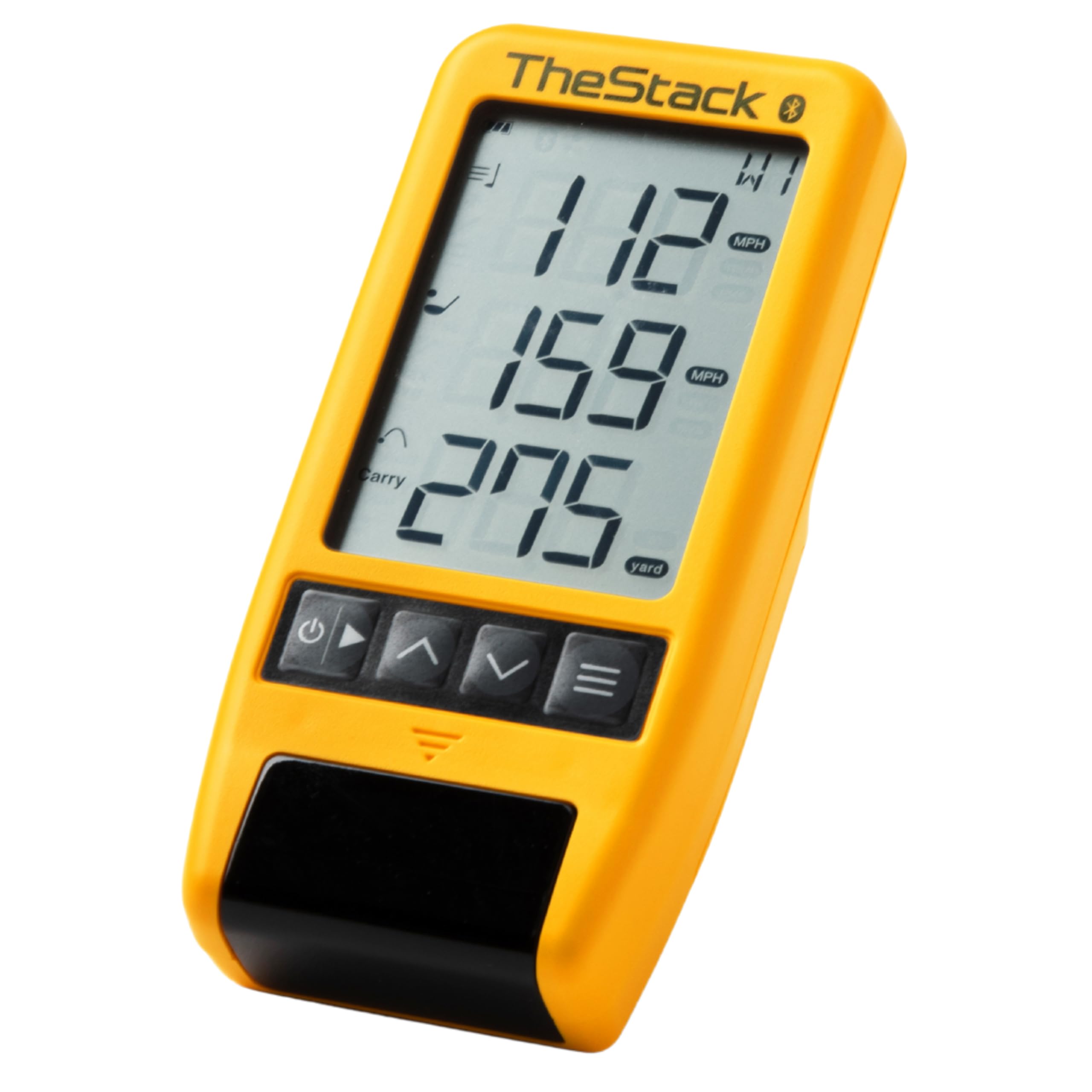
TheStack Radar is not a general-purpose launch monitor. It is a purpose-built sensor designed to pair exclusively with TheStack speed training system. It measures swing speed and ball speed, then calculates estimated carry distance and smash factor. When used with TheStack app, it auto-transmits data to structure speed training sessions, track progress, and compare against the community database of over 55,000 users. The Stack Wedging mode gamifies wedge distance control with skill-specific practice sessions.
The unit is incredibly compact — 0.13 kilograms and roughly the size of a smartphone — making it the most portable option in this guide. Battery is powered by replaceable cells rather than rechargeable lithium, which some users find inconvenient but ensures the unit is always ready when you are. The Bluetooth pairing is instant and stable according to most users. The Radar connects to both iOS and Android devices for speed training, but Wedging mode is currently iOS-only.
Trusted by 2022 US Open Champion Matt Fitzpatrick, the Stack system is clinically proven to deliver speed gains. Users in this guide reported 4–15 mph swing speed increases over periods of 10 days to 10 weeks. The Radar is essential for that feedback loop — without it, the weighted Stack trainer becomes guesswork. If speed training is your primary goal, this dedicated sensor outperforms any generalist monitor in that specific domain.
Why it’s great
- Direct integration with proven Stack speed training system
- Ultra-portable design fits in any bag pocket
- Community comparison data from 55,000+ users
Good to know
- Wedging mode is iOS-only at this time
- Uses replaceable batteries rather than rechargeable
6. Garmin Approach G80

The Garmin Approach G80 is unique in this lineup because it combines a premium GPS golf handheld with an integrated launch monitor in a single device. The 3.5-inch sunlight-readable touchscreen is preloaded with more than 41,000 color course maps worldwide, and the GPS function delivers accurate front, center, and back distances without a second device. The launch monitor tracks club head speed, ball speed, smash factor, swing tempo, and estimated distance using Doppler radar.
Battery life reaches 15 hours in GPS mode, comfortably covering two full rounds plus warmup time. The G80 includes a trolley or cart mount and carabiner lanyard for attachment during play. Practice and game modes allow testing skills on the course, and the tempo trainer provides audible feedback for rhythm work. Users consistently praise the GPS accuracy and course coverage as the device’s strongest assets.
As a launch monitor, the G80 has clear limitations. Swing speed readings can become unreliable above 100 mph, and ball flight distance estimates show notable variance compared to dedicated monitors. The launch data is useful for warmup trends but not precise enough for serious gapping sessions. The rubber band strap included for attachment is flimsy and often replaced. The G80 excels as a GPS device that happens to include launch data, not the reverse.
Why it’s great
- Excellent GPS accuracy with 41,000 preloaded courses
- Long 15-hour battery covers multiple rounds
- Integrated tempo trainer for rhythm practice
Good to know
- Launch monitor accuracy degrades above 100 mph swing speed
- Included rubber strap mount is not durable
7. Garmin Xero C1 Pro

The Garmin Xero C1 Pro is not a golf launch monitor in the traditional sense — it is a radar chronograph designed to measure projectile velocity from 100 to 5,000 fps for bullets, arrows, slugs, birdshot, paintballs, and airsoft BBs. Its relevance to a golf buyer guide lies in its use for measuring golf ball velocity and club speed with extreme precision. The radar-based system eliminates the setup problems of optical chronographs — no lighting requirements, no alignment poles, no connection to the firearm or club.
The compact design fits in a back pocket, and setup takes roughly one minute: turn it on, point it in the right direction, and shoot within about 15 inches of the device. The backlit LCD display is readable in any lighting condition. Bluetooth pairing to the ShotView app enables recording results, calculating extreme spreads, tracking deviation, and comparing every shot in a session. The IPX7 water-resistant rating means the device survives rain on the range or at the shooting lane.
The Xero C1 Pro delivers flawless shot capture with zero errors — every user in the data set reported 100% read rates, a claim few golf-specific monitors can match. The tradeoff is that it provides velocity and timing data only, not launch angle, spin rate, or carry distance estimates. Golfers who want only club speed and ball speed for speed training will find it superior to any dedicated golf launch monitor in this list for those two metrics. The high entry cost and limited metric set restrict its appeal to serious speed trainers or multi-sport households.
Why it’s great
- Flawless 100% shot capture rate with zero missed readings
- Rugged IPX7 water-resistant build survives weather
- Ultra-compact and sets up in under one minute
Good to know
- Measures velocity only — no launch angle or spin data
- Premium pricing puts it outside pure golf budget territory
8. SkyTrak

SkyTrak occupies a unique position as the only photometric launch monitor in this budget-oriented guide. Using high-speed cameras rather than radar, it captures ball speed, launch angle, spin rates, club speed, and carry distance from a position beside the hitting area. The bundled metal protective case with leveling legs protects the unit from stray strikes and provides a stable platform for consistent measurement. The driving range mode provides real-time data feedback without requiring course play subscriptions.
The photometric sensor requires consistent lighting and a clean hitting area to read reliably. Users report that the unit reads roughly 1 in 10 shots when lighting conditions are poor or the surface is cluttered, while performing well under ideal indoor conditions. Setup is straightforward via USB connection to a laptop or iPad, and many users integrate the SkyTrak with projectors for a full simulator experience. The protective metal case with adjustable legs is considered essential — the unit without it is vulnerable to damage.
The most significant hidden cost is the software subscription. SkyTrak’s basic game improvement plan requires an annual fee to unlock full functionality, and third-party course play apps add another subscription layer. Users report frustration with the subscription model after the initial purchase. The unit can occasionally freeze when transitioning between holes in course play mode. SkyTrak works best for the golfer who wants an indoor simulator and is willing to accept the ongoing software costs in exchange for photometric accuracy in a controlled environment.
Why it’s great
- Photometric sensor captures spin rates accurately indoors
- Protective metal case with leveling legs included
- Established software ecosystem with multiple simulator options
Good to know
- Requires annual subscription for full app functionality
- Read rate drops significantly in poor lighting conditions
9. TheStack Weighted Speed Trainer
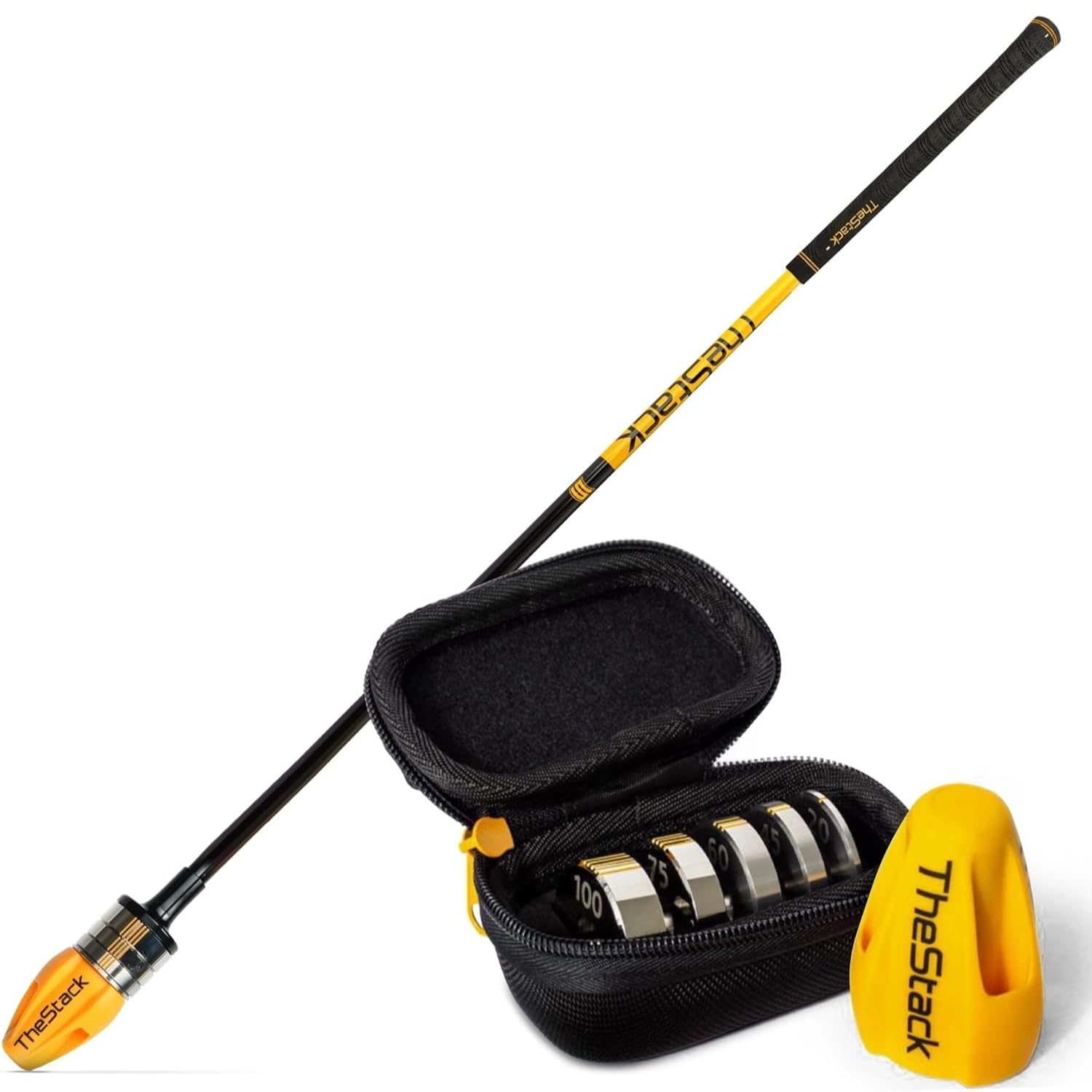
TheStack Weighted Speed Trainer is not a launch monitor — it is the weighted training club that completes the Stack ecosystem. With 30 adjustable weight combinations allowing precise overload and overspeed training, it is the most scientifically validated speed training tool available for golfers. The system is built on analysis of over 35 million swings from 55,000 users showing average speed gains of 10.1 mph. 2022 US Open Champion Matt Fitzpatrick used TheStack to gain the speed necessary for his major title.
The accompanying app coaches through timed sessions, tracks personal bests, and compares your progress against the community. A one-year app membership is included with purchase. The Stack Putting module adds guided practice for short game work. Weighted training protocols are structured around progressive overload — users in this guide reported gains from 4 mph in 10 days to 15 mph over longer training blocks, translating to 20–30 yards of added carry distance.
Critical to understand: The weighted trainer requires a separate radar device capable of measuring non-contact swing speeds. It does not include any sensor itself. The separate Stack Radar, or another compatible monitor, is essential for feedback. The app subscription renews annually after the first year. Beginning golfers may find the system overwhelming without the app guidance, and there is no trial period for the app before purchase. This is a specialist tool for the dedicated golfer pursuing measurable speed gains through structured training.
Why it’s great
- Proven average speed gains of over 10 mph from community data
- Comprehensive app with guided protocols and progress tracking
- Used by tour professionals for competition preparation
Good to know
- Requires a separate radar device for swing data
- App subscription renews after first year
FAQ
Can a cheap launch monitor accurately measure spin rate?
How much indoor space do I need for a budget radar launch monitor?
Do I need special golf balls for a cheap launch monitor?
What is the most important metric a cheap launch monitor should track?
Will a budget launch monitor help me lower my handicap?
Final Thoughts: The Verdict
For most users, the best cheap golf launch monitor winner is the Voice Caddie SC300i because it balances verified accuracy within 2-3 yards of premium monitors with essential features like voice feedback, 20-hour battery life, and a solid companion app. If you want environmental sensor compensation and a premium metal build with zero subscription fees, grab the Swinora GX-03. And for dedicated speed training with a clinically proven system, nothing beats the TheStack Radar paired with the weighted trainer for measurable swing speed gains.

Mo Maruf
I created WellFizz to bridge the gap between vague wellness advice and actionable solutions. My mission is simple: to decode the research and give you practical tools you can actually use.
Beyond the data, I am a passionate traveler. I believe that stepping away from the screen to explore new environments is essential for mental clarity and physical vitality.