Our readers keep the lights on and my smoothie glass nicely filled. As an Amazon Associate, I earn from qualifying purchases.
The market is flooded with machines pairing decade-old CPUs with modern-looking cases, and deciphering which one actually delivers playable 1080p performance requires knowing where to look. This guide cuts through the marketing noise to highlight the machines that hit the performance-per-dollar sweet spot.
I’m Mohammad Maruf — the founder and writer behind WellFizz. I’ve spent hundreds of hours analyzing hardware specifications, cross-referencing customer benchmarks, and digging into component generations to separate the genuine value picks from the traps in the budget gaming PC space.
Whether you’re aiming for esports titles or dipping into AAA gaming, finding the best cheap gaming pc means critically evaluating the GPU, architecture age, and upgrade path rather than just counting core clocks.
How To Choose The Best Cheap Gaming PC
A budget gaming PC is a balancing act between a capable graphics solution, a modern enough CPU to avoid bottlenecking, and a platform that doesn’t lock you out of future upgrades. Understanding where to allocate your limited budget is the single most important decision.
Prioritize the Graphics Card Above All
For gaming at 1080p, the GPU is the single component that determines your frame rate. A dedicated card like the Radeon RX 580 or the GeForce RTX 3050 will drastically outperform any integrated solution. If you see a PC with an Intel Core i7 but no dedicated GPU, it will struggle with modern games. Conversely, a machine with a slightly older CPU but a solid 8GB dedicated GPU will deliver a much better gaming experience.
Watch for Platform Age and Upgrade Potential
Many so-called cheap gaming PCs rely on decade-old motherboards and CPUs like the i7-4770 from 2013. While these may boot up quickly, they lack modern features like NVMe boot support, TPM 2.0, and PCIe 4.0, and they offer no meaningful upgrade path to modern processors. A newer platform like AMD’s AM4 or Intel’s LGA1700, even with a lower-tier CPU, allows you to swap in a faster processor down the line without replacing the whole motherboard.
Storage and Memory: SSD is Non-Negotiable
A PC with an NVMe SSD for the operating system and favorite games is a hard requirement for a responsive experience. Avoid any machine still using a mechanical hard drive as the boot drive. For RAM, 16GB is the baseline for modern gaming; 8GB will cause stuttering in demanding titles. DDR4-3200 is the standard to look for — avoid older DDR3 systems entirely.
Quick Comparison
On smaller screens, swipe sideways to see the full table.
| Model | Category | Best For | Key Spec | Amazon |
|---|---|---|---|---|
| NINGMEI Desktop PC (Ryzen 7 5700G) | Mid-Range | Integrated graphics for esports + GPU upgrade path | AMD Radeon Vega 8 (integrated) | Amazon |
| suevery Desktop PC (i5-12400F + RTX 3050) | Premium | 1080p high/ultra out of the box | NVIDIA GeForce RTX 3050 6GB | Amazon |
| STGAubron (RTX 3050 6G) | Mid-Range | Value with a modern GPU | NVIDIA GeForce RTX 3050 6GB | Amazon |
| YAWYORE (R5 5600GT) | Mid-Range | Integrated Vega 7 for esports + GPU upgrade | AMD Radeon Vega 7 (integrated) | Amazon |
| CyberPowerPC Gamer Master (RX 6500 XT) | Mid-Range | Entry-level dedicated GPU from a known builder | AMD Radeon RX 6500 XT 4GB | Amazon |
| Blackout Computers (i7 + RX 580) | Mid-Range | Budget 1080p gaming with dedicated 8GB GPU | AMD RX 580 8GB | Amazon |
| STGAubron (G5905 + RX 580) | Budget | Cost-effective GPU-first approach | AMD Radeon RX 580 8GB | Amazon |
| abytees (i7-4770 + RX 590) | Budget | Cheapest entry with dedicated 8GB GPU | AMD Radeon RX 590 8GB | Amazon |
| ACEMAGICIAN M1 (Ryzen 7 7735HS) | Premium | Ultra-compact 4K office and light gaming | AMD Radeon 680M 12-Core (integrated) | Amazon |
| GMKtec M7 Ultra (Ryzen 7 PRO 6850U) | Premium | Mini PC with OCuLink for eGPU expansion | AMD Radeon 680M 12-Core (integrated) | Amazon |
| msi Codex Z2 (RTX 5070) | Premium | High-end 1440p/4K AAA gaming | NVIDIA GeForce RTX 5070 12GB | Amazon |
In‑Depth Reviews
1. msi Codex Z2 Gaming Desktop

The Codex Z2 is a significant step up in budget, pairing an AMD Ryzen 7 8700F processor with NVIDIA’s next-gen Blackwell RTX 5070 graphics card and 32GB of DDR5 RAM. This combination is built for high-refresh 1440p gaming and smooth 4K output in AAA titles, making it the most powerful machine on this list by a wide margin. The 2TB NVMe SSD provides ample storage for a large game library.
The chassis features a clean aesthetic with ARGB front fans and a rear exhaust fan to manage the thermals of the RTX 5070. MSI includes a keyboard and mouse in the box, and the MSI Center software allows for lighting and performance customization. The unit is VR-ready and includes a USB Type-C port on the front panel.
While some users report minor firmware issues and fan noise under heavy gaming loads, the raw gaming performance is exceptional. The Blackwell architecture delivers a massive generational leap in ray tracing, and 32GB of DDR5 ensures future-proof memory bandwidth for upcoming titles.
Why it’s great
- Top-tier RTX 5070 GPU for high-end ray tracing and 1440p/4K.
- 32GB DDR5 and 2TB NVMe SSD for heavy multitasking and storage.
- VR-ready with fast USB-C connectivity.
Good to know
- Fans can become audible under sustained load.
- The stock Bluetooth module may require an upgrade for stability.
2. suevery Desktop Computer (i5-12400F + RTX 3050)

The suevery desktop represents the ideal sweet spot for budget-conscious buyers, featuring a 12th-generation Intel Core i5-12400F — a modern 6-core processor — paired with an NVIDIA GeForce RTX 3050 6GB GPU. This combination delivers smooth 1080p gameplay at high to ultra settings in most modern titles without the CPU bottleneck typical of older budget builds. The 16GB of DDR4-3200 RAM supports seamless multitasking.
Visually, this is a standout machine with an all-white theme and five customizable RGB fans that create a bright, modern aesthetic. The advanced airflow design keeps the components cool during extended sessions, and the 512GB NVMe SSD provides fast boot times and adequate storage for a core game library.
The i5-12400F platform supports PCIe 4.0 and offers a clear upgrade path to 13th and 14th-gen Intel processors. This makes it a smart foundation — you can run games now and upgrade the CPU years later without replacing the motherboard. It’s a balanced machine that avoids the obsolete-platform trap entirely.
Why it’s great
- Modern 12th-gen CPU and RTX 3050 for true 1080p high settings gaming.
- Upgradeable platform with PCIe 4.0 and future Intel CPU support.
- Striking white theme with bright RGB fans and good cooling.
Good to know
- Only 512GB storage may fill quickly with larger game installs.
- Some users report needing to install audio drivers on a fresh Windows install.
3. NINGMEI Desktop PC (Ryzen 7 5700G)

The NINGMEI desktop leverages the AMD Ryzen 7 5700G, one of the most powerful APUs on the market with integrated Radeon Vega 8 graphics capable of running esports titles like Valorant, Fortnite, and League of Legends at playable frame rates. This is a strategic buy for someone who wants a functional gaming PC today and plans to add a dedicated GPU later. The 16GB of DDR4-3200 RAM is dual-channel, which is crucial for integrated graphics performance.
The machine comes in a black case with six RGB fans and a magnetic dust screen on top for easy cleaning. The 550W 80PLUS Bronze power supply provides enough headroom to support a mid-range dedicated graphics card. The 1TB NVMe SSD offers generous out-of-box storage, and the AM4 platform gives you the option to upgrade to a Ryzen 5000-series CPU in the future.
This build excels for users who want to spread the cost of a gaming PC over time. Start with the integrated Vega 8 for lighter titles, then drop in a used Radeon RX 580 or GeForce RTX 2060 for a massive frame rate boost. The platform is modern enough to avoid the upgrade dead ends of older budget machines.
Why it’s great
- Powerful integrated Radeon Vega 8 for playable esports gaming out of the box.
- Modern AM4 platform with clear CPU and GPU upgrade path.
- Six RGB fans and large 1TB NVMe SSD included.
Good to know
- No dedicated GPU for demanding AAA games – requires an add-on purchase.
- Fans can get moderately loud under prolonged load.
4. ACEMAGICIAN M1 Mini PC (Ryzen 7 7735HS)

The ACEMAGICIAN M1 is a mini PC that packs a surprising punch with an AMD Ryzen 7 7735HS processor and 12-core Radeon 680M integrated graphics. This GPU is capable of running lighter AAA titles at low-to-medium settings and handling esports games with ease. The 24GB of LPDDR5 memory operates at 5500MT/s, significantly boosting the integrated GPU’s bandwidth compared to older DDR4 systems.
Its compact size makes it a unique option for gamers with limited desk space or those who want a living room gaming machine for emulation and indie titles. It supports three 4K displays via HDMI, DisplayPort, and USB-C, making it viable for productivity alongside gaming. Connectivity includes WiFi 6, Bluetooth 5.2, and a 2.5G LAN port.
While it won’t match a dedicated GPU for heavy AAA gaming, the Radeon 680M is a massive step up from older integrated solutions. For someone who prioritizes a tiny footprint and quiet operation over raw frame rates, this is an elegant solution. The 24GB RAM ensures smooth multitasking, and the triple-display support is a bonus for creators.
Why it’s great
- Exceptionally compact design with powerful Radeon 680M graphics.
- 24GB LPDDR5 memory at 5500MT/s for high integrated GPU bandwidth.
- Triple 4K display support with WiFi 6 and 2.5G LAN.
Good to know
- Cannot be upgraded with a dedicated GPU – limited to integrated graphics.
- Best suited for esports and indie titles, not AAA gaming at high settings.
5. GMKtec M7 Ultra Mini PC (Ryzen 7 PRO 6850U)
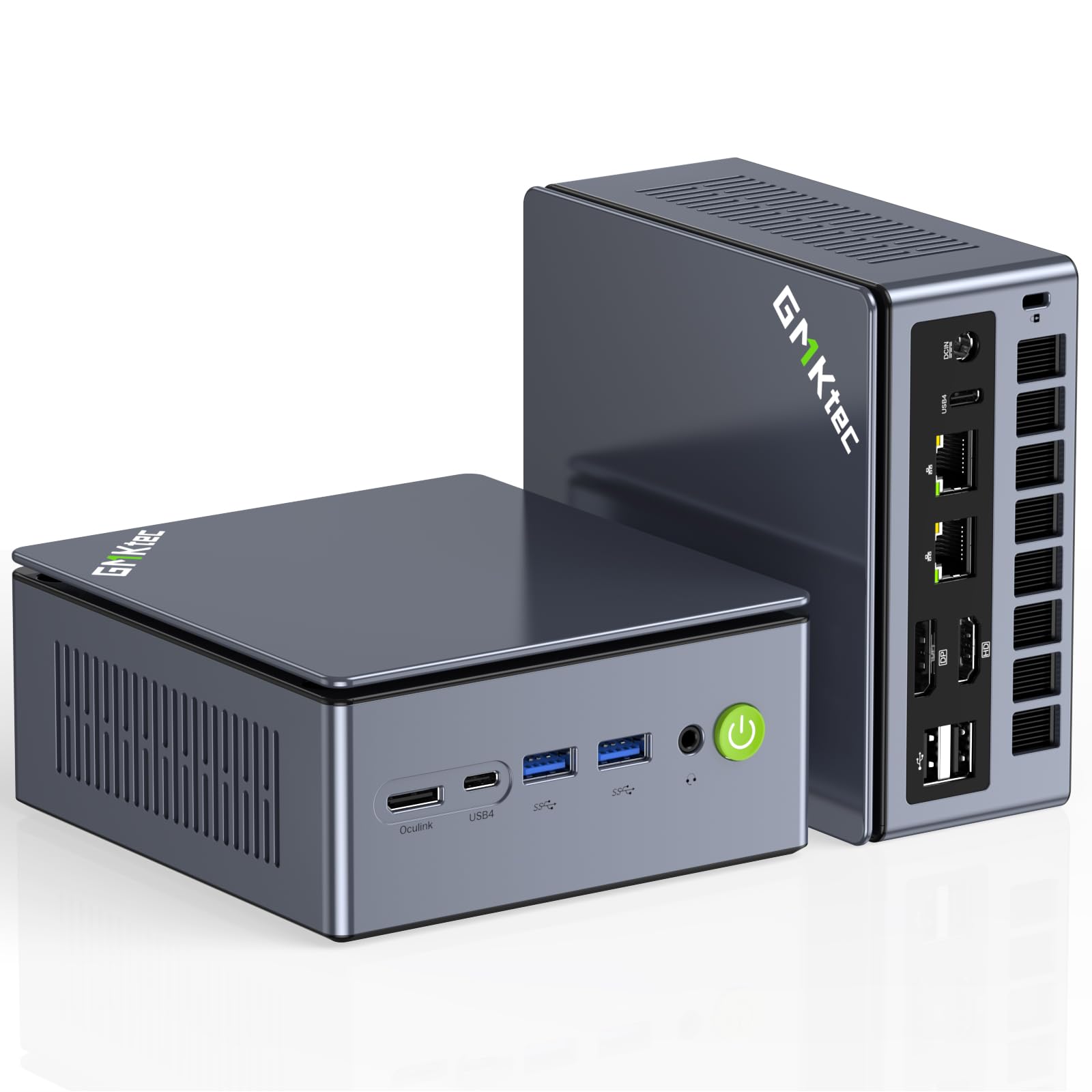
The GMKtec Nucbox M7 Ultra is a premium mini PC designed with a specific niche in mind: users who want an ultra-compact core system but retain the ability to connect an external GPU (eGPU) via its dedicated OCuLink port. This port offers higher bandwidth than Thunderbolt, resulting in better frame rates and lower latency. The AMD Ryzen 7 PRO 6850U and Radeon 680M handle daily tasks and light gaming on their own.
This unit features dual USB4 ports supporting 8K@60Hz output and HDMI 2.1. The updated Hyper Ice Chamber 2.0 cooling system uses dual fans to keep temperatures in check while operating as low as 35dB in Quiet mode. Three performance modes (Quiet, Balance, Performance) allow you to tune the 35W to 70W TDP depending on your workload.
The OCuLink port is the standout feature here. It means you can buy this mini PC as a capable desktop now, then add a powerful eGPU dock later for serious gaming without replacing the entire system. With dual 2.5GbE LAN ports, it also doubles as a powerful home server or firewall appliance.
Why it’s great
- OCuLink port provides a high-bandwidth pathway for future eGPU upgrades.
- Dual USB4 and HDMI 2.1 for 8K display output and quad-screen support.
- Three performance modes with quiet 35dB operation for low-noise environments.
Good to know
- Requires a separate eGPU enclosure and graphics card for serious gaming.
- Integrated Radeon 680M is not sufficient for AAA games at high settings.
6. STGAubron Gaming PC (i7 + RTX 3050 6G)

The STGAubron with an RTX 3050 6GB and a 4th-gen Intel Core i7 offers a dedicated graphics solution that is well-suited for 1080p gaming. The RTX 3050 provides access to NVIDIA’s software ecosystem, including DLSS upscaling, which can boost frame rates in supported titles. The 16GB of DDR4 RAM is the standard for smooth modern gaming, and the 512GB SSD provides decent boot and load times.
This tower features six RGB fans for strong airflow, plus a mouse and keyboard in the box. The black case design is understated. The included Wi-Fi 6 and Bluetooth 5.0 connectivity are modern and reliable.
The primary trade-off here is the CPU platform. The i7-4790 is over a decade old and lacks support for modern NVMe boot drives, PCIe 4.0, and high-speed RAM. This means the system is effectively locked to its current CPU, and you may experience minor stuttering in CPU-intensive titles. It is a viable budget option if you prioritize the dedicated RTX 3050 and do not plan to upgrade the processor.
Why it’s great
- RTX 3050 6GB provides solid 1080p gaming with DLSS support.
- Six RGB fans for excellent airflow and thermal management.
- Includes Wi-Fi 6 and Bluetooth 5.0 out of the box.
Good to know
- CPU is a 4th-gen Intel i7 from 2014, offering no upgrade path.
- Some users report faulty Wi-Fi adapters requiring a USB replacement.
7. YAWYORE Gaming PC (R5 5600GT)

The YAWYORE desktop centers on the AMD Ryzen 5 5600GT, a 6-core APU with capable Radeon Vega 7 integrated graphics. This unit is designed for users seeking a stable, quiet machine for esports and older titles, with the clear intention of adding a dedicated GPU. The 16GB of DDR4-3200MHz RAM is dual-channel, maximizing the integrated graphics performance.
The build features an MSI A520M-A PRO motherboard, a reliable entry-level platform with a 550W 80PLUS Bronze PSU that can comfortably power a mid-range GPU upgrade. The 1TB M.2 NVMe SSD provides high-speed storage for games and applications. Five 120mm ARGB fans keep the system cool and quiet.
A notable advantage is the modern AM4 platform, allowing a future upgrade to a Ryzen 7 5800X3D or similar CPU. Users report that adding a used graphics card like an RX 580 transforms this from an esports machine into a capable 1080p gaming rig. The system includes a remote to control the fan speed for quieter operation when not gaming.
Why it’s great
- Modern AM4 platform with a clear CPU and GPU upgrade path.
- 550W 80PLUS Bronze PSU ready for a dedicated graphics card.
- Quiet operation with remote-controlled ARGB fans.
Good to know
- Integrated Vega 7 graphics are only suitable for esports and older titles.
- Does not include a dedicated GPU in the box.
8. Blackout Computers Gaming Desktop (i7 + RX 580)
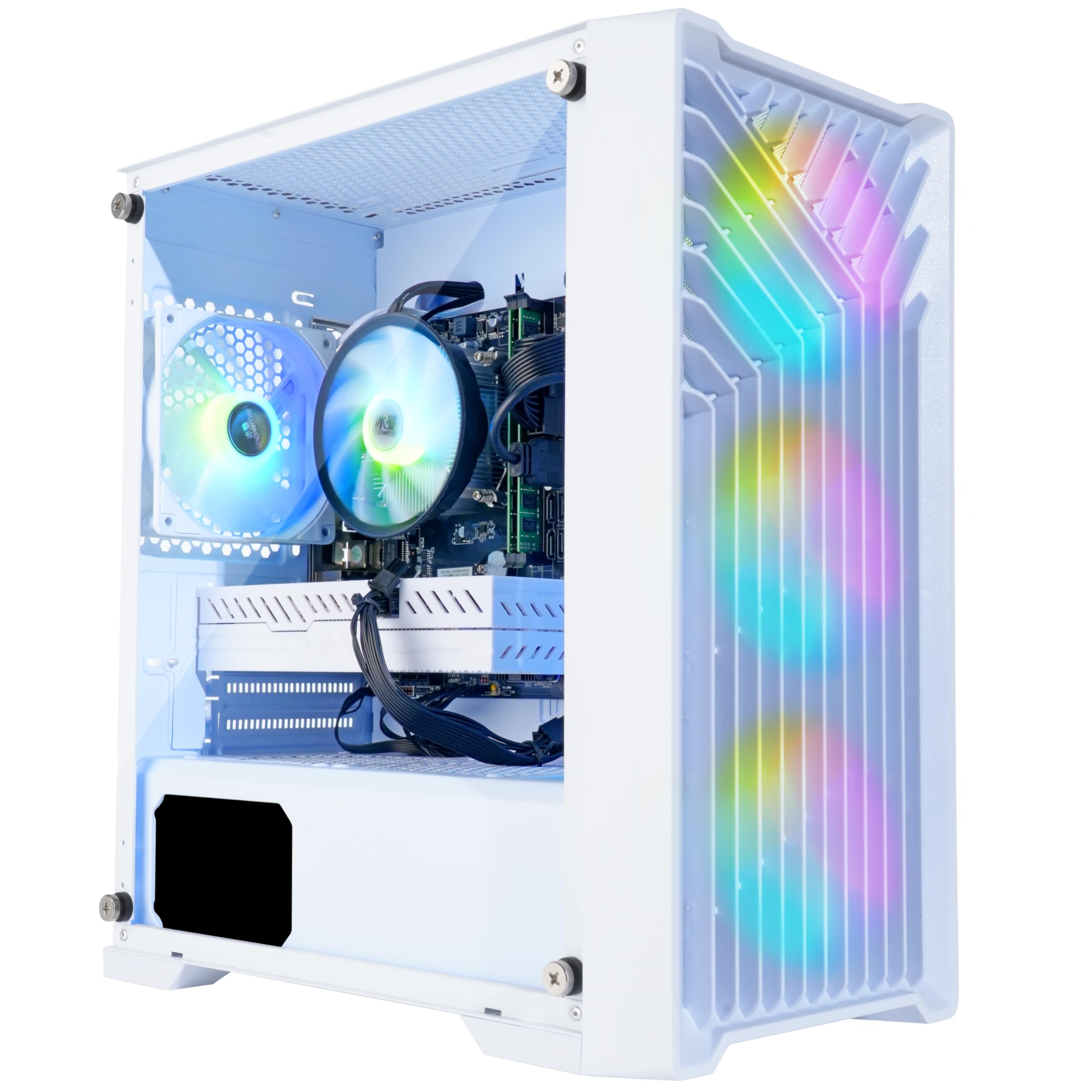
The Blackout Eclipse Edition is built around the AMD Radeon RX 580 8GB, a proven GPU that can handle 1080p gaming at medium settings in AAA titles and high settings in esports. The Intel Core i7-4790 CPU supports a 4.0GHz boost clock, and the 16GB of DDR3 RAM with a 1TB NVMe SSD ensures fast storage and adequate system memory for most games.
The case features a white design with a tempered glass side panel and four RGB fans for decent airflow. It comes with a remote control for the fan and lighting colors. The included Windows 11 Pro is a bonus for users needing enterprise features.
The trade-off is the DDR3 platform and the aging 4th-gen CPU, which limits memory bandwidth and offers no upgrade path. The RX 580 GPU is the real value here; you can repurpose it into a future build if you outgrow the motherboard. It is a solid choice if you need a functional 1080p gaming PC immediately and don’t mind a locked-in CPU platform.
Why it’s great
- RX 580 8GB is a reliable, dedicated GPU for 1080p gaming.
- Comes with Windows 11 Pro and a 1TB NVMe SSD.
- Remote-controlled RGB fans and lighting for easy customization.
Good to know
- Uses DDR3 memory and a 2013-era CPU with no upgrade path.
- Some units may require initial troubleshooting to boot with customer support.
9. STGAubron Gaming PC (G5905 + RX 580 8G)
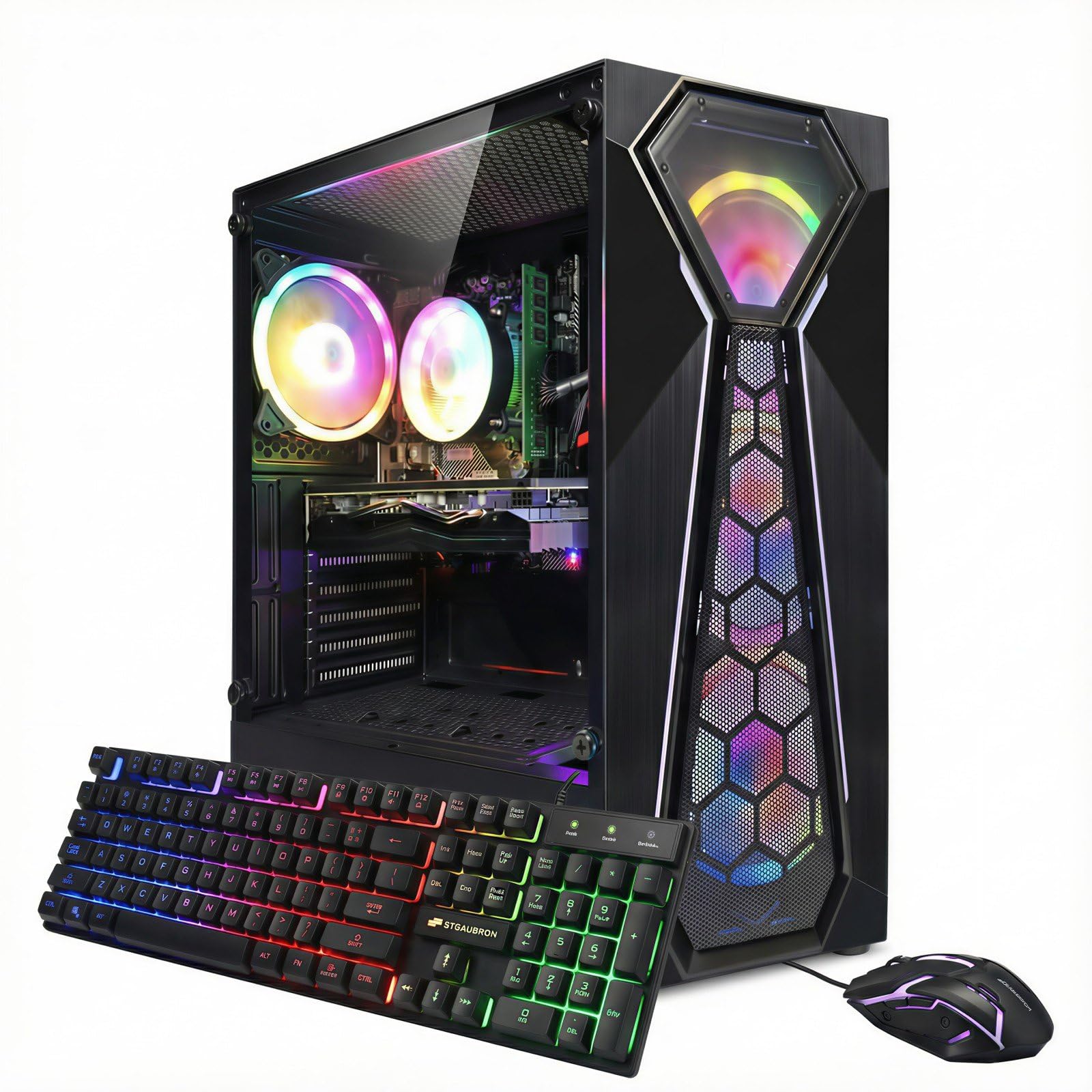
The STGAubron model with a G5905 processor and RX 580 8GB is a budget-first design that allocates significant resources to the GPU. The Radeon RX 580 8GB is a veteran card still capable of handling Fortnite, Call of Duty Warzone, and GTA V at 60+ FPS on medium settings. The 16GB of DDR4 RAM and a 1TB SSD provide solid foundations for a game library.
The black case includes four RGB fans and comes with a wired keyboard and mouse. Connectivity includes Wi-Fi 6 and Bluetooth 5.0. The inclusion of 1TB of SSD storage is a major advantage at this price point, as it avoids the need to immediately manage storage space.
The Intel G5905 is a dual-core, low-power CPU that can bottleneck the RX 580 in CPU-intensive scenes. This is a system for playing games that rely more on the GPU than the CPU. It is a true entry-level machine, best suited for users who want max GPU power for as little money as possible and are willing to accept occasional CPU limitations in demanding open-world titles.
Why it’s great
- RX 580 8GB offers strong value for 1080p gaming on a tight budget.
- Enormous 1TB SSD included for extensive game installations.
- Wi-Fi 6 and Bluetooth 5.0 for modern wireless connectivity.
Good to know
- Dual-core G5905 CPU can bottleneck GPU in CPU-intensive games.
- Some users report quality control issues like missing dust filters or faulty fans.
10. CyberPowerPC Gamer Master (RX 6500 XT)

The CyberPowerPC Gamer Master GMA3100A3 offers a modern foundation with an AMD Ryzen 5 5500 6-core processor and a dedicated Radeon RX 6500 XT 4GB GPU. This combination provides smooth entry-level 1080p gaming in esports and less demanding AAA titles. The 8GB of DDR4 RAM is a noticeable limitation, as it can cause stuttering in memory-intensive games.
The system uses an AMD B550 chipset motherboard, offering PCIe 4.0 support for fast storage and future graphics cards. The 500GB PCIe 4.0 NVMe SSD is fast, but the storage capacity is limited. The case includes a tempered glass side panel with customizable RGB lighting, and a keyboard and mouse are included.
The RX 6500 XT is limited by its 4GB VRAM and narrow memory bus, which hurts performance in higher-resolution texture settings. However, for someone stepping into PC gaming for the first time, the modern B550 platform means you can upgrade the GPU, add more RAM, and even swap the CPU years down the line, making it a future-proofed entry point.
Why it’s great
- Modern B550 platform with PCIe 4.0 for future CPU/GPU upgrades.
- Dedicated RX 6500 XT provides a smooth entry-level gaming experience.
- Full-size case with tempered glass and customizable RGB lighting.
Good to know
- Only 8GB RAM causes stuttering in modern titles; 16GB upgrade recommended.
- RX 6500 XT’s 4GB VRAM and PCIe 4.0 x4 interface limit performance in some games.
11. abytespark Prebuilt Gaming PC (i7-4770 + RX 590)

The abytespark desktop is the lowest cost entry point on this list, pairing an Intel Core i7-4770 with an AMD Radeon RX 590 8GB. The RX 590 is a slightly faster variant of the RX 580, offering solid 1080p performance in many games. The 16GB of DDR3 RAM and a 512GB SSD provide a functional system for gaming and light productivity.
The white case features a sea-view side panel and four RGB fans for a bright, gamer-focused aesthetic. The system includes a wired keyboard, mouse, and mouse pad. It is a plug-and-play unit that can run popular titles like Fortnite and Apex Legends at 60+ FPS.
The i7-4770 is a 2013 processor on a platform that lacks Bluetooth, TPM 2.0 support, and PCIe 3.0. The listing itself was noted for product misrepresentation by some customers regarding Windows 11 compatibility. This is the most trade-off-prone machine on the list, suited only for buyers with the absolute lowest budget who need a GPU first and understand the CPU limitations.
Why it’s great
- RX 590 8GB is a capable budget GPU for 1080p gaming.
- 16GB of RAM and SSD storage at the lowest price point.
- White case with RGB fans and included peripherals.
Good to know
- CPU dates from 2013 on a platform with no upgrade path and no Bluetooth.
- May require a separate Wi-Fi/BT adapter and lacks TPM 2.0 for official Windows 11 support.
FAQ
Can a cheap gaming PC with integrated graphics play modern games?
Is it better to buy a prebuilt cheap gaming PC or build my own?
How important is NVMe storage for a budget gaming PC?
Will an older CPU like the i7-4770 hold back my gaming performance?
What should I immediately upgrade on a cheap gaming PC?
Final Thoughts: The Verdict
For most users, the best cheap gaming pc winner is the suevery Desktop PC because it combines a modern 12th-gen Intel CPU with an RTX 3050, providing a balanced 1080p gaming experience with a clear future upgrade path. If you want a machine you can upgrade piece-by-piece, grab the NINGMEI Desktop PC with its powerful integrated graphics and modern AM4 platform. And for the absolute lowest entry point with a dedicated GPU, nothing beats the GPU-first value of the STGAubron with RX 580.

Mo Maruf
I created WellFizz to bridge the gap between vague wellness advice and actionable solutions. My mission is simple: to decode the research and give you practical tools you can actually use.
Beyond the data, I am a passionate traveler. I believe that stepping away from the screen to explore new environments is essential for mental clarity and physical vitality.