Our readers keep the lights on and my smoothie glass nicely filled. As an Amazon Associate, I earn from qualifying purchases.
Finding a gaming mouse under tight constraints usually means sacrificing sensor accuracy for RGB gimmicks, or accepting a stiff cable and mushy clicks as the norm. The market is flooded with generic shells that share the same cheap optical sensor, making the hunt for a responsive, durable pointer at a low price point more about avoiding pitfalls than chasing features.
I’m Mohammad Maruf — the founder and writer behind WellFizz. After cross-referencing sensor specifications, polling rates, button actuation mechanisms, and weight distribution across dozens of budget-oriented models, the real performance outliers become clear.
This guide breaks down five wired and wireless options that prove affordable hardware can still deliver competitive tracking speeds and solid build quality. Whether you are fragging in Counter-Strike or grinding macros in an MMORPG, the best cheap gaming mouse for your grip style and game type is detailed below.
How To Choose The Best Cheap Gaming Mouse
At entry-level pricing, manufacturers often cut costs on the sensor, switch quality, or cable flexibility. Knowing which specs are non-negotiable for your primary game genre keeps you from wasting money on a mouse that feels sluggish within a week.
Sensor Class and Polling Rate
The sensor is the heart of a gaming mouse. Budget models often use generic optical sensors that exhibit noticeable acceleration or jitter above 4000 DPI. Look for known sensor architectures like the PAW3311, HERO, or PixArt variants that offer native 1ms response times. A consistent 1000 Hz polling rate ensures your movements register instantly—anything lower introduces perceptible delay in fast-paced shooters.
Weight and Form Factor
Ultra-light mice (under 50 grams) reduce fatigue during long sessions but can feel unstable if your grip is aggressive. Mid-range weights (80–90 grams) with a weight-tuning system let you dial in the balance. For claw and fingertip grips, a shorter profile with a pronounced hump provides better control. Palm grippers need a longer body with a gentle slope to avoid cramping.
Button Count and Customization
MMO and MOBA players benefit from a high button count—12 side buttons can replace an entire keyboard row for spell casting. FPS players rarely need more than two side buttons and prefer minimal clutter to avoid accidental presses. Verify that the companion software allows per-button macro assignment and onboard memory so your binds travel with the mouse.
Connectivity and Cable
Wired mice under budget pricing often use rubber cables that drag on the mousepad. A braided or paracord-style cable reduces friction and improves glide. Wireless options at this price point use Bluetooth or 2.4 GHz dongles—2.4 GHz provides lower latency, while Bluetooth conserves battery for productivity use. Check whether the battery is internal (rechargeable) or AA-based, as internal cells degrade over two years and cannot be replaced.
Quick Comparison
On smaller screens, swipe sideways to see the full table.
| Model | Category | Best For | Key Spec | Amazon |
|---|---|---|---|---|
| RK Royal Kludge M30 | Wireless | Ultra-light FPS / travel | 43g weight, PAW3311 sensor | Amazon |
| Logitech G305 | Wireless | Battery-life priority | 250h battery, HERO sensor | Amazon |
| Redragon M908 | Wired | MMO 12 side buttons | 18 programmable buttons | Amazon |
| Redragon M811 Aatrox | Wired | Ergonomic MMO / productivity | 15 buttons, natural grip | Amazon |
| Logitech G502 Hero | Wired | Versatile FPS / productivity | 25,600 DPI, 5 weights | Amazon |
In‑Depth Reviews
1. RK Royal Kludge M30 Wireless

The RK M30 packs a genuine PAW3311 optical sensor into a 43-gram chassis, making it one of the lightest wireless mice available without stepping into enthusiast pricing. Tri-mode connectivity (2.4 GHz, Bluetooth 5.1, USB-C) gives you flexibility for gaming on a desktop or pairing with a laptop, and the 1000 Hz polling rate ensures consistent tracking. The 250 mAh internal battery lasts roughly 24 hours at 1000 Hz, which means charging every couple of days with moderate use.
The right-handed ergonomic shape suits claw and fingertip grips better than full palm rests. Five programmable buttons via RK software cover basic macros and DPI shifting, though the DPI switch located on the underside is inconvenient for on-the-fly changes. The PTFE feet glide smoothly on cloth pads right out of the box.
Build quality is solid for the price point, though the ultra-light plastic shell flexes slightly under firm grip pressure. For players transitioning from heavier mice, the 43-gram weight takes a session or two to adapt to, but the reduction in wrist fatigue during extended play is immediately noticeable.
Why it’s great
- Competitive-grade PAW3311 sensor at entry-level pricing
- Wireless freedom without latency compromise
- Extremely low weight reduces arm strain
Good to know
- Internal battery is not user-replaceable
- DPI switch placement on the underside hinders quick adjustments
- Some users report creaking from the plastic shell
2. Logitech G305 Lightspeed

The G305 remains a benchmark in the budget wireless category because of its HERO sensor, which delivers 400 IPS tracking and 12,000 DPI with power efficiency that translates to 250 hours of continuous gaming on a single AA battery. That battery life, combined with the option to switch to Endurance mode for up to nine months of light use, eliminates recharge anxiety completely. The 1 ms report rate via Lightspeed wireless feels indistinguishable from a wired connection.
Weighing 99 grams with the AA battery installed, the G305 sits in the middle of the weight spectrum—not ultra-light, but balanced enough for most grip styles. The compact symmetrical shape accommodates claw and fingertip grips well but may feel small for palm users with larger hands. Six programmable buttons, including two responsive side buttons, are configurable via Logitech G Hub with onboard memory for portability.
The plastic build is durable and the nano receiver stores inside the mouse body, making it an excellent travel companion. The only notable omission is RGB lighting, which keeps battery drain low but means no aesthetic customization. The scroll wheel is indexed and responsive without overscrolling, a common issue in cheaper alternatives.
Why it’s great
- Industry-leading battery life on a single AA
- HERO sensor tracking is accurate and efficient
- Durable compact design with onboard memory
Good to know
- No RGB lighting for visual customization
- Shape feels small for palm-grip users
- Requires AA battery replacement over time
3. Redragon M908 Impact
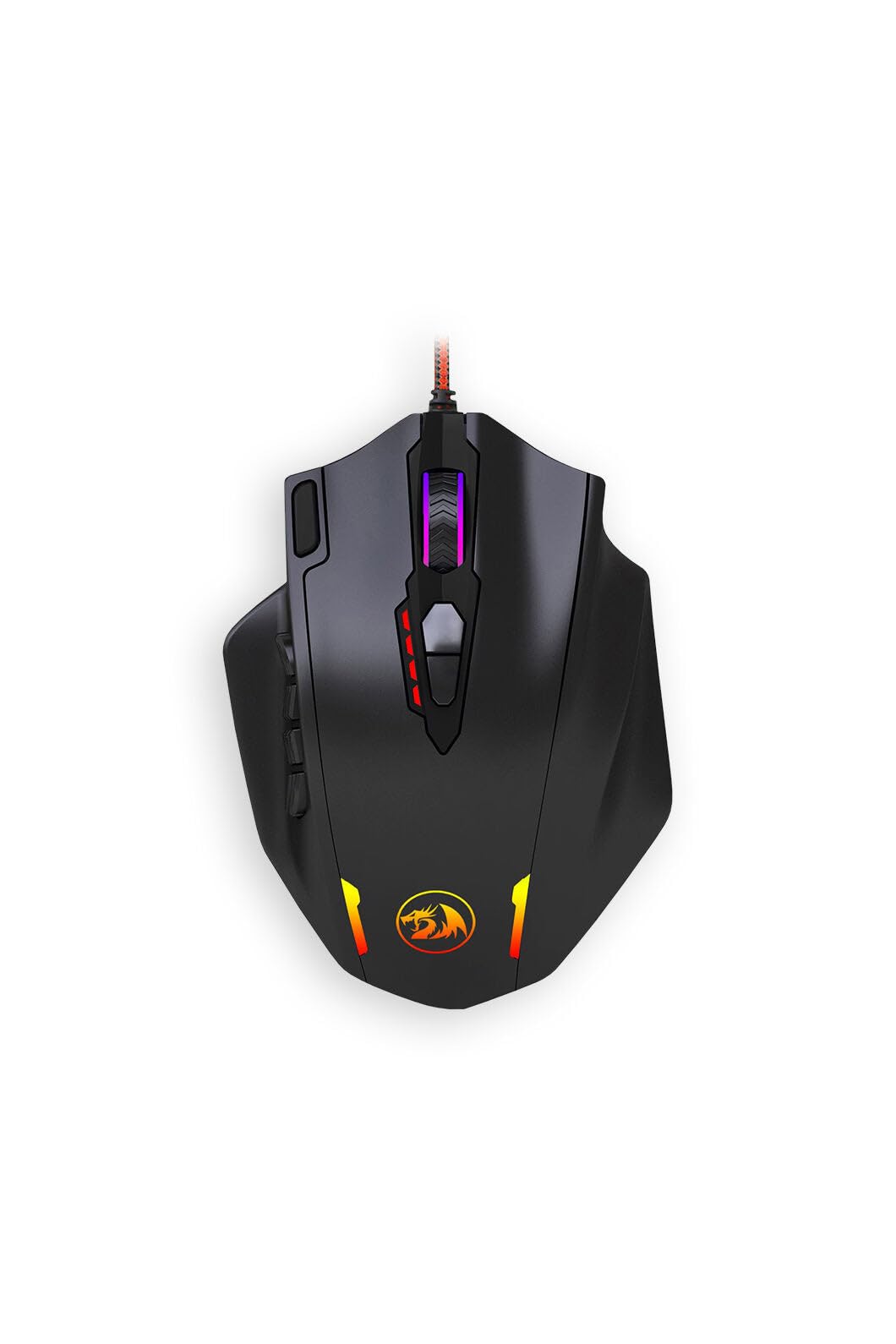
The Redragon M908 is built specifically for MMO players who need a high button count without spending Razer Naga money. Eighteen programmable buttons—12 on the side, four on the top deck, and left/right clicks—allow binding entire hotkey bars directly to the mouse. The included weight tuning cartridge lets you add or remove metal slugs to adjust the overall heft, a feature seldom found at this price tier.
The optical sensor supports DPI switching from 500 to 12,400 via the software, with on-the-fly adjustment using dedicated DPI buttons behind the scroll wheel. The polling rate is configurable up to 1000 Hz, though the default is set to 500 Hz out of the box. The braided USB cable is two meters long and reduces drag compared to standard rubber cables.
The side buttons are slightly smaller and stiffer than premium MMO mice, requiring deliberate presses to avoid accidental triggers. The RGB lighting covers the scroll wheel, logo, and side panel with 16.8 million colors, configurable through the software. Build quality is good for the price—plastic panels fit tightly and the weight system adds a premium feel during lifts and flicks.
Why it’s great
- High button count for MMO macro binding
- Adjustable weight system for personalized balance
- Software allows per-button macro assignment
Good to know
- Side buttons are stiff and closely spaced
- Software interface is not intuitive
- Wired connection only (no wireless variant)
4. Redragon M811 Aatrox

The M811 Aatrox distinguishes itself from the M908 by offering a contoured shape that follows the natural curve of the human hand, reducing fatigue during marathon sessions. Fifteen programmable buttons are arranged with two large primary side buttons and eight smaller secondary buttons, providing tactile feedback that helps differentiate between actions without looking. The layout works well for MMOs and MOBAs where precise hotkey access matters.
DPI levels are adjustable across five presets (default: 500/1000/2000/3000/6200) with a dedicated DPI cycle button. The software supports full customization of all buttons, plus RGB backlighting with five preset modes. The six-foot braided cable is flexible enough to minimize desk drag, and the PTFE feet glide smoothly on hard and cloth pads alike.
Build quality is slightly better than the M908—plastic panels feel denser and the primary clicks use Omron-style switches with a crisp actuation. The matte coating attracts fingerprints and may wear off over extended use, but the ergonomic relief makes this a strong contender for users with medium to large hands who prefer a palm or hybrid grip.
Why it’s great
- Ergonomic shape reduces hand fatigue
- Tactile side buttons are easy to distinguish
- Onboard memory stores profiles without software
Good to know
- Matte coating wears over time
- Software is clunky and lacks macro reordering
- Too large for small or medium hands
5. Logitech G502 Hero

The G502 Hero is the most feature-rich mouse on this list, packing the HERO 25K sensor capable of 25,600 DPI with zero smoothing, filtering, or acceleration. Eleven programmable buttons include a dual-mode hyper-fast scroll wheel that toggles between free-spin and indexed scrolling—a productivity powerhouse for document editing and web browsing in addition to gaming. The adjustable weight system uses five 3.6-gram cartridges for personalized balance tuning from 114 grams up to 130 grams.
The mechanical spring tensioning system on the left and right buttons delivers crisp, tactile clicks with rapid feedback, ideal for games requiring quick double-taps. LIGHTSYNC RGB provides full 16.8-million-color customization that can synchronize with game events through Logitech G Hub. The braided cable is thick and durable, though it introduces more drag than a paracord-style cable.
At its base weight, the G502 is heavier than most modern FPS mice, which some players prefer for stability during low-sensitivity aiming. The sculpted right-handed design with textured thumb rest accommodates palm and claw grips well but is not ambidextrous. Onboard memory stores up to five DPI profiles and button assignments, making it a reliable choice for LAN events or multi-machine setups.
Why it’s great
- Top-tier HERO 25K sensor with sub-micron tracking
- Hyper-fast scroll wheel doubles as productivity tool
- Adjustable weight system for custom balance
Good to know
- Heavy compared to ultra-light competition
- Braided cable creates more desk drag
- Not suitable for left-handed users
FAQ
Is a 12,000 DPI sensor enough for competitive gaming?
Why do MMO mice have so many side buttons?
Can a cheap gaming mouse last more than two years?
Does wireless latency matter in budget gaming mice?
Final Thoughts: The Verdict
For most users, the best cheap gaming mouse winner is the RK Royal Kludge M30 because it combines a genuine PAW3311 sensor with ultra-light 43-gram wireless design at an entry-level price point—features that typically cost double. If you value battery longevity above all else, grab the Logitech G305 with its 250-hour HERO sensor. And for MMO players who need a high button count and adjustable weight, nothing beats the Redragon M908.

Mo Maruf
I created WellFizz to bridge the gap between vague wellness advice and actionable solutions. My mission is simple: to decode the research and give you practical tools you can actually use.
Beyond the data, I am a passionate traveler. I believe that stepping away from the screen to explore new environments is essential for mental clarity and physical vitality.