Our readers keep the lights on and my smoothie glass nicely filled. As an Amazon Associate, I earn from qualifying purchases.
Finding a gaming keyboard and mouse that delivers responsive performance, customizable RGB, and comfortable ergonomics without draining your wallet is the ultimate challenge for budget-conscious gamers. The market is flooded with options that either feel mushy or break within weeks, forcing you to choose between a decent keyboard and a decent mouse on separate budgets.
I’m Mohammad Maruf — the founder and writer behind WellFizz. I’ve spent countless hours dissecting the build quality, switch durability, DPI ranges, and real-world feedback from verified buyers to separate the true value finds from the disposable junk in this specific price tier.
After analyzing hundreds of reviews and comparing key specs like key rollover, DPI presets, battery capacity, and overall material quality, this guide will help you pick the best cheap gaming keyboard and mouse combo that actually delivers on its promises without requiring an upgrade next month.
How To Choose The Best Cheap Gaming Keyboard And Mouse
Navigating the budget gaming peripheral market requires knowing which corners you can safely cut and where you absolutely should not compromise. The goal is to find a combo that feels good, lasts longer than six months, and offers enough customization to keep your setup looking sharp.
Switch Technology: Membrane vs. Mechanical Feel
Nearly all combos in this price range use membrane switches. The best ones simulate a mechanical-like tactile bump with a responsive rebound, while basic ones feel mushy. Look for descriptions that mention “mechanical feel,” “fast rebound,” or “crisp feedback” — these indicate a higher-quality silicone dome design that won’t tire your fingers after an hour.
Anti-Ghosting and Key Rollover
For competitive gaming in FPS and MOBA titles, you need a keyboard that can handle simultaneous key presses without missing inputs. A 19-key anti-ghosting rating is a solid baseline for a budget combo. Anything less than 12-key may cause problems in complex action sequences. Don’t confuse backlight features with actual input performance — prioritize rollover specs.
DPI Range and Sensor Quality
The mouse’s DPI determines tracking sensitivity. For budget combos, a range from 800 DPI to 3200 DPI covers most gaming and productivity needs. Some units now push to 6400 or 7200 DPI, which offers smoother tracking at lower sensitivity on high-resolution monitors. The sensor should be optical (not laser) for reliable surface tracking.
Quick Comparison
On smaller screens, swipe sideways to see the full table.
| Model | Category | Best For | Key Spec | Amazon |
|---|---|---|---|---|
| Redragon S101-3 PRO | Wired Value | Macro & Lighting Customization | 7200 DPI / 5 Macro Keys | Amazon |
| CHONCHOW Wireless Combo | Wireless Freedom | Clean Desk & Late-Night Gaming | 2500 mAh Keyboard Battery | Amazon |
| SABLUTE Gaming Combo | Quiet Performance | Shared Spaces & Typing Comfort | 3200 DPI / 19-Key Anti-Ghosting | Amazon |
| MSI Forge GK100 Combo | Brand Trust | Durable Switch Longevity | 6400 DPI / 10M Switch Rating | Amazon |
| CHONCHOW 4-in-1 Bundle | Complete Kit | First-Time Builders | 3200 DPI / Includes Headset | Amazon |
In‑Depth Reviews
1. Redragon S101-3 PRO Gaming Keyboard and Mouse

The Redragon S101-3 PRO stands out in the budget tier by offering software-level customization that is usually exclusive to premium combos. The full-size keyboard features 6 backlight modes and 5 dedicated macro keys for recording complex command sequences — a huge advantage for MMO and MOBA players. The membrane keys deliver a quiet, responsive feel with a soft-touch landing, making it suitable for both late-night gaming and daytime typing.
On the mouse side, the sensor goes up to 7200 DPI with on-the-fly adjustment, covering everything from precise sniper shots to fast flick movements. The mouse includes 10 lighting effects, though some users note its default red lights don’t match the keyboard’s full RGB spectrum. The companion software (downloadable from Redragon) allows deep per-key lighting control and macro assignments that save directly to the hardware — so your settings survive PC restarts.
Build quality is a step above the average budget combo, with no key wobble or paint wear reported even after months of use. The ergonomic wrist rest reduces fatigue during long sessions. The only trade-off is that the mouse requires periodic charging (for wireless models, though this wired variant avoids that concern), and the keyboard sleep mode can cause a brief reconnection delay. For users who want true customization and reliable daily performance, this is the strongest all-rounder in the category.
Why it’s great
- Software-driven macro and lighting customization rare at this price
- Quiet membrane keys with good tactile feedback for fatigue-free use
- 7200 DPI mouse sensor with on-the-fly adjustment covers all gaming styles
Good to know
- Mouse lighting is monochromatic red, not matching the keyboard’s RGB
- Keyboard sleep mode can cause a 5-10 second reconnect delay on wake
2. CHONCHOW USB Wireless Gaming Keyboard and Mouse Combo

Wireless at this price point is rare, and the CHONCHOW combo delivers genuine 2.4 GHz connectivity with a single shared USB adapter for both the keyboard and mouse. The keyboard packs a 2500 mAh rechargeable battery that offers up to 10 hours of continuous use with the backlight on, plus an automatic sleep function after 5 minutes of inactivity to conserve power. The mouse adds its own 500 mAh battery and syncs seamlessly through the same receiver.
The keyboard features rainbow LED backlighting across all keys with 3 brightness and breathing speed levels, so you can find keys accurately in the dark. The volcano-shaped keycaps are designed for ergonomic comfort with a stepped layout and foldable stand for adjustable typing angle. While it’s a membrane board, the mechanical-feel construction provides a satisfying rebound that outclasses most office-grade wireless keyboards.
The symmetrical mouse offers 3 DPI levels (1600/2400/3200) with 7 auto-changing breathing backlight colors. It uses a smooth surface design for all-day comfort. Some users have reported connectivity issues or battery failures after a few months, which is a known risk with ultra-budget wireless gear. This combo is best for gamers who value a clean, cable-free desk over maximum raw performance, and it works with PC, PS3/4/5, Xbox, and Mac.
Why it’s great
- True 2.4 GHz wireless with single shared receiver — clean desk setup
- Large 2500 mAh keyboard battery lasts through long gaming sessions
- Rainbow backlight across all keys with brightness and speed adjustment
Good to know
- Some units report connectivity dropouts or battery failure after 1-2 months
- Mouse DPI limited to 3200 max, lower than wired competitors
3. SABLUTE Gaming Keyboard and Mouse

The SABLUTE combo is built around quiet enjoyment, making it the top choice for shared bedrooms, dorm rooms, and late-night sessions. The membrane keyboard produces significantly softer keystrokes than mechanical alternatives while still offering a mechanical-like tactile feel with fast rebound. The dynamic RGB lighting reacts to each keystroke, providing immersive feedback without annoying your roommate or partner.
A standout feature at this price is the detachable PU leather wrist rest that provides genuine ergonomic support and reduces fatigue during long typing or gaming marathons. The compact 98-key layout saves desk space while retaining a full number pad for productivity tasks. The multimedia knob offers quick volume and playback control without alt-tabbing — a rare convenience in this segment.
The mouse offers 4 DPI levels (800/1600/2400/3200) and the keyboard supports 19-key anti-ghosting for accurate multi-key input during fast-paced gameplay. A minor quibble is that some users find the keyboard slightly small, leading to accidental Enter key presses, and the missing Print Screen key can be inconvenient. It’s compatible with PC, Xbox, and PS5, and is backed by a 1-year replacement warranty for extra peace of mind.
Why it’s great
- Exceptionally quiet keys with mechanical-like feel — ideal for shared spaces
- Detachable PU leather wrist rest reduces strain during long sessions
- 19-key anti-ghosting and multimedia knob for convenience
Good to know
- Compact layout may feel small — some users hit Enter accidentally
- Missing Print Screen key; Shift-Windows-S shortcut may not work
4. MSI Forge GK100 Combo

MSI brings its known reliability to the budget segment with the Forge GK100 combo, featuring switches rated for over 10 million actuations on both the keyboard and mouse. That’s a meaningful durability statement for a membrane-based unit — most competitors don’t publish switch lifespans. The keyboard offers 19-key anti-ghosting and predefined RGB effects that add a “gamer” aesthetic without requiring software installation.
The mouse is the highlight here, equipped with an optical sensor that reaches 6400 DPI — one of the highest in the budget wired segment — and 4 adjustable presets. The ambidextrous design fits both left- and right-handed users, and the clicks are solid and responsive. Predefined lighting effects cover the keyboard and mouse, though they cannot be customized or saved across restarts, meaning the colors reset to default each time you reboot your PC.
The build uses decent plastics that feel sturdier than the price suggests, and the AZERTY layout (note: this model ships with that regional arrangement) may be a consideration. It’s a reliable, no-nonsense combo that prioritizes sensor performance and switch longevity over flashy customization — perfect for competitive players who care about tracking accuracy above all.
Why it’s great
- Excellent 6400 DPI mouse sensor for accurate tracking at high resolutions
- Switches rated for 10 million actuations — strong long-term durability
- Ambidextrous design works for left-handed users
Good to know
- RGB settings reset on restart — no software to save preferences
- Available in AZERTY layout; confirm regional variant before purchase
5. CHONCHOW 4-in-1 Gaming Bundle
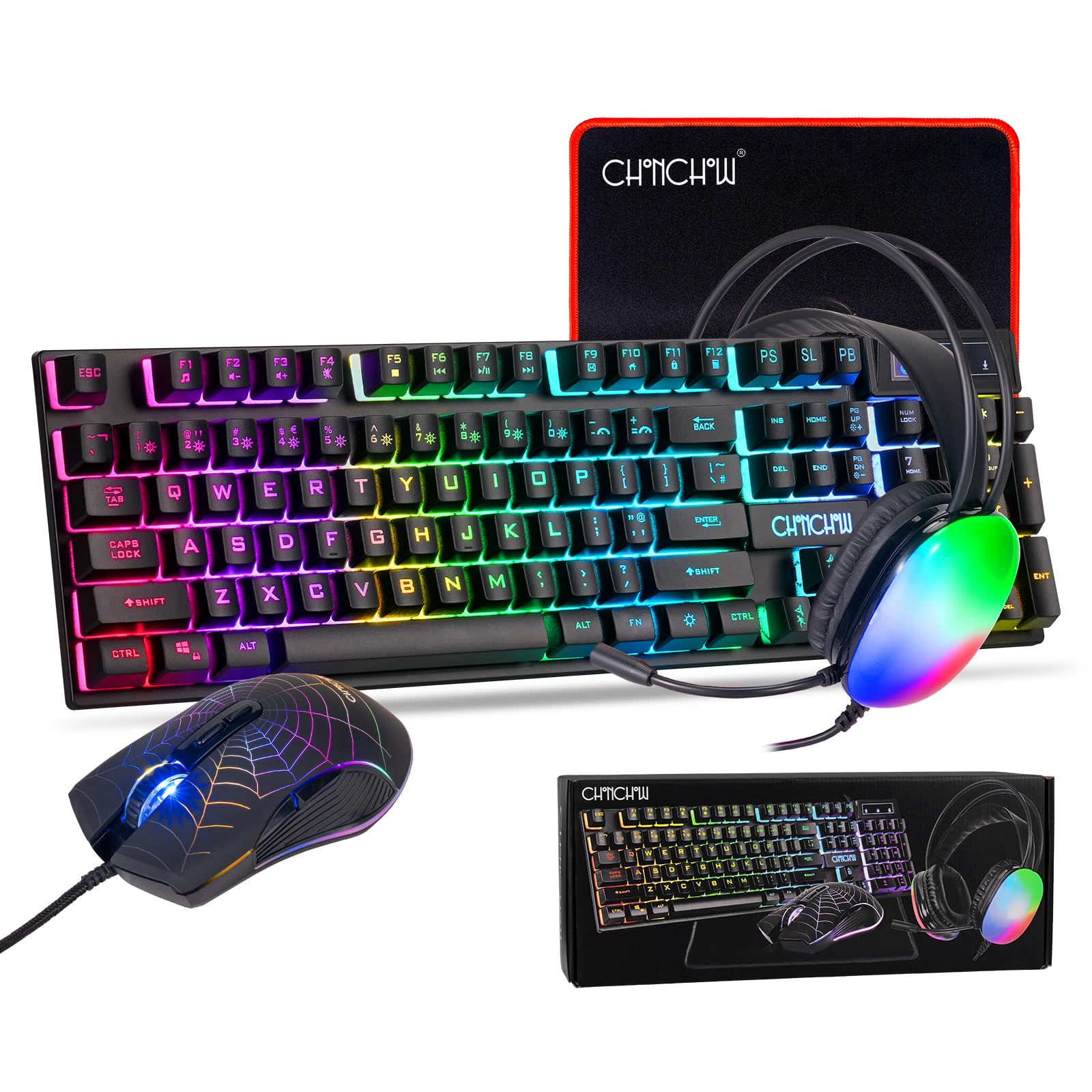
The CHONCHOW 4-in-1 bundle throws in a keyboard, mouse, headset, and mouse pad for a single price — making it the ultimate starting point for first-time PC gamers or anyone building a budget rig from scratch. The full-size 104-key keyboard features 26 anti-ghosting keys and 10 dynamic RGB backlight modes with 5 adjustable brightness and speed levels, plus a dedicated game mode that disables the Windows key to prevent accidental alt-tab exits.
The ergonomic claw-grip mouse offers 4 DPI levels (800/1600/2400/3200) with 7-color breathing backlight that can be turned off. The included wired headset has dual 50mm audio drivers for clear stereo sound, an adjustable headband, soft ear cushions, and a 360-degree omnidirectional microphone for in-game communication. The 290x250mm non-slip mouse pad completes the setup with a smooth cloth surface for precise tracking.
All components use USB wired connections with plug-and-play compatibility across PC, PS4, PS5, Xbox, and Mac. Build quality is entry-level — the keyboard uses double-shot injection keycaps that won’t fade, but the overall feel is basic compared to dedicated combos. This bundle is ideal for parents setting up a child’s first gaming PC or for anyone who wants a complete workstation upgrade in a single order without worrying about component matching.
Why it’s great
- 4 components in one purchase — keyboard, mouse, headset, mouse pad
- 26-key anti-ghosting and 10 RGB modes with brightness adjustment
- Plug-and-play across PC and consoles, no software needed
Good to know
- Entry-level build quality — not as durable as dedicated combos
- Mouse DPI limited to 3200; headset audio is basic stereo
FAQ
Can cheap gaming keyboards handle fast FPS gameplay like Valorant or Overwatch?
Do wireless budget combos have noticeable input lag compared to wired?
How long do budget gaming keyboard and mouse combos typically last?
Which console gaming systems support these PC gaming keyboard and mouse combos?
Final Thoughts: The Verdict
For most users, the best cheap gaming keyboard and mouse winner is the Redragon S101-3 PRO because it offers genuine software-level customization — macro recording, per-key RGB, and hardware-saved profiles — features typically reserved for combos costing twice as much, plus a high-performance 7200 DPI sensor. If you want a completely quiet typing experience for shared spaces, grab the SABLUTE Gaming Combo with its detachable wrist rest and multimedia knob. And for a zero-cable desk setup without breaking the bank, nothing beats the wireless freedom of the CHONCHOW Wireless Combo.

Mo Maruf
I created WellFizz to bridge the gap between vague wellness advice and actionable solutions. My mission is simple: to decode the research and give you practical tools you can actually use.
Beyond the data, I am a passionate traveler. I believe that stepping away from the screen to explore new environments is essential for mental clarity and physical vitality.