Our readers keep the lights on and my smoothie glass nicely filled. As an Amazon Associate, I earn from qualifying purchases.
Specs are compiled from manufacturer listings and verified buyer reviews and can change over time — please confirm the key details on the product page before buying.
You want to hear every footstep and gunshot the instant it happens, but spending a lot on a gaming headset makes you wince. Most budget-friendly earbuds add a noticeable delay, turning quick reflexes into late reactions. This guide cuts through the noise to find the few models that deliver low-latency sound without wrecking your wallet.
I’m Mohammad Maruf — the founder and writer behind WellFizz. This guide is built by comparing the manufacturers’ published specifications and the patterns across verified customer reviews, so you get each pick’s real strengths and trade-offs instead of marketing spin.
Whether you play on PC, console, or mobile, a pair of cheap gaming earbuds can give you a real competitive edge if you know which specs matter most — we break it all down here.
Quick Picks
- ONIKUMA T27 New Version Wireless Gaming Earbuds — Best Overall
- Middle Rabbit SW5 Wireless Gaming Earbuds — Top Performer
- KASOTT 2.4GHz Wireless Gaming Earbuds — Best Value
- Transformers T76 Bluetooth 6.0 Wireless Gaming Earbuds — Premium Pick
- Vibes 202M Wired Earbuds (Audiovance) — Zero Lag Pick
- YOVDA K98 Wireless Gaming Earbuds — Budget Champion
How To Choose The Best Cheap Gaming Earbuds
Picking the right budget-friendly gaming earbuds depends on a few hard specs — not flashy lights or big brand names.
Latency: The Number That Decides Your Reaction Time
Latency is the delay between a sound happening in the game and you hearing it in your ear, measured in milliseconds (ms). You want this number as low as possible — anything under 40ms is typically good for casual play, but competitive gamers should aim for 20ms or less. — anything under 40ms is typically good for casual play, but competitive gamers should aim for 20ms or less. A high latency (over 100ms) creates a noticeable lip-sync delay that makes shooters and rhythm games feel sluggish. Wireless earbuds that use a 2.4GHz USB dongle (a small plug for your device) almost always beat pure Bluetooth models on this spec.
Wireless Connection: Bluetooth vs. 2.4GHz Dongle
Standard Bluetooth connections usually add 100ms to 200ms of latency, which is too slow for gaming. A 2.4GHz wireless dongle (a small plug you insert into your PC, console, or USB-C port) creates a direct radio link that cuts latency to 20ms or 30ms. Some earbuds now offer a dual-mode setup — letting you use the dongle for gaming on your console while staying connected via Bluetooth to your phone for calls. If you play on a PlayStation, Xbox, or Nintendo Switch, a dongle is basically essential.
Battery Life: Reading Between the Numbers
Many budget-friendly listings claim “30 hours” or “40 hours” of total playtime, but that figure usually includes the charging case. The earbuds themselves typically hold 4 to 8 hours per charge — a much more honest number. For example, one model in this list claims 30 hours total, but the earbuds last only about 6 hours before they need to go back in the case. Buyer reports frequently point out this discrepancy, so keep an eye on the per-charge number rather than the total.
Quick Comparison
| Model | Best For | Latency | Connection | Per-Charge Battery | Amazon |
|---|---|---|---|---|---|
| ONIKUMA T27 | Lowest Latency | 20ms | 2.4GHz + Bluetooth 5.3 | 6 Hours | Amazon |
| Middle Rabbit SW5 | App Control | 20ms | 2.4GHz + Bluetooth 5.4 | 8 Hours | Amazon |
| KASOTT 2.4GHz | ANC on a Budget | 30ms | 2.4GHz + Bluetooth 5.4 | 8 Hours | Amazon |
| Transformers T76 | Build Quality | Low (Game Mode) | Bluetooth 6.0 | 5-6 Hours | Amazon |
| Vibes 202M (Wired) | Zero-Lag Audio | 0ms (Wired) | 3.5mm Wired | No Battery Needed | Amazon |
| YOVDA K98 | Ultra Budget | 65ms | Bluetooth 5.1 | 6 Hours | Amazon |
In‑Depth Reviews
1. ONIKUMA T27 New Version Wireless Gaming Earbuds

The lowest latency on the list, giving you a direct-wire feel without the bulk of a headset.
You get a wired-tight 20ms response here. Typical Bluetooth earbuds usually add about 100ms to 200ms of latency. The dual-mode 2.4GHz plus Bluetooth 5.3 connection means you plug the USB-C dongle (a small plug) into your PS5, PC, or Nintendo Switch for lag-free sound, while the Bluetooth channel stays linked to your phone for incoming calls. Reviewers report that the audio syncs perfectly with rhythm games and first-person shooters on a Steam Deck and PS5, calling the sound “crisp” with “strong bass” and good spatial awareness.
The battery gives you about 6 hours per charge (the included case tops them up), though one reviewer noted the volume is not loud enough for some gaming scenarios. Another mentioned the earbuds connect one at a time to a single device, which limits stereo audio to one source. Still, for the price, the combination of a 20ms latency and dual-device connectivity is tough to top.
The ENC (Environmental Noise Cancellation) mic quiets background noise during squad chat, and the 13mm dual dynamic drivers deliver punchy bass and clear highs. The package includes the charging case, a USB-C dongle, a USB-A adapter, extra ear tips, and a charging cord.
Low-latency wireless comfort
- Fastest latency on the list at 20ms for near-zero lag
- Dual-mode connection lets you game on console and take calls on your phone
- USB-C dongle works with PS5, PC, Switch, and Steam Deck right from the start
Mediocre battery life
- Some users find the max volume too low for competitive gaming
- One buyer mentioned only one earbud connects per device, limiting stereo use
- Pairing process can be finicky according to a few buyers
Budget gamers: you play across multiple platforms (PS5, PC, Steam Deck) and want the fastest possible wireless lag on a budget.
Long sessions: you need very loud audio or prefer a simple single-device pairing experience.
2. Middle Rabbit SW5 Wireless Gaming Earbuds
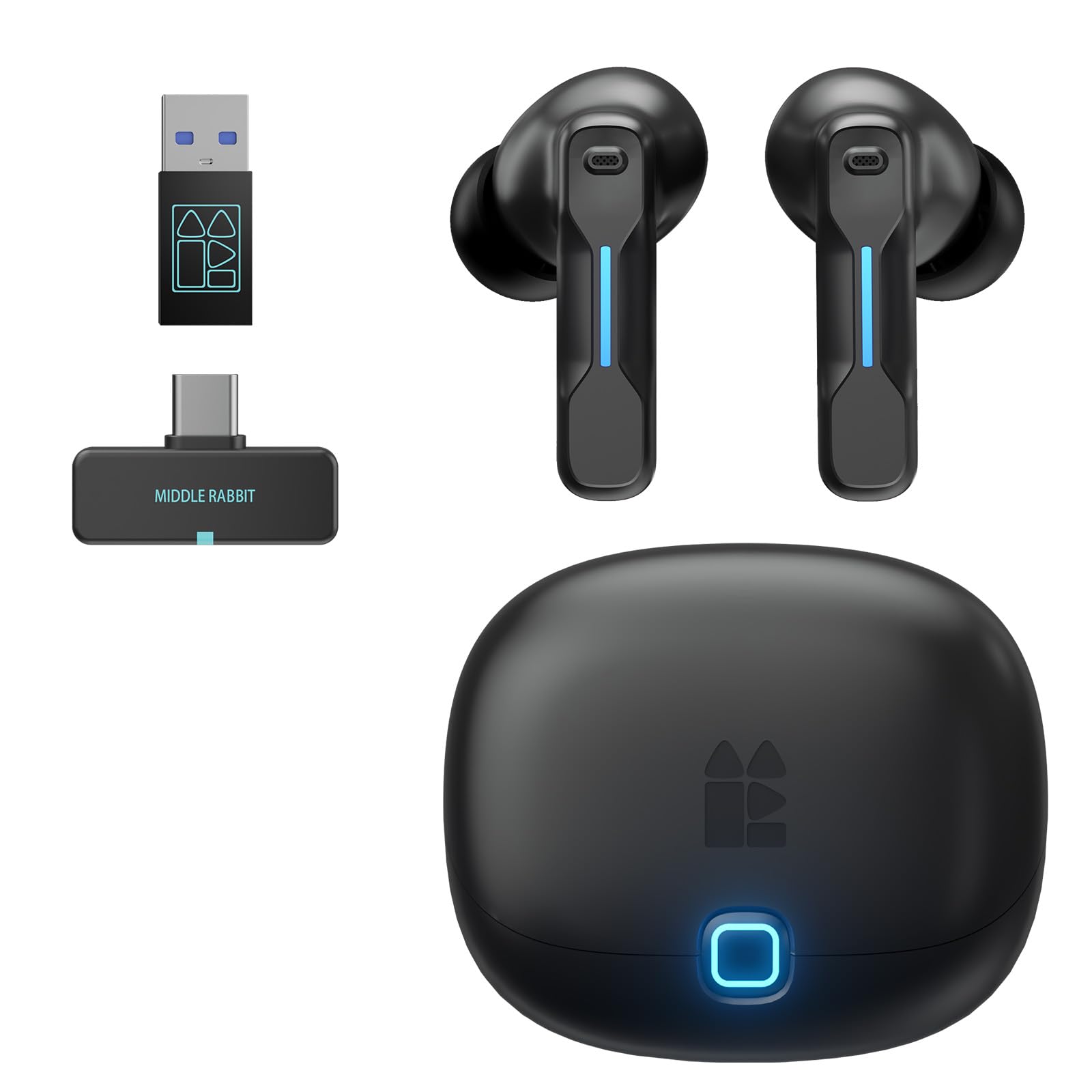
Surprising app customization and a 20ms dongle that keeps your audio perfectly in sync.
The Middle Rabbit SW5 matches the ONIKUMA T27 on latency (20ms) using the LC3 audio codec through its 2.4GHz dongle, but it adds a layer of polish the others lack — a dedicated mobile app. You can switch between Music, Game, and Podcast EQ presets, or create a custom curve to boost footsteps or reduce bass. One owner reported the app also enables OTA firmware updates and battery monitoring, calling it “a great upgrade experience” over the previous SW4 model.
Battery life per charge sits at roughly 6 to 8 hours, though a verified buyer reported the left earbud became extremely quiet after a few days — a durability concern worth noting. The AI-enhanced HD microphone impressed most users, with one mentioning “crisp voice chat” and solid background noise rejection. The dual-device connectivity allows you to keep a Discord call running on your phone while gaming on your PS5, all through the same earbuds.
Stable 2.4GHz connection
- App-based EQ presets and OTA firmware updates are rare at this price tier
- Dual-device connection works smoothly for game audio + voice chat
- Comfortable for 4 to 6 hours of continuous wear, per multiple reviews
Bulky charging case
- One unit had a left earbud fail after a few days — build quality can vary
- Touch controls can be unresponsive, requiring precise taps
- No active noise cancellation; relies on passive seal from ear tips
PC gaming: gamers who like to fine-tune sound profiles and want a smooth console-to-phone audio handoff.
Portability: reliability reports are mixed, so buy from a return-friendly retailer.
3. KASOTT 2.4GHz Wireless Gaming Earbuds
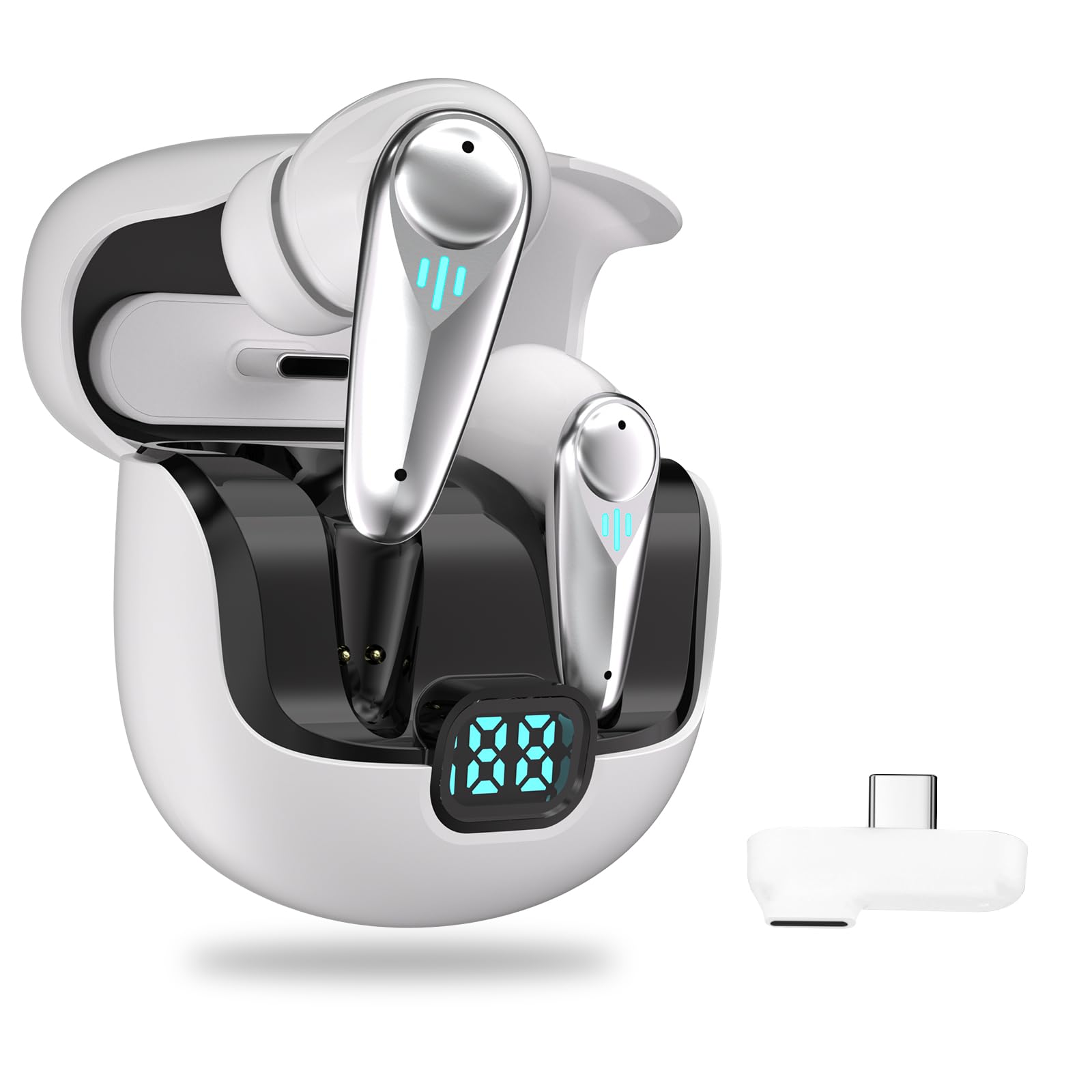
Active noise cancellation at a budget price, with a solid 30ms dongle for console gaming.
This is the only pair on the list that includes active noise cancellation (ANC), which uses tiny microphones to block out ambient sound. The 2.4GHz dongle delivers a 30ms latency, which is slightly slower than the 20ms models above but still well under the threshold where most gamers notice a delay. The KASOTT earbuds are compatible with Meta Quest 3/2, Steam Deck, PS5/PS4, PC, and Nintendo Switch right from the start.
However, buyer reports reveal a real battery problem. The listing claims the buds last 8 hours per charge (40 hours total with the case), but one verified review states “the battery life doesn’t last over 2 hours which the company claims more.” That is a steep drop, so treat the official numbers with caution. Another reviewer noted the sound is “muffled” compared to their previous earbuds, and the touch sensors are overly sensitive — you can accidentally change settings just by adjusting the fit.
Dedicated dongle reliability
- Active noise cancellation at a near-entry-level price point
- Works with Quest VR headsets, making it a solid pick for VR gaming
- USB-C fast charging: 10 minutes gives you about 4 hours of play, per the listing
Limited codec support
- Real battery life may be far shorter than advertised — some users report under 2 hours
- Sound quality described as “muffled” compared to other budget earbuds
- Over-sensitive touch controls lead to accidental commands
Competitive play: VR gamers on a Quest headset who want ANC to block out room noise without spending premium money.
Audiophiles: the battery gap between the spec sheet and real life is the widest on this list — plan for shorter sessions.
4. Transformers T76 Bluetooth 6.0 Wireless Gaming Earbuds
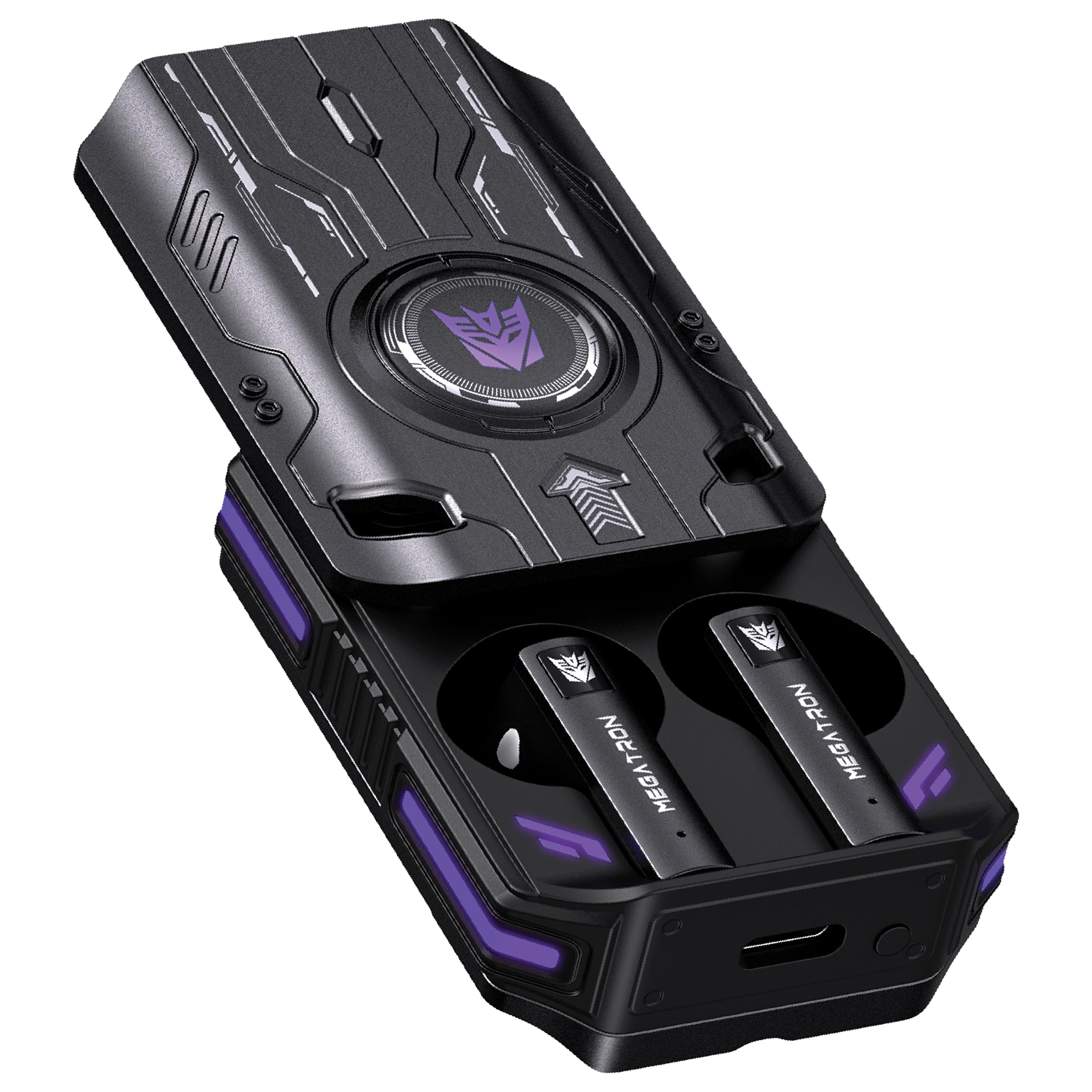
The mecha-style zinc alloy case is the toughest thing you will pull out of your pocket.
Unlike most earbuds that ship in a flimsy plastic charging case, the T76 comes in a zinc alloy Cyber-Armor case that actually feels indestructible — reviewers call it “sleek” and “durable.” Inside, the 13mm dynamic drivers produce solid bass and clear mids, and the low-latency Game Mode syncs footsteps and shots with no noticeable delay. The Bluetooth 6.0 connection offers a range of about 28 to 32 feet (or 9.15 meters per the spec sheet).
The total 40-hour playtime is split into about 5 to 6 hours per earbud charge, with the 500mAh case providing multiple top-ups. USB-C fast charging takes about 2 hours for a full case charge. There are no customer reviews yet for this model, so buyer feedback on real-world battery life and durability is not available — be aware you are buying on brand specs alone. It works with smartphones, tablets, laptops, and Bluetooth-enabled gaming devices like the Nintendo Switch and Steam Deck.
Transformer aesthetic design
- Zinc alloy charging case is far more durable than standard plastic cases
- Bluetooth 6.0 is the newest standard on this list for stable connectivity
- 13mm drivers deliver good bass and clarity for music and gaming
Unstable Bluetooth sync
- No verified customer reviews yet — no real-world feedback to confirm claims
- Bluetooth-only connection means higher latency than 2.4GHz dongle models
- Limited to Bluetooth-compatible devices; no dongle for consoles without Bluetooth
Collectors: you want a durable, stylish carrying case and prefer the newest Bluetooth standard for daily music and casual gaming.
Reliability seekers: you need guaranteed low latency for competitive play — without a dongle, lag is a risk.
5. Vibes 202M Wired Earbuds (Audiovance)
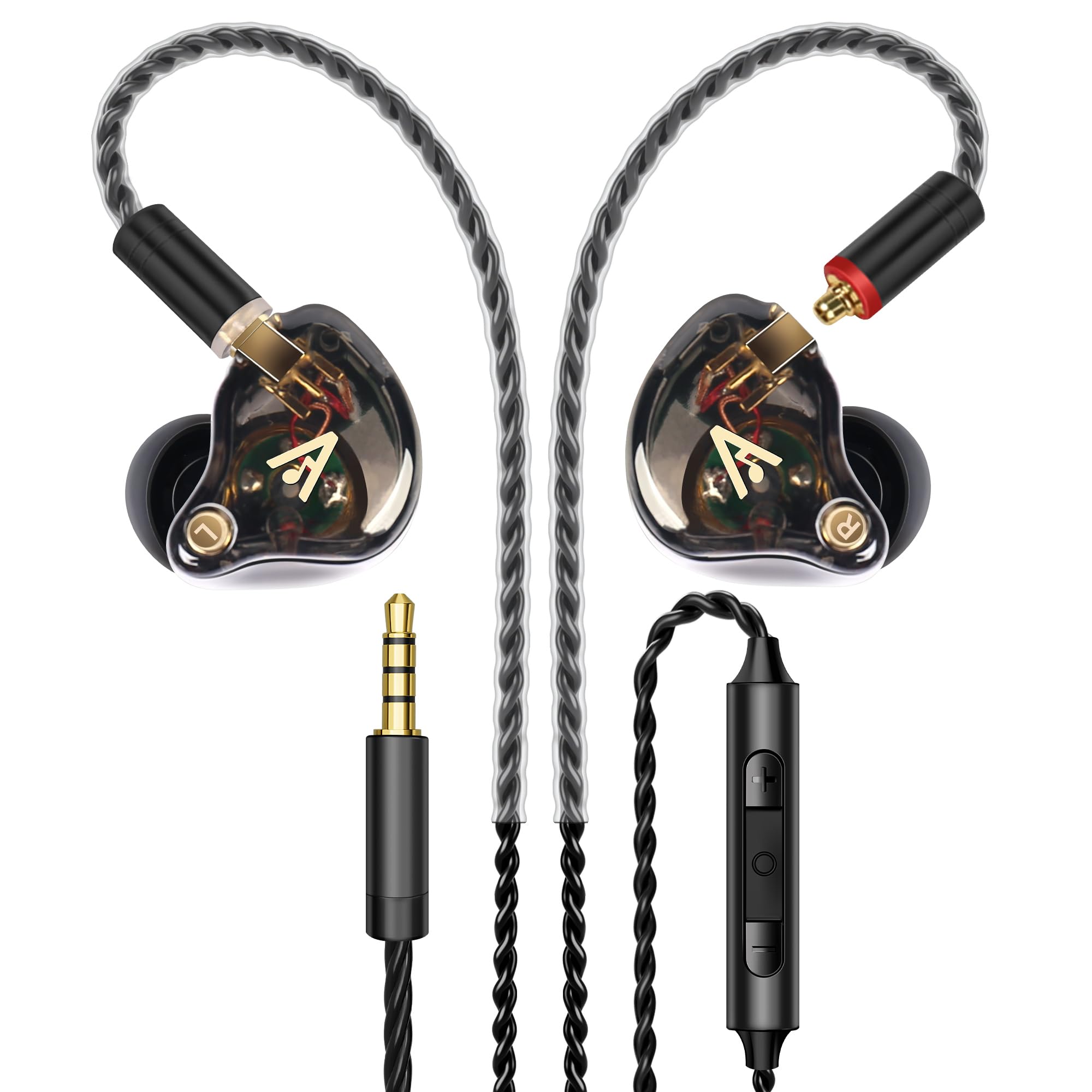
The only wired option here, but it delivers a perfect zero-lag connection that no wireless earbud can match.
If you absolutely cannot tolerate any audio delay, the Vibes 202M bypasses the problem entirely — no battery, no Bluetooth, just a direct analog connection through a 3.5mm jack. The 1-Tesla dynamic driver produces HiFi sound across an 8Hz to 23kHz frequency range, and buyers consistently call the clarity “amazing,” saying it rivals headphones that cost more. The silver-plated Litz-braided cable is detachable via MMCX connectors (a common two-pin plug), so you can replace the cord if it ever fails — a smart touch for long-term use.
The kit is generous: six pairs of ear tips in two colors and three sizes, a hard carrying case, and a carabiner. Reviewers praise the noise isolation (it blocks ambient sound passively), the comfortable over-ear hooks, and the inline microphone with volume control. The catch is the cord itself — at about 55 inches (1.4 meters), it is long enough for desktop use but can get in the way on the go. It also lacks a USB-C plug, so you will need an adapter for modern phones or consoles that have dropped the 3.5mm port.
Rich wired soundstage
- Zero audio latency — a hard-wired connection is always in perfect sync
- HiFi sound quality that buyers report beats many wireless options
- Detachable MMCX cable means you can fix it rather than replace the whole set
No wireless freedom
- Wired only — no Bluetooth option for phone calls or wireless convenience
- Long cord can be cumbersome outside a stationary gaming setup
- Requires a 3.5mm port or adapter; no native USB-C or Lightning plug
Studio monitoring: competitive PC and console gamers who value absolute audio sync and sound quality over wireless freedom.
Mobile use: you need to move around the room, want to connect to a phone without a dongle, or hate dealing with cables.
6. YOVDA K98 Wireless Gaming Earbuds

The entry-level all-rounder with flashy lights and a real gamble on battery life.
This is the cheapest option on the list, and its limitations show why you sometimes get what you pay for. The 65ms latency is fine for casual mobile gaming or watching videos, but it is noticeably slower than the 20ms and 30ms options above — you may feel a slight lag in fast shooters. The standout feature is the breath RGB LED lighting on the earbuds, which glows in three color gradients and is aimed at younger gamers who want a bit of flash.
The battery situation is messy. The listing says “25 hours Play time” total, but the spec on the box reportedly says 6 hours per charge — a discrepancy one verified buyer called out directly, saying “package says 6hr, listing says 25hr.” The earbuds use a 90-degree Hall switch (a magnetic sensor) to auto-pair when you open the case, which works reliably for most phones. However, reviews mention frequent disconnects when used with a PC (the intended target for some buyers), and the average sound quality does not stand out. It does include a game mode (long-press the right bud for 2 seconds) that helps a little with sync.
Affordable RGB lighting
- Cheapest entry point into wireless gaming earbuds with low-latency game mode
- Glaring RGB LED lights appeal to younger, style-focused players
- Auto-pair Hall switch makes connection on smartphones simple and fast
Plastic build quality
- Battery life claim is disputed — expect closer to 6 hours per charge, not 25
- Bluetooth 5.1 is two generations old; range is limited to about 10 meters
- Not reliable for PC gaming; one customer observed constant disconnects
RGB enthusiasts: a kid’s first pair of gaming earbuds for mobile games where the RGB lights are the main attraction.
Durability: you need dependable PC compatibility or consistent battery life — this is a gamble even at the low price.
Understanding the Specs
Latency (measured in milliseconds)
This is the delay between a sound being produced in the game and you hearing it in your ear. A low latency (under 40ms) means footsteps, gunshots, and voice cues sync instantly with what you see on screen. Higher latency (over 100ms) creates a noticeable lag that makes games feel unresponsive. Wireless gaming earbuds that use a dedicated 2.4GHz dongle (like a small USB plug) typically hit 20ms to 30ms, while standard Bluetooth models often lag at 100ms to 200ms. Wired earbuds have zero latency.
2.4GHz vs. Bluetooth connection
Standard Bluetooth is designed for convenience, not speed — it introduces a delay that is fine for music but ruins gaming sync. A 2.4GHz wireless connection uses a dedicated USB-C or USB-A dongle that creates a direct radio link between the earbuds and your device. That link is much faster and more stable for gaming. Some modern earbuds offer dual-mode: the dongle connects to your console for low-latency game audio, while Bluetooth stays linked to your phone for calls. If you play on a PS5, Switch, or PC, look for earbuds that come with a 2.4GHz dongle.
FAQ
Will cheap gaming earbuds work with my PlayStation 5 or Xbox?
What is the difference between 20ms latency and 65ms latency for gaming?
Can I use gaming earbuds for regular music and calls too?
How long do cheap gaming earbuds typically last on a single charge?
Do I need a 2.4GHz dongle, or is Bluetooth enough for gaming?
What does “gaming mode” on earbuds actually do?
Will cheap gaming earbuds work with Nintendo Switch?
Are wired or wireless gaming earbuds better for competitive play?
Why do some cheap gaming earbuds have RGB lights?
Can I use a single earbud for gaming while the other charges?
Final Thoughts: The Verdict
For most buyers, the cheap gaming earbuds winner is the ONIKUMA T27 because it combines the lowest 20ms latency with dual-device connectivity at a price that undercuts almost every competitor. If you want app-controlled EQ and a slightly longer 8-hour battery, grab the Middle Rabbit SW5. And for absolute zero-lag audio that never needs charging, the standout is the wired Vibes 202M.
How We Picked
We do not accept paid placement. Every pick is matched to a real buyer and a real use-case; we do not hands-on test units.
Sources & Methodology
Specifications: manufacturer listings and product documentation. Review insights: verified customer reviews, as of July 2026. Pricing: not shown on this page (it changes often); check the current price via the retailer link.
As an Amazon Associate, WellFizz earns from qualifying purchases. This does not affect which products we feature.

Mo Maruf
I created WellFizz to bridge the gap between vague wellness advice and actionable solutions. My mission is simple: to decode the research and give you practical tools you can actually use.
Beyond the data, I am a passionate traveler. I believe that stepping away from the screen to explore new environments is essential for mental clarity and physical vitality.