Our readers keep the lights on and my smoothie glass nicely filled. As an Amazon Associate, I earn from qualifying purchases.
Specs are compiled from manufacturer listings and verified buyer reviews and can change over time — please confirm the key details on the product page before buying.
Too many cheap gaming desks look like a deal until your monitor sways with every mouse flick. The real challenge is finding a desk that feels solid under your gear without emptying your wallet. This guide cuts through the flimsy options to show you which affordable gaming desks deliver real stability, useful features, and enough space to keep your setup organized.
I’m Mohammad Maruf — the founder and writer behind WellFizz. This guide is built by comparing the manufacturers’ published specifications and the patterns across verified customer reviews, so you get each pick’s real strengths and trade-offs instead of marketing spin.
These selections cover power outlets, LED lighting, storage, and overall sturdiness — everything that defines a good cheap gaming desk that won’t let you down mid-session.
Quick Picks
- Korfile 59 inch L Shaped Computer Desk with Power Outlets — Best Overall
- ODK 66″ L Shaped Gaming Desk with Power Outlet and LED Lights — Premium Pick
- EnHomee 56.5″ Office Desk with Drawers and Printer Space — Best Value
- ODK 53 Inch L Shaped Gaming Desk with LED Lighting — Compact Corner
- AODK 48 Inch Gaming Desk with LED Lights — Mid-Range Straight
- Korfile 40 Inch Gaming Desk with Power Outlet & LED Lights — Compact L-Shape
- Lufeiya Small Desk with Power Outlets and LED Lights, 32 Inch — Budget Champ
How To Choose The Best Cheap Gaming Desk
Picking a budget gaming desk means you have to weigh a few trade-offs that just do not come up with pricier options. The frame, the features, and how much assembly you are willing to do — each one makes a real difference in what your desk will feel like once everything is on it.
Frame Material and Leg Design
Metal legs with a thick steel frame are the foundation of a desk that will not wobble. Look for X-shaped or double Z-shaped leg supports — they add cross-bracing that keeps the desk steady when you are in a fast game. Particle board tabletops are standard at this price range, but a powder-coated metal frame underneath is what stops the shaking.
Power Outlets and USB Ports
Built-in power strips with AC outlets and USB ports save you from crawling under the desk to plug in your phone or headphones. The best budget desks come with at least 2 AC sockets and 2 USB ports (some include a Type-C port). That means your monitor, PC, phone charger, and LED strip can all run from one integrated hub.
Size and Desk Shape
Measure your room before you buy. A 32-inch desk works for small dorm rooms but will feel cramped with a full-size tower and a 27-inch monitor. L-shaped desks (40 to 59 inches) use corners efficiently and give you separate zones for gaming and work. Straight desks around 48 to 53 inches are the balance for dual-monitor setups without eating the whole room.
Assembly Difficulty
Almost every desk in this price range requires self-assembly. Look for products that include labeled parts and clear step-by-step instructions — a good sign the process will not take more than an hour or two. Poorly aligned screw holes and unlabeled parts are the top frustration in customer reviews, so a desk with pre-labeled hardware saves you real headache.
Quick Comparison
| Model | Best For | Desktop Size | Frame Material | Power Ports | Amazon |
|---|---|---|---|---|---|
| Korfile 59″ L-Shaped | Multi-monitor workspace | 59″W | Steel frame | 3 AC + 1 USB + 1 Type-C | Amazon |
| ODK 66″ L-Shaped | Large rich gaming setup | 66″W (listed) | Metal frame | 3 AC + 2 USB | Amazon |
| EnHomee 56.5″ Desk | Office/gaming hybrid | 56.5″W | Metal frame | 3 AC + 2 USB | Amazon |
| ODK 53″ L-Shaped | Compact corner setup | 53″W | Alloy steel | 3 AC + 2 USB | Amazon |
| AODK 48″ Desk | Spacious straight desk | 48″W | Metal frame | None built-in | Amazon |
| Korfile 40″ L-Shaped | Small corner gaming nook | 40″W | Metal frame | 3 AC + 2 USB | Amazon |
| Lufeiya 32″ Desk | Compact teen or dorm setup | 32″W | Metal frame | 2 AC + 2 USB | Amazon |
In‑Depth Reviews
1. Korfile 59 inch L Shaped Computer Desk with Power Outlets
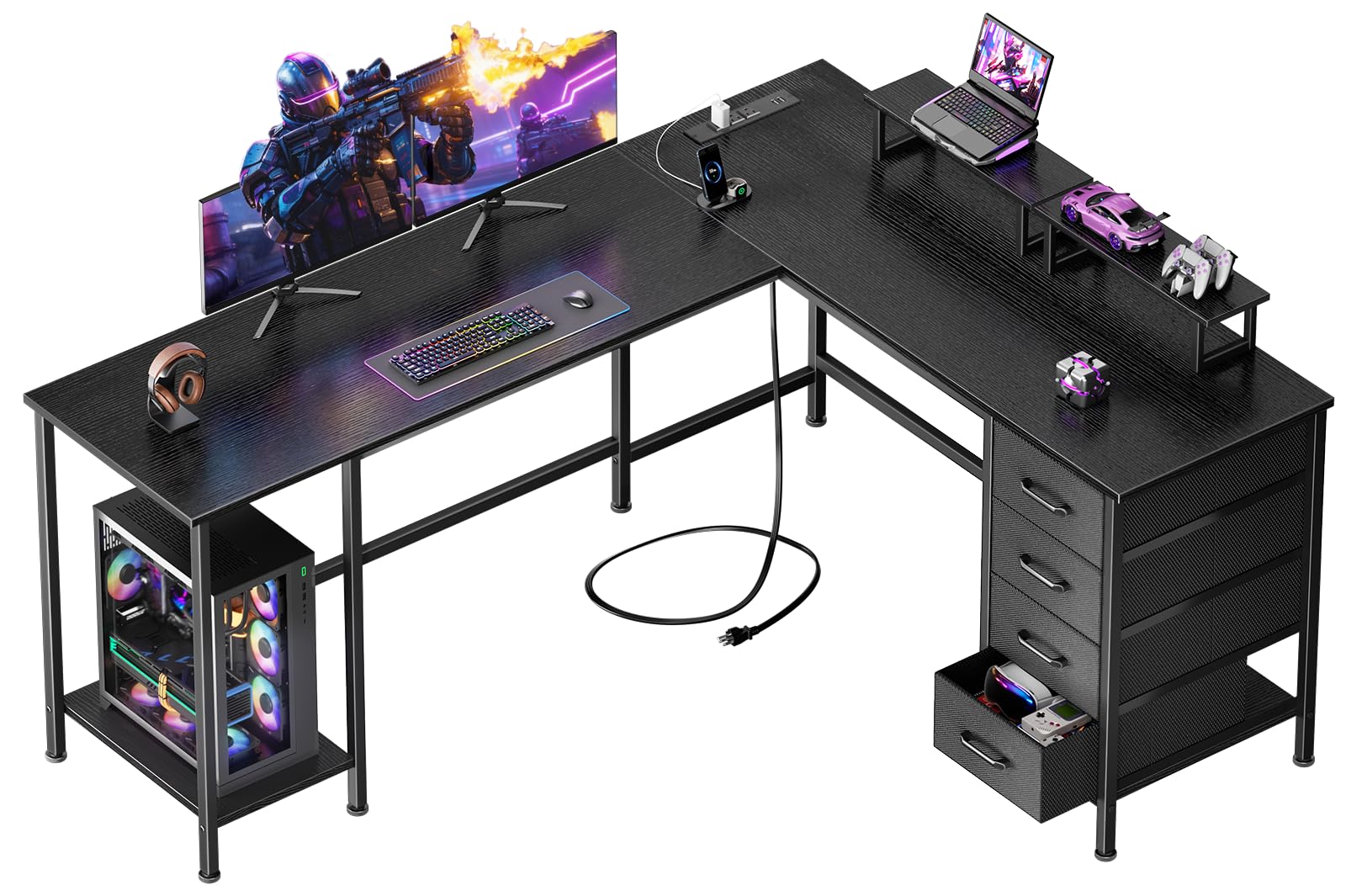
The L-shaped desk that gives you drawers, dual monitor stands, and a Type-C port without the premium price tag.
At 59 inches wide, this Korfile desk gives you room for a full multi-monitor battle station plus a dedicated PC tower stand that improve your computer off the floor — protecting it from dust and bumps. The four non-woven fabric drawers are repositionable, so you can slide storage exactly where you need it. One reviewer noted the L-shape tune corner space while providing enough room for multiple monitors, and buyers report it feels sturdy and stable for the cost.
The built-in charging station sets this apart from cheaper competition: you get 3 AC outlets, 1 USB port, and 1 Type-C port — so your phone, headset, and controller all plug in right at the desk surface. Unlike the ODK 53-inch L-Shaped below, this model also includes two adjustable monitor stands, making it easier to set both screens at ergonomic eye level without buying risers separately.
Corner-space champion: The reversible structure lets you switch between an L-shaped corner layout and a straight configuration, and the drawers can be repositioned to match. The desk supports up to 180 pounds, and adjustable feet keep it stable on carpet or uneven floors.
Best for: Gamers who need a spacious corner desk with drawers, a Type-C port, and dual monitor stands — all at a mid-range price.
Minor trade-off: The two monitor shelves do not screw down, so owners mention they can slide around a bit if you bump them.
2. ODK 66″ L Shaped Gaming Desk with Power Outlet and LED Lights

The biggest desk on the list, with a full monitor stand that doubles your usable surface and LEDs that remember your last setting.
This 66-inch L-shaped desk (listed size) is built for gamers who want maximum surface area. The center of the main desktop measures 36 inches long, which customers note makes room for a large monitor plus a laptop without crowding. The full monitor stand runs across the main section, lifting your screens to eye level while freeing up space underneath for a keyboard, controller dock, or small accessories.
The built-in LED strip offers 10 colors and 10 dynamic modes with a memory function, so it resumes your last color setting when you power it on — a detail cheaper LED desks often skip. You also get 3 AC outlets and 2 USB ports integrated into the frame. Reviewers point out the assembly takes 2 to 3 hours solo, but the instructions support both left and right orientations, and the desk feels sturdy once fully tightened.
Storage and stability: A 2-tier under-shelf with a computer tower stand and an adjustable 4-tier shelf give you organized space for a PC case, games, and extra gear. The premium MDF board and metal frame keep the desk stable even with three monitors and a heavy tower on it.
Reach for this if: You want a massive, rich gaming station with smart LED memory, a long monitor riser, and enough shelf storage to keep everything off the main surface.
Look elsewhere if: Your room cannot fit a 66-inch corner desk — measured diagonally, the actual desktop is 58 inches long on the main side, not the advertised 66, according to some buyer feedback.
3. EnHomee 56.5″ Office Desk with Drawers and Printer Space
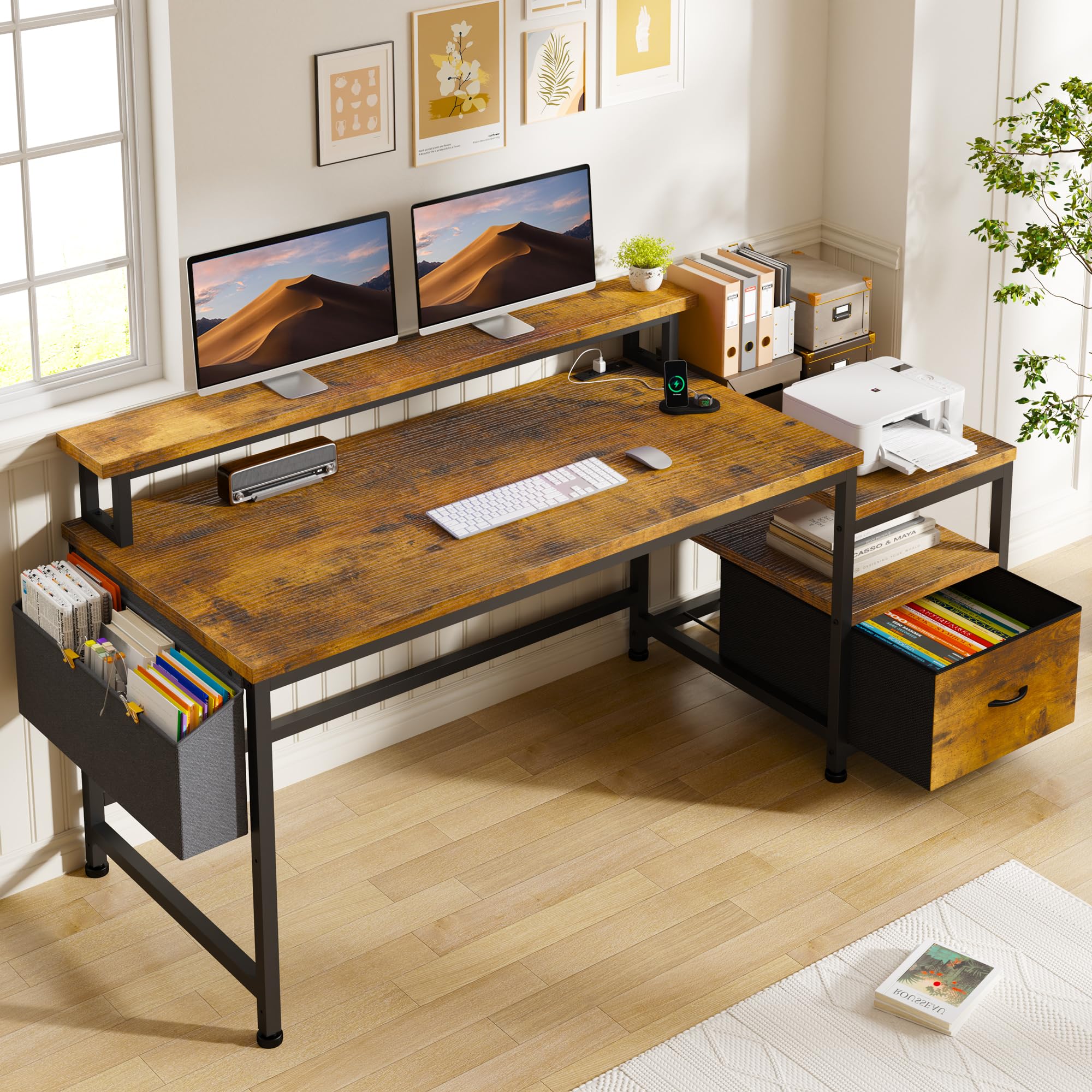
A hybrid desk that blends a full filing cabinet with a monitor stand and power hub, designed for work and play.
This 56.5-inch desk stands out because it includes a fabric filing cabinet with a drawer that fits standard A4 file folders — something no other desk on this list offers. The side shelf is deep enough for a printer or scanner, making this a rare option if you need to store office equipment alongside your gaming setup. The monitor stand measures 40 inches by 7 inches, long enough to hold two monitors side by side, according to reviews.
The charging station brings 3 AC outlets and 2 USB ports, so your desk becomes a central power hub. One buyer mentioned assembly took “hardly any time at all,” and shoppers say the desk is sturdy once fully assembled, even on carpet, thanks to the anti-slip leg pads. Unlike the Korfile 59-inch desk above, this model includes a wall anchor for extra tipping safety, which matters if you have kids or pets.
What stands out
- Fabric file drawer fits A4 documents — unique at this price
- Long 40-inch monitor stand holds two screens
- Wall anchor included for child/pet safety
What to know
- No LED lighting included — a neutral look
- Not a true L-shape; straight desk with side shelf
Dual-purpose pick: Best for students or remote workers who need file storage and a printer shelf alongside a dual-monitor gaming setup — it does both without looking out of place.
One gap: The rustic brown finish and lack of RGB lighting mean it does not scream “gamer” — pure enthusiasts should stick with the ODK or Korfile options above for LED ambiance.
4. ODK 53 Inch L Shaped Gaming Desk with LED Lighting

The space-efficient corner desk that packs shelves, a CPU stand, and RGB lighting into a 53-inch footprint.
This ODK L-shaped desk is 53 inches wide, making it a solid middle-ground between the compact 40-inch Korfile and the massive 66-inch ODK above. The X-shaped alloy steel frame is designed to add stability — a common weak point on budget L-desks. You also get dual shelves, a dedicated CPU stand, an accessory hook, and a storage bag, all integrated into the design. Buyers confirm the desk fits well in a bedroom or small gaming room without feeling cramped.
The LED lighting is more adjustable than most at this price: 10 color presets, 8 brightness levels, and 10 dynamic modes with a memory function. The charging station provides 3 AC outlets and 2 USB ports, plus cable management channels along the frame. Buyers report the desk is easy to assemble with pre-labeled parts, though a few mention the monitor shelf is too low for some larger monitors — check your monitor height before committing.
Smart storage layout: The side pocket holds books or a tablet, and the reversible side modules let you configure the desk for left or right corner placement. The adjustable foot pads keep the wobble away on uneven floors.
Good for: Gamers who want a corner desk with generous storage shelves and a CPU stand, but do not have space for a 59-inch or larger L-shape.
Watch out for: The monitor shelf height is fixed — if your monitor stands taller than about 12 inches without its base, it may not fit underneath.
5. AODK 48 Inch Gaming Desk with LED Lights
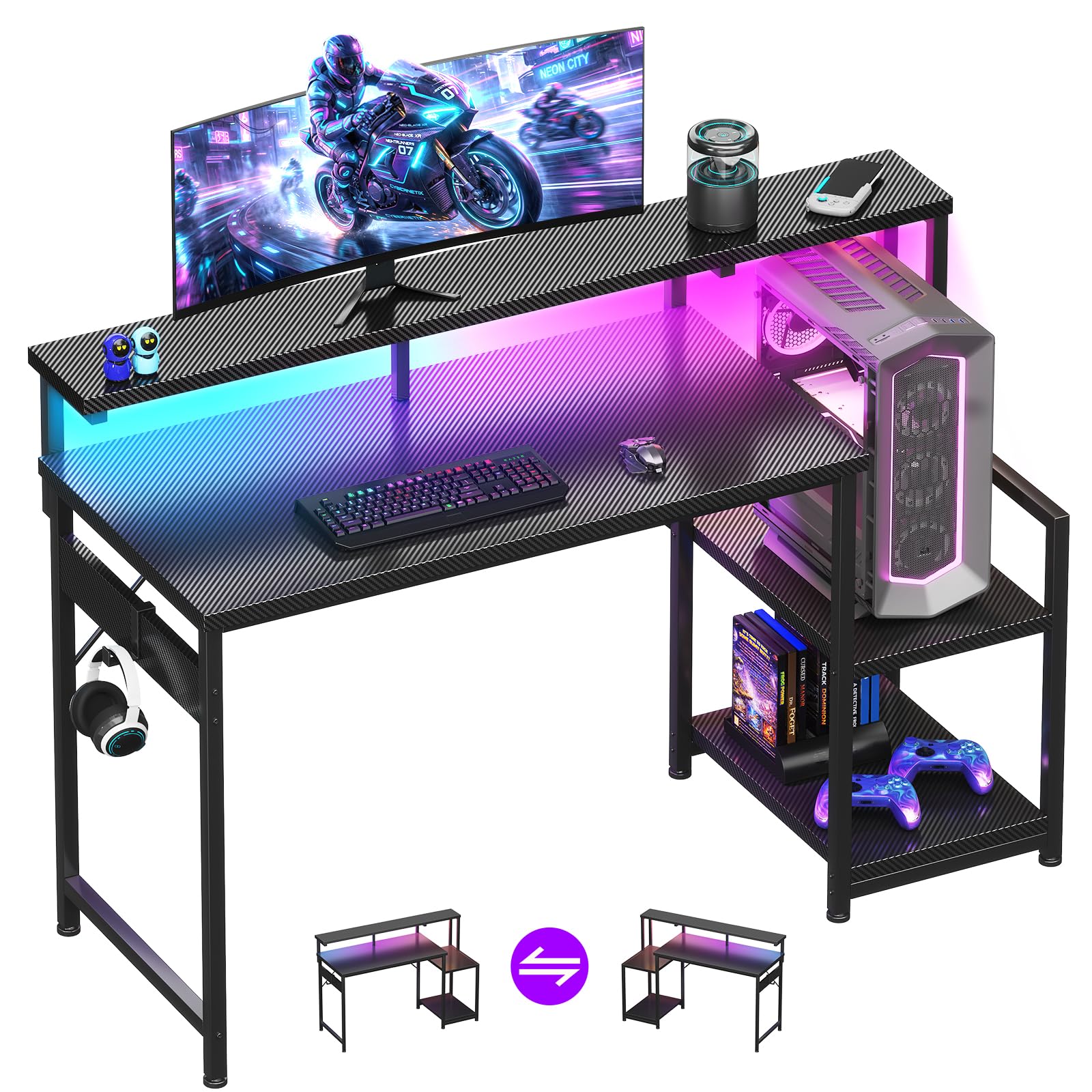
A 48-inch straight desk with a carbon fiber top and a reversible shelf — straightforward and solid for a pure gaming setup.
This AODK desk skips the L-shape complexity and delivers a clean 48-inch straight surface with a carbon fiber textured tabletop that resists scratches and spills. The full-length monitor shelf holds a monitor plus small decorative items, and buyers confirm the “48-inch surface fits monitor, keyboard, accessories” without crowding. The reversible storage shelf can go on the left or right side and adjusts to two heights, giving you flexibility to store the PC tower up high or accessories down below.
The LED light strip sits under the monitor shelf and offers 10 static colors and 10 dynamic modes. One difference versus the ODK models above: the AODK does not include a built-in power strip, so you will need to plug your gear into a separate surge protector. Setup takes about 30 to 45 minutes, and owners mention the instructions are easy to follow — just watch the leg labeling, as one owner reported the front and back legs are not marked, which caused a small rework.
Carbon fiber feel: The textured top gives a smooth, premium touch without the glossy fingerprints the Korfile’s lacquered finish picks up. The metal frame feels sturdy for a 48-inch span, and the monitor shelf reduces neck strain by lifting the screen to a comfortable viewing angle.
Best for: Gamers who want a no-nonsense straight desk with a quality-feeling carbon fiber surface and a reversible shelf, and do not need built-in power outlets.
skip it if: You rely on a desk-side power hub — this model has no integrated AC or USB ports, unlike every other full-size desk on this list.
6. Korfile 40 Inch Gaming Desk with Power Outlet & LED Lights
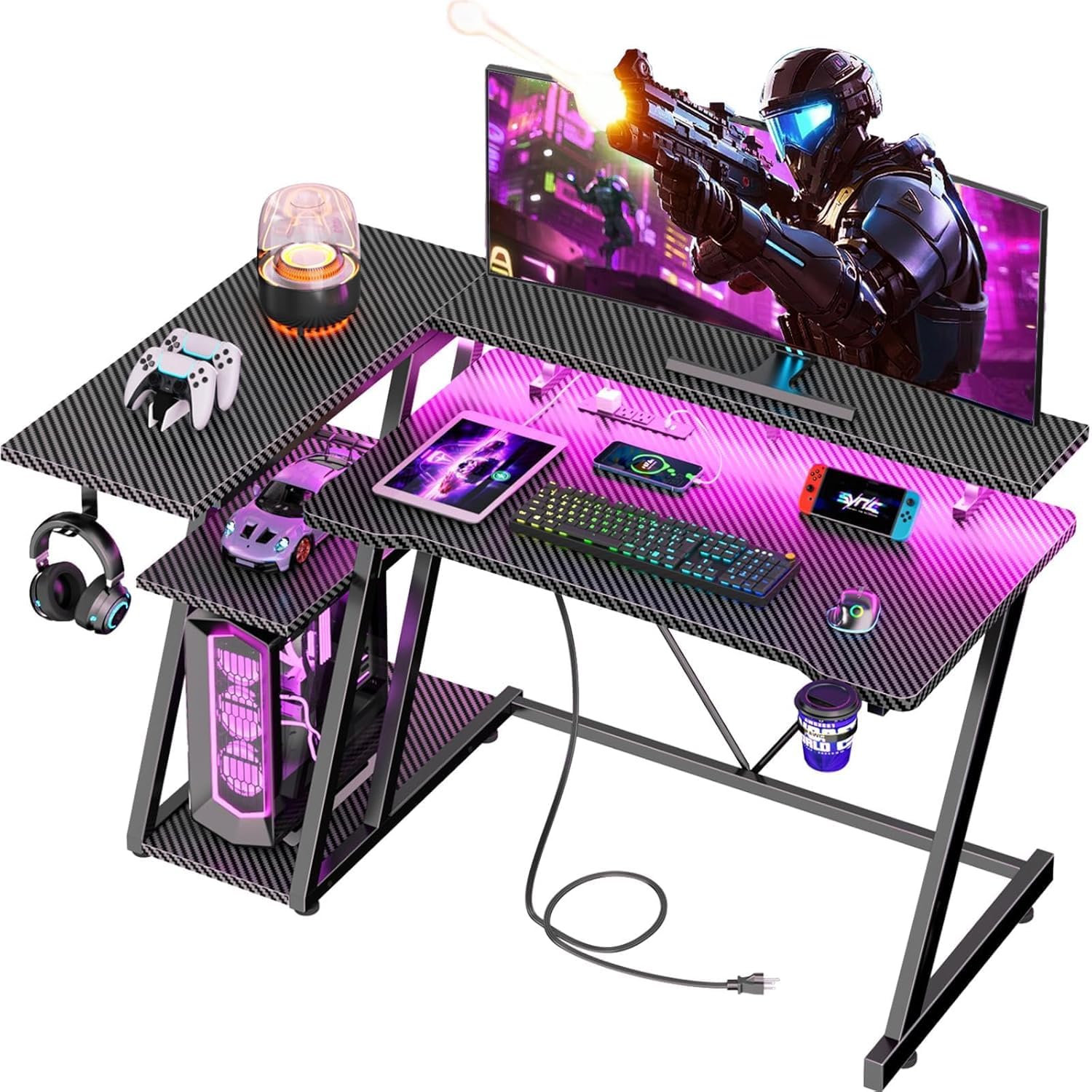
A petite L-shaped desk with app-controlled LEDs, a 220-pound capacity, and power outlets — big features in a small package.
This Korfile desk packs features usually found on larger models into a compact 40-inch L-shape. The RGB LED strip supports APP control, so you can change colors and modes from your phone without reaching under the desk. You get 3 AC sockets and 2 USB ports built into the frame — generous for a desk this size. One customer observed it “only took me maybe 40 minutes to put together,” making it one of the quickest builds on the list.
The double Z-shaped legs and adjustable leg pads keep the desk stable on uneven floors, and the frame holds up to 220 pounds — impressive for a compact unit. According to the maker, the monitor stand is long enough to hold two 24-inch monitors side by side. Like the ODK 53-inch model above, this desk is reversible and can even combine two units into a U-shaped configuration, but in practice most buyers use it as a single corner desk for a small gaming nook.
Smart extras: A cup holder and headphone hook come included. The carbon fiber texture MDF surface resists scratches and cleans easily — a good match for snack-and-game sessions.
Ideal for: Gamers in a tight corner space who still want app-controlled RGB, power outlets, and enough surface for dual 24-inch monitors.
One caveat: The main ledge is relatively small, and if your monitor has a large base, you may need to tuck it into the corner for a stable fit — several buyers noted this layout works better than expected once adjusted.
7. Lufeiya Small Desk with Power Outlets and LED Lights, 32 Inch

The smallest option here — 32 inches of desk with built-in power, RGB lights, and a monitor stand for tight budgets and tighter spaces.
If you are outfitting a dorm room, a kid’s bedroom, or a corner where every inch counts, this Lufeiya desk delivers the essentials in a very compact package. The 32-inch desktop includes a built-in power strip with 2 AC outlets and 2 USB ports, plus an RGB LED strip with 7 colors, 4 dynamic modes, and 16 static types. The monitor stand keeps your screen at eye level, which customers note helps maintain good posture during long study or gaming sessions.
The trade-off for the low price and tiny footprint is stability. One buyer frankly warned “the wobble is no good for gaming,” though they solved it by sticking Velcro to the back wall. The desk is made of thick particle board with a metal frame, and the included storage bag and two headphone hooks are removable. Assembly is quick — the hardware and instructions come in the box and require no extra tools — but the 32-inch width means a full-size gaming keyboard and mousepad will hang over the edges.
What you get
- Built-in 2 AC + 2 USB power strip
- RGB LED with 7 colors and 4 dynamic modes
- Monitor stand for ergonomic viewing height
- Removable storage bag and headphone hooks
What to consider
- 32-inch width is tight for a full gaming setup with a tower
- Wobble reported under gaming mouse movement — may need wall anchoring
Best for: A teen’s first gaming desk or a compact study desk where the priority is a small footprint and built-in power — not stability under intense gameplay.
Not for: Any gamer who needs a steady surface for competitive mouse work — look at the AODK 48-inch or the Korfile 40-inch above for a much more solid feel at a modest step up in price.
Understanding the Specs
Frame Material and Stability
The frame material (metal, alloy steel, or particle board) determines how much your desk will shake when you are in the middle of a game. A powder-coated metal or alloy steel frame with X-shaped or Z-shaped bracing holds everything steady. Particle board alone is a warning sign — it can flex under heavy monitors. Look for metal legs paired with a thick steel frame, and check if the desk includes adjustable foot pads for leveling on carpet or uneven floors.
LED Lighting and Power
Budget gaming desks often include RGB LED strips, but the quality varies. Look for at least 10 color presets and 10 dynamic modes (static, breathing, flash, etc.) — anything less feels limited. A memory function that remembers your last setting when you power the desk back on is a nice bonus you only get on a few models. For power, 3 AC outlets and 2 USB ports is the balance; it covers your monitor, PC, phone charger, and headset dock without needing an external power strip.
FAQ
Will a cheap gaming desk wobble with a heavy monitor?
What size gaming desk do I need for a dual monitor setup?
Are built-in power outlets safe on budget desks?
Can I assemble a cheap gaming desk by myself?
How much weight can a budget gaming desk hold?
What is the difference between a carbon fiber and a matte/wood desk surface?
Can an L-shaped desk be converted to a straight desk?
Do these desks come with cable management features?
What is the difference between a 2 USB port and a 2 USB + Type-C charging station?
How long does assembly usually take for these desks?
Final Thoughts: The Verdict
For the majority of shoppers, the cheap gaming desk winner is the Korfile 59-inch L-Shaped Desk because it combines a spacious 59-inch surface, a Type-C charging port, four fabric drawers, and dual monitor stands — all at a mid-range price that beats the competition on features-per-dollar. If you want maximum surface area and rich LED lighting, grab the ODK 66-inch L-Shaped Desk for its massive desktop and memory-function RGB lights. And for a hybrid workspace that doubles as a gaming station, the EnHomee 56.5-inch Desk brings a file cabinet and printer shelf that no other budget gaming desk offers.
How We Picked
We do not accept paid placement. Every pick is matched to a real buyer and a real use-case; we do not hands-on test units.
Sources & Methodology
Specifications: manufacturer listings and product documentation. Review insights: verified customer reviews, as of July 2026. Pricing: not shown on this page (it changes often); check the current price via the retailer link.
As an Amazon Associate, WellFizz earns from qualifying purchases. This does not affect which products we feature.

Mo Maruf
I created WellFizz to bridge the gap between vague wellness advice and actionable solutions. My mission is simple: to decode the research and give you practical tools you can actually use.
Beyond the data, I am a passionate traveler. I believe that stepping away from the screen to explore new environments is essential for mental clarity and physical vitality.