Our readers keep the lights on and my smoothie glass nicely filled. As an Amazon Associate, I earn from qualifying purchases.
Specs are compiled from manufacturer listings and verified buyer reviews and can change over time — please confirm the key details on the product page before buying.
A sore wrist or aching forearm after a long day at the keyboard isn’t something you just have to live with. The right shape changes your comfort completely — and you don’t need to spend a lot for real relief. This guide finds the most effective cheap ergonomic mouse options that deliver on their promise.
I’m Mohammad Maruf — the founder and writer behind WellFizz. This guide is built by comparing the manufacturers’ published specifications and the patterns across verified customer reviews, so you get each pick’s real strengths and trade-offs instead of marketing spin.
Whether you are battling early signs of carpal tunnel or want a more natural hand position, these picks focus on comfort first. This is your complete guide to the best cheap ergonomic mouse options that balance real wrist support with a price that won’t make you flinch.
Our Picks at a Glance


How To Choose The Best Cheap Ergonomic Mouse
An ergonomic mouse is about changing how your hand sits. Most use a vertical “handshake” angle that keeps your wrist straight and your forearm relaxed. Here is what to look for when you are shopping on a budget.
Hand Size and Grip Angle
The most important fit factor is your hand size. Many vertical mice are built specifically for small-to-medium hands or medium-to-large hands. The angle of the tilt matters too — common angles range from 57 to 59 degrees. A steep angle forces a more upright grip, which some find relaxing and others find tiring at first. Plan on a one-to-two week adjustment period.
Connectivity: Bluetooth vs. 2.4GHz
A 2.4GHz connection uses a tiny USB receiver for a stable, plug-and-play link — no pairing needed. Bluetooth lets you switch between devices like a laptop and a tablet without swapping dongles. Many budget models offer both, letting you connect up to three devices at once. Just note that the most affordable models often skip Bluetooth entirely.
DPI and Sensor Sensitivity
DPI (dots per inch) measures how fast the cursor moves across the screen. A higher DPI number means the cursor zips farther with less physical movement. Most budget ergonomic mice offer three or four adjustable levels, typically ranging from 800 to 4000 DPI. Lower settings are better for precision tasks like photo editing; higher settings suit big monitors or fast-paced work.
Quick Comparison
| Model | Best For | DPI Range | Connectivity | Buttons | Amazon |
|---|---|---|---|---|---|
| Uineer Wireless Ergonomic Mouse★ Best Overall | Best Overall: Small-medium hands, multi-device users | 800 – 2400 | Bluetooth 5.0/4.0 + 2.4GHz | 6 | Amazon |
| PHILIPS Ergonomic Wireless Mouse (SPK7858)Top Performer | Multi-device with USB-A/C, dual scroll wheels | 800 – 4000 | Bluetooth + 2.4GHz (USB-A/C) | 5 | Amazon |
| PHILIPS SPK7628 Vertical Mouse | Small hands, silent office work | 800 – 1600 | 2.4GHz | 6 | Amazon |
| Acer Ergonomic Mouse Wireless | Multi-device switching, side-scroll power users | 1200 – 4000 | Bluetooth 5.2 + 2.4GHz | 8 | Amazon |
| Anker 2.4G Wireless Vertical Mouse | Proven durability, large hands | 800 – 1600 | 2.4GHz | 6 | Amazon |
| Lekvey Ergonomic Vertical Mouse | Rechargeable battery, medium-large hands | 1000 – 1600 | 2.4GHz | 6 | Amazon |
| SABLUTE MAM1 Pro Trackball Mouse | Arm-saving trackball control, adjustable tilt | 800 – 4800 | Bluetooth + 2.4GHz | 8 | Amazon |
In‑Depth Reviews
1. Uineer Wireless Ergonomic Mouse
The rechargeable vertical mouse that syncs three devices and keeps your wrist happy for weeks.
You get wrist relief from the natural handshake grip — it angles your hand so your wrist stays straight and your forearm relaxes. That is the standout feature buyers rave about, with 20 separate mentions in reviews. The Uineer is built for small-to-medium hands only, so measure your palm before you order.
Connectivity is the real party piece here. You get dual Bluetooth 5.0 and 4.0 plus a 2.4GHz dongle (a tiny USB receiver for a stable link), letting you pair with up to three devices at once — a laptop, a tablet, and a phone — and switch between them without re-pairing. The rechargeable battery is a practical highlight; as buyers report, it lasts over a week of heavy use before needing a top-up. The four DPI levels (800/1200/1600/2400) cover everything from spreadsheet precision to casual browsing. At 71 grams it is very light plastic — some owners find it a bit too light — but 17 mentions praise the build quality. The 7-color ambient LED is a fun bonus you can ignore if you prefer a clean look.
The Uineer wins the top spot because it offers more features than any other budget model: rechargeable battery, tri-device Bluetooth, four DPI levels, and reliable ergonomics — all without crossing into premium pricing. The trade-off is its plastic lightness and the small-to-medium hand sizing, which won’t suit everyone.
Why it stands out
- Rechargeable battery lasts over a week of heavy use, with a low-battery LED reminder
- Tri-mode connectivity (dual BT + 2.4G) switches between three devices smoothly
- 4-level adjustable DPI (800 to 2400) handles documents, design, and casual gaming
- Smart power-saving auto-sleep after 10–30 minutes of inactivity
Who might look elsewhere
- Best for small-to-medium hands only — larger hands may feel cramped
- Very light plastic build at 71 grams; some owners prefer a heftier feel
- Side buttons are not functional on macOS systems
- Connectivity is occasionally reported as mixed in a few units
Reach for this if: you want the most versatile budget ergonomic mouse with rechargeable battery, multi-device Bluetooth, and proven wrist relief.
Think twice if: you have large hands or prefer a heavier, more solid mouse in your palm.
2. PHILIPS Ergonomic Wireless Mouse (SPK7858)
The productivity-focused vertical mouse with a side scroll wheel and a month-long battery.
This is the Philips SPK7858, and it does something few budget ergonomic mice bother with: a dedicated thumb-side horizontal scroll wheel. That tiny wheel lets you slice through wide spreadsheets or long timelines without dragging your cursor edge-to-edge. The shape is a contoured right-handed shell with an anti-slip thumb rest, designed for a wider grip that minimizes daily fatigue. The main wheel and the thumb wheel are both tactile, and the left and right clicks are library-quiet — a real bonus if you share an office or work late.
The included dual 2.4G receiver has both USB-A and USB-C connectors, so you can plug directly into a modern MacBook or an older laptop without an adapter. It also pairs via Bluetooth, letting you switch instantly between three devices. The 500mAh rechargeable battery is the star here: Philips claims a 25-day heavy workload (8 hours per day), and the emergency top-up feature gives you one hour of use from a five-minute charge. The 5-level DPI sensor (800 to 4000) keeps tracking crisp on bare coffee shop tables. At 97 grams it feels more substantial than the Uineer, and the overall build quality punches above its price point. The dotted texture on the scroll wheel bothers a few owners after long sessions, and some units eventually develop a USB connection quirk, but the value is undeniable — as regular owners put it, this mouse outdoes far more expensive models on battery life and everyday features.
What makes it special
- Thumb-side horizontal scroll wheel for easy spreadsheet and timeline navigation
- Dual USB-A/C receiver eliminates the need for a hub; also works via Bluetooth
- 500mAh battery with 25-day heavy-use life and a 5-minute emergency top-up
- Library-quiet silent clicks for shared workspaces and late-night use
What to know
- Dotted texture on the scroll wheel can feel uncomfortable during extended sessions
- A small number of units develop a USB connection issue after months of use
- Sensor skips on glossy surfaces — a matte mouse pad is recommended
- Only 5 buttons; no dedicated forward/back buttons for browsing
Best suited for: spreadsheet warriors, multi-monitor users, and anyone who wants a premium feature set (side scroll, dual USB receiver) without the premium price tag.
Pass if: you need dedicated forward/back browser buttons or prefer a lightweight, less contoured mouse.
3. Acer Ergonomic Mouse Wireless with Side Scroll Wheel

The button-packed vertical mouse with a side scroll wheel and 8 total controls for multi-device pros.
That side wheel is a genuine productivity boost for anyone juggling multiple applications or wide documents. The 59-degree vertical tilt (the angle that puts your hand in a handshake posture) reduces pressure on the wrist, though Acer warns it takes one to two weeks to adjust.
Connectivity is dual-mode (Bluetooth 5.2 and 2.4GHz), letting you switch between three devices by double-clicking the DPI button. The DPI range is unusually wide for a budget mouse: 1200/2400/3200/4000, giving you precise cursor control for detailed design work or fast cursor movement on a large monitor. It weighs 87 grams and feels light and responsive. The main trade-off is that this mouse is not rechargeable — it runs on two AAA batteries that are not included. A few owners mention the connection drops after a short idle and the clicks are louder than expected. If you want lots of programmable buttons and a side wheel, this is the most capable option under. It has more buttons than the Uineer but lacks a rechargeable battery.
8-button advantage: The Acer has a side scroll wheel with three fixed functions (window toggle, zoom, horizontal scroll) plus forward/back buttons, making it the most feature-rich clicker in this roundup.
Battery caveat: It uses AAA batteries (not included) and is not rechargeable — some customers note fast drain, so keep spares handy.
Grab it for: the extra buttons and side scroll wheel if you multitask heavily and want the widest DPI range among budget models.
Skip if: you want a rechargeable mouse or prefer silent clicks — the Acer’s buttons are on the louder side.
4. SABLUTE MAM1 Pro Ergonomic Wireless Trackball Mouse

The trackball mouse with an adjustable 0/18-degree tilt that keeps your arm still and your wrist relaxed.
This is a completely different approach to wrist relief. Instead of moving the whole mouse, you roll a thumb-operated trackball to move the cursor. That means your arm stays stationary on the desk — no shoulder or elbow movement at all. The SABLUTE MAM1 Pro lets you set the tilt to either 0 degrees (flat) or 18 degrees, so you can find the handshake angle that feels most natural. For first-time trackball users, expect a one-to-two week learning curve.
Build quality is surprisingly good for the price. The base is a hefty metal that keeps the mouse stable, and the magnetic attachment makes the trackball easy to pop out for cleaning. It connects to three devices via dual Bluetooth and a 2.4GHz receiver, and the USB receiver stores neatly in the base. The DPI range stretches from 800 to 4800 — the widest in this guide — and the buttons are ultra-quiet with up to 95% reduced click noise, according to the manufacturer. The built-in rechargeable battery with USB-C charging eliminates disposable batteries, and the soft ambient backlight can be turned off. Some owners note that the trackball makes a “clanking” sound when tilted to one side, and the Bluetooth can occasionally lag (the dongle fixes that). If you want to save your entire arm, not just your wrist, this is the smartest pick on the list.
Why it wins
- Thumb-operated trackball eliminates arm and shoulder movement entirely — ideal for small desks
- Adjustable tilt (0° or 18°) lets you dial in your preferred handshake angle
- Widest DPI range in the guide: 800 to 4800 for any task or monitor size
- Rechargeable with USB-C; magnetic trackball base for easy cleaning
Consider carefully
- Trackball can make an audible “clanking” sound when tilted left during use
- Requires a 1–2 week adjustment period for first-time trackball users
- Bluetooth may lag at times — using the included dongle solves it
- Downloadable driver is not compatible with Mac OS
Perfect for: anyone with shoulder or elbow pain who wants to keep their arm completely still while working, and for trackball enthusiasts on a budget.
Not for: people who want a traditional mouse feel or aren’t willing to spend a week adapting to a trackball.
5. Anker 2.4G Wireless Vertical Ergonomic Optical Mouse

The classic vertical mouse that has been saving wrists since 2014 — still the most reviewed budget option.
Anker’s original vertical mouse has been around for years, and its sheer number of reviews speaks to its staying power. The shape promotes a neutral “handshake” wrist position. It weighs 3.4 oz and measures 120 x 62.8 x 74.8 mm, making it a comfortable fit for medium-to-large hands. The rubbery matte finish gives it a nice grip, and the button layout is intuitive — next and previous buttons sit right under your thumb for easy browsing.
Tracking is smooth on most surfaces (though it skips on glass), and the 800/1200/1600 DPI settings cover everyday office tasks well. The power-saving mode kicks in after 8 minutes of inactivity and cuts power entirely — a simple click wakes it up. It runs on two AAA batteries (not included), and reviewers point out the battery life is excellent, often lasting months. The biggest positive is the comfort: Owners with carpal tunnel or arthritis report it reduces hand pain, wrist ache, and numbness after a short adjustment period.. The main downside is that the surface can feel a bit slippery for some — a few owners wish for a pinky rest. At 53274 ratings, this is the most crowd-tested mouse on the list. It is simpler than the Uineer (no Bluetooth, no rechargeable battery) but more reliable according to the review volume.
Track record: Over 53,000 ratings with a 4.2-star average — this is the most proven pick in the guide, with owners reporting flawless daily use for years.
Honest limit: No Bluetooth, no rechargeable battery, and no pinky rest — it is the simplest, most reliable design, not the most feature-packed.
Reach for this if: you want a no-fuss, proven vertical mouse with a long warranty and a track record of relieving wrist pain.
Look elsewhere if: you need Bluetooth, a rechargeable battery, or prefer a smaller mouse for small hands.
6. Lekvey Ergonomic Vertical Wireless Mouse
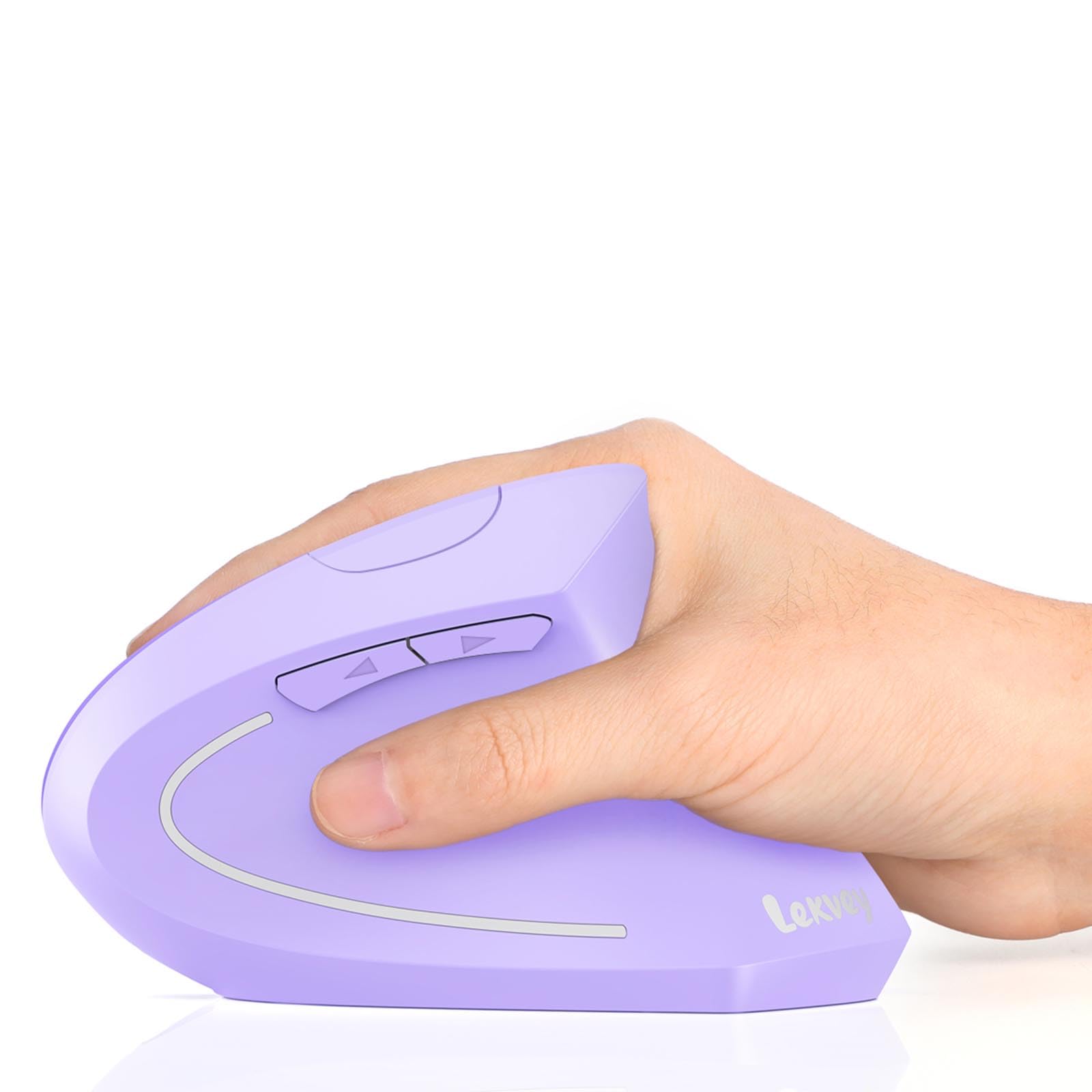
The rechargeable budget vertical mouse with a 600mAh battery that keeps going for 150 hours.
The Lekvey is a straightforward vertical mouse that nails the basics. It uses a natural handshake grip to minimize carpal tunnel strain, and the 3-level DPI (1000/1200/1600) covers standard office tasks. The big story here is the battery: a 600mAh Li-Ion cell that provides up to 150 hours of use from a 3-hour charge, with 120 days of standby. That easily beats every other rechargeable mouse in this guide, including the Uineer’s week-long life and the Philips SPK7858’s claimed 25 days. It also features whisper-quiet left and right clicks that won’t annoy anyone nearby.
It connects via a tiny 2.4GHz USB receiver with a reliable range of up to 33 feet. The auto-sleep mode kicks in after 20 minutes to save power. It is designed for medium and large hands (5.0 x 3.0 x 2.5 inches, 0.21 lb), so smaller-handed users should measure first. The forward and back buttons work on Windows but are not compatible with Mac OS. Shoppers say immediate wrist pain relief, with many noting the pain returned when switching back to a traditional mouse. The Lekvey is a solid value pick — it doesn’t have Bluetooth or a side wheel, but its battery life and quiet operation make it a smart choice for focused, single-computer work.
What earns its spot
- 600mAh rechargeable battery provides 150 hours of use — best battery life in the budget tier
- Whisper-quiet silent clicks ideal for libraries, offices, and shared spaces
- Auto-sleep after 20 minutes of inactivity to conserve power
- 2.4GHz range of up to 33 feet for a clean, cable-free desk
The fine print
- No Bluetooth connectivity — 2.4GHz only
- Forward/back buttons are not compatible with Mac OS
- Designed for medium-to-large hands; smaller hands may find it too big
- Requires a 1–2 week adjustment period for first-time vertical mouse users
Best for: anyone who prioritizes battery life above all else and wants a quiet, reliable vertical mouse for a single computer.
Not for: Mac users who need the forward/back buttons or anyone who needs to switch between multiple devices.
7. PHILIPS SPK7628 Ergonomic Vertical Mouse
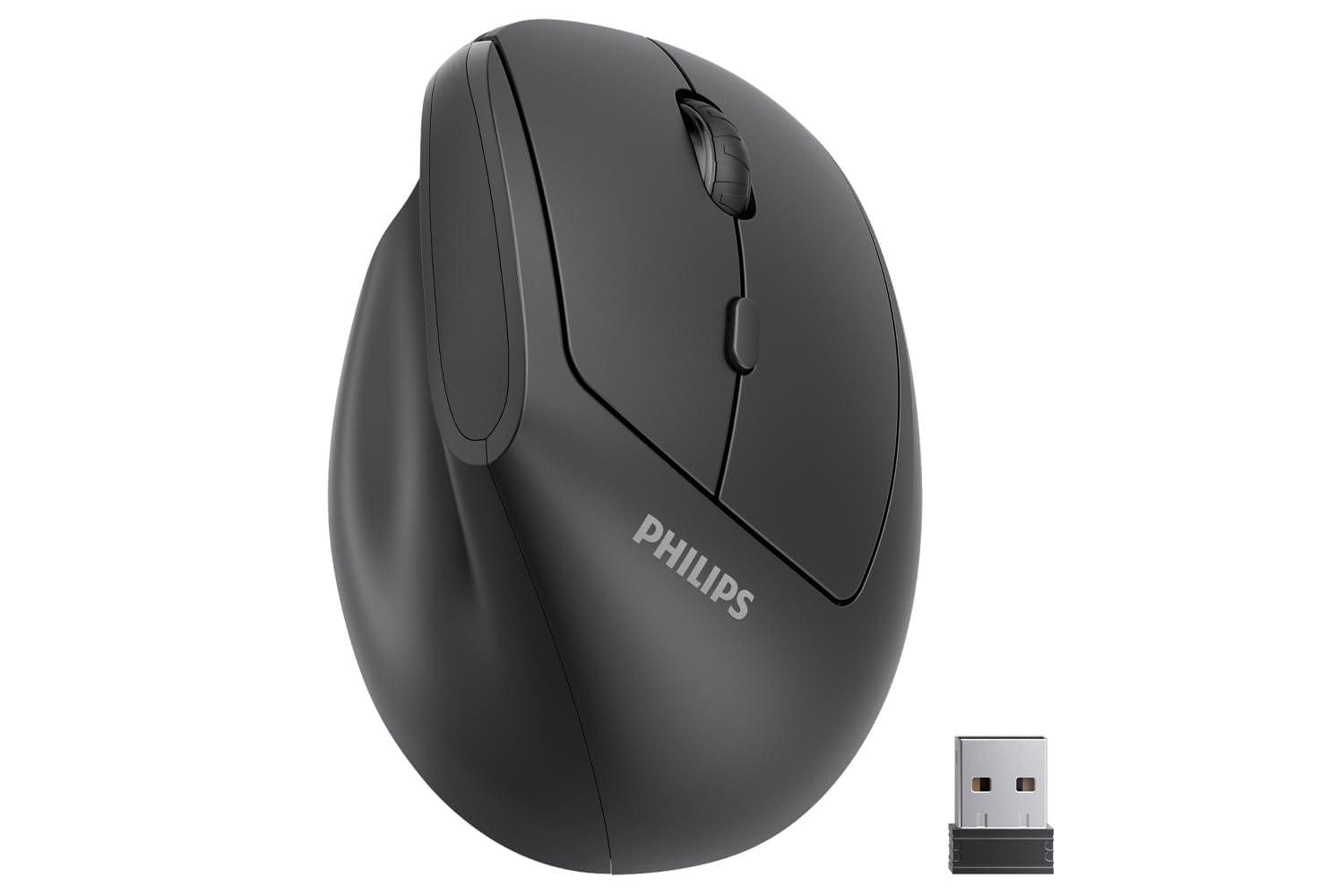
The lightweight 57-degree vertical mouse built specifically for smaller hands and quiet workspaces.
The Philips SPK7628 is the most compact vertical mouse here, tune for hands up to 7 inches long. The 57-degree handshake angle reduces wrist pressure and forearm strain, and the upright grip promotes a relaxed posture during long workdays. It is incredibly lightweight, making it easy to toss into a laptop bag for commuting or hybrid work setups. The quiet left and right buttons are a genuine advantage for shared offices — no one will hear you clicking away.
Connectivity is simple 2.4GHz wireless with a USB receiver that stores in the mouse base. There is no Bluetooth, so it is a single-device mouse. The three DPI levels (800/1200/1600) cover standard tasks, and the intelligent sleep mode helps extend battery life. It runs on a single AA battery, which is included. The comfort and ergonomics earn the highest praise from owners — 64 separate mentions call out the comfort, and 62 mention the ergonomics. The reliability, however, is more mixed than any other mouse in this guide. A small number of units arrive with erratic pointer behavior, and replacement units sometimes show the same issue. For most buyers, this mouse is a solid, comfortable value — but if you receive a defective unit, the support process can be slow. If you have small hands and want a quiet, lightweight vertical mouse, this is the best fit; if you want guaranteed reliability, the Anker above is safer.
Best for small hands: Sized for hands up to 7 inches, this is the most comfortable vertical mouse for petite users — the buttons are within easy reach without stretching.
Reliability note: A small portion of units have tracking issues, and Philips support can be slow to resolve replacements. Not a widespread problem, but worth knowing going in.
Grab this for: smaller hands, quiet shared workspaces, and ultra-light portability — it is the most travel-friendly vertical mouse on the list.
Pass if: you need Bluetooth, have larger hands, or want the highest reliability without any potential QC concerns.
Understanding the Specs
Vertical Angle
The tilt of the mouse is measured in degrees from the desk. A 57-degree angle puts your hand in a natural handshake posture, keeping your wrist straight and your forearm relaxed. Steeper angles feel more upright at first but often provide better relief for existing wrist pain. Most budget models land between 57 and 59 degrees.
DPI (Dots Per Inch)
This number measures how far the cursor moves for each inch you move the mouse. A lower DPI (like 800) gives you precise, slow cursor movement — great for detailed photo editing or small screens. A higher DPI (like 4000) zips the cursor across large monitors with a tiny wrist flick. Most budget mice let you toggle between 3-5 levels.
Rechargeable vs. Battery-Powered
A rechargeable mouse has a built-in lithium battery you charge via USB-C. It costs more upfront but saves money on disposables. A battery-powered mouse uses AA or AAA cells. It stays working for months on a single set, but you’ll need to keep spares handy. Battery-powered mice are often lighter because they don’t carry a heavy lithium cell.
Multi-Device Connectivity
A mouse with Bluetooth and a 2.4GHz receiver can connect to up to three devices — like a laptop, tablet, and phone — and let you switch between them with a button press. This is a huge time-saver if you work across multiple machines. A single-device 2.4GHz-only mouse is simpler and cheaper, but you have to unplug and replug the receiver to switch computers.
FAQ
Will an ergonomic mouse actually help my wrist pain?
What hand size do I need for these mice?
Can I use an ergonomic mouse with a Mac?
How long does the battery last in a rechargeable ergonomic mouse?
Are vertical mice difficult to get used to?
What is DPI and how many levels do I need?
Can I connect an ergonomic mouse to a tablet or phone?
Do all ergonomic mice work for left-handed users?
What is the main difference between a vertical mouse and a trackball mouse?
Are silent click mice actually quiet?
Final Thoughts: The Verdict
For most people, the cheap ergonomic mouse that does it all is the Uineer Wireless Ergonomic Mouse because it combines a rechargeable battery, tri-device Bluetooth, four DPI levels, and proven wrist relief — all without crossing into premium pricing. If you want a side scroll wheel and 8 buttons for heavy multitasking, grab the Acer Ergonomic Mouse Wireless. And for arm-saving trackball control with an adjustable tilt, the SABLUTE MAM1 Pro is the one to reach for. The most reliable, simple pick remains the Anker 2.4G Wireless Vertical Mouse — time-tested by over 53,000 owners.
How We Picked
We do not accept paid placement. Every pick is matched to a real buyer and a real use-case; we do not hands-on test units.
Sources & Methodology
Specifications: manufacturer listings and product documentation. Review insights: verified customer reviews, as of July 2026. Pricing: not shown on this page (it changes often); check the current price via the retailer link.
As an Amazon Associate, WellFizz earns from qualifying purchases. This does not affect which products we feature.
Related Guides

Mo Maruf
I created WellFizz to bridge the gap between vague wellness advice and actionable solutions. My mission is simple: to decode the research and give you practical tools you can actually use.
Beyond the data, I am a passionate traveler. I believe that stepping away from the screen to explore new environments is essential for mental clarity and physical vitality.