Our readers keep the lights on and my smoothie glass nicely filled. As an Amazon Associate, I earn from qualifying purchases.
Specs are compiled from manufacturer listings and verified buyer reviews and can change over time — please confirm the key details on the product page before buying.
Finding a reliable drawing tablet on a tight budget can feel like hunting for a pen that doesn’t skip. You want something that actually tracks pressure accurately, doesn’t need a battery in the stylus, and won’t disconnect in the middle of a line. Most people just want a tool that feels enough like real paper to stop fighting the hardware and start drawing.
I’m Mohammad Maruf — the founder and writer behind WellFizz. This guide is built by comparing the manufacturers’ published specifications and the patterns across verified customer reviews, so you get each pick’s real strengths and trade-offs instead of marketing spin.
We have combed through six different models to find the ones that deliver genuine pen-on-paper feel without flexing the wallet. Whether you are new to digital art or just need a secondary tablet, this breakdown of the best cheap drawing tablet gives you the honest facts to make a quick, confident decision.
Our Picks at a Glance

How To Choose The Best Cheap Drawing Tablet
When money is tight, every spec matters more. You do not want to waste cash on a tablet that feels laggy or wears out the nibs in a week. The three things to lock down first are pressure sensitivity, active area size, and whether the pen needs a battery.
Pressure Sensitivity Levels
This number tells you how lightly or heavily the tablet reads your touch. Most budget tablets offer 8192 levels, which is plenty for smooth shading and thin-to-thick lines. Some newer models promise 16384 levels, which sounds better on paper but is hardly noticeable unless you are doing very subtle watercolor-style work.
Active Area and Portability
The active area is the actual drawing surface. A tiny 6 x 3.7 inch area works if you mostly sketch on the go, but a larger 10 x 6 inch surface gives your wrist room to make sweeping strokes. Pick the size that matches where you draw — small for a packed desk, large for a dedicated studio setup.
Battery-Free vs Battery Stylus
Every cheap drawing tablet worth buying uses a battery-free pen. That means no charging, no dead pen mid-sketch, and a lighter stylus that feels closer to a real pencil. If a tablet demands you plug in the pen, skip it.
Quick Comparison
| Model | Best For | Active Area | Pressure Levels | Shortcut Keys | Amazon |
|---|---|---|---|---|---|
| Wacom Intuos Small★ Best Overall | Absolute beginner reliability | 6 x 3.7 in | 4096 | 4 | Amazon |
| GAOMON M10KBig Canvas | Max drawing space on a budget | 10 x 6.25 in | 8192 | 10 + Touch Ring | Amazon |
| HUION Inspiroy 2 Small | Ultra-portable sketching | 6.3 x 3.9 in | 8192 | 6 + Scroll Wheel | Amazon |
| XPPen Deco 01 V3 | Highest pressure sensitivity | 10 x 6.25 in | 16384 | 8 | Amazon |
| GAOMON WH851 | Wireless freedom | 8 x 5 in | 16384 | 8 + Dial | Amazon |
| HUION Inspiroy 2 Large | Premium-sized all-rounder | 10.5 x 6.56 in | 8192 | 8 (3 groups) + Wheel | Amazon |
In‑Depth Reviews
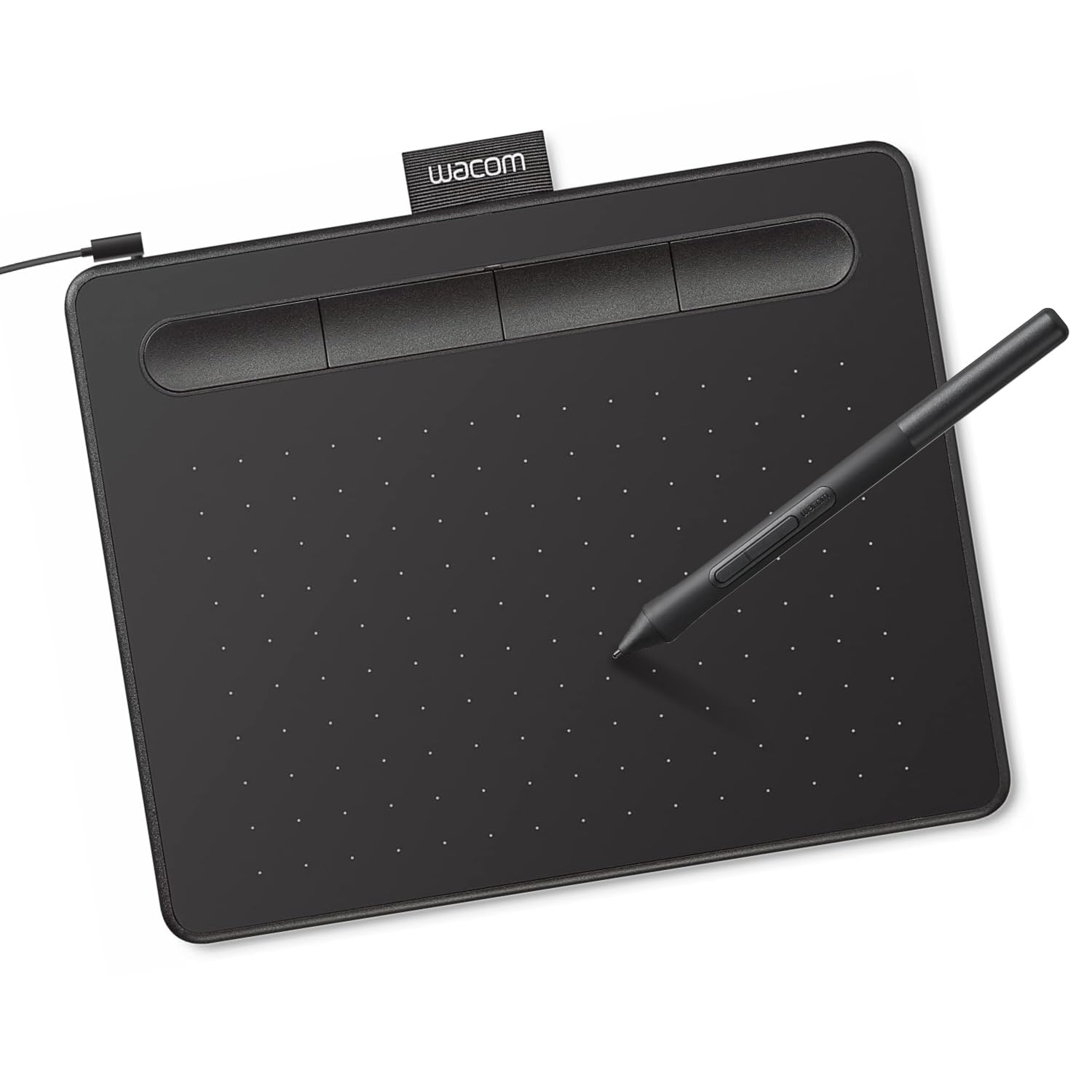
1. Wacom Intuos Small Graphics Drawing Tablet
The entry-level gold standard that has taught thousands of beginners their first digital lines.
Buyers over many years have consistently praised the build quality and sheer reliability of this tablet — it simply works when you plug it in. The 133Hz refresh rate and 4096 levels of pressure sensitivity (a spec that measures how many different line thicknesses the pen can read) mean the pen response feels tight and immediate, with near-zero input lag. One owner summed up the consensus: “Wacom has never disappointed. It’s easy to use, the sensitivity is great, and the pen is comfortable in the hand.”
The active area measures 6 x 3.7 inches, which is enough space to learn proper wrist strokes but compact enough to slide into a laptop bag. What wins people over most is the trusted functionality and obvious quality, backed by the highest review counts in the budget category. The trade-off is nib wear — the plastic nibs on the included Wacom Pen 4K rub down faster than some competitors, so having spares on hand is wise. It is not the tablet for full-time professionals needing acres of canvas, but for anyone learning the ropes, this is the safest bet of the bunch.
Why It Wins Beginners Over
- Industry-leading brand with proven longevity
- Battery-free pen (never charge the stylus)
- Highly responsive 133Hz refresh rate feels fluid
- Wide software compatibility, including Chromebooks
The Smart Shopper’s Caveat
- Small active area limits sweeping arm strokes
- Nibs wear down faster than some budget alternatives
- No dedicated Bluetooth version
Grab it if: you want the most low-maintenance, proven beginner tablet with the strongest driver ecosystem.
Think twice if: you need a larger canvas for full-arm drawing — the small size may feel cramped.
2. GAOMON M10K Drawing Tablet
More screen space than the Wacom Intuos — 10 x 6.25 inches versus 6 x 3.7 inches — at nearly the same price.
The GAOMON M10K is the tablet you reach for when you hate feeling boxed in by a tiny drawing window. Its active area is 10 x 6.25 inches, which is far roomier than the Wacom Intuos Small’s 6 x 3.7 inches, giving your arm real estate to make longer, natural strokes. The included AP31 stylus is battery-free and offers 8192 levels of pressure sensitivity, so your shading transitions are smooth and continuous.
Ten programmable press keys plus a touch ring sit along the left side, which owners say makes zooming, scrolling, and switching brushes faster than using the keyboard. The consensus among many buyers is that this tablet delivers “reliability and quality comparable to Wacom” for a fraction of the usual investment. A couple of reviewers flagged that the pen tip can pop out easily on arrival, but the box includes 8 replacement nibs and a pen case to cover that. This is the pick for teachers, note-takers, and artists who need a big work area without a big price tag.
A Spacious Workhorse: The combination of 8192 pressure levels (how hard you press changes line thickness), 10 hotkeys, and the touch ring makes this among the most fully-featured cheap drawing tablets available. The one honest limitation is the USB-only connection — no Bluetooth here.
Pick this if: you need maximum drawing surface for note-taking, OSU, or full-arm sketching on a slim budget.
Look elsewhere if: you must have a wireless connection — this tablet stays tethered by USB cable.
3. HUION Inspiroy 2 Small Drawing Tablet

A lightweight, palm-sized tablet that packs a scroll wheel and fan-favorite accuracy.
HUION’s Inspiroy 2 Small uses the newer PenTech 3.0 technology, which owners say delivers noticeably less wobble and lag compared to older budget models. The active area is 6.3 x 3.9 inches — similar to the Wacom Intuos Small — but the HUION adds a unique scroll wheel beside six customizable press keys, making zoom and brush-size changes much faster than digging through menus. The whole unit weighs only 275 grams, so it disappears into a laptop bag without adding weight.
Build quality is consistently praised, with reviewers calling it “high quality for the price” and describing it as “accurate and gorgeous.” The battery-free PW110 stylus has a slim, soft silicone grip that feels comfortable over long sessions. The main trade-off reported by a few owners is that the nib wears down quicker than expected, and there is no Bluetooth — it uses a USB-C cable connection. It is an ideal starter tablet for students, travelers, or anyone who wants a mouse-replacement that doubles as a sketchpad.
Standout Perks
- Scroll wheel is genuinely useful for zooming and scrolling
- PenTech 3.0 technology reduces line wobble
- Slim body and lightweight — fits in any bag
- Works with Android 6.0+ devices
What to Consider
- Smaller area may feel restrictive for large strokes
- Nib replacement needed sooner than some peers
- No wireless connection option
Go for it if: you want a portable, high-accuracy tablet with convenient shortcut inputs for under the mid-range tier.
skip it if: you need a larger canvas for broad arm movements.
4. XPPen Deco 01 V3 Drawing Tablet

The first budget tablet to cross the 16,384 pressure sensitivity threshold without crossing the price barrier.
XPPen’s Deco 01 V3 delivers the highest advertised pressure sensitivity in this lineup — 16,384 levels — alongside 60 degrees of tilt detection (which mimics holding a real pencil at an angle for shading). Combined with a large 10 x 6.25 inch active area, this tablet gives you the specs you normally see in premium models at a fraction of the cost. Buyers mention the tablet feels solid in hand and works perfectly with Sketchbook and Photoshop right from the start.
The tablet is just 8 mm thin, making it easy to slip into a backpack for travel. It also works with Android devices running version 10.0 and above, which is rare at this price. The eight customizable express keys sit on the left side and toggle left-hand mode easily. The most common honest note from the community is that occasional random disconnects happen — about 1 in 6 sessions — though most buyers report the connection is stable after a driver update. For beginners who want cutting-edge spec numbers without paying a premium, this is the play.
High-Spec Bargain: The 16K pressure levels and 60-degree tilt support are genuine upgrades over the 8192 competitors. The trade-off is a driver setup that sometimes needs a reinstall, and the USB-C port is a known weak point if the cable snags.
Perfect for you if: you want the highest pressure sensitivity and tilt available in a cheap drawing tablet for detailed shading work.
Be aware: a small number of owners mention random driver drops — keep the installation file handy.
5. Bluetooth Drawing Tablet GAOMON WH851
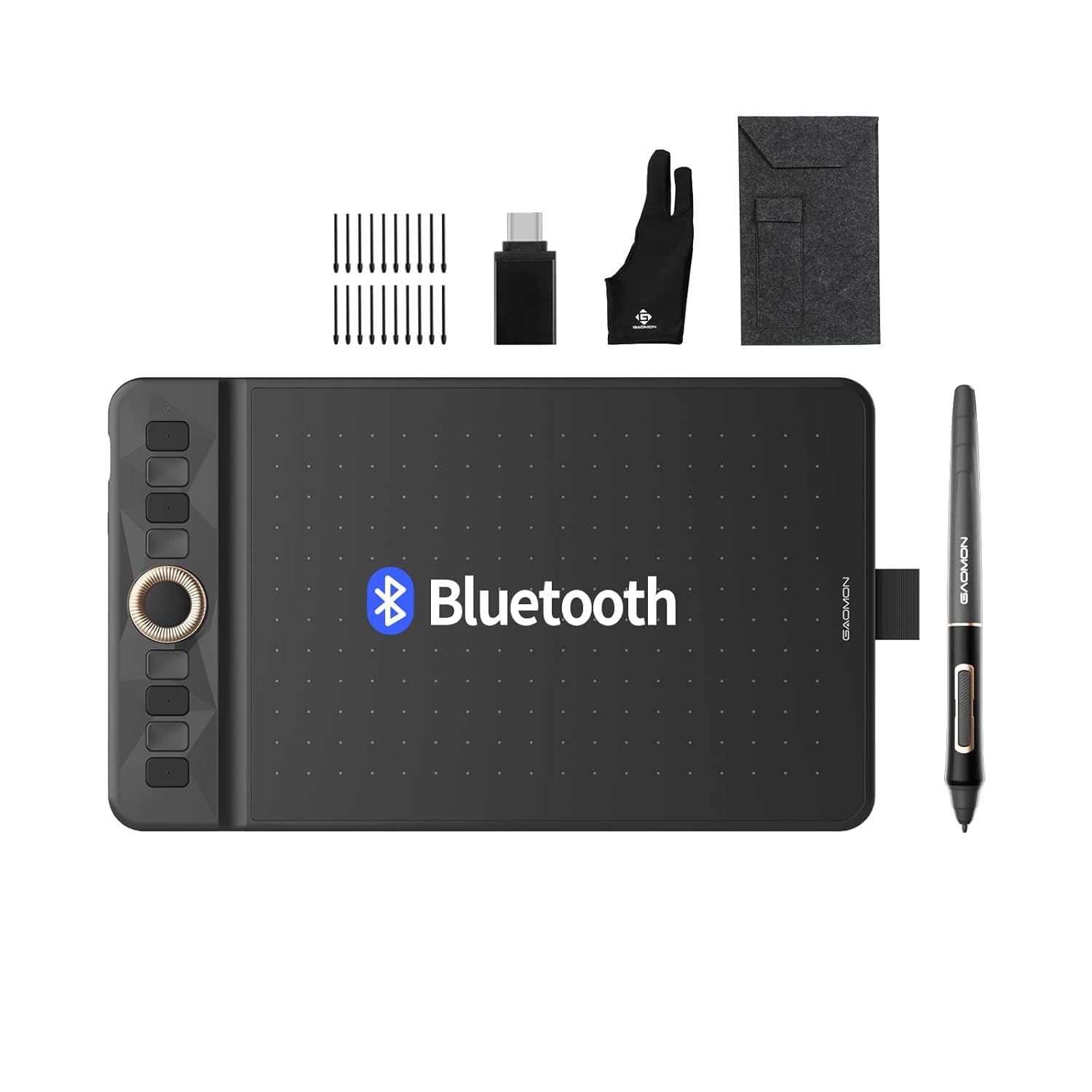
The rare budget tablet that cuts the cord — Bluetooth 5.0 with 18 hours of battery life.
The GAOMON WH851 stands out from every other tablet on this list because it is the only one that works wirelessly via Bluetooth 5.0, with a built-in battery that lasts 18 hours per charge. That means you can sit across the room from your laptop or use it in a classroom without a USB tether. The active area is a mid-sized 8 x 5 inches — smaller than the M10K or Deco 01 V3, but large enough for solid sketching and note-taking.
It also features the premium spec of 16,384 pressure levels and a battery-free pen, just like the XPPen. The intuitive center dial is another highlight — customers note it makes zooming and brush adjustment feel natural. Build quality is described as excellent, with one owner calling it “better than Wacom Intuos Pro 4” for pixel art work. The only consistent note is that Bluetooth mode feels slightly sluggish compared to wired, so most owners prefer USB-C for precise work. If you value a clean, wire-free desk, this is the best cheap drawing tablet for that use case.
Wireless Advantages
- Bluetooth 5.0 with 18-hour battery life
- 16,384 pressure levels and tilt support
- Intuitive center dial for quick zoom/scrolling
- Lightweight at 397 grams
Honest Limitations
- Bluetooth has slight input lag; wired mode is smoother
- Smaller 8 x 5 inch area than the top picks
- Pen is not sold separately — whole unit needed as backup
Choose this if: you hate tangled cables and want a tablet that works untethered for hours.
Hold off if: you need the lowest latency for competitive OSU or fast gesture drawing — wired tablets are snappier.
6. HUION Inspiroy 2 Large Drawing Tablet

The largest active area in the list — 10.5 x 6.56 inches — with a three-set shortcut system for power users.
The HUION Inspiroy 2 Large is the biggest tablet here, offering 10.5 x 6.56 inches of drawing space, while the GAOMON M10K offers 10 x 6.25 inches. This generous surface, combined with PenTech 3.0 technology, means you get accurate, wobble-free line work on a canvas that rivals professional tablets. The pen features a soft silicone grip and side buttons, and the tablet comes with three groups of eight programmable express keys plus a scroll wheel — that is up to 24 custom shortcuts across different applications.
Buyers consistently praise the quality and value for money, calling it “a great entry-level option” that is easy to set up and use immediately. The consensus from the community is that this tablet works perfectly with MediBang Paint and Krita, and the shortcut buttons genuinely speed up the workflow. The main honest observation from owners is that the plastic body feels a bit fragile compared to Wacom’s sturdier build — treat it gently if you travel often. This is the choice for artists who want professional-scale real estate and advanced button customization without crossing into the premium price tier.
Big Features
- Largest active area in the comparison (10.5 x 6.56 in)
- Three groups of 8 customizable shortcut keys (24 total)
- PenTech 3.0 for smooth, stable line output
- USB-C connection with Android compatibility
Worth Noting
- Build materials feel less rugged than other brands
- Binding resets reported by some owners
- No wireless or Bluetooth option
Best suited for: hobbyists and students who want a large canvas and plenty of shortcut keys for a comfortable digital art setup.
Consider another if: you need a rugged tablet for frequent travel — the chassis is not built for heavy drops.
Understanding the Specs
Pressure Sensitivity Levels
This is the number that measures how many different line thicknesses the pen can register between a light touch and a hard press. 4096 levels is the entry point and works fine for basic sketching. 8192 levels gives you much smoother, more natural shading transitions. 16384 levels is the highest consumer spec available — you get very subtle control but the difference is mostly noticeable in watercolor or soft shading work.
Active Area
The active area is the rectangle on the tablet that actually tracks your pen strokes. A smaller area (around 6 x 3.7 inches) forces you to use only your wrist, which can feel cramped during long sessions. A larger area (10 x 6 inches and above) lets you draw from your elbow and shoulder, which is more natural for sweeping lines. Pick the size that fits your desk and your drawing style.
FAQ
Do cheap drawing tablets need a battery in the pen?
Can I use a cheap drawing tablet with my Android phone?
How many pressure sensitivity levels do I actually need?
Will these tablets work with Photoshop, Krita, and Clip Studio Paint?
Is a larger active area always better?
Do I need to install drivers to use these tablets?
How long do the pen nibs last on a cheap drawing tablet?
Can left-handed people use these cheap drawing tablets?
Final Thoughts: The Verdict
For most buyers, the smartest cheap drawing tablet to start with is the Wacom Intuos Small because it offers the most proven reliability, excellent driver support, and a battery-free pen that feels natural — all backed by the largest base of happy buyers. If you need a bigger canvas without spending more, grab the GAOMON M10K for its 10 x 6.25 inch active area and 8192 pressure levels. And for wireless freedom on a budget, the GAOMON WH851 is the one to reach for.
How We Picked
We do not accept paid placement. Every pick is matched to a real buyer and a real use-case; we do not hands-on test units.
Sources & Methodology
Specifications: manufacturer listings and product documentation. Review insights: verified customer reviews, as of July 2026. Pricing: not shown on this page (it changes often); check the current price via the retailer link.
As an Amazon Associate, WellFizz earns from qualifying purchases. This does not affect which products we feature.
Related Guides

Mo Maruf
I created WellFizz to bridge the gap between vague wellness advice and actionable solutions. My mission is simple: to decode the research and give you practical tools you can actually use.
Beyond the data, I am a passionate traveler. I believe that stepping away from the screen to explore new environments is essential for mental clarity and physical vitality.