Our readers keep the lights on and my smoothie glass nicely filled. As an Amazon Associate, I earn from qualifying purchases.
Specs are compiled from manufacturer listings and verified buyer reviews and can change over time — please confirm the key details on the product page before buying.
Finding a cheap controller that does not feel like a toy is the real challenge — you want something responsive and durable, not a flimsy gamepad that drifts or breaks after a few weeks. You do not need to spend premium money to get a solid, comfortable gamepad for daily PC gaming. This guide breaks down the best budget options by what they actually do well — wireless freedom, Hall Effect precision, or a dirt-cheap backup pair — so you can pick the right one without second-guessing.
I’m Mohammad Maruf — the founder and writer behind WellFizz. This guide is built by comparing the manufacturers’ published specifications and the patterns across verified customer reviews, so you get each pick’s real strengths and trade-offs instead of marketing spin.
A great cheap controller for PC should feel solid in your hands and respond without lag, and the eight options here prove you can get exactly that starting at budget-friendly price points. cheap controller for pc picks don’t have to mean cheap quality, and this list shows exactly where to look.
Our Picks at a Glance

How To Choose The Best Cheap Controller For PC
Picking a budget controller depends on understanding a few key trade-offs that matter more than the price tag itself. You want a gamepad that works the day you open it and still feels right months later, so knowing what to prioritize makes the difference between a smart buy and a frustrating one.
Wired vs. Wireless Connection
A wired controller gives you zero-latency response (no delay at all) and never needs charging — just plug it in and go. The trade-off is the cable itself, which can feel restrictive if you sit far from your PC or prefer a clutter-free desk. Wireless models, especially those using a 2.4GHz USB dongle, offer near-wired responsiveness with freedom of movement, but you will need to keep an eye on battery life. Bluetooth is convenient for pairing with laptops or Android devices, but it can introduce a small but noticeable lag compared to a 2.4GHz or wired link.
Hall Effect Joysticks vs. Traditional Potentiometers
Hall Effect joysticks use magnetic sensors instead of physical contact points, meaning they resist the stick drift (an annoying phantom movement) that eventually wears down traditional controllers. For a cheap controller, this is the single best feature to look for if you want it to last beyond a few months. Traditional potentiometer sticks are cheaper to make and can feel fine initially, but they degrade faster with heavy use. If you play shooters or racing games where tiny stick movements matter, the Hall Effect upgrade is worth prioritizing.
Extra Buttons, Vibration, and Turbo Features
Back buttons or bumpers that you can remap give you quicker access to common actions without lifting your thumbs off the sticks — a genuine help in fast-paced games. Dual vibration adds immersion, and a turbo function (automated rapid button presses) is useful in certain action or fighting games. The key is to decide which extras actually fit how you play, because unnecessary features can push up the price without adding daily value for a casual gamer.
Quick Comparison
| Model | Best For | Connection | Joystick Type | Extra Buttons | Amazon |
|---|---|---|---|---|---|
| Zamia 2-Pack Wired★ Best Overall | Budget Multiplayer Pair | Wired | Standard | — | Amazon |
| 8BitDo Ultimate 2C WirelessAlso Great | Best Overall Wireless | 2.4GHz / Wired / BT | Hall Effect | L4/R4 Bumpers | Amazon |
| AKNES 8BitDo Ultimate 2C | Best Value Wireless | 2.4GHz / Wired / BT | Hall Effect | L4/R4 Bumpers | Amazon |
| GameSir G7 SE Wired | Premium Wired Pick | Wired | Hall Effect | 2 Back Buttons | Amazon |
| Hyperkin DuchesS Wired | Nostalgia + Performance | Wired | Hall Effect | — | Amazon |
| Turtle Beach Rematch Wired | Glow-in-the-Dark Style | Wired | Standard | 2 Back Buttons | Amazon |
| RivalPlay Wired | Entry-Level Extra Features | Wired | Standard | 2 Mapping Buttons | Amazon |
In‑Depth Reviews
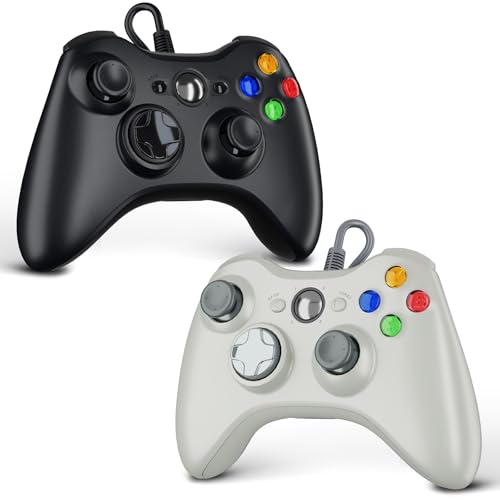
1. Zamia 2 Pack Wired Controller for Xbox 360 / PC
Two wired controllers for the price of one — built for local multiplayer on a tight budget.
This two-pack is the pure value play for anyone who needs a pair of controllers for co-op or versus gaming without spending much. Each controller features dual vibration motors for rich rumble, a 2.5mm headphone jack, and an ergonomic shape designed to reduce hand fatigue during extended play. The 6-foot USB cable is simple to plug into a PC running Windows 11, 10, 8, or 7 with no driver installation required, and it supports up to four controllers on a single console for bigger multiplayer sessions.
The build quality is decent for the price — owners call them simple, well-made, and exactly what they needed for a straightforward setup. The honesty about the triggers is the main reason to manage expectations: a handful of reviewers point out that the triggers can get stuck or start squeaking after a short period of use, and the cords are on the shorter side if your PC is far from your seating position. As one buyer put it: “Cords are very short, and the triggers started to squeak after 20 minutes.” If you are buying a spare set for casual use or for younger players who may not be as gentle, these do the job. For daily competitive gaming, the other options on this list offer better longevity.
What You Get
- Two fully functional wired controllers in one box for true budget value
- Dual vibration motors add basic immersion without extra cost
- Plug-and-play with no drivers on Windows 7 through 11
What to Expect
- Triggers can stick or squeak after limited use — not built for heavy daily gaming
- 6-foot cables may be too short depending on your desk or couch setup
Pick this for: an ultra-budget two-pack for casual multiplayer — ideal as spare controllers or for younger gamers who need a functional pair.
pass on it if: you need precise, durable triggers for shooters or racing games, or you prefer a longer cable run.
2. 8BitDo Ultimate 2C Wireless Controller
The wireless that honestly rivals a wired connection in responsiveness — without the drift.
This controller redefines what you should expect at a budget price point. It packs Hall Effect joysticks and triggers (magnetic sensors that have no rubbing contacts), so the sticks physically cannot develop stick drift over time. That means the precision stays consistent for years, not months. On top of that, the 1000 Hz polling rate (how often the controller reports its position to your PC — 1000 times per second) means every flick and turn registers instantly, whether you use the included 2.4GHz wireless dongle or a wired connection. Bluetooth is available for convenience, but the real magic lives in the 2.4GHz mode, where latency effectively disappears.
Owners rave most about the battery life — as buyers report, it is the kind of longevity that lets you charge once a month and forget about it. The 280-gram weight keeps it light enough for long sessions without feeling hollow, and the extra L4/R4 bumpers on top are remappable without any software, which is a rare convenience at this level. It works plug-and-play on Windows as an Xbox controller, so Steam and Game Pass recognize it immediately. The only honest trade-off is that the power button can be a little finicky — it sometimes takes two presses to wake the controller up — but once it is on, everything else runs without a hitch.
Why It Wins
- Hall Effect joysticks and triggers completely remove drift worries
- 1000 Hz polling rate on 2.4GHz and wired feels indistinguishable from a premium controller
- Battery life that lasts weeks between charges — owners mention monthly charging
- Extra remappable L4/R4 bumpers with no software needed
The Small Gripes
- Power button occasionally needs a second press to wake the controller
- The included cable is fine for a desktop setup but a bit short for couch play
Reach for this if: you want a wireless controller with premium internals — Hall Effect sticks, no drift, and battery life measured in weeks — without spending more than a modest budget.
Think twice if: the double-press power quirk would annoy you, or you absolutely need Bluetooth-only wireless (the 2.4GHz dongle is the real star here).
3. AKNES 8BitDo Ultimate 2C Wireless Controller
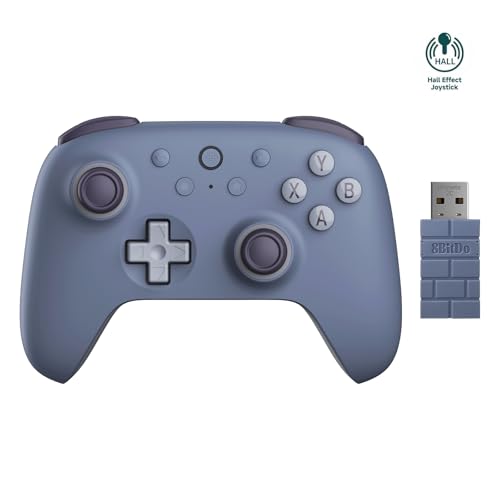
Same Hall Effect core as the top pick, but adds Bluetooth for Android and Steam Deck.
This version of the 8BitDo Ultimate 2C shares the same core DNA — Hall Effect joysticks and triggers, a 1000 Hz polling rate on 2.4GHz and wired, and the same four extra remappable bumpers. It adds Bluetooth support for Android devices and a 480mAh rechargeable battery that owners describe as long-lasting and fast to charge. The crowd that uses this for competitive titles like Rocket League finds it sturdy and reliable, with no disconnects and a weight that feels substantial without being heavy. It is slightly lighter than a PS5 controller, which makes a real difference during marathon sessions.
The ergonomic design handles both small and large hands comfortably, and the D-pad, while improved over older models, can occasionally register an accidental diagonal input if you press near the edges. A few owners mention that the left trigger developed a squeak after a week and a half of use, though this seems to be an occasional manufacturing quirk rather than a widespread pattern. The connectivity options are genuinely versatile — 2.4GHz for low-latency PC gaming, wired via USB-C for absolute zero-lag, and Bluetooth for Steam Deck or phone gaming — so it covers almost every scenario you might throw at it. It lands in the middle of the price range, trading off the 8BitDo’s simpler wake-up routine for Bluetooth versatility.
What Stands Out
- Hall Effect joysticks resist drift and deliver smooth, precise control
- Three connection modes (2.4GHz, wired, Bluetooth) cover PC, Android, and Steam Deck
- 480mAh battery offers strong endurance with fast recharging
- Comfortable for both small and large hands over long gaming sessions
The Occasional Quirks
- D-pad can register accidental diagonal presses near the edges
- A small number of units develop a trigger squeak within a couple of weeks
Pick this one for: maximum connection flexibility — the Bluetooth option for Android and Steam Deck makes it more versatile than the standard 8BitDo 2C.
Pass if: you need every button to feel flawless from the start, as the D-pad precision can be a mild letdown for fighting-game fans.
4. GameSir G7 SE Wired Controller

A durable wired workhorse with Hall Effect precision and a huge, loyal fanbase.
This wired controller is among the most reliable bets in the budget space. Its Hall Effect joysticks and triggers deliver the same zero-drift performance as the wireless options above but at a lower entry point — no battery to manage, just plug it in. The 420-gram weight gives it a reassuringly solid feel in the hands, and the removable magnetic faceplate lets you swap colors or clean underneath without tools. The two custom back buttons are programmable and sit where your middle fingers naturally rest, so pulling off complex moves in shooters or racing games becomes second nature after a short adjustment period.
The wired connection means zero latency concerns and no battery management — just plug the detachable USB-C cable into your PC running Windows 10 or 11 (plus Xbox consoles) and you are in the game. The Nexus companion app allows you to remap buttons, adjust dead zones, tweak vibration intensity, and even set hair trigger locks for faster shots. The catch is that the bumpers have a known fragility — a few customers note the plastic snapping after several months of use — and the B button can lose sensitivity gradually if you really pound on it. These are not universal issues by any stretch, but they are note if you tend to be aggressive with your inputs.
Why Gamers Love It
- Hall Effect sticks offer drift-free precision that holds up over time
- Removable magnetic faceplate for easy customization and cleaning
- Dedicated back buttons and hair trigger locks give a competitive edge
- The Nexus app allows deep customization without needing third-party software
The Fragility Factor
- Bumpers can snap after months of heavy use — treat them gently
- Cable fraying near the connector has been reported after a few months
Grab it for: a plug-and-play wired experience with Hall Effect reliability and software tweaks that actually matter for competitive play.
skip it if: you need a wireless controller, or if you are prone to squeezing the bumpers hard during intense sessions.
5. Hyperkin DuchesS Wired Controller

The classic Xbox Controller S shape, rebuilt with modern Hall Effect internals and a 10-foot cable.
This wired controller is a love letter to the original Xbox Controller S design, updated with Hall Effect joysticks that glide smoothly and resist drift, plus impulse triggers that add realistic vibration feedback to your games. The ergonomics are spot-on — owners consistently mention that the shape eliminates hand pain even after seven-hour sessions, and the 243-gram weight strikes a comfortable middle ground between substantial and fatigue-free. The 10-foot braided USB-C cable gives you plenty of reach from your PC or Xbox, and the wired connection guarantees zero latency at all times. It is a stronger fatigue-free choice than the heavier GameSir G7 SE for marathon play.
The button layout stays true to the retro feel, with satisfyingly clicky buttons and a D-pad that is genuinely improved over the original. The headphone jack on the controller works well for game audio, but a few owners note that the microphone quality can sound muffled to other players in online chat — something to be aware of if you rely on voice communication. It is officially licensed for Xbox Series X|S and Xbox One, and it works smoothly with Windows 10 and 11 as a plug-and-play device. The lack of wireless is the main reason some buyers pass, but for a dedicated wired setup, this is among the most comfortable controllers at the price.
The Highlights
- Hall Effect joysticks provide smooth, drift-resistant precision
- 10-foot braided USB-C cable offers generous reach and durability
- Ergonomics that genuinely prevent hand fatigue during long sessions
- Officially licensed for Xbox and PC with plug-and-play simplicity
The Downsides
- Wired-only design — no wireless option at all
- Headphone jack can make your voice sound muffled in online chat
Choose this if: you love the classic Xbox Controller S shape and want modern Hall Effect internals in a wired, fatigue-free package.
Look elsewhere if: you need wireless freedom or rely on crisp voice chat through the controller jack.
6. Turtle Beach Rematch Advanced Wired Controller
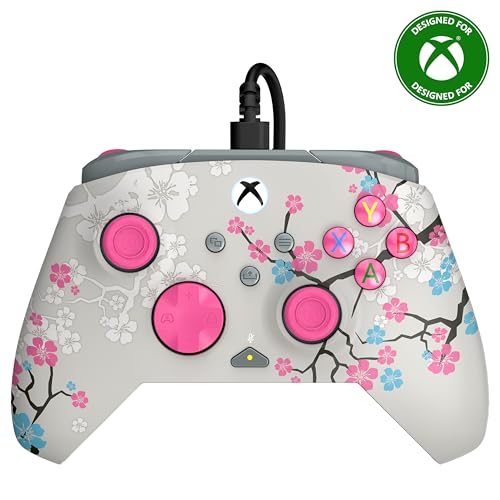
A glow-in-the-dark wired controller that brings Turtle Beach audio pedigree to your hands.
This controller stands out in a dark room — literally — with a Cherry Blossom finish that glows after exposure to UV light. The a neat extra is backed by solid hardware: the two-stop True Hall Effect hair triggers (triggers with two distinct pull points for faster shots) let you pull off shots faster by reducing the travel distance. The two remappable back buttons give you quick access to whichever actions you assign. The dual rumble motors and impulse triggers add layered vibration that makes impacts and engine roars feel more tactile, and the control hub app lets you tweak button mappings and diagnostic settings on the fly.
The ergonomics are designed for extended comfort, with laser-etched texture on the thumbsticks, triggers, and grips that keeps your hands from slipping during heated matches. It includes on-board audio controls for game/chat mix, master volume, and a dedicated mic mute button — genuinely useful if you play with a headset. The 8-foot detachable USB-C cable gives you plenty of slack, but the controller uses standard joysticks rather than Hall Effect ones, so it is more susceptible to stick drift over the long haul compared to the previous picks. Owners generally praise the responsiveness and feel, though a few mention that the glow effect is less dramatic than expected in normal indoor light.
What Makes It Unique
- Glow-in-the-dark shell adds a unique visual angle to your setup
- Hall Effect hair triggers shorten trigger pull for faster reaction times
- Integrated audio controls for chat mix, volume, and mic mute
- Laser-etched texture on grips and sticks prevents slipping
What to Watch
- Standard joysticks are more prone to drift over time than Hall Effect alternatives
- UV exposure needed for best glow effect — room light alone may disappoint
Reach for it if: the glow-in-the-dark look and built-in audio controls matter to you, and you value hair triggers for competitive shooters.
Pass if: you want Hall Effect joysticks for long-term drift protection, as this one uses traditional stick hardware.
7. RivalPlay Wired Controller

A dirt-cheap wired controller that actually includes mapping buttons and adjustable vibration.
For the price, this controller punches well above its weight — it features two programmable mapping buttons on the back for quick-access commands, plus adjustable vibration with three intensity levels (30%, 70%, 100%, or off entirely) and a turbo function with speeds of 5, 12, or 20 presses per second. The 2-meter cable gives you a solid 6.5 feet of reach, and the plug-and-play compatibility with Windows 7 through 11 means zero driver fuss. Reviewers sum it up: “Plug and play, intuitive to use, good response time on screen.”
The build quality feels better than its price suggests — owners call the plastic solid rather than cheap, and the weight is well-balanced without being heavy. The main caveats are the size and button placement: a few owners find the controller slightly small in the hand, and the back buttons could be positioned a touch higher for easier access. Still, for a wired controller that gives you remappable buttons and turbo at an entry-level price, it is hard to argue with the value. The vibration adjustment alone separates it from most competitors at similar price points, letting you dial the rumble to your preference rather than accepting a one-size-fits-all buzz. The budget-minded buyer who wants extra features without jumping to a Hall Effect controller will find this is the best route.
The Smart Buy Points
- Two programmable back buttons add real in-game utility at this price
- Adjustable vibration (30/70/100%) lets you tune rumble intensity
- Turbo function with three speed settings for rapid-fire inputs
- 2-meter cable offers plenty of desk-to-couch range
The Trade-Offs
- Feels slightly small in larger hands
- Back button placement could be more ergonomic for some grips
Buy it for: a budget-friendly wired controller with extra features — mapping buttons, turbo, and adjustable vibration — that you usually have to pay more to get.
Avoid if: you have larger hands that need a full-size frame, or you insist on Hall Effect joysticks.
Understanding the Specs
Hall Effect Joysticks
These use magnets to detect stick movement instead of physical contact points that rub together. The result is a joystick that resists the drift (phantom movement) that normally develops as traditional controllers wear out. For a cheap controller, Hall Effect sensors are the single best indicator of long-term reliability — they keep your aim true and your movements precise for years rather than months.
Polling Rate
Measured in hertz (Hz), this is how often the controller reports its position to your computer. A 1000 Hz polling rate means it sends an update 1000 times every second, which translates to virtually no delay between moving the stick and seeing the result on screen. For fast-paced games like shooters and fighters, a higher polling rate makes a noticeable difference in responsiveness.
Wired vs 2.4GHz vs Bluetooth
Wired gives you the fastest possible connection with zero battery anxiety, but it tethers you to your desk. A 2.4GHz wireless connection uses a small USB dongle and offers near-wired latency with the freedom to sit back. Bluetooth is the easiest for pairing with laptops and phones, but it can introduce a small but perceptible delay compared to the other two options.
Turbo Function
This feature lets the controller automatically press a button repeatedly at a set speed (measured in presses per second, like 5, 12, or 20 times per second). It is useful in games where you need to rapidly tap a single button — think auto-firing in shooters or quick menu navigation — without wearing out your finger or the button itself.
FAQ
Will a cheap PC controller work with Steam and Game Pass?
How long do budget PC controllers usually last?
Can I use an Xbox 360 controller on Windows 10 or 11?
What is the difference between 2.4GHz wireless and Bluetooth for gaming?
Do I need extra software to remap buttons on a budget controller?
Are wired controllers faster than wireless ones for PC gaming?
What does the polling rate actually do for my gameplay?
Can I use a PC controller with Android or Steam Deck?
Why do some cheap controllers develop stick drift quickly?
Is a two-pack of controllers worth it for the price?
Final Thoughts: The Verdict
The cheap controller for pc landscape has more genuinely good options than ever, and the winner is the 8BitDo Ultimate 2C Wireless because it delivers Hall Effect reliability, a 1000 Hz polling rate, and weeks of battery life at a price that undercuts most competitors while outclassing them in core performance. If you want the same internals with Bluetooth for Android and Steam Deck, grab the AKNES 8BitDo Ultimate 2C. And for a wired setup with exceptional comfort and Hall Effect precision, the Hyperkin DuchesS is the one to reach for — especially if the retro Xbox Controller S shape appeals to you.
How We Picked
We do not accept paid placement. Every pick is matched to a real buyer and a real use-case; we do not hands-on test units.
Sources & Methodology
Specifications: manufacturer listings and product documentation. Review insights: verified customer reviews, as of July 2026. Pricing: not shown on this page (it changes often); check the current price via the retailer link.
As an Amazon Associate, WellFizz earns from qualifying purchases. This does not affect which products we feature.
Related Guides

Mo Maruf
I created WellFizz to bridge the gap between vague wellness advice and actionable solutions. My mission is simple: to decode the research and give you practical tools you can actually use.
Beyond the data, I am a passionate traveler. I believe that stepping away from the screen to explore new environments is essential for mental clarity and physical vitality.