Our readers keep the lights on and my smoothie glass nicely filled. As an Amazon Associate, I earn from qualifying purchases.
A scratchy mic and tinny audio can turn a five-minute meeting into a thirty-minute ordeal. A budget-friendly computer headset shouldn’t force you to choose between your wallet and your sanity. The right wired headset delivers clear, reliable communication without the headache of poor build quality or constant dropouts.
I’m Mohammad Maruf — the founder and writer behind WellFizz. I’ve spent hours combing through customer feedback, technical specs, and real-world performance data to find the wired headsets that actually deliver on their promises for daily work and calls.
This guide cuts through the noise to help you find a dependable cheap computer headset that prioritizes call clarity, comfortable fit, and essential features without wasting a single dollar on hype.
How To Choose The Best Cheap Computer Headset
Finding a reliable headset under the premium price tag is about focusing on the features that matter most for clear conversations and daily comfort. A cheap price doesn’t have to mean cheap performance if you know what to look for.
Microphone Quality is Non-Negotiable
The primary job of a computer headset is to transmit your voice clearly. A unidirectional or noise-canceling boom microphone is essential. It focuses on your voice and rejects keyboard clatter, background chatter, and room noise, ensuring your colleagues hear you, not your environment. A fixed or poor-quality mic will frustrate everyone on the call.
Wired Connectivity: USB-A vs. 3.5mm vs. USB-C
Your computer’s ports dictate your choice. USB-A headsets offer the simplest plug-and-play experience with digital audio, often including built-in controls. A 3.5mm jack provides wider compatibility with tablets and phones but may lack inline mute features. The newer USB-C standard is becoming more common on modern laptops. Choose the connector that matches your primary device without needing an adapter.
Comfort and Build for Extended Wear
A headset that pinches or feels heavy becomes unusable after an hour. Prioritize lightweight designs, typically under 150 grams. Look for padded, leatherette ear cushions that are soft and easy to clean. An adjustable headband is crucial for a proper fit. Avoid hard plastic joints that feel brittle; a little flex in the headband indicates better long-term durability.
Quick Comparison
On smaller screens, swipe sideways to see the full table.
| Model | Category | Best For | Key Spec | Amazon |
|---|---|---|---|---|
| Logitech H390 | USB-A | Contact Center & Long Shifts | 6.2 ft USB-A cable | Amazon |
| Logitech H391 | USB-C | Modern Laptop Users | 6.2 ft USB-C cable | Amazon |
| Lenovo USB-A Gen 2 | USB-A | AI Noise Canceling via App | 140g lightweight | Amazon |
| Jabra Evolve 10 | USB-A | Eco-Friendly All-Day Wear | 50%+ recycled plastic | Amazon |
| Amazon Basics On Ear | 3.5mm/USB-A | Ultra-Budget & Portability | Foldable, 32mm drivers | Amazon |
In‑Depth Reviews
1. Logitech H390 Wired Headset

The Logitech H390 has earned its reputation as a workhorse in contact centers and home offices. Its fine-tuned 30mm drivers deliver digital stereo sound that brings clarity to music, meetings, and media without distortion at higher volumes. The USB-A connection ensures instant plug-and-play compatibility with virtually any PC or Chromebook.
The rotating noise-canceling microphone is a standout feature for its build and functionality. It effectively minimizes keyboard and ambient noise, tucking away neatly when not in use. The 6.23-foot cable provides generous freedom of movement, allowing you to stand and stretch during long conversations without unplugging.
Comfort is addressed with an adjustable headband and swivel-mounted, leatherette ear cushions. Multiple reviewers report wearing the H390 for 6 to 13-hour shifts without discomfort, though users wearing glasses may need to adjust for a perfect fit. The durable build, including FSC-certified packaging, makes this a responsible and reliable choice.
Why it’s great
- Proven durability, with users reporting 6+ years of use
- Excellent noise rejection for clear calls in noisy environments
- Comfortable leatherette ear cushions for all-day wear
Good to know
- Headband may lose some tension over extended periods
- Can feel snug for users who wear glasses
2. Logitech H391 Wired Headset
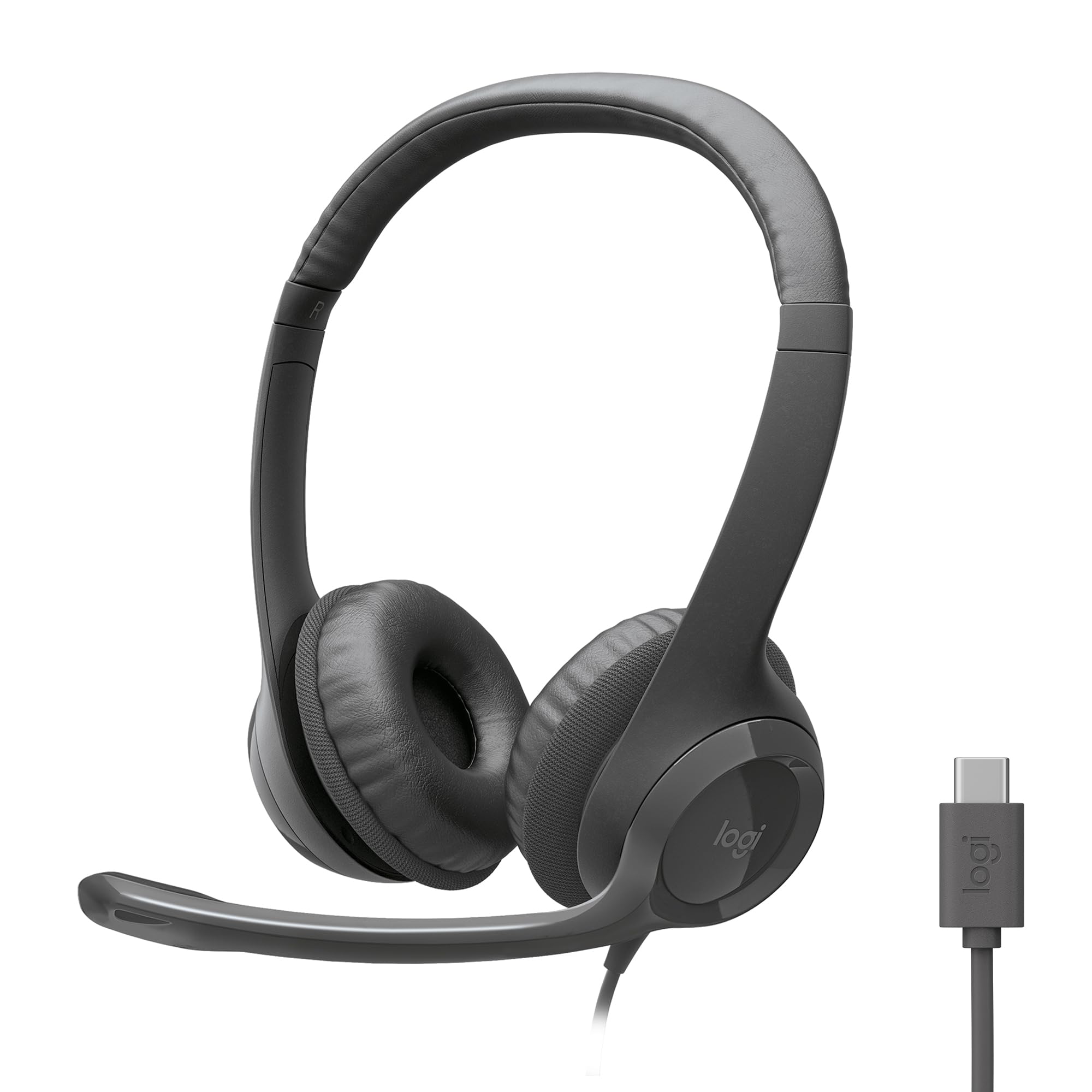
The Logitech H391 brings the core strengths of the H390 family to the USB-C era. It features the same fine-tuned dynamic drivers for digital stereo sound and the same rotating noise-canceling microphone, but with a modern USB-C connector. This makes it the direct choice for newer laptops, tablets, and docks that have phased out USB-A ports.
Music and call clarity are on par with its sibling, providing clear highs and a warm midrange that makes voices sound natural. The noise-canceling mic does an excellent job of filtering out ambient sounds, as one reviewer noted it was the best among three headsets they tested, leading them to return more expensive models.
The H391 also emphasizes sustainability, with plastic parts containing 53% post-consumer recycled material. The padded leatherette ear cushions and adjustable headband provide a comfortable fit, though the clamping force can feel slightly tight for some users. The 6.23-foot USB-C cable gives plenty of slack for movement without feeling overly bulky.
Why it’s great
- Modern USB-C plug-and-play for current laptops
- Effective noise-canceling microphone beats more expensive options
- Lightweight build and comfortable leatherette cushions
Good to know
- Clamping force may feel tight for some head shapes
- Long cable can be cumbersome to manage
3. Lenovo USB-A Wired Stereo Headset Gen 2

Weighing in at just 140 grams, the Lenovo USB-A Gen 2 headset is designed for professionals who prioritize lightweight comfort. You can wear this headset for hours without any pressure or fatigue, making it ideal for back-to-back calls. The USB-A connection is truly plug-and-play, automatically recognized by Teams, Zoom, and Google Meet.
A key differentiator is the Lenovo Accessories and Device Manager (LADM) software. While the out-of-the-box performance is solid, installing this app enhances the noise-cancellation algorithm, actively filtering out background noise in busy environments. The double-sided boom microphone captures your voice cleanly, and the in-line control box provides easy access to mute, volume, and call management.
The replaceable earcups are a thoughtful touch, extending the headset’s lifespan. User reviews consistently praise its crystal-clear call quality and reliable performance. The 4.9-ounce weight and soft earcups create a transformative comfort experience for anyone who spends their workday in meetings.
Why it’s great
- Ultra-lightweight 140g design minimizes fatigue
- AI-powered noise canceling via LADM software
- Replaceable earcups for longer product life
Good to know
- Enhancing noise cancel requires optional software installation
- Requires a single AAAA battery (included) for mic functionality
4. Jabra Evolve 10 Wired Headset
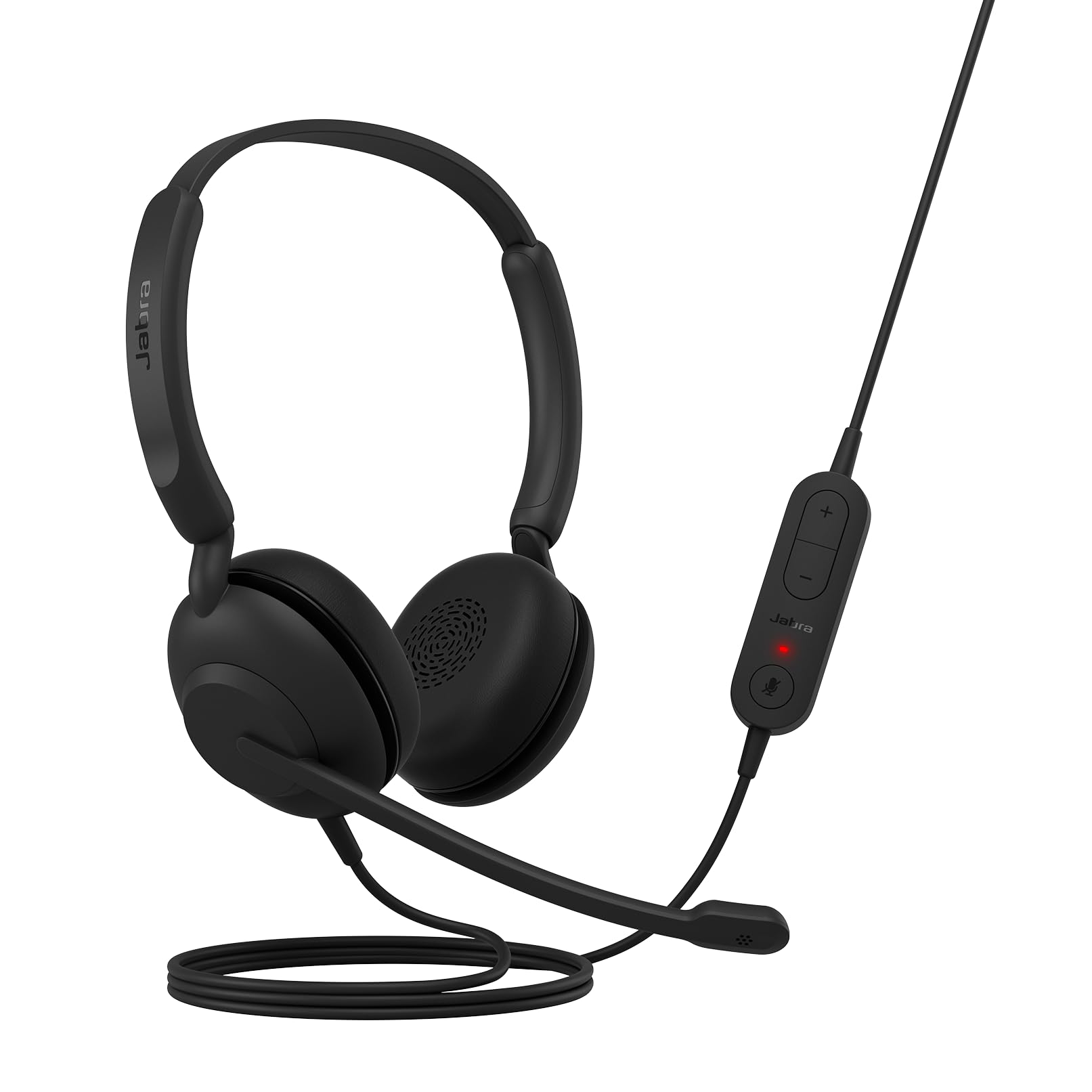
The Jabra Evolve 10 proves that an eco-friendly design doesn’t sacrifice performance. Made from more than 50% recycled plastic and TCO certified, this headset is the responsible choice for the environmentally conscious user. Its minimalist, compact design feels durable and light, making it a great travel companion for the home or office.
Call quality is the priority here. The noise-canceling microphone effectively filters out background chatter, ensuring your voice comes through loud and clear. The adjustable boom arm offers wearability on either the left or right side, a convenient feature for single-ear monitoring or switching hands during calls.
The Evolve 10 is straightforward USB-A plug-and-play, with no complex setup required. The inline call and volume controls are simple to use. User feedback highlights the excellent sound quality and comfortable fit, though some note it is best suited for moderate call volumes rather than heavy media consumption due to its focused sound profile.
Why it’s great
- TCO certified with over 50% recycled plastic
- Lightweight, all-day comfort with a compact design
- Flexible boom mic can be worn on left or right side
Good to know
- Sound profile is optimized for voice, not bass-heavy music
- No software or app for additional noise control features
5. Amazon Basics On Ear Wired Computer Headset
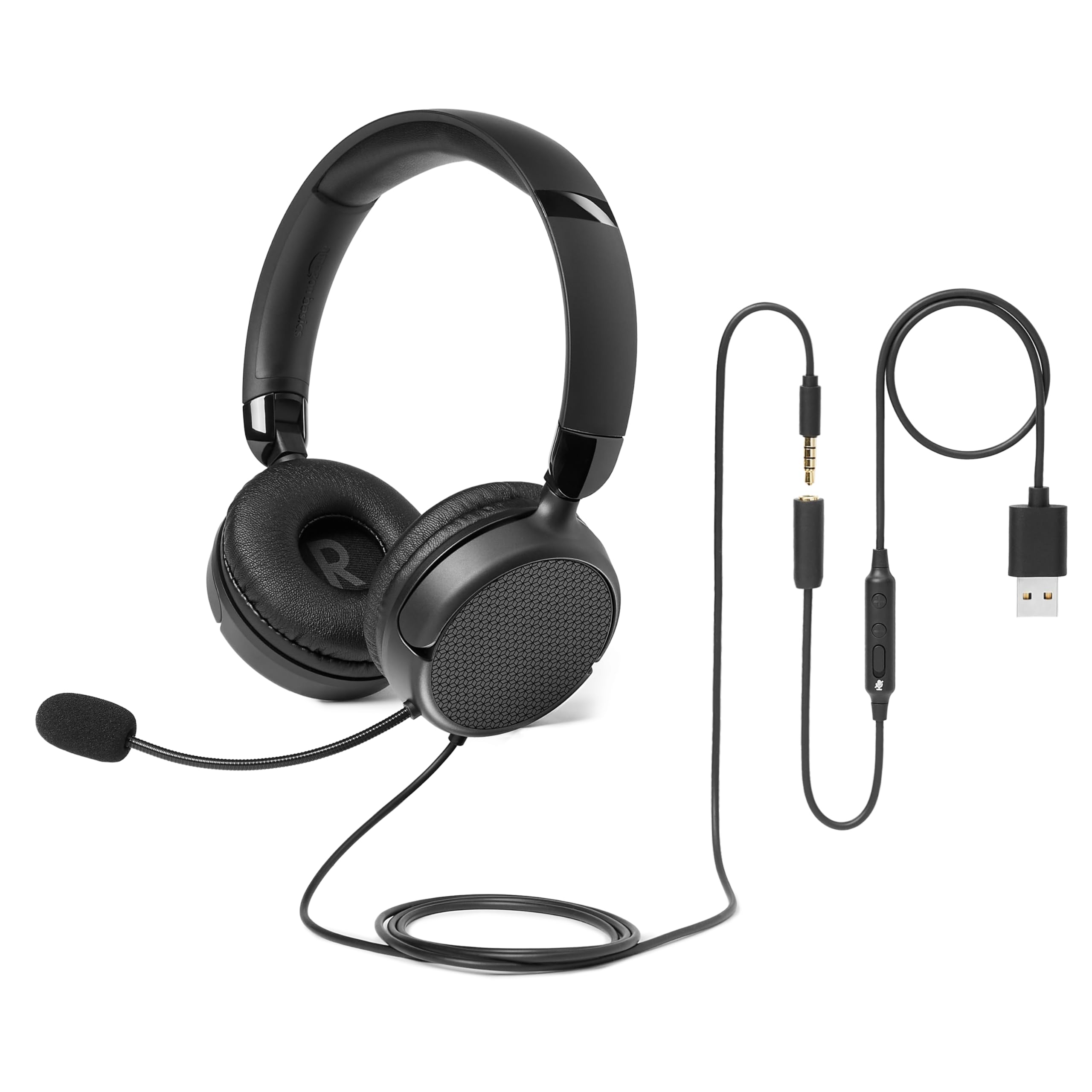
The Amazon Basics On Ear headset is an entry-level champion for portability and versatility. Its foldable design packs down small, making it easy to toss in a bag for the office, library, or travel. It comes with both a 3.5mm cable for phones/tablets and a USB-A adapter for computer use, giving you connectivity flexibility that few budget headsets offer.
The 32mm dynamic drivers deliver clear sound that works well for calls and online learning. The flexible, adjustable boom microphone is unidirectional, which helps reduce background noise when positioned correctly. The in-line control box provides one-touch mute/unmute and volume adjustment, a critical feature for seamless meetings.
This headset is designed for small to medium head sizes. User feedback suggests the fit is comfortable for those with smaller ears, but larger heads may find the ear cushions too tight. The build uses lightweight plastics with some flex, making it best for gentle, daily carry use. It is a functional, no-frills solution for the most budget-conscious buyer.
Why it’s great
- Foldable design offers excellent portability
- Dual connectivity with 3.5mm and USB-A adapter
- Very lightweight for extended wear without strain
Good to know
- Best fit for small to medium head sizes
- Plastic joints may be vulnerable to rough handling
FAQ
Are cheap computer headsets good for music?
Can I use a USB-A headset with a USB-C only laptop?
Final Thoughts: The Verdict
For most users, the cheap computer headset winner is the Logitech H390 because it offers an unmatched combination of long-term durability, excellent noise rejection, and all-day comfort for a price that is hard to beat. If you need a modern USB-C connection for a newer laptop, grab the Logitech H391. And for the lightest possible wear and AI-enhanced noise canceling, the Lenovo USB-A Gen 2 is a fantastic featherlight option.

Mo Maruf
I created WellFizz to bridge the gap between vague wellness advice and actionable solutions. My mission is simple: to decode the research and give you practical tools you can actually use.
Beyond the data, I am a passionate traveler. I believe that stepping away from the screen to explore new environments is essential for mental clarity and physical vitality.