Our readers keep the lights on and my smoothie glass nicely filled. As an Amazon Associate, I earn from qualifying purchases.
A sturdy desk shouldn’t be a luxury, but when your budget hovers near the entry-level price point, you often face a trade-off between stability and workspace. The best budget-friendly computer desks prove you can have a stable, functional surface that supports your daily workflow without breaking the bank or wobbling under your keyboard.
I’m Mohammad Maruf — the founder and writer behind WellFizz. I’ve spent countless hours analyzing customer feedback, build materials, and real-world assembly experiences across dozens of desks to identify which sub- models actually deliver on their promises.
After filtering through hundreds of verified reviews, I’ve narrowed the field to seven models that balance price with real utility — this is the definitive guide to the cheap computer desk market for shoppers who refuse to sacrifice function for affordability.
How To Choose The Best Cheap Computer Desk
When your budget sits in the entry-level to mid-range zone, every decision about frame construction, desktop dimensions, and storage features directly affects whether you’ll be replacing this desk in six months. Understanding a few key specs separates a smart purchase from a frustrating one.
Frame Material and Build Stability
The frame is the skeleton of your desk. Alloy steel provides the best rigidity at this price level, while powder-coated steel offers decent corrosion resistance. Look for crossbars or Z-shaped leg designs — these structural reinforcements prevent lateral wobble, especially if you plan to place a monitor arm or heavy tower on the desk. Adjustable leg pads are a must for uneven floors.
Desktop Dimensions and Weight Capacity
Measure your available space and your equipment. A 47-inch desktop accommodates a dual-monitor setup with room for a laptop, while compact 27-inch models suit tight corners or dorms. Pay attention to the depth (typically 18 to 24 inches) — shallow desks force your monitor closer to your face. Weight capacity above 100 pounds ensures the frame can handle your monitors, peripherals, and occasional leaning without flexing.
Storage and Cable Management
Fabric drawers, monitor shelves, CPU stands, and headphone hooks turn a basic surface into an organized workstation. A monitor riser improves ergonomics by lifting your screen to eye level, reducing neck strain. Built-in power outlets and USB ports are a premium feature at this price, but they eliminate cable clutter. Prioritize the storage that matches your daily habits — if you have a printer or filing needs, look for dedicated shelves or file drawers.
Quick Comparison
On smaller screens, swipe sideways to see the full table.
| Model | Category | Best For | Key Spec | Amazon |
|---|---|---|---|---|
| ODK L Shaped with Hutch | Premium | Large Gaming Setup | 53″ L-shape, 2-Tier Hutch | Amazon |
| ODK L Shaped with Power Outlets | Premium | Immersive Gaming | 53″ L-shape, RGB LEDs, 3 Outlets | Amazon |
| EnHomee Office Desk | Premium | Work from Home | 56.5″, File Drawer, Printer Shelf | Amazon |
| Korfile Gaming Desk with Drawers | Mid-Range | Gaming + Organization | 47″, 5 Drawers, Power Outlets | Amazon |
| AODK 48 Inch Gaming Desk | Mid-Range | Dual Monitor Workflow | 48″, Full-Length Monitor Shelf | Amazon |
| Korfile 40 Inch L Shaped Desk | Mid-Range | Corner Spaces + LED | 40″ L-shape, Carbon Fiber, 220 lb | Amazon |
| Dripex Small Computer Desk | Budget | Small Spaces / Kids Room | 27.5″, 3-Tier Shelves | Amazon |
In‑Depth Reviews
1. ODK 53″ L Shaped Gaming Desk with Hutch & Headphone Hook
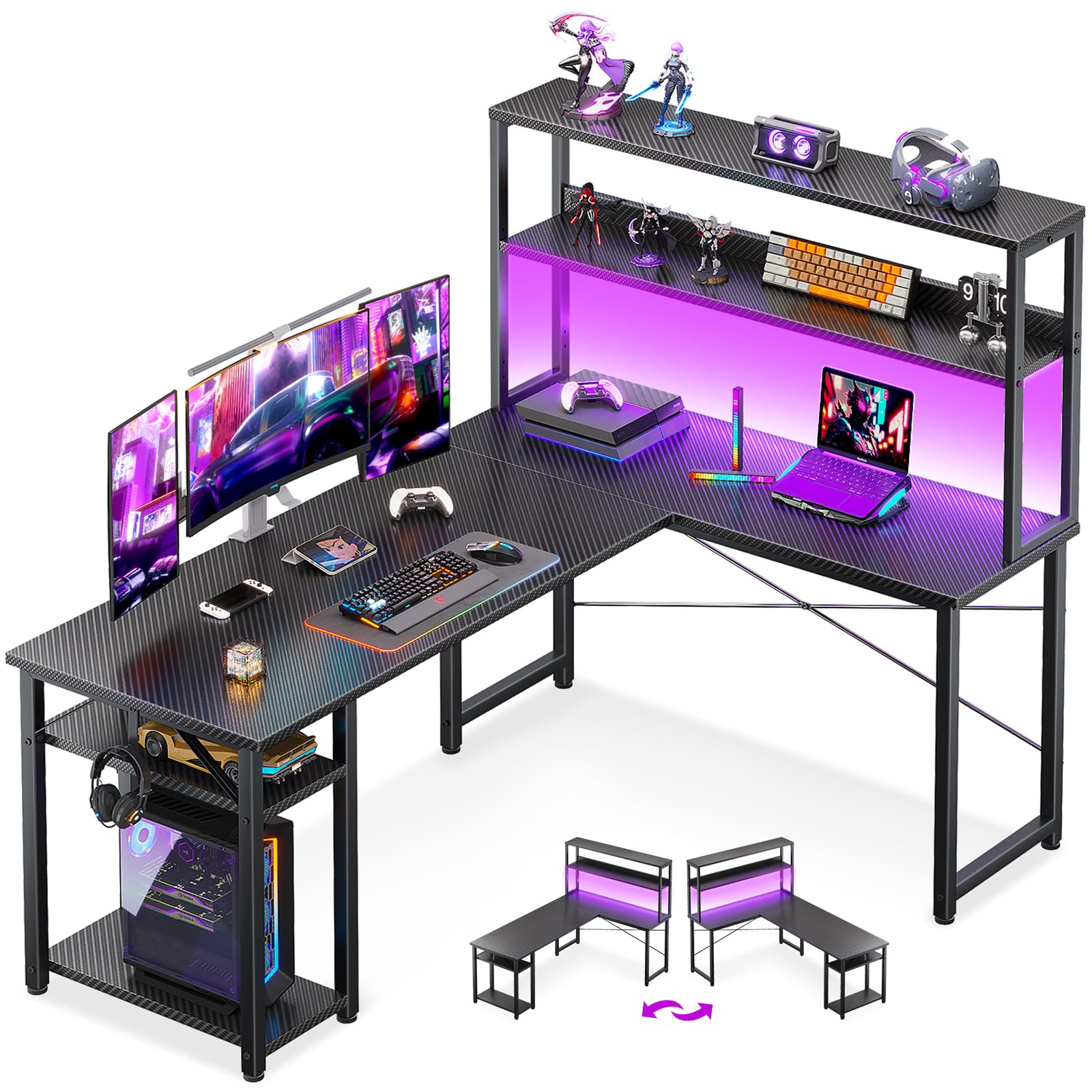
The ODK L-shaped desk delivers the largest usable surface in this roundup, stretching 53 inches across both wings with an optional two-tier hutch that doubles as a monitor riser. The alloy steel frame and MDF desktop support a substantial setup — multiple monitors, a tower, and peripherals — without significant flex, and the adjustable leg pads eliminate wobble on carpet or uneven hardwood.
Assembly takes roughly two hours for a single person, with clearly marked holes and all necessary tools included. The headphone hook and CPU stand are welcome additions, but the lack of pre-drilled cable management holes means you’ll need to run cords around the back edge, which may require pulling the desk away from the wall for full access.
The hutch can be configured as either a storage shelf or a monitor stand, giving you flexibility depending on your screen height preference. For users who want corner-filling coverage with room to spread out documents, peripherals, and decorative items, this is the most spacious option that still lands in a reasonable price tier.
Why it’s great
- Spacious L-shape fits dual monitors and a laptop comfortably
- Versatile hutch functions as monitor riser or storage shelf
- Sturdy alloy steel frame with anti-slip leg pads
Good to know
- No built-in cable management cutouts
- Assembly instructions could be clearer for the hutch section
2. ODK 53 Inch L Shaped Gaming Desk with LED Lighting & Power Outlets

This ODK model builds on the same L-shaped footprint but adds an RGB LED strip with 10 color presets and 8 brightness levels, plus three AC outlets and two USB ports built into the desktop. The X-shaped steel frame enhances lateral stability, and the 220-pound weight capacity means you can load it with dual monitors, a heavy tower, and still have room for a laptop or tablet.
The integrated storage includes dual shelves, a CPU stand, an accessory hook, and a side pocket bag — a thoughtful combination for gamers who want controllers, headsets, and cables organized but out of sight. The reversible side modules let you place the shorter wing on either left or right, adapting to your room’s corner orientation.
One drawback is the LED light strip’s power plug uses a dedicated outlet, reducing the number of available charging ports slightly. Assembly is manageable but requires careful attention to the X-frame brace alignment — several reviews mention that leaving screws loose until all parts are aligned prevents wobble. For the price, this desk packs more features per square inch than most competitors.
Why it’s great
- Built-in 3-outlet power strip with dual USB ports
- RGB LED strip with multiple dynamic modes and memory function
- Reversible design fits left or right corner layouts
Good to know
- LED power plug occupies one outlet on the strip
- X-frame assembly requires careful bolt alignment
3. EnHomee 56.5″ Office Desk with Drawers and Printer Space
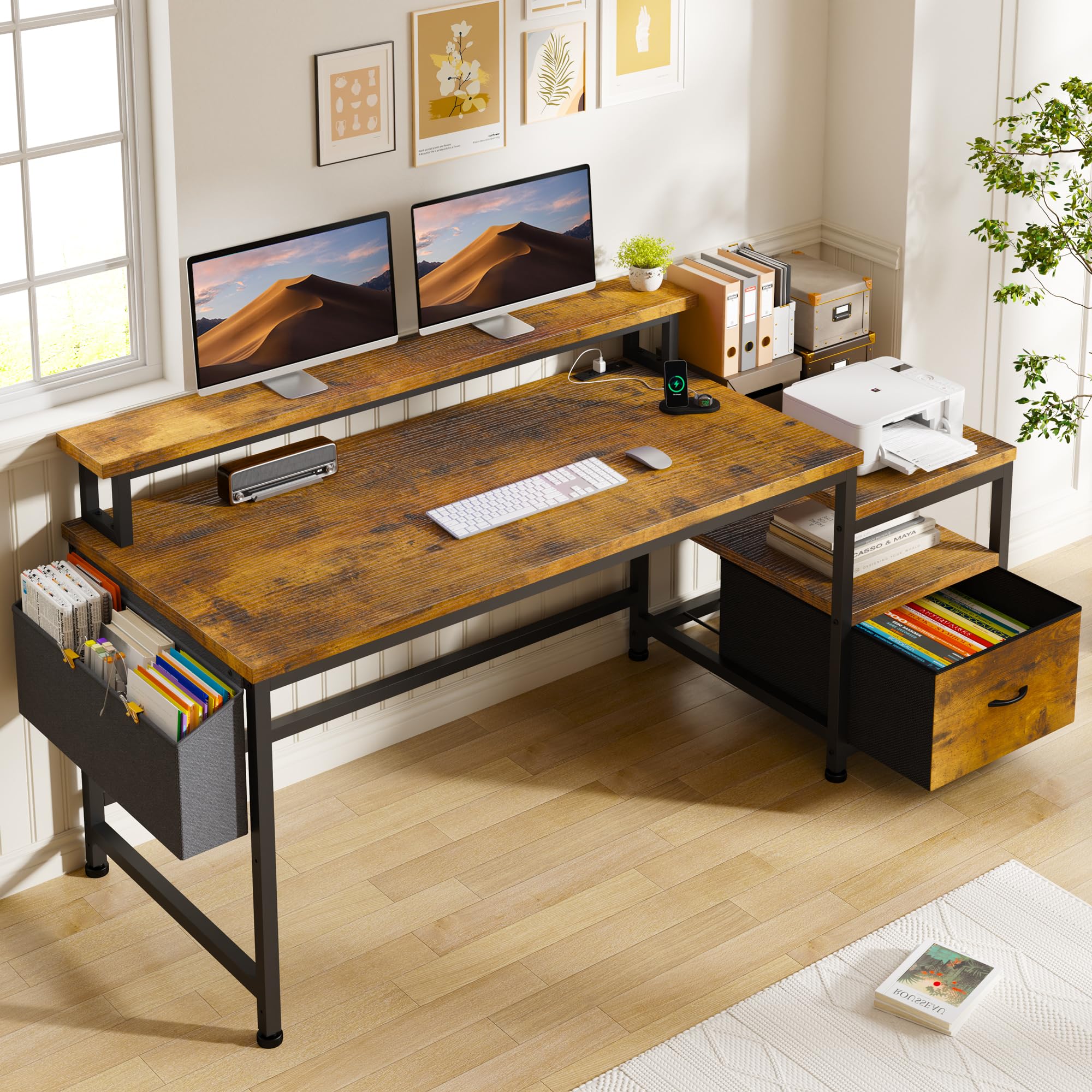
The EnHomee desk targets the work-from-home crowd with a 56.5-inch rectangular surface, a long 40-inch monitor stand that accommodates two monitors, and a dedicated fabric file cabinet plus open printer shelf. The rustic brown finish gives it a warmer aesthetic than the black gaming desks, making it blend better with living room or bedroom decor.
Built-in charging station with three standard sockets and two USB ports keeps your phone, tablet, and peripherals powered without a separate surge protector. The 7-inch-deep monitor riser lifts screens to a more ergonomic height, and the crossbar supports underneath help manage cable routing, though there are no dedicated grommets.
Assembly is straightforward — most customers report completing it solo within an hour. The fabric file drawer is better suited for documents and small office supplies than heavy binders. Overall, this desk offers the most professional-grade storage among the budget-friendly options, especially if you need a printer shelf and filing space.
Why it’s great
- Fabric file cabinet and open printer shelf provide real office storage
- Long monitor stand supports dual screens at eye level
- Power strip with 3 outlets and 2 USB ports built into the desktop
Good to know
- No cable management grommets in the desktop
- Fabric drawer not designed for heavy files or binders
4. Korfile 47 Inch Gaming Desk with Power Outlets and LED Lights
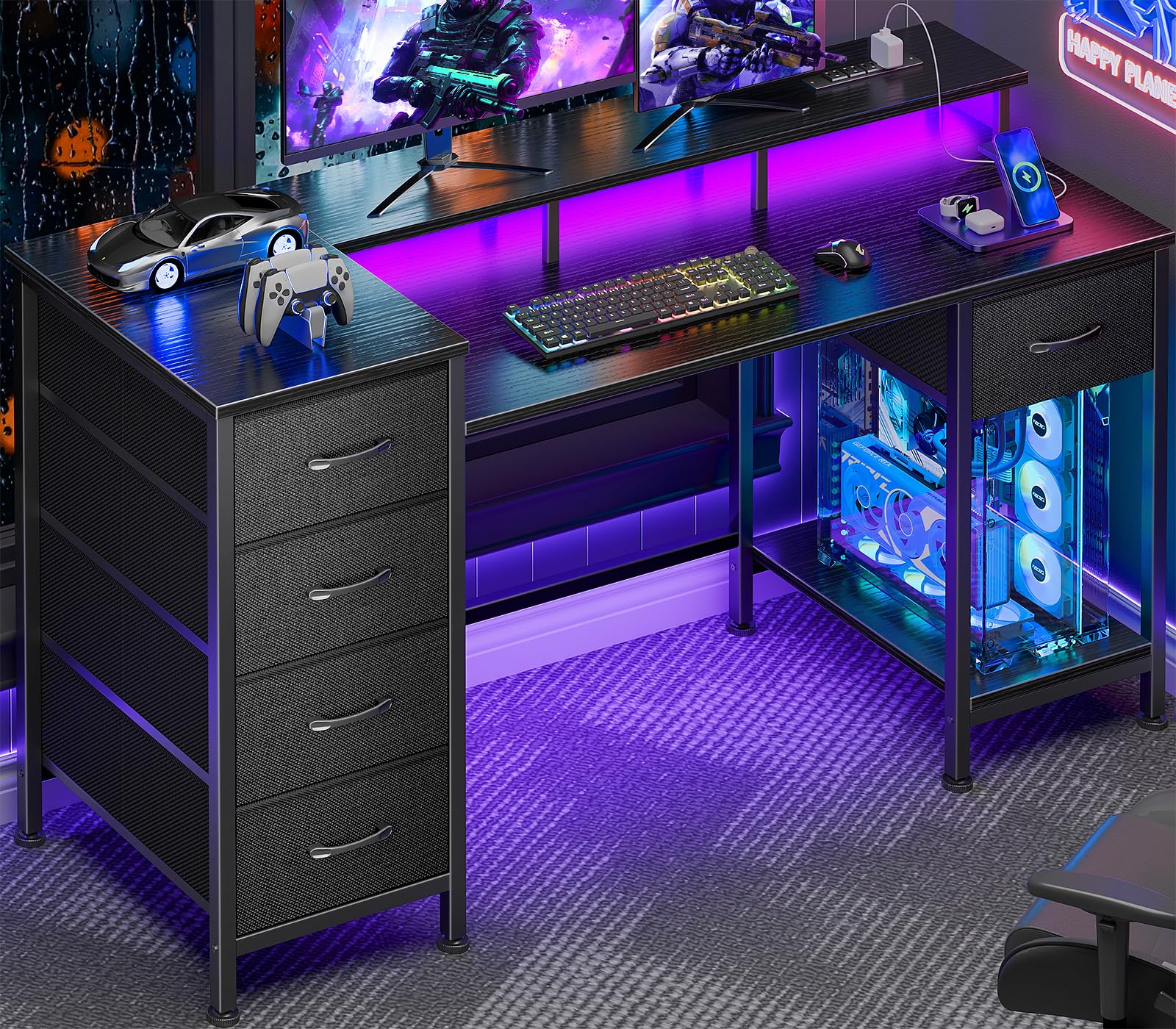
The Korfile 47-inch desk distinguishes itself with five non-woven fabric drawers that can be mounted on either the left or right side, with four possible height positions. This modular storage system lets you tailor the desk to your gear — place the drawers high for quick access to pens and notebooks, or low for storing gaming controllers and cables out of sight.
The integrated RGB LED strip offers 22 customizable effects, and the built-in power station includes three AC outlets and two USB ports. The full-coverage monitor stand lifts your screen to a comfortable viewing angle, reducing neck strain during long sessions. An extra wood panel in the box allows an alternate CPU tower configuration, adding flexibility.
Assembly requires patience — several users note that over-tightening screws into the wood particle board can strip the threads, and the drawer glides need careful alignment. The fabric drawer bottoms may sag under heavy loads, so keep lightweight items in them. Despite these quirks, the sheer amount of integrated, configurable storage at this price point is unmatched.
Why it’s great
- Five adjustable drawers with flexible left/right mounting
- RGB LED strip with 22 effects and built-in power outlets
- Full-coverage monitor stand improves ergonomics
Good to know
- Fabric drawer bottoms sag with heavy items
- Monitor arm desk mounts will not fit the crossbar design
5. AODK 48 Inch Gaming Desk with LED Lights and Storage Shelves
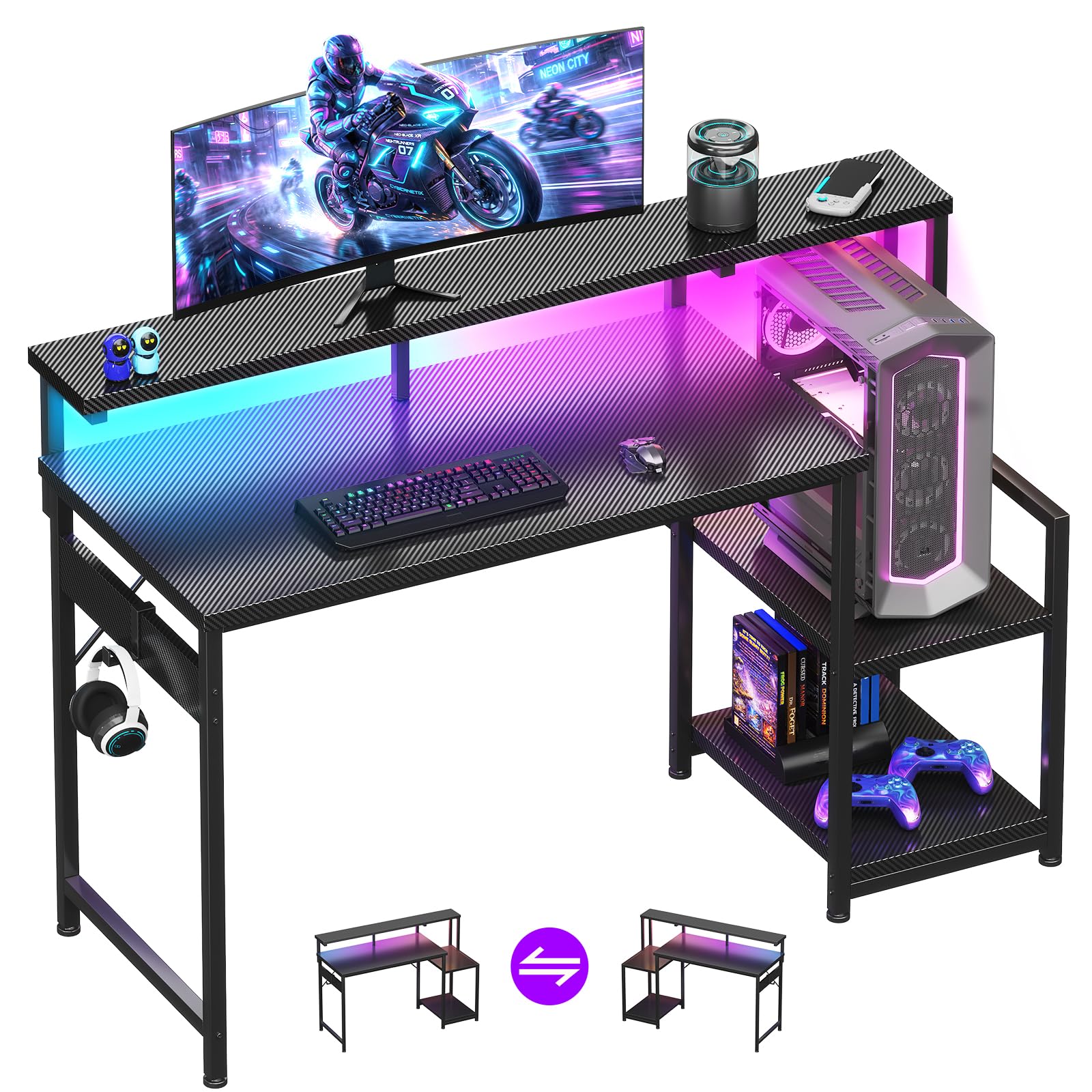
The AODK 48-inch desk offers a full-length monitor shelf that runs the entire width of the desktop — a rare feature at this price level. This gives you a continuous elevated surface for two monitors side by side, with the lower desktop area free for your keyboard, mouse, and writing space. The carbon fiber textured surface resists scratches and is easy to wipe clean.
The LED light strip under the monitor shelf provides 10 static colors and 10 dynamic modes, creating ambient backlighting without taking up desktop real estate. The reversible storage shelf can be mounted on either the left or right side and adjusts to two heights, accommodating a CPU tower or gaming accessories.
The main drawback is the depth: the front-to-back measurement from the desktop edge to the elevated shelf is relatively shallow, which pushes your monitors closer to your face. Users who prefer a deep work surface may find the viewing distance too close. Assembly is straightforward with clear instructions, and the metal frame provides stable support for everyday use.
Why it’s great
- Full-length monitor stand creates a clean continuous elevated surface
- Carbon fiber texture is scratch-resistant and waterproof
- Reversible and height-adjustable storage shelf
Good to know
- Shallow depth forces monitors closer to the user
- No built-in power outlet or USB ports
6. Korfile 40 Inch Gaming Desk with Power Outlet & LED Lights
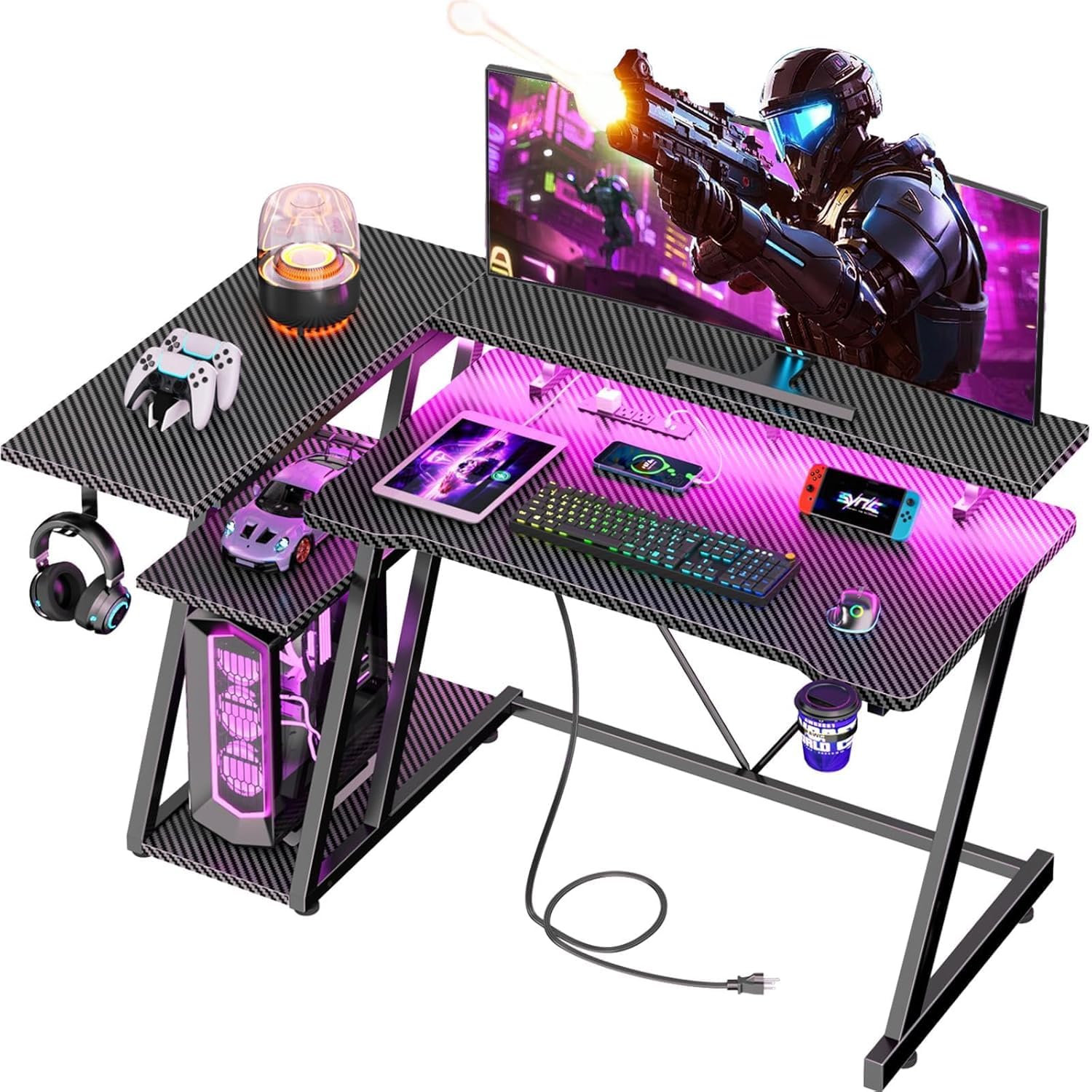
The Korfile 40-inch L-shaped desk is the smallest corner configuration in this roundup, making it ideal for tight spaces like dorm rooms or small bedrooms. Despite its compact footprint, it includes a carbon fiber textured surface, an RGB LED strip with app control, and a built-in power station with three AC outlets and two USB ports.
Double Z-shaped legs provide a weight capacity of 220 pounds — impressive for a desk in this size and price bracket. The reversible design allows the L-shape to flip left or right, and two units can be combined into a U-shaped configuration. The included cup holder, headphone hook, and long monitor stand add convenience for gamers.
Some users report that assembly is moderately difficult, particularly aligning the Z-shaped leg brackets, and the cable management is basic — you’ll need zip ties for a clean look. The 40-inch L-shape provides enough room for a single monitor and laptop, but a large tower may not fit on the leg side. It’s best suited for laptop users or compact gaming setups.
Why it’s great
- Small L-shape fits corners where a full-size desk won’t
- 220-pound weight capacity for a compact frame
- Built-in power outlets, RGB lights, cup holder, and headphone hook
Good to know
- Z-shaped leg assembly can be tricky to align
- Limited legroom depth for a large PC tower
7. Dripex Computer Desk for Small Spaces, 27.5 inch

The Dripex 27.5-inch desk is the most compact and affordable model here, designed specifically for small spaces, kids’ rooms, or as a secondary workstation. Its three-tier design — top shelf, main desktop, and bottom storage shelf — maximizes vertical storage for a printer, books, or monitor stand, keeping the main surface clear for a laptop and mouse.
The solid wood desktop paired with a steel frame provides surprising stability for its size, and the lightweight construction makes it easy to move. Assembly is quick, with clear instructions and labeled parts — most users report completing it in under 30 minutes. The black finish is neutral and blends into most room aesthetics.
The trade-offs are obvious: the 27.5-inch width limits you to a single small monitor or laptop, and the leg design means a standard PC tower won’t fit on the bottom shelf. Best suited for light use — writing, studying, or as a dedicated laptop station — this desk is a solid entry-level buy for those prioritizing price and simplicity over expandability.
Why it’s great
- Ultra-compact footprint fits tight corners and narrow spaces
- Three-tier shelving maximizes vertical storage
- Quick assembly with clear instructions and included tools
Good to know
- 27.5-inch width fits only a single monitor or laptop
- Leg design prevents a full-size PC tower from sitting on the bottom shelf
FAQ
Can a cheap computer desk support a dual monitor setup?
What is the best frame material for a budget-friendly desk?
How important are adjustable leg pads on a cheap desk?
Do budget desks come with cable management solutions?
How long should a cheap computer desk last?
Final Thoughts: The Verdict
For most users, the cheap computer desk winner is the ODK 53″ L Shaped Desk with Hutch because it offers the largest usable surface, a functional hutch, and a sturdy alloy steel frame at a price that undercuts comparable L-shaped desks. If you want integrated RGB lighting and power outlets for a gaming setup, grab the ODK L Shaped with LED and Outlets. And for a dedicated home office with filing and printer space, nothing beats the EnHomee 56.5″ Office Desk.

Mo Maruf
I created WellFizz to bridge the gap between vague wellness advice and actionable solutions. My mission is simple: to decode the research and give you practical tools you can actually use.
Beyond the data, I am a passionate traveler. I believe that stepping away from the screen to explore new environments is essential for mental clarity and physical vitality.