Our readers keep the lights on and my smoothie glass nicely filled. As an Amazon Associate, I earn from qualifying purchases.
Getting a clean, professional-looking stream doesn’t require a DSLR rig or a thousand-dollar mirrorless setup. The real challenge is finding a camera that delivers sharp 1080p video, reliable autofocus, and decent low-light performance without blowing your budget. That’s the sweet spot this guide is built around.
I’m Mohammad Maruf — the founder and writer behind WellFizz. I’ve spent countless hours researching the streaming camera market, analyzing sensor sizes, autofocus systems, and frame rate capabilities at every price tier to find the models that actually deliver on their specs.
Every camera here was selected for its ability to produce watchable, engaging video at a price that won’t make you wince. Whether you’re gaming on Twitch, hosting a podcast, or running a small YouTube channel, these picks will get you on air fast. This is your definitive guide to the best cheap camera for streaming.
How To Choose The Best Cheap Camera For Streaming
Streaming cameras under the premium tier share common constraints: smaller sensors, fixed or slow autofocus, and limited frame rate options. The trick is knowing which compromises you can accept for your specific use case. Here’s what to look for.
Sensor Size and Low-Light Capability
The sensor is the heart of any camera. A larger physical sensor — like a 1/2.0″ or 1/2.8″ CMOS — captures more light, producing less grain in dimmer rooms. Cheap cameras with tiny sensors look flat and noisy the moment your ring light isn’t blasting. Look for models that advertise their sensor size explicitly; it’s a strong signal of honest engineering.
Autofocus vs. Fixed Focus
Many budget webcams use a fixed focus lens, meaning you must sit at a precise distance to stay sharp. If you lean in to show a prop or lean back, you blur instantly. Cameras with phase detection autofocus (PDAF) or contrast-based autofocus keep you sharp whether you’re 10 inches or 3 feet from the lens. For streaming, autofocus is nearly essential.
Frame Rate: 30 fps vs 60 fps
For talking-head streams, podcasts, and most vlogging, 1080p at 30 fps is perfectly fine. For fast-motion content like gaming reaction shots or unboxing demos with rapid hand movement, 1080p at 60 fps eliminates judder and looks significantly smoother. Many cheap cameras cap out at 30 fps, but a few mid-range units offer the 60 fps upgrade without the price jump.
Microphone Quality
Your audio quality is arguably more important than your video for audience retention. Built-in mics on cheap cameras range from tinny to serviceable. Dual omnidirectional mics with noise suppression can handle casual streaming, but if you’re serious about vocal clarity, budget for a separate USB mic. The camera’s mic is a fallback, not a solution.
Quick Comparison
On smaller screens, swipe sideways to see the full table.
| Model | Category | Best For | Key Spec | Amazon |
|---|---|---|---|---|
| OBSBOT Meet SE | Premium Pick | AI tracking & high frame rate streaming | 1080p at 100 fps, 1/2.8″ Stacked CMOS | Amazon |
| NexiGo N660P Pro | Mid-Range | Sharp 4K/1080p60 with distortion-free lens | 4K at 30 fps / 1080p at 60 fps | Amazon |
| EMEET S600L | Mid-Range | Built-in ring light & 4K imaging | 4K@30fps, 1/2.0″ Samsung sensor, PDAF | Amazon |
| EMEET C60E Dual-Camera | Mid-Range | Dual-lens streaming with remote control | 4K sensor, 11X hybrid zoom, dual lenses | Amazon |
| Logitech C920x | Mid-Range | Reliable 1080p for meetings & streaming | 1080p at 30 fps, autofocus, light correction | Amazon |
| AVerMedia Live Streamer Cam 313 | Budget Pick | Simple plug-and-play with privacy shutter | 1080p at 30 fps, fixed focus, 360° swivel | Amazon |
| Abel Gaming Streaming Kit | Entry-Level | All-in-one starter bundle with mic & light | 1080p at 30 fps, bundled USB mic & LED | Amazon |
In‑Depth Reviews
1. OBSBOT Meet SE

The OBSBOT Meet SE punches far above its price tier with a 1/2.8″ Stacked CMOS sensor and the ability to stream at 1080p at 100 fps. That frame rate is unheard of at this level — it means silky-smooth motion for gaming reaction streams or any content where fast movement matters. The Staggered HDR and 2.9 µm pixel size deliver impressive dynamic range even in mixed lighting, avoiding the blown-out look common on cheaper sensors.
Its AI framing system intelligently tracks your face or multiple people in group mode, adjusting the composition in real-time without manual intervention. The gesture controls — a raised palm toggles AI framing, a pointed finger controls zoom — work reliably without requiring software open, which is a massive convenience for live settings. The magnetic mount is sturdy and the included USB-C cable is a welcome modern touch.
Build quality is compact and lightweight, though the metal body can get warm during extended streaming sessions. The built-in mic is average, so pair this with a dedicated USB microphone for best results. The OBSBOT Center software gives you full manual control over exposure, white balance, and beauty mode settings, adding pro flexibility for those who want to dial in their look.
Why it’s great
- Unmatched 1080p at 100 fps for ultra-smooth streaming
- AI framing and gesture controls work without background software
- Staggered HDR and large pixel sensor handle low-light exceptionally well
- Included magnetic mount and privacy cover add convenience
Good to know
- Runs warm during extended use; unplug when not streaming
- Built-in mic is serviceable but not professional-grade
- Limited to 1080p resolution (no 4K option)
2. NexiGo N660P Pro

The NexiGo N660P Pro is a rare find at this price point: a true 4K-capable webcam that also delivers 1080p at 60 fps for fluid motion. Its distortion-free lens eliminates the fisheye effect that plagues many wide-angle cameras, preserving natural facial proportions and straight lines behind you. The 80° field of view is tighter than many competitors, which actually helps keep the focus on you rather than a cluttered background.
Autofocus is fast and reliable thanks to the phase detection system, and the dual noise-canceling microphones do a solid job isolating your voice from keyboard clicks and room ambience. The 3DNR (3D Noise Reduction) engine cleans up grain in moderate lighting, so you don’t look like a grainy mess when your ring light isn’t at full blast. The sliding privacy cover is external and easy to operate without looking.
The 360° swivel mount and integrated 1/4″ tripod thread give you flexible mounting options. The NexiGo software allows 4X digital zoom with good quality retention. Some users report that the privacy cover loosens slightly over time, and the 4K resolution is best used with good lighting — low-light 4K can be noisy. It’s compatible with Switch 2 via a USB-C to USB-A adapter, broadening its appeal for multi-platform streamers.
Why it’s great
- True 4K@30fps and 1080p@60fps in one affordable package
- Distortion-free lens keeps faces and backgrounds natural
- 3DNR and dual noise-canceling mics improve overall quality
- Sliding privacy cover and tripod mount add flexibility
Good to know
- 4K performance in low light is grainy; needs good lighting
- Privacy cover can loosen with repeated use
- Software required for zoom control; no hardware remote
3. EMEET S600L
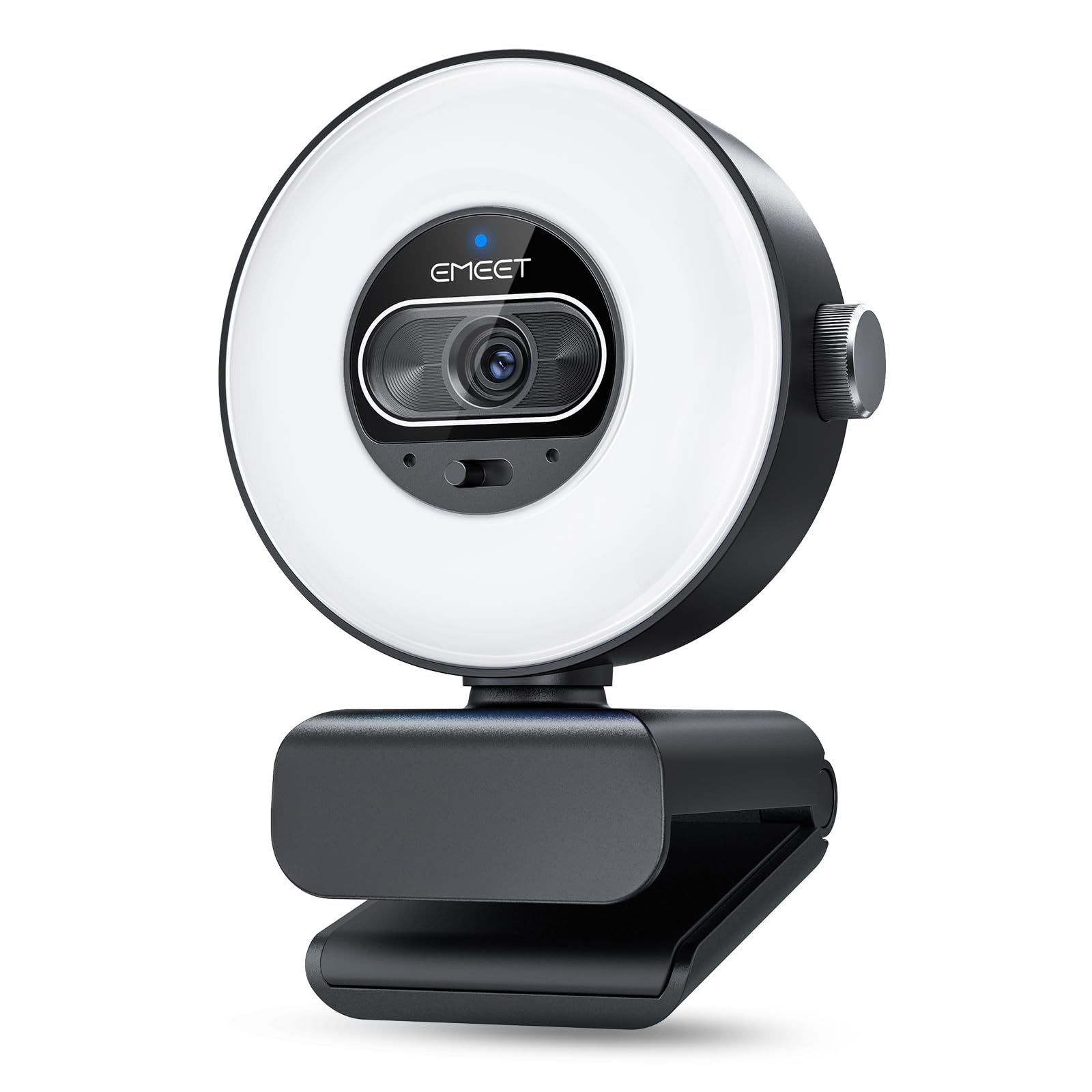
The EMEET S600L solves the biggest streaming lighting problem — uneven shadows — by building a proper ring light directly into the camera bezel. The 1/2.0″ Samsung sensor is physically larger than most competitors, and the PDAF autofocus locks in within 0.2 seconds from as close as 10 cm. The ring light offers four modes (Cool White, Warm White, Natural White, and Ambient Light) plus a rainbow boot-up effect for visual flair when the camera is idle.
What sets the S600L apart is its AI-coordinated imaging system: when the ring light turns on, the camera automatically rebalances exposure and facial detail to avoid the overexposed, washed-out look that plagues cameras with added front lighting. The physical dial control lets you switch lighting modes and adjust brightness without clicking through menus — a huge advantage during a live stream. The dual mics capture clear voice within a 10-foot radius, though they still benefit from a dedicated mic for serious podcasting.
The gimbal supports 360° horizontal rotation and ±15° tilt, plus vertical capture mode for portrait-oriented content. The privacy cover slides on and off easily, and the 1/4″ mount works with any standard tripod. Some users have noted that the camera can appear overly yellow in certain lighting conditions until manually corrected via the EMEET STUDIO software, and a few find the ambient light mode’s color cycling distracting during professional calls.
Why it’s great
- Integrated ring light with AI-coordinated exposure prevents over-lit faces
- Large 1/2.0″ Samsung sensor captures detail in low light
- Physical dial control for lighting modes is streamer-friendly
- Supports vertical capture and 360° gimbal rotation
Good to know
- Color balance can lean warm; requires software adjustment
- Ambient light color cycling may distract in professional contexts
- Built-in mic quality is decent but not studio-grade
4. EMEET C60E Dual-Camera

The EMEET C60E is billed as the world’s first dual-camera streaming webcam, and it actually delivers on that promise. Two lenses share a single 1/2.8″ CMOS 4K sensor: a wide-angle lens for panoramic shots and a telephoto lens for close-up detail. You can switch between them on the fly using the included remote control or the EMEET STUDIO software, making it ideal for product demonstrations, cooking streams, or any scenario where you alternate between full-scene and detail shots.
The 11X hybrid zoom is smooth, with preset steps at 3X, 5X, 7X, and 11X. PDAF autofocus keeps the image sharp at every magnification level, though zoom is not supported in 4K, 60 fps, or YUY2 mode. The remote control is a standout feature at this price tier — it lets you adjust zoom, switch cameras, and control RGB lighting without touching your computer. The RGB lighting accents add a stylish glow with red, green, and blue options matching different moods.
Setup is plug-and-play on Windows and macOS, and the camera supports 1/4″ tripod mounting. The dual omnidirectional mics capture clear sound within a 9.8-foot radius. Some users report that the camera requires initial privacy settings adjustment on Windows to achieve the best picture quality, and the instructions could be clearer. For streamers who need both wide and close-up views without moving hardware, this dual-lens system is a unique and valuable tool.
Why it’s great
- Unique dual-lens system (wide-angle + telephoto) for flexible framing
- 11X hybrid zoom with PDAF autofocus stays sharp across range
- Included remote control for zoom, camera switch, and RGB lighting
- RGB lighting adds visual personality to streaming setup
Good to know
- Zoom not supported in 4K, 60 fps, or YUY2 modes
- Initial Windows privacy settings adjustment required for best quality
- Instructions are minimal; some setup trial-and-error expected
5. Logitech C920x

The Logitech C920x is the standard by which budget streaming webcams are measured. Its Full HD 1080p resolution at 30 fps is not the highest spec on this list, but its consistency and driver support across every major streaming and conferencing platform make it one of the most reliable picks. The HD lighting adjustment system automatically fine-tunes exposure in dim conditions, producing brighter and sharper images than most generic 1080p cameras at this price.
Autofocus is smooth and accurate in good lighting, though it can hunt in very low light. The dual omnidirectional mics capture clear stereo audio, and the camera’s compatibility with Nintendo Switch 2’s GameChat mode is a nice bonus for console streamers. Setup takes under a minute — plug it into any USB port and it works immediately with Zoom, Teams, OBS, Twitch, and YouTube. The 3-month XSplit VCam license for background removal without a green screen is still a useful add-on.
Build quality is the typical Logitech durability, though the C920x lacks a physical privacy shutter — you’ll want to unplug or cover the lens when not in use. The picture quality is noticeably softer than more modern sensors like the OBSBOT’s, and in very low light the image gets grainy quickly. The clip-on mount works on monitors and laptops, but it’s not 360° rotating, so you’re limited to forward-facing angles.
Why it’s great
- Industry-standard compatibility with all streaming and meeting platforms
- HD light correction improves image in less-than-ideal conditions
- Stereo dual mics capture clear, natural-sounding audio
- Proven durability and plug-and-play simplicity
Good to know
- No physical privacy shutter included
- Low-light performance is grainy; autofocus hunts in dim rooms
- Fixed mount lacks 360° rotation; no 60 fps support
6. AVerMedia Live Streamer Cam 313 (PW313)

The AVerMedia PW313 keeps things simple: 1080p at 30 fps, fixed focus, and a 360° swivel design that lets you point the lens anywhere without moving your monitor. The fixed focus means you need to sit at a consistent distance (roughly 20-30 inches) to stay sharp, but for a stationary talking-head setup, this is rarely an issue. The image quality is clear and color-accurate, with good detail in moderate to bright lighting conditions.
The built-in privacy shutter is a nice physical security feature, sliding completely over the lens when not in use. The dual microphone array picks up voice clearly in quiet rooms, though there’s no noise cancellation for louder environments. Setup is truly plug-and-play — no drivers, no software required — and the compact form factor clips securely onto any monitor or laptop lid. The tripod support thread at the base adds versatility for desktop tripods or goose-neck arms.
Color reproduction is better than average for this tier, avoiding the overly warm or cool casts common on very cheap webcams. The depth of field is limited, meaning backgrounds farther than a few feet behind you will appear softer. Some users note that the fixed focus can be a limitation for product demonstrations or leaning in. If you need autofocus and can stretch your budget, the Logitech C920x or OBSBOT Meet SE are better choices.
Why it’s great
- True plug-and-play with no drivers needed; works with everything
- 360° swivel design offers unmatched directional flexibility
- Built-in sliding privacy shutter for physical security
- Accurate color reproduction and clear 1080p image
Good to know
- Fixed focus means blur if you move outside the sharp zone
- No noise cancellation on built-in microphones
- Limited depth of field; backgrounds become soft quickly
7. Abel Gaming Streaming Kit
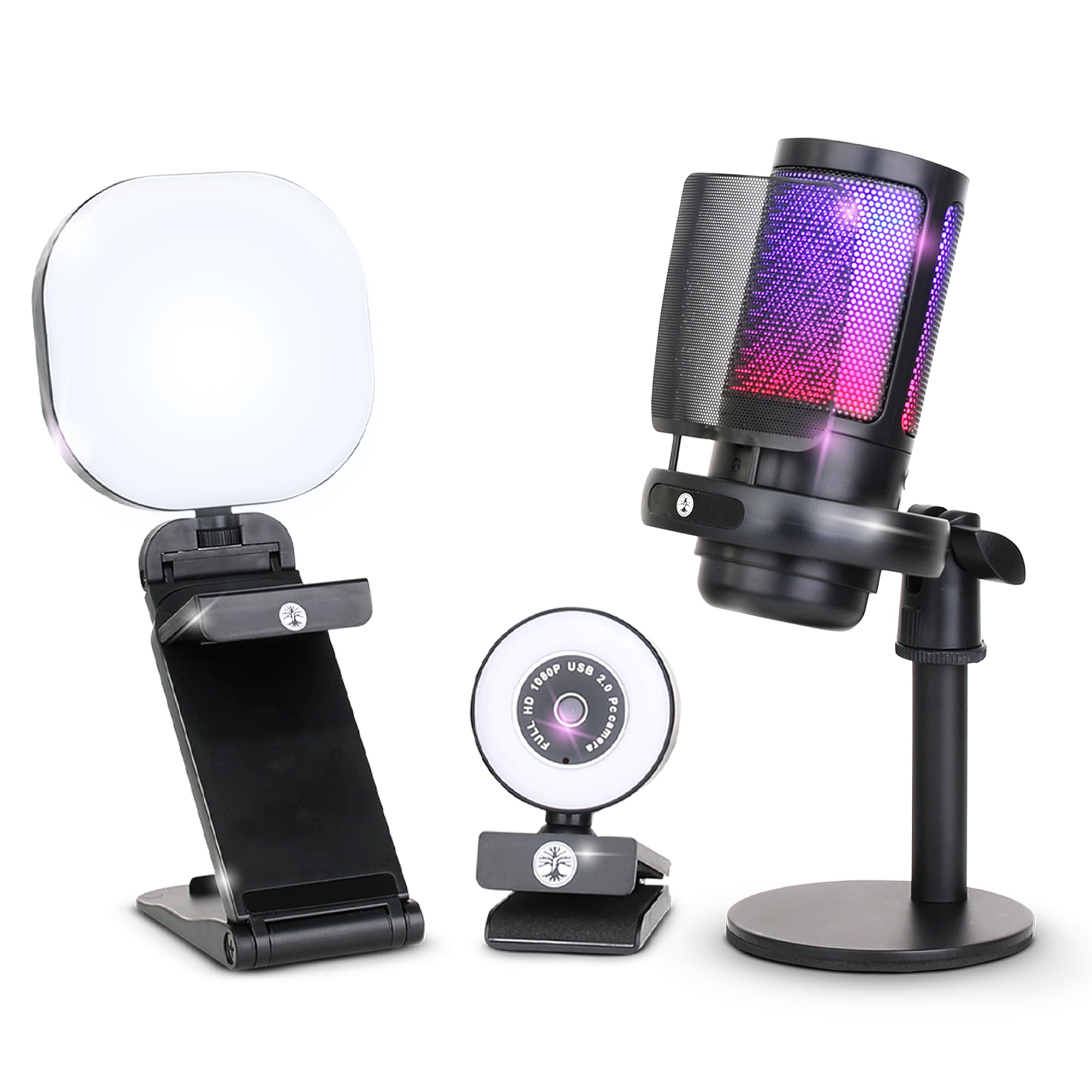
The Abel Gaming Streaming Kit takes a different approach: instead of a single high-end camera, it bundles a 1080p webcam, a USB RGB microphone, and a multi-mode LED light into one purchase. For someone starting from zero, this eliminates the need to buy each component separately. The webcam delivers 1080p at 30 fps with automatic exposure control, and its anti-shake and low-light features help stabilize the image in less-than-ideal conditions.
The USB microphone includes a built-in noise suppression circuit, making it a significant step up from the mics built into most cheap webcams. The LED light has warm, cool, and mixed modes with a flexible stand, providing real control over your lighting. The bundle is designed for plug-and-play compatibility with Windows, Mac, Android, and iOS — though it is NOT compatible with PlayStation, Xbox, or consoles without a separate capture card and PC. The RGB lighting on the mic adds some visual flair for gaming streams.
This is an entry-level kit, and it shows in the details. The camera is the weakest component — image quality is acceptable for casual streaming but lacks the sharpness and color accuracy of dedicated cameras like the OBSBOT or NexiGo. The mic stand is lightweight and can be unstable on cluttered desks, and support documentation is minimal. For a gamer or podcaster on a tight budget who needs everything in one box, it works well. For anyone wanting higher video quality, this should be seen as a temporary starter kit to upgrade from.
Why it’s great
- Complete starter kit includes camera, mic, and LED light
- USB microphone with noise suppression is better than built-in webcam mics
- Multi-mode LED light provides flexible lighting control
- Plug-and-play works across multiple platforms
Good to know
- Camera image quality is soft and lacks color accuracy of dedicated webcams
- Mic stand is unstable and support documentation is minimal
- Not compatible with consoles without a capture card
- Video quality is the kit’s weakest link; plan to upgrade the camera first
FAQ
Does a cheap streaming camera need 4K resolution?
What frame rate is best for live streaming on a budget?
Can I use a cheap webcam with OBS or Streamlabs?
Is a dedicated microphone required with these cheap streaming cameras?
Final Thoughts: The Verdict
For most users, the best cheap camera for streaming winner is the OBSBOT Meet SE because it combines the highest frame rate in its class (1080p at 100 fps) with AI framing, gesture controls, and excellent low-light sensor technology — all at a price that leaves room for a decent microphone. If you want a built-in ring light and automated exposure coordination, grab the EMEET S600L. And for an all-in-one starter bundle that gets you on the air with zero extra purchases, nothing beats the Abel Gaming Streaming Kit.

Mo Maruf
I created WellFizz to bridge the gap between vague wellness advice and actionable solutions. My mission is simple: to decode the research and give you practical tools you can actually use.
Beyond the data, I am a passionate traveler. I believe that stepping away from the screen to explore new environments is essential for mental clarity and physical vitality.