Our readers keep the lights on and my smoothie glass nicely filled. As an Amazon Associate, I earn from qualifying purchases.
Tripping over a nest of wall warts every morning is a real-world friction that a dedicated power station solves in one clean swap. The difference between a chaotic pile of bricks and a single, organized hub isn’t just cosmetic—it’s about reclaiming desk space and knowing every device hits its optimal charge rate without negotiation.
I’m Mohammad Maruf — the founder and writer behind WellFizz. I’ve spent hundreds of hours cross-referencing wattage tables, GaN generations, and real-world current draw patterns to separate the chargers that actually deliver their rated specs from those that throttle under load.
The right charging hub depends on your specific device mix, power demands, and workspace layout. This guide breaks down the key specs and trade-offs to help you find the best charger for multiple devices for your personal setup.
How To Choose The Best Charger For Multiple Devices
The single biggest mistake buyers make is assuming a high port count guarantees high speed. A 10-port hub sharing 60W total will trickle-charge each device, while a 3-port GaN charger with 160W can run a laptop at full speed and still fast-charge a phone and tablet simultaneously. Understand your power budget first.
Total Wattage vs. Per-Port Output
Look at the charger’s total wattage, then divide it by the number of high-power ports you plan to use simultaneously. A 200W charger with four USB-C ports might deliver 65W on one port but drop to 30W or less on the others when all are active. Check the manufacturer’s power-sharing table before buying.
GaN Technology and Thermal Management
Gallium Nitride (GaN) chargers run cooler and smaller than traditional silicon-based units at the same power level. GaN IV and V generations offer better efficiency and tighter thermal control, which directly affects longevity and safety. A charger that stays cool under full load will last longer and charge faster without throttling.
Protocol Compatibility
Not all fast charging protocols are equal. Power Delivery (PD) is the universal standard for laptops, tablets, and modern phones. Qualcomm Quick Charge (QC) covers many Android devices, while Programmable Power Supply (PPS) allows finer voltage steps for Samsung Super Fast Charging. A charger that supports PD 3.1 and PPS will cover the widest range of gear.
Physical Layout and Cable Management
Desktop hubs benefit from vertical towers that keep cables organized, while compact wall warts are better for travel. Consider the cord length, plug orientation (flat vs. standard), and whether the charger blocks adjacent outlets on a power strip. The best unit disappears into your workspace rather than adding visual clutter.
Quick Comparison
On smaller screens, swipe sideways to see the full table.
| Model | Category | Best For | Key Spec | Amazon |
|---|---|---|---|---|
| SABRENT VOLTIK 252W | Premium Desktop Hub | Full workstation charging with live monitoring | 252W total, 100W per USB-C port | Amazon |
| Anker Prime 160W | Premium Compact GaN | Laptop + phone + tablet on the go | 160W total, 140W single port | Amazon |
| Kioson 12-in-1 200W | Mid-Range GaN Tower | Mixed AC + USB desktop organization | 200W total, 65W USB-C main port | Amazon |
| TenTrend Flat Plug Tower | Mid-Range Power Strip | Dorm or bedroom with many AC devices | 12 AC outlets, 2 PD 20W USB-C ports | Amazon |
| Lcssio 200W 2-Pack | Mid-Range GaN Value | Travel or dual-location laptop charging | 200W total, 65W USB-C main port | Amazon |
| Anker PowerPort 6 | Budget Desktop Hub | USB-A device families (tablets, phones) | 60W total, 12A over 6 USB-A ports | Amazon |
| Ziwodiv 8-Port LED Hub | Budget USB-A Hub | Large families of USB-A gadgets | 60W total, 12A over 8 USB-A ports | Amazon |
In‑Depth Reviews
1. SABRENT VOLTIK 252W Charging Station
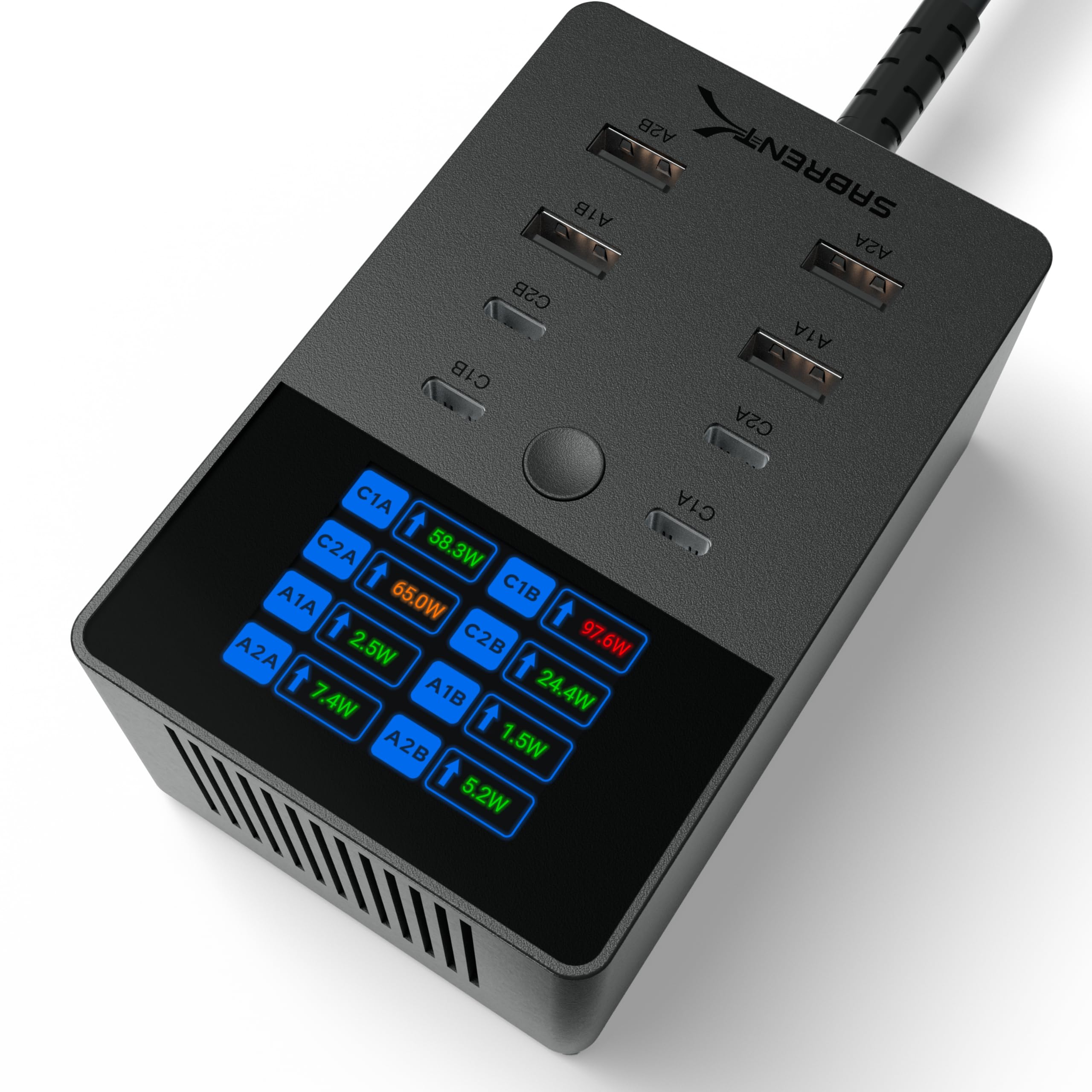
The SABRENT VOLTIK delivers a real 252W total output across 4 USB-C and 4 USB-A ports, with the USB-C ports individually capable of 100W—enough to run a MacBook Pro at full speed while still fast-charging three other devices. The built-in color LCD screen lets you cycle through each port to see live wattage, voltage, amperage, and internal temperature, turning your charging hub into a diagnostic tool rather than a black box.
UL certification adds a layer of trust that many competitors skip, covering overcharge, overcurrent, overheating, and short-circuit protection. The unit supports PD 3.0, PPS, QC 4.0, and QC 3.0 protocols, making it compatible with everything from Samsung Galaxy S24 series Super Fast Charging 3.0 to iPhone 16 and the latest iPad Pro models. The compact rectangular form factor keeps the desk clean and replaces the typical mess of individual bricks.
Reviewers consistently note that the hub stays cool under sustained load and that the per-port monitoring helps them confirm their devices are actually getting the power they expect. The included mounting kit and wall-plate bracket add flexibility for permanent installation, though some wish the power cord entered the device from the rear rather than the bottom for tighter cable routing.
Why it’s great
- 252W total power with 100W per USB-C port covers laptops, tablets, and phones simultaneously
- Color LCD screen provides real-time per-port wattage, voltage, and temperature data
- UL certified with full overcharge, overcurrent, and short-circuit protection
- Supports PD 3.0, PPS, QC 4.0+, and QC 3.0 for broad device compatibility
Good to know
- Power cable is bottom-mounted, which can complicate desk cable management
- Heavier than some travel-focused hubs due to the display and metal construction
- No wireless charging pad included, despite the premium price point
2. Anker Prime 160W Charger
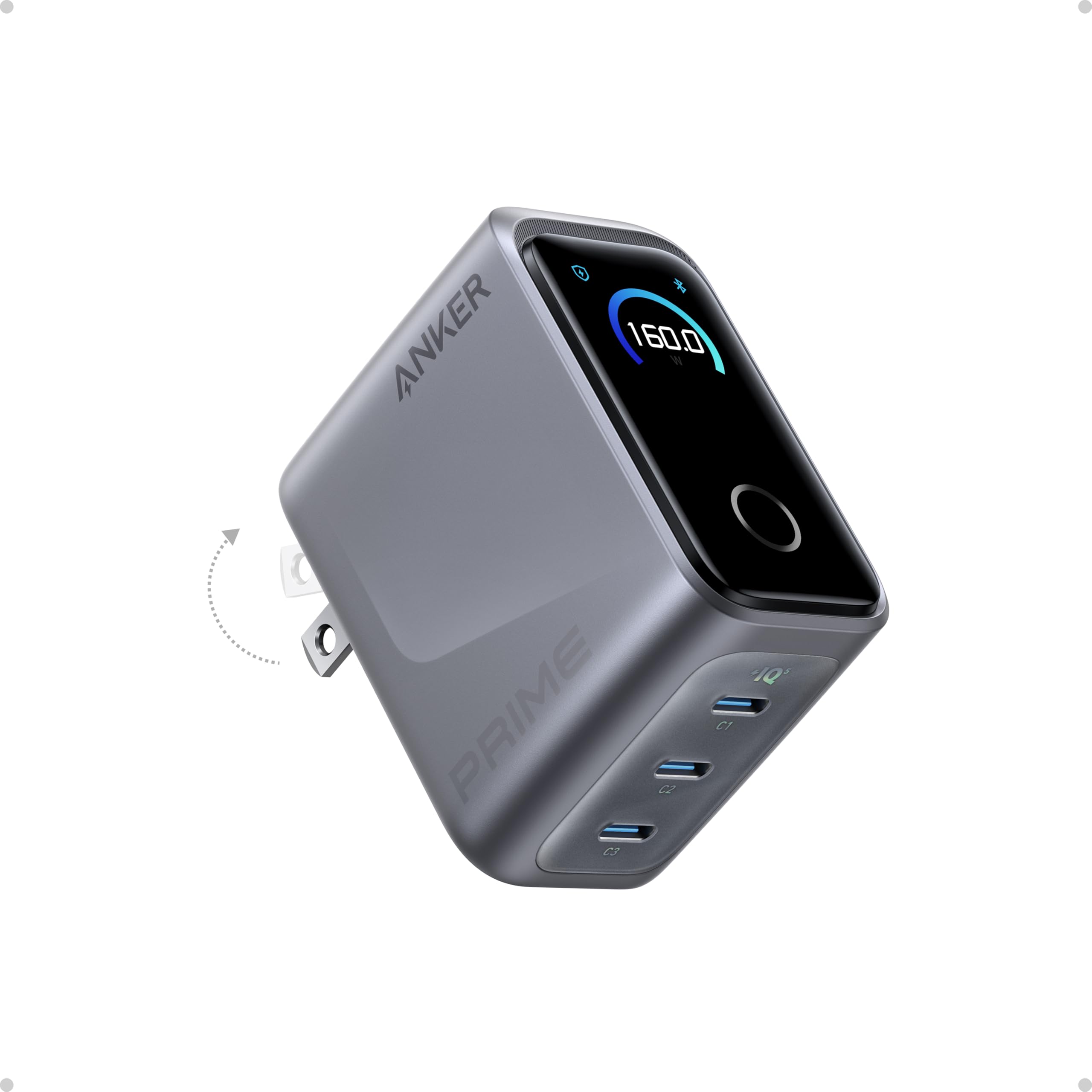
The Anker Prime packs 160W into a chassis roughly the size of an AirPods Pro case, making it the most power-dense unit in this lineup. The three USB-C ports deliver a consistent 140W from any single port without derating—enough to charge a 16-inch MacBook Pro to 50% in 25 minutes. PowerIQ 5.0 handles dynamic distribution, so plugging in an iPhone 16 and an iPad Pro alongside the laptop automatically rebalances to 140W + 35W + 35W without needing manual intervention.
The integrated AnkerSense View display shows live wattage, voltage, and temperature data, and the touch controls let you cycle through ports or switch charging modes. Bluetooth connectivity adds remote monitoring and custom power profiles through the Anker app, which is rare at this size and price. Foldable prongs and the compact footprint make it ideal for daily carry between home, office, and travel.
Reviewers praise the build quality—the unit feels dense and premium—and note that it stays surprisingly cool given the power density. The main trade-off is port count: three ports means you can only charge three devices at once. If you need to power a laptop, two phones, a tablet, and a smartwatch simultaneously, you will need a hub with more ports. Cable not included.
Why it’s great
- 160W total in an AirPods-sized GaN chassis with 140W single-port output
- Smart display with touch controls and Bluetooth app for power profile customization
- PowerIQ 5.0 automatically balances 140W + 35W + 35W across three ports
- Foldable prongs and compact design ideal for frequent travel
Good to know
- Only three USB-C ports, limiting simultaneous device count
- No USB-A ports for older accessories or cables
- Gets warm under sustained 160W load, though still within safe limits
- Cable not included in the box
3. Kioson 12-in-1 200W GaN IV Charging Station

The Kioson 12-in-1 bridges the gap between a traditional power strip and a modern GaN charger by offering 4 AC outlets alongside 8 USB ports (4 USB-C and 4 USB-A) sharing a 200W total budget. The main USB-C port delivers 65W PD, hitting 50% on a MacBook Pro in roughly 30 minutes, while the remaining USB-C ports and USB-A ports handle phones, tablets, smartwatches, and earbuds at lower wattages.
GaN IV technology keeps the unit compact at 5.04 x 3.02 x 1.18 inches, and the 0.7-inch flat plug with a 5-foot 14AWG copper cord makes it easy to place behind furniture without blocking the bottom outlet. The 1382°F fire-resistant PC shell and automatic power cutoff when rated power is exceeded add a margin of safety that matters when charging multiple devices overnight.
Customer feedback highlights its utility in shared spaces like dental offices and planning sessions where coworkers need simultaneous laptop and phone charging. Some users note that the AC outlets are tight, requiring extra force to insert three-prong plugs, but once seated they hold securely. The short 5-foot cord may limit placement options for larger rooms.
Why it’s great
- 200W total power shared across 8 USB ports plus 4 AC outlets for maximum versatility
- GaN IV technology for efficient heat management and compact footprint
- 65W USB-C main port can fast-charge a MacBook Pro to 50% in 30 minutes
- Flat 0.7-inch plug with 5-foot 14AWG copper cord fits behind furniture cleanly
Good to know
- AC outlets are tight and may require extra effort for three-prong plugs
- 5-foot cord may be too short for some desk or room layouts
- Per-port power distribution isn’t user-configurable
4. TenTrend Flat Plug Power Strip Tower

The TenTrend tower is built for raw capacity: 12 AC outlets and 8 USB ports (2 PD 20W USB-C plus 6 USB-A) can charge up to 20 devices simultaneously. The vertical form factor takes up only 3.4 x 3.4 inches of desk space, keeping outlets accessible from all sides without wrestling with a horizontal strip. The 0.27-inch flat plug with a 10-foot pure copper cord solves the reach problem in large rooms or awkwardly placed furniture.
The dual 20W PD USB-C ports support iPhone fast charging at roughly 3X the speed of a standard 5W adapter, while the USB-A ports deliver 12W each. The 1382°F fire-resistant ABS+PC shell and overload protection with an on/off switch provide basic safety coverage. Rubber feet on the base prevent sliding, and the lightweight design at just over a pound makes it easy to relocate between rooms.
Reviewers consistently praise the space-saving design, noting that the tower keeps craft rooms and bedside tables organized. The 10-foot cord is a standout feature for rooms where outlets are behind heavy furniture. The main limitation is the 20W PD ceiling—if you need to charge a high-power laptop from the USB-C ports, the Kioson or Sabrent units are better suited.
Why it’s great
- 20-device capacity with 12 AC outlets and 8 USB ports including 2 PD 20W USB-C
- Ultra-thin flat plug with 10-foot pure copper cord for maximum placement flexibility
- Vertical tower design saves desk space and keeps outlets accessible from all sides
- Rubber feet and lightweight build make it easy to move between rooms
Good to know
- USB-C ports are limited to 20W PD, not enough for laptop fast charging
- USB-A ports deliver only 12W, slow for modern tablets
- No surge protection rating listed, despite being marketed as a surge protector
5. Lcssio 200W USB C Charger 2-Pack
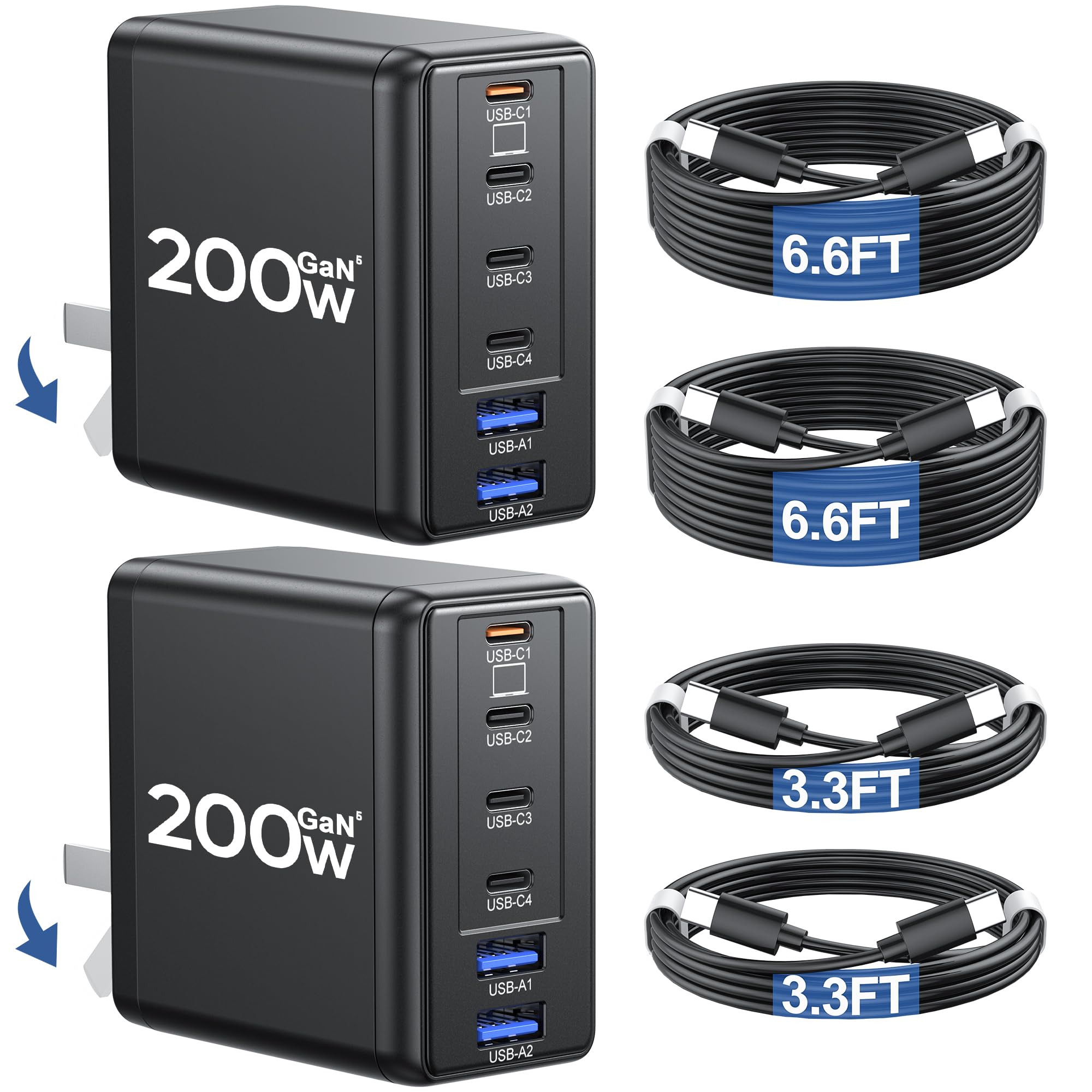
The Lcssio 2-pack delivers two 200W GaN5 chargers with 6 ports each (4 USB-C and 2 USB-A), plus four USB-C to C cables included in the box—a rare value proposition at this price point. The main USB-C port pushes 65W, capable of charging a 16-inch MacBook Pro to 50% in 45 minutes per PD 3.1, while the three remaining USB-C ports fall back to 30W and the two USB-A ports deliver standard 12W.
GaN5 technology shrinks each unit to roughly 50% smaller than traditional 200W silicon chargers, with foldable prongs and an 11-ounce weight that makes them genuinely travel-friendly. Real-time temperature control and rapid heat dissipation prevent throttling during extended charging sessions. The included 24-month warranty matches the coverage of more expensive brands.
Reviewers appreciate having two chargers for dual-location use—one for the office backpack, one for the home desk—though some note the power distribution isn’t as transparent as the Sabrent’s display. One user measured the main port at 54W solo instead of the rated 65W, and shared power drops the secondary ports to 12W, 9W, and 6W when all are loaded. Fine for mixed-device charging, but not for running three high-power laptops simultaneously.
Why it’s great
- Two 200W GaN5 chargers plus four USB-C cables included for exceptional value
- 65W main USB-C port charges MacBook Pro to 50% in 45 minutes via PD 3.1
- Compact and lightweight with foldable prongs for easy travel
- Real-time temperature control and 24-month warranty
Good to know
- Shared power pool drops secondary ports significantly under full load
- Actual single-port output may measure closer to 54W than 65W
- USB-A ports are limited to 12W without fast charging protocols
6. Anker PowerPort 6

The Anker PowerPort 6 is a proven workhorse with 60W total output spread across 6 USB-A ports, each capable of up to 2.4A via PowerIQ and VoltageBoost technology. This isn’t a GaN unit—it uses traditional silicon—but Anker’s MultiProtect safety system (surge protection, temperature control, overcharge prevention) and UL certification give it a reliability edge that budget competitors often lack. The flat rectangular form factor measures roughly the size of a passport and packs easily into a bag.
Compatibility spans iPhone 15/14, Galaxy S23, iPad Pro, and a broad range of Android devices, though Qualcomm Quick Charge is not supported. The 5-foot detachable power cord adds flexibility for desk placement, and the hook-and-loop strip helps manage excess cable length. Anker’s 18-month warranty and responsive customer service add peace of mind that many off-brand hubs don’t match.
Customer reviews consistently rate it five stars with comments like “should have bought it sooner” and “cut my iPad charge time in half.” The main limitation is the port type: all six ports are USB-A, which means no USB-C fast charging for modern laptops or newer phones that rely on PD. If your devices are all USB-A compatible, this remains a solid, safe choice.
Why it’s great
- Anker’s MultiProtect safety system with UL certification for reliable everyday use
- PowerIQ and VoltageBoost deliver up to 2.4A per port across 6 USB-A ports
- Compact passport-sized form factor with detachable 5-foot power cord
- Excellent customer service and 18-month warranty
Good to know
- All ports are USB-A, with no USB-C support for modern laptop charging
- Does not support Qualcomm Quick Charge protocols
- 60W shared across 6 ports means lower per-device speed under full load
7. Ziwodiv 8-Port 60W Charging Station

The Ziwodiv 8-port hub offers the highest USB-A port count at the lowest entry cost, with 60W total output shared across 8 USB-A ports. The built-in LED display cycles through current and voltage readings for each port, giving you basic visibility into charging status that many cheaper hubs omit entirely. CE, FCC, and RoHS certifications provide baseline safety coverage against overheat, overcharge, overcurrent, overload, and short circuits.
Smart chip detection means each port negotiates the correct amperage for the connected device, so plugging in an iPhone and a Kindle simultaneously won’t push excess current to the lower-draw device. The compact plastic chassis and 4-foot cord keep desk clutter minimal, and the unit is light enough to toss in a bag for trips. Compatibility spans iPhone 13 series, Samsung Galaxy S20/S10/S9/Note 10, LG V30/G7, Google Pixel 3, and Kindle devices.
User reviews are generally positive, with one customer noting it’s “great for charging 8 Disney World MagicBands” and another appreciating that it replaced a melted power strip. Build quality is adequate for the price, though the plastic enclosure feels less premium than Anker or Sabrent metal options. The lack of USB-C ports limits its future-proofing—within a few years, most new devices will expect a USB-C connection.
Why it’s great
- 8 USB-A ports provide the highest port count in the budget tier
- LED display shows real-time current and voltage per port for basic monitoring
- CE/FCC/RoHS certified with overheat, overcharge, and short-circuit protection
- Compact and lightweight design suitable for travel or shared family spaces
Good to know
- All ports are USB-A with no USB-C support for modern devices
- 60W shared across 8 ports limits per-device speed under full load
- Plastic enclosure feels less durable than premium metal hubs
FAQ
What total wattage do I need to charge a laptop, phone, and tablet simultaneously?
Does a higher port count always mean faster overall charging?
Is GaN technology worth the extra cost over silicon chargers?
Can I leave my devices plugged into a multi-port charger overnight safely?
Final Thoughts: The Verdict
For most users, the charger for multiple devices winner is the SABRENT VOLTIK 252W because it balances 100W per USB-C port, live monitoring, and UL certification at a price that undercuts premium desktop hubs. If you need pocketable travel power, grab the Anker Prime 160W. And for a family charging station that handles AC appliances alongside USB gear, nothing beats the Kioson 12-in-1 200W GaN IV.

Mo Maruf
I created WellFizz to bridge the gap between vague wellness advice and actionable solutions. My mission is simple: to decode the research and give you practical tools you can actually use.
Beyond the data, I am a passionate traveler. I believe that stepping away from the screen to explore new environments is essential for mental clarity and physical vitality.