Our readers keep the lights on and my smoothie glass nicely filled. As an Amazon Associate, I earn from qualifying purchases.
Every second you wait for a RAW photo or 8K video clip to offload is a second you aren’t shooting, editing, or delivering. A CFexpress Type B card reader is the bottleneck between your camera’s flagship sensor and your post-production timeline. The wrong reader introduces lag, file corruption, and workflow-breaking disconnects that no amount of software optimization can fix. Choosing the right one means matching your card’s full potential with a reader that doesn’t throttle, overheat, or drop out mid-transfer.
I’m Mohammad Maruf — the founder and writer behind WellFizz. I’ve spent countless hours analyzing transfer rate benchmarks, build materials, thermal performance, and connector compatibility across dozens of card reader models to identify the units that actually deliver on their speed promises for professional photography and videography workflows.
Whether you are offloading massive bursts from a Canon R5 Mark II or ingesting ProRes footage on location, the best cfexpress type b card reader keeps your creative momentum from stalling at the transfer stage.
How To Choose The Best CFexpress Type B Card Reader
Not every reader labeled “high-speed” can sustain full bandwidth without overheating or disconnecting. Professional media workflows require a reader that matches your card’s interface speed, dissipates heat under sustained load, and offers cable redundancy for field use. Here are the critical factors to evaluate before you buy.
Interface Generation and Real-World Throughput
The USB generation directly governs how fast data moves between the card and your computer. USB 3.2 Gen 2 caps at 10Gbps, which covers the sustained read speeds of most CFexpress Type B cards. If you use cards rated above 1700MB/s, look for USB 3.2 Gen 2×2, which doubles the bandwidth to 20Gbps and unlocks the full sequential performance of premium media. Always verify that your computer’s port also supports the same generation, or the reader will fall back to the slower common standard.
Thermal Management Under Load
CFexpress Type B cards operate at high power draw, and sustained transfers generate significant heat inside the reader. Readers built from anodized aluminum with internal heat sinks passively dissipate thermal energy far more effectively than all-plastic housings. Overheating causes the reader to throttle transfer speeds or drop the connection entirely, corrupting files mid-transfer. For professionals offloading hundreds of gigabytes in a single session, thermal capacity is as important as raw speed.
Slot Configuration and Cable Redundancy
A dedicated single-slot reader maximizes speed for CFexpress Type B cards, but a dual-slot design that also accepts SD cards offers workflow flexibility for hybrid shooters. Cable quality matters more than most buyers realize: readers that ship with both USB-C to USB-C and USB-C to USB-A cables prevent compatibility surprises on older laptops or studio desktops. Avoid readers that rely on a single proprietary cable, because losing it means the device becomes useless until you source a replacement rated for full 10Gbps speeds.
Quick Comparison
On smaller screens, swipe sideways to see the full table.
| Model | Category | Best For | Key Spec | Amazon |
|---|---|---|---|---|
| Lexar Professional LRW550U | Premium | Ultra-high-speed 1700MB/s transfers | USB 3.2 Gen 2×2 (20Gbps) | Amazon |
| Lexar Professional LRW520U | Premium | Dual-slot CFexpress + SD workflow | USB 3.2 Gen 2 (10Gbps) | Amazon |
| Delkin Devices DDREADER-54 | Mid-Range | Rugged aluminum travel reader | Anodized aluminum heatsink | Amazon |
| Rocketek 8-in-1 Hub | Mid-Range | Multi-format hub for studio setups | 8-slot + 2 USB-A ports | Amazon |
| Rocketek Dual-Slot Reader | Entry-Level | Budget dual-slot for hybrid shooters | 10Gbps USB 3.2 Gen 2 | Amazon |
In‑Depth Reviews
1. Lexar Professional CFexpress Type B USB 3.2 Gen 2×2 Reader (LRW550U)

The Lexar LRW550U is the only reader on this list equipped with a USB 3.2 Gen 2×2 interface, pushing a theoretical ceiling of 20Gbps. For real-world transfers, that translates to sustained reads around 1700MB/s, which fully saturates the fastest CFexpress Type B cards on the market. Professional photographers working with 8K RAW streams or rapid-fire burst sequences will notice the difference immediately — especially when ingesting hundreds of 45MP+ images into Lightroom in a single session. The compact aluminum housing stays cool under load, and thermal throttling is virtually absent even after transferring 200GB continuously on a Mac system.
The reader ships with a single 30cm 2-in-1 cable that terminates in both USB-C and USB-A connectors, so you can plug directly into modern laptops or legacy desktops without an adapter. It is designed exclusively for CFexpress Type B cards, meaning there is no secondary SD slot — a deliberate tradeoff that keeps the footprint pocket-sized and the signal path optimized. Users at racetracks and studios alike report zero overheating even during marathon offloads, and the build quality feels solid enough for daily pack-and-go use.
One verified reviewer noted file corruption after repeated transfers, though this may be linked to cable integrity or card age rather than the reader itself. For maximum reliability, use the included cable or a certified 20Gbps-capable USB-C cable. If you work exclusively with CFexpress Type B and demand the fastest possible offload speeds, this reader sits alone at the top.
Why it’s great
- USB 3.2 Gen 2×2 delivers up to 1700MB/s reads for the fastest card offloads
- Aluminum chassis dissipates heat effectively under sustained heavy loads
- Pocket-sized design with a reliable 2-in-1 cable for USB-C and USB-A hosts
Good to know
- Single-slot design only — no secondary SD card reader
- Some users report file corruption if using an under-specced cable
- Requires a computer port that supports 20Gbps for full performance
2. Lexar Professional CFexpress Type B / SD USB 3.2 Gen 2 Reader (LRW520U)
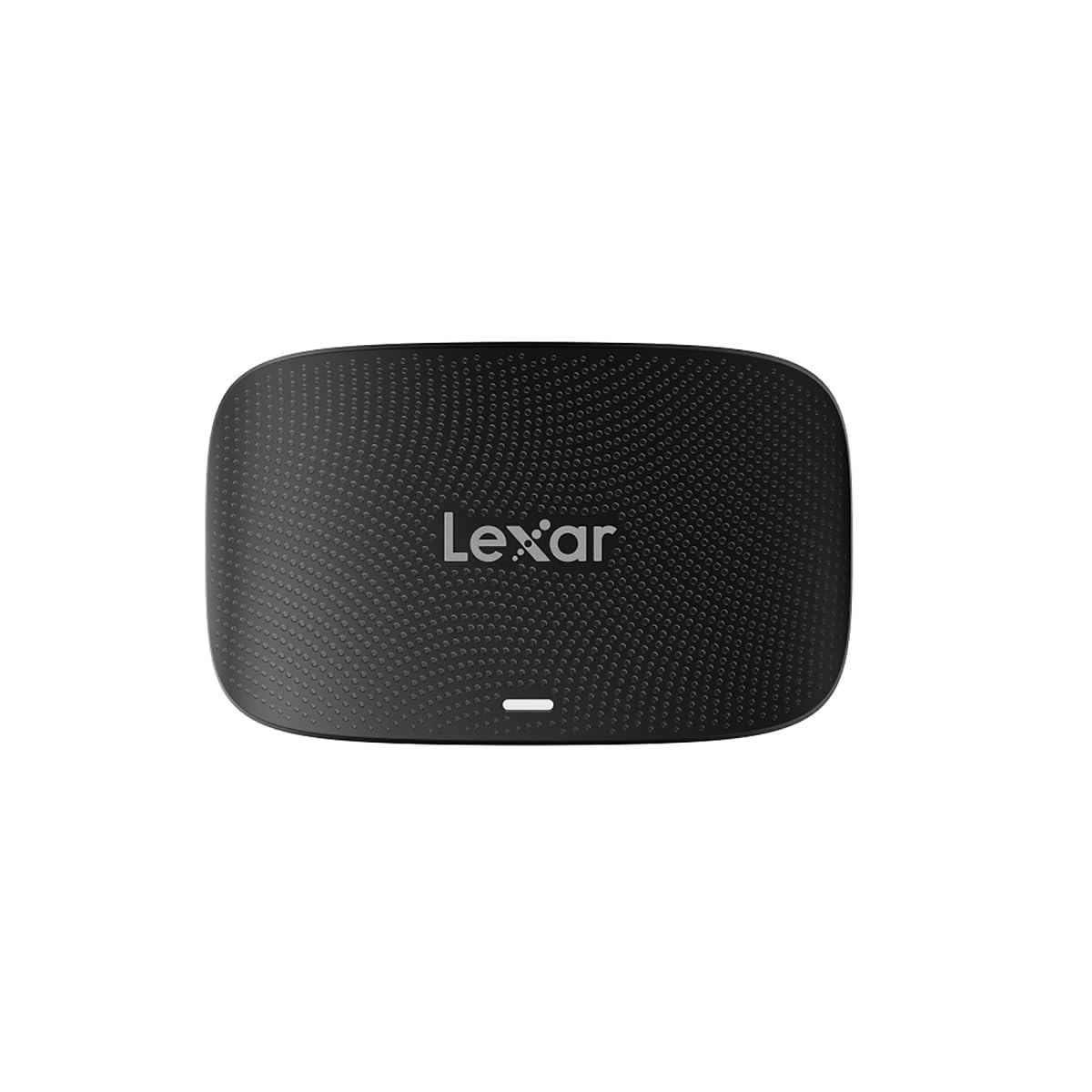
The LRW520U strikes the most practical balance between speed and versatility. It offers two independent slots — one for CFexpress Type B and one for SD — and both run at USB 3.2 Gen 2 speeds up to 10Gbps. Professional shooters who carry a primary camera with CFexpress and a backup body or drone using SD cards can offload both simultaneously without hot-swapping. The reader supports simultaneous reads, meaning you can ingest footage from two cards at once, which dramatically collapses the time between shooting and editing.
Build quality is solid Lexar: a black plastic-aluminum hybrid body that feels sturdy without being heavy. It ships with a single 2-in-1 USB-C cable plus a USB-C to USB-A adapter, guaranteeing connectivity across a wide range of machines. One user reported that the reader initially failed to recognize Canon R5 Mark II 8K files when using a generic cable, but switching to the included cable resolved the issue instantly — a reminder that cable quality matters at 10Gbps. The reader supports Windows 11/10, macOS 10.8+, and even older USB 2.0 ports, making it one of the most compatible units in this roundup.
Some reviewers note that the reader requires the exact high-speed cable it ships with; using a random USB-C cable from a drawer may cause connection drops or slow speeds. For any professional working across CFexpress and SD formats, the LRW520U delivers reliable, fast, dual-format offloads without forcing you to carry two separate readers.
Why it’s great
- Dual CFexpress Type B and SD slots for simultaneous offloads
- Full 10Gbps USB 3.2 Gen 2 bandwidth on both slots
- Compatible with Windows, macOS, and older USB standards
Good to know
- Only ships with one cable — losing it means buying a 10Gbps-rated replacement
- Plastic-aluminum hybrid doesn’t dissipate heat as well as full aluminum
- Slightly larger footprint compared to single-slot readers
3. Delkin Devices USB 3.2 CFexpress Type B Card Reader (DDREADER-54)
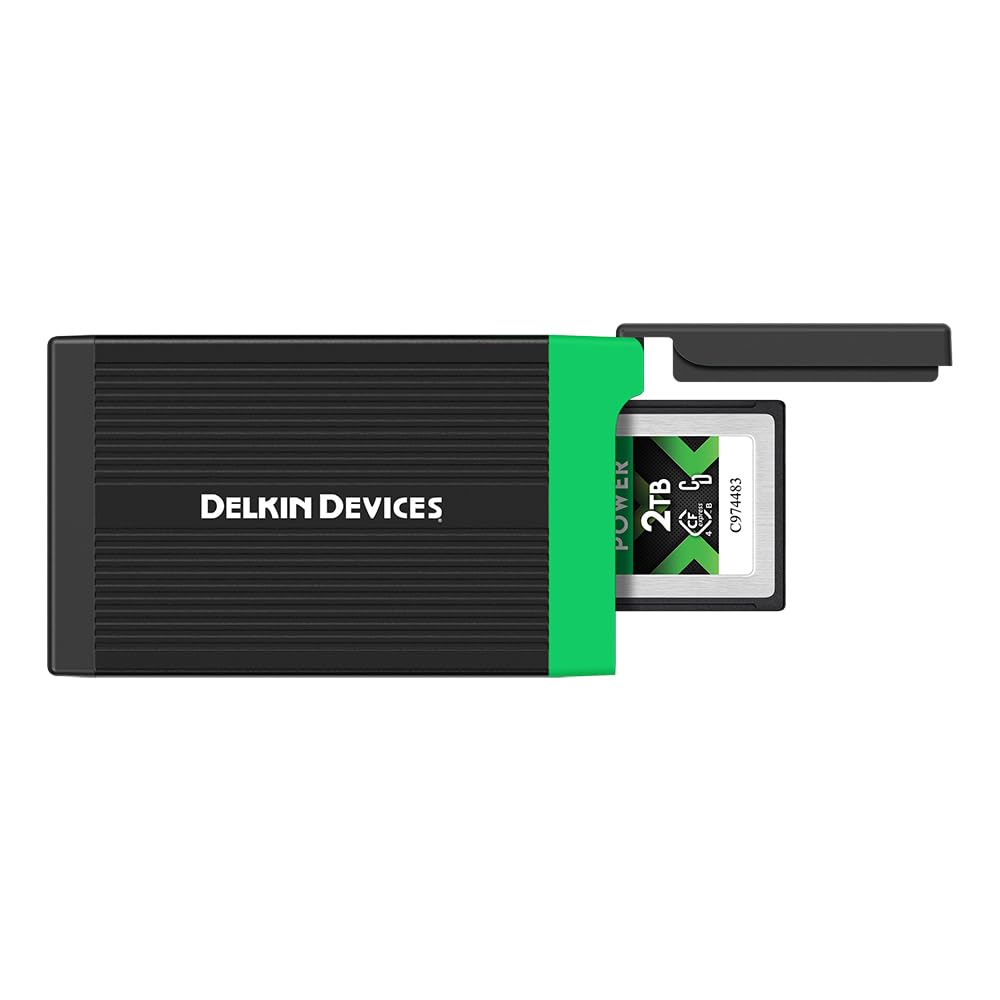
Delkin takes a different approach: rather than chasing the highest interface speed, it prioritizes durability and thermal management. The DDREADER-54 is built from anodized aluminum with internal heat sinks and a rubberized end cover that protects the card slot when not in use. The push-in/push-out mechanism for the CFexpress card is mechanically superior to side-press button designs, and the reader itself is only 3 inches long — small enough to live permanently in a camera bag pocket. It weighs under a quarter-pound, so it disappears in a backpack without adding noticeable bulk.
The data interface is USB 3.2 Gen 2 with a 10Gbps ceiling, which is enough to saturate most CFexpress Type B cards currently on the market. Delkin includes both USB-C to USB-C and USB-C to USB-A cables, giving you redundancy straight out of the box — a thoughtful touch for field work where a lost cable means a dead reader. The internal card storage bay is a unique feature: you slide the CFexpress card inside the reader body and snap the rubber cover shut, protecting the card from dust and impacts during transport.
One common critique from users is that the rubber cover flap does not latch securely and may pop open if the reader is jostled in a bag. The flap also feels like the first point of failure if dropped. Still, for professionals who value reliability and thermal performance over multi-format flexibility, the Delkin reader is a rugged companion that holds up to daily abuse in outdoor shooting environments.
Why it’s great
- Anodized aluminum body with heat sinks prevents thermal throttling
- Internal card storage bay protects your CFexpress card during travel
- Includes both USB-C and USB-A cables for immediate flexibility
Good to know
- Rubber cover flap doesn’t stay closed securely
- Single-slot design — no SD or other card support
- Slightly slower sequential speeds than Gen 2×2 readers
4. Rocketek 8-in-1 CFexpress Type B Card Reader Hub
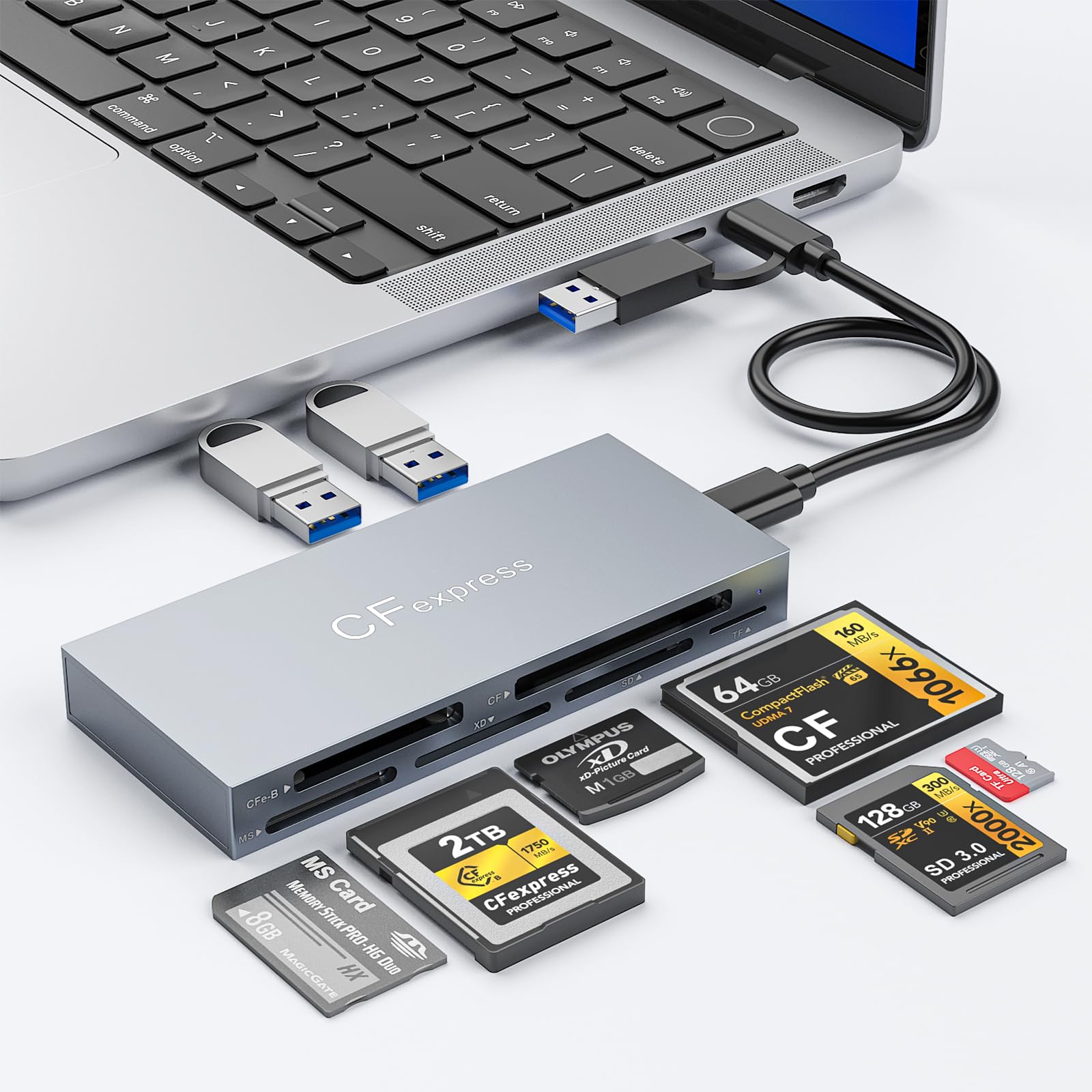
This Rocketek hub is the most versatile reader in the lineup, supporting not only CFexpress Type B but also CompactFlash, SD, microSD, Memory Stick PRO Duo, and xD Picture Cards — plus two USB 3.2 Gen 2 data ports for connecting flash drives or peripherals. It is effectively a small desktop dock that consolidates your memory card ingestion and USB expansion into a single device connected to your laptop via a single USB-C cable. The aluminum housing helps dissipate heat during simultaneous reads, though sustained dual-card transfers will warm the chassis noticeably.
The USB-C 3.2 Gen 2 host connection delivers 10Gbps bandwidth shared across all slots and ports. In practice, a single CFexpress Type B card can saturate that bandwidth, so running multiple transfers at once will divide the throughput. The reader ships with both USB-C to USB-C and USB-C to USB-A cables, ensuring compatibility with modern MacBooks and older PC workstations alike. Plug-and-play operation requires no drivers, and it works natively on Windows, macOS, and Linux systems.
Some users note that the CompactFlash slot (separate from the CFexpress Type B slot) is useful for older Blackmagic Pocket Cinema Camera workflows. The primary tradeoff is that its wider footprint — 4.33 inches long — is less convenient for pocket carry compared to dedicated single-slot readers. If your kit includes CF, SD, microSD, and CFexpress Type B media, this hub replaces multiple individual readers and keeps your desk cable clutter to a minimum.
Why it’s great
- 8-in-1 design with support for CF, SD, microSD, MS, and xD cards
- Two USB-A 3.2 Gen 2 ports for peripheral expansion
- Aluminum body aids heat dissipation during heavy transfers
Good to know
- Bandwidth shared across all active ports — simultaneous transfers reduce per-port speed
- Larger footprint than single-slot readers, less ideal for pocket carry
- Limited to 10Gbps, not suitable for 1700MB/s+ cards at full potential
5. Rocketek Dual-Slot CFexpress Type B and SD Card Reader
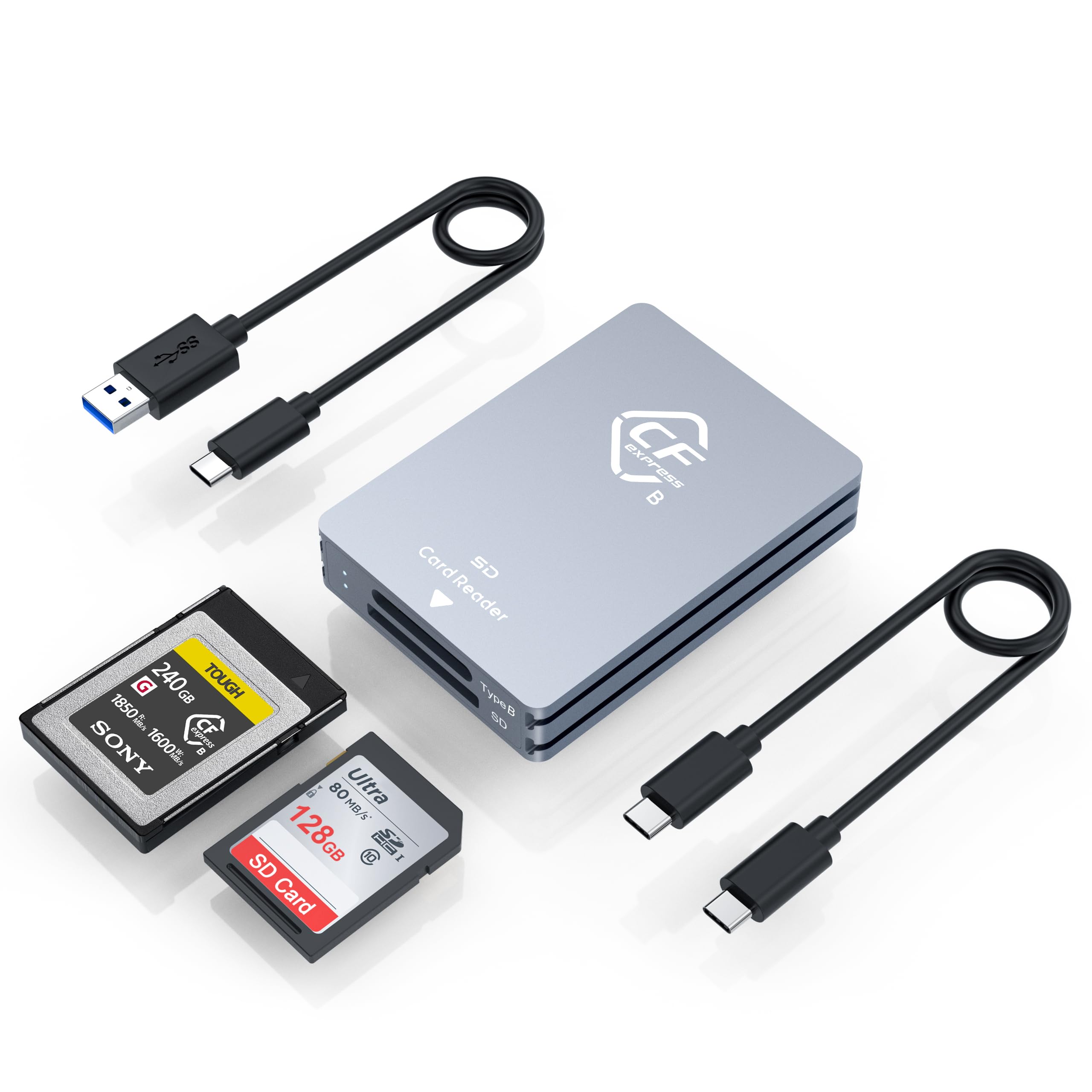
The entry-level Rocketek dual-slot reader offers USB 3.2 Gen 2 speeds up to 10Gbps at an accessible price point, making it a solid starting point for photographers moving to CFexpress Type B for the first time. It supports both CFexpress Type B and SD cards (UHS-I), with dedicated slots that allow you to switch between media types without unplugging. The silver plastic-aluminum casing is lightweight and compact enough to slip into a camera bag pocket alongside spare batteries and cables.
Rocketek includes both USB-C to USB-C and USB-C to USB-A cables in the box, so you can connect to any modern laptop or older desktop without hunting for adapters. Plug-and-play compatibility covers Windows, macOS, Linux, and Android devices. Verified users report that it works seamlessly for offloading stills from mirrorless cameras like the Canon R6 Mark II, with no driver installation required. The SD slot supports UHS-I speeds, which is adequate for backup body transfers but slower than UHS-II cards require.
Some owners experienced read speed fluctuations between 200MB/s and 600MB/s, and a small number reported the reader disconnecting mid-transfer and overheating. For professional workloads with tight deadlines, the inconsistency may be a risk. However, for hobbyist or semi-pro use where occasional slower transfers are acceptable, this reader delivers dual-format convenience at an entry-level investment.
Why it’s great
- Affordable dual-slot design for CFexpress Type B and SD cards
- Includes both USB-C and USB-A cables for broad compatibility
- Compact, lightweight form factor for travel
Good to know
- SD slot limited to UHS-I speeds, not UHS-II
- Read speed fluctuation reported by some users
- Overheating and disconnect issues in isolated cases
FAQ
Can I use any USB-C cable with my CFexpress Type B reader?
Will a USB 3.2 Gen 2 reader bottleneck a 1700MB/s CFexpress Type B card?
Is a dual-slot reader slower than a single-slot reader?
Why does my CFexpress reader get hot during transfers?
Final Thoughts: The Verdict
For most users, the best cfexpress type b card reader winner is the Lexar Professional LRW520U because it combines full 10Gbps speed with a dual-slot design that handles CFexpress and SD cards simultaneously, giving you workflow flexibility without sacrificing performance. If you want the absolute fastest offloads for 1700MB/s cards, grab the Lexar Professional LRW550U. And for rugged field use where build quality and thermal stability matter more than multi-format convenience, nothing beats the Delkin Devices DDREADER-54.

Mo Maruf
I created WellFizz to bridge the gap between vague wellness advice and actionable solutions. My mission is simple: to decode the research and give you practical tools you can actually use.
Beyond the data, I am a passionate traveler. I believe that stepping away from the screen to explore new environments is essential for mental clarity and physical vitality.