Our readers keep the lights on and my smoothie glass nicely filled. As an Amazon Associate, I earn from qualifying purchases.
The hunt for a cell phone built around typing reveals a fundamental divide: you either love the glass slab or you need tactile feedback under your thumbs. A touchscreen keyboard works for short messages, but long conversations, work emails, or quick notes expose the lack of physical keys. Screen real estate shrinks the moment the virtual keyboard appears, and autocorrect errors compound into frustration. This guide isolates the phones and keyboard cases engineered specifically for high-volume, accurate text input.
I’m Mohammad Maruf — the founder and writer behind WellFizz. My approach to this guide involves cross-referencing real-world feedback on physical keyboard mechanisms, KaiOS texting interfaces, and smartphone displays to identify which devices genuinely improve the typing experience for heavy texters.
Whether you need a distraction-free flip phone with tactile buttons or a modern smartphone with a detachable keyboard case, this roundup of the best cell phone for texting focuses on input speed, autocorrect reliability, and screen-to-keyboard balance.
How To Choose The Best Cell Phone For Texting
The decision comes down to how you type. One group wants the most accurate physical QWERTY available. Another wants large, well-spaced touchscreen keys with reliable haptic feedback. A third wants a minimal flip phone with tactile buttons for basic SMS without distractions. Understanding your typing volume, typical message length, and tolerance for on-screen keyboards narrows the options fast.
Physical Keyboard vs Touchscreen
A physical keyboard offers zero screen occlusion, audible and tactile confirmation of each keypress, and the ability to type without looking at the keys. The tradeoff is a thicker phone and often a smaller display. Touchscreen keyboards respond to predictive text and autocorrect, which can be faster once you train the dictionary, but they cover roughly half the screen when active. For heavy daily typing, a physical keyboard reduces error rate measurably. For quick replies, a touchscreen wins on convenience.
Carrier Compatibility
Many unlocked phones labeled as “international versions” lack support for Verizon and its MVNOs. If your network uses CDMA (Verizon, US Mobile, Straight Talk on CDMA) or requires VoLTE certification, check the band support list before buying. Flip phones and older BlackBerry models often work only on AT&T or T-Mobile networks. For texting, VoLTE is essential because 3G shutdowns mean a phone without VoLTE cannot make or receive calls — texting over LTE still works but the device must be on an approved list.
Battery Life for Heavy Use
Extended messaging sessions drain the battery faster than voice calls. Look for a minimum 3000mAh capacity for a smartphone and 2000mAh for a flip phone. Large displays with high refresh rates consume more power per hour of typing. Phones with removable batteries, like the Gigglizio flip phone, allow instant replacement without downtime, which matters if you text all day and cannot wait for a recharge.
Keyboard Layout and Key Spacing
Key size and travel distance determine typing comfort. Small keys packed tightly cause thumb fatigue and mistypes. Wider keys with distinct separation allow faster thumb movement without accidental presses. The BlackBerry and Unihertz keyboards feature slightly domed keys with a tactile bump. The Clicks keyboard case for iPhone offers chiclet-style keys. Flip phone buttons use a rubber membrane with long travel — ideal for users with less finger precision.
Quick Comparison
On smaller screens, swipe sideways to see the full table.
| Model | Category | Best For | Key Spec | Amazon |
|---|---|---|---|---|
| BlackBerry KEY2 | Premium QWERTY | Power texters wanting Speed Key shortcuts | Physical QWERTY with fingerprint sensor | Amazon |
| Unihertz Titan 2 | 5G Physical Keyboard | Modern Android with tactile keys | 5050mAh battery, 1440×1440 display | Amazon |
| BlackBerry KEYone | Unlocked International | Typing purists on AT&T/T-Mobile | Physical QWERTY, 3505mAh battery | Amazon |
| Clicks Keyboard for iPhone 16 Pro | Keyboard Case | iPhone users needing tactile keys | Programmable shortcut keys | Amazon |
| Clicks Keyboard Case for iPhone 17 Pro | Keyboard Case | Latest iPhone with QWERTY case | Backlit keys, MagSafe compatible | Amazon |
| Motorola Moto G Play | Touchscreen Value | Budget-friendly touchscreen typing | 5000mAh battery, 90Hz display | Amazon |
| Gigglizio 4G Flip Phone | Flip Phone | Simple tactile buttons for basic SMS | 2000mAh removable battery | Amazon |
In‑Depth Reviews
1. BlackBerry KEY2

The BlackBerry KEY2 remains the benchmark for physical keyboard smartphones. Its 4.5-inch display is paired with a redesigned QWERTY keyboard that includes a Speed Key for instant app shortcuts, flick typing for predictive word input, and an embedded fingerprint sensor in the space bar. The keyboard surface also supports touch navigation — you can scroll through web pages by swiping across the keys without lifting your thumbs. The aluminum frame with a textured diamond-grip back keeps the phone comfortable during long messaging sessions.
Under the hood, the Snapdragon 660 processor with 6GB of RAM provides smooth multitasking for messaging apps, email, and social media. The 3500mAh battery supports up to two days of mixed use, and Quick Charge 3.0 refuels rapidly. The dual 12MP rear cameras produce usable photos, but the real strength here is the keyboard-centric Android experience with BlackBerry Hub unifying all your messages in one inbox. This is a purpose-built tool for anyone who types more than they browse.
Compatibility is limited to GSM carriers — AT&T and T-Mobile — so Verizon users need to look elsewhere. The non-slider design means watching video on the smaller 4.5-inch display is less enjoyable. Some users report that the keyboard trackpad gesture can be inconsistent. At this tier, you’re paying a premium for a niche but expertly engineered typing device.
Why it’s great
- Physical QWERTY with Speed Key and flick typing reduces error rate
- 6GB RAM + Snapdragon 660 handles heavy messaging without lag
- 3500mAh battery lasts up to 2 days on moderate texting
Good to know
- Only compatible with AT&T and T-Mobile networks
- Video viewing ratio is awkward on the 4.5-inch display
- Keyboard trackpad gestures can be inconsistent
2. Unihertz Titan 2
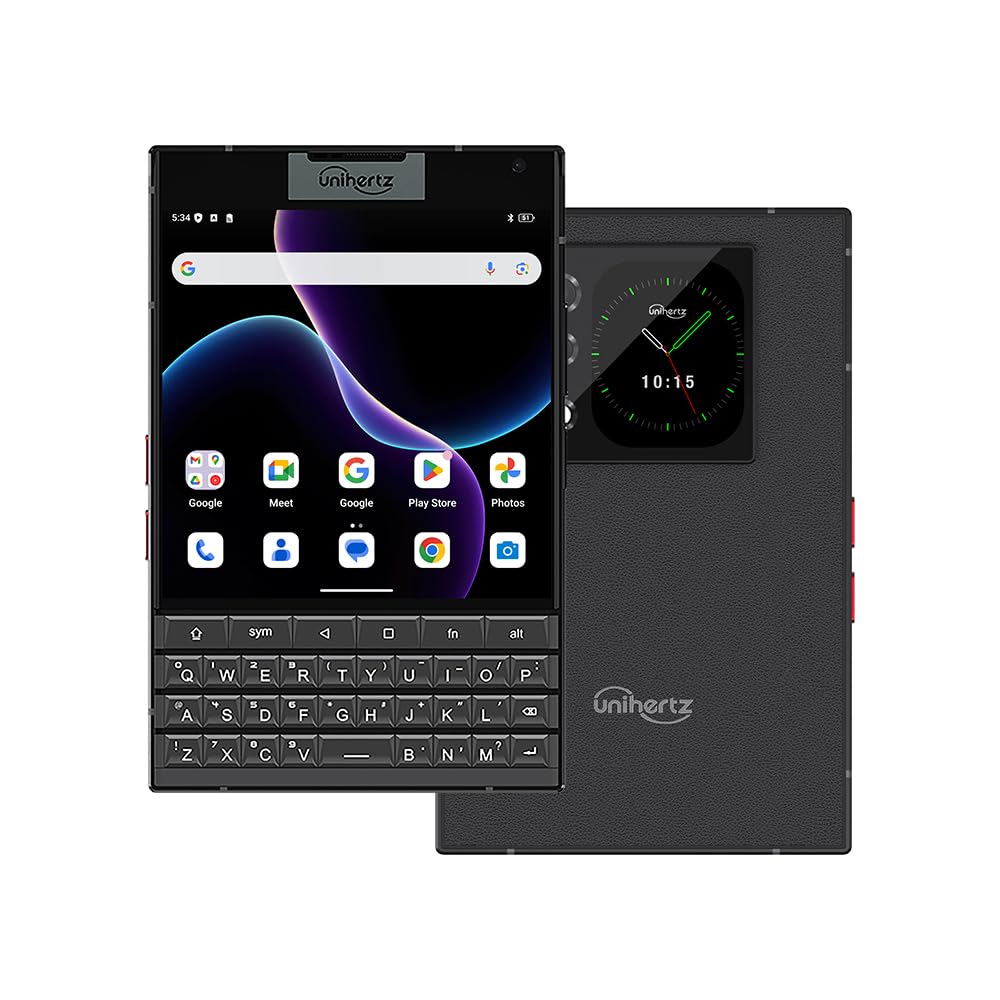
The Unihertz Titan 2 brings a physical QWERTY keyboard into the 5G era. Its 4.5-inch square display — 1440×1440 pixels — is flanked by a backlit keyboard with assignable shortcuts for each letter key. You can long-press the “W” key to open WhatsApp or short-press “M” for Maps. The keyboard surface supports swipe gestures for cursor movement and browsing. This is the closest modern equivalent to the BlackBerry Passport, with Android 15 out of the box and 12GB of RAM plus 512GB of storage.
The 5050mAh battery with 33W fast charging delivers all-day heavy use. The dual-screen design adds a secondary rear display for notifications. Carrier compatibility covers T-Mobile, Verizon (with a SIM activation workaround), and AT&T. Users praise the tactile key feel and the large battery, though the square screen makes landscape gaming and some apps look unusual. The camera is functional for daytime shots but struggles indoors — serious photographers will keep a separate camera.
The phone is noticeably large and heavy, which may strain smaller hands during long typing sessions. A few reports mention LCD screen failure with black lines appearing under the clock. The build quality includes a case, screen protector, and charger in the box, which adds value. For physical keyboard fans who need modern app support and 5G speeds, this is the most capable option available today.
Why it’s great
- Modern Android 15 with 5G support on major US carriers
- Backlit physical keyboard with per-key shortcut assignments
- 5050mAh battery with 33W fast charging
Good to know
- Large and heavy form factor strains smaller hands
- Square display causes compatibility issues with some apps
- Camera performance is mediocre in low light
3. BlackBerry KEYone

The BlackBerry KEYone delivers the iconic physical QWERTY experience at a more approachable tier than the KEY2. Its 4.5-inch display and aluminum frame with a textured back provide a secure grip. The keyboard functions as a touch-sensitive trackpad for scrolling, and each key is slightly domed for precise thumb placement. The spacebar integrates a fingerprint sensor. For pure texting accuracy, this keyboard is among the best ever designed for a smartphone.
The 3505mAh battery supports up to 14 hours of talk time and easily gets through a full day of messaging. The Snapdragon 625 processor with 3GB of RAM is adequate for texting apps, email, and light browsing but shows its age with heavier apps. The 12MP rear camera includes a flash. This is an unlocked international version (BBB100-2), so compatibility is limited to AT&T and T-Mobile GSM bands. Verizon and Sprint users cannot activate this phone.
Some units sold through third-party sellers have had issues with returned products or incorrect accessories. The phone runs Android 7.1 Nougat, which is outdated and no longer receives security patches. Users who only need SMS, WhatsApp, and email will find it functional, but anyone wanting modern app support should look at the KEY2 or Unihertz instead. The keyboard itself remains a joy to type on.
Why it’s great
- Premium physical keyboard with touch-sensitive trackpad scrolling
- 3505mAh battery delivers all-day power for texting
- Spacebar fingerprint sensor is well-integrated
Good to know
- Runs Android 7.1 Nougat — no security updates available
- Only works on AT&T and T-Mobile networks
- Snapdragon 625 and 3GB RAM limit multitasking
4. Clicks Keyboard for iPhone 16 Pro

The Clicks Keyboard case transforms an iPhone 16 Pro into a device with a physical QWERTY keyboard at the bottom, freeing up the entire display for content. The keyboard is backlit, with programmable shortcut buttons for one-click access to apps, contacts, voice-to-text, and Siri. The case attaches via USB-C and supports pass-through charging and data mode for CarPlay. You charge the phone normally while the case draws minimal power from the iPhone itself — no separate battery needed.
Tactile feedback reduces mistypes compared to the glass screen keyboard. Users report that muscle memory for physical keys returns quickly, and the additional screen real estate is a significant advantage when composing long emails or messages. The case is lightweight and easy to remove. It fits snugly and protects the phone with a matte finish.
The main downsides are the added length — the phone becomes roughly 20% longer — and the small key size. Some fast typists find the keys too far apart or too close together depending on thumb size. There is no water resistance or shock protection added by the case. A few users report that the typing speed improvement is marginal compared to a well-trained touchscreen keyboard. The price positions this as a premium accessory for dedicated typists.
Why it’s great
- Frees full screen from virtual keyboard occlusion
- Backlit keys with programmable shortcuts for quick actions
- Supports normal USB-C charging and CarPlay data pass-through
Good to know
- Adds significant length to the iPhone
- Key size may not suit all thumb sizes for fast typing
- No water resistance or drop protection added
5. Clicks Keyboard Case for iPhone 17 Pro
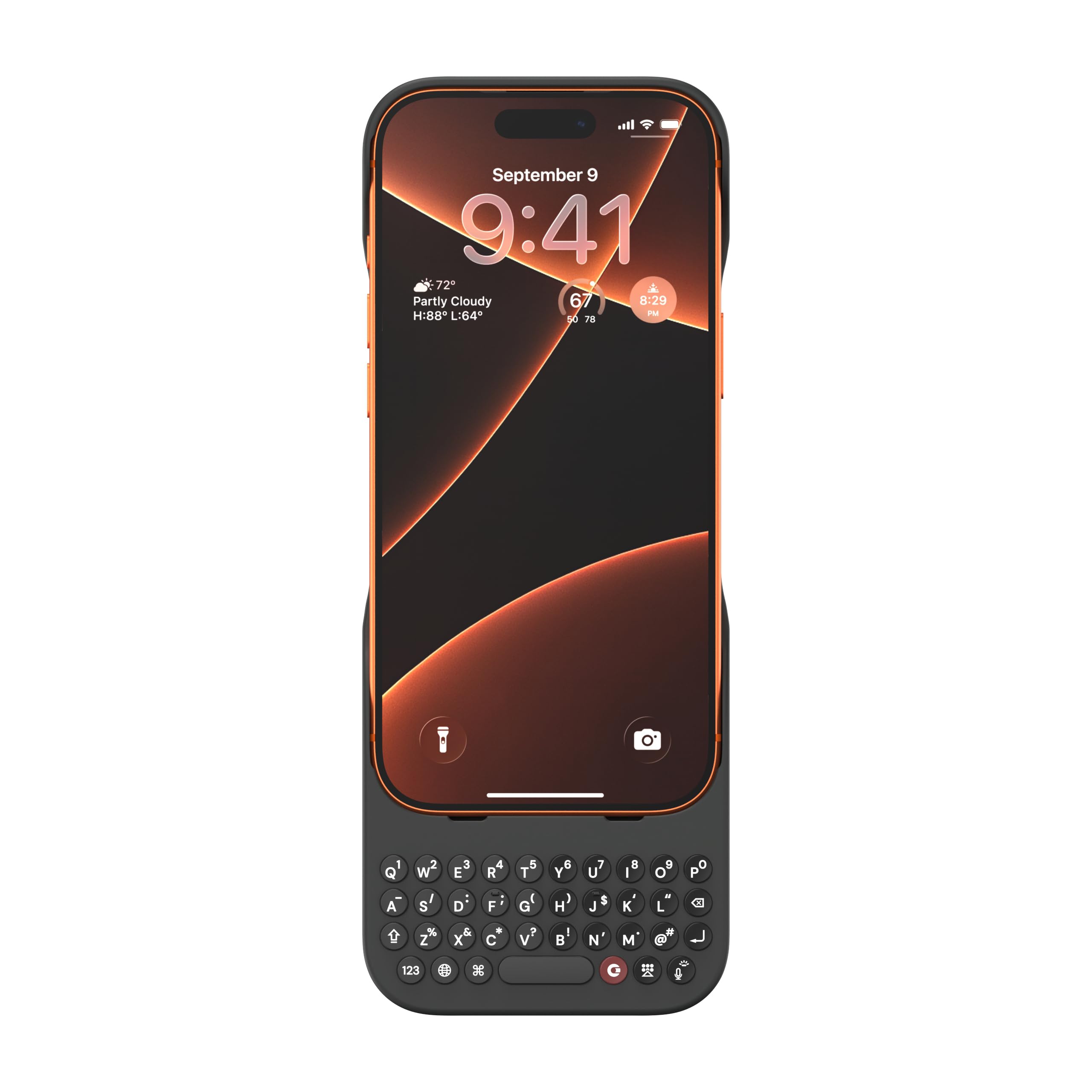
The Clicks Keyboard Case for the iPhone 17 Pro offers the same core experience as the 16 Pro version — a one-piece keyboard case that attaches via the USB-C port. The keys are backlit, and the case supports MagSafe and magnetic wireless charging. The keyboard includes a dedicated button for voice-to-text and Siri, plus shortcuts for common actions. It turns the iPhone into a mini productivity device reminiscent of the old Palm and BlackBerry days.
Users consistently highlight the tactile typing feel and the full-screen advantage. The keyboard adds a satisfying click with each press, and the shortcut keys reduce the need to reach up to the touchscreen. The case allows pass-through data for CarPlay connections. The build quality is solid with a polycarbonate enclosure and a matte finish that feels natural in hand.
The same length and balance issues apply — the phone becomes top-heavy, requiring two-handed typing for stability. The perimeter protection is minimal, so the case functions more as a keyboard accessory than a heavy-duty case. One verified review reports a letter key (T) stopped working after short use, indicating potential durability concerns. At this price point, buyers should weigh the typing benefit against the case’s limited protective qualities.
Why it’s great
- Backlit mechanical-style keys with satisfying click feedback
- MagSafe and magnetic wireless charging support
- Shortcut keys and voice-to-text reduce touchscreen dependency
Good to know
- Top-heavy design requires two hands for stable typing
- Minimal perimeter protection — not a rugged case
- Reports of individual keys failing after limited use
6. Motorola Moto G Play

The Moto G Play represents the best touchscreen option for texting on a budget. Its 6.5-inch HD+ display with a 90Hz refresh rate provides a spacious canvas for the Gboard keyboard, with enough width for comfortable two-thumb typing. The large 5000mAh battery is the star feature — heavy texters report 5–6 days of use on a single charge when the phone is used primarily for calls and messages. The Snapdragon 680 processor with 4GB of RAM handles SMS apps, WhatsApp, and email without lag.
The 50MP Quad Pixel camera captures decent photos in good light, though low-light performance is limited. Stereo speakers with Dolby Atmos make voice messages and calls clear. The phone includes a 3.5mm headphone jack, expandable storage up to 1TB, and a fingerprint reader. Moto gestures like chop-for-flashlight are convenient extras. For pure texting throughput, the large screen and responsive touch panel edge out smaller devices.
The downsides include some interface lag when multitasking between heavier apps and the camera overprocessing shadows. The side-mounted fingerprint reader can be accidentally triggered. The build is plastic but feels solid. For users who prefer touchscreen typing and need maximum battery endurance, this is the clear budget pick. It lacks a physical keyboard, so anyone wanting tactile keys should choose the flip phone or QWERTY options above.
Why it’s great
- 5000mAh battery provides up to 5–6 days for basic use
- 6.5-inch 90Hz display offers comfortable typing space
- 3.5mm headphone jack and expandable storage
Good to know
- Camera overprocesses images in low light
- Side fingerprint reader placement can cause accidental triggers
- No physical keyboard for tactile typists
7. Gigglizio 4G Flip Phone
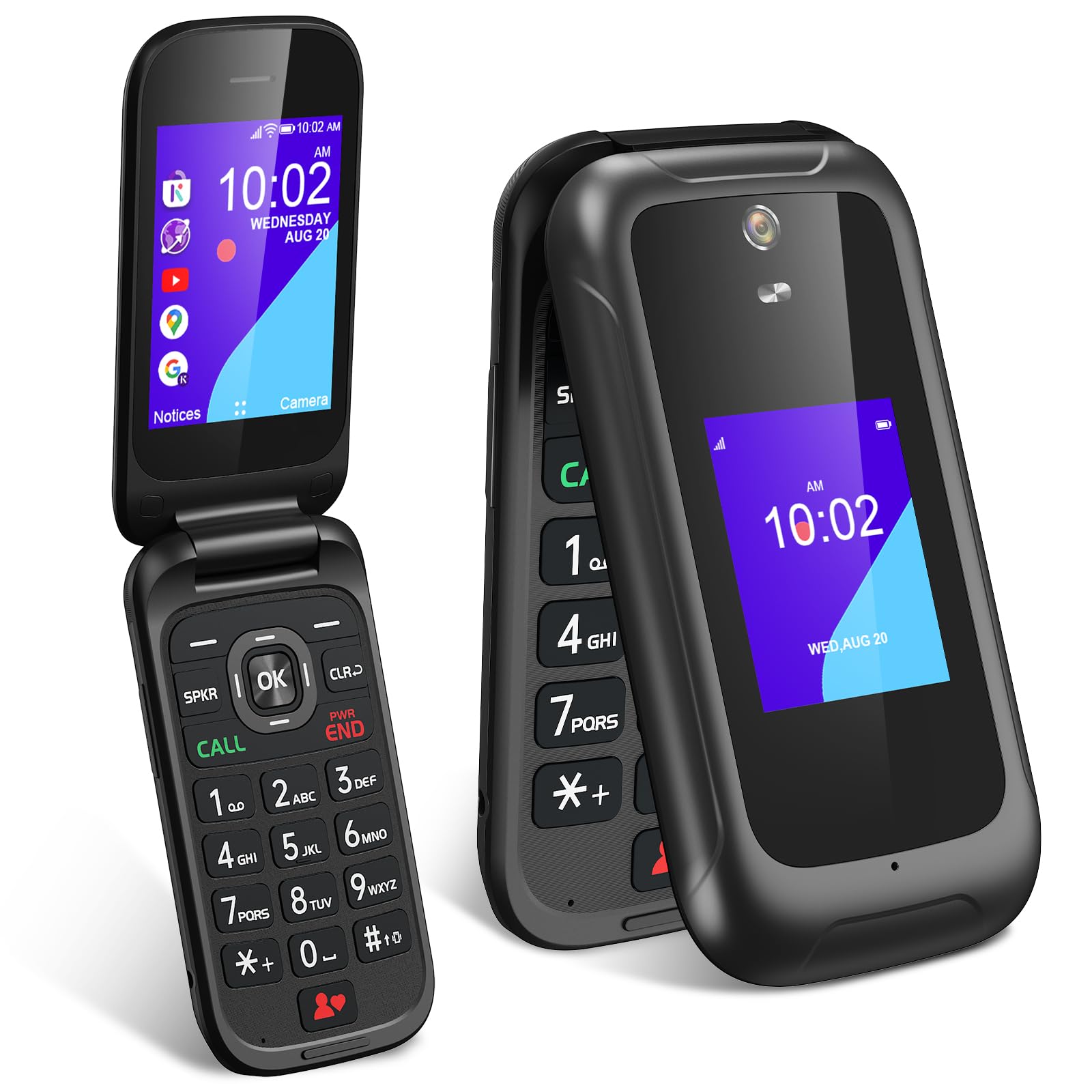
The Gigglizio 4G Flip Phone targets the simplest texting experience with tactile buttons, large fonts, and no touchscreen. Each physical key provides clear feedback when pressed, making it ideal for seniors, children, or anyone seeking a digital detox. The dual-screen design — a 3.2-inch main display and a 2.0-inch external screen — lets you check notifications without opening the phone. Predictive text input assists with composing messages on the T9-style keypad.
KaiOS brings smart capabilities without complexity: you get access to the KaiOS App Store, Google Maps, YouTube, a voice assistant, and a web browser. This means you can still check email or directions without the distraction of social media feeds. The 2000mAh removable battery lasts several days on a single charge. Users report excellent call quality and reliable performance on T-Mobile and AT&T. The phone supports Wi-Fi, Bluetooth 4.2, GPS, and has a 5MP rear camera.
The main drawbacks are the learning curve for T9 texting if you’re used to a full QWERTY, and the phone is not compatible with Verizon or its MVNOs. A few units have arrived defective or without proper documentation. The build is slightly heavier than the Nokia 2780. For users who send short SMS messages and value simplicity over speed, this flip phone removes all friction from basic texting.
Why it’s great
- Tactile physical buttons with large fonts for easy typing
- Removable 2000mAh battery lasts multiple days
- KaiOS provides essential smart features without distractions
Good to know
- Not compatible with Verizon or CDMA-based networks
- T9 predictive text requires adjustment from QWERTY users
- Some units have arrived defective or without manuals
FAQ
Can I use a physical keyboard phone on Verizon?
Does the Clicks keyboard case drain the iPhone battery faster?
Is T9 predictive text on flip phones faster than touchscreen keyboards?
Final Thoughts: The Verdict
For most users, the best cell phone for texting winner is the BlackBerry KEY2 because its physical QWERTY keyboard, Speed Key shortcuts, and BlackBerry Hub integration create the most efficient texting workflow available. If you need modern Android with 5G and a physical keyboard, grab the Unihertz Titan 2. And for a distraction-free tactile typing experience on a budget, nothing beats the Gigglizio 4G Flip Phone.

Mo Maruf
I created WellFizz to bridge the gap between vague wellness advice and actionable solutions. My mission is simple: to decode the research and give you practical tools you can actually use.
Beyond the data, I am a passionate traveler. I believe that stepping away from the screen to explore new environments is essential for mental clarity and physical vitality.