Our readers keep the lights on and my smoothie glass nicely filled. As an Amazon Associate, I earn from qualifying purchases.
Modern laptops shed the disc drive years ago, yet the pile of CDs and DVDs on your shelf still holds music, software, movie collections, and archived photos that only an external drive can read. Picking the right one means balancing read/write speeds, portability, and whether you want bonus ports or a simple no-frills burner.
I’m Mohammad Maruf — the founder and writer behind WellFizz. I’ve spent years analyzing optical drive specs, from data transfer rates and media speeds to compatibility lists and real-world user reports on noise and reliability.
After comparing the top contenders, I’ve narrowed the field to five models that cover every use case. This guide will help you find the right cd/dvd external drive for your specific needs, whether you’re ripping a CD collection or installing legacy software on a desktop.
How To Choose The Best CD/DVD External Drive
Optical drives have become a commodity, but not all are built the same. You need to look past the price tag and check a few critical specs to avoid a noisy, underpowered, or incompatible unit.
Read and Write Speeds
An 8x DVD read speed is standard for smooth movie playback and data backup. For CDs, look for 24x read and write speeds so you aren’t waiting minutes per disc. Premium drives often hit these numbers reliably, while budget models may throttle under sustained load.
Connectivity and Power
USB 3.0 offers a theoretical max of 5 Gbps — plenty for optical media. Some laptops have low-power USB ports that can’t spin up the drive, so choose a model with an auxiliary power cable or one that includes a power supply. Integrated cable designs prevent cable loss but can be short; check the cable length before buying.
Extra Features: Hub vs. Pure Drive
A multi-port drive with additional USB-A, USB-C, and SD/TF card slots turns a single peripheral into a docking station. If your laptop has limited ports, this is a huge advantage. However, a pure drive is smaller, lighter, and often more reliable since there are fewer electronics to fail.
Quick Comparison
On smaller screens, swipe sideways to see the full table.
| Model | Category | Best For | Key Spec | Amazon |
|---|---|---|---|---|
| ORIGBELIE 6-in-1 | Premium | Multi-device users | 8x DVD / 24x CD + 4 USB Ports | Amazon |
| BPAKDU with Carrying Case | Premium | Travel and portability | 9 oz / 4 USB + 2 SD Slots | Amazon |
| GODBPNYMU 5-in-1 | Mid-Range | Budget-conscious with card reader | 24x CD / 8x DVD + Dual Cable | Amazon |
| Rioddas USB 3.0 | Mid-Range | Simple plug-and-play | 5 Gbps / Physical Eject | Amazon |
| Wbacon 7-in-1 | Budget | Maximum ports at lowest cost | 5 Gbps / USB 3.0 Type-C | Amazon |
In‑Depth Reviews
1. ORIGBELIE External CD/DVD Drive

The ORIGBELIE drive earns its top spot by combining a full-speed USB 3.0 interface with a 6-in-1 hub that adds two USB-A ports, two USB-C ports, and separate SD/TF card slots. The 8x DVD and 24x CD read/write speeds match any task you throw at it, from ripping audio CDs to burning video files. The built-in auxiliary power cable ensures stable operation even on older desktop USB ports that may not supply enough current.
Users consistently praise its plug-and-play nature — no driver installation needed on Windows, macOS, or Linux. The RGB LED indicator adds a modern aesthetic, and the included storage bag makes it easy to keep clean during travel. On the rare occasion a low-power port fails to spin the disc, the included power cable connects to any 5V charger or power bank to resolve the issue instantly.
DVD playback is smooth, with no stuttering or freezing during standard movie watching. The drive also handles dual-layer DVD+R discs for larger backups. While it won’t play Blu-ray or 4K discs (no external drive in this price range does), it covers every standard CD and DVD format you’re likely to own.
Why it’s great
- Built-in 4-port USB hub plus SD/TF reader saves laptop ports
- RGB lighting looks sharp on a desk setup
- External power cable included for low-power USB ports
Good to know
- SD and TF slots cannot be used simultaneously
- Heavier than a pure drive due to hub components
2. BPAKDU External CD/DVD Drive

At just 9 ounces and bundled with a dedicated carrying case, the BPAKDU is built for people who need their optical drive to travel with them. The embedded USB cable stows neatly underneath, so you never forget a cable. Despite its slim profile, it still squeezes in four USB-A ports, one USB-C port, and two memory card slots — making it a true portable hub.
Read/write speeds hit the standard 8x DVD and 24x CD marks, which is enough for burning music compilations or pulling old photos off a disc. The bundled case protects the drive from bumps in a laptop bag, and the skip-proof rubber pad on the bottom keeps it from sliding around on smooth surfaces during use.
Compatibility is broad, supporting Windows 11 down to XP, macOS (including M1 and M2 chips), and Linux. Some users found that low-power USB ports required plugging the auxiliary power cable, but the drive includes one in the box. A notable downside: it does not support iPads, so Mac users with only an iPad Pro are out of luck.
Why it’s great
- Ultra-light design with included protective carrying case
- Four USB-A ports plus two card slots for a full hub experience
- Embedded cable eliminates cable clutter
Good to know
- Not compatible with iPads or tablets
- May need auxiliary power on older desktop ports
3. GODBPNYMU 5-in-1 External Drive
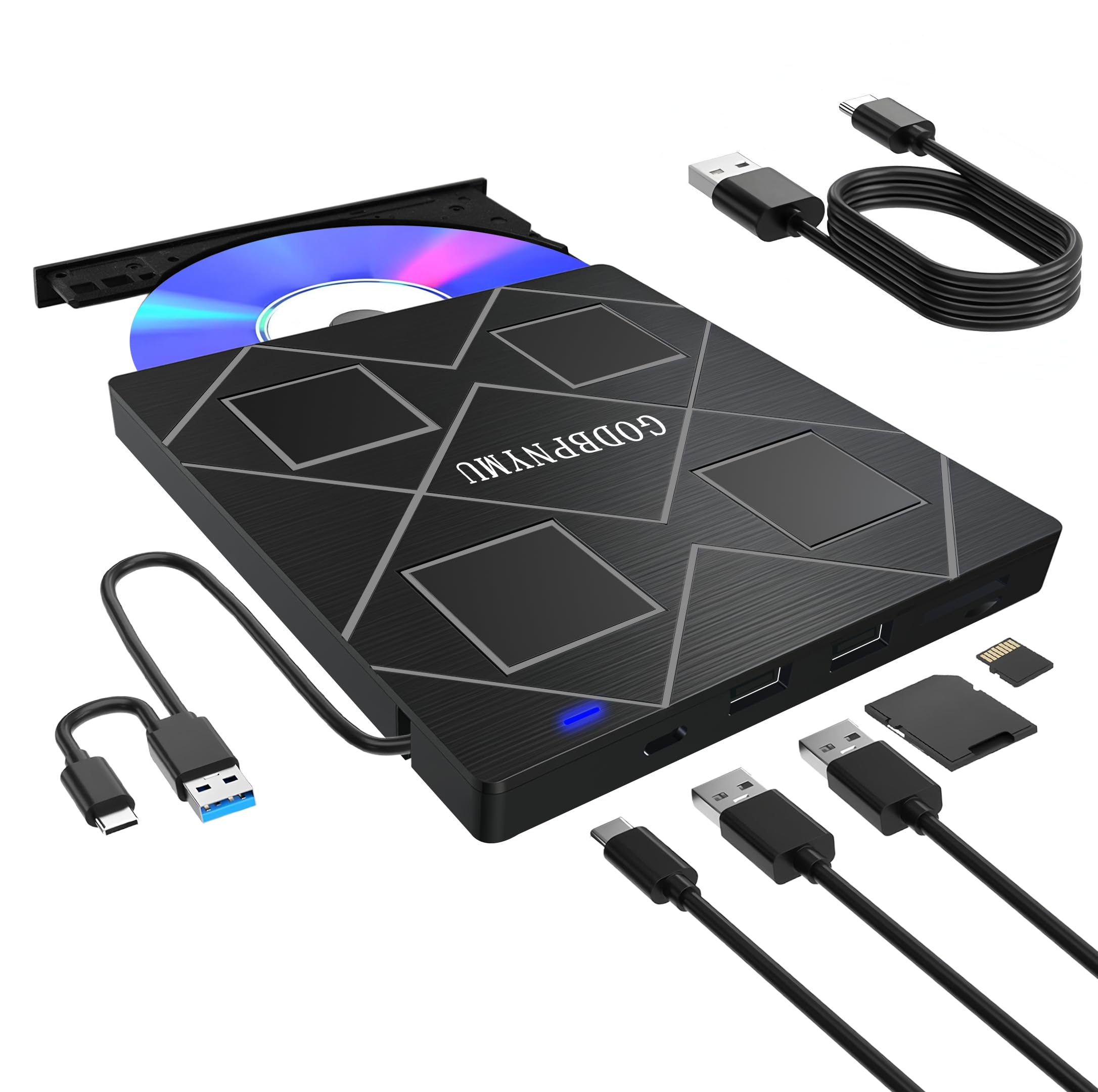
The GODBPNYMU drive stands out with an Amazon Climate Pledge Friendly certification, using recyclable packaging and energy-efficient components. That eco-friendly design doesn’t sacrifice performance — you get the standard 24x CD read/write and 8x DVD read/write speeds. The 5-in-1 hub includes two USB 2.0 ports plus SD and TF card slots, letting you transfer camera photos alongside your disc work.
The integrated cable design stores both a USB-A and USB-C cable directly on the bottom of the drive, so you can connect to modern laptops without an adapter. A separate power cable is included for devices that need extra current to spin discs reliably. The unit is also remarkably quiet in operation, thanks to noise reduction technology that dampens the spinning motor.
Build quality is solid for an ABS plastic shell, and the compact footprint (just 6.1 inches wide) fits easily into any laptop bag. Users report flawless plug-and-play on Windows 11 and macOS, though the permanently attached USB cable is short — you’ll want to keep the drive close to your computer. The 24-month warranty provides extra peace of mind over typical 90-day coverage.
Why it’s great
- Climate Pledge Friendly certification for eco-conscious buyers
- Includes both USB-A and USB-C cables built-in
- Very quiet operation during read and burn cycles
Good to know
- USB 2.0 ports only on the hub, not USB 3.0
- Attached cable is short, limiting placement distance
4. Rioddas External CD/DVD Drive

The Rioddas drive takes a no-nonsense approach: a clean brushed-texture shell, a physical eject button that works even when your computer can’t find the drive, and copper mesh technology for stable data transmission. It’s a pure optical drive with no extra ports, which keeps the size minimal and the weight low. The USB 3.0 interface delivers up to 5 Gbps, though optical media rarely saturates that bandwidth.
Setting up requires zero effort — plug it into a USB port, insert a disc, and Windows or macOS detects it instantly. Users note that on desktop PCs, plugging into a rear motherboard USB port eliminates any recognition issues. The drive handles CD-ROM, DVD-ROM, and rewritable formats without complaint, and burning speeds are consistent with the 24x CD and 8x DVD specs.
A standout feature is the physical eject button, a rare inclusion that lets you safely retrieve a stuck disc if the software eject command fails. The embedded USB cable tucks into the chassis, so you always have it handy. The main trade-off is the short cable length — you’ll need to keep the drive close to your computer, and the manual disc tray adds a step compared to slot-loading designs.
Why it’s great
- Physical eject button saves you from a stuck disc headache
- Copper mesh technology for stable data transmission
- True plug-and-play on all major operating systems
Good to know
- Short USB cable limits placement options
- Manual disc tray, not slot-load — slightly less convenient
5. Wbacon 7-in-1 External DVD Drive

The Wbacon drive packs the most ports into the lowest cost tier without skimping on the core burner function. Its 7-in-1 hub includes a USB 3.0 port, a USB 2.0 port, two USB-C ports, a TF slot, and an SD card slot — enough to connect a mouse, keyboard, flash drive, and camera card simultaneously. The optical mechanism delivers 8x DVD read and 24x CD read/write speeds that match drives costing more.
Plug-and-play works as advertised on Windows 11, 10, 8, 7, XP, and macOS 10.6 and above. The embedded USB-C cable is convenient for newer MacBooks and ultrabooks, though the cable length is on the short side. A rubber pad underneath prevents the drive from sliding during use, a thoughtful touch for such an affordable unit.
Customer feedback highlights that early units could be noisy with a rattling sound, but replacements have been nearly silent. The drive works flawlessly for ripping CDs, playing DVDs, and burning data discs. It does not support Chromebooks, TVs, or projectors, so confirm your device before ordering. For a pure budget entry with maximum port flexibility, it’s hard to beat.
Why it’s great
- Seven ports in one: USB-A, USB-C, SD, and TF coverage
- Embedded USB-C cable works natively with modern Macs and PCs
- Skip-proof rubber base keeps it stable during use
Good to know
- Some early units had noise issues, though replacements are quiet
- Not compatible with Chromebooks, TVs, or projectors
FAQ
Why does my external drive need an auxiliary power cable?
Can a CD/DVD external drive play Blu-ray discs?
Why doesn’t my drive work with a Chromebook or TV?
Final Thoughts: The Verdict
For most users, the cd/dvd external drive winner is the ORIGBELIE 6-in-1 because it combines full-speed 8x DVD burning with a four-port USB hub and dual card slots, all backed by an auxiliary power cable for reliability. If you want the lightest travel companion, grab the BPAKDU with carrying case. And for the best value with a card reader, nothing beats the GODBPNYMU 5-in-1.

Mo Maruf
I created WellFizz to bridge the gap between vague wellness advice and actionable solutions. My mission is simple: to decode the research and give you practical tools you can actually use.
Beyond the data, I am a passionate traveler. I believe that stepping away from the screen to explore new environments is essential for mental clarity and physical vitality.