Our readers keep the lights on and my smoothie glass nicely filled. As an Amazon Associate, I earn from qualifying purchases.
Modern laptops have shed their optical drives in favor of thinner frames, leaving millions of users with a stack of CDs and DVDs and no way to read them. Whether you need to install legacy software, rip a music library, burn a data backup, or watch a movie on a flight, the right external CD drive turns that dead-weight disc collection back into a useful tool — without adding bulk to your bag.
I’m Mohammad Maruf — the founder and writer behind WellFizz. I’ve spent years analyzing hardware specs and build quality in portable peripherals, and I evaluate each CD drive by its USB interface speed, physical footprint, media format support, and real-world read/write reliability across Windows and macOS.
After comparing dozens of options across price tiers, these five slim, USB-powered disc drives rise above the noise. This guide breaks down everything you need to confidently choose the best cd drive for your specific setup and usage habits.
How To Choose The Best CD Drive
Picking the right disc drive comes down to four factors: connectivity type, physical form factor, read/write speed specs, and OS compatibility. A premium drive you can’t plug in is no better than a budget one that refuses to read a disc.
USB vs. SATA: External or Internal
Most buyers need an external USB-powered drive for modern laptops. USB 3.0 offers 5 Gbps transfer rates — about ten times faster than USB 2.0 — which directly reduces ripping and burning time. Internal SATA drives, like the 5.25-inch desktop model in this list, are meant for desktop towers, duplicators, and workstations where you want permanent installation and a dedicated SATA cable.
Read and Write Speed Ratings
Look for a drive that offers at least 24x CD read/write speeds and 8x DVD read/write speeds. Higher numbers mean faster data access. If you routinely burn dual-layer DVDs for backup, ensure the drive explicitly supports DVD+R DL and DVD-R DL formats so you can use those larger 8.5 GB discs.
Extra Ports and Build Quality
Some slim external drives double as USB hubs or include SD/TF card slots, which saves you from carrying a separate adapter. A carrying case or storage bag protects the drive in transit. For desktop internal drives, check that the installation kit includes SATA cable and mounting screws — not all budget models include them.
Quick Comparison
On smaller screens, swipe sideways to see the full table.
| Model | Category | Best For | Key Spec | Amazon |
|---|---|---|---|---|
| ORIGBELIE External (5-in-1 Hub) | External USB Hub Drive | Max portability + card reader | USB 3.0, 24x CD read, 8x DVD read | Amazon |
| BestDuplicator Lite-On Internal | Internal SATA Drive | Desktop workstation builds | 24x DVD write, 5.25-inch SATA | Amazon |
| BPAKDU External 4-Port Hub | External USB Hub Drive | Multi-device USB expansion | 4 USB-A + 2 card slots, 24x CD | Amazon |
| BUNUD External 5-in-1 Drive | External USB Drive | Compact with card reader | USB 3.0 Type-C, 24x CD burn | Amazon |
| ORIGBELIE Ultra Slim Drive | External USB Drive | Budget-friendly portable | 13mm thick, 0.2 kg, USB 3.0 | Amazon |
In‑Depth Reviews
1. ORIGBELIE External CD DVD Drive (5-in-1 Hub)

This drive pairs a full 24x CD and 8x DVD read/write engine with a four-port USB hub (one USB 3.0, one USB 2.0, two USB-C) plus separate SD and TF card slots. The 5 Gbps USB 3.0 interface keeps data moving fast during ripping sessions, and the built-in 2-in-1 USB cable with Type-A and Type-C ends eliminates the need for a dongle. Owners consistently report flawless plug-and-play recognition on Windows 11 and macOS, even without the extra power cable for most modern computers.
The aluminum-alloy enclosure keeps the drive cool during extended use, and the included carrying case and storage bag add real travel protection. The RGB LED gradient light is a cosmetic bonus that does not affect performance, but the real value is in the card slots — they handle SD and microSD transfers from cameras and dashcams without a separate reader. Max write speed on DVD-R is 8x, which burns a full 4.7 GB disc in about seven minutes.
Be aware that this drive does not support Blu-ray discs, Chromebooks, Surface devices, or gaming consoles. A small number of users hit a corrupted file bug during photo transfers, but a driver uninstall/reinstall typically resolves it. For anyone who needs a portable CD drive and a hub in one device, this is the most versatile option on the list.
Why it’s great
- Integrated 4-port USB hub plus SD/TF card reader saves desk space and bag weight.
- USB 3.0 Type-A and Type-C built-in cable works with both older and newer laptops.
- Carrying case and storage bag provide excellent portability protection.
Good to know
- Not compatible with Chromebooks, Surface, iPad, or game consoles.
- RGB lighting cannot be turned off if you prefer a stealth look.
2. BestDuplicator Lite-On 24x Dual-Layer SATA Drive
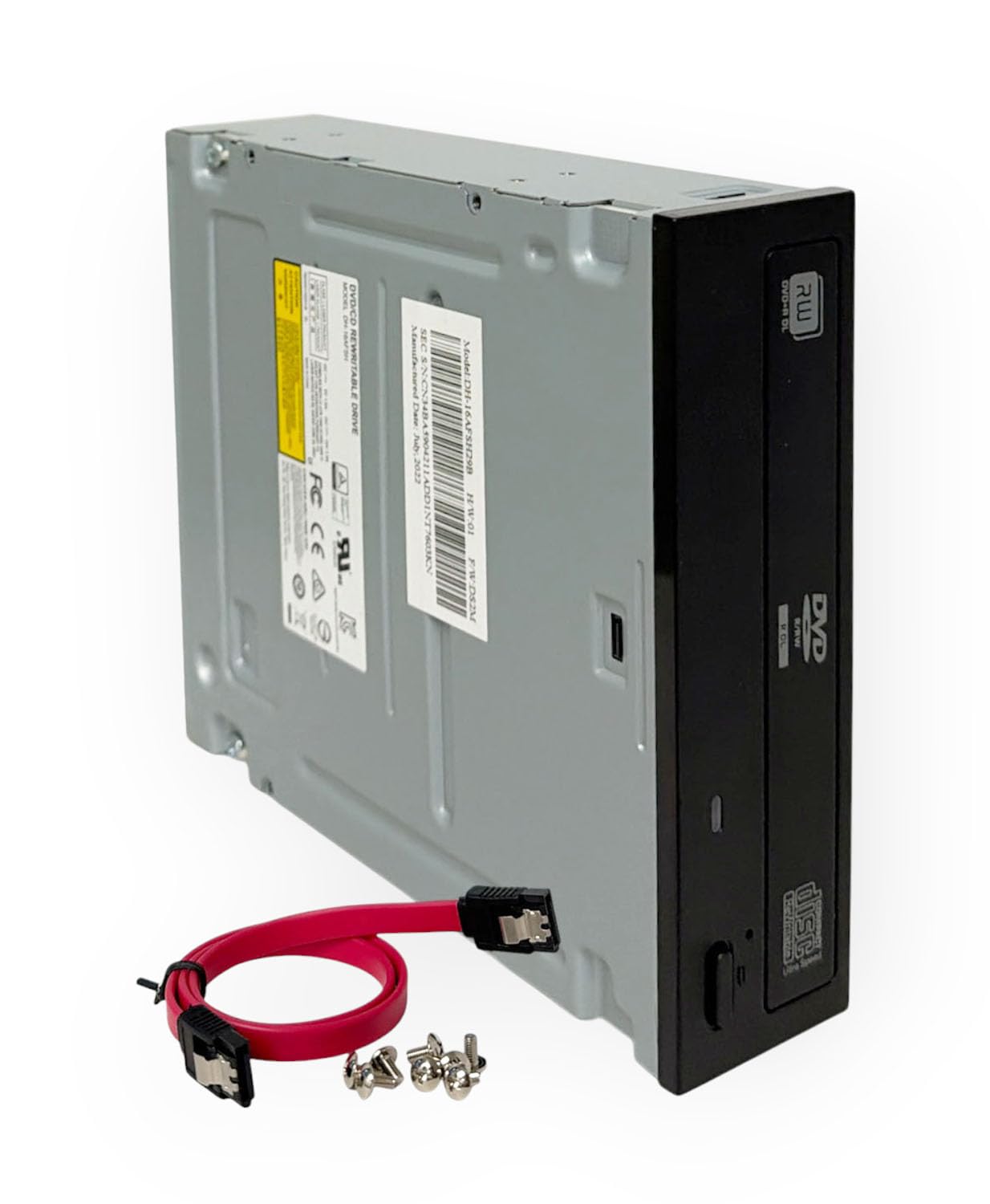
This is the only internal drive in the roundup — a 5.25-inch SATA optical drive designed for desktop towers, duplicators, servers, and workstations. It hits 24x DVD write speed, which is the fastest standard available for consumer DVD burning, and supports dual-layer discs up to 8.5 GB for large backups. The drive reads and writes CD-R, CD-RW, DVD±R, DVD±RW, and DVD+R DL media without requiring additional drivers on Windows or Linux.
The package includes a SATA data cable and mounting screws, so installation into a standard desktop case is straightforward — slide it in, connect the cable, and you are ready. The 1.5 MB cache buffer helps maintain consistent write speeds, and the drive is widely recognized on Linux Mint and other distributions without extra configuration. Users report that this unit reads commercial CDs and DVDs immediately, and the burning utility works reliably with common software like Brasero or ImgBurn.
Because it is an internal SATA device, it is not portable — you cannot use it with a laptop unless you buy an external SATA-to-USB adapter, which adds cost and complexity. Some units produce audible noise during spin-up, though performance is not affected. If you need a permanent high-speed burner for a desktop duplicator or a media server, this is the most cost-effective and reliable choice.
Why it’s great
- 24x DVD write speed is the fastest available for consumer DVD burning.
- Installation kit includes SATA cable and screws — no extra purchases needed.
- Works seamlessly with Linux, Windows, and duplicator hardware without special drivers.
Good to know
- Requires a desktop case with a 5.25-inch bay — not for laptops.
- Drive can be audible during high-speed spinning; normal for an internal unit.
3. BPAKDU External CD/DVD Drive with 4 USB Ports

The BPAKDU drive packs a 24x CD burner and an 8x DVD reader into a slim 9-ounce plastic enclosure, but its real draw is the built-in hub: four USB-A ports, one USB-C port, plus separate slots for SD and TF memory cards. This makes it a practical all-in-one for users who need to connect a flash drive, mouse, or camera and rip discs simultaneously without hunting for a separate hub.
Setup is genuinely plug-and-play on Windows 11 and macOS — the drive appears automatically without driver downloads. The USB 3.0 interface delivers the full 5 Gbps bandwidth for fast data transfers, and the drive handles CD±R/RW, DVD±R/RW, and dual-layer DVD formats without issue. Users report it loads software quickly and burns audio CDs reliably using standard media player software. A rubberized base prevents sliding on desks, and the embedded cable design means you won’t lose the cord.
The main limitation is that the hub ports are all USB 2.0 speed (except the Type-C port), so high-speed external SSDs will not see full performance. Also, the SD and TF slots cannot be used simultaneously — you must choose one at a time. If you mostly need a CD/DVD reader with handy but not speed-critical USB expansion, this drive delivers excellent value for the price.
Why it’s great
- Four USB-A ports and a USB-C port eliminate the need for a separate hub.
- Integrated SD/TF card reader for direct camera and dashcam file transfers.
- Lightweight at 9 ounces with an embedded cable for easy packing.
Good to know
- Hub USB-A ports are USB 2.0 only — not for fast external SSDs.
- SD and TF card slots cannot work simultaneously; pick one at a time.
4. BUNUD External DVD Drive USB-C Superdrive
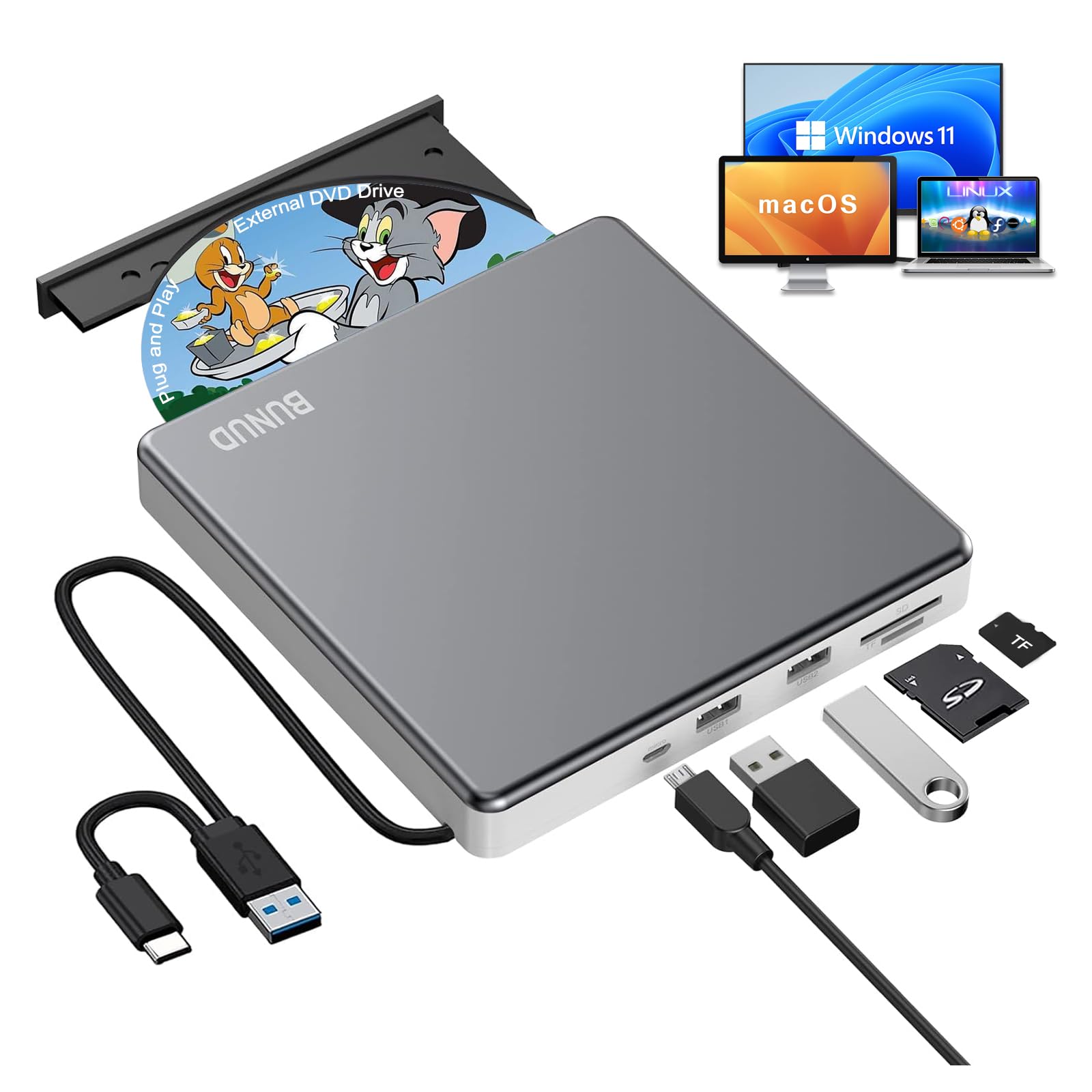
BUNUD’s drive brings a 5-in-1 hub design into a brushed aluminum enclosure that looks at home next to a MacBook. It includes a built-in SD card slot, a TF card slot, two additional USB ports, and a micro USB input for supplemental power — all while keeping the overall footprint slightly smaller than a CD jewel case. Plug the Type-C or Type-A connector into your laptop, and the drive is recognized instantly on macOS and Windows without extra software.
Read and write speeds match the category standard: 24x for CDs and 8x for DVDs. The drive handles damaged and scratched discs better than many competitors, according to user reports, and it supports simultaneous read from a flash drive and SD card while burning a disc. The aluminum shell dissipates heat well during extended ripping sessions, and the rubber pad holds the drive steady on a desk.
The fixed USB cable is permanently attached and cannot be replaced if damaged — a potential long-term failure point. SD cards also protrude slightly from the slot, which may be an issue if the drive sits in a tight laptop bag pocket. For macOS users, remember that the desktop icon only appears after you insert a disc — this is normal behavior for external drives on Macs. Overall, this is a solid mid-range pick with no major performance complaints.
Why it’s great
- Reads scratched and damaged discs more reliably than budget alternatives.
- Aluminum enclosure looks premium and manages heat well.
- Supports simultaneous flash drive + SD card + disc burn operation.
Good to know
- Fixed USB cable cannot be replaced if damaged.
- SD card sticks out slightly from the slot when inserted.
5. ORIGBELIE Ultra Slim External CD/DVD Drive

At just 13 mm thick and 206 grams, this is the most portable drive in the lineup — it fits flat inside a laptop sleeve or a small messenger bag without adding noticeable bulk. The built-in 2-in-1 data cable (USB Type-A and Type-C on a single line) means you never have to carry an extra adapter, and plugging it in triggers automatic detection on Windows 11 and macOS. The drive reads and writes CD±R/RW, DVD±R/RW, and dual-layer DVDs at the standard 24x CD / 8x DVD speeds.
Owners praise the straightforward plug-and-play experience and the fact that it works with no driver installation on both modern and older operating systems, including Windows 7 and Linux. The package includes a drawstring storage bag to protect the drive during travel, and a separate power cable that can be connected to a 5V charger or power bank if the host computer’s USB port cannot supply enough juice — a common issue on some ultra-portable laptops.
This drive lacks the extra USB hub or card reader found on more expensive models, so you will not get expanded connectivity. It also does not support Blu-ray discs, gaming consoles, or tablets. For users who simply need a lightweight, no-frills external CD/DVD reader that works reliably and costs less than many single-port hubs, this is the best entry-level option.
Why it’s great
- Extremely thin and light — 13 mm and 206 g, ideal for travel.
- Built-in USB-A / USB-C cable works with both old and new laptops.
- Includes a separate power cable for computers with weak USB output.
Good to know
- No USB hub, SD card reader, or extra ports — pure drive only.
- Not compatible with Chromebooks, Surface, iPads, or game consoles.
FAQ
Will an external CD drive work with my MacBook Air or MacBook Pro?
Why does my computer not recognize the CD drive when I plug it in?
Can I play Blu-ray discs with a standard external CD/DVD drive?
Final Thoughts: The Verdict
For most users, the best cd drive winner is the ORIGBELIE External 5-in-1 Hub because it combines fast USB 3.0 read/write speeds, a built-in four-port hub, and SD/TF card slots into a portable package with a carrying case. If you need a permanent high-speed burner for a desktop workstation, grab the BestDuplicator Lite-On Internal SATA Drive. And for a budget-friendly, ultra-light drive that slips into any bag without extra weight, nothing beats the ORIGBELIE Ultra Slim 13mm Drive.

Mo Maruf
I created WellFizz to bridge the gap between vague wellness advice and actionable solutions. My mission is simple: to decode the research and give you practical tools you can actually use.
Beyond the data, I am a passionate traveler. I believe that stepping away from the screen to explore new environments is essential for mental clarity and physical vitality.