Our readers keep the lights on and my smoothie glass nicely filled. As an Amazon Associate, I earn from qualifying purchases.
An indoor security camera is only as good as its ability to see what you can’t. Between fuzzy night vision, limited fields of view, and hidden subscription costs, picking the wrong model leaves you blind when it matters most. The differences in motor quality, smoke detector false alerts, and app reliability separate a useful tool from a frustrating gadget.
I’m Mohammad Maruf — the founder and writer behind WellFizz. I analyze market trends and hardware specifications for consumer electronics, focusing on the firmware stability, low-light sensor performance, and AI detection accuracy that make indoor cameras either dependable or disposable.
This guide breaks down seven top contenders based on resolution, storage flexibility, and core features to help you find the best cctv indoor camera for your home or business.
How To Choose The Best CCTV Indoor Camera
Choosing the right camera begins with understanding where you’ll place it and what you need to monitor. A camera aimed at a crib has different requirements than one covering a living room or office entryway.
Resolution and Sensor Quality
Resolution determines how much detail the camera captures. 1080p HD is the baseline, but 2K and 4K sensors let you digitally zoom into a license plate, a face, or a pet without the image turning into a blur. The lens aperture (F1.6 or lower) also matters — wider apertures let in more light for clearer night vision without relying solely on infrared LEDs.
Pan, Tilt, and Field of View
A fixed camera sees only what is directly in front of it. Pan-tilt models offer motorized 360° rotation and vertical tilt, letting you sweep an entire room from your phone. If your camera will sit on a shelf or a high corner, look for a pan range of at least 355° and a tilt that can point downward enough to see a floor-level crib or pet bed.
Storage: Local vs. Cloud
Local storage uses a microSD card (up to 512 GB) to record footage directly on the camera with zero monthly fees. Cloud storage uploads clips to a remote server, usually requiring a subscription that adds cost over time. The best option is a camera that supports both, giving you free local recording while offering optional cloud backup if you need extended history.
AI Detection and Alerts
Smart detection filters out false alarms from ceiling fans, passing headlights, or falling leaves. Look for cameras that distinguish between humans, pets, vehicles, and specific sounds like baby crying. Advanced models also offer auto-tracking, where the camera physically follows a moving person or pet across the room.
Quick Comparison
On smaller screens, swipe sideways to see the full table.
| Model | Category | Best For | Key Spec | Amazon |
|---|---|---|---|---|
| eufy 4K Indoor Cam E30 | Pan-Tilt | No-subscription 4K recording with AI tracking | 4K UHD / f/1.6 Aperture | Amazon |
| REOLINK E1 Pro | Pan-Tilt | Budget-friendly 3K with dual-band Wi-Fi | 2880×1616 / 5 MP | Amazon |
| Ring Pan-Tilt Indoor Cam | Pan-Tilt | Seamless Ring ecosystem and 360° coverage | 1080p HD / Color Night Vision | Amazon |
| Ring Indoor Cam (1080p) | Fixed | Easy fixed-angle monitoring with Alexa | 1080p HD / Privacy Cover | Amazon |
| Tapo C100 4-Pack | Fixed | Multi-room coverage on a budget | 1080p FHD / 117° FOV | Amazon |
| Google Nest Cam Indoor (Wired) | Fixed | Google Home integration and 2K HDR | 2K HDR / 152° FOV | Amazon |
| Simsky Baby Monitor (2 Cam) | Dedicated Monitor | Dedicated parent unit with split-screen baby monitoring | 4MP Dual Cam / 7″ Display | Amazon |
In‑Depth Reviews
1. eufy Security 4K Indoor Camera E30

The eufy E30 is the only camera in this roundup that delivers true 4K UHD recording in a pan-tilt body without locking you into a subscription. Its F1.6 aperture lens pulls in enough light to keep the spotlight-fed color night vision sharp even in dim rooms, and the built-in spotlight doubles as a visual deterrent when motion is detected.
The AI detection on this unit distinguishes between humans and pets, and the auto-tracking motor follows movement smoothly across the full 360° pan range. The Quick Focus Tap and Panoramic View features in the app let you jump to any corner of the room instantly, which is useful for parents scanning a nursery or for monitoring a home office.
Local storage via microSD card (sold separately) keeps your footage private and free, though you still have the option of eufy Cloud if you want remote backup. HomeKit, Alexa, and Google Assistant support integrate the camera into existing smart home routines without friction.
Why it’s great
- True 4K resolution at 15 fps with excellent daytime sharpness
- No subscription required for local recording or AI features
- Smart auto-tracking follows movement reliably across the room
Good to know
- HomeKit stream is limited to 1080p
- Night vision is good but not as crisp as some dedicated 2K sensors in complete darkness
2. REOLINK E1 Pro 3K PT Wi-Fi Indoor Camera

The REOLINK E1 Pro punches well above its tier with a 5MP sensor delivering 2880×1616 resolution — noticeably sharper than standard 1080p cameras. The F1.6 aperture keeps low-light footage clean, and the dual-band Wi-Fi (2.4/5 GHz) ensures a stable stream even on congested networks where cheaper 2.4 GHz-only cameras lag.
The pan-tilt motor covers a full 360° and auto-tracking engages when the AI detects a person, pet, or baby movement. The crying detection is a standout feature for parents, sending a push notification directly to the phone. Unlike some competitors, REOLINK does not require a monthly fee for any of these AI features or for using the app.
Storage options are flexible: microSD up to 512 GB, REOLINK NVR, or FTP/NAS via RTSP/ONVIF. This makes it easy to integrate into a larger security setup. The initial setup can be slightly technical for non-IT users, but once configured, the camera is rock-solid.
Why it’s great
- 3K resolution with excellent low-light performance
- No subscription fees for AI detection or app access
- ONVIF/RTSP support for third-party NVR integration
Good to know
- Initial Wi-Fi setup can be tricky; may require a wired Ethernet step
- Plastic housing feels less premium than metal-bodied alternatives
3. Ring Pan-Tilt Indoor Cam (Newest Model)
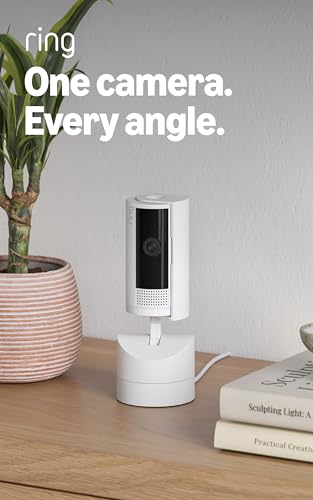
The Ring Pan-Tilt Cam brings motorized rotation to the Ring ecosystem, giving you full 360° pan and a 169° tilt range from your phone. The 1080p HD stream is clear and the color night vision works well in low ambient light, keeping details visible without switching to black-and-white infrared.
Integration with Ring Alarm and Alexa is seamless — you can trigger camera movements based on alarm events or ask an Echo Show to pan left. The two-way talk is clear enough to warn a delivery person or comfort a pet. The compact form factor is smaller than the Stick Up Cam with a separate pan base, saving shelf space.
Motion tracking works reliably during the day, though the 2.4 GHz Wi-Fi only connection can introduce lag in congested networks. Saved recordings require a Ring Protect subscription, which is a consideration if you want cloud history without monthly costs.
Why it’s great
- Smooth motorized pan/tilt covers an entire room from a single camera
- Works perfectly with Ring Alarm and Alexa routines
- Compact design that does not dominate the room visually
Good to know
- No 5 GHz Wi-Fi or Ethernet port
- Subscriptions required for recorded clip history
4. Ring Indoor Cam (1080p HD)

The standard Ring Indoor Cam delivers the same 1080p HD video and color night vision as its larger siblings in a fixed, entry-level package. The physical privacy cover is a thoughtful touch — a simple plastic flap that slides over the lens when you want to guarantee the camera is not recording.
Installation takes less than two minutes with the plug-and-play design, and the flexible swivel mount lets you set the angle on a table or mount it to a wall. The Advanced Pre-Roll feature captures a few seconds of video before a motion trigger, giving you context that many budget cameras skip.
Live view and motion alerts are free, but like the Pan-Tilt model, cloud recording of saved clips requires a Ring Protect subscription. If you are already invested in the Ring ecosystem for a doorbell or alarm, this camera integrates effortlessly.
Why it’s great
- Manual privacy cover provides mechanical assurance when disabled
- Easy setup and stable 1080p video quality
- Works seamlessly with existing Ring devices and Alexa
Good to know
- No local microSD slot; recordings require subscription
- Fixed lens cannot pan or tilt remotely
5. Tapo 1080P Indoor Wired Security Camera C100 (4-Pack)

The Tapo C100 4-pack is the most cost-effective way to cover multiple rooms with dependable 1080p FHD video. Each camera features a 117° field of view, an integrated IR system for 40 feet of night vision, and a built-in siren that can be triggered remotely or by motion detection.
Two-way audio is clear, and the Tapo app provides instant push notifications for motion, person detection, and baby crying — all without requiring a subscription. Storage is fully local via a microSD card (up to 512 GB), though an optional Tapo Care cloud plan exists if you need off-site backup.
Setup per camera takes under five minutes, and the included mounting hardware lets you place them on walls or corners quickly. The 1080p sensor is solid in good light but loses detail faster than 2K or 4K sensors in low light or when digitally zooming. For general room monitoring, this pack is a workhorse.
Why it’s great
- Four cameras in one box at a bundle price significantly below buying individuals
- Free local microSD storage with no subscription needed for core features
- Built-in siren adds a layer of active deterrence
Good to know
- 1080p resolution means digital zoom quickly becomes pixelated
- No pan-tilt; each camera sees only a fixed 117° angle
6. Google Nest Cam Indoor (Wired, 3rd Gen)

The Google Nest Cam Indoor (3rd Gen) is the most intelligent camera here, thanks to Gemini AI integration. The 2K HDR sensor captures crisp, vibrant video with a 152° field of view — noticeably wider than most fixed indoor cameras — and the night vision keeps details visible without washing out highlights.
AI detection is a step above basic motion alerts. The camera can distinguish between people, vehicles, and animals, and with a Google Home Premium subscription it can recognize familiar faces and generate GPT-style summaries like “Kids are playing soccer in the living room.” The event video previews (short clips of recent events) let you decide if an alert needs attention without loading the full history.
The wired design means no batteries to change, and the Google Home app integration is fluid if you already use Nest speakers or smart displays. The magnetic mount works on metal surfaces, but the magnet is weaker than expected; many users opt for the third-party L-mount for a secure hold. Key AI features require a subscription, but the live view and standard alerts are free.
Why it’s great
- 2K HDR video with wide 152° field of view
- Gemini AI provides natural language summaries of events
- Seamless integration with Google Home ecosystem
Good to know
- No local microSD slot; all recording requires a subscription
- Magnetic mount is weak for the camera weight
7. Simsky 7″ Split-Screen Baby Monitor with 2 Cameras
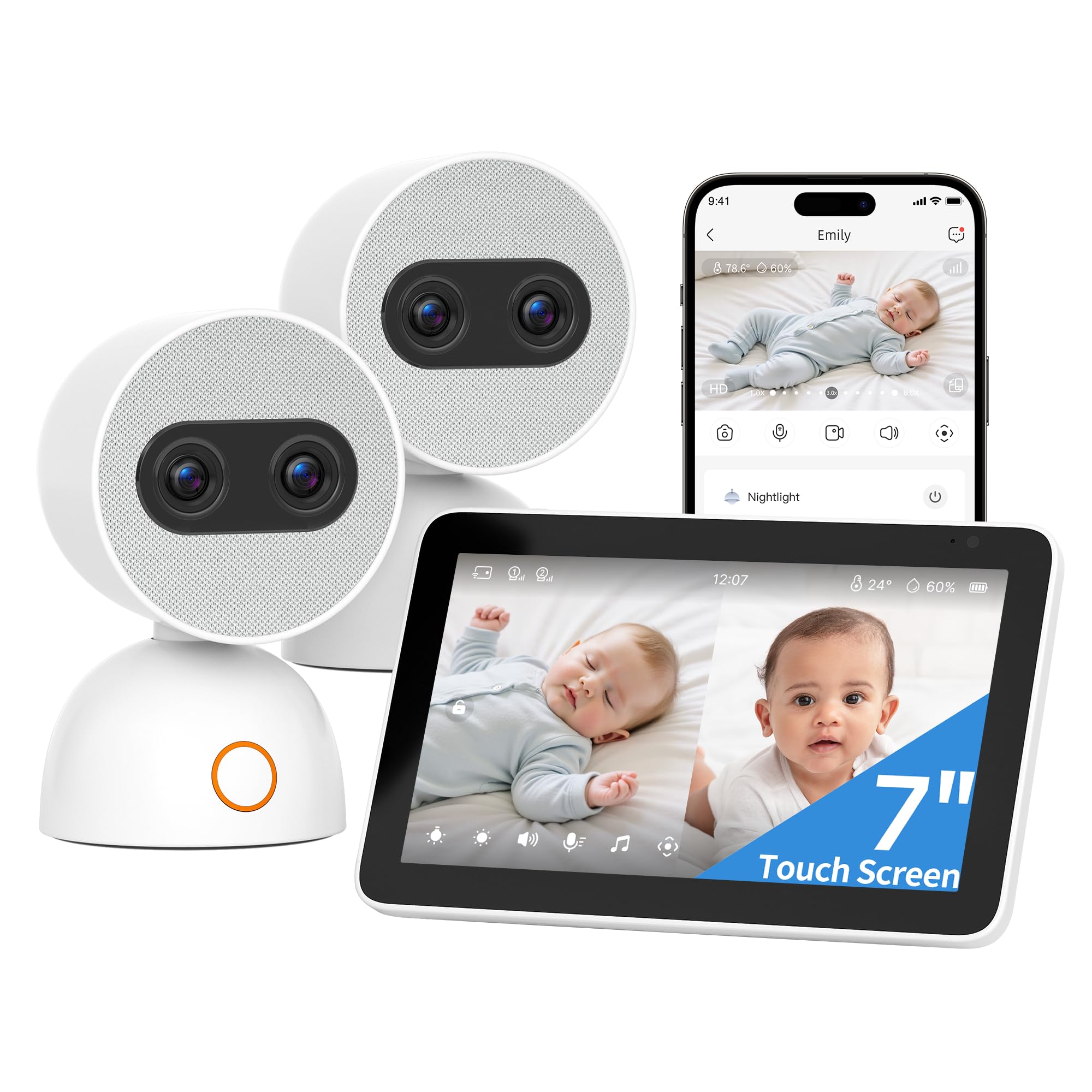
The Simsky monitor takes a different approach — instead of relying on your phone, it provides a dedicated 7-inch 1080p touchscreen that shows both cameras in split-screen mode simultaneously. Each 4MP camera offers a motorized pan-tilt-zoom with 6x optical-quality zoom, letting you focus on a sleeping baby without moving the camera physically.
AI features include cry detection, face-covered alerts, and custom danger zones — all processed locally within the parent unit. The AES 128-bit encrypted system stores all recordings on a built-in 32 GB memory (expandable to 256 GB) with no cloud exposure, making it effectively hack-proof as long as you keep it off remote access.
The free smartphone app provides remote viewing when you leave the house, and the 5200 mAh battery runs the parent unit for up to nine hours. The large screen and split view are a massive advantage over app-only monitors when you want a glanceable display on the nightstand.
Why it’s great
- Large 7-inch touchscreen with intuitive split-screen for two cameras
- Hack-proof local storage with AES-128 encryption
- AI cry detection and danger zone alerts work without Wi-Fi
Good to know
- Battery life drops to 8-9 hours with both cameras on and sound monitor active
- Screen is somewhat grainy, and hybrid zoom is not true optical zoom
FAQ
Do I need a subscription to use an indoor security camera?
What is the difference between pan-tilt and fixed cameras?
Is 4K resolution worth it for an indoor security camera?
Can I mount an indoor camera to watch through a window?
Final Thoughts: The Verdict
For most users, the best cctv indoor camera winner is the eufy 4K Indoor Cam E30 because it delivers the highest resolution, reliable AI auto-tracking, and full local storage with no subscription. If you want a near-equivalent at a lower entry point, grab the REOLINK E1 Pro for its 3K clarity and ONVIF compatibility. And for multi-room coverage without breaking the bank, nothing beats the Tapo C100 4-Pack.

Mo Maruf
I created WellFizz to bridge the gap between vague wellness advice and actionable solutions. My mission is simple: to decode the research and give you practical tools you can actually use.
Beyond the data, I am a passionate traveler. I believe that stepping away from the screen to explore new environments is essential for mental clarity and physical vitality.