Our readers keep the lights on and my smoothie glass nicely filled. As an Amazon Associate, I earn from qualifying purchases.
Printing functional parts that actually replace factory components demands a material that won’t snap, warp, or wear down under stress. Standard PLA is fine for display models, but when you need parts for drones, automotive fixtures, or tools, the stiffness-to-weight ratio of carbon-fiber-reinforced filaments is the only serious option. The catch is that not every printer can handle the abrasive nature of these composites—standard brass nozzles wear out fast, and flimsy motion systems struggle with the higher viscosity carbon fibers demand.
I’m Mohammad Maruf — the founder and writer behind WellFizz. I’ve analyzed hundreds of 3D printer specifications and real-world reliability data to determine which machines deliver consistent layer adhesion, clog-free extrusion, and the structural rigidity needed for carbon fiber printing without constant maintenance.
Whether you are upgrading from a basic model or building a production-ready setup, finding the right machine comes down to nozzle temperature, enclosed chamber control, and a reinforced motion system. This guide breaks down every meaningful spec so you can choose the best carbon fiber 3d printer for your specific workflow.
How To Choose The Best Carbon Fiber 3D Printer
Carbon fiber filaments are abrasive, require higher extrusion temperatures, and often demand an enclosed chamber to avoid delamination. Skipping any one of these requirements will ruin prints and damage components. Here are the four critical factors to evaluate before buying.
Hotend Temperature & Nozzle Hardness
Carbon fiber composites typically print between 260°C and 350°C. If your hotend maxes out at 260°C, you are limited to PLA-CF blends and cannot handle PA-CF or PET-CF which require 280°C+. The nozzle itself must be hardened steel or a bimetallic titanium-alloy design—standard brass nozzles will widen beyond usable tolerances after a single kilogram of CF filament.
Enclosed Chamber & Active Heating
Carbon fiber nylons and polycarbonates are hygroscopic and warp aggressively when cooling unevenly. An enclosed printer that maintains a chamber temperature of at least 50–60°C (measured, not ambient) prevents edge curling and improves interlayer adhesion. Passive enclosures help with draft shielding, but active chamber heating is the gold standard for advanced composites.
Motion System Rigidity
A rigid CoreXY frame with vibration compensation minimizes ghosting and layer shifting when printing stiff, fast-sintering CF materials. Bedslinger designs tend to wobble at higher accelerations, which causes visible artifacts on rigid composite parts. Look for die-cast aluminum or reinforced steel frames with linear rail guides rather than V-slot wheels.
Direct Drive Extruder & Filament Handling
Carbon fiber filaments are brittle and prone to snapping in Bowden tubes. A direct-drive extruder with a short, guided filament path reduces friction and breakage. Filament runout sensors and tangle detection are also important because failed prints waste expensive composite material. A clog-resistant extruder with a spring-loaded idler grip prevents slipping on smooth CF surfaces.
Quick Comparison
On smaller screens, swipe sideways to see the full table.
| Model | Category | Best For | Key Spec | Amazon |
|---|---|---|---|---|
| Bambu Lab P1S | Premium Mid-Range | Reliable enclosed printing | 500mm/s, 260mm³ build, auto-level | Amazon |
| QIDI Q1 Pro | Premium Enclosed | Active chamber heating, 350°C hotend | 60°C chamber, 350°C nozzle | Amazon |
| Creality K1C | High-Speed CF | Carbon fiber prints, AI camera | 600mm/s, 300°C unicorn nozzle | Amazon |
| FLASHFORGE AD5M Pro | Enclosed Value | Dual filtration, smart monitoring | 600mm/s, 280°C quick-swap nozzle | Amazon |
| FLASHFORGE AD5X | Multi-Color CF | 4-color printing with PLA-CF | 600mm/s, 4-color IFS, CoreXY | Amazon |
| FLASHFORGE Adventurer 5M Pro | Enclosed Beginner | Beginner-friendly enclosed printer | 600mm/s, 280°C, HEPA filter | Amazon |
| ELEGOO Centauri Carbon | Best Value Enclosed | Affordable ready-to-print enclosed | 500mm/s, 320°C nozzle, die-cast frame | Amazon |
| Bambu Lab A1 Mini Combo | Compact Multi-Color | Small models, multi-color PLA-CF | ≤48 dB, 4-color AMS Lite | Amazon |
| ELEGOO Saturn 4 Ultra 16K | Resin Detail | Ultra-high detail resin models | 16K mono LCD, 30°C heated vat | Amazon |
| Crafit 3D Printer Cabinet | Storage Enclosure | Storage and print environment | Holds 48 spools, 40% noise reduction | Amazon |
| Original Prusa XL 5-Toolhead | Industrial Large-Format | Large-format multi-material pro | 5-tool, 14.17″³, segmented heated bed | Amazon |
In‑Depth Reviews
1. Bambu Lab P1S 3D Printer

The Bambu Lab P1S strikes the best balance of speed, reliability, and ecosystem integration for carbon fiber capable printing in the mid-range tier. With a fully enclosed body, 500mm/s CoreXY motion, and automatic bed leveling that operates before every print, you spend more time building and less time tweaking. The 260mm³ build volume handles sizable functional parts, and the printer is known for consistent first-layer adhesion even with warping-prone materials like PA-CF.
Users report setup in under 30 minutes with no manual calibration. The Bambu Studio slicer streamlines workflow, and the MakerWorld community provides a massive library of pre-tuned profiles. While the P1S officially discourages carbon/glass fiber reinforced polymers, many users run PLA-CF successfully with upgraded nozzles. The printer is also noticeably quieter than earlier Bambu models, though the exhaust fan still pushes fumes toward a window in enclosed setups.
For anyone who wants a workhorse FDM printer that delivers industrial-quality results without constant hands-on maintenance, the P1S is the machine to beat. Its auto-leveling and filament runout handling make failed prints extremely rare, which matters when you are paying a premium for composite materials.
Why it’s great
- Consistent, fast prints with auto-leveling before every job
- Fully enclosed chamber supports advanced filaments
- Excellent Bambu Studio slicer and MakerWorld community
Good to know
- Not officially recommended for carbon/glass fiber filaments
- Produces waste material (poops) during multi-color printing
- Lacks active chamber heating for high-temp nylons
2. QIDI Q1 Pro 3D Printer

The QIDI Q1 Pro stands out for its active chamber heating system that maintains a stable 60°C environment inside the enclosure. This is a critical spec for printing carbon fiber nylons and polycarbonates, which warp aggressively without thermal stabilization. The 350°C bimetallic nozzle handles the highest temperature CF filaments without clogging, and the CoreXY system with dual Z-axis motors keeps motion precise at up to 600mm/s.
Users consistently praise the out-of-box reliability—auto Z-offset, filament tangle detection, and a 1080P HD camera for remote monitoring. The printer is based on Klipper firmware, giving advanced users full open-source customization. The side spool mount feels flimsy and the exhaust fan lacks integrated carbon filtration, but the print quality with ABS, ASA, and PA-CF is exceptional. Customer support from QIDI is reportedly responsive and effective.
If your primary material set includes high-temperature composites that require a warm chamber to prevent delamination, the Q1 Pro offers the best active heating in its class without jumping to industrial pricing brackets. It is ready to print right out of the box with minimal tuning required.
Why it’s great
- Active 60°C chamber heating for warp-prone CF composites
- 350°C bimetallic nozzle handles high-temp materials
- Klipper-based open-source firmware with great community support
Good to know
- No built-in air filter for ABS/ASA fumes
- Side spool mount feels less robust than rear options
- Touchscreen is sometimes unresponsive
3. Creality K1C 3D Printer

The Creality K1C is built specifically for carbon fiber printing with a tri-metal unicorn nozzle that integrates a titanium alloy heatbreak and hardened steel tip. This design eliminates clogs even during extended prints with abrasive composites. The enclosed chamber, 300°C hotend, and silent mode running at ≤45dB make it suitable for home studios and classrooms. The AI camera detects print failures and foreign objects in real time, reducing waste on expensive CF material.
Users report good print quality after initial tuning, with fast speeds of 600mm/s and 20000mm/s² acceleration. The Creality OS based on Klipper allows for deep customization. Some users note that the travel speed is still audible even in silent mode and that lid risers are helpful for carbon fiber filaments. The auto-leveling system works reliably, but the slicer integration with multicolor CFS can be confusing for beginners.
For users who want a dedicated carbon fiber machine with an AI monitoring feature and a clog-proof extruder, the K1C offers excellent value. It also prints standard filaments well, making it a versatile choice if you occasionally switch between composites and PLA.
Why it’s great
- Tri-metal unicorn nozzle resists clogs with abrasive CF filaments
- AI camera for real-time print failure detection
- Quiet silent mode at ≤45dB
Good to know
- Lid risers recommended for carbon fiber materials
- Multicolor CFS setup documentation is confusing
- Travel speed still noticeable in silent mode
4. FLASHFORGE AD5M Pro 3D Printer

The Flashforge AD5M Pro combines a fully enclosed chamber with dual-layer filtration that blocks dust and smoke, making it a strong candidate for studio and classroom environments where air quality matters. The quick-swap nozzle system lets you change sizes in about three seconds, and the direct-drive extruder handles flexible TPU and carbon fiber filaments without skipping. The CoreXY frame supports 600mm/s speeds while vibration compensation keeps layer alignment precise.
Users praise the easy setup and reliable Wi-Fi connectivity, though the included software on the USB drive is outdated and needs an immediate update. The enclosed design stabilizes temperatures for ABS and PETG, but the door seals are not completely airtight, so some fumes may escape. Customer service experiences are mixed, with some users reporting difficulty getting replacement parts.
For users who want a pre-enclosed printer with multi-material capability and good filtration for safer operation, the AD5M Pro offers solid value. It prints PLA-CF and PETG-CF reliably once the proper slicer profiles are dialed in.
Why it’s great
- Fully enclosed with dual-layer HEPA/carbon filtration
- Quick-swap nozzle changes in seconds
- Good print quality at high speeds with vibration compensation
Good to know
- Door seals leak some fumes
- USB software is outdated and needs manual update
- Customer support can be inconsistent for replacement parts
5. FLASHFORGE AD5X Multi-Material 3D Printer

The Flashforge AD5X brings multi-color printing to the carbon fiber conversation with its Intelligent Filament System (IFS) that supports up to four materials simultaneously. It is compatible with PLA-CF, PETG-CF, and other composite blends, making it one of the few printers that can produce multicolor functional parts. The CoreXY structure with vibration compensation ensures that frequent tool changes do not degrade layer alignment.
Users find the setup straightforward and the out-of-box print quality impressive, especially for multicolor Benchy models. However, the purge settings are locked in firmware, wasting 3–4x more filament than necessary for color changes. The heating element failures reported by some users indicate inconsistent quality control. The bed also heats slowly, taking 25–30 minutes to reach PETG temperatures.
If your workflow requires functional prototypes in multiple colors or materials and you are willing to work around firmware limitations, the AD5X delivers capabilities that few other carbon fiber compatible printers offer at this price point.
Why it’s great
- 4-color IFS for multicolor carbon fiber printing
- CoreXY with vibration compensation for high-speed precision
- Compact modular design saves workspace
Good to know
- Locked purge settings waste significant filament
- Heating element failures reported by multiple users
- Bed heats slowly for PETG temperatures
6. FLASHFORGE Adventurer 5M Pro 3D Printer

The Adventurer 5M Pro is designed for users who want an enclosed printer with minimal tinkering. It supports PLA, ABS, PETG, ASA, TPU, PC, and carbon fiber blends through its 280°C full-metal extruder. The dual circulation system includes HEPA and carbon filters to reduce dust and fumes, which is a meaningful feature for home and classroom use. Setup takes about 10 minutes, and the auto-leveling pressure sensor ensures a flawless first layer without manual Z-axis calibration.
Users report excellent packaging and build quality, though the FlashPrint and Orca-Flashforge slicer software on the included USB drive has compatibility issues with newer macOS versions. The HEPA filtration reduces particle emissions, but the door seals are not completely airtight, so some VOCs may still escape. A small percentage of units arrive with defects, but Flashforge support is generally responsive in providing replacements.
For beginners who want a carbon fiber-capable printer without building an enclosure from scratch, the Adventurer 5M Pro is a reliable starting point. It prints fast and clean, though you will need a computer with a compatible operating system.
Why it’s great
- Built-in HEPA and carbon filtration for safer operation
- 10-minute setup with full auto-leveling
- Supports multiple nozzle sizes for different materials
Good to know
- Slicer software is not compatible with newest macOS versions
- Door seals leak some VOCs
- Occasional defective units reported
7. ELEGOO Centauri Carbon 3D Printer

The ELEGOO Centauri Carbon delivers exceptional value by combining a 320°C brass-hardened steel nozzle and a rigid die-cast aluminum frame at a budget-friendly price point. This printer is specifically engineered for carbon fiber reinforced filaments, with an enclosed chamber and enhanced cooling that supports materials like PLA-CF and PET-CF. The CoreXY structure achieves 500mm/s speeds with automatic vibration compensation and pressure advance for smooth first layers.
Users consistently describe the setup as straightforward, with auto bed leveling and an intuitive touchscreen. The built-in camera with dual LED lighting enables remote monitoring and time-lapse recording. Some units have experienced hotend communication errors within the first week, and the USB-C connector placement on a moving part is a known design concern. However, ELEGOO support handles replacements for defective units.
For cost-conscious users who need a printer that handles carbon fiber out of the box without adding a premium enclosure or aftermarket hotend, the Centauri Carbon is the best entry point. It prints fast and reliably once any initial kinks are resolved.
Why it’s great
- 320°C hardened steel nozzle for abrasive CF filaments
- Rigid die-cast aluminum frame minimizes vibration
- Built-in camera with dual LED lighting for remote monitoring
Good to know
- Some units have hotend communication errors early on
- USB-C connector on moving part is a weak design point
- Heavy machine requires stable surface and help unboxing
8. Bambu Lab A1 Mini Combo

The Bambu Lab A1 Mini is a compact, ultra-quiet printer that hits ≤48 dB, making it suitable for shared living spaces or office desks. While the 180mm³ build volume limits the size of carbon fiber parts, it supports PLA-CF through its AMS Lite multi-color system. The full-auto calibration and active flow rate compensation deliver consistent print quality without manual intervention. The quick-swap nozzle design makes switching between materials fast and clean.
Users praise the plug-and-play experience, especially for beginners. The Bambu Handy app provides remote printing and monitoring. Multi-color printing does create filament waste during color changes, and the printer works best on a solid desk rather than a carpeted floor where shaking can occur. Some users report occasional print failures that require troubleshooting.
If you print small functional prototypes with carbon fiber blends and want a quiet, compact machine that integrates with the Bambu ecosystem, the A1 Mini Combo is an excellent choice. It excels at reliability and ease of use above all else.
Why it’s great
- Ultra-quiet operation at ≤48 dB for shared spaces
- Full-auto calibration and active flow rate compensation
- Seamless Bambu Studio and app integration
Good to know
- Small 180mm³ build volume limits part size
- Multi-color printing wastes significant filament
- Requires solid desk surface for best results
9. ELEGOO Saturn 4 Ultra 16K Resin 3D Printer

The Saturn 4 Ultra uses resin technology rather than FDM, making it an outlier in a carbon fiber-focused guide. Resin printers produce parts with ultra-high detail (16K resolution at 10 inches) and smooth surfaces unmatched by FDM, but they use photopolymer resins, not carbon fiber filament. Here, carbon fiber reinforced resins are available from specialty manufacturers, offering composite-level stiffness in a castable or structural form.
Users love the plug-and-play auto-leveling, WiFi file transfer, and smart tank heating that keeps resin at 30°C for consistent viscosity. The tilt release technology speeds up peeling and reduces layer separation. Print quality is exceptional, capturing hair-like textures and fine surface details. Resin printing requires ventilation, gloves, and post-processing wash and cure stations, which adds to the workspace overhead.
If your goal is highly detailed jewelry, miniatures, or dental models with carbon fiber reinforced resin, the Saturn 4 Ultra delivers unmatched resolution. It is not a direct replacement for an FDM carbon fiber printer, but it serves a distinct niche for high-detail composite parts.
Why it’s great
- 16K resolution captures extreme detail on small parts
- Heated resin vat maintains consistent viscosity
- Auto-leveling and tilt release for fast, reliable printing
Good to know
- Uses photopolymer resin, not carbon fiber filament
- Requires ventilation, gloves, and post-processing setup
- Build plate adhesion can require sanding for best results
10. Crafit 3D Printer Cabinet with Filament Storage
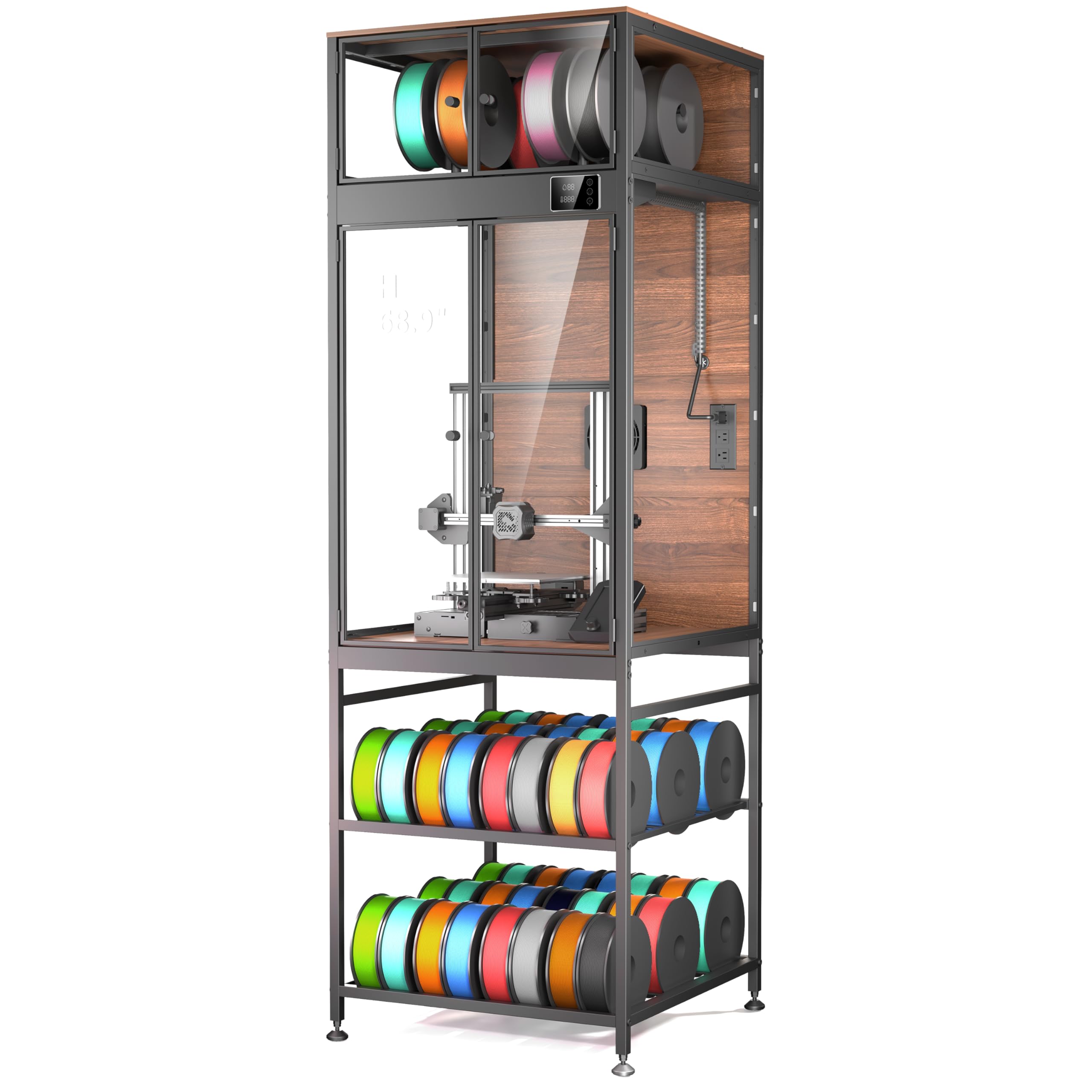
The Crafit 3D Printer Cabinet is an enclosure accessory rather than a printer, but it directly supports carbon fiber printing by providing a stable, temperature-controlled environment. Its heavy-duty carbon steel frame and composite walls reduce noise by up to 40% and dampen vibrations that cause layer shifting. The built-in thermo-hygrometer and manual ventilation fan let you manage chamber conditions for warp-prone CF materials.
Users find the assembly straightforward but time-consuming at about 2.5 hours. The top compartment stores up to 8 spools and feeds filaments through integrated ports for multi-material setups. The base holds up to 48 spools, making it ideal for users with large filament collections. Some users note that the acrylic panels are thin and the magnetic door seals are not fully airtight, but the temperature and humidity control improves print quality for ABS and nylon composites.
If you already own a printer like the Ender 3 or Bambu Lab X1 and want a dedicated enclosure with filament storage to stabilize conditions for carbon fiber printing, the Crafit Cabinet is the only vertical solution that maximizes floor space while improving print reliability.
Why it’s great
- Massive 48-spool filament storage in the base
- Noise reduction up to 40% for quieter operation
- Integrated ventilation fan controls fumes and temperature
Good to know
- Acrylic panels are thin and may warp over time
- Door seals are not fully airtight
- Assembly takes approximately 2.5 hours
11. Original Prusa XL 5-Toolhead 3D Printer

The Original Prusa XL is a professional-grade, large-format CoreXY printer with five independent toolheads that enable multi-material and full-color printing with carbon fiber composites. The segmented heated bed uses intelligent zoning to reduce warping on large prints, and the 14.17-inch cubed build volume can produce sizable functional parts. Prusa’s open platform means no forced updates or cloud lock-in, and the company offers lifetime technical support.
Users praise the print quality and the Prusa ecosystem, though the printer requires significant assembly—the extruders are not pre-installed, and setup takes half a day. The software can be buggy, with Wi-Fi connectivity issues and occasional blue screen crashes. It is also heavy (75 pounds) and large, requiring dedicated floor space. Despite these quirks, the XL delivers unparalleled material flexibility for industrial prototyping.
For professionals who need to print large structural parts using carbon fiber reinforced nylons or who require multi-material assemblies in a single job, the Prusa XL is the most capable machine on this list. It is expensive, complex, and not for beginners, but it justifies its price with industrial reliability and an open ecosystem.
Why it’s great
- Five independent toolheads for true multi-material printing
- Segmented heated bed reduces warping on large parts
- Open platform with lifetime technical support
Good to know
- Extensive assembly required, not plug-and-play
- Software can have connectivity and stability issues
- Very heavy (75 pounds) and requires significant space
FAQ
What is the minimum nozzle temperature needed for carbon fiber filament?
Do I need an enclosed chamber for carbon fiber 3D printing?
Can I print carbon fiber on a regular PLA printer?
How much does a carbon fiber compatible 3D printer cost?
Final Thoughts: The Verdict
For most users, the best carbon fiber 3d printer winner is the Bambu Lab P1S because it offers the best combination of speed, reliability, and ecosystem support for printing carbon fiber composites without constant maintenance. If you need active chamber heating for nylon and polycarbonate composites, grab the QIDI Q1 Pro. And for large-format industrial prototyping with multi-material capability, nothing beats the Original Prusa XL.

Mo Maruf
I created WellFizz to bridge the gap between vague wellness advice and actionable solutions. My mission is simple: to decode the research and give you practical tools you can actually use.
Beyond the data, I am a passionate traveler. I believe that stepping away from the screen to explore new environments is essential for mental clarity and physical vitality.