Our readers keep the lights on and my smoothie glass nicely filled. As an Amazon Associate, I earn from qualifying purchases.
A webcam that makes you look washed out, blurry during movement, or grainy in standard room lighting destroys your professional credibility and audience engagement. The difference between a soft, poorly-lit stream and a crisp, true-to-life video comes down to sensor quality, autofocus technology, and lens design — specs that most product listings either obscure or exaggerate.
I’m Mohammad Maruf — the founder and writer behind WellFizz. I spend my time dissecting sensor sizes, comparing autofocus architectures, and analyzing bitrates across dozens of streaming and conferencing cameras to separate genuine performance from marketing claims.
best cameras for webcams deliver sharper video, faster autofocus, and better audio than built-in laptop lenses, transforming your virtual presence for meetings, live streams, and content creation.
How To Choose The Best Cameras For Webcams
Choosing a dedicated webcam means looking past the 4K label and understanding what actually determines image quality for your specific use case — be it office meetings, live streaming, or recording. Sensor quality, autofocus technology, microphone performance, and physical design all play decisive roles.
Autofocus Technology: PDAF vs. CDAF vs. TOF
Phase Detection Autofocus locks onto a subject in under a second without hunting, which is critical for presenters who move naturally during calls. Contrast Detection is slower and can pulse in and out of focus. Time-of-Flight sensors measure depth directly for instant focus in any lighting, making them the gold standard for professional streams.
Microphone Array Quality
Dual noise-cancelling microphones are now standard on budget and mid-range models, but the placement, pickup radius, and frequency response vary widely. Triple-mic arrays offer studio-grade versatility with selectable sound modes — live mode for steady noise suppression, and recording mode for full ambient detail.
Field of View and Lens Distortion
Standard webcams offer a 78-80 degree field of view, which frames one person well without excessive background. Wider angles above 90 degrees often introduce fisheye distortion that warps facial proportions and room geometry. Premium lenses compensate with distortion-free glass elements that preserve natural lines — essential for product demonstrations and professional appearances.
Quick Comparison
On smaller screens, swipe sideways to see the full table.
| Model | Category | Best For | Key Spec | Amazon |
|---|---|---|---|---|
| EMEET PIXY | Premium PTZ | AI Tracking, Content Creation | 0.2s PDAF & AI Autofocus | Amazon |
| EMEET C60E Dual-Camera | Mid-Range | Streaming, Product Demos | 11X Hybrid Zoom, Dual Lenses | Amazon |
| NexiGo N660P Pro 4K | Premium | Gaming, Live Streaming | Distortion-Free Lens, 3DNR | Amazon |
| Logitech HD Pro C920 | Premium | Video Calling, Meetings | 3MP Sensor, 1080p | Amazon |
| N newline 4K Webcam | Mid-Range | Sim Racing, Head Tracking | 1s PDAF Autofocus, 79° FOV | Amazon |
| Angetube 866Max 4K | Mid-Range | Low-Light Meetings | Built-in Ring Light, TOF Focus | Amazon |
| NEWORK EasyCam 502 | Mid-Range | Budget Streaming, Teaching | PDAF & CDAF Dual-Autofocus | Amazon |
In‑Depth Reviews
1. EMEET PIXY Dual-Camera AI-Powered PTZ Camera 4K

The EMEET PIXY uses a dual-camera system with a 1/2.55-inch Sony sensor for the primary imaging camera and an auxiliary AI camera dedicated to face detection. This dual-sensor architecture enables 0.2-second autofocus — five times faster than standard PDAF-only webcams — and maintains flawless exposure and skin tones even as lighting shifts during a stream or meeting.
The PTZ mechanism provides 310 degrees of pan and 180 degrees of tilt, driven by a three-chip AI system that tracks movement smoothly without jerky reframing. Gesture control by holding an open palm centered for two seconds lets you lock tracking without touching software. The triple-mic array offers three selectable sound modes — live, noise canceling, and original — giving you studio-grade audio versatility without external microphones.
EMEET STUDIO software unlocks preset positions, whiteboard detection, and built-in AIGC for creating shot lists and automated movements. The USB-C connection with included Type-A adapter ensures broad compatibility, while the gravity-based monitor clip provides tool-free mounting.
Why it’s great
- Blink-speed 0.2-second dual autofocus locks focus instantly
- Full PTZ movement with gesture control eliminates manual reframing
- Selectable triple-mic array adapts audio to environment
Good to know
- AI tracking can lose subjects in very dim conditions
- Software is feature-rich but can feel laggy on older systems
2. EMEET C60E Dual-Camera 4K Webcam

The EMEET C60E is unique in the webcam market with its dual-camera configuration: a wide-angle gray camera for panoramic scenes and a telephoto blue camera for close-up detail at 13.8 inches. Both cameras share a single 1/2.8-inch CMOS 4K sensor, allowing seamless switching between full-room and focused views during product demonstrations, teaching, or streaming.
The 11X hybrid zoom transitions smoothly from 1X to 11X with PDAF autofocus maintaining stability at every step. A bundled remote control provides real-time zoom, color, and resolution adjustments without interrupting the stream. EMEET STUDIO software adds fine control over brightness, focus, and RGB lighting — a feature rarely seen at this tier.
Two omnidirectional microphones capture natural sound within a 9.8-foot radius, and the built-in privacy cover slides down to physically block the lens. USB 2.0 Type-A plug-and-play with support for 1/4-inch tripod mounting makes this a flexible, portable streaming solution.
Why it’s great
- True dual-camera design for instant wide-to-close-up switching
- Remote control provides hands-free zoom and color adjustment
- RGB lighting adds visual personality to streams
Good to know
- Zoom not supported in 4K or 60FPS modes
- Minor grain visible in very low-light conditions
3. NexiGo N660P Pro 4K Webcam
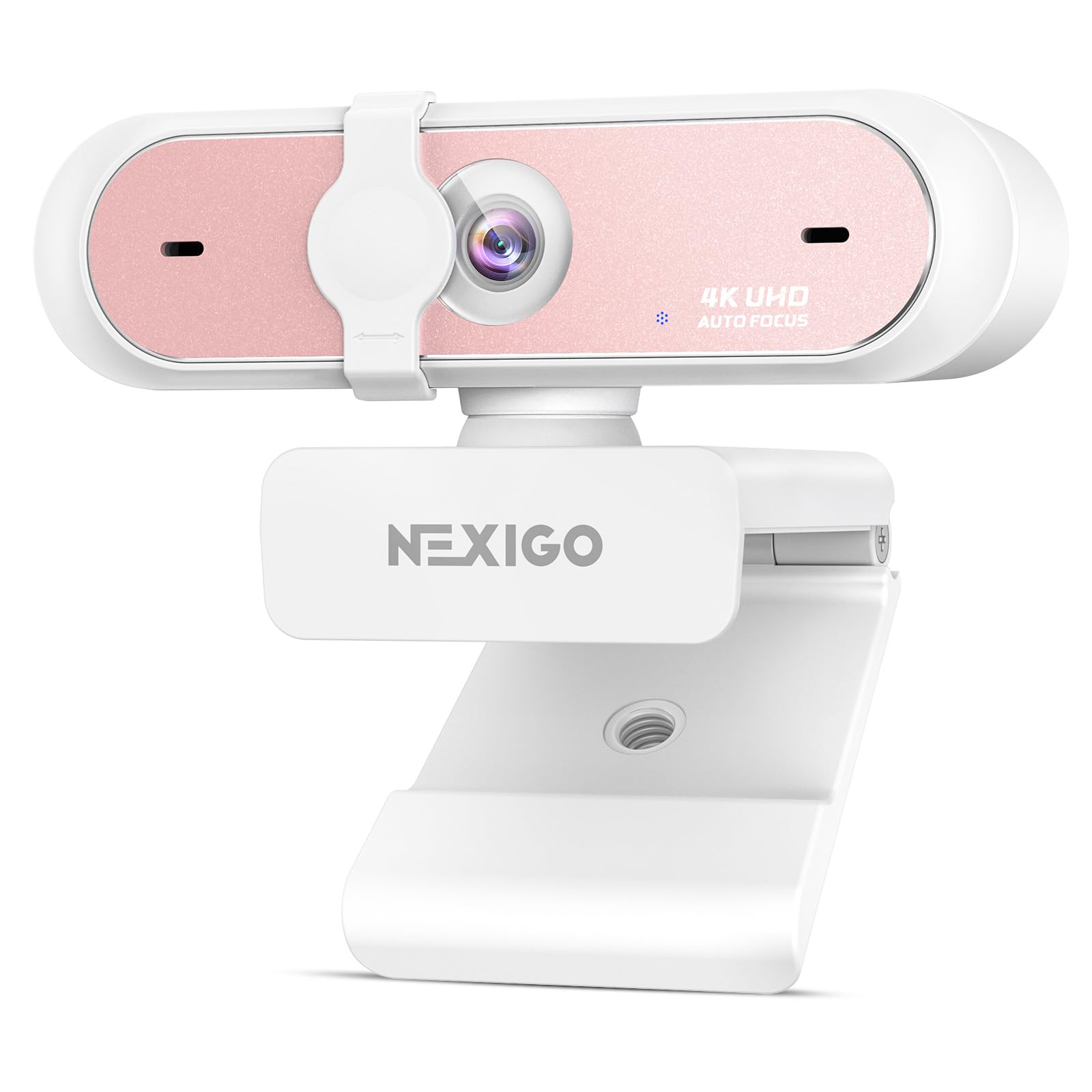
The NexiGo N660P Pro differentiates itself with a distortion-free lens that preserves natural facial proportions and eliminates the fisheye warping common in wide-angle webcams. Combined with integrated 3D Noise Reduction, the camera removes visual grain in real-time to deliver a clean 4K image even in imperfect lighting conditions.
Dual noise-cancelling microphones isolate the speaker’s voice from background hums and keyboard clicks, and the advanced autofocus system keeps the subject sharp during movement. The included NexiGo software supports up to 4X digital zoom with professional-grade composition tools.
A 360-degree swivel mount and integrated 1/4-inch tripod thread provide flexible positioning options. The external sliding privacy shutter physically blocks the lens when not in use. USB plug-and-play works with Windows 7-11, Mac OS 10.6+, and Chrome OS out of the box.
Why it’s great
- Distortion-free lens maintains natural face proportions
- 3DNR technology eliminates grain for clear 4K output
- 360-degree swivel mount offers flexible positioning
Good to know
- Some users report graininess at 1080p in low light
- Privacy cover mechanism may loosen over extended use
4. Logitech HD Pro Webcam C920

The Logitech C920 remains a benchmark for 1080p webcams years after its release, thanks to a true 3MP sensor that delivers sharp, color-accurate video with automatic low-light correction. The RightLight technology adjusts brightness and white balance in real time, making it reliable in rooms with mixed natural and artificial lighting.
Hardware compression via H.264 enables smooth 1080p streaming without overloading the host computer’s CPU — an important consideration for older laptops. The 78-degree field of view frames a single person naturally without excessive background, and the 3X digital zoom maintains reasonable clarity for closer framing.
Dual omnidirectional microphones deliver decent stereo audio, though professionals will still prefer a dedicated USB mic for critical applications. The universal mounting clip fits flat monitors, laptops, and mini tripods, and the 45-degree vertical pivot provides adequate angle adjustment.
Why it’s great
- Proven image quality with true 3MP sensor
- Hardware H.264 compression reduces CPU load
- Reliable autofocus and low-light correction
Good to know
- Maximum 1080p resolution, no 4K option
- Autofocus can lag during quick movements
5. N newline 4K Webcam with PDAF Autofocus

The N newline 4K webcam uses a Sony 1/2.5-inch sensor with PDAF autofocus that locks focus in approximately one second — fast enough for head-tracking applications in sim racing and flight simulation, as verified by user reviews using OpenTrack and IATrack. The 79-degree field of view reduces distortion while keeping the user centered in frame.
Dual noise-cancelling microphones capture clear voice within a 9.8-foot radius, and automatic light correction balances shadows and highlights without manual adjustment. Plug-and-play USB connection works with Windows and MacOS without additional software, making it truly out-of-the-box ready.
The built-in privacy cover slides to block the lens when not in use, and the durable clip and joint construction provide stable long-term mounting. Users report reliable performance at 1080p@60FPS with MJPEG encoding for smooth tracking.
Why it’s great
- Sony sensor delivers true 4K clarity
- Fast PDAF autofocus supports head-tracking use
- Effective auto light correction for mixed lighting
Good to know
- Image clarity inconsistent in some units
- No built-in software for custom settings
6. Angetube 866Max 4K Webcam with Light

The Angetube 866Max integrates a 3-level adjustable ring light with stepless brightness control, solving the dominant problem of low-light video quality without requiring external lighting. The TOF autofocus system measures depth directly for instant focus lock during fast movements or scene changes, delivering consistent sharpness for business conferences and educational lectures.
Dual AI noise-cancelling microphones use machine learning to isolate the speaker’s voice while filtering background noise, which is effective in open-plan offices or noisy home environments. The built-in privacy cover slides into the front of the lens, making accidental activation unlikely.
Plug-and-play USB-A or USB-C connectivity works with the included adapter, and the flexible mounting clip attaches to desks, monitors, laptops, or tripods. Users consistently praise the 4K image quality at this tier, noting that colors appear natural with good contrast and no oversaturation.
Why it’s great
- Built-in ring light eliminates need for external lighting
- TOF autofocus locks instantly in any light
- AI noise-cancelling mics handle noisy environments well
Good to know
- Microphone quality is tinny and low-volume on some units
- Ring light brightness dial lacks a stop point
7. NEWORK EasyCam 502 4K Webcam

The NEWORK EasyCam 502 uses dual autofocus technology combining PDAF for quick subject tracking with CDAF for fine detail refinement. This hybrid system ensures stable focus even when the user shifts position during live teaching, presentations, or video calls. The 79-degree wide-angle lens captures group settings without barrel distortion.
Dual noise-cancelling microphones offer a 3-meter pickup radius, filtering out background sounds for clear audio without the echo or reverb common at this price tier. Plug-and-play USB-A connectivity works with Windows, Mac, and Linux without driver installation, and the camera is compatible with Zoom, Teams, Skype, and OBS.
The built-in privacy cover slides to block the lens physically, and users consistently report easy setup and reliable performance for streaming and meetings. While some users note that the image is slightly less sharp than premium models, the color balance and contrast are accurate for the category.
Why it’s great
- Dual autofocus system for stable tracking during movement
- 3-meter microphone pickup is strong for group calls
- Plug-and-play with any major OS and video app
Good to know
- Picture slightly less sharp than premium competitors
- No software for adjusting brightness or zoom
FAQ
Is 4K resolution worth it for standard video calls?
What does PDAF autofocus mean for streaming?
How does a dual-camera webcam improve streaming?
Final Thoughts: The Verdict
For most users, the best cameras for webcams winner is the EMEET PIXY because its dual-camera AI-powered PTZ system and Sony sensor deliver professional-grade tracking and image quality in a single device. If you want distortion-free 4K with excellent noise reduction, grab the NexiGo N660P Pro. And for a budget-friendly dual-lens solution with remote control, nothing beats the EMEET C60E.

Mo Maruf
I created WellFizz to bridge the gap between vague wellness advice and actionable solutions. My mission is simple: to decode the research and give you practical tools you can actually use.
Beyond the data, I am a passionate traveler. I believe that stepping away from the screen to explore new environments is essential for mental clarity and physical vitality.